

If you've ever picked up a food product in a U.S. grocery store, you've seen the FDA's work. That nutrition facts panel, the ingredient list, the allergen warnings, they're all there because the Food and Drug Administration (FDA) requires them to be.
The FDA is the U.S. government agency responsible for protecting public health by regulating food, drugs, cosmetics, and medical devices. For food manufacturers, one of the most critical responsibilities is ensuring every product label meets FDA requirements. This isn't just about following rules; it's about consumer safety. A missing allergen warning or incorrect nutrition information can trigger recalls, legal action, and in severe cases, harm consumers.
What makes a label compliant? FDA regulations specify exactly what must appear on packaged food labels. The core required elements include:
- Nutrition Facts Panel: Standardized table showing calories, nutrients, serving size
- Ingredient List: Complete list in descending order by weight
- Allergen Statement: Clear identification of major allergens
- Manufacturer Information: Name and address of the responsible company
The Computer Vision Opportunity for FDA Label Compliance
Most label compliance checking still happens manually. Quality assurance teams review designs before production, and inspectors spot-check finished products. This approach is slow, error-prone, expensive, and doesn't scale well for manufacturers with thousands of stock keeping units (SKUs).
In this tutorial, we'll leverage computer vision to build a detection system that identifies required compliance elements on food labels using Roboflow. We'll start with the foundation: training a model to detect and locate the key components. Then, we'll explore how this detection step fits into a complete verification pipeline that can read, validate, and flag potential compliance issues at scale.
Let's get started!
Automating Label Component Detection with Roboflow
The first step in automating label compliance is teaching a computer vision model to recognize the required elements on a label. Before we can verify that the information is correct, we need to know where it is.
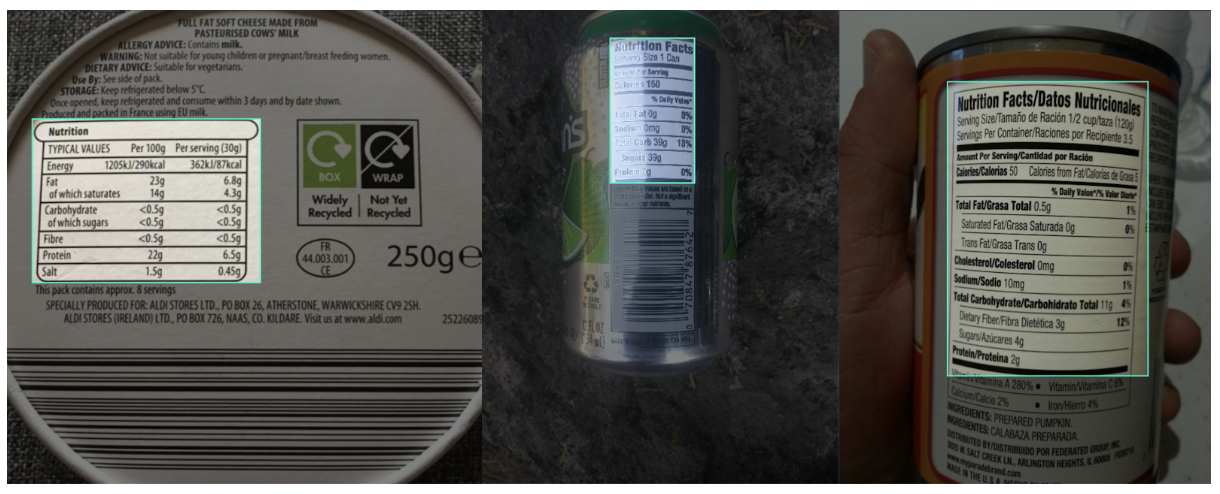
Today, we'll focus on detecting Nutrition Facts panels. This panel follows a strict format defined by the FDA, making it an ideal starting point for automated detection. Once you understand how to detect this component, the same approach can be extended to other required elements like ingredient lists, allergen statements, and manufacturer information.
Your Starting Point: Roboflow Universe
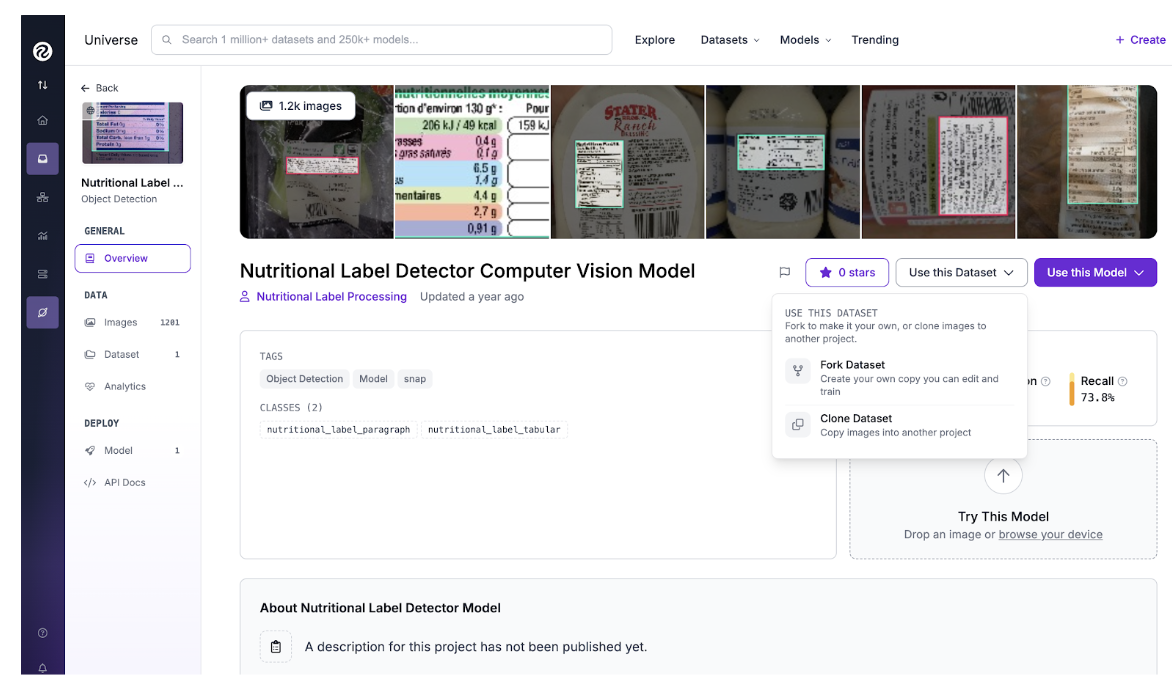
Before collecting and annotating hundreds of images yourself, it's worth checking if someone has already done the work. Roboflow Universe hosts thousands of computer vision datasets, many of which are publicly available. For this tutorial, we'll use the Nutrition Label Dataset which contains annotated images of Nutrition Facts panels from various food products. This dataset gives us a solid foundation with diverse examples: different label sizes, lighting conditions, and product types.
Forking and Preparing the Dataset
To get started with a Universe dataset, navigate to the dataset page and click the "Fork Dataset" button. Forking creates a complete copy of the dataset in your own Roboflow workspace, giving you full control to modify annotations, add new images, or apply preprocessing and augmentation techniques. Once forked, you have full control. You can add more images, adjust annotations, or apply preprocessing and augmentation techniques to improve model performance.
Augmentation Strategy
One advantage of working with label detection is that we can anticipate real-world variations and simulate them through augmentation. In production, a camera system might capture labels at different angles, under varying lighting, or with slight blur. Here's the augmentation configuration I applied in Roboflow:
Preprocessing:
- Auto-Orient: Ensures images are correctly rotated
- Resize: 512x512 (input size for RF-DETR small)
Augmentation:
- Rotation: ±15 degrees (labels might not be perfectly straight)
- Brightness: ±20% (different lighting conditions)
- Blur: Up to 1.5px (simulates camera motion or focus issues)
- Noise: Up to 2% (sensor noise in industrial cameras)
These augmentations generate multiple variations of each training image, helping the model generalize better without requiring hundreds of additional photographs.
Note: If you're working on a specific use case, i.e. a fixed camera position in a production line, you might need supplemental images that match your exact setup. The beauty of forking a Universe dataset is that you can add your own images to the existing collection, combining the benefit of a pre-built dataset with custom data for your scenario.
Training the Model
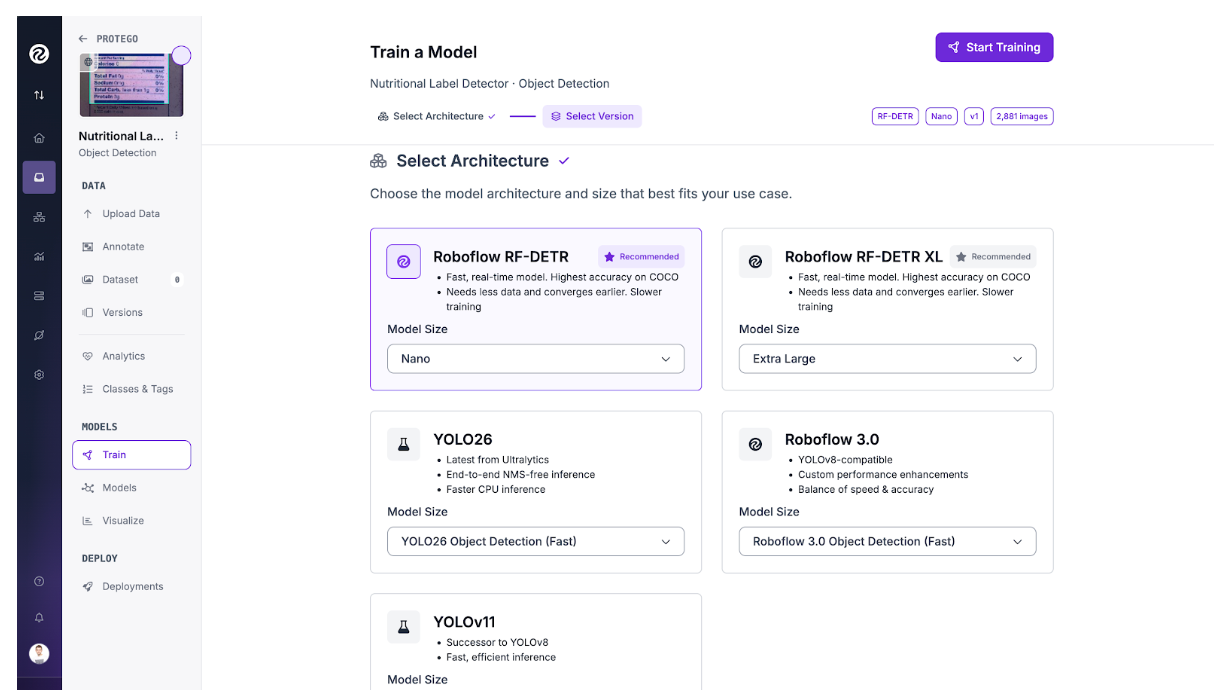
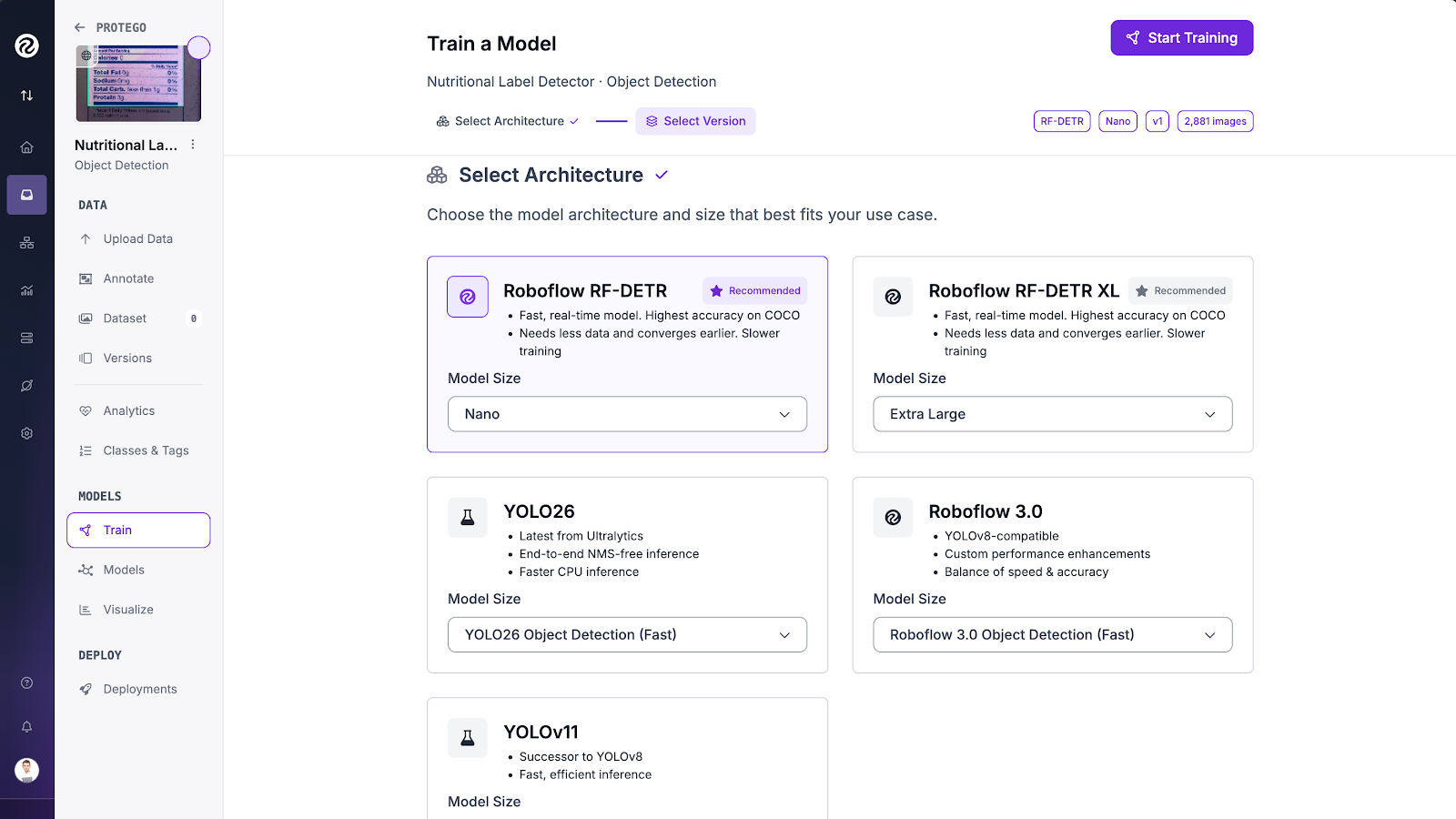
With our dataset prepared, it's time to train. We'll use RF-DETR (Roboflow's Detection Transformer), which is available directly in the platform. To train the model, navigate to your dataset's "Train" tab in the platform and select RF-DETR as your model architecture. Y
ou'll need to choose where to train from, that means whether you're starting from scratch or using a pre-trained checkpoint as a starting point. Using a checkpoint is highly recommended, as it typically provides faster convergence and better results, especially with smaller datasets.
Once you've configured these settings, click "Start Training" and Roboflow will handle the rest, managing the infrastructure and training process automatically.
Once training completes, Roboflow provides several metrics to assess your model. For compliance detection, recall is particularly important. A false negative (missing a Nutrition Facts panel that's actually there) is more problematic than a false positive (detecting something that isn't quite right, which human review can catch).
Complete Verification with Roboflow Workflows
We've built a model that can reliably detect Nutrition Facts panels on product labels. That's a solid first step, but it's not a complete compliance solution. Detecting where a panel exists doesn't tell us if the information inside it is correct, if required fields are present, or if the formatting meets FDA standards.
Detection confirms a Nutrition Facts panel is present and locates it on the label. But FDA compliance requires verifying the content of that panel, and that's where OCR becomes critical.
A production compliance system needs to orchestrate multiple steps: detection, text extraction, validation, and decision making. Building this from scratch means managing multiple services, APIs, and glue to connect everything.
Roboflow Workflows provides a visual framework for connecting these building blocks without managing infrastructure. Each step in your pipeline becomes a modular block that you can configure and connect.
Each block is modular and reusable. Need to add ingredient list detection? Add another detection block. Want to verify manufacturer information? Extend the workflow with additional steps. The architecture scales naturally as your compliance requirements grow.
Here's the workflow we'll create. The workflow starts by receiving a product label image through an input block. This image is then processed by our trained RF-DETR detection model, which locates the Nutrition Facts panel and returns its bounding box coordinates. The detected region is cropped from the original image and sent to an OCR service which extracts the text content from the panel.
In this case, we have two branches for testing different OCR models: docTR and Google Gemini. The extracted text then flows into an output block which returns the different results from each stage. These results will be retrieved in json format.
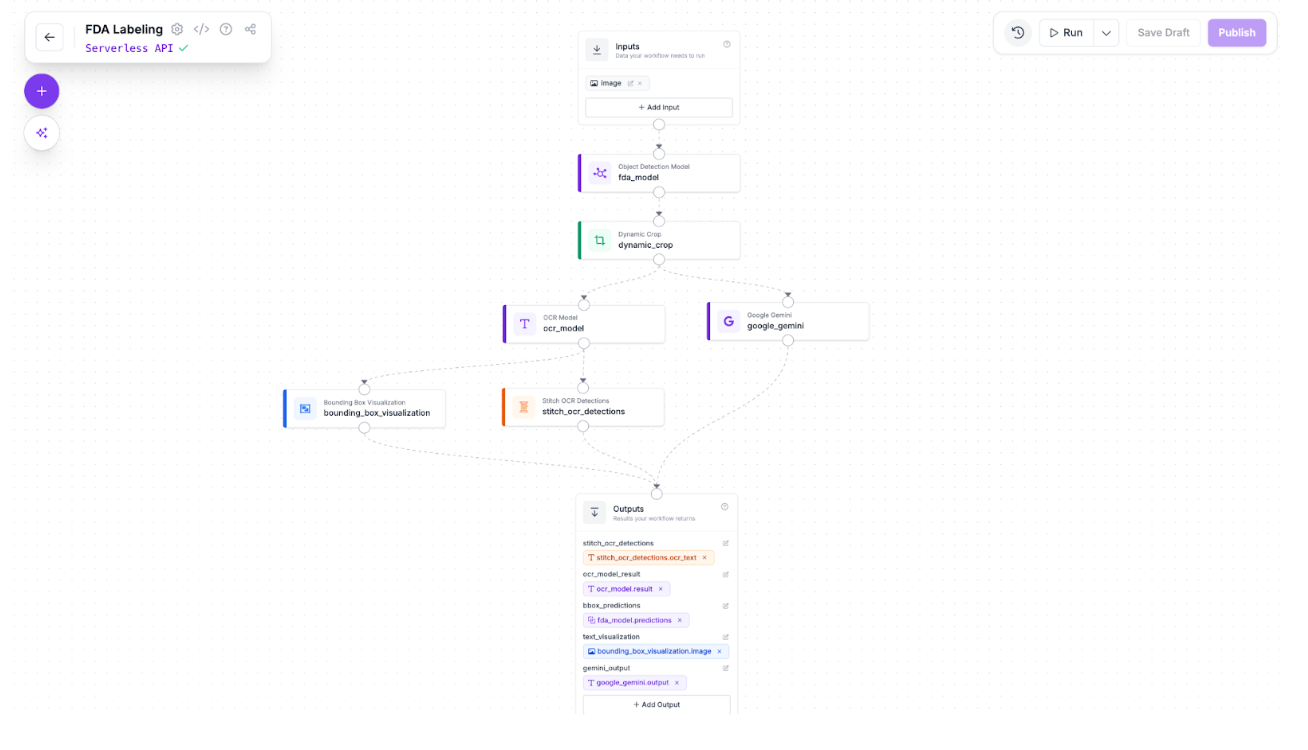
You can now test the workflow directly in the Roboflow platform, but let's take it a step further. In a real production scenario, you'd have reference values that define what a compliant nutrition panel should contain such as the expected calorie count, required nutrients, etc. By running the workflow with custom validation logic, you can compare the OCR-extracted data against these reference values to verify compliance automatically. Here is a code example of how this can be achieved.
If we run this workflow with some food images, we should get an output similar to this one:
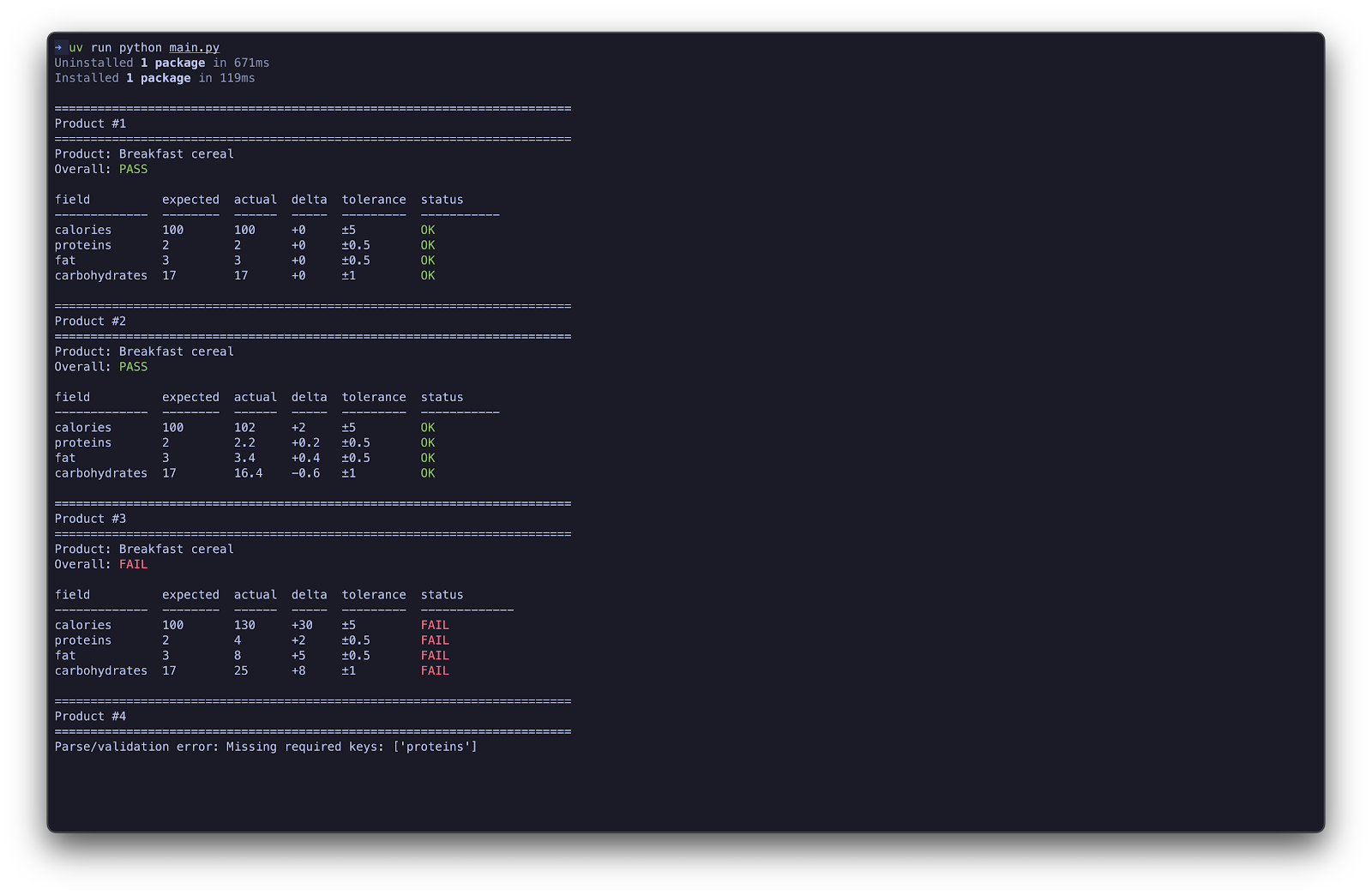
The system implemented includes a tolerance threshold to account for OCR reading variations. When the extracted value differs from the expected reference value by more than the allowed tolerance, the workflow flags that product as non-compliant. In a production environment, this would trigger an alert, stopping the line or diverting the product for manual inspection before it ships.
Next Steps
Your real-world compliance system would require:
- Calibration for your specific products: Our model was trained on a general dataset. Production systems will need fine-tuning on your actual label designs, camera setup, and lighting conditions.
- Multiple detection classes: We focused on Nutrition Facts panels. Real compliance requires detecting ingredient lists, allergen statements, net quantity declarations, and manufacturer information.
- Robust validation logic: The OCR and validation steps need deep domain knowledge and business rules specific to your product categories.
How To Ensure FDA Label Compliance Conclusion
We've walked through building an FDA label compliance detector using Roboflow, from finding a dataset in Universe and training an RF-DETR model to understanding how detection fits into a complete verification pipeline. Label compliance is fundamentally a visual inspection problem that computer vision can solve. This is where Roboflow Workflows enter into the equation as it provides a user-friendly framework for connecting detection, OCR, and validation into production-ready compliance pipelines.
Written by David Redó Nieto.
Cite this Post
Use the following entry to cite this post in your research:
Contributing Writer. (Jan 30, 2026). Automate FDA Label Compliance with Computer Vision. Roboflow Blog: https://blog.roboflow.com/automate-fda-label-compliance/