

Open-weight AI has changed how developers build AI systems. Earlier, using a capable foundation model often meant relying on paid API access and working with a closed system. Now developers can download model weights, inspect the architecture, run inference on their own hardware, and fine tune models on their own data. DeepSeek has played an important role in this shift by releasing a series of foundation models built with Mixture-of-Experts architecture, reinforcement learning, and efficient training methods.
This post focuses on the vision capabilities of DeepSeek models. These include models that understand images, read documents, perform OCR, answer visual questions, ground objects, and generate images. We go through the main DeepSeek vision and multimodal models, explain what each one is designed to do, and show how they can be used in practical vision pipelines with the Roboflow Supervision library.
What Is DeepSeek?
DeepSeek is an AI research company from China that started in 2023. It has become widely known for releasing powerful open-weight foundation models with strong performance and efficient training. A major reason developers pay attention to DeepSeek is that its models are released openly, so people can study the architecture, download the weights, run inference locally, and fine tune them for their own use cases.
DeepSeek works across three main areas. These include general language models, reasoning models, and vision language models. Over time, it has released models for chat, coding, long-context reasoning, multimodal understanding, OCR, document analysis, visual grounding, and image generation. Its model family includes important releases such as DeepSeek-LLM, DeepSeek Coder, DeepSeek-V2, DeepSeek-V3, DeepSeek-R1, DeepSeek-VL, DeepSeek-VL2, and Janus series.
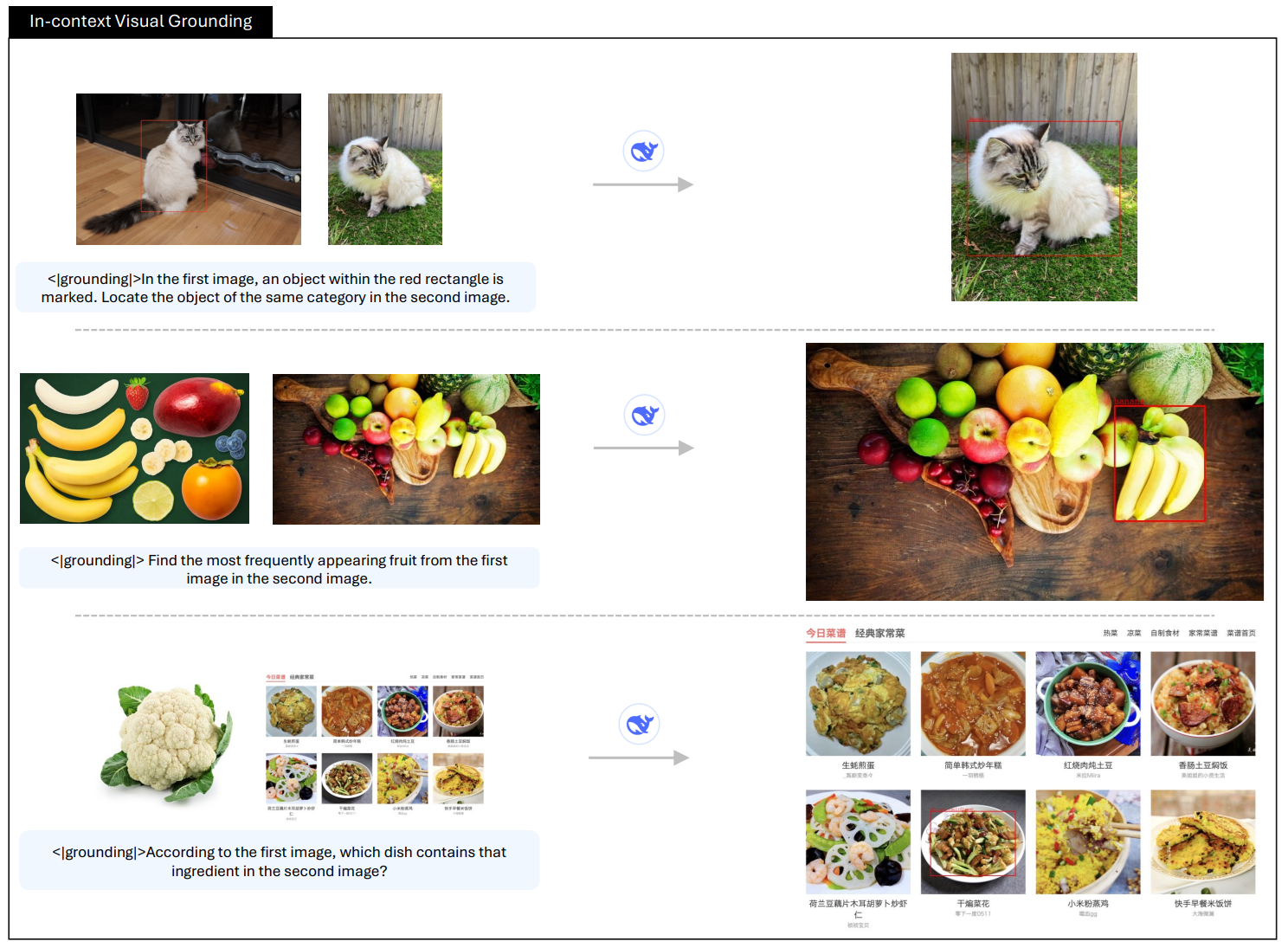
DeepSeek Vision Models
DeepSeek has released multiple distinct vision-capable model families since 2024, each designed for a different purpose. Let’s explore these models:
1. DeepSeek-VL
DeepSeek-VL is DeepSeek’s first vision-language model, designed to understand both images and text together. It focuses on real-world multimodal tasks like documents, web pages, diagrams, and natural images rather than only benchmark datasets.
Architecture
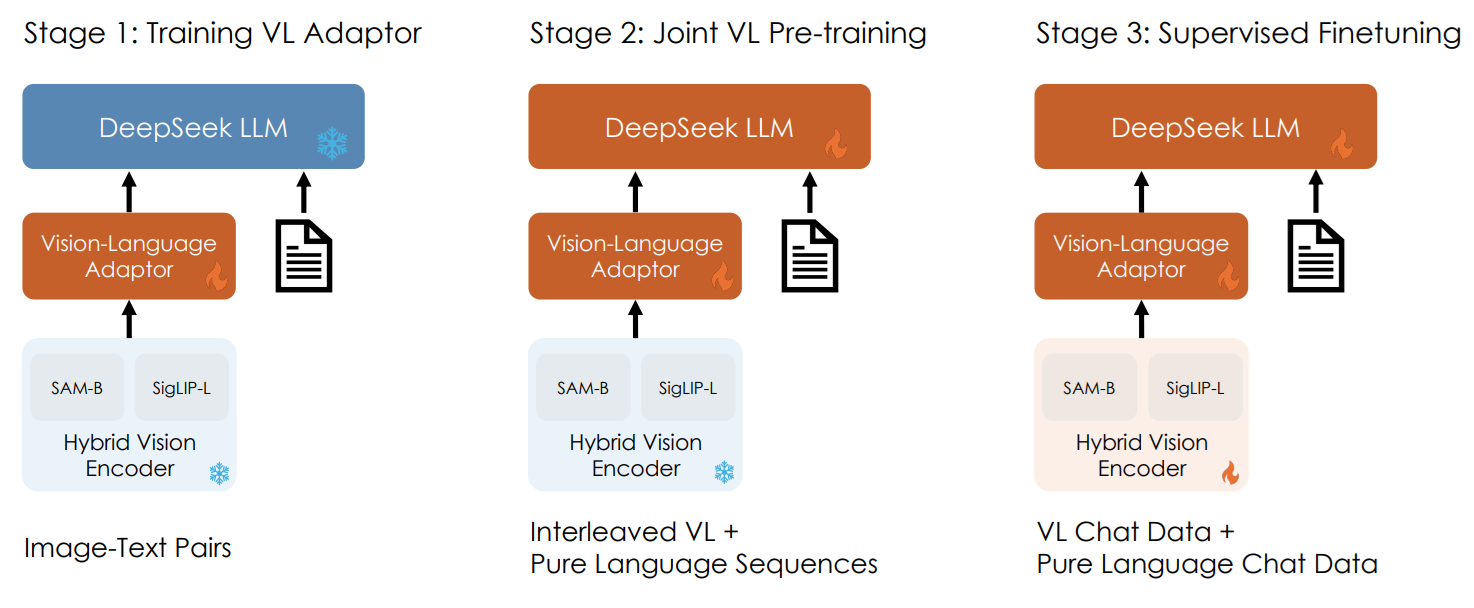
DeepSeek-VL uses a hybrid vision encoder that combines SigLIP-L for overall semantic understanding and SAM-B for capturing fine visual details. This allows the model to process high-resolution images while preserving both global context and small elements like text and structure. The visual features are then passed through a vision-language adaptor, which projects them into the language model input space so the model can reason over image and text together.
Key capabilities
- Visual question answering on images and documents
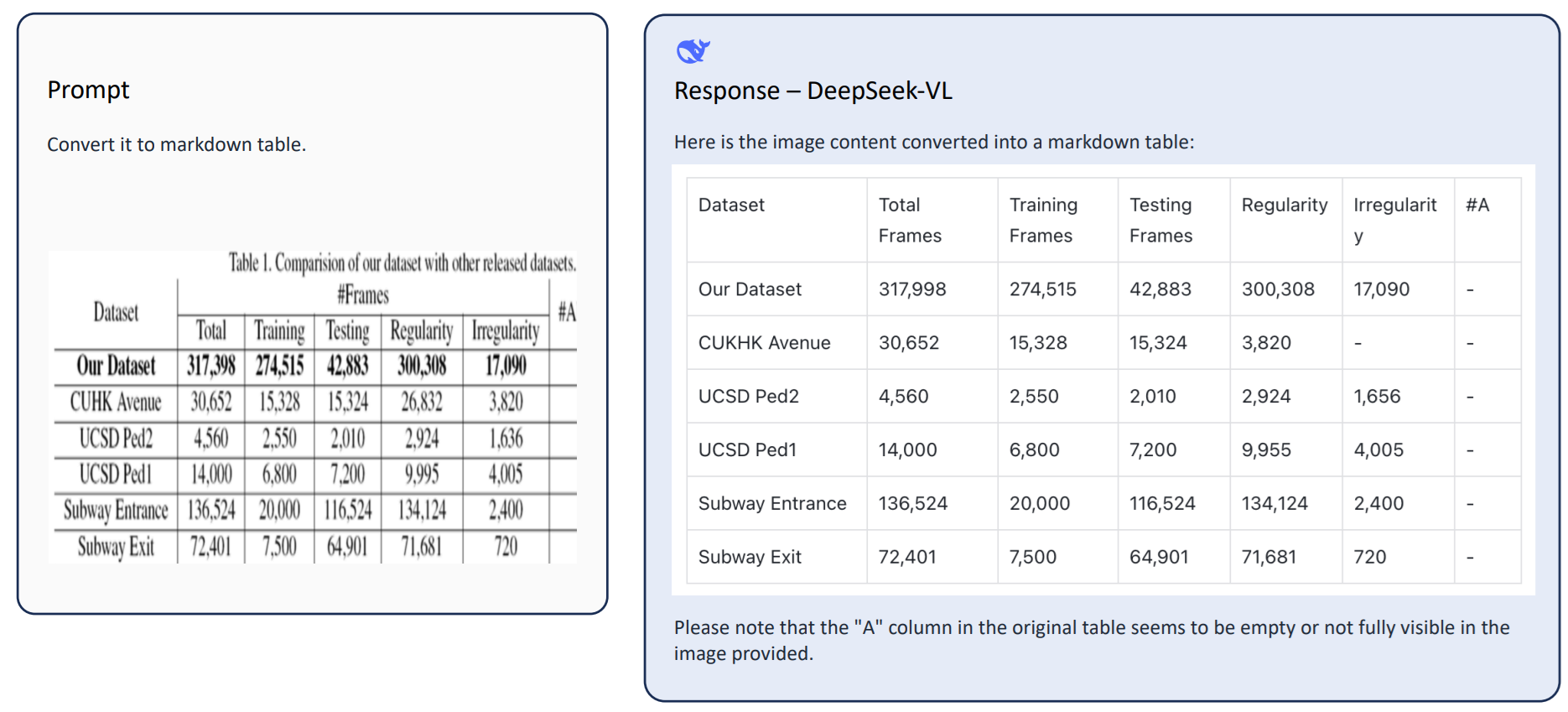
- OCR and text reading from images
- Diagram and chart understanding
- Web page and screenshot understanding
- Understanding structured content like tables and layouts
- Multimodal reasoning over image and text together
2. Janus
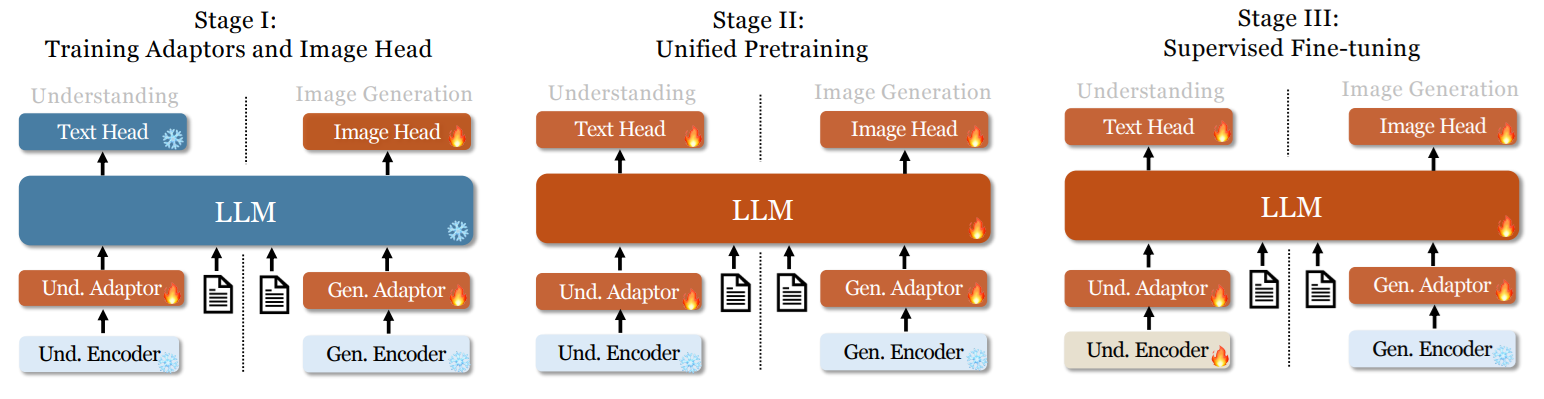
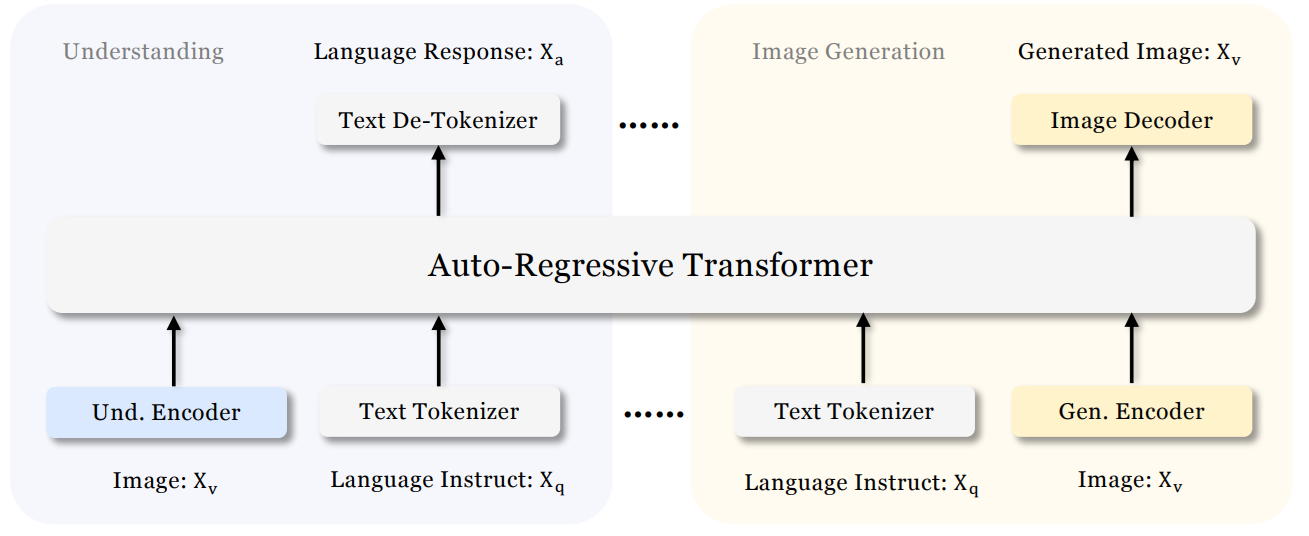
Janus is DeepSeek's unified vision-language model that can both understand images and generate images within the same architecture. Unlike earlier models that use a single visual encoder for both tasks, Janus decouples the visual encoding pathways for understanding and generation while routing both through a shared autoregressive transformer.
Architecture
Janus uses an autoregressive framework that unifies multimodal understanding and generation within a single, unified transformer architecture. It decouples visual encoding into separate pathways for understanding and generation, while both remain connected through a shared language backbone.
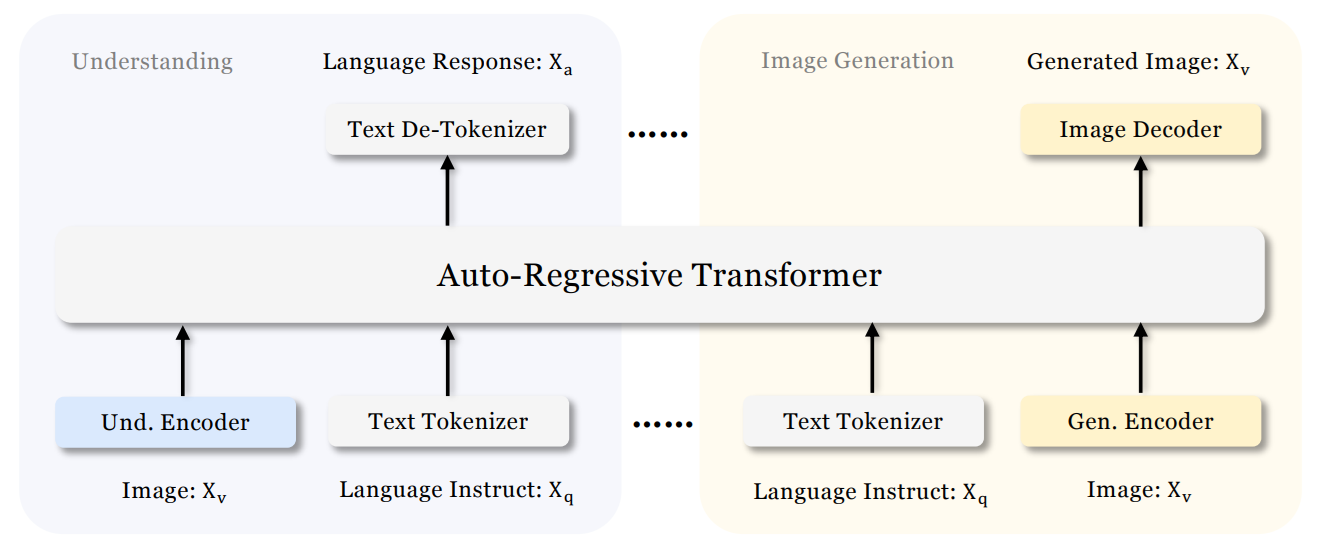
For image understanding, it uses a SigLIP vision encoder to extract semantic features and map them into the language model input space. For image generation, it uses a VQ tokenizer to convert images into discrete IDs, which are then modeled autoregressively by the same transformer to generate images from text prompts.
This design allows Janus to handle both directions:
- image → text (understanding)
- text → image (generation)
Key capabilities
- Image understanding and visual question answering
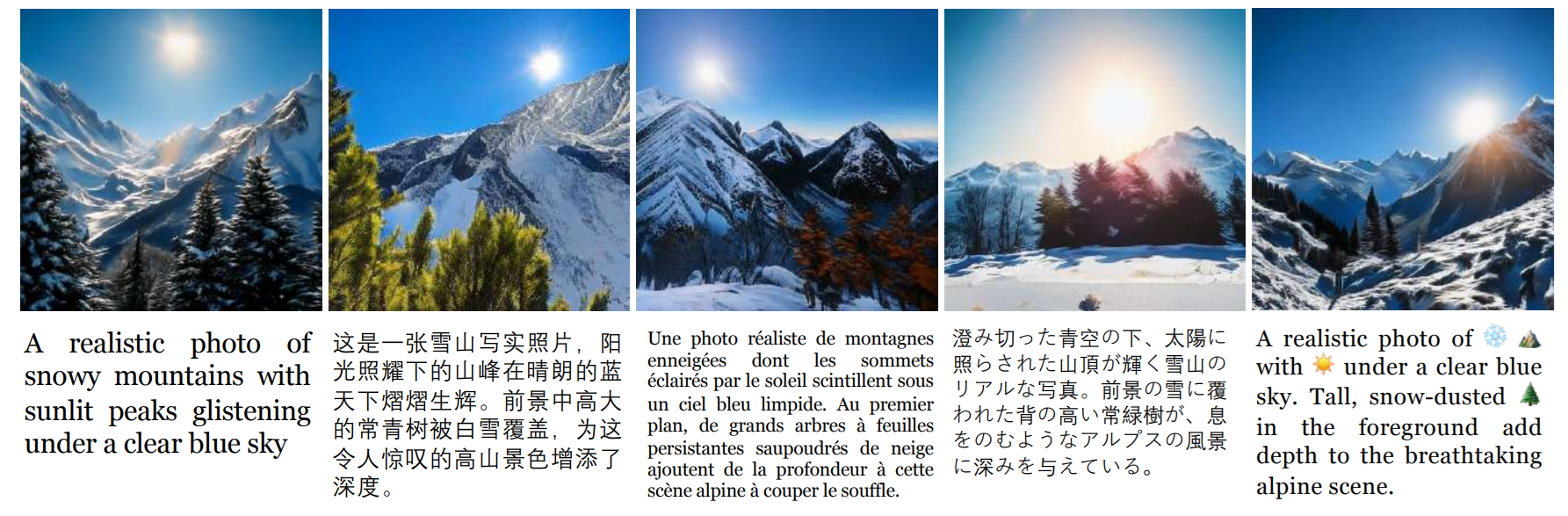
- Text-to-image generation
- Multimodal reasoning over image and text
- Generating images based on natural language prompts
3. JanusFlow (November 2024)
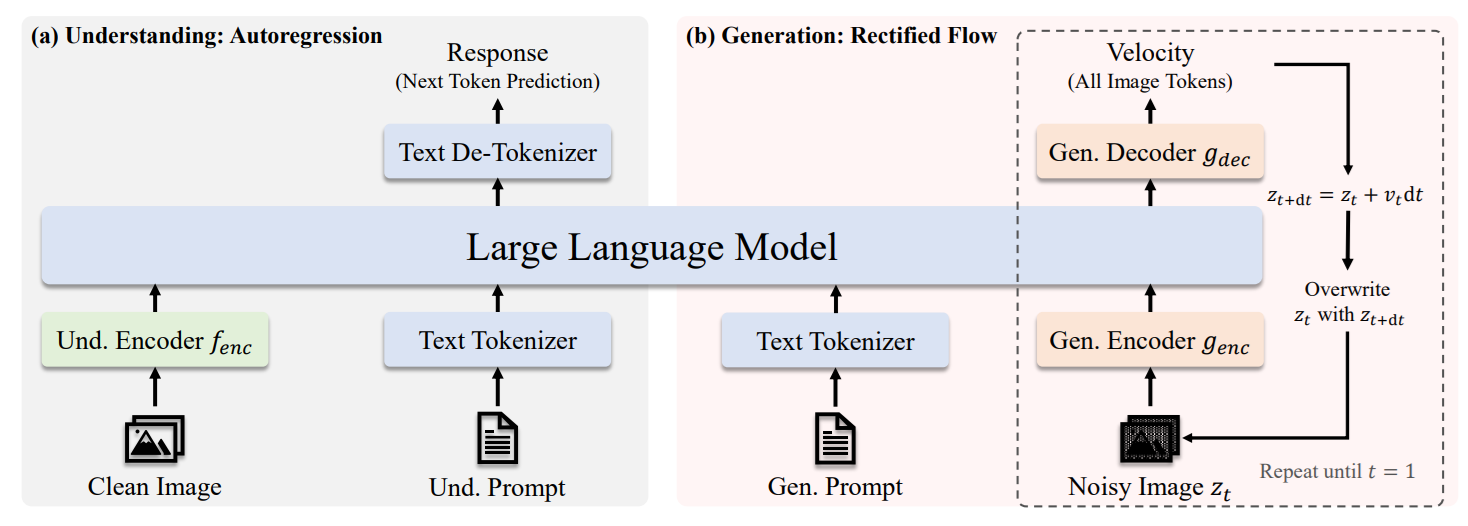
JanusFlow is a unified multimodal model from DeepSeek that brings image understanding and image generation together in a single framework. Unlike approaches that use fully separate models for each task, JanusFlow integrates both capabilities through a shared autoregressive language backbone, making it possible to handle perception and generation within one model.
Architecture
JanusFlow combines a shared autoregressive LLM backbone, decoupled visual encoders, and rectified flow–based image generation in one model. The shared LLM backbone acts as the core reasoning engine for both understanding and generation, while the decoupled visual encoders let each task use its own specialized visual pathway. Instead of generating images as discrete tokens, JanusFlow integrates rectified flow into the LLM framework, which makes image generation more natural and effective without requiring complex architectural modifications. It is trained with representation alignment so that the understanding and generation branches stay semantically consistent and work well together.
Key capabilities
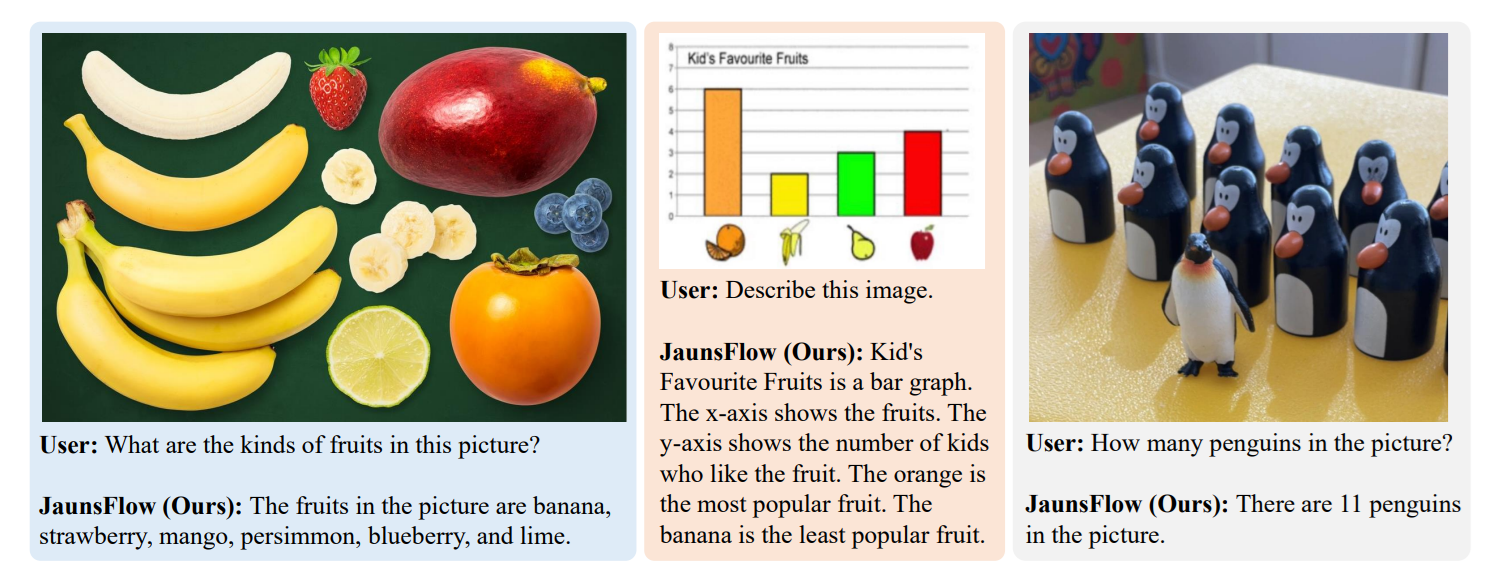
- Image understanding
- Visual question answering
- Text-to-image generation
- Unified perception and generation in a single model
4. Janus-Pro
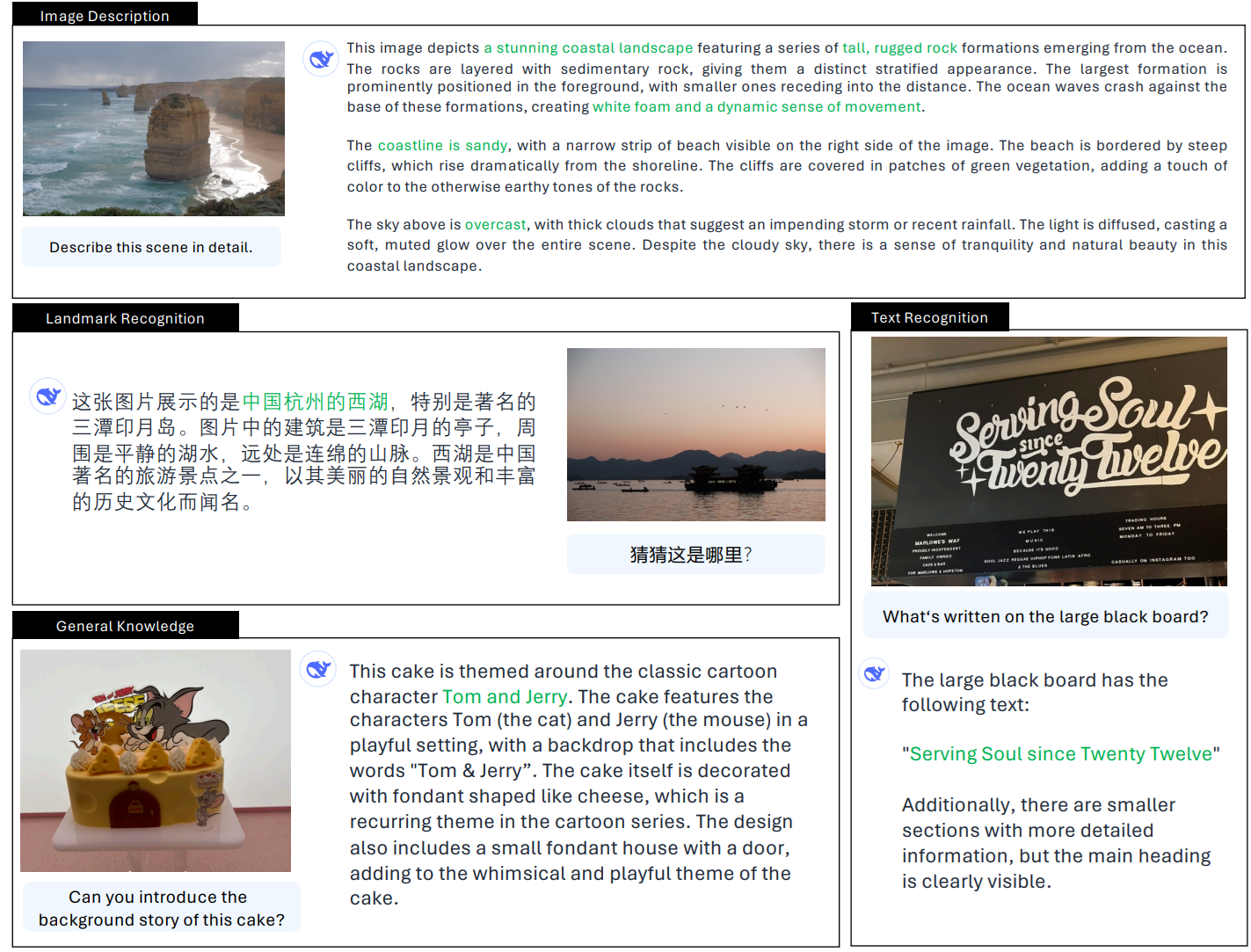
Janus-Pro is an advanced version of Janus built for both image understanding and image generation. It keeps the same unified multimodal design, but improves the model with an optimized training strategy, expanded training data, and larger model sizes, which leads to stronger performance on both understanding and generation tasks.
Architecture
Janus-Pro keeps the same unified autoregressive framework as Janus, using decoupled visual encoding so image understanding and image generation are handled through separate visual pathways within a shared language backbone. For image understanding, it uses SigLIP-L as the visual encoder. For image generation, it uses a VQ tokenizer that converts images into discrete tokens. This allows the model to support multimodal understanding and text-to-image generation in one system. Janus-Pro also improves the training pipeline across three dimensions:
- an optimized training strategy,
- expanded training data for both understanding and generation,
- and scaling to larger model sizes (1B and 7B).
These changes result in stronger multimodal understanding, better text-to-image instruction following, and more stable image generation compared to the original Janus.
Key capabilities
- Image understanding
- Visual question answering
- Text-to-image generation
- Multimodal reasoning across image and text
5. DeepSeek-VL2
DeepSeek-VL2 is DeepSeek’s second-generation vision-language model built for stronger multimodal understanding. It improves the earlier DeepSeek-VL with better handling of high-resolution images, a more efficient MoE language backbone, and stronger performance on tasks like OCR, document understanding, chart understanding, and visual reasoning.
Architecture
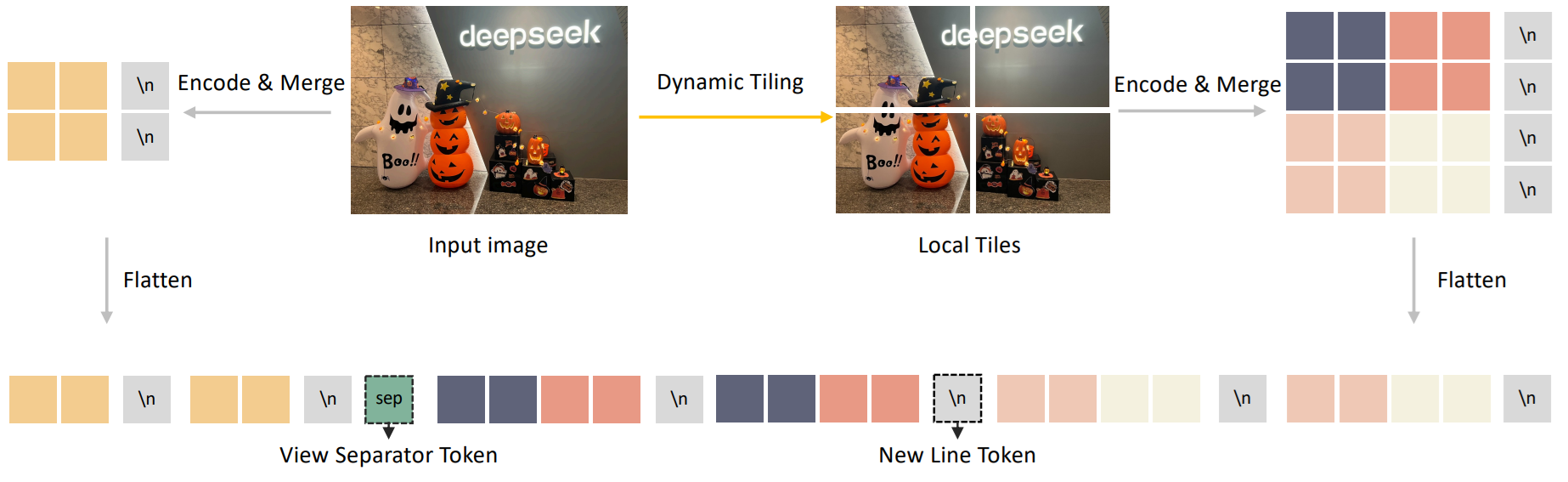
DeepSeek-VL2 uses a LLaVA-style architecture with three main parts: a vision encoder, a vision-language adaptor, and a Mixture-of-Experts language model. Its main architectural upgrade is dynamic tiling, where a high-resolution image is resized to a suitable candidate resolution, split into multiple 384 × 384 local tiles, and combined with one global thumbnail tile. All tiles are processed by a shared SigLIP-SO400M-384 vision encoder, which helps the model preserve fine detail in documents, charts, and dense text.
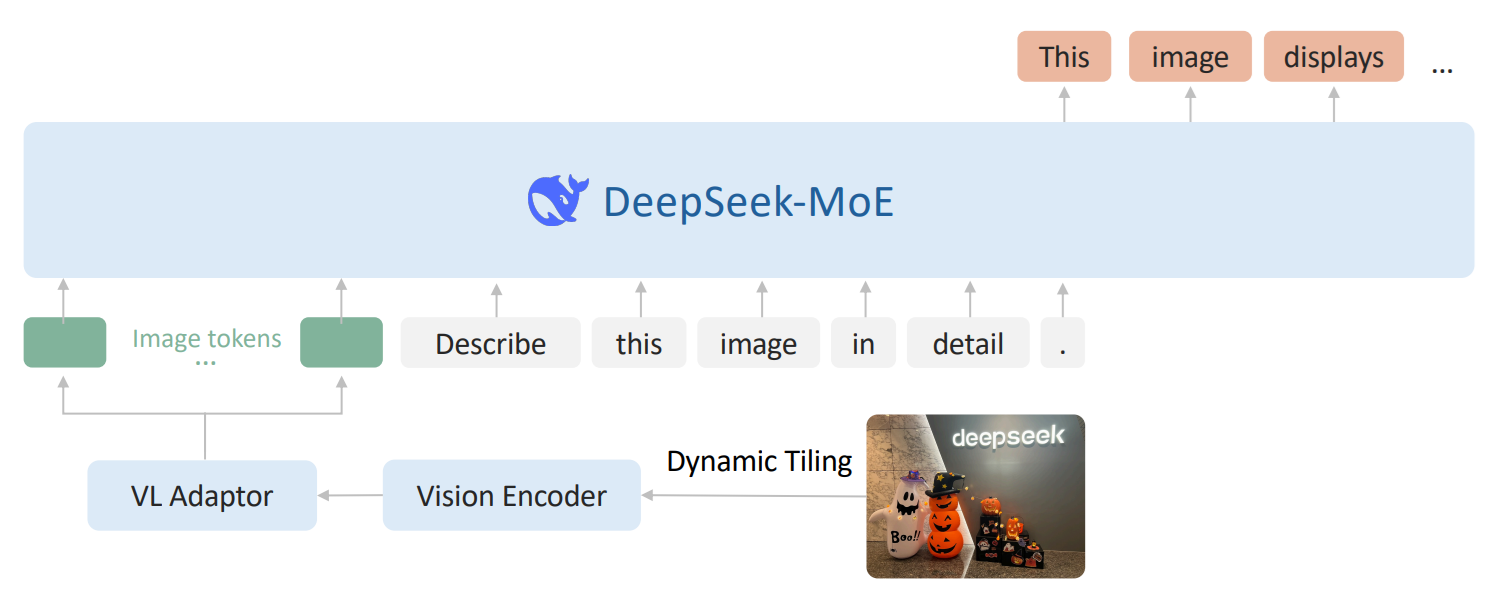
After visual features are extracted, the model uses a vision-language adaptor to compress each tile’s visual tokens with a 2 × 2 pixel shuffle. The complete visual sequence is then projected into the language model’s embedding space using a two-layer MLP. On the language side, DeepSeek-VL2 uses DeepSeekMoE with Multi-head Latent Attention (MLA), which compresses the Key-Value cache into a latent vector and improves inference efficiency for long multimodal sequences.
Key capabilities
- Visual question answering
- OCR
- Document understanding
- Table and chart understanding
- Visual reasoning
- Visual grounding
- Multi-image understanding
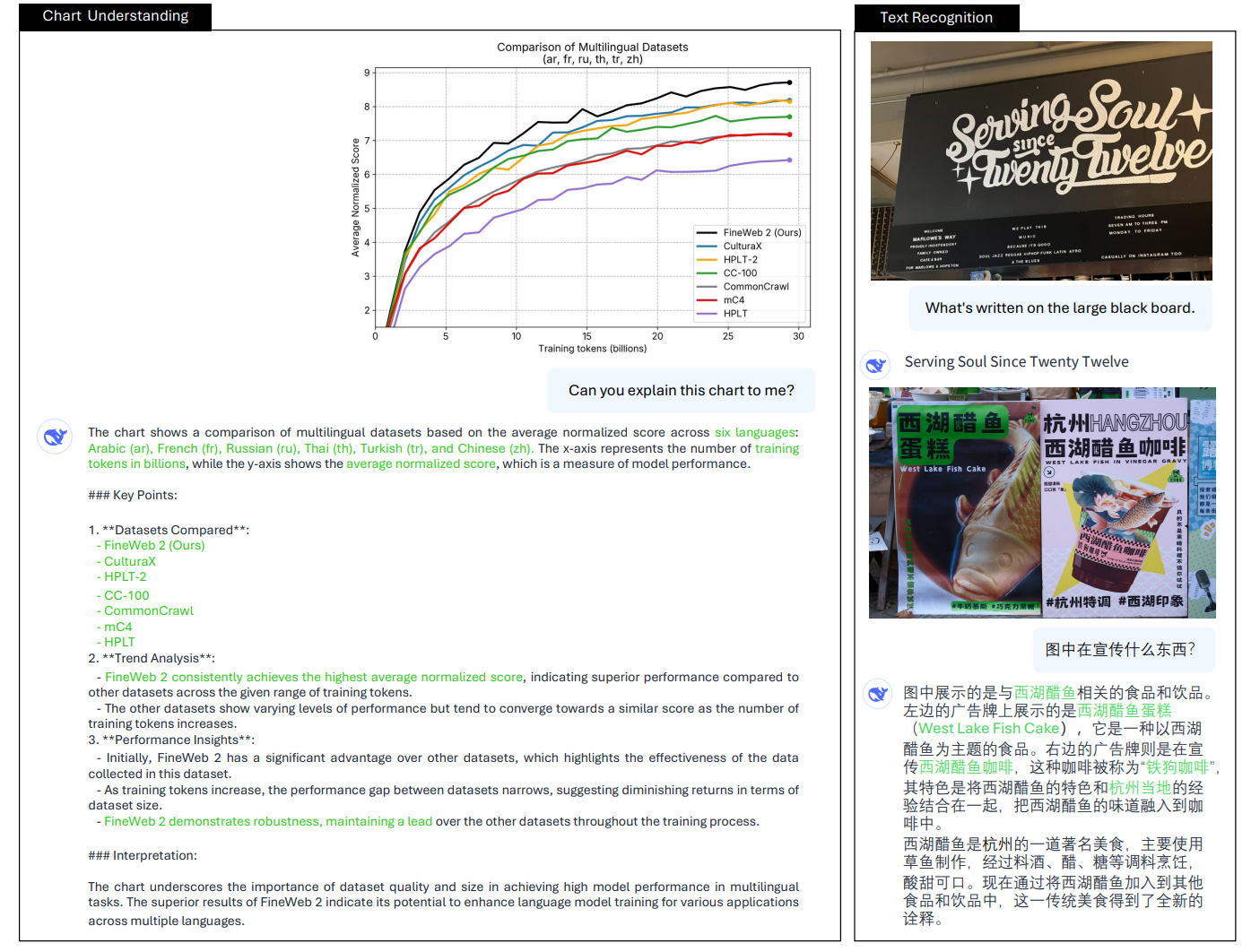
DeepSeek-VL2 model family offers scalable multimodal understanding across edge, mid-range, and production deployment needs as shown in table below.
|
Model |
Total Params |
Activated |
Key Vision
Capabilities |
Best For |
|
DeepSeek-VL2-Tiny |
~3B MoE |
1.0B |
VQA, OCR,
grounding |
Edge, low-GPU |
|
DeepSeek-VL2-Small |
~16B MoE |
2.8B |
VQA, charts,
OCR, grounding |
Mid-range GPU |
|
DeepSeek-VL2 |
~27B MoE |
4.5B |
All tasks,
multi-image, grounding |
Production |
6. DeepSeek-OCR
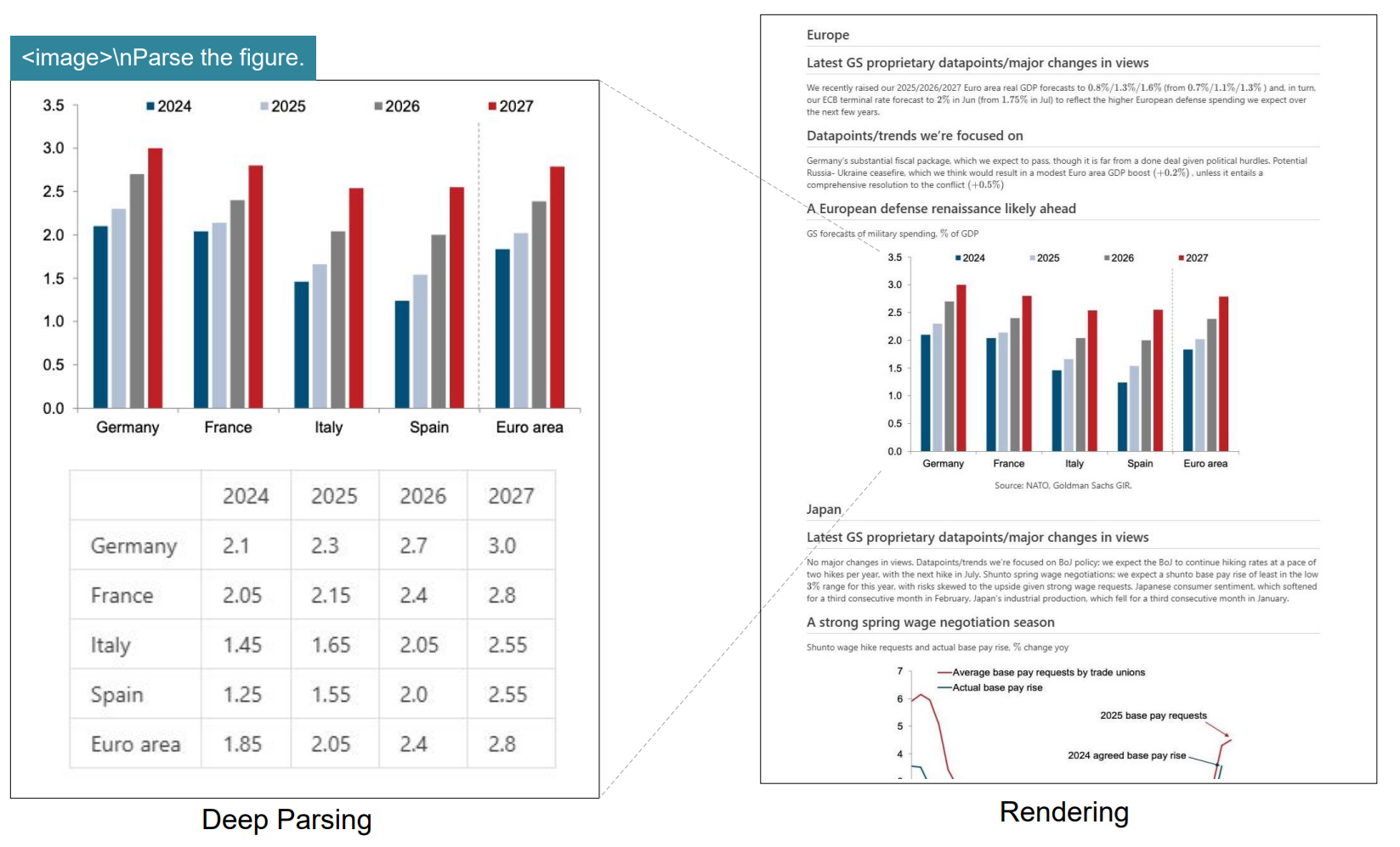
DeepSeek-OCR is a specialist vision model built for OCR and long-document understanding. Its main idea is to treat document content as a visual compression problem, so the model can keep useful page information while using far fewer vision tokens than typical document VLM pipelines. The paper presents it as an early exploration of compressing long contexts through optical 2D mapping.
Architecture
DeepSeek-OCR has two main parts: DeepEncoder and DeepSeek3B-MoE-A570M as the decoder. DeepEncoder is designed to keep low activations under high-resolution input while still achieving a high compression ratio, so the final number of vision tokens stays manageable. In simple terms, the encoder tries to squeeze a large document page into a compact visual representation before the decoder reads it.
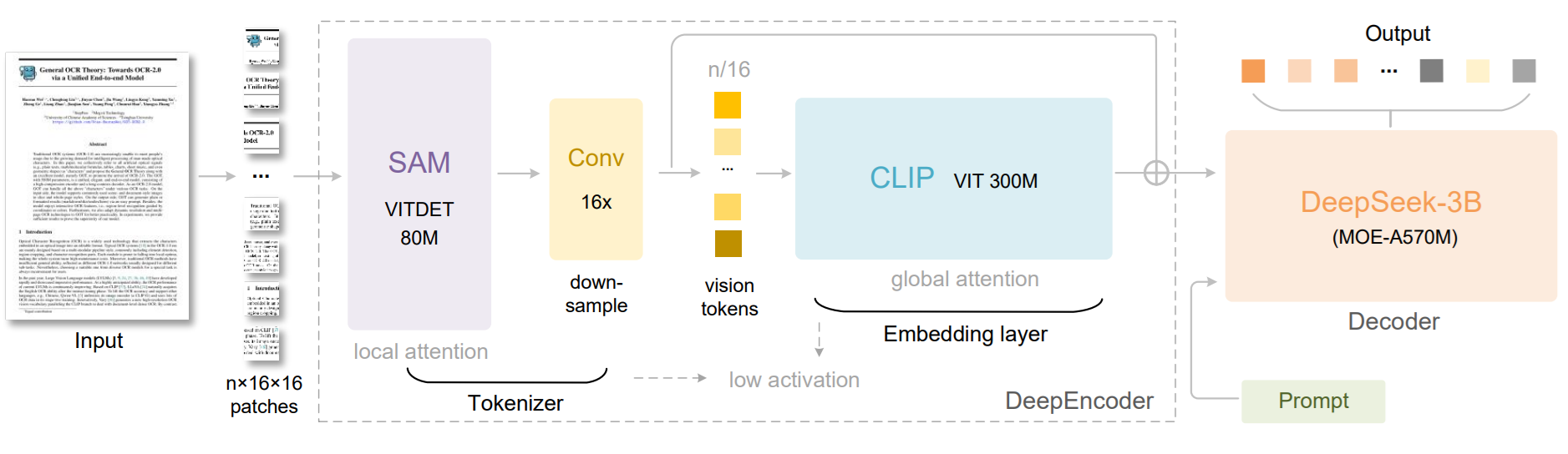
This architecture is meant for cases where long pages and dense layouts would normally create too many tokens. By compressing the visual context first, DeepSeek-OCR can process long documents more efficiently while still preserving useful OCR information. The abstract also highlights its practical efficiency in production-scale document processing.
Key capabilities
- OCR on long and dense documents
- High visual compression for page understanding
- Efficient document parsing with fewer vision tokens
- Large-scale training data generation for LLM and VLM pipelines
- Strong performance on document OCR benchmarks like OmniDocBench
7. DeepSeek-OCR 2 (January 2026)
DeepSeek-OCR 2 is the next version of DeepSeek-OCR. It focuses on improving document understanding by changing how visual tokens are ordered before they are sent to the language model. Instead of reading an image in a fixed left-to-right, top-to-bottom order, it tries to follow a more semantic and causally meaningful scanning order, especially for complex layouts.
Architecture
DeepSeek-OCR 2 introduces DeepEncoder V2, a new encoder designed to dynamically reorder visual tokens based on image semantics. The paper explains that most vision-language models process visual tokens in a rigid raster-scan order, but DeepSeek-OCR 2 changes this by letting the encoder reorganize tokens before the language model reads them.
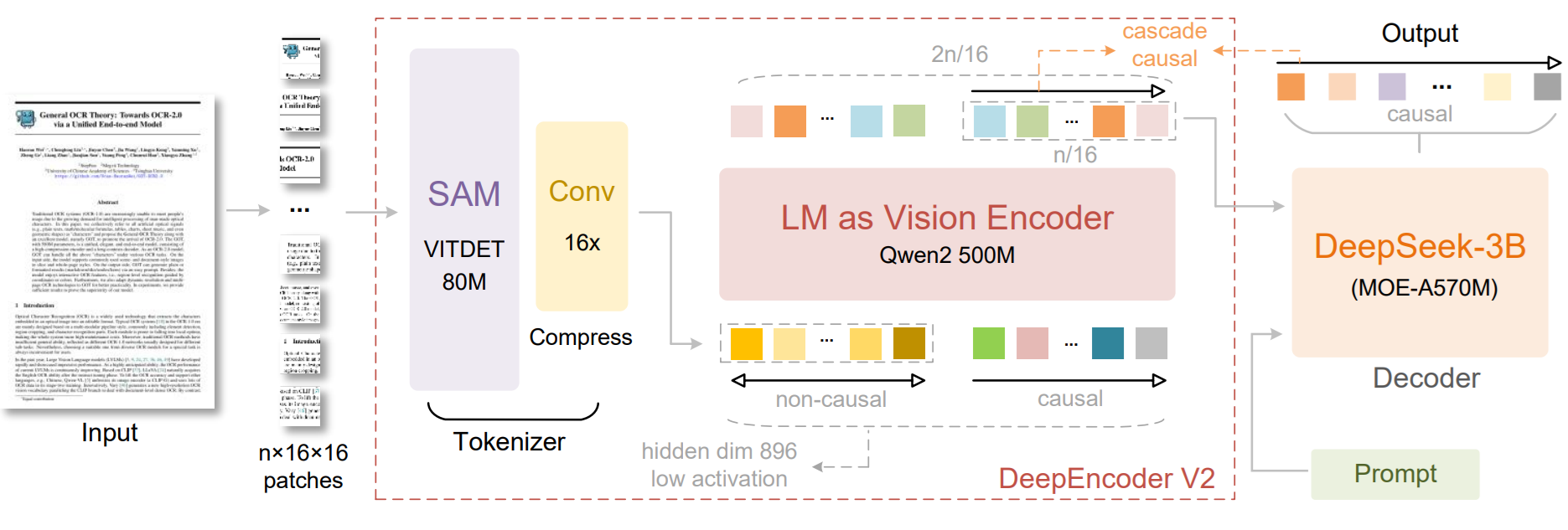
The core idea is called Visual Causal Flow. It is inspired by the way human vision follows logical structures in a page rather than scanning everything in one fixed order. DeepEncoder V2 is built to add this kind of causal reasoning ability into the visual encoding stage, so the model can better understand structured layouts and complex document content. The work explores whether 2D image understanding can be handled through two cascaded 1D causal reasoning structures.
Key capabilities
- OCR with layout-aware visual token ordering
- Better understanding of complex document structures
- Semantic reordering of visual tokens before decoding
- Stronger reasoning over pages with non-linear layouts
- A new architecture for document-focused visual understanding
The following table provides a summary of DeepSeek model family for vision tasks.
|
Model |
Vision
Type |
Key
Vision Capabilities |
|
DeepSeek-VL-1.3B
/ 7B |
Understanding |
VQA,
OCR, diagrams, web screenshots |
|
Janus-1.3B |
Understanding
+ Generation |
Unified
multimodal understanding and text-to-image generation |
|
JanusFlow-1.3B |
Understanding
+ Generation |
Janus-based
model with rectified flow for unified understanding and image generation |
|
DeepSeek-VL2-Tiny |
Understanding |
MoE
VLM, 1.0B activated, OCR, VQA, document understanding |
|
DeepSeek-VL2-Small |
Understanding |
MoE
VLM, 2.8B activated, strong OCR, chart and table understanding |
|
DeepSeek-VL2 |
Understanding |
MoE
VLM, 4.5B activated, OCR, grounding, multi-image reasoning |
|
Janus-Pro-1B
/ 7B |
Understanding
+ Generation |
Improved
multimodal understanding and image generation |
|
DeepSeek-OCR |
Specialist
OCR |
Contexts
Optical Compression for long-document OCR |
|
DeepSeek-OCR-2 |
Specialist
OCR |
Visual
Causal Flow based OCR model |
How to Use DeepSeek-VL2 with Roboflow Supervision
DeepSeek-VL2 can be used with Roboflow’s Supervision library when you want to turn the model’s text output into standard detection objects with bounding boxes and labels. Supervision supports sv.VLM.DEEPSEEK_VL_2 inside Detections.from_vlm(), and for DeepSeek-VL2 the required input is the raw model result string plus the original image resolution. Roboflow’s docs also show the recommended prompt style for DeepSeek-VL2 object localization and grounding.
What DeepSeek-VL2 gives you
DeepSeek-VL2 is a vision-language model, so it does not directly return detections in the same format as a detector like YOLO. Instead, it generates a text response. For grounding tasks, that response contains special tokens such as <|ref|> for the object phrase and <|det|> for the bounding box coordinates. The official DeepSeek-VL2 examples show outputs like:
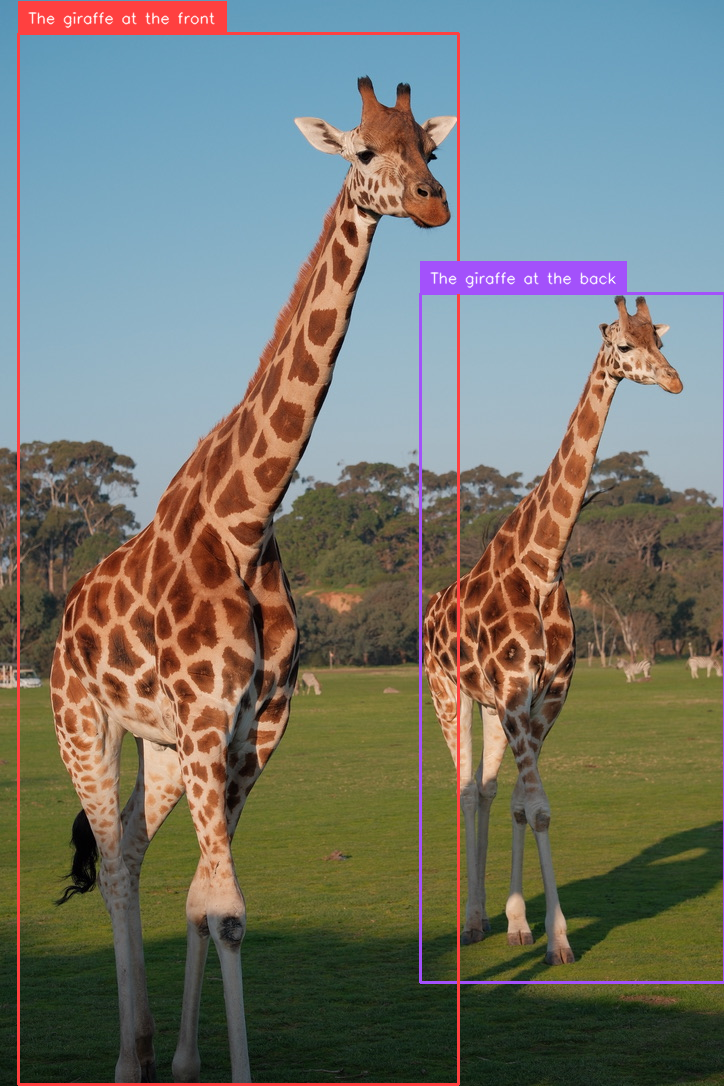
<|ref|>The giraffe at the back.<|/ref|><|det|>[[580, 270, 999, 900]]<|/det|>
This is exactly the kind of response that Supervision can parse into boxes and labels.
Step 1. Run DeepSeek-VL2 on an image
First, you run DeepSeek-VL2 on your image and prompt. The official GitHub quick start loads a model such as deepseek-ai/deepseek-vl2-tiny, prepares the image and conversation, creates image embeddings, and then calls language.generate() to get the response string. DeepSeek’s repository also notes that <|ref|> and <|/ref|> are used for object localization, while <|grounding|> can be added for grounded captioning style prompts.
For example, a localization prompt can look like this:
<image>
<|ref|>The giraffe at the front<|/ref|>
And for grounding multiple objects, Roboflow recommends a prompt like:
<image>
<|grounding|>Detect the giraffes
These prompt styles help DeepSeek-VL2 return detection coordinates in the <|det|> format.
Step 2. Save the raw DeepSeek-VL2 result
Once the model responds, keep the raw output string exactly as it is. In your example, that string is:
deepseek_vl2_result = (
    "<|ref|>The giraffe at the back<|/ref|>"
    "<|det|>[[580, 270, 999, 904]]<|/det|>"
    "<|ref|>The giraffe at the front<|/ref|>"
    "<|det|>[[26, 31, 632, 998]]<|/det|>"
    "<|end▁of▁sentence|>"
)
This string contains both the object phrases and the coordinates. Supervision reads this format and extracts the detections automatically. Roboflow’s documentation uses the same idea in its DeepSeek-VL2 example.
Step 3. Convert the result into sv.Detections
This is where Roboflow Supervision becomes useful. You pass the raw DeepSeek-VL2 output into sv.Detections.from_vlm() together with the original image size:
detections = sv.Detections.from_vlm(
    vlm=sv.VLM.DEEPSEEK_VL_2,
    result=deepseek_vl2_result,
    resolution_wh=image.size
)
Supervision then parses the <|det|> boxes and builds a standard detection object. According to the docs, this gives you structured outputs like detections.xyxy, detections.class_id, and detections.data["class_name"].
Step 4. Inspect what Supervision parsed
After parsing, your code prints:
print(detections.xyxy)
print(detections.data)
This lets you check that the coordinates and labels were extracted correctly. Roboflow’s example shows that DeepSeek-VL2 detections become normal arrays of bounding boxes, and the object names are stored in class_name.
In practice, this step is important because DeepSeek-VL2 is still a VLM, not a dedicated detector. So you want to verify that the model understood your prompt correctly and returned the right grounded objects.
Step 5. Draw boxes and labels on the image
Once the detections are in Supervision format, you can use the normal annotation tools. Your code uses BoxAnnotator() and LabelAnnotator():
box_annotator = sv.BoxAnnotator()
label_annotator = sv.LabelAnnotator()
Then it draws the boxes and labels on the OpenCV image and saves the result. This is a nice part of the Roboflow workflow, because after parsing, DeepSeek-VL2 behaves like any other detection source inside Supervision. You can visualize it, track it, filter it, or pass it downstream into other CV logic.
Here's the full code:
from PIL import Image
import cv2
import supervision as sv
from IPython.display import display

image_path = "giraffe.png"

# PIL for size
image = Image.open(image_path)

# OpenCV for drawing
image_cv = cv2.imread(image_path)

deepseek_vl2_result = (
    "<|ref|>The giraffe at the back<|/ref|>"
    "<|det|>[[580, 270, 999, 904]]<|/det|>"
    "<|ref|>The giraffe at the front<|/ref|>"
    "<|det|>[[26, 31, 632, 998]]<|/det|>"
    "<|end▁of▁sentence|>"
)

detections = sv.Detections.from_vlm(
    vlm=sv.VLM.DEEPSEEK_VL_2,
    result=deepseek_vl2_result,
    resolution_wh=image.size
)

print(detections.xyxy)
print(detections.data)

# labels from parsed class names
labels = detections.data["class_name"].tolist()

# annotators
box_annotator = sv.BoxAnnotator()
label_annotator = sv.LabelAnnotator()

# draw boxes
annotated = box_annotator.annotate(
    scene=image_cv.copy(),
    detections=detections
)

# draw labels
annotated = label_annotator.annotate(
    scene=annotated,
    detections=detections,
    labels=labels
)

# display in notebook
display(Image.open("giraffe_boxed.png"))
When you run the code, you should see output like following:
DeepSeek-VL2 Vision Capabilities
DeepSeek-VL2 is a general-purpose vision-language model that can handle a wide range of vision tasks using natural language prompts. You provide an image and describe what you want, and the model responds with text or structured output. Below are the key capabilities that you can try:
1. Visual Question Answering (VQA)
Visual Question Answering is the most general capability of DeepSeek-VL2. You provide an image, ask a question in natural language, and the model returns a natural language answer. This makes it a good starting point for any new vision application.
It can handle:
- Scene-level questions
- Object counting
- Relationships between objects
- Reasoning over visual context
Example:
conversation = [
    {
        "role": "<|User|>",
        "content": "<image>\nWhat is happening in this image?",
        "images": ["street.jpg"],
    },
    {"role": "<|Assistant|>", "content": ""}
]
Practical use cases:
- Retail shelf analysis
- Quality inspection reporting
- Image-based search
- Customer support with images
2. Optical Character Recognition (OCR)
DeepSeek-VL2 can read and extract text from images, including documents and real-world scenes. It works well on structured layouts where both text and formatting matter. It can handle:
- Printed documents and forms
- Text in natural scenes (labels, boards)
- Dense tables and structured layouts
- Mixed text and graphics
Example:
conversation = [
    {
        "role": "<|User|>",
        "content": "<image>\nExtract all text from this document.",
        "images": ["invoice.png"],
    },
    {"role": "<|Assistant|>", "content": ""}
]
Practical use cases:
- Invoice processing
- Document digitization
- Form data extraction
- Reading product labels
3. Document, Table, and Chart Understanding
Beyond reading text, DeepSeek-VL2 can interpret structured visual content such as tables, charts, and reports. It can handle:
- Table understanding and querying
- Chart interpretation (line, bar, etc.)
- Extracting key-value information
- Summarizing structured documents
Example:
conversation = [
    {
        "role": "<|User|>",
        "content": "<image>\nWhat trend is shown in this chart?",
        "images": ["chart.png"],
    },
    {"role": "<|Assistant|>", "content": ""}
]
Practical use cases:
- Financial report analysis
- Dashboard interpretation
- Scientific figure understanding
- Automated data extraction
4. Visual Grounding (Language-Based Detection)
Visual grounding allows you to locate objects in an image using natural language. The model returns bounding box coordinates for the described object. It can handle:
- Object localization using text descriptions
- Multiple object grounding
- Zero-shot detection (no training required)
Example:
conversation = [
    {
        "role": "<|User|>",
        "content": "<image>\n<|ref|>The red fire extinguisher<|/ref|>",
        "images": ["factory.jpg"],
    },
    {"role": "<|Assistant|>", "content": ""}
]
Practical use cases:
- Visual search systems
- Robotics (target object identification)
- Auto-annotation tools
- Zero-shot detection pipelines
5. Multi-Image Understanding
DeepSeek-VL2 can process and reason over multiple images in a single interaction. It can handle:
- Comparing images
- Detecting differences
- Reasoning across image sequences
- Few-shot visual understanding
Example:
conversation = [
    {
        "role": "<|User|>",
        "content": "<image>\n<image>\nWhich product has more quantity?",
        "images": ["before.png", "after.png"],
    },
    {"role": "<|Assistant|>", "content": ""}
]
Practical use cases:
- Before/after analysis
- Quality comparison
- Inspection workflows
- Visual change detection
6. Image Captioning
DeepSeek-VL2 can generate detailed natural language descriptions of images without requiring a specific question. It can handle:
- Scene description
- Object listing
- Context-aware summaries
Example:
conversation = [
    {
        "role": "<|User|>",
        "content": "<image>\nDescribe this image in detail.",
        "images": ["scene.jpg"],
    },
    {"role": "<|Assistant|>", "content": ""}
]
Practical use cases:
- Dataset annotation
- Accessibility (alt-text generation)
- Image indexing and search
7. Region-Level Understanding
DeepSeek-VL2 can answer questions about specific parts of an image, not just the whole scene. It can handle:
- Localized queries
- Reading specific regions
- Fine-grained analysis
Example:
conversation = [
    {
        "role": "<|User|>",
        "content": "<image>\nWhat is written on the signboard in the top left corner?",
        "images": ["street.jpg"],
    },
    {"role": "<|Assistant|>", "content": ""}
]
Practical use cases:
- UI and screen analysis
- Industrial inspection
- Localized text extraction
8. Grounded Captioning
This combines object detection and description. The model can describe objects along with their locations. It can handle:
- Object description with bounding boxes
- Multi-object scene understanding
- Structured output generation
Example:
conversation = [
    {
        "role": "<|User|>",
        "content": "<image>\n<|grounding|>Describe all objects in the image.",
        "images": ["scene.jpg"],
    },
    {"role": "<|Assistant|>", "content": ""}
]
Practical use cases
- Auto-labeling datasets
- Scene understanding
- Training data generation
9. GUI and Screen Understanding
DeepSeek-VL2 can interpret structured UI elements and screen layouts. It can handle:
- Buttons, menus, and layout detection
- Dashboard understanding
- Structured UI reasoning
Example:
conversation = [
    {
        "role": "<|User|>",
        "content": "<image>\nWhat are the main sections in this dashboard?",
        "images": ["dashboard.png"],
    },
    {"role": "<|Assistant|>", "content": ""}
]
Practical use cases:
- RPA (Robotic Process Automation)
- UI testing
- Workflow automation
10. Visual Instruction Following
You can give instructions based on image content, and the model executes them. It can handle:
- Task-based reasoning
- Instruction-driven outputs
- Structured reporting
Example:
conversation = [
    {
        "role": "<|User|>",
        "content": "<image>\nFind all damaged parts and list them.",
        "images": ["machine.jpg"],
    },
    {"role": "<|Assistant|>", "content": ""}
]
Practical use cases:
- Manufacturing inspection
- Quality control
- Automated reporting
11. Few-Shot Visual Reasoning
DeepSeek-VL2 can use example images to guide reasoning on new inputs. It can handle:
- Pattern matching
- Example-based reasoning
- Visual similarity tasks
Example:
conversation = [
    {
        "role": "<|User|>",
        "content": "<image>\n<image>\nFind objects similar to the first image in the second image.",
        "images": ["example.jpg", "target.jpg"],
    },
    {"role": "<|Assistant|>", "content": ""}
]
Practical use cases:
- Visual search
- Defect detection
- Pattern recognition
12. Scene and Spatial Reasoning
The model can understand spatial relationships and logical structure in images. It can handle:
- Distance and proximity reasoning
- Object relationships
- Scene-level logic
Example:
conversation = [
    {
        "role": "<|User|>",
        "content": "<image>\nWhich object is closest to the door?",
        "images": ["room.jpg"],
    },
    {"role": "<|Assistant|>", "content": ""}
]
Practical use cases:
- Robotics and navigation
- Smart assistants
- Scene analysis
DeepSeek-VL2 is not limited to a single task like OCR or detection. It is a unified multimodal system that supports a wide range of vision tasks through natural language interaction. This makes it highly flexible for real-world applications where requirements evolve over time.
DeepSeek Vision Models Conclusion
DeepSeek's integration with Roboflow Supervision is especially useful for developers and teams building production-ready CV systems, allowing users to use these models for advanced vision-language tasks. This makes it easier to move from raw model responses to structured detections, annotated outputs, and real application pipelines. Explore more models' performance on OCR, object detection, and more in the Roboflow Playground.
Cite this Post
Use the following entry to cite this post in your research:
Timothy M. (Mar 20, 2026). DeepSeek Vision Models. Roboflow Blog: https://blog.roboflow.com/deepseek-vision-models/