

Every touchscreen in the world shares one assumption: your fingers have to touch the glass. That constraint is so fundamental we rarely question it. But it's not a law of physics, it's just a design choice no one has had a good reason to challenge.
Egocentric vision flips the model: a paradigm where the camera lives on you, not on the device. Instead of a fixed sensor watching a scene, you become the reference point. Your hands move through space, and the system interprets that movement as input.
Devices like Meta Ray-Ban glasses and Apple Vision Pro are already pushing this idea into consumer hardware. But you don't need cutting-edge hardware to start building in this space. A camera, a laptop and a few well-chosen libraries are enough to prototype something genuinely interesting today.
In this article, we'll build exactly that: a system that uses a POV camera to detect a laptop screen, track your hand landmarks in real time, and convert pinch gestures into zoom actions where no touching is required.
What We're Building with Egocentric Hand Keypoint Detection
The pipeline works in four steps, and it's worth having a clear mental model before we get into the code:
- A camera captures a first-person view of the scene (InferencePipeline).
- An object detection model (RF-DETR) identifies the laptop screen and establishes it as the interaction surface.
- MediaPipe extracts 21 hand landmarks from the same frame.
- A gesture interpreter measures the distance between your thumb and index finger.
The resulting prototype is a system where you can zoom in and out on your laptop screen purely through hand gestures from the perspective of someone wearing a camera. What makes this architecture interesting beyond the specific project is that it's a reusable pattern: detect the interaction surface, localize the hand within it, interpret the gesture, emit the OS event.
Roboflow Inference - Stream Management Without the Boilerplate
Building a computer vision pipeline from scratch means solving a set of problems that have nothing to do with your actual idea. You need to open a camera stream, grab frames at a consistent rate, run model inference without blocking the capture loop, handle dropped frames gracefully, and keep everything synchronized. That's a meaningful amount of plumbing before you've written a single line of gesture logic.
Roboflow's inference library (which just shipped v1.0.0) abstracts all of that into a single InferencePipeline object. Under the hood it manages frame capture in a dedicated thread, queues frames for inference, and dispatches results to your callback without you having to coordinate any of it manually. The architecture is deliberately non-blocking, the camera never waits for inference to finish, which means you're not dropping frames because a model took 30ms longer than expected on a given pass.
What this looks like in practice is that your entire application logic lives inside the on_prediction callback. Every time a frame is processed, you receive the predictions and the original frame together, already synchronized. You don't manage threads, you don't poll a queue, and you don't write a while True capture loop. That separation is genuinely useful as the pipeline grows more complex, for example adding a second model or a logging step is just more logic inside the callback, not a restructuring of the whole architecture.
For a project like this one, where we're running both object detection and hand landmark extraction on every frame, keeping the stream management out of sight means the code stays readable and the bottlenecks are easy to identify when they appear.
from inference import InferencePipeline

pipeline = InferencePipeline.init_with_custom_logic(
        video_reference=settings.camera,
        on_video_frame=processor.infer,
        on_prediction=processor.on_prediction,
)
MediaPipe Hand Landmarks Detection
Training a custom hand keypoint model is really time consuming: collecting data, labeling 21 landmarks per image, handling occlusion and varied lighting. If you don’t have any particular restriction or need your own personal data for a specific project, MediaPipe gives you all of that out of the box, with 21 well-calibrated landmarks running efficiently on CPU. For detecting a pinch gesture, it's exactly what we need.
The landmarks we care about are index 4 (thumb tip) and index 8 (index finger tip). When those two points move close together, that's a pinch. When they move apart, that's a release.
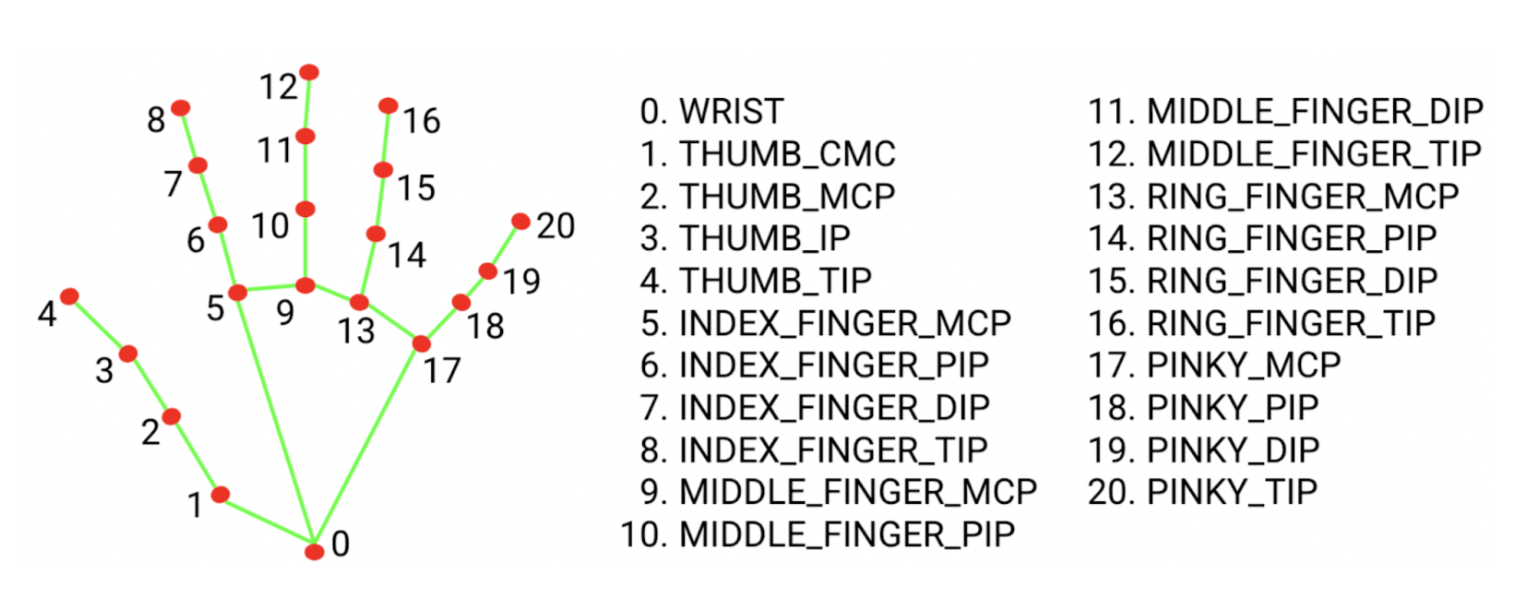
The following code snippet helps you understand how to load a hand landmark model:
import mediapipe as mp

BaseOptions = mp.tasks.BaseOptions
HandLandmarker = mp.tasks.vision.HandLandmarker
HandLandmarkerOptions = mp.tasks.vision.HandLandmarkerOptions
HandLandmarkerResult = mp.tasks.vision.HandLandmarkerResult
VisionRunningMode = mp.tasks.vision.RunningMode

options = HandLandmarkerOptions(
        base_options=BaseOptions(model_asset_path=model_path),
        running_mode=VisionRunningMode.LIVE_STREAM,
        num_hands=1,
        result_callback=result_callback,
)
landmarker = HandLandmarker.create_from_options(options)

# This would be in the actual inference function
rgb_image = cv2.cvtColor(video_frame.image, cv2.COLOR_BGR2RGB)
mp_image = mp.Image(image_format=mp.ImageFormat.SRGB, data=rgb_image)
We're using LIVE_STREAM mode rather than VIDEO mode because our pipeline is asynchronous, frames arrive at variable rates, and we don't want inference to block on each one. The result_callback fires with landmark results as they're ready, decoupled from the capture loop.
RF-DETR - Anchoring the Gesture Space
Hand position alone isn't enough. Here's why that matters: when you perform a pinch gesture, the system doesn't just need to know that you're pinching, it needs to know where your fingers are relative to the screen. Without a reference point, gesture coordinates are just positions in the camera frame, which tells you nothing about which part of the display you're interacting with.
By anchoring to the laptop's top-left corner, we can translate raw finger coordinates into a position relative to the screen surface. In practice this means that if you hold a pinch gesture over the left half of the laptop, the zoom action fires in whatever application window occupies that region. It's important to note that this approach does not involve 3D projection or perspective correction. The system relies on the assumption that the camera is positioned close to and roughly perpendicular to the screen, such that finger pixel coordinates in the camera frame approximate screen coordinates with sufficient accuracy. This assumption holds well within the constraints of the current setup, but would degrade with more oblique viewing angles or at greater distances from the display.
A more robust version would compute a full projective transform between the detected screen corners and the actual display coordinates. That's a natural next step if you want the gesture space to remain accurate as the camera angle changes.
We solve this by using RF-DETR Nano to detect the laptop screen and extract the top-left corner of the detection mask. That corner becomes the origin for all gesture coordinates downstream. If you hold a pinch over the left half of the laptop, the zoom action fires in whatever application window occupies that region. We use the Nano variant specifically for speed: it runs at the frame rates we need on a modern CPU without a GPU. The tradeoff is that it's slightly less accurate than the full RF-DETR model on difficult cases, but for a well-lit laptop screen against a typical desk background, it's more than sufficient.
As we can see in the RFDETR repository its usage is quite simple:
model = RFDETRSegNano()
model.optimize_for_inference(dtype=torch.float16)
model.predict(frame.image, threshold=threshold)
Putting It Together
With all three components in place: the stream, the hand tracker, and the laptop detector, the integration is straightforward. We implement these two methods that conform to InferencePipeline's expected callback signatures:
def infer(self, video_frames: List[VideoFrame]) -> List[Any]:
        frame = video_frames[0]  # We only accept one stream
        hand_results = self._hand_tracker.infer(frame)
        laptop_detections = self._laptop_detector.detect(frame)
        return [(hand_results, laptop_detections)]

def on_prediction(
   self,
   predictions: Any,
   video_frame: VideoFrame
) -> None:
        hand_result = predictions[0]
        laptop_detections = predictions[1]

        corner = self._laptop_detector.get_corner(laptop_detections)
        if hand_result is not None and hand_result.hand_landmarks:
            for hand_landmarks in hand_result.hand_landmarks:
                self._gesture_manager.detect_and_execute(hand_landmarks, corner)
The infer method runs the two models and returns their combined output as a tuple. on_prediction receives that tuple along with the original frame, extracts the laptop corner, and passes both to the gesture manager. The gesture manager handles the threshold logic and fires the appropriate pynput keyboard shortcut for zoom in or zoom out.
Notice that neither method touches the camera, manages threads, or coordinates timing. All of that lives inside InferencePipeline, these methods only care about what to do with a frame once it arrives.
Here it is a complete demo of zooming in and out from two different applications. For visualizing purposes, I’ve annotated the hand landmarks and the top-left corner of the laptop.
Limitations
There are some limitations in the current implementation that will be improved in the next interactions:
- Lighting is the most immediate factor. MediaPipe hand detection degrades noticeably in low-contrast or high-glare conditions: a lamp behind you, strong sunlight through a window, or a poorly lit room all affect reliability more than you'd expect. Consistent, diffuse lighting isn't just a recommendation; it meaningfully changes detection confidence.
- The current gesture vocabulary is narrow by design: two states, pinching and not pinching, mapped to two actions, zoom in and zoom out. Extending to swipe, rotate, or multi-finger commands would require a proper gesture state machine rather than the simple distance threshold used here. That's not a difficult engineering problem, but it's a different one.
- Finally, the spatial mapping relies on the proximity assumption described earlier. The further the camera moves from perpendicular, the less reliable the coordinate mapping becomes. If you want to use this at unusual angles, the projective transform approach is the right fix.
Egocentric Hand Trajectory Detection Conclusion
What we've built here is a small but complete demonstration of a genuinely different interaction paradigm. A webcam captures a first-person view of your workspace. RF-DETR Nano finds the laptop screen and anchors the gesture space to it. MediaPipe extracts hand landmarks on every frame, and a simple distance threshold between your thumb tip and index finger tip translates a pinch into a zoom action, all without touching the display.
The most immediate extension is richer gesture support. A state machine that tracks gesture transitions would unlock a much wider vocabulary without changing the underlying pipeline architecture.
The spatial mapping is also a natural area to improve. Computing a full homography between the detected screen corners and actual display coordinates would make the system robust to camera angle and distance, and would open the door to more precise pointer control rather than just zoom.
And of course, the egocentric effect is most compelling when the camera is genuinely head-mounted. A clip-on webcam at eye level or, eventually, actual smart glasses hardware would make the interaction feel far more natural.
The full code is available on GitHub. If you build something on top of it, I'd be curious what gesture vocabulary you end up with.
Written by David Redó
Cite this Post
Use the following entry to cite this post in your research:
Contributing Writer. (Mar 19, 2026). Turning Any Screen Into a Touchless Display with Egocentric Hand Keypoint Detection. Roboflow Blog: https://blog.roboflow.com/egocentric-hand-keypoint-detection/