

Computer vision has traditionally focused on detection, drawing bounding boxes that tell us where something appears in an image. But many real-world workflows don’t stop at localization. Businesses need systems that understand documents, extract meaning, and convert visual information into structured data that software can actually use. Detecting a receipt is useful; automatically extracting totals, dates, and merchants is transformative.
The business case is clear: finance teams processing 1,000 manual expense reports annually waste over 400 hours and thousands of dollars in staff time on data entry alone. Businesses that automate expense management reduce processing time by 60% and cut costs by 35%, turning a tedious administrative burden into a streamlined workflow.
In this tutorial, you’ll build a workflow that turns receipt images into structured JSON using vision-language models inside Roboflow. We’ll walk through a practical expense reimbursement automation pipeline, showing how images move from raw input to reliable, machine-readable outputs ready for downstream systems.
How to Extract Structured JSON from Any Image Tutorial: Automate Expense Receipt Processing
In this section, we’ll build a practical expense receipt processing pipeline designed for corporate reimbursement workflows. Instead of manually reviewing receipts, we’ll use Roboflow Workflows and a vision-language model (VLM) to extract structured data directly from receipt images and convert it into standardized JSON. By the end, you’ll have a reproducible workflow that takes an uploaded receipt, extracts key expense fields, and prepares the data for automated expense reporting systems.
Workflow Overview
This workflow processes a receipt image through Roboflow Workflows to generate structured expense data automatically. A vision-language model extracts key fields into a predefined JSON format, which is then parsed and validated within the pipeline.
Once processed, the workflow sends a formatted expense summary to Slack for real-time expense logging and reimbursement processing, while also producing structured JSON output ready for downstream automation or storage. Here's the workflow we'll build.
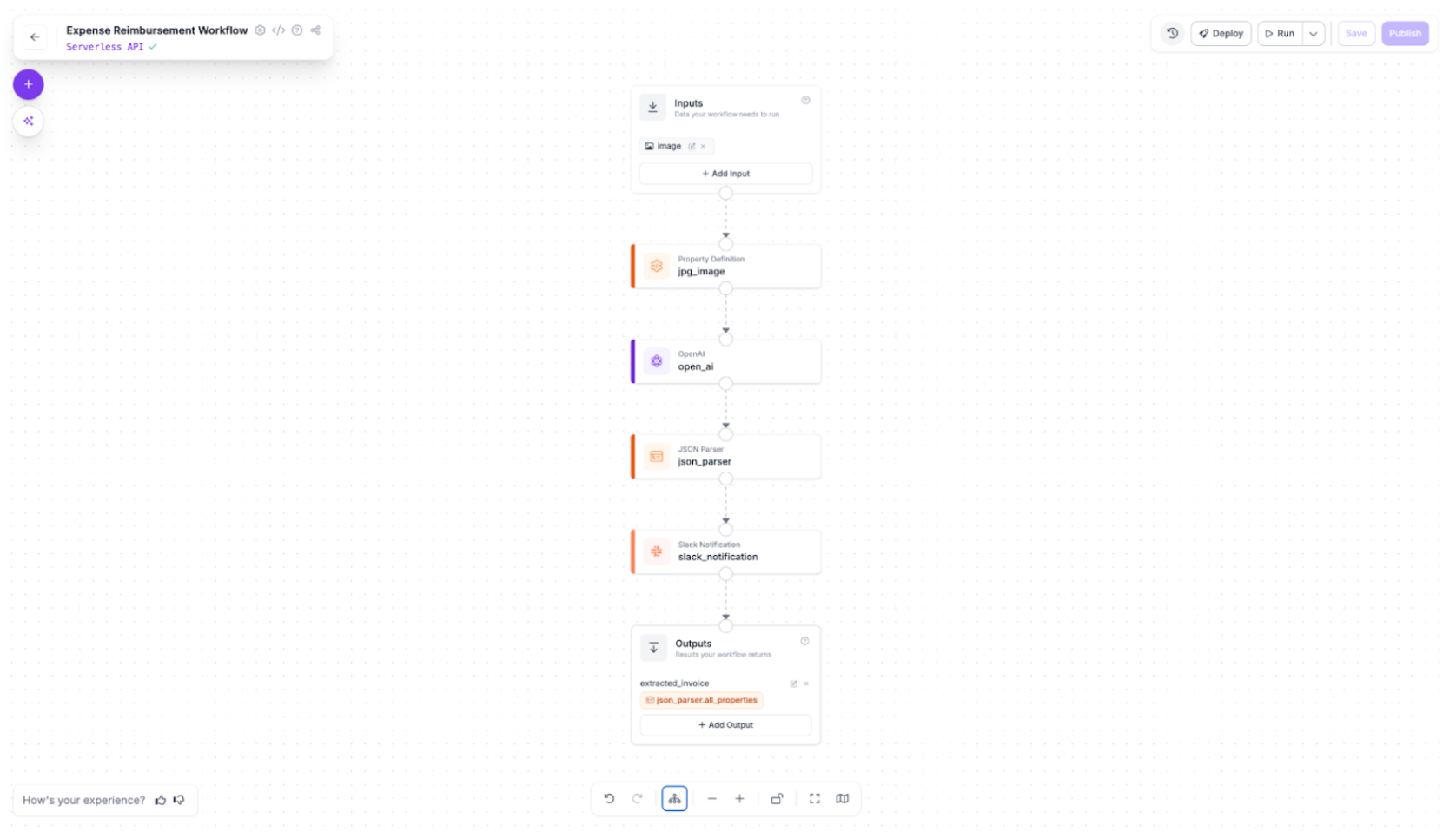
Step 1: Standardize the Input Image
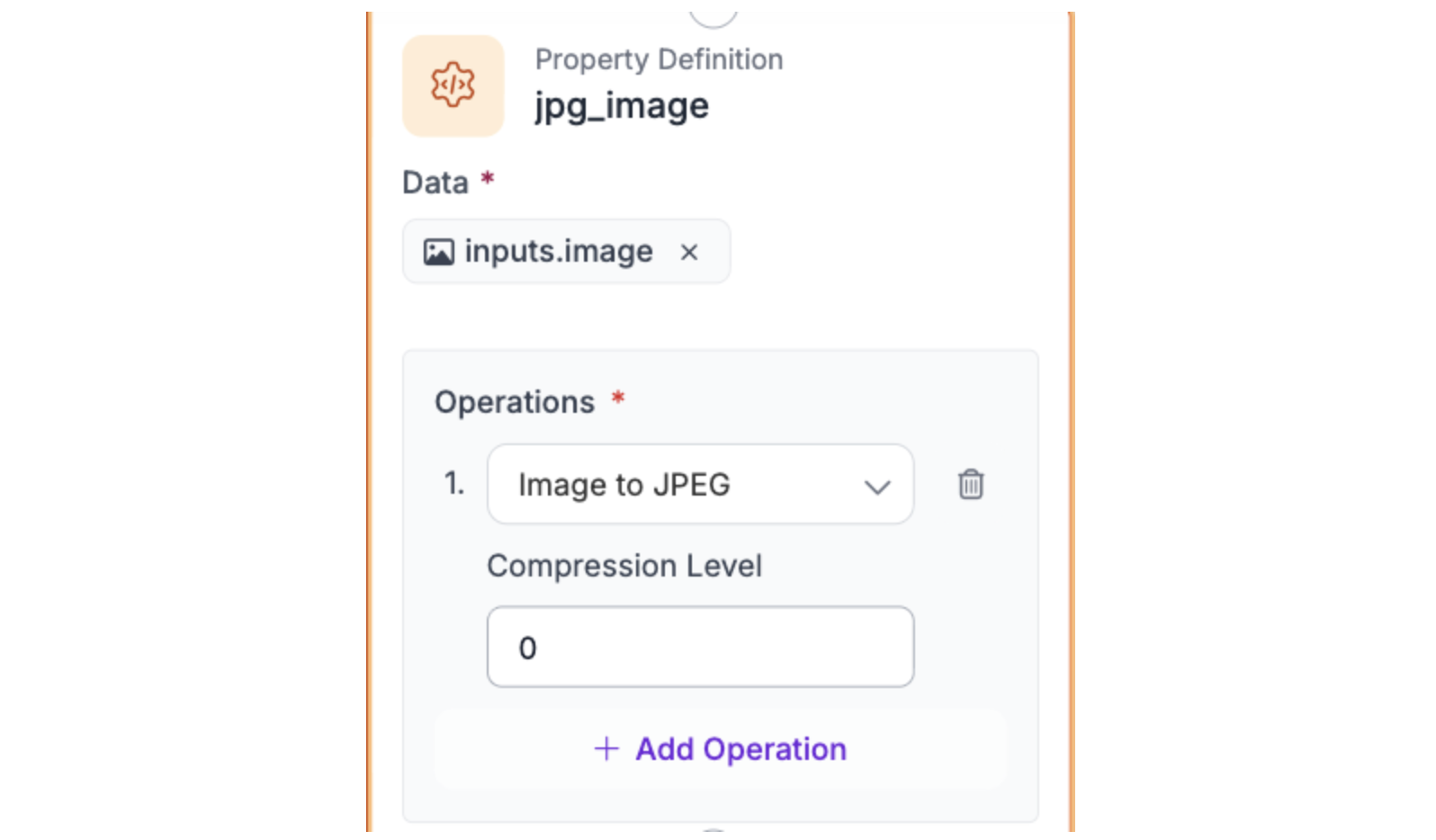
The first step in the workflow ensures that all receipt images are in a consistent format. Using a Property Definition block named `jpg_image`, we convert incoming images into JPEG. This normalization step prevents compatibility issues with downstream blocks, like Slack attachments, ensuring that every image is processed reliably, regardless of the original format.
In practice, this means that when a receipt is uploaded, it’s automatically prepared for extraction without requiring manual intervention, keeping the workflow smooth and reproducible.
Step 2: Extract Data with the OpenAI Model
Next, add an OpenAI model block using GPT-5.2, chosen for its high accuracy in structured data extraction and reliable JSON generation from images. Set the task type to Structured Output Generation, so the model extracts key receipt fields: merchant, date, subtotal, tax, total, currency, payment_method, category, and line_items.
The prompt used:
You are a receipt data extraction assistant. Analyze this receipt image and extract key information with high accuracy.

Extract receipt data and return ONLY this exact JSON structure with no additional text:

{"merchant":"","date":"","subtotal":0,"tax":0,"total":0,"currency":"USD","payment_method":"unknown","category":"","line_items":[]}


Extraction Rules:

1. merchant: Business name from receipt header (e.g., "Starbucks", "Shell Gas Station")

2. date: Format as YYYY-MM-DD (e.g., "2024-02-15")

3. subtotal, tax, total: Numbers only, no $ symbols (e.g., 24.99 not "$24.99")

4. currency: Use "USD" unless clearly different

5. payment_method: credit, debit, cash, or unknown

6. category: Choose from: meals, travel, office_supplies, services, fuel, other

7. line_items: Leave empty [] if individual items are not clearly visible


Defaults for unclear/missing information:

- Text fields: "unknown"

- Number fields: 0

- Arrays: []


Critical:

- Amounts must be exact as shown on receipt

- Double-check that subtotal + tax = total (or use total if subtotal/tax missing)

- Return ONLY valid JSON - no explanations, markdown, or extra text
The output structure used
{
  "output_schema": "{\"type\":\"object\",\"properties\":{\"merchant\":{\"type\":\"string\",\"description\":\"Business/vendor name from invoice header\"},\"date\":{\"type\":\"string\",\"description\":\"Transaction date in YYYY-MM-DD format\"},\"subtotal\":{\"type\":\"number\",\"description\":\"Amount before tax\"},\"tax\":{\"type\":\"number\",\"description\":\"Tax amount\"},\"total\":{\"type\":\"number\",\"description\":\"Final total amount paid\"},\"currency\":{\"type\":\"string\",\"description\":\"Currency code - default to USD unless invoice clearly shows different currency (EUR, GBP, CAD, etc.)\"},\"payment_method\":{\"type\":\"string\",\"description\":\"Payment type: credit, debit, cash, or unknown\"},\"category\":{\"type\":\"string\",\"description\":\"Expense category: meals, travel, office_supplies, services, fuel, or other\"},\"line_items\":{\"type\":\"array\",\"items\":{\"type\":\"object\",\"properties\":{\"description\":{\"type\":\"string\"},\"quantity\":{\"type\":\"number\"},\"unit_price\":{\"type\":\"number\"},\"total\":{\"type\":\"number\"}},\"required\":[\"description\",\"total\"]},\"description\":\"Individual items purchased (empty array if unclear)\"}},\"required\":[\"merchant\",\"date\",\"total\",\"currency\",\"payment_method\",\"category\",\"line_items\"]}",
  "instructions": "You are an invoice data extraction specialist. Extract data from this invoice image and return it as a JSON object with the following exact structure. Do not nest the fields under any wrapper key. Return the fields directly at the root level: merchant, date, subtotal, tax, total, currency, payment_method, category, and line_items. Extract the merchant name exactly as shown. Convert dates to YYYY-MM-DD format. All monetary amounts must be numbers without currency symbols. For category, infer from merchant type: restaurants/cafes→meals, Uber/Lyft/gas stations→travel, Office Depot/Staples→office_supplies, contractors/consultants/manufacturing→services, gas stations→fuel, everything else→other. Include line_items only if clearly visible; otherwise return empty array. For unclear fields use: text='unknown', numbers=0, arrays=[]. Amounts must be exact as shown on the invoice."
}
The prompt and output structure enforces exact formatting, default values for missing data, and ensures totals are correct. GPT-5.2 produces strictly valid JSON with no extra text, ready for parsing and downstream automation.
Step 3: Parse the Model Output
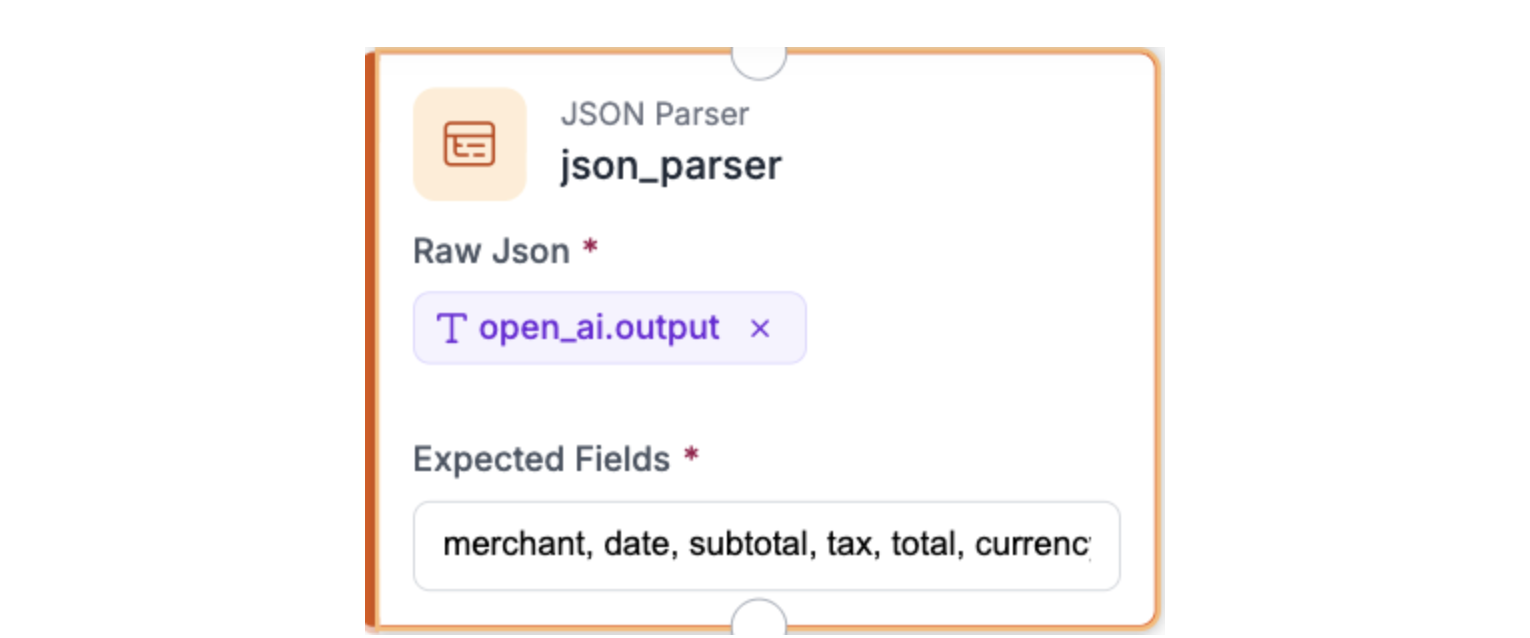
After the OpenAI block, add a JSON Parser block to convert the raw model output into structured workflow parameters. This block reads the JSON string returned by GPT-5.2 and extracts each key (merchant, date, subtotal, tax, total, currency, payment_method, category, and line_items) so they can be referenced individually in later steps.
Using this block ensures that downstream actions, like Slack notifications or data exports, can reliably access each field without errors caused by string formatting or malformed JSON.
Step 4: Send the Extracted Data to Slack
Add a Slack Notification block to automatically route extracted expense data to your finance or operations channel, enabling real-time expense logging and reimbursement processing. For instructions on configuring the Slack token and selecting your target channel, follow Step 5 in Roboflow’s Slack Notification guide.
Once configured, format the message using the parsed fields:
New Invoice Received

Merchant: {{$parameters.merchant}}
Date: {{$parameters.date}}
Subtotal: ${{$parameters.subtotal}}
Tax: ${{$parameters.tax}}
Total: ${{$parameters.total}}
Currency: {{$parameters.currency}}
Payment: {{$parameters.payment_method}}
Category: {{$parameters.category}}

Line Items: {{$parameters.line_items}}
Instead of mapping fields manually in the UI, you can define `message_parameters` directly in the block’s JSON editor:
  "message_parameters": {
    "merchant": "$steps.json_parser.merchant",
    "date": "$steps.json_parser.date",
    "subtotal": "$steps.json_parser.subtotal",
    "tax": "$steps.json_parser.tax",
    "total": "$steps.json_parser.total",
    "currency": "$steps.json_parser.currency",
    "payment_method": "$steps.json_parser.payment_method",
    "category": "$steps.json_parser.category",
    "line_items": "$steps.json_parser.line_items"
  }
Finally, attach the processed image so reviewers can verify the extracted values visually:
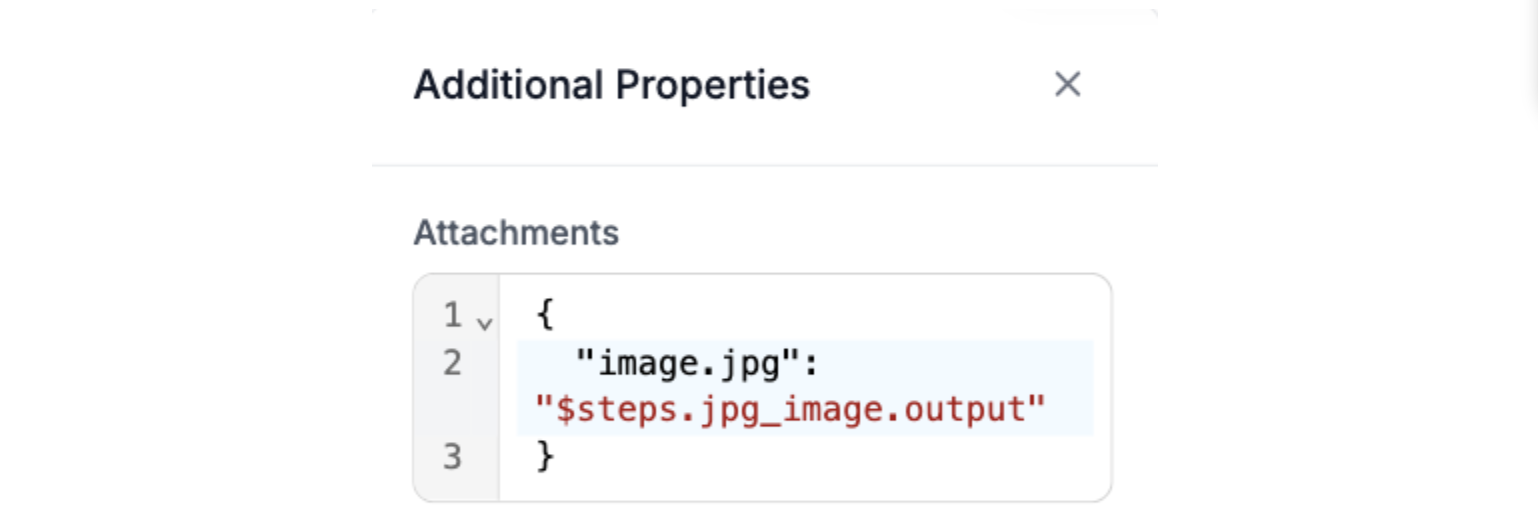
This step provides an immediate human-in-the-loop validation layer while keeping the data structured for automation.
Step 5: Test the workflow
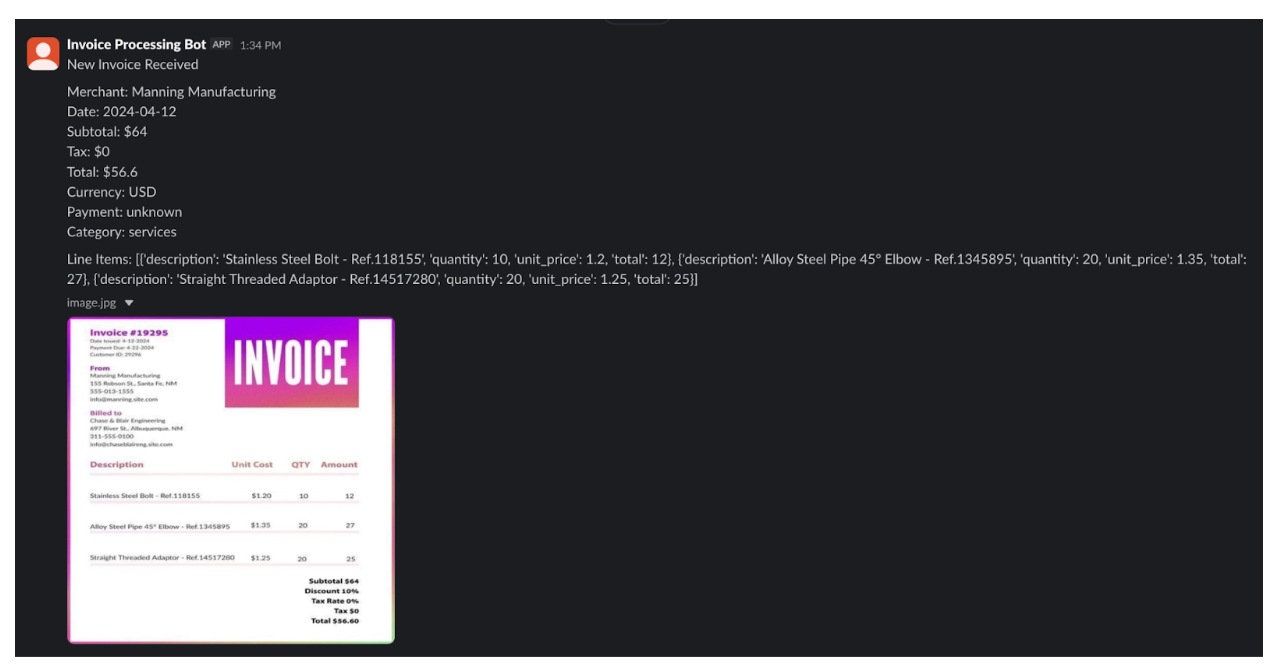
With all blocks configured, run the workflow using a sample receipt image from your dataset. Once triggered, the image flows through the pipeline: standardized, processed by the VLM, parsed into structured fields, and sent to Slack as a formatted expense entry.
In Slack, you should see a structured message containing the extracted merchant, date, totals, category, and any detected line items. This confirms that the workflow is correctly generating structured JSON and routing it into your expense automation channel.
From Prototype to Production: Making Extraction Reliable
A working receipt extraction workflow is a strong start, but production systems demand consistency, observability, and resilience. In real deployments, small variations in input can cascade into failures downstream, especially when dealing with millions of documents or strict compliance workflows.
Improve Accuracy Through Iteration
Instead of static prompts, adopt a prompt versioning strategy where you:
- Maintain a repository of prompt templates
- Track model performance against a labeled validation set
- Iterate with few‑shot examples drawn from real error cases
Leverage schema validation as a production guardrail: reject outputs missing required fields or with mismatched totals, and route them to a fallback queue or human‑in‑the‑loop review.
Handle Real‑World Edge Cases
Documents in the wild often break assumptions:
- Blurry or skewed images from phone captures
- Unusual merchant layouts or multi‑language text
- Partial receipts cut off at the edges
Mitigate with:
- Preprocessing steps (image rotation, brightness/contrast normalization)
- Image quality heuristics to flag low‑confidence extractions
- A retry or recovery path that re‑runs extraction with relaxed thresholds or alternate prompts
Instrumentation and Monitoring
Production systems need visibility:
- Track extraction success rates and field‑level error rates over time
- Capture model confidence scores
- Log inputs that trigger fallback defaults
Set up dashboards and alerts so that a sudden spike in failures (e.g., tax values missing across hundreds of receipts) triggers investigation rather than silent degradation.
Scale and Cost Optimization
As throughput grows:
- Batch process receipts during off‑peak hours
- Cache repeated merchant extraction patterns (e.g., same restaurant logos)
- Use cost caps and performance tiers on API usage
Balance latency and throughput depending on SLAs: real‑time Slack routing for urgent expenses versus nightly batch ingestion for large corporate feeds.
Seamless Downstream Integration
Treat structured JSON not as an endpoint, but as a service contract:
- Push outputs into expense platforms (e.g., SAP Concur, Expensify)
- Sync with internal ERP systems
- Persist into data lakes or analytics pipelines
At this stage, extraction stops being a demo feature and becomes a dependable infrastructure within your operational stack.
Conclusion: Extracting Structured JSON from Images
In this tutorial, we built a complete pipeline to extract structured JSON from receipt images using Roboflow Workflows and a vision-language model. From standardizing input images to generating validated JSON and sending automated Slack notifications, every step is designed for reproducibility and production readiness.
By following these methods, you can move beyond simple detection and create systems that understand and act on visual data. The same principles apply to other document types, forms, or catalogs, making structured extraction a versatile tool for automating workflows, reducing manual effort, and integrating visual data seamlessly into operational systems.
Further reading
Below are a few related topics you might be interested in:
Cite this Post
Use the following entry to cite this post in your research:
Contributing Writer. (Mar 5, 2026). Extracting Structured JSON from Any Image. Roboflow Blog: https://blog.roboflow.com/extracting-structured-json-from-images/