

For the last decade, computer vision has largely been about one thing: identification. We built models to tell us "that is a car," "this is a defect," or "here is a person." But the landscape of AI is shifting rapidly. We are moving from static models that simply see to dynamic agents that can think and act.
That's where Vision AI Agents (or Vision Agents) come in. Driven by the massive capabilities of new foundation models like Google's Gemini 3 Pro, these agents reason about the visual world, plan multi-step tasks, and execute actions to solve complex problems.
In this post, we'll explore what Vision AI Agents are, how foundation models like Gemini 3 Pro power them, why they represent a generational shift in computer vision, and how you can start building your own using Roboflow Workflows.
What Is a Vision AI Agent?
A Vision AI Agent is an autonomous system that combines visual perception with the reasoning capabilities of a Large Multimodal Model (LMM). Unlike a traditional object detection model that performs a single task, a vision agent operates in a loop:
- Perceive: The agent ingests visual data (images, video streams, or screen recordings) from its environment.
- Reason: It uses a foundation model to understand the context, spatial relationships, and intent behind the visual data; not just identifying objects but comprehending complex scenes.
- Act: It uses tools like API calling, querying a database, triggering a robotic arm, or clicking a button to achieve a goal.
- Reflect: It verifies if the action was successful and adjusts its plan if necessary. This closed-loop design enables continuous improvement and adaptation.
This iterative "See, Think, Act, Reflect" loop is fundamentally different from traditional computer vision pipelines. A classical model detects objects and stops. An agent detects, understands, decides, and acts; then learns from the outcome.
The Engine: Gemini 3 Pro
The catalyst for this shift is the arrival of highly capable multimodal foundation models. Gemini 3 Pro, released by Google DeepMind in late 2025, represents a generational leap in this domain.
Unlike previous models that treated images as secondary inputs, Gemini 3 Pro is natively multimodal. It was trained from the start to understand text, code, audio, images, and video simultaneously. This means the model doesn't have separate "vision" and "language" modules that need to be stitched together. Instead, everything is processed in a unified way through interleaved tokenization.
Key Capabilities for Vision Agents
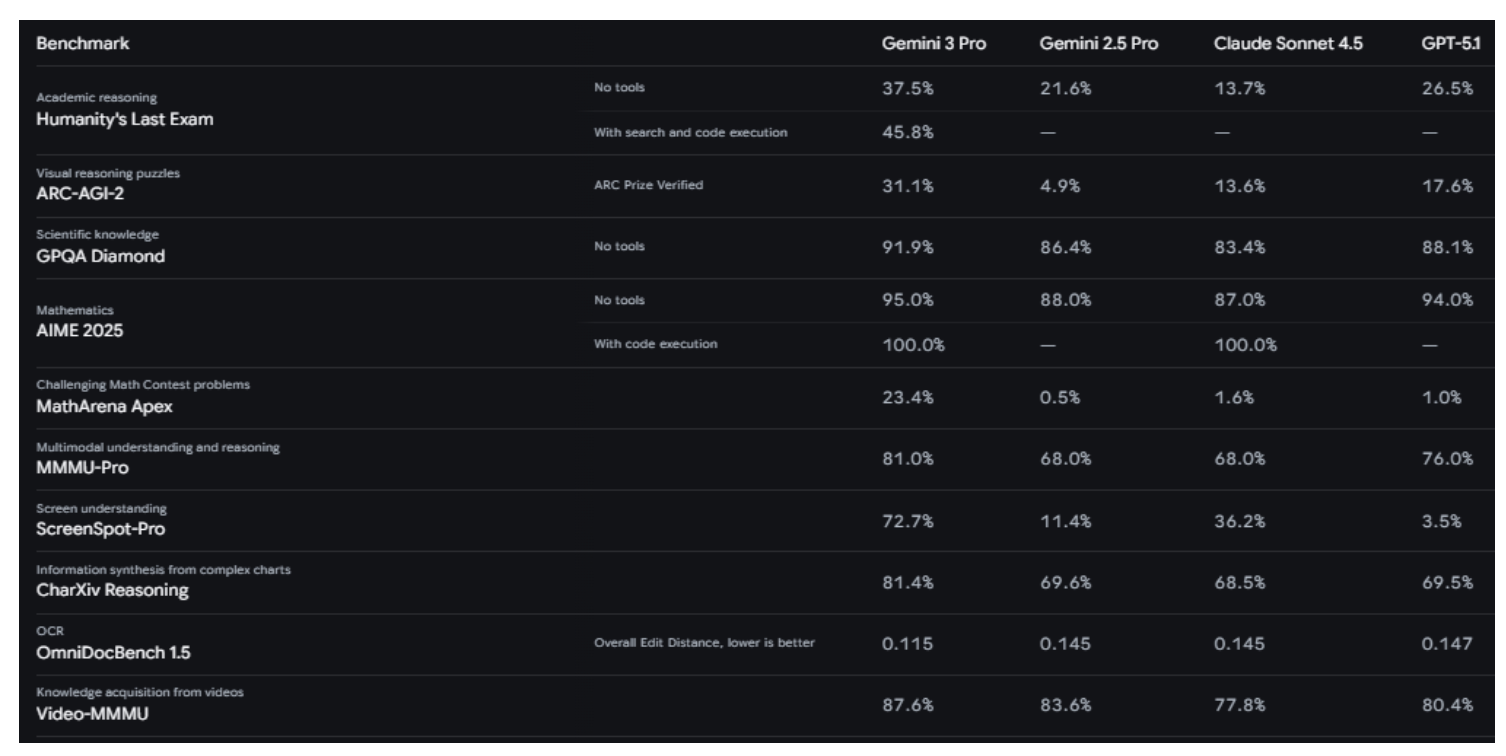
- Complex Multimodal Reasoning: Gemini 3 Pro achieves 81% on MMMU-Pro; a benchmark measuring complex visual reasoning tasks requiring deliberate reasoning across diagrams, charts, and visual problem-solving.
- Advanced Video Understanding: With an 87.6% score on Video-MMMU, Gemini 3 Pro excels at temporal reasoning, understanding how video content evolves over time. The model is optimized to process video at 10 FPS, capturing fast-paced actions that would be missed at standard sampling rates.
- Spatial Understanding & Pointing: Gemini 3 Pro can output pixel-precise coordinates, allowing it to "point" at specific objects in images or UI elements. This capability enables computer-use agents and robotic manipulators.
- 1M+ Token Context Window: The massive context window allows the model to process hours of video or thousands of pages of documents in a single pass.
- Agentic Reasoning with Deep Think Mode: With features like "Deep Think," the model can decompose complex visual tasks into step-by-step plans (e.g., "First, locate the screw. Second, check if it is rusted...").
- Structured Output: It can reliably output JSON, making it easy to pipe its reasoning directly into code or other software systems.
- Document Understanding: Gemini 3 Pro excels at processing real-world documents with messy handwriting, nested tables, and non-linear layouts, achieving 80.5% on the CharXiv Reasoning benchmark.
The Architectural Shift from Recognition to Reasoning
Building an effective vision agent requires three components working in harmony:
Component 1: The Perception Layer (Fast Detection)
The perception layer handles real-time visual input. For speed and cost efficiency, this is where specialized models like RF-DETR or YOLO11 shine. These models are fast; YOLO11 can run at 200+ FPS on GPUs, and can be fine-tuned to detect domain-specific objects.
Component 2: The Reasoning Layer (Foundation Models)
The reasoning layer answers complex questions that require context. This is where Gemini 3 Pro operates. It ingests the results from the perception layer (along with the raw image/video) and performs high-level reasoning.
Component 3: The Action Layer (APIs and Tools)
The action layer executes decisions. If the reasoning layer decides that a worker is not wearing safety equipment, the action layer might trigger a Slack alert or signal a robotic system to pause.
Building Vision Agents with Roboflow Workflows
While foundation models provide the "brain," they often lack the speed or granular control needed for specific enterprise tasks. This is where Roboflow Workflows fits in perfectly.
By combining the reasoning of Gemini 3 Pro with the precision of specialized models (like YOLO11 or RF-DETR) inside Roboflow Workflows, you can build powerful agents that are both smart and fast.
Let's build something simple together. Our vision agent performs the following steps:
- Detect whether a face is present using a fast, pre-trained RF-DETR model.
- Gate the workflow so downstream reasoning only runs if a face is detected.
- Use Gemini 3 Pro to analyze the detected person’s activity and attention state.
- Convert Gemini’s output into structured JSON for reliable downstream logic.
- Send an automated email notification containing the parsed results.
This design ensures the agent is fast, cost-efficient, and deterministic, while still benefiting from high-level reasoning.
Step 1: Log into Roboflow
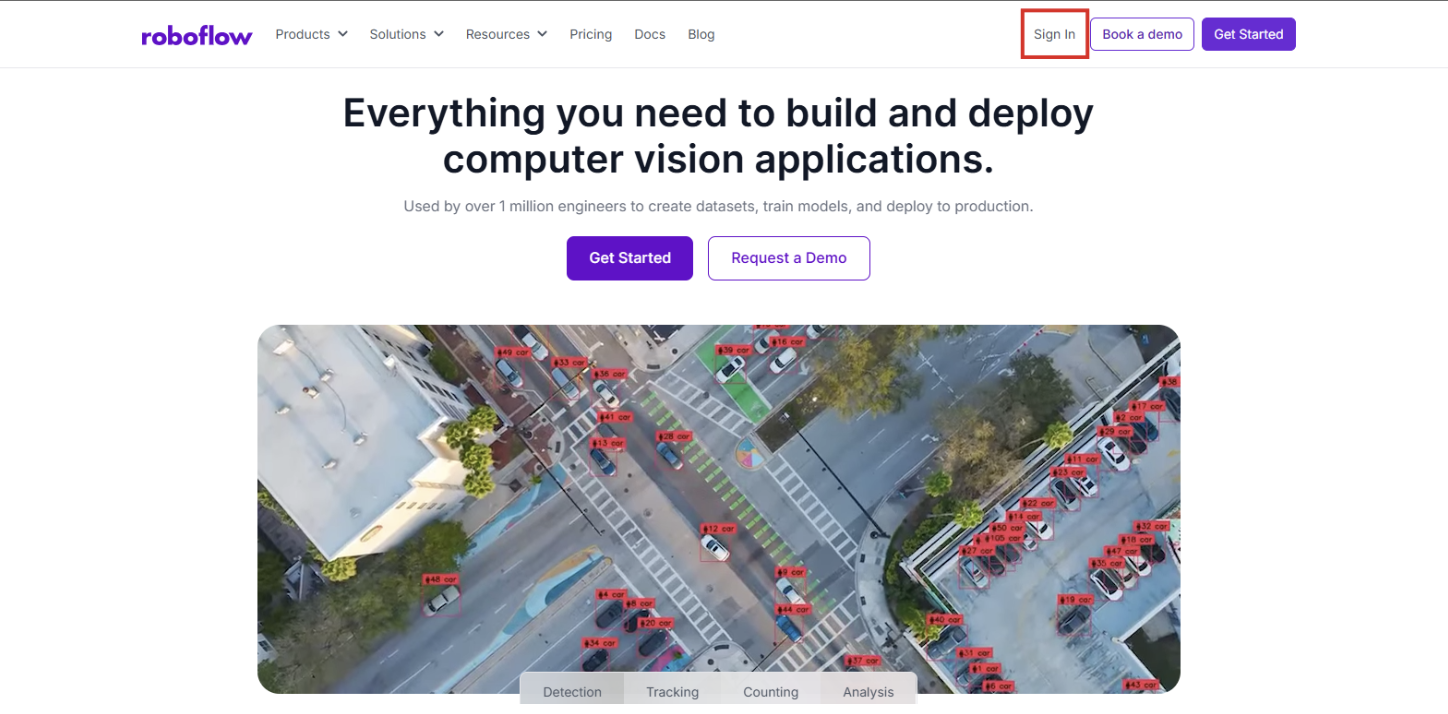
- Navigate to Roboflow and sign in. If you don’t have an account, sign up for free; it takes just a minute.
- Ensure you have a workspace set up for your projects.
Step 2: Create a New Workflow
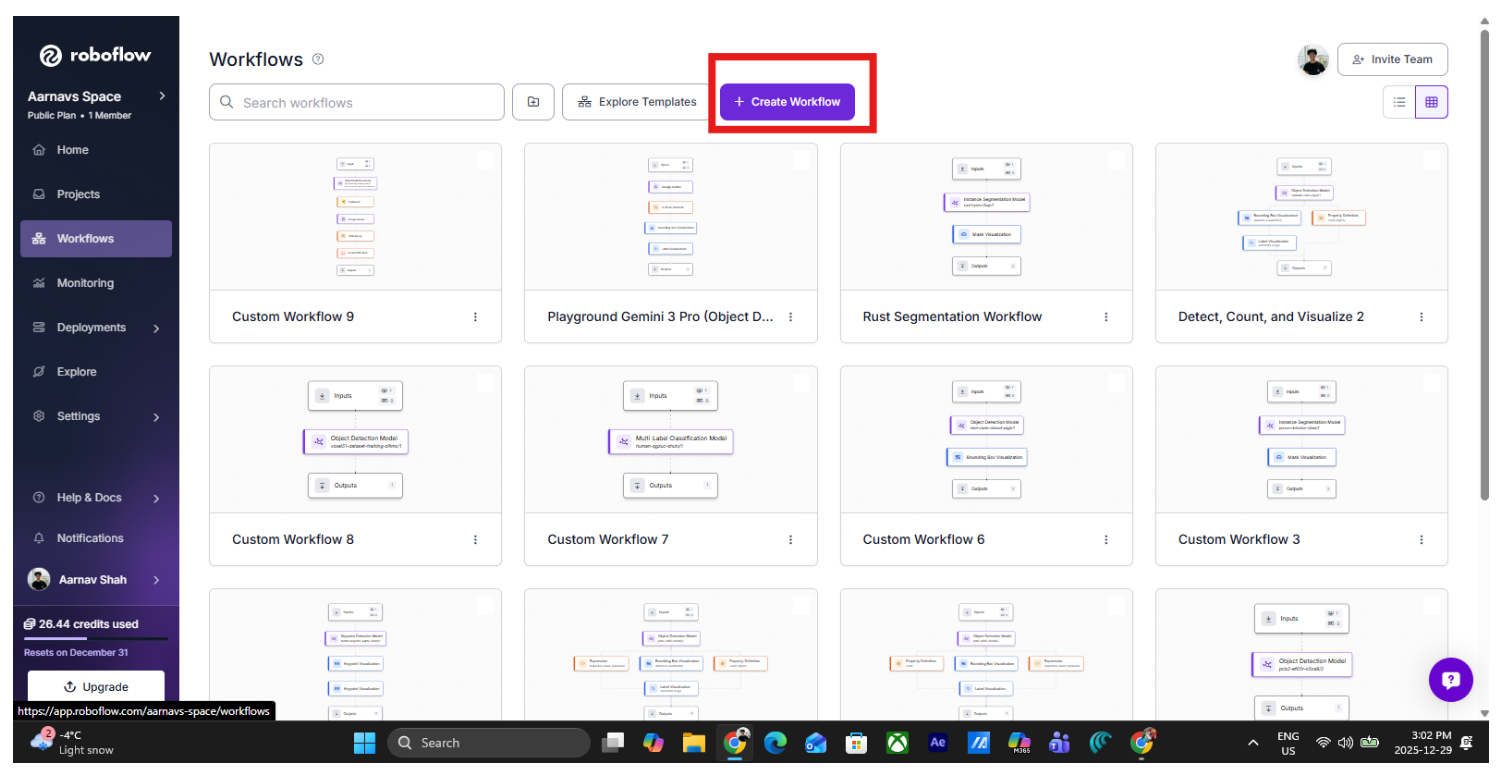
Start by creating a new workflow in Roboflow Workflows. Navigate to the workflow tab on the left side and click “create workflow”:
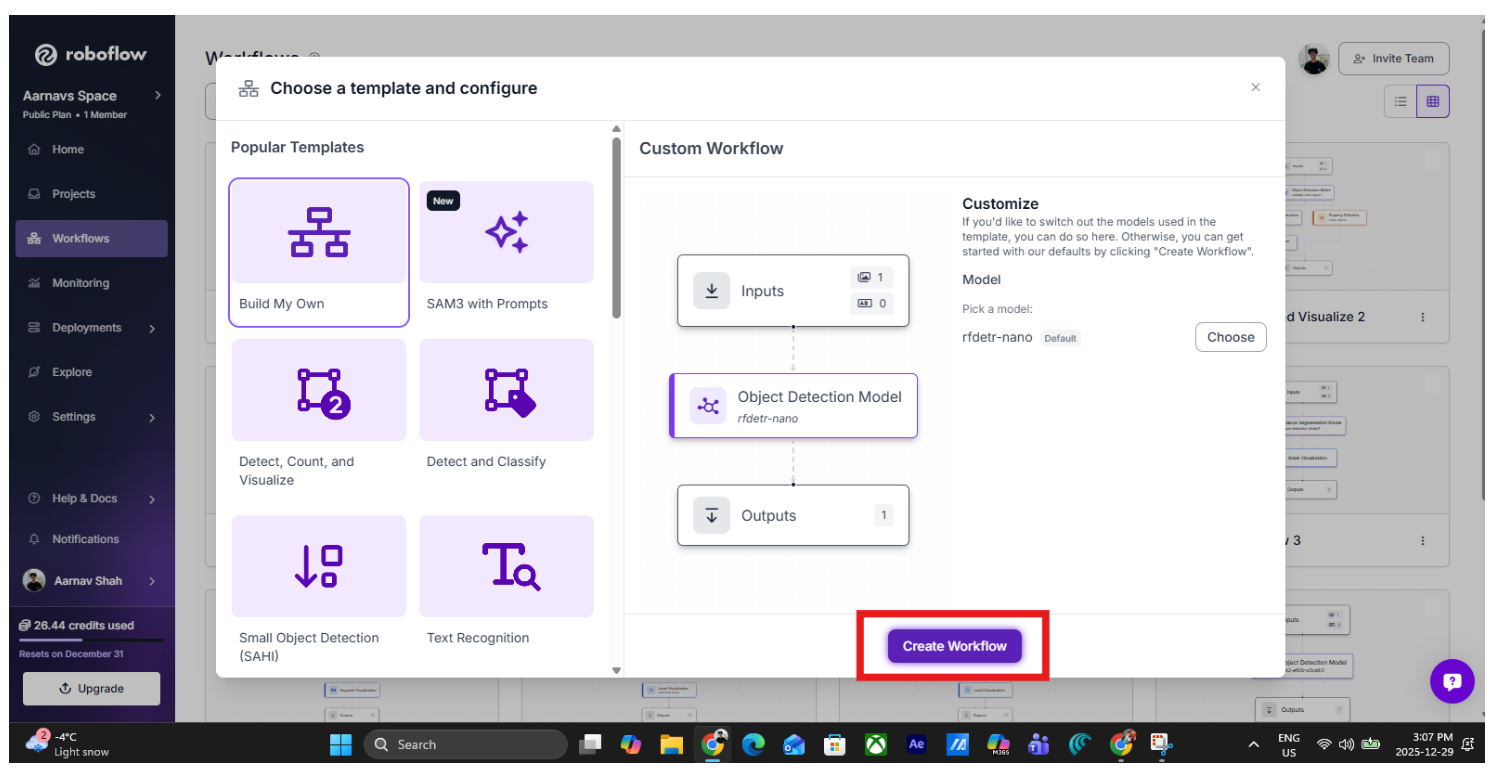
Then select “build your own” and click “Create Workflow”:
This workflow will process images one frame at a time. The input can come from uploaded images, periodic image capture, or a camera feed.
Step 3: Add a Fast Face Detection Model
The first step in the workflow is fast object detection.
Add an Object Detection block and select a prebuilt RF-DETR face detection model. This tutorial assumes that you already have an object detection model built. If not, you can use this tutorial to create one. For now, I will use a face-detection model that I previously made.
Select the object detection model block and then click under the “Model” subheading in the right panel.
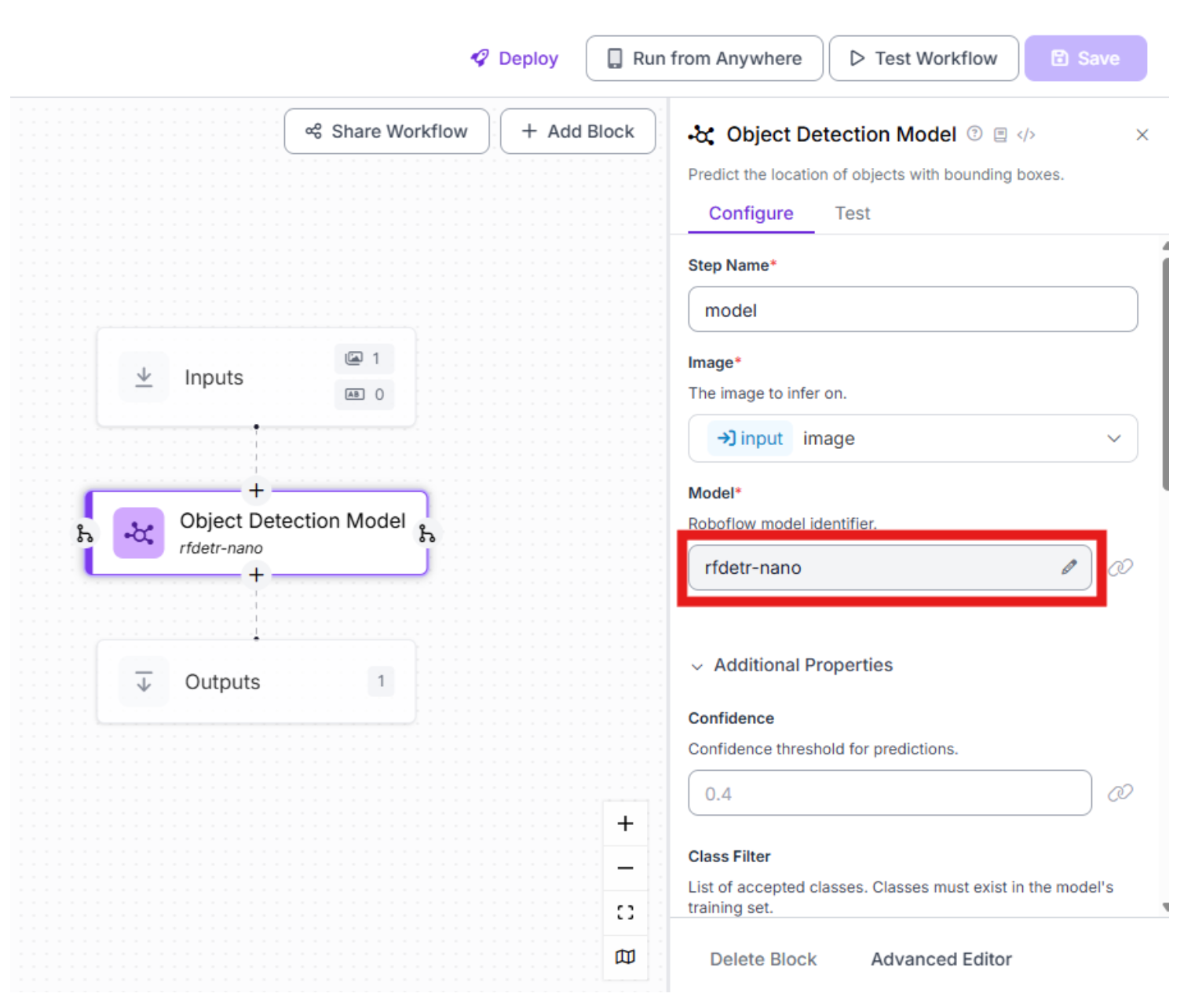
Choose your preferred model to act as the perception layer for fast object detection:
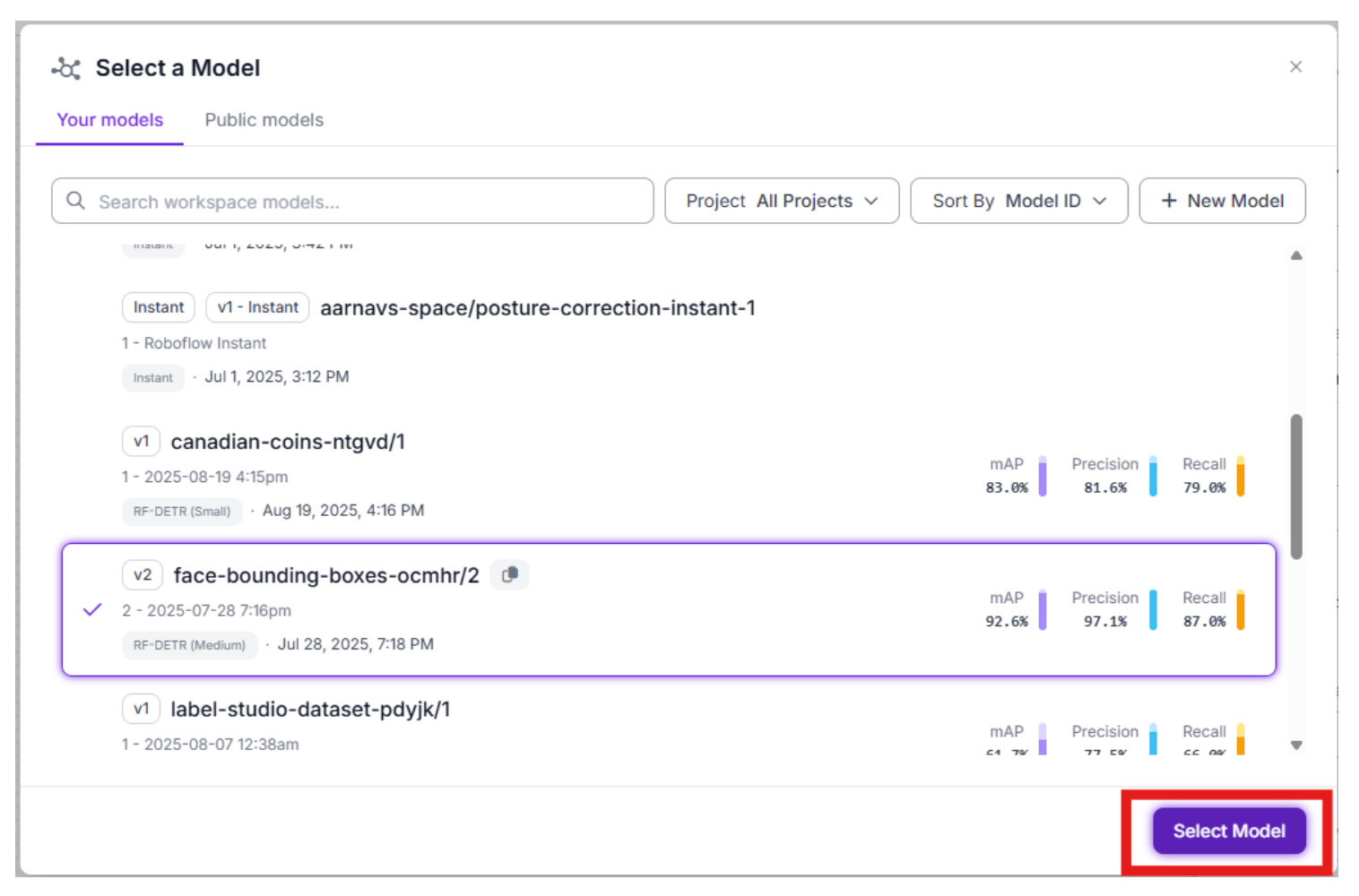
Why this step comes first: It avoids unnecessary LLM calls; it filters out empty frames; RF-DETR is fast and deterministic.
At this point, the workflow can reliably tell whether a face exists in the image.
Step 4: Gate the Workflow with Conditional Logic
Next, add a Continue If block.
This block ensures that the workflow only continues when a face is detected.
In the Configure Condition step, you’re telling the workflow exactly what signal should decide whether execution continues. When you select $steps.model.predictions, you’re pointing the condition at the raw output of your detection model. Choosing “Condition based on the Number of Bounding Boxes” means the workflow will evaluate how many detections remain after processing, rather than checking pixel values or model metadata. The key toggle here is “Filter detections before counting?” which when enabled, Roboflow applies your detection filters before the count is computed, removing low-confidence predictions, enforcing class constraints (e.g., only faces).
Finally, setting the Detection Threshold (≥) defines the minimum number of valid detections required to proceed; for example, ≥ 1 ensures the workflow only continues when at least one real, filtered object is detected. Together, these settings guarantee that downstream steps (like Gemini reasoning or email alerts) only run when a meaningful detection actually exists. Lastly, don’t bother filling in “next steps”, as Roboflow will do this automatically
This gating step is critical for building scalable agents.
Step 5: Add Gemini 3 Pro for Activity Reasoning
Once a face is detected, the image is passed to Gemini 3 Pro, which acts as the reasoning layer.
Add a Google Gemini block and select a structured prompt such as:
“{
"has_face": "true if a human face is visible in the image, otherwise false",
"activity": "the primary activity the person appears to be doing (e.g., talking, looking_at_phone, walking). If unclear, 'unknown'",
"attention_state": "whether the person appears attentive, distracted, or neutral",
"confidence": "number between 0 and 1 representing confidence in the activity classification",
"details": "brief explanation of visual cues used to infer the activity"
}”
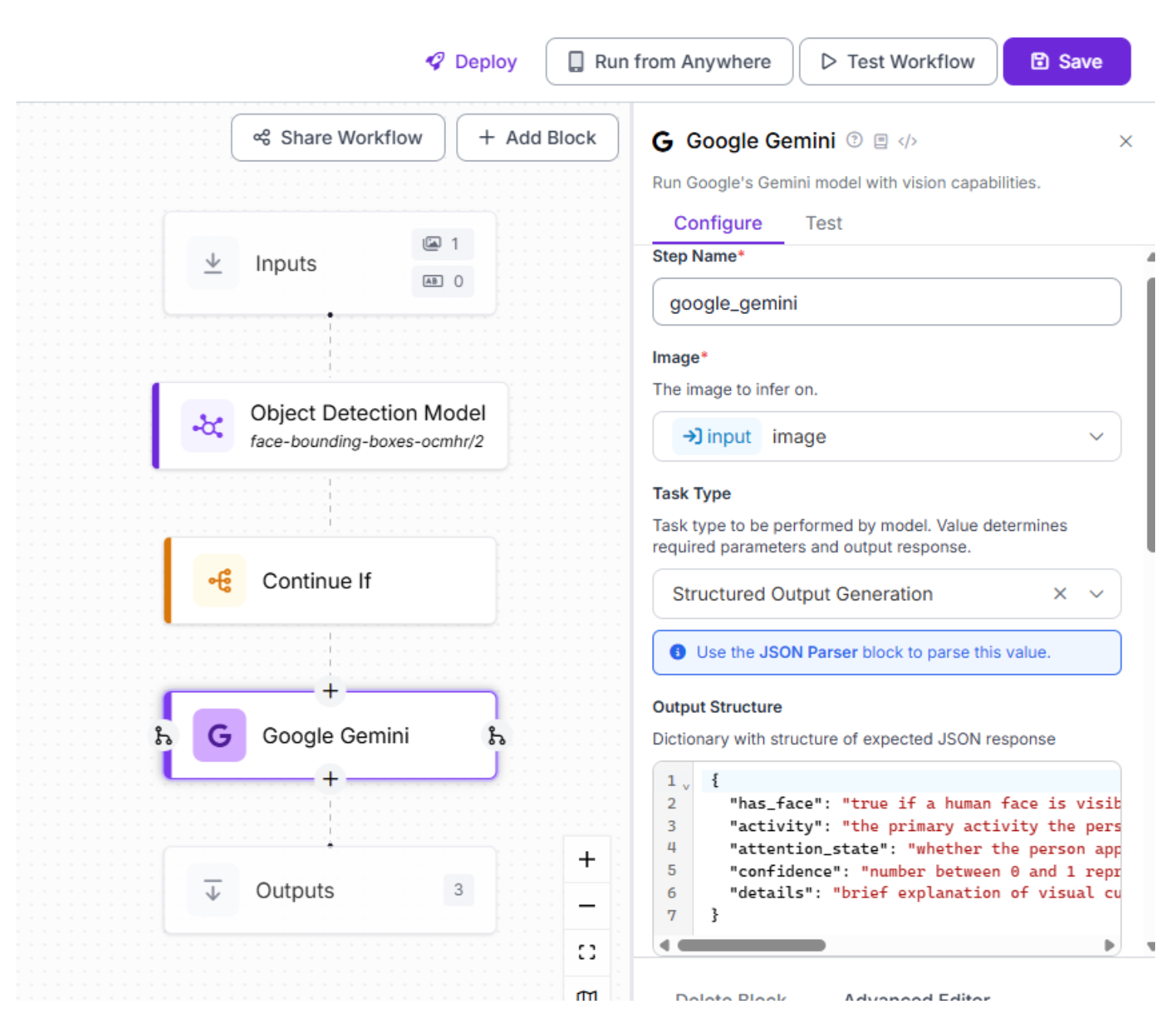
Gemini performs high-level semantic reasoning that traditional vision models cannot: Providing contextual explanation, estimating attention state, and inferring activity.
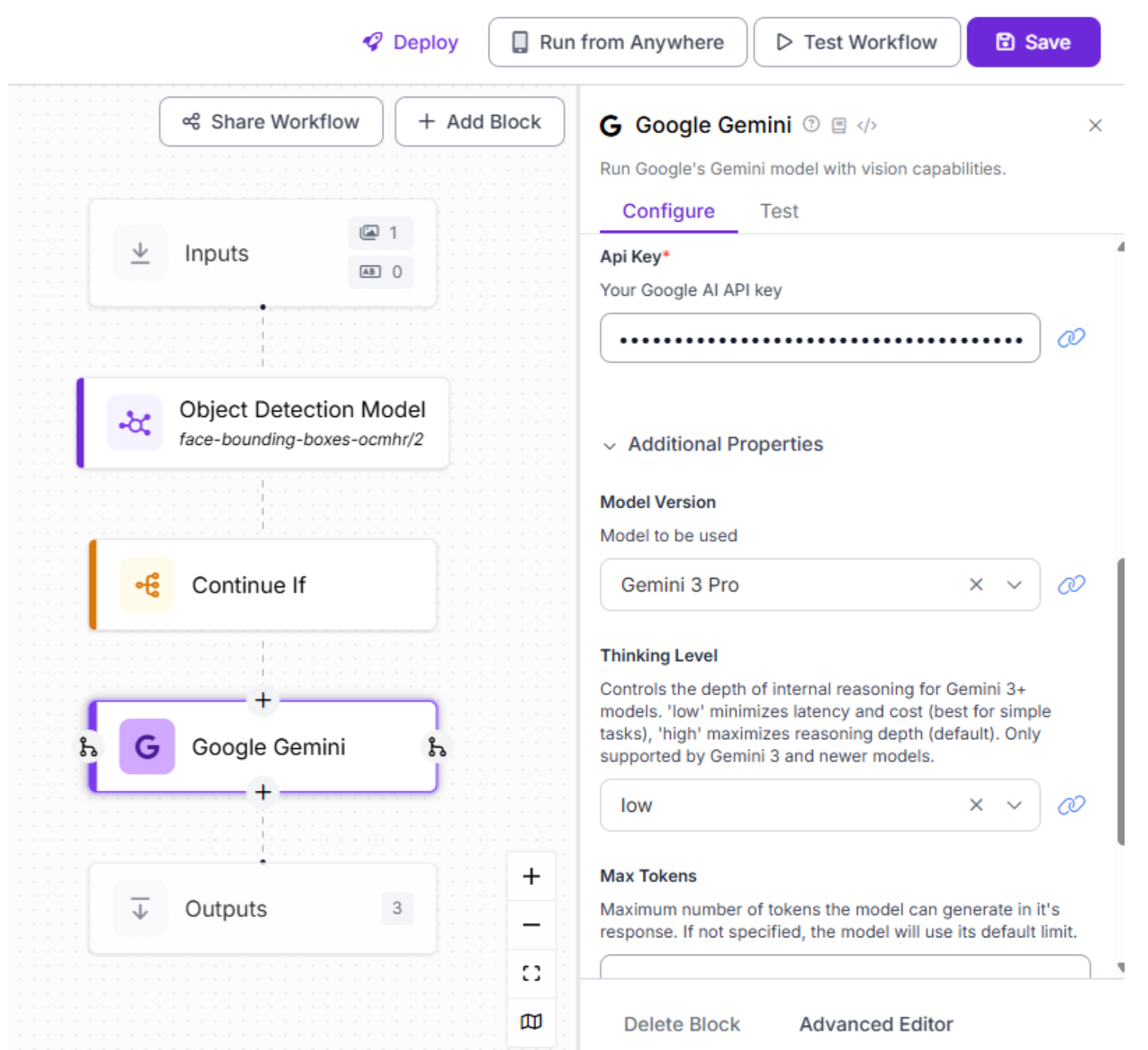
So select the Gemini 3 Pro model and provide your Gemini API key. Next, configure the thinking level, which controls how deeply the model reasons about each input. For simpler or smaller-scale applications, a lower thinking level is often sufficient and keeps latency low. For more complex scenarios or large-scale deployments that require nuanced reasoning and consistency, a higher thinking level is recommended.
Step 6: Convert Gemini Output into Structured JSON
Gemini returns text, which is unreliable for automation unless it is structured.
Add a JSON Parser block immediately after the Gemini block.
In the Expected Fields section, we can define fields that match the structured JSON we asked Gemini to return. Based on the prompt used in this workflow, the most appropriate fields are has_face, activity, attention_state, confidence, and details. These fields allow the workflow to reliably parse Gemini’s output and use it in downstream steps such as notifications or logging. For your own application, the exact fields may differ depending on what information you want the model to extract.
This step transforms free-form reasoning into machine-readable data that downstream actions can trust.
Step 7: Send an Automated Email Alert
Finally, add an Email Notification block to serve as the action step of the workflow. While email alerts are a simple example, the same pattern applies to more advanced use cases; Roboflow Workflows uses this exact mechanism to trigger any downstream action, whether that’s logging to a database, calling a webhook, or integrating with external systems.
This block sends an alert when the workflow reaches this point, meaning:
- The output was parsed into structured data
- Gemini successfully analyzed the image
- A face was detected
The email can include:
- Additional details
- Confidence score
- Attention state
- The detected activity
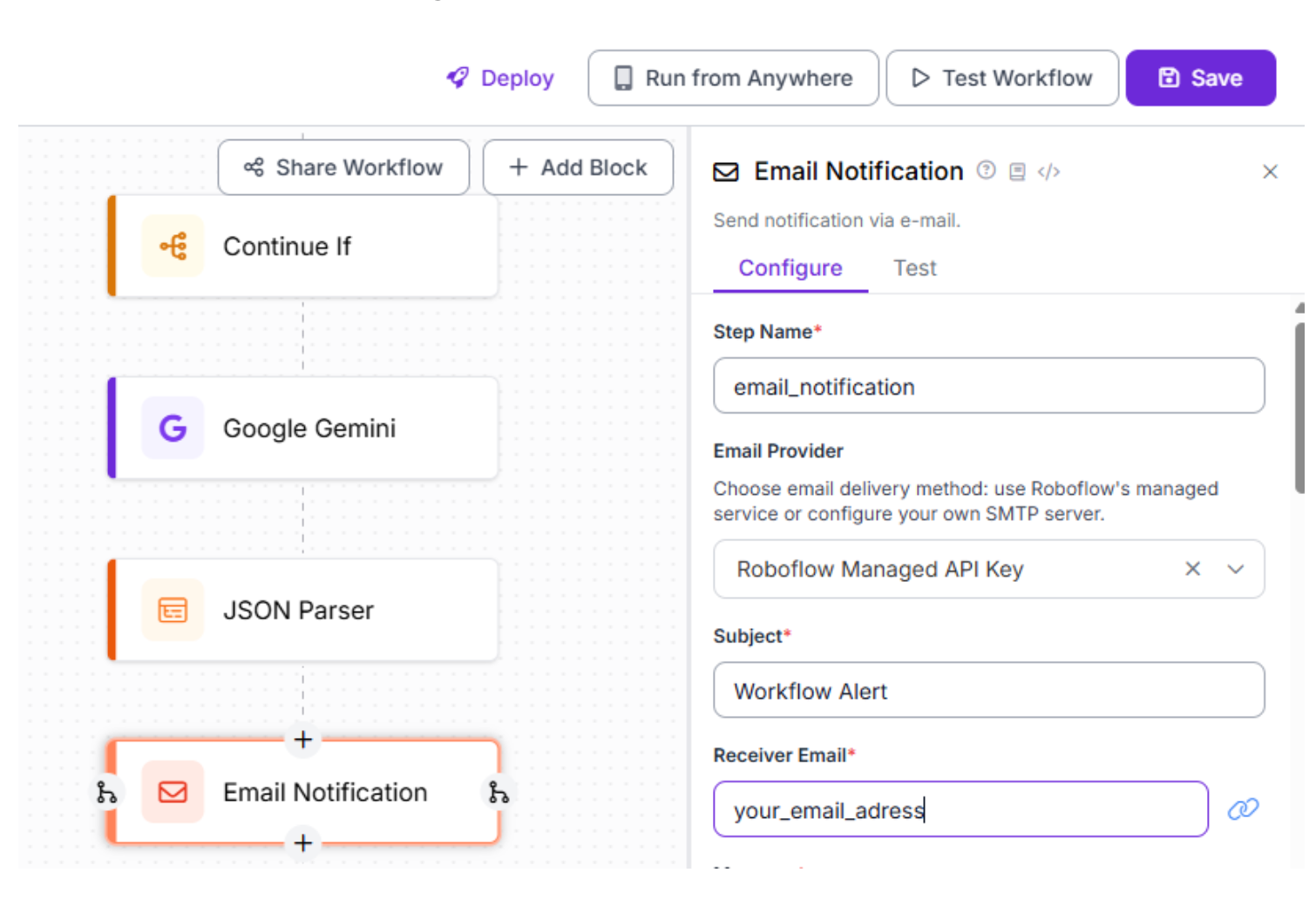
To start off, once you’ve chosen the correct block, start by giving the block a clear step name, such as email_notification, so it’s easy to identify and debug later in the workflow. Next, decide on the email provider. For most users, selecting Roboflow Managed API Key is recommended, since Roboflow will handle email delivery for you without any SMTP setup. Then, fill out the subject field with a short, descriptive title like Workflow Alert, so the email is immediately recognizable. Finally, enter the receiver email address, which determines where the notification will be sent; this can remain static or be made dynamic later, depending on your use case.
Next, fill out what you want inside the email. This is the human-readable alert content. It supports templating using {{ }} syntax.
For example:
Face detected
Has Face: {{ $parameters.has_face }}
Activity: {{ $parameters.activity }}
Attention: {{ $parameters.attention_state }}
Confidence: {{ $parameters.confidence }}
Details: {{ $parameters.details }}
- The message does not directly access steps
- It only references message parameters
- {{ $parameters.* }} are placeholders that get replaced with real values at runtime
Lastly, we can add all the parameters. This section binds real data from your workflow to the placeholders used in the message.
Each property does two things:
- Pulls a value from a previous step
- Makes it available as {{ $parameters.<name> }} in the message
Example:
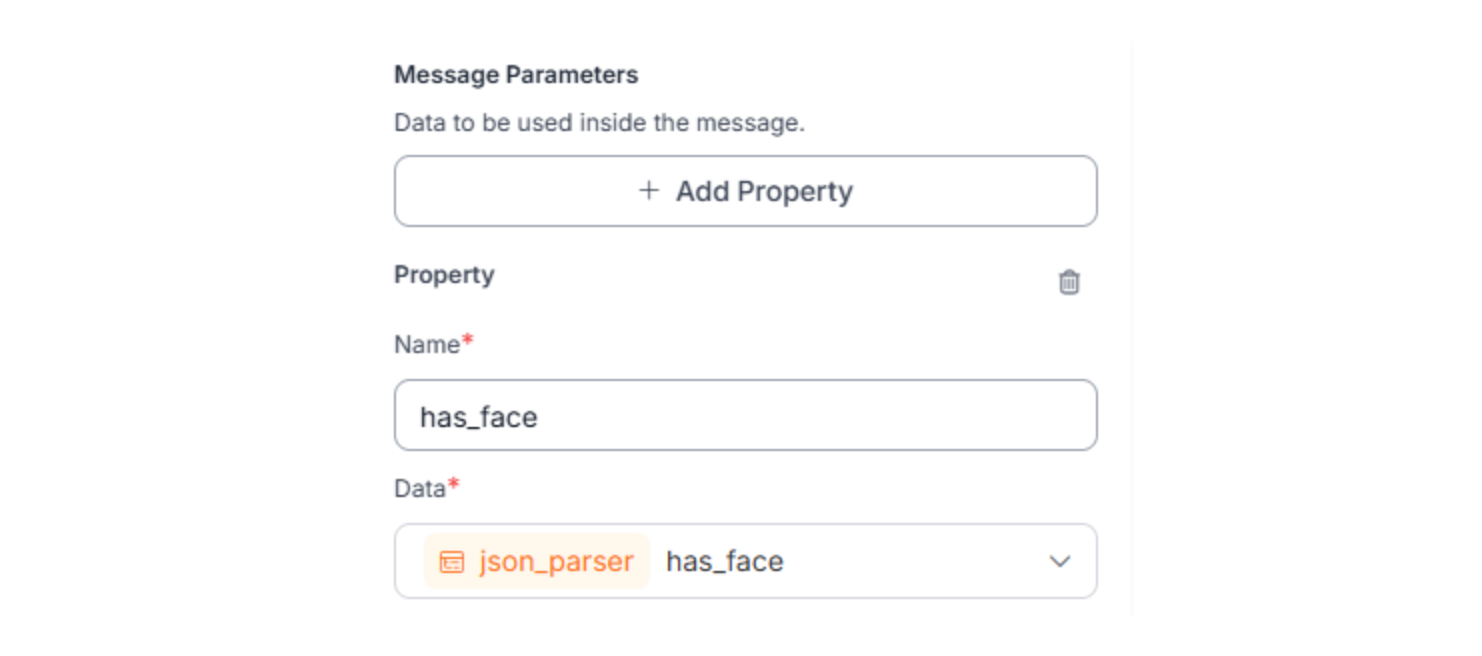
Repeat this exact pattern for all variables from previous steps that you wish to put into your message. This step is required. If a value is not defined here, it cannot be used in the message, even if it exists in earlier steps.
Step 8: Test, Activate, and Iterate
With the workflow complete, validate and deploy it.
Upload a test image to the workflow
If a face is detected:
- Detection model returns valid predictions
- “Continue If” condition passes
- Image is sent to Gemini 3 Pro for reasoning
- JSON Parser extracts structured fields
- Email is sent with activity, attention state, confidence, and details
If no face is detected:
- “Continue If” condition fails
- Workflow stops immediately
- Gemini is not called
- No email is sent
Verify:
- Emails only arrive for images with faces
- Email values are populated (not template placeholders)
- No unnecessary reasoning or alerts for empty frames
Vision Agent Architecture (Aligned to This Workflow)
This workflow implements a complete vision agent architecture:
- Action (The “Hands”): An automated email alert is triggered based on the result.
- Structured Output: Gemini’s response is converted into deterministic JSON.
- Reasoning (The “Brain”): Gemini 3 Pro analyzes human activity and attention.
- Control Flow: Conditional logic ensures downstream reasoning only runs when needed.
- Perception (The “Eyes”): A fast RF-DETR face detection model identifies whether a face is present.
- Trigger: An image frame enters the workflow.
Real-World Use Cases: Vision Agents in Action
1. Automated QA Testing
Vision agents can "watch" a software interface, using Gemini 3 Pro's screen understanding to verify that buttons appear where they should and that the UI responds correctly. The agent can click buttons, fill forms, and verify outputs based on whether the UI "looks right" rather than just checking pixel coordinates.
2. Smart Robotics and Manufacturing
Instead of hard-coding robotic coordinates, a vision agent can be given a high-level goal: "Clean up the table." It uses Gemini 3 Pro to identify trash versus valuables and guides the robot's end-effector. For manufacturing, agents can perform quality control by detecting defects (using YOLO11) and analyzing root causes (using Gemini).
3. Complex Document Processing
Standard OCR tools often fail on messy documents. Gemini 3 Pro can read documents like a human, synthesizing info from charts and text simultaneously. Organizations processing thousands of invoices or medical records gain massive productivity improvements.
4. Sports Analytics and Coaching
Gemini 3 Pro's 10 FPS video processing transforms coaching. Upload a golf tournament recording, and the agent identifies the subject, analyzes swing mechanics frame-by-frame, and generates personalized recommendations; an analysis that previously required expensive experts.
5. Safety Monitoring and Compliance
Vision agents monitor high-risk environments in real-time. Using lightweight detection models paired with Gemini 3 Pro, the agent can assess compliance (e.g., proper PPE usage) and trigger alerts before incidents occur, applying domain knowledge to make judgment calls.
Vision AI Agents Conclusion
The era of the Vision AI Agent is here. By leveraging the reasoning power of models like Gemini 3 Pro alongside the robust infrastructure of Roboflow, developers can build systems that actively participate in observing the world.
You no longer need to choose between speed and reasoning. Fast specialist models handle perception; foundation models handle reasoning; Roboflow Workflows orchestrate the entire pipeline.
Whether you are automating industrial inspection, building smart assistants, or processing complex documents, the path forward is clear: start with Roboflow Workflows, combine specialized models with Gemini 3 Pro reasoning, and let your vision agents learn and adapt.
Written by Aarnav Shah
Cite this Post
Use the following entry to cite this post in your research:
Contributing Writer. (Dec 30, 2025). Vision Agents. Roboflow Blog: https://blog.roboflow.com/vision-agents/