

Quality control is a critical part of manufacturing. On an assembly line, the difference between “good” and “bad” isn’t just an object class - it’s a missing piece, a warped edge, a subtle deviation from what should be there.
This tutorial will show you how to compare a live product image against a visual reference, generate a structured pass/fail verdict, and surface exactly what’s wrong. Using Roboflow Workflows and Gemini, you’ll build a visual assembly inspection pipeline that treats every image like a quality check.
How To Complete Visual Assembly Verification with Vision AI
This tutorial begins with a public baseline dataset from Roboflow Universe to establish a realistic and repeatable starting point for inspection.
Start With a Baseline Dataset
For this tutorial, we use the Assembly Line Fault Detection dataset, which contains images of plastic bottles captured on an assembly line. The dataset is well suited for inspection workflows because it presents two clearly defined visual states:
- Fully intact bottles, labeled as pass
- Damaged or deformed bottles, labeled as reject
This clear separation makes it easy to define what a “correct” product looks like without introducing unnecessary complexity. The intact bottle images serve as a stable reference standard, while the damaged bottles represent deviations that inspection logic should catch.
Roboflow accelerates this stage by simplifying dataset import, organization, and reference consistency. Teams can quickly organize reference images that define acceptable products and ensure all inspections rely on the same visual baseline. This consistency is essential for producing predictable and repeatable results.
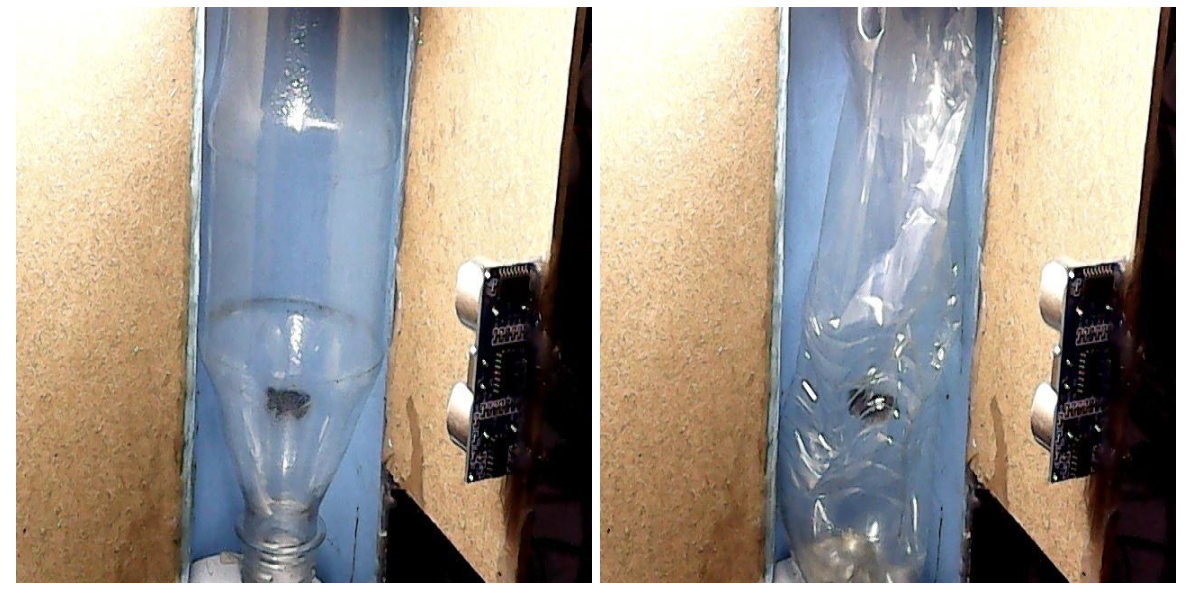
Another key consideration is real-world variation. Assembly line images are rarely identical: lighting changes, camera angles shift, and products may appear slightly rotated or offset. A useful inspection system must account for these variations without flagging false failures.
By starting with a dataset that already includes natural visual variation, teams can validate that inspection logic focuses on meaningful differences rather than superficial changes. This ensures outputs remain trustworthy and relevant as conditions evolve.
Build a Workflow That Turns Detection Into Actionable Insights
Roboflow Workflows extends vision systems beyond raw predictions by producing structured, decision-ready outputs. This tutorial uses a Roboflow Workflow with a single Google Gemini block that takes a reference image and a product image as inputs, compares them, and produces a structured JSON output with a pass/fail verdict and detailed discrepancy descriptions. Here's the finished workflow.
Workflow structure:
- Inputs:
- Reference (image)
- Product (image)
- Gemini Block: Compare reference and product images, generate inspection output
- JSON Parser: Extract structured fields from Gemini output
- Output: Structured JSON result (pass/fail + discrepancies)
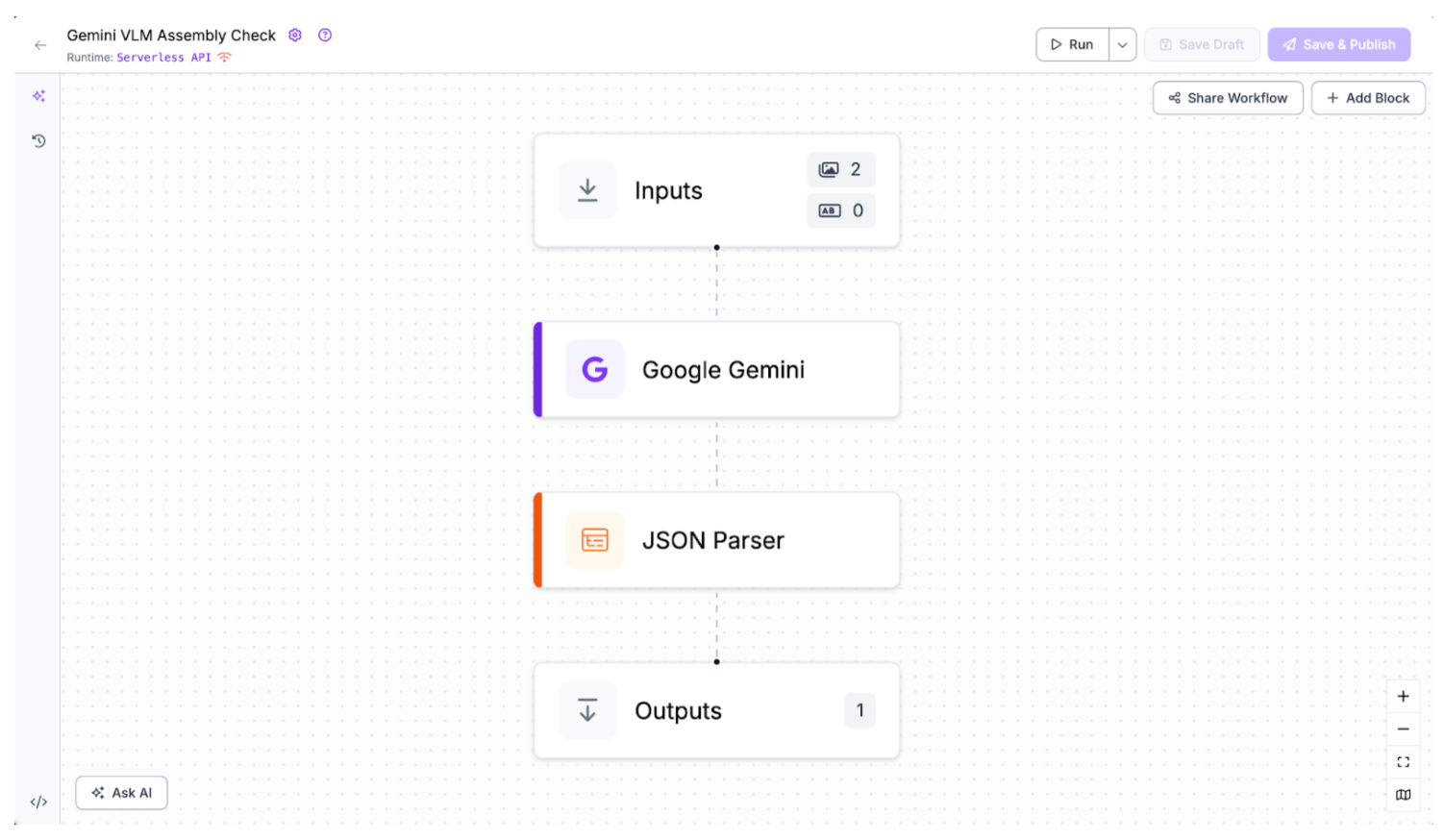
Step 1: Configure the Gemini Inspection Block
The first step is configuring a single Google Gemini block that compares the reference and product images directly, allowing the model to reason about discrepancies and produce structured inspection results in one pass.
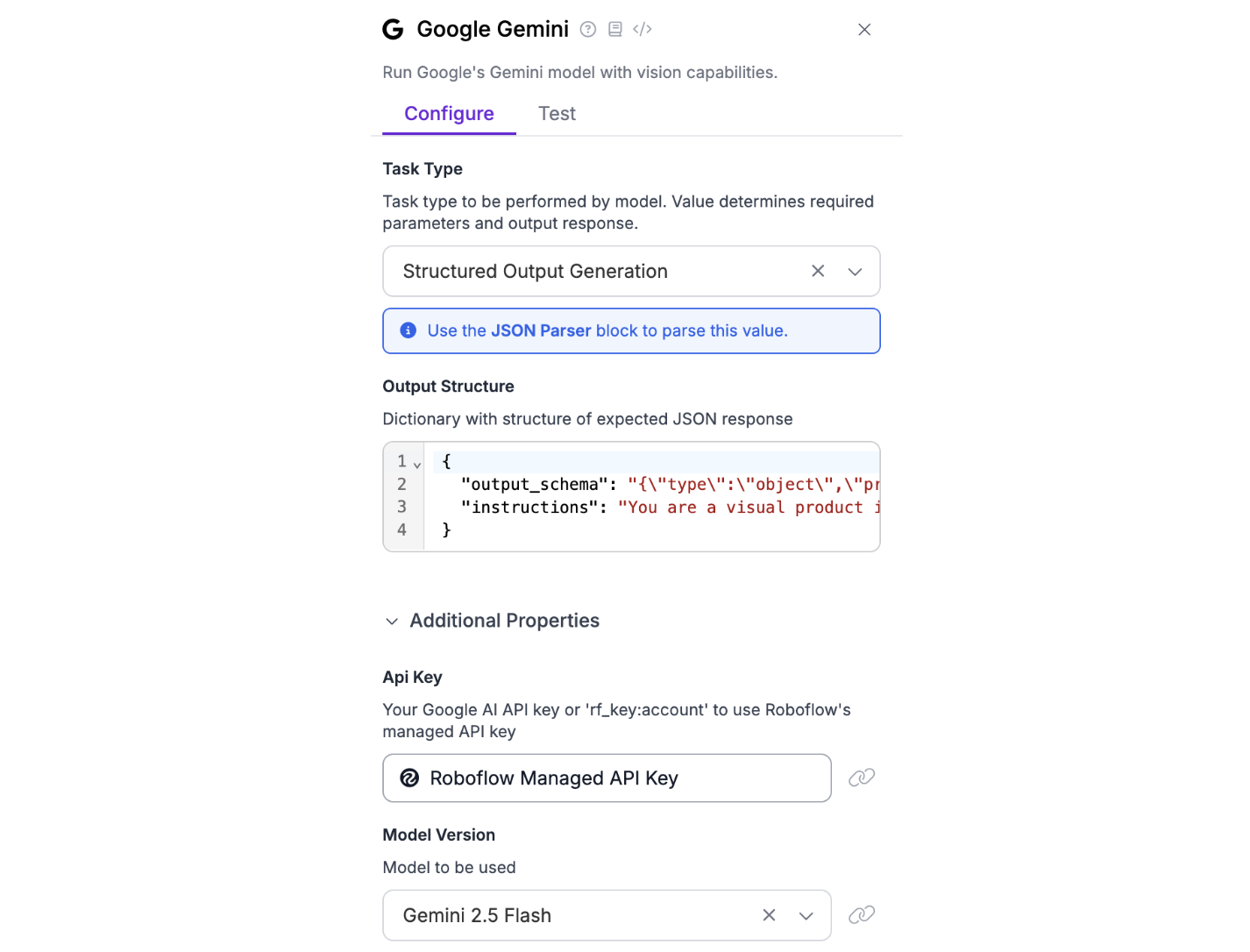
Task Type: Structured Output Generation
This task type allows the Gemini model to return machine-readable JSON, rather than free-form text. This is critical for inspection workflows, where downstream systems need reliable, structured results instead of subjective descriptions.
Output Structure
The output structure defines both what the model should return and how it should reason about the task. In this workflow, the structure enforces a clear inspection contract:
- A verdict field indicating PASS or FAIL
- A discrepancies field listing all visible deviations from the reference
{
  "output_schema": "{\"type\":\"object\",\"properties\":{\"verdict\":{\"type\":\"string\",\"description\":\"PASS if product matches reference, FAIL otherwise\"},\"discrepancies\":{\"type\":\"array\",\"items\":{\"type\":\"string\"},\"description\":\"List of visible defects or deviations from reference\"}},\"required\":[\"verdict\",\"discrepancies\"]}",

  "instructions": "You are a visual product inspector. Compare the PRODUCT image ($inputs.Product) to the REFERENCE image ($inputs.Reference). Return ONLY valid JSON according to the provided schema. If the product fully matches the reference, verdict must be 'PASS' and discrepancies must be an empty array. If there are any visible deviations (shape, structure, missing parts, deformations), verdict must be 'FAIL'. List all deviations in the discrepancies array. Do not include explanations outside the JSON."
}
This ensures every inspection result follows the same predictable format, regardless of the input images.
Within the output structure, the $inputs.Reference and $inputs.Product variables act as workflow input bindings, allowing the Gemini block to directly consume images defined in the input block. These references pass the images into the model at runtime, clearly establishing which image represents the visual standard and which represents the item under inspection. This mechanism enables direct, multi-image reasoning without additional wiring or code, ensuring the model compares both images in a single, structured inference step.
Model Selection: Gemini 2.5 Flash
Gemini 2.5 Flash is well-suited for this use case because it provides fast, multimodal reasoning while maintaining strong visual comparison capabilities. It balances performance and cost, making it appropriate for inspection workflows that may run frequently or at scale.
Step 2: Parse the Inspection Output with JSON Parser
Once the Gemini block produces its structured output, the next step is extracting the relevant fields using a JSON Parser block, ensuring each key piece of information is cleanly separated and ready for downstream workflow steps.
Expected Fields
In the JSON Parser configuration, specify the fields to extract:
verdict, discrepanciesEach extracted field becomes a separate, addressable output that can be referenced by downstream workflow steps, such as logging, triggering alerts, or conditional branching.
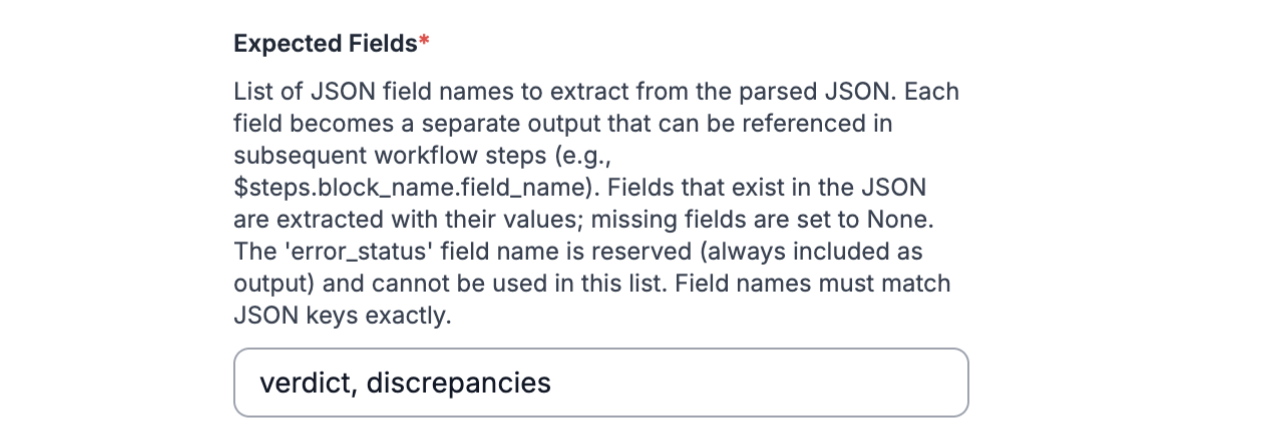
This step ensures the Gemini response is transformed into clean, reliable, and reusable workflow outputs, making it easier to integrate inspection results into dashboards, operational tools, or automated reporting pipelines.
Step 3: Test the Workflow
With the inputs connected, the workflow is ready to run inspections and produce structured, actionable results automatically. Testing allows you to verify that the model correctly interprets both the reference and product images and applies the inspection logic consistently. Below is an example of the output you should get:
[
  {
    "json_parser": {
      "verdict": "FAIL",
      "discrepancies": [
        "Dark debris is visible inside the transparent plastic funnel portion of the bottle.",
        "Condensation or water droplets are present inside the upper part of the plastic bottle."
      ],
      "error_status": false
    }
  }
]
Running this test confirms that the workflow produces reliable, structured outputs. It ensures all discrepancies are captured and that pass/fail verdicts reflect the actual condition of each product, providing confidence before scaling to larger datasets or production deployment.
From Tutorial to Production: Reliable, Scalable Assembly Inspection
Once your workflow is validated, the next step is ensuring it can operate reliably and at scale in real production environments. Workflows supports this by letting teams build operational logic that manages inspection outputs. Using conditional blocks, thresholds, and simple aggregation rules, you can filter results, prioritize alerts, and reduce noise caused by minor variations or transient issues, helping teams focus on genuine discrepancies and maintain trust in inspection outcomes.
Scaling considerations are important for production deployments. Teams may need to process images from multiple sources, inspect different product types, or handle diverse edge cases consistently. Roboflow Workflows supports these scenarios by letting teams reuse the same pipeline across different inputs, combine custom logic and model blocks, and deploy workflows to scalable inference endpoints or batch jobs, ensuring repeatable inspections without needing to rebuild the workflow for each new scenario.
Inspection outputs can be integrated into dashboards, alert systems, or internal operational tools, turning visual verification into actionable insights that support decision-making at scale. Production workflows also benefit from repeatable inspection logic, automated monitoring, and centralized logging, helping teams track performance, detect anomalies, and ensure consistent, reliable results across all product lines.
Visual Assembly Verification with Computer Vision Conclusion
Roboflow Workflows makes it possible to turn visual inspections into reliable, actionable processes. By combining pretrained models with structured logic, teams can automatically detect discrepancies, generate pass/fail verdicts, and focus on meaningful issues rather than environmental noise. This approach ensures consistent results across repeated inspections.
Further reading
Below are a few related topics you might be interested in:
- How to Build a Vision-Language Model Application with Next.js
- Comprehensive Guide to Vision-Language Models
- Best Local Vision-Language Models
Written by Mostafa Ibrahim
Cite this Post
Use the following entry to cite this post in your research:
Contributing Writer. (Jan 20, 2026). Visual Assembly Verification with Computer Vision. Roboflow Blog: https://blog.roboflow.com/visual-assembly-verification/