

Gemini 3 is the latest and most intelligent model in the Gemini series, developed by Google DeepMind. With its native multimodality and powerful reasoning capabilities, it stands at the forefront of modern AI. Gemini 3 introduces Deep Think, a specialized reasoning mode, designed to help users tackle complex, multi-step problems and tasks. This capability enables Gemini to be effectively utilized in real-world applications.
What Is Gemini 3?
The Gemini team states that Gemini 3 is the world’s leading model for multimodal understanding and Google's most powerful agentic and vibe coding model yet, built on a foundation of state-of-the-art reasoning. It excels across a wide range of subjects including science, mathematics, physics, engineering, computer science and programming. This model has the potential to revolutionize research and serve as a versatile partner in scientific discovery.
Gemini 3 exhibits exceptional performance across image, audio, video, and text modalities, advancing the frontier of multimodal reasoning. It achieves state-of-the-art results in vision and spatial understanding, making it a valuable and versatile model for cutting-edge AI applications, with a strong impact in the field of computer vision.
Today, you can use Gemini 3 in Roboflow Workflows and test it in Playground.

The Evolution of Gemini Models
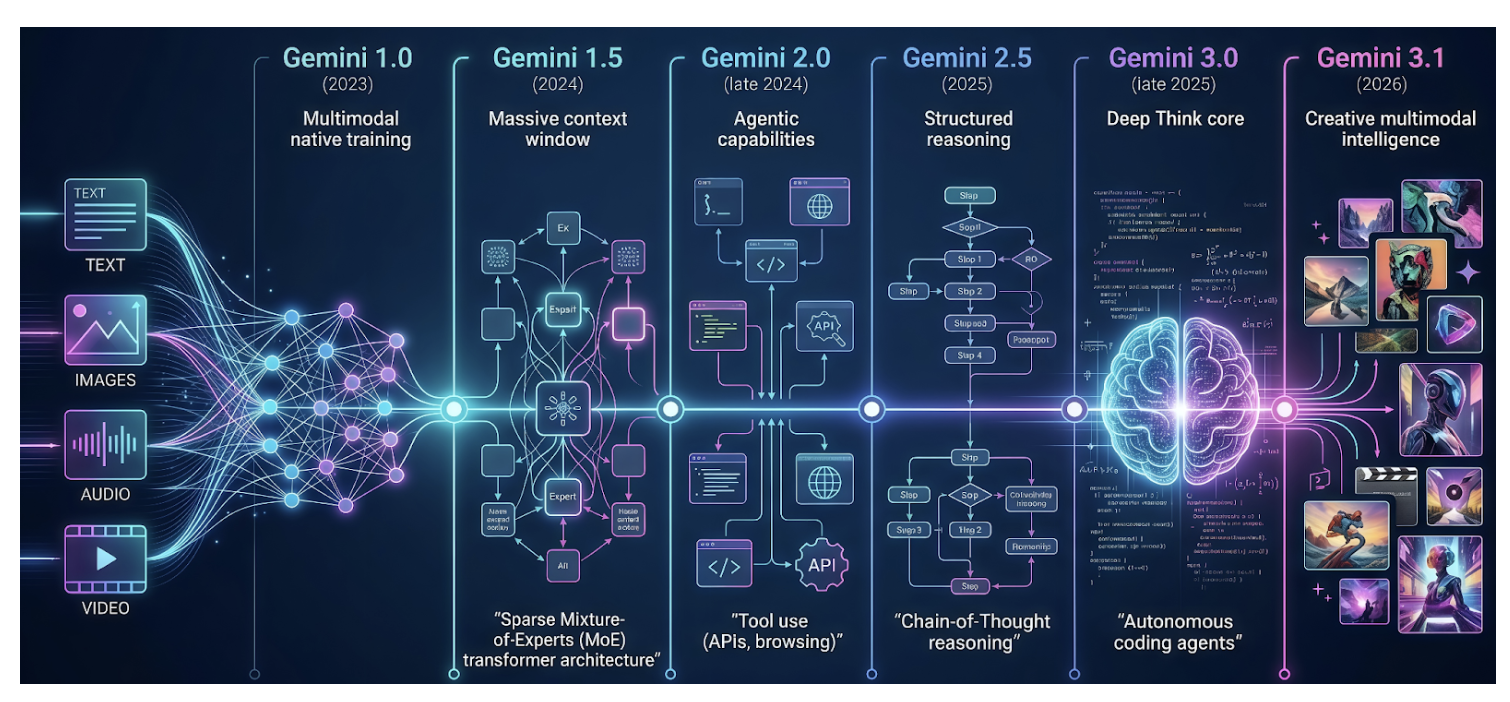
Gemini 1.0
Gemini 1.0, the first model in the family, was introduced in late 2023 as a new series designed for cross-modal reasoning and language understanding. Unlike models primarily designed for text understanding, which treat image and audio inputs as separate add-on modules, Gemini models are natively multimodal, designed from the ground up to handle multiple modalities seamlessly.
Because Gemini was trained jointly across text, image, audio, and video, it has developed a more holistic and coherent understanding across different types of inputs, rather than treating each type as a separate problem. This unified training has resulted in stronger performance within individual modalities as well as enhanced cross-modal reasoning capabilities.
Gemini 1.5
Released in 2024, Gemini 1.5 represented the next generation of efficient multimodal models. It supports a 1-million-token context window, enabling it to process long documents, hours of video and audio, entire books, and complete coding repositories. A key innovation in its architecture is the sparse mixture-of-experts (MoE) transformer-based model, which allows it to achieve greater intelligence without increasing computational cost. This architectural design will be discussed in more detail later in this article.
Gemini 2.0
Gemini 2.0, released in late 2024, introduced several key enhancements over Gemini 1.5, including agentic capabilities such as tool use, experimental multimodal outputs (generated images and audio), minimal latency, and a more engaging conversational style. These enhancements made interacting with Gemini feel more like collaborating with an intelligent partner than simply using a tool.
Gemini 2.5
The next generation, Gemini 2.5, introduced in 2025, excels at multimodal understanding and supports chain-of-thought (CoT) reasoning, significantly reducing hallucinations. This generation offers a variety of models spanning the full spectrum of capability vs cost.
Gemini 3.0
Gemini 3, released in late 2025, significantly advances both reasoning and multimodal understanding. It introduces an enhanced reasoning mode, Deep Think, which delivers improved performance on complex and challenging tasks. It is also positioned as one of the most powerful agentic and vibe coding models, enabling more autonomous workflows and efficient code generation.
Gemini 3.1
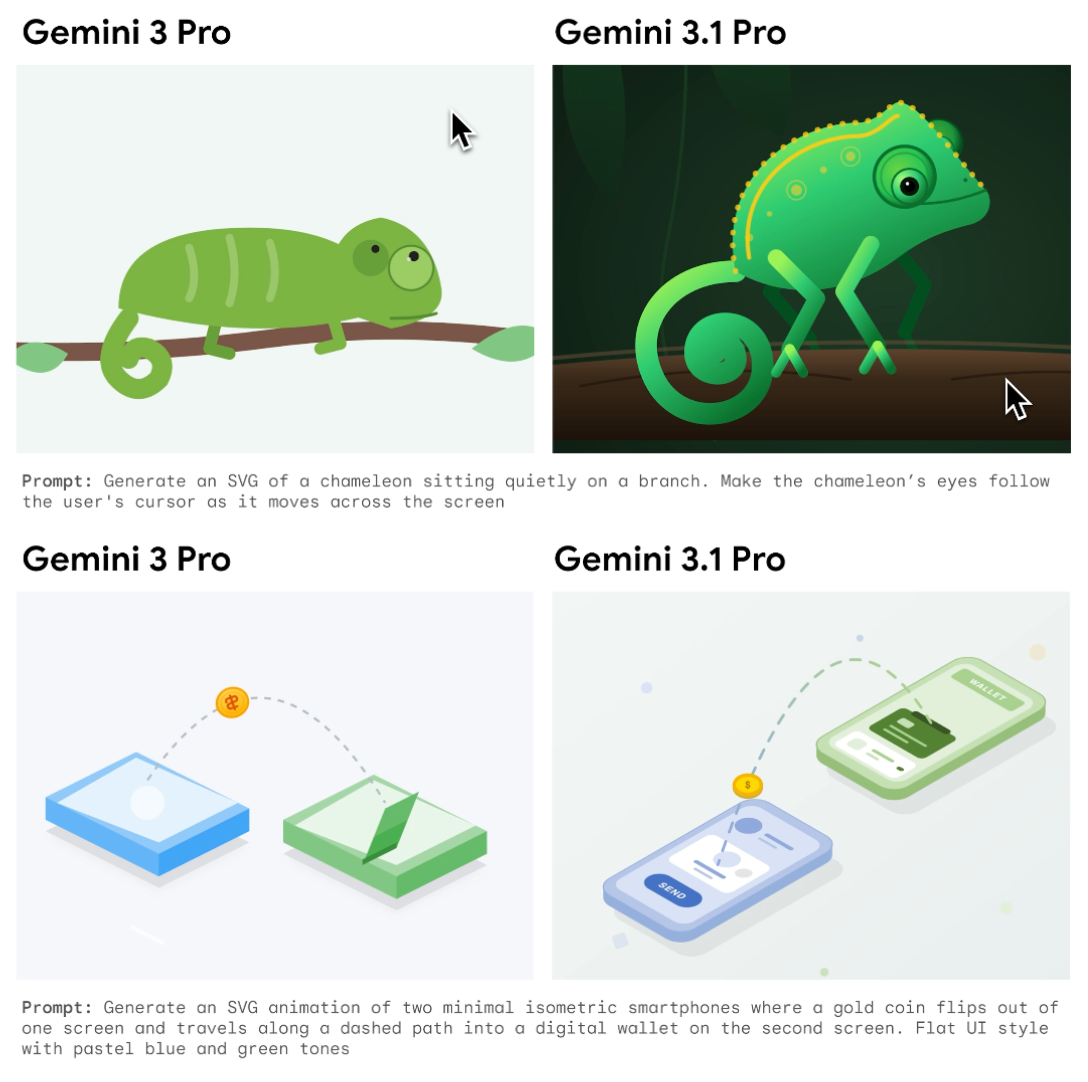
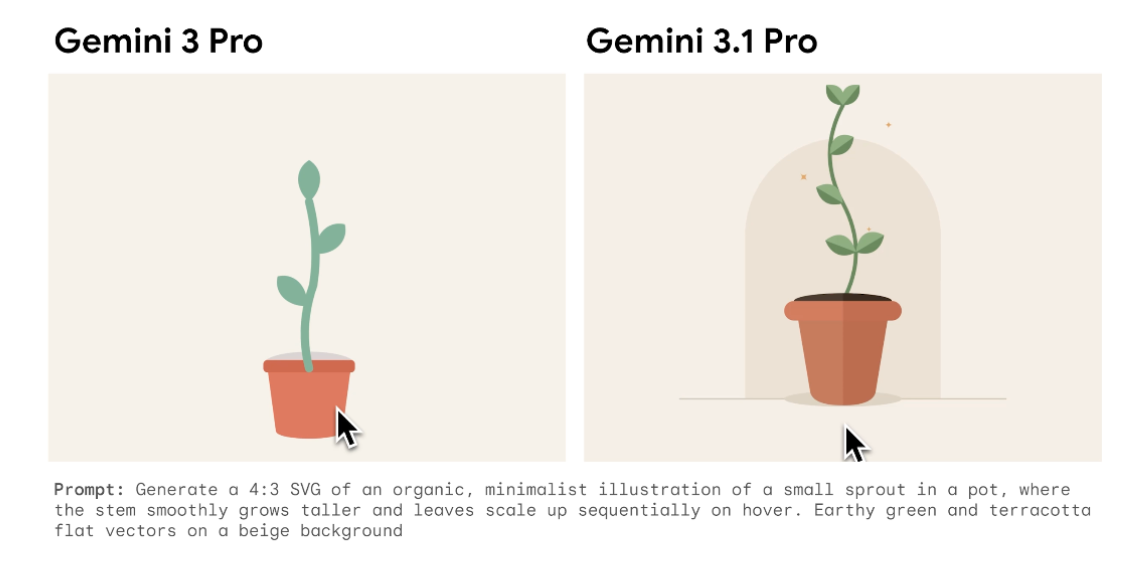
The most recent model, Gemini 3.1, released in early 2026, builds upon the Gemini 3 series and enhances its reasoning capabilities even further. It incorporates advancements associated with Gemini 3 Deep Think into a more powerful general-purpose model. As a result, it is the most intelligent model in the Gemini series, able to tackle complex, real-world problems that were once considered beyond the reach of AI. Moreover, it can generate richer, more creative explanations and visually compelling content.
Examples illustrating the enhanced creativity of Gemini 3.1 Pro compared to Gemini 3 are presented below.
Gemini 3 Models
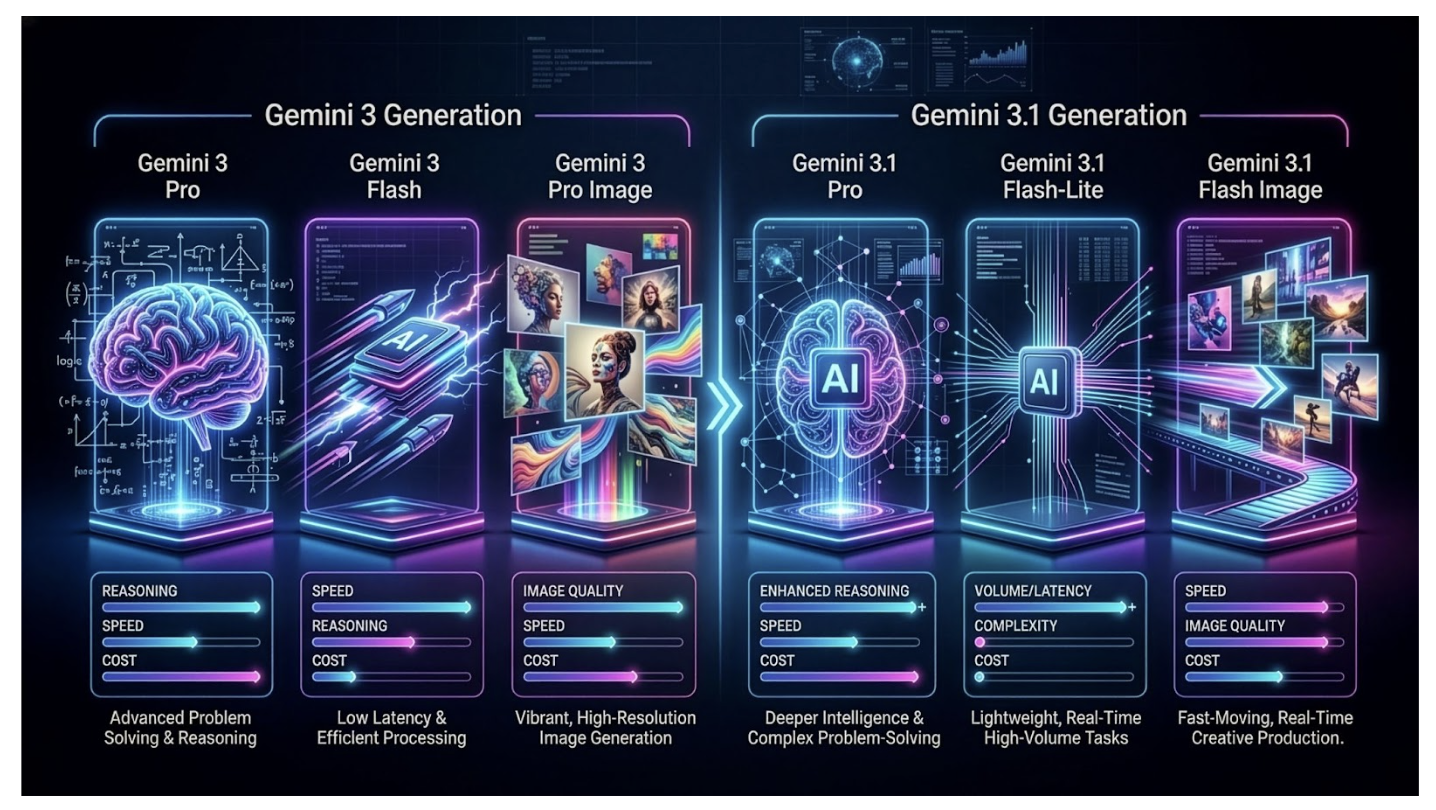
The Gemini 3 series includes a variety of models tailored for different capability and cost levels. Gemini 3 Pro is designed for complex reasoning and advanced problem-solving, while Gemini 3 Flash focuses on reducing latency and cost, yet still maintains solid performance. Gemini 3 Pro Image, known as Nano Banana Pro, is specifically tailored for advanced image generation.
Building on Gemini 3, Gemini 3.1 Pro enhances overall performance, reasoning, and multimodal understanding. Gemini 3.1 Flash-Lite provides a cost-efficient, faster, lightweight option optimized for high-volume, real-time tasks. Finally, Gemini 3.1 Flash Image, known as Nano Banana 2, combines speed with advanced image generation capabilities. All these models offer the flexibility to balance quality, latency and cost, to meet specific user requirements.
The Technology Behind Gemini 3
The architecture of Gemini 3, consistent with Gemini 1.5 and subsequent versions, is a sparse mixture-of-experts (MoE) transformer-based model.
Sparse Mixture-of-Experts (MoE)
The MoE architecture was first introduced in 1990 in the paper Adaptive Mixtures of Local Experts by Jacobs, Jordan, Nowlan, and Hinton. The idea was to utilize a system of multiple networks, each specializing in different subsets of the training dataset. The original task is split into smaller subtasks that can be solved by a specialized expert network.
This architecture design has gained prominence due to the massive scaling of modern models, particularly Large Language Models (LLMs). As model sizes increase, there is a growing need for more efficient approaches that reduce computational requirements, latency, and cost. Many state-of-the-art models have adopted MoE architecture, such as Kimi-K2, DeepSeek-R1 and Qwen 3.
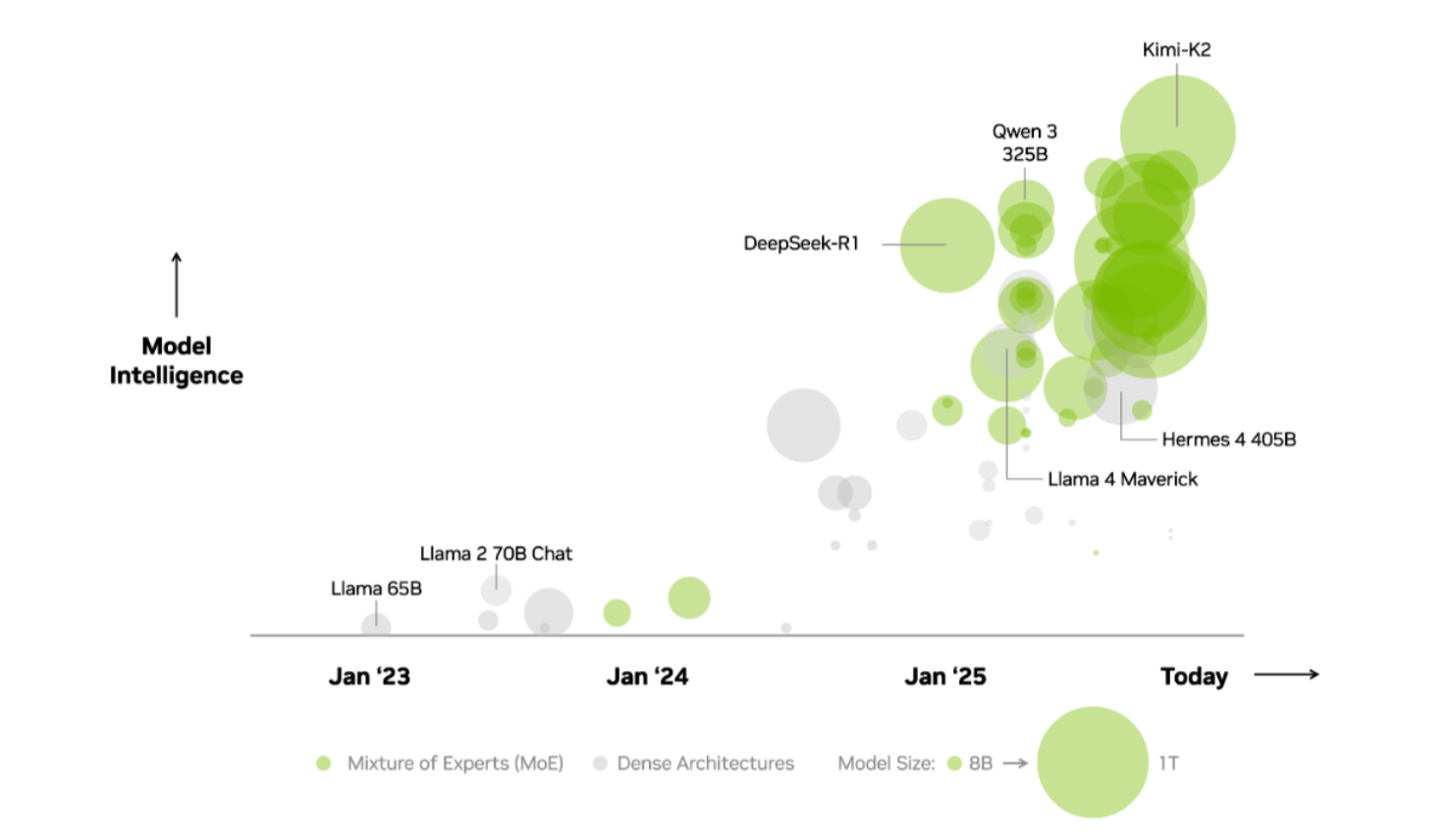
In sparse MoE models, only a subset of the model’s parameters, called experts, is activated. A gating network or router determines which experts are activated. This mechanism allows a complex task to be divided into simpler subtasks, each handled by smaller, specialized networks.
Each network focuses on a specific aspect of the problem, resulting in improved performance and lower computational requirements. Latency is also reduced, as these networks can operate in parallel, often across different GPUs.
The architecture is called sparse because only a few experts are active at any given time. It functions like the human brain, directing various sensory inputs, such as vision, hearing, or touch, to specialized regions for processing.
Experts
The experts can be individual dense layers or even entire Feed Forward Neural Networks (FFNNs). During training, each expert is exposed to different subsets of the training data, determined by the router, allowing them to specialize in distinct tasks. During inference, the router dynamically selects and activates only the most relevant experts for a given input, improving efficiency and performance.
Gating Network/Router
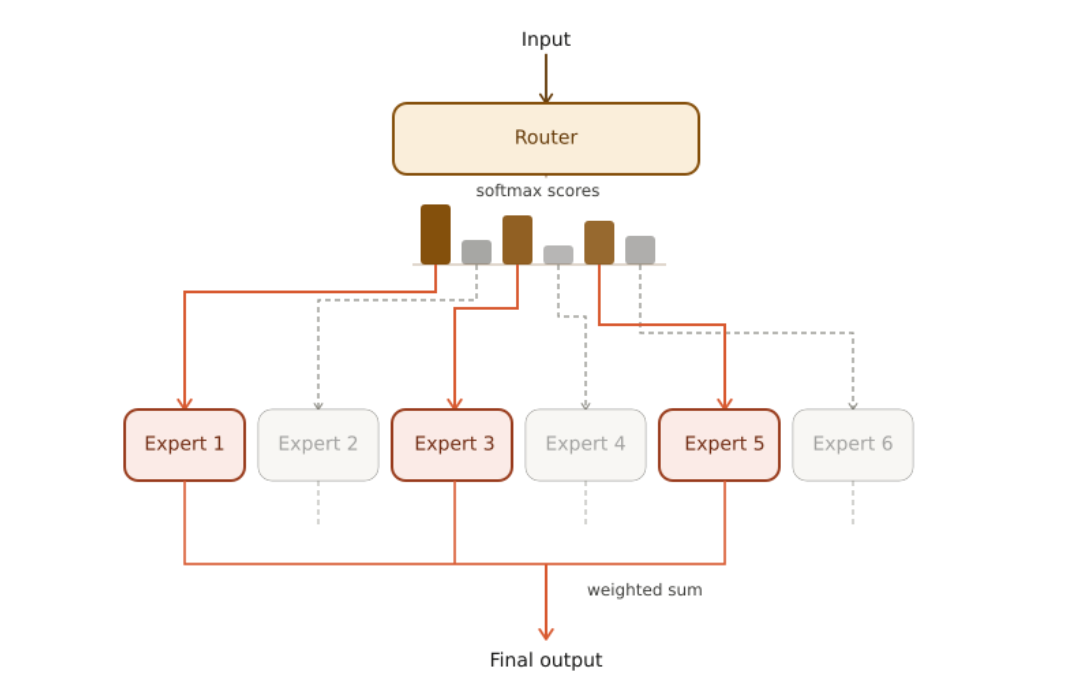
The gating network or router is implemented as a Feed Forward Neural Network (FFNN), which determines how input tokens are distributed among the experts. For each input, it assigns a probability score to each expert. The final output is computed as the weighted sum of the experts’ outputs using the assigned probabilities.
Dense vs. Sparse MoE
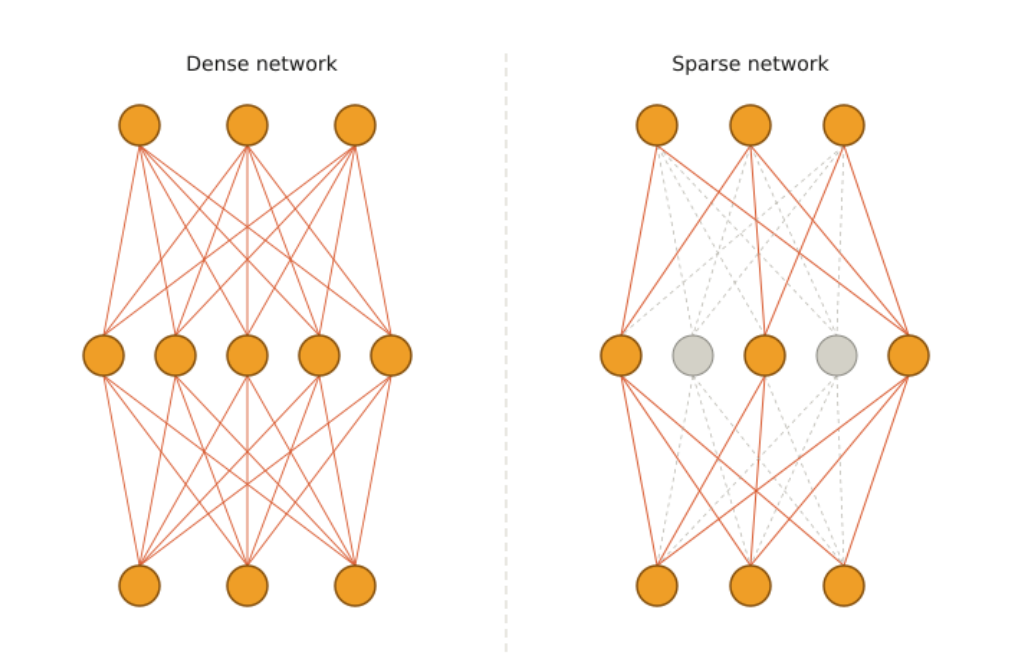
The mechanism described above utilizes all experts to produce the final output, each weighted by its assigned probability. This approach is known as Dense MoE, since all parameters are activated for every input.
In contrast, the paper Outrageously Large Neural Networks: The Sparsely-Gated Mixture-of-Experts Layer proposes the Keep Top-K Experts approach that keeps the top-K experts with the highest probabilities, rather than utilizing all experts. This approach increases model capacity without a proportional increase in computational cost. It relies on conditional computation, where only a subset of the network is active for every input. This architecture is known as Sparse MoE, because only a subset of the total parameters is activated at any given time.
A comparison between a dense and a sparse neural network is shown in the image below.
MoE Layer
The router and the experts together form a MoE layer, as illustrated in the following image. For a given input, only the top-3 experts are activated.
Multi-Layer MoE
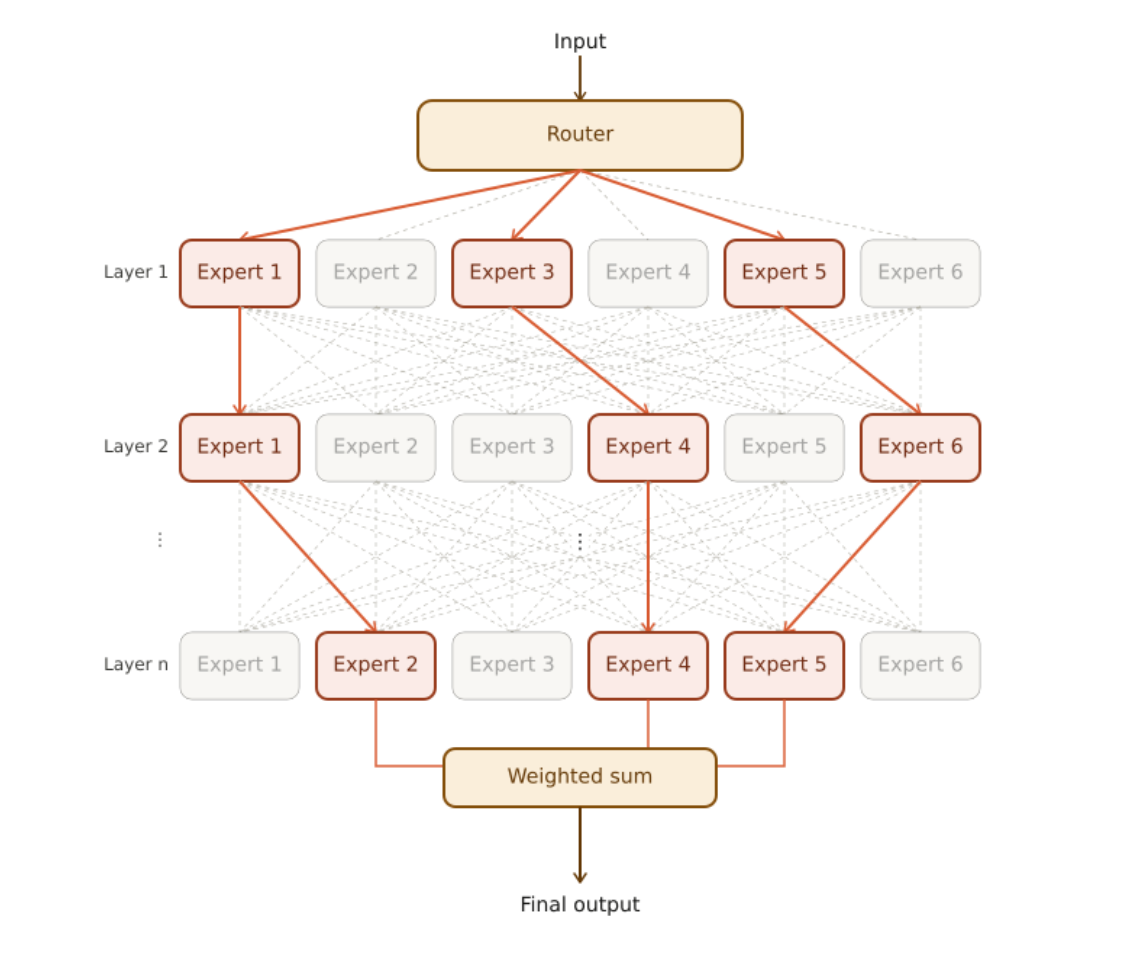
In a multi-layer MoE architecture, each hidden layer of the network contains many experts. Each input follows a unique path, activating different experts at each layer. The image below illustrates a multi-layer MoE architecture, where the top-3 experts are activated in every layer.
Training a MoE Network
The MoE layer is trained jointly, with a loss function that combines the losses from both the individual experts and the router. Gradients are propagated through the router and the experts, enabling updates that improve the overall performance of the MoE network.
The Keep Top-K Experts approach described above can result in the same experts being selected repeatedly, as some experts may learn faster than others. This is known as the load balancing problem, where certain experts may receive little or no training and remain underutilized during inference.
To address this, Outrageously Large Neural Networks: The Sparsely-Gated Mixture-of-Experts Layer proposes adding Gaussian noise to the router’s output before the softmax function. The amount of noise for each component is controlled by trainable weights. This stochasticity encourages all experts to be trained and ensures they are utilized during inference.
To further address the load balancing problem, an auxiliary loss is introduced to promote equal importance among experts and ensure that each receives a roughly equal number of training examples, improving training stability.
To mitigate imbalances in the distribution of tokens across experts an expert capacity is introduced. Imbalances occur when some experts receive significantly more tokens than others, which can slow their training or underutilize other experts. The number of tokens each expert can process is limited, and once this limit is reached, additional tokens are redirected to the next expert.
MoE in Transformers
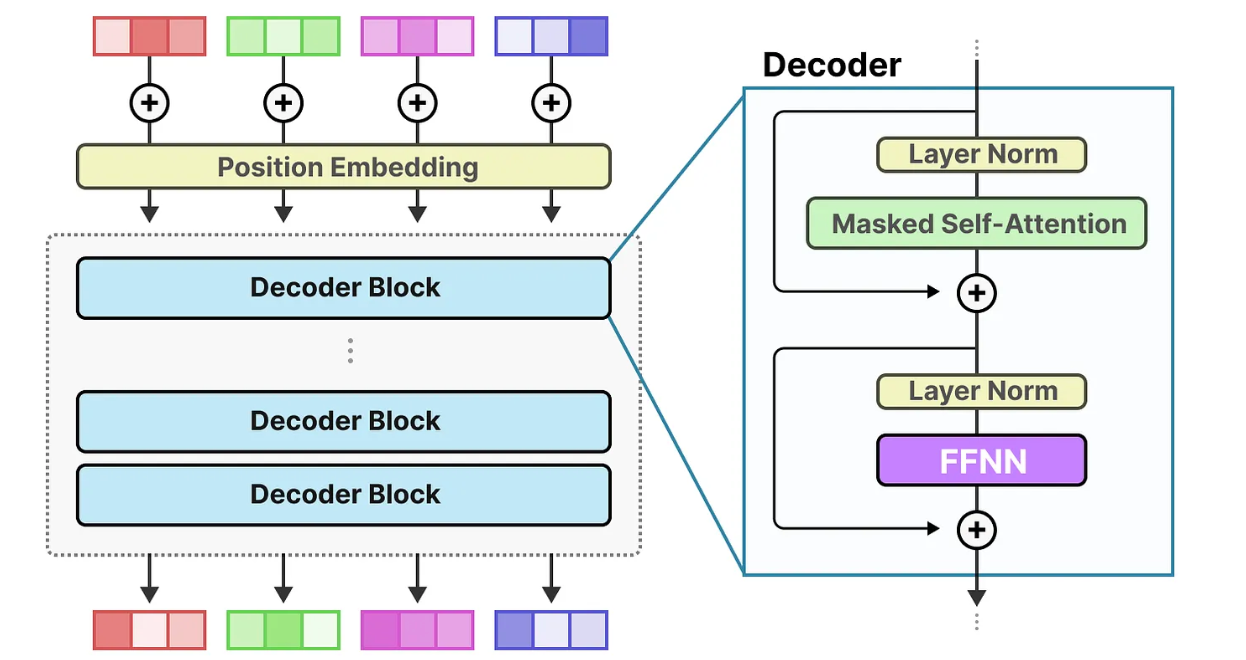
The image below illustrates a decoder-only transformer architecture. Input tokens are first combined with positional embeddings and then processed through multiple decoder blocks. Each block refines the generated representation to capture more complex patterns. The Feedforward Neural Network (FFNN) in each decoder block transforms the information extracted by the attention mechanism to capture high-level relationships in the data.
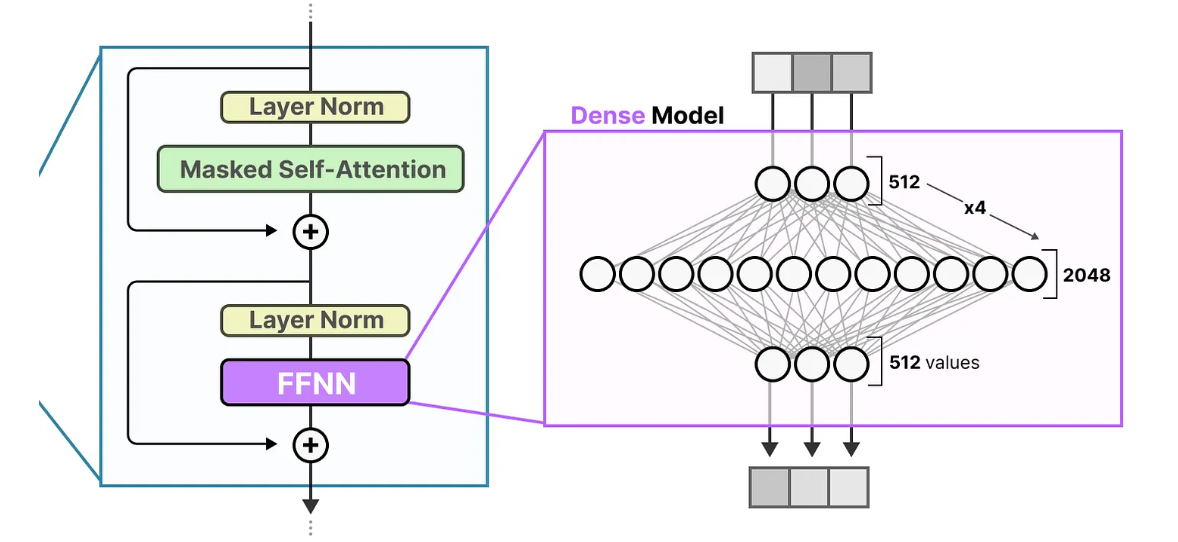
The following image shows the typical architecture of a FFNN model.
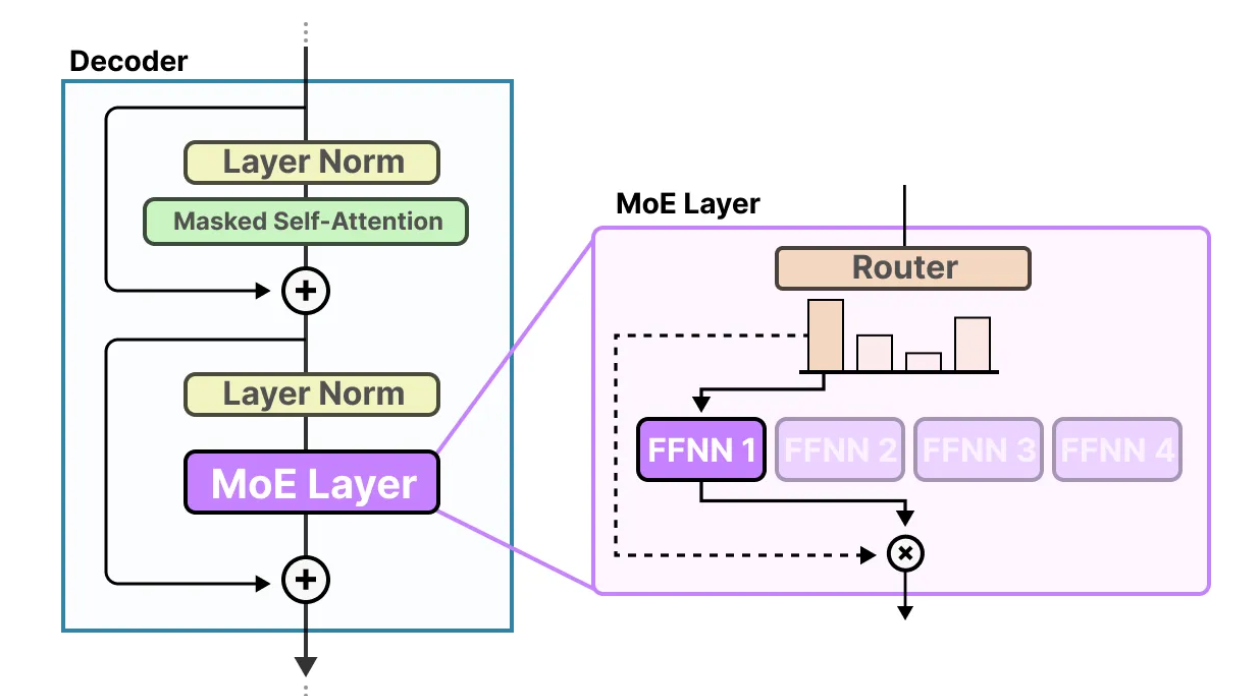
In MoE transformers, the standard FFNN is replaced by a MoE layer, as illustrated in the image below. In this image, Top-1 expert strategy is utilized, where only one expert is activated for each input.
Switch Transformer
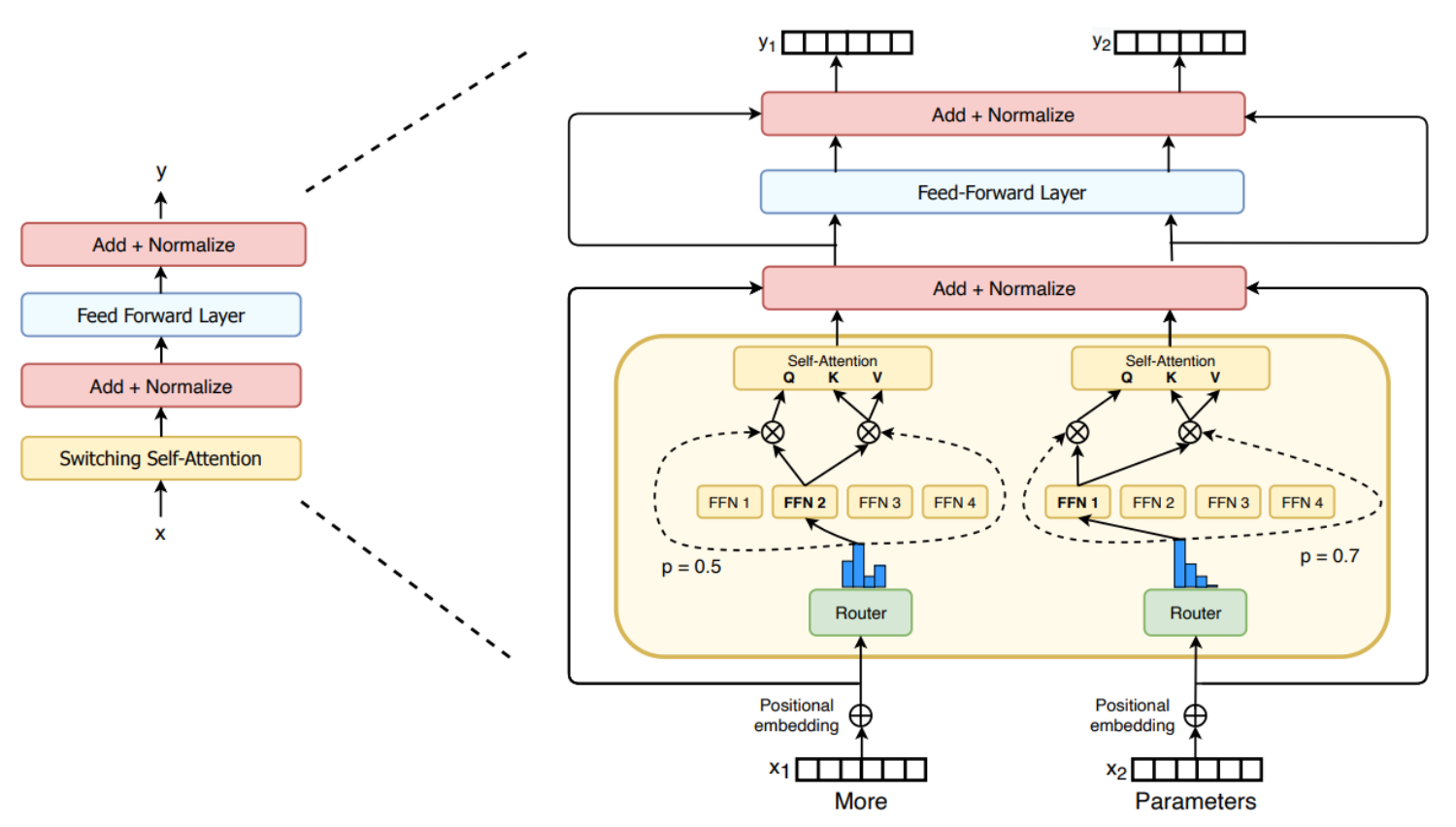
The Switch Transformer was one of the first transformer-based MoE models. It is an encoder-decoder transformer-based model that replaces the traditional FFNN layer with a Switching Layer, a Sparse MoE Layer that selects a single expert per token using the Top-1 expert selection mechanism. Additionally, the Switch Transformer introduces a capacity factor that scales the expert capacity, determining the maximum number of tokens an expert can process, along with an auxiliary loss to mitigate the load balancing problem.
The image below illustrates the switching layer in FFNN. The switching FFNN layer contains two MoE layers, each composed of four experts. For each token, the router activates the top-1 expert. Finally, the output of each MoE layer is weighted by the probability assigned by the corresponding router.
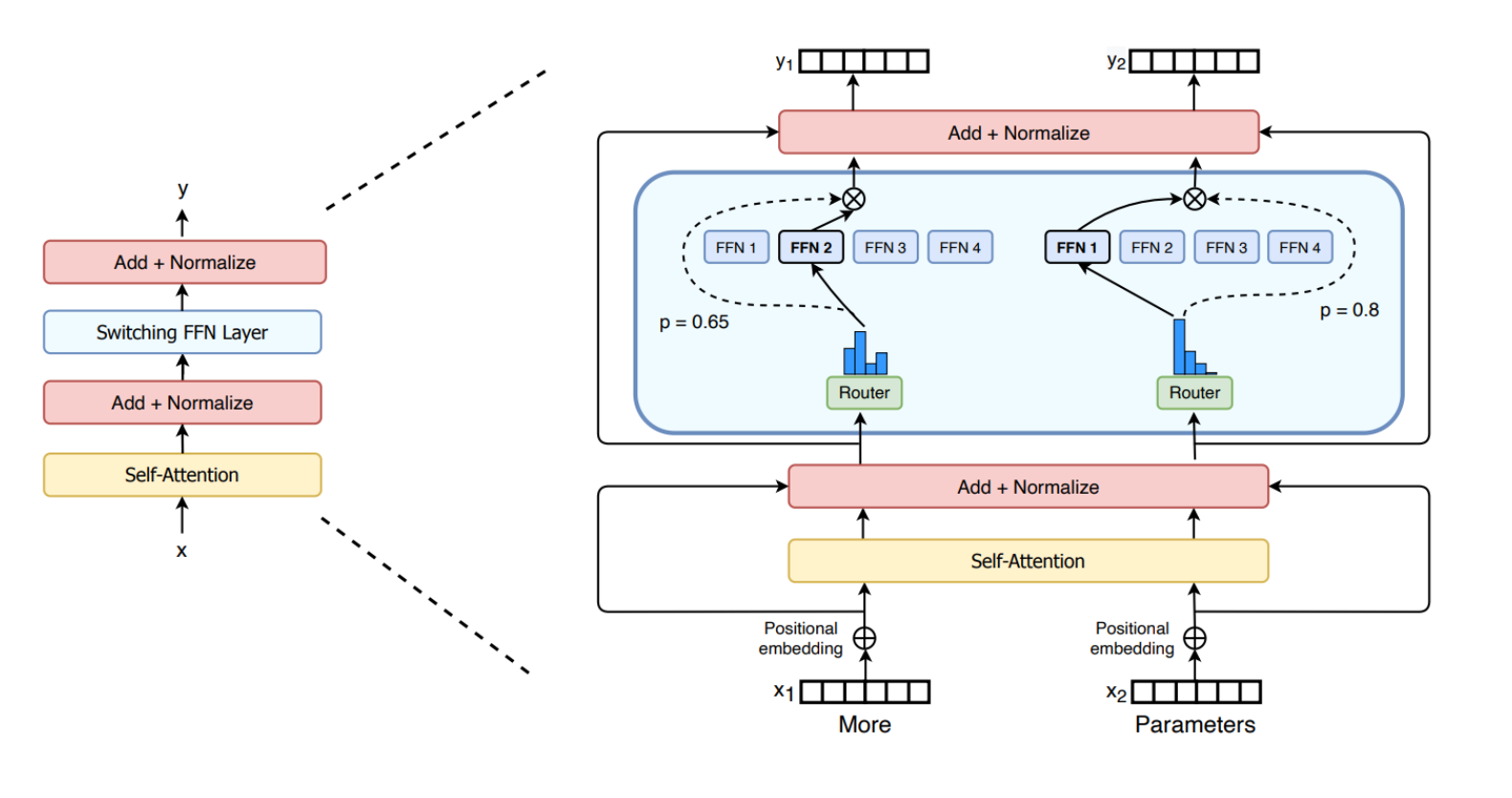
The following image shows the switching layer in attention. For each token, one set of weights generates the query, while a separate set of weights produces the shared keys and values.
Mistral 8x7B
Mixtral 8x7B is a Sparse MoE language model, comprising eight experts. At each layer, the router activates the top-2 experts for every token to process the current input. Each token has access to 47B parameters loaded into VRAM, but only 13B parameters are active during inference. As a result, MoE models require more VRAM but offer faster inference.
Vision MoE
In the following image, the architecture of the vision transformer (ViT) is illustrated. The input image is first divided into fixed-size patches, which are flattened and linearly projected into patch embeddings. Positional embeddings are added to preserve spatial information. The resulting embeddings are then processed by a standard transformer encoder. Through self-attention, each token can attend to all others, allowing it to capture information from the entire image rather than only its local neighborhood. In ViT, multi-head attention is utilized, with multiple self-attention heads operating in parallel, allowing the model to attend to different relationships between image patches simultaneously.
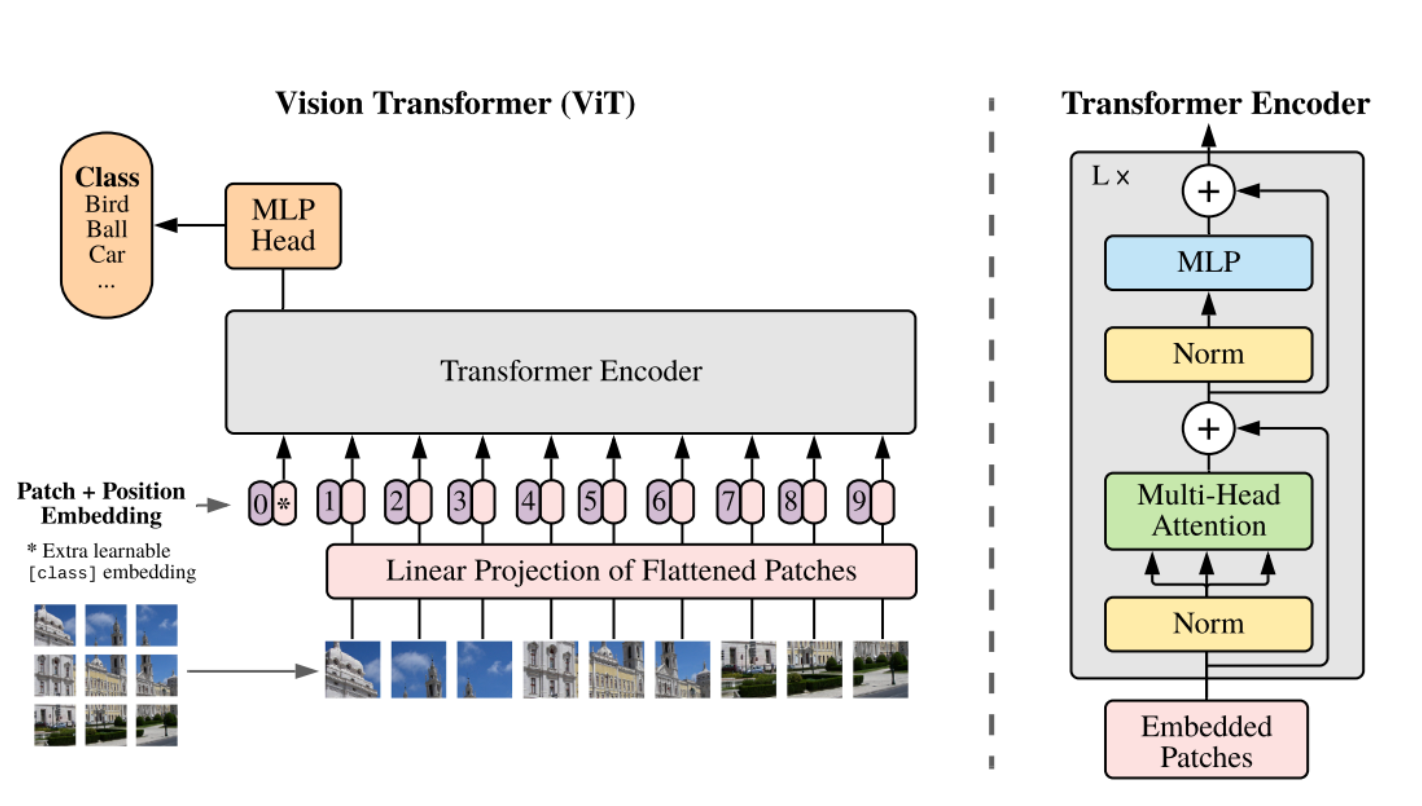
MoE can also be applied to Vision Transformers (ViTs), since input images are transformed into tokens, as described in the previous paragraph.
Vision MoE (V-MoE) is a sparse version of the Vision Transformer that incorporates MoE architecture. In this model, the MLP layers in certain transformer encoder blocks are replaced with MoE layers, with each expert stored on a separate device. V-MoE achieves performance comparable to state-of-the-art networks while requiring only about half the computational cost during inference. Leveraging the MoE architecture enables ViTs to scale by adding more experts, achieving higher performance without increasing inference computations.
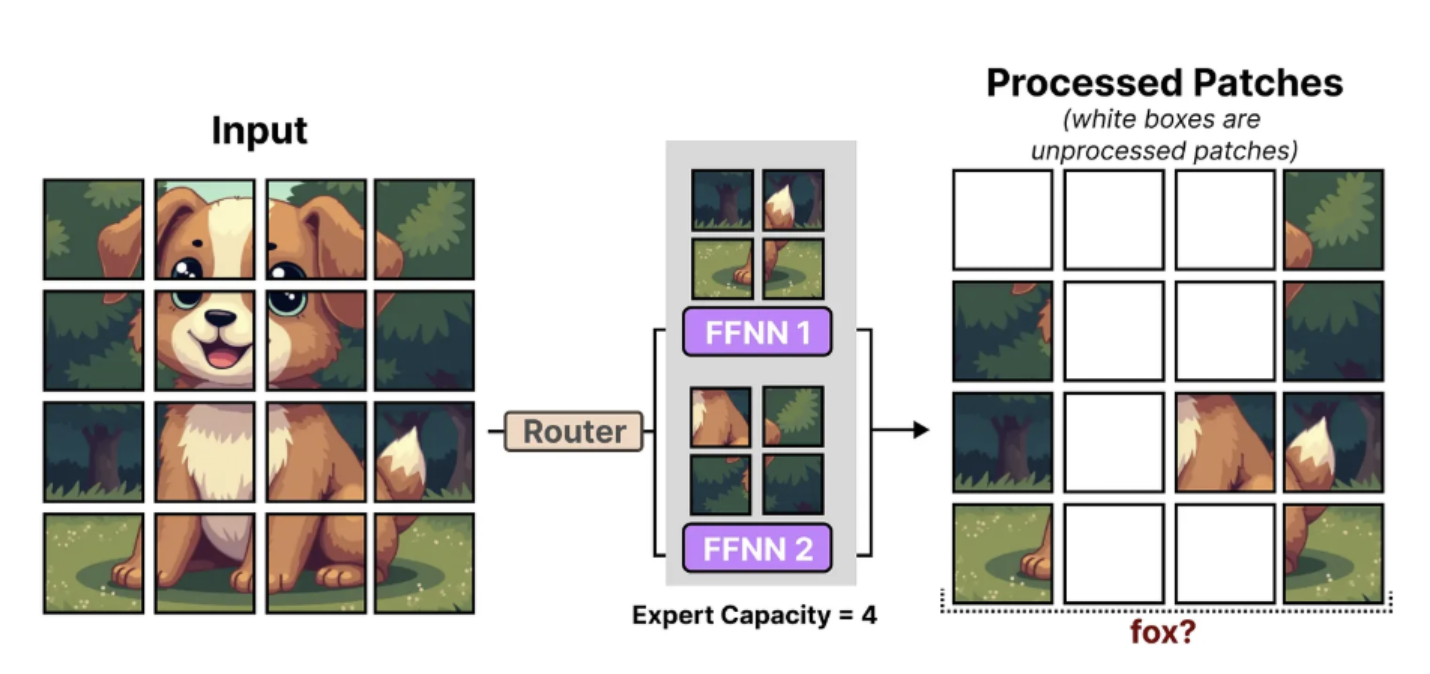
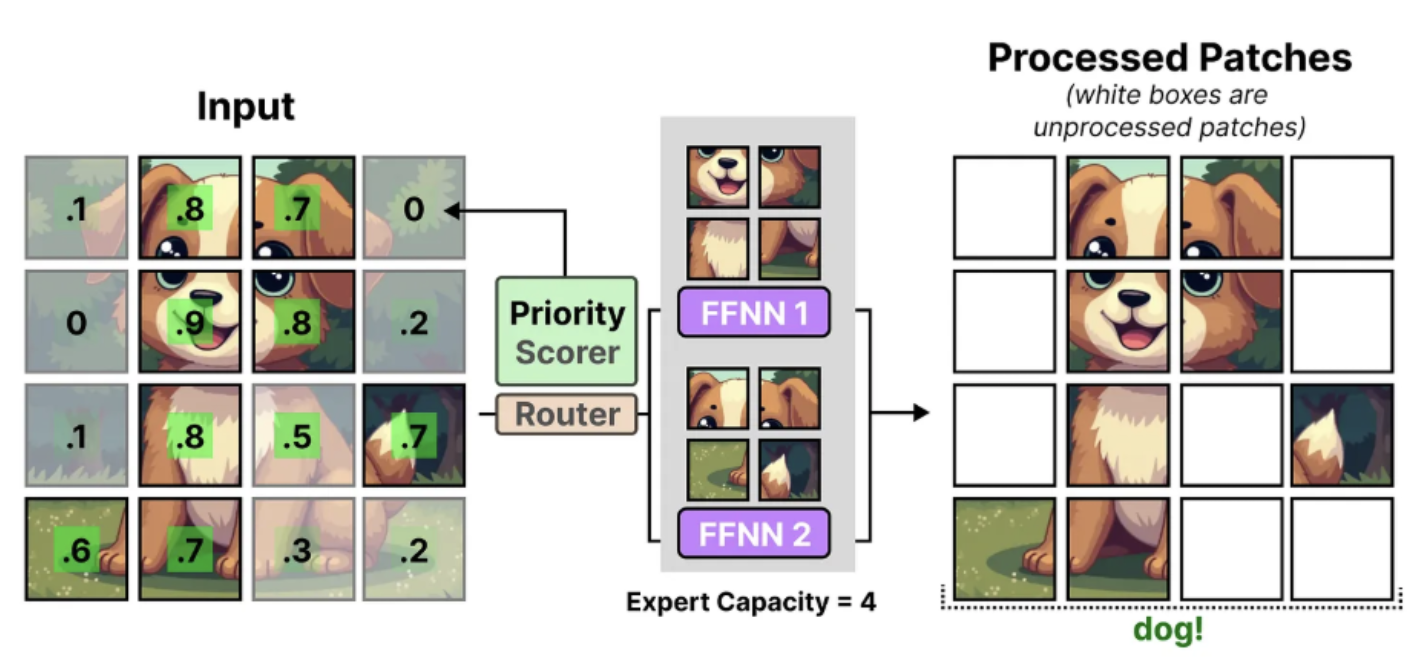
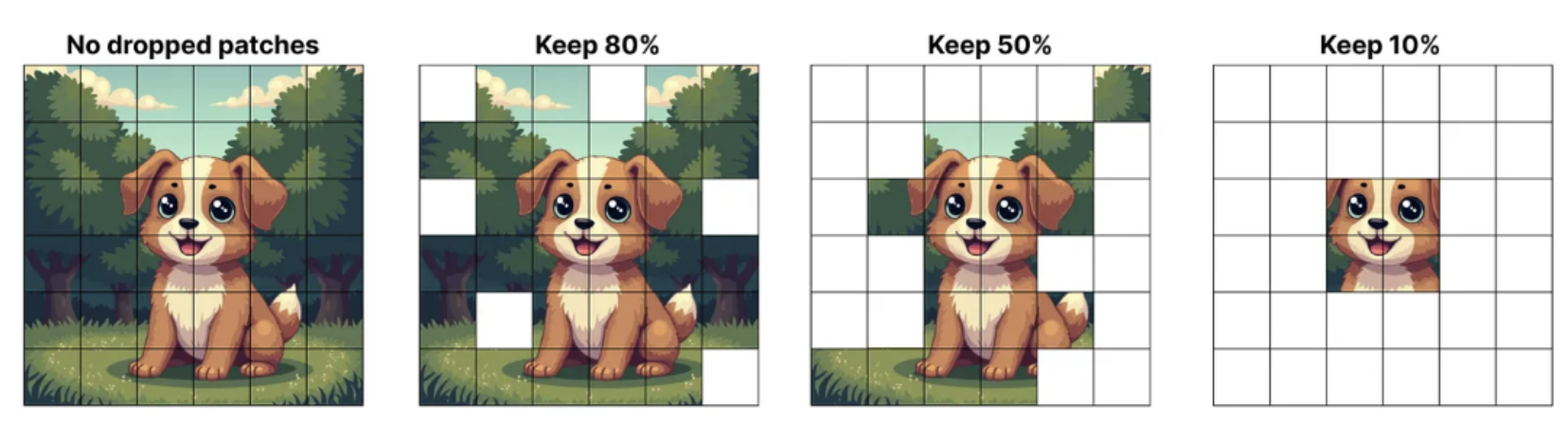
V-MoE uses a fixed expert capacity to reduce hardware requirements, which can result in tokens being dropped, a phenomenon known as token overflow. In such cases, extra tokens are not processed by any expert, and information from these specific tokens is lost. To mitigate this, V-MoE utilizes a mechanism called batch prioritized routing, which assigns importance scores to tokens and prioritizes the most relevant ones. This allows less informative tokens, such as those from background patches, to be discarded, enabling the model to focus on important information while maintaining low computational cost.
The images below illustrate one example without, and one with, batch prioritized routing. Without this mechanism, important patches are dropped, making it difficult to correctly classify the image. In contrast, with batch prioritized routing, mostly background patches are discarded, allowing the model to retain critical information and successfully classify the image.
In the following image we can observe which patches are dropped, while the percentage of the tokens retained decreases. Even when only 10% of the tokens are kept, the model is still able to preserve the most important information.
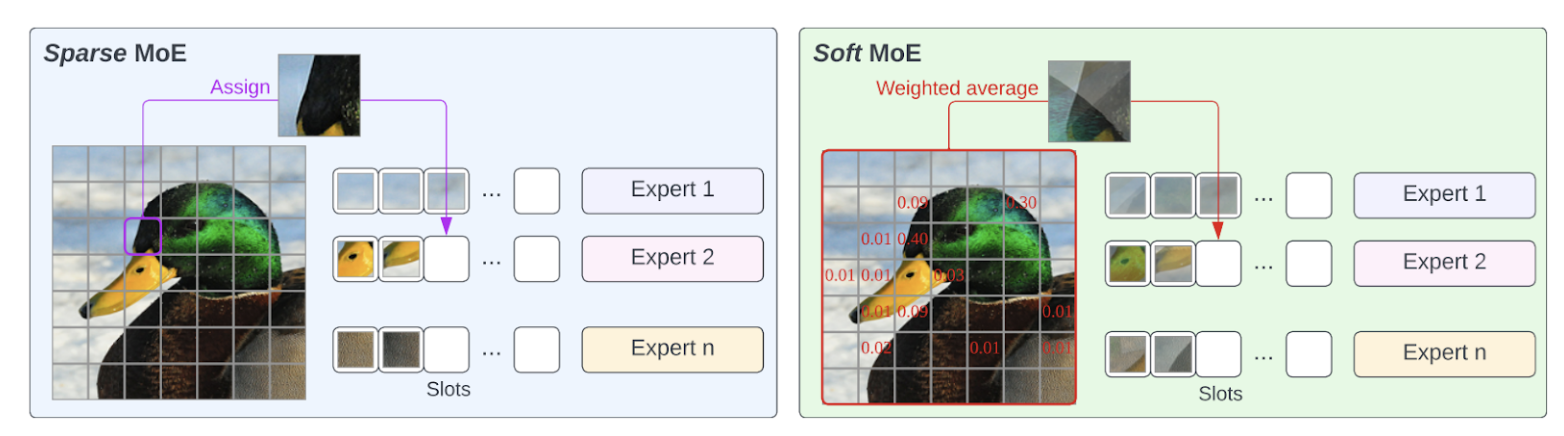
Another solution to address token dropping and training instability was called Soft MoE, proposed in From Sparse to Soft Mixtures of Experts. Soft MoE performs a soft assignment by passing weighted combinations of all input tokens to each expert. As shown in the next image, the router in Sparse MoE assigns individual tokens to available slots, while in Soft MoE each slot is the result of a weighted average of all the input tokens.
Advantages and Disadvantages of MoE
To sum up, MoE architecture offers improved performance while maintaining low inference latency and computational cost. However, it also has drawbacks, including high VRAM requirements to store the full model, potential training instability and the need for complex hyperparameter tuning. Despite these challenges, MoE enables models to scale without a proportional increase in computational complexity, which is why it is increasingly adopted in modern state-of-the-art networks, including Gemini 3.
Native Multimodality
Gemini models are natively multimodal, meaning they are designed from the beginning to handle diverse modalities, including text, images, audio and video. The Gemini team demonstrated that joint training across all modalities can lead to stronger performance within individual modalities as well as enhanced cross-modal reasoning capabilities.
Gemini models are highly capable of extracting useful information from diverse modalities and integrating it with the enhanced reasoning abilities of a language model. They also demonstrate strong performance in identifying fine-grained details, aggregating information across space and time and applying these skills to analyze temporally related inputs, such as videos or audio recordings.
In the following image the native multimodality of Gemini models is illustrated. These models can take as input interleaved sequences of text, image, audio and video (different input modalities are represented by tokens of different colors) and can produce interleaved outputs of text and images.
The term interleaved means that multiple types of inputs or outputs can be mixed together in any order, rather than being grouped separately by modality. For example, a text segment could be followed by an image, then a video and then another image, all within the same input sequence.
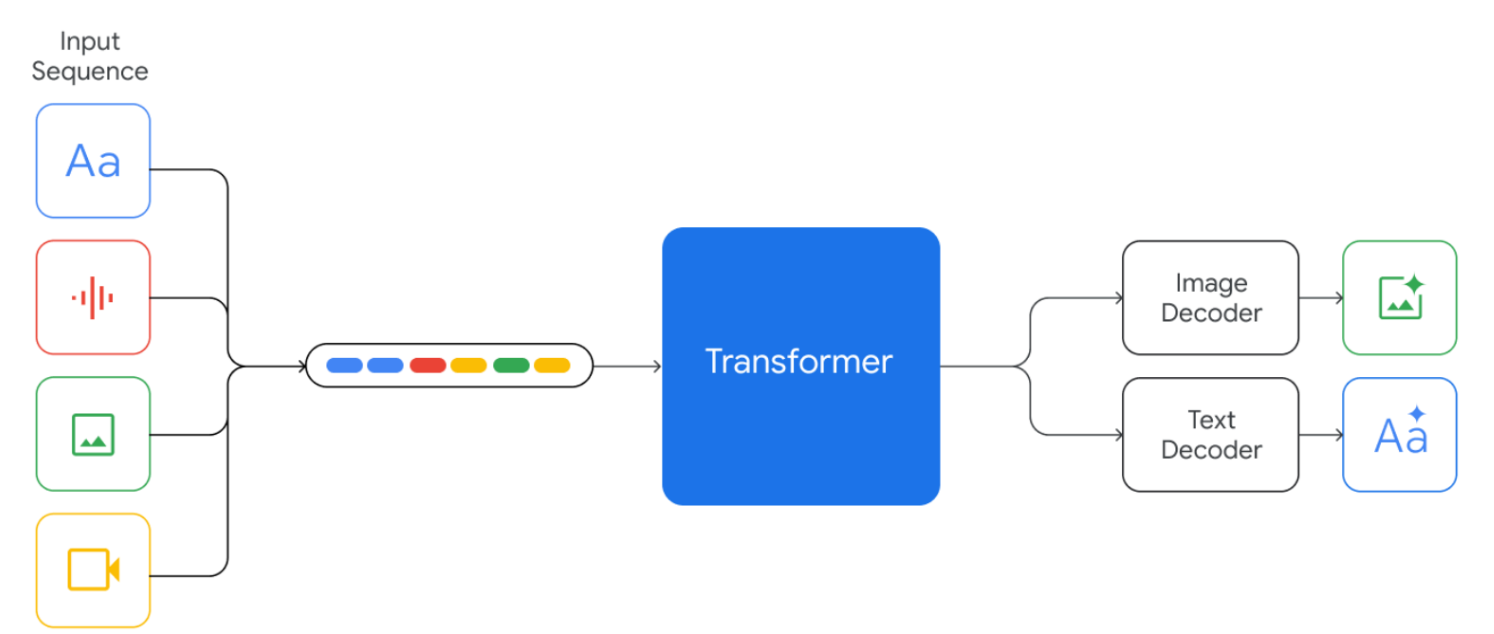
In many existing multimodal models, different input modalities are processed by separate, specialized transformer-based encoders and the extracted information is fused at a later stage. In contrast, Gemini models use a single transformer-based model to process diverse input modalities as a unified entity.
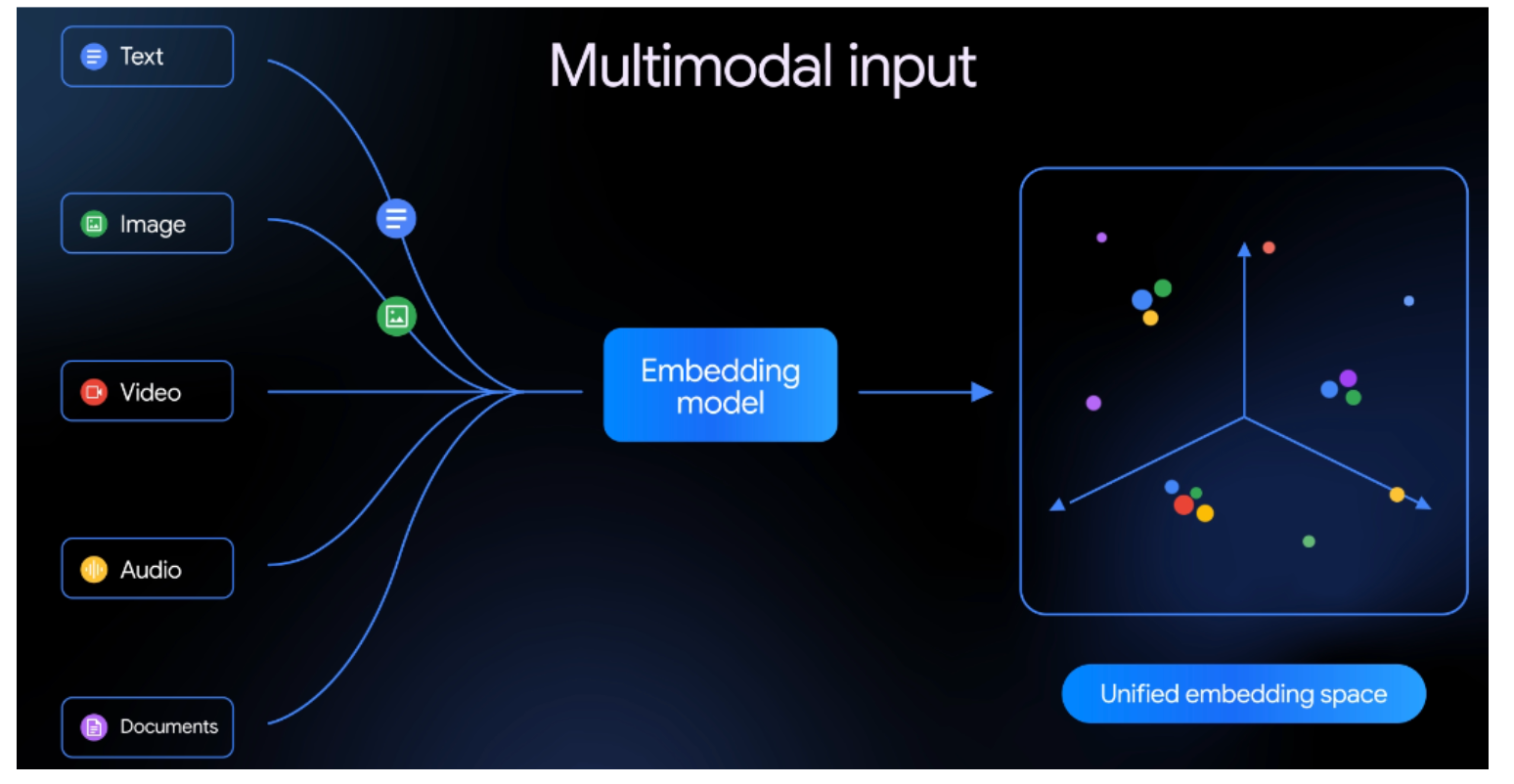
Inputs are first converted into tokens and then projected into embeddings within a shared embedding space. This design enables Gemini models to develop a more holistic and coherent understanding across modalities, resulting in stronger multimodal reasoning and understanding capabilities.
In the image below, an example of a unified embedding space is shown, where inputs of all types are projected into the same space. The image is sourced from the recent Gemini Embedding 2 model.
Long Context Window
Gemini 3 supports a 1 million-token context window, enabling it to process massive amounts of data at once, including long videos and audio recordings, entire books, extended documents and codebases.
A context window is the maximum amount of information, measured in tokens, that a model can process in a single prompt. When the input exceeds the context window, the model is unable to recall the earliest tokens, potentially losing important information.
Gemini 1.5 and subsequent models can process up to 1 million tokens, representing the longest context window of any large-scale foundation model to date. While Google has not published the exact details of how this capability is achieved, it enables the models to handle massive amounts of data at once, enabling more comprehensive understanding, long-range reasoning, and multi-step planning, thereby unlocking agentic and complex problem solving capabilities.
Deep Think
Gemini 3 introduced Gemini 3 Deep Think mode, which leverages extended reasoning time to enhance performance on complex tasks. While responses are slower, the model demonstrates enhanced reasoning, stronger scientific knowledge and visual understanding. In Deep Think mode, Gemini 3 evaluates multiple potential solutions for a given problem, pausing in real time to carefully reason through them and identify the optimal answer.
Google states that the model demonstrates PhD-level reasoning and excels in mathematics, science and long-horizon planning. Published papers, showcase the use of Gemini’s Deep Think mode to tackle professional research problems, resulting from collaboration between mathematicians, physicists and computer scientists.
Agentic Workflows
Gemini 3 demonstrates advanced agentic capabilities, evolving from a useful tool into an autonomous partner capable of leveraging multiple tools in real time. As a powerful agentic and vibe-coding model, it can plan, execute, and evaluate multi-step workflows, excelling in long-horizon reasoning.
Training Specifications
Dataset
Gemini 3 was trained on a large-scale, diverse collection of data spanning multiple domains and modalities, including web documents, text, code, images, audio and video. The model was further fine-tuned using instruction tuning, reinforcement learning and human-preference data. All data were carefully curated to remove noise, duplicates and filter out potentially harmful content. Reinforcement learning techniques were utilized during training to guide the model in performing multi-step reasoning and complex problem-solving.
Hardware
Gemini 3 was trained using Google’s Tensor Processing Units (TPUs), specialized hardware designed to handle the massive computations involved in training LLMs, enabling significantly faster training.
Knowledge Distillation
The smaller Gemini variants, such as Gemini Flash, are trained using knowledge distillation with a k-sparse distribution of the teacher’s token predictions, improving model performance while keeping inference costs low despite increased training storage and throughput demands. Models trained using knowledge distillation achieve better performance than those trained from scratch, as they learn not only the correct outputs but also the probability patterns provided by the teacher model.
Typically, when training a student model using knowledge distillation, the student learns from the output probabilities of the teacher model, which normally predicts a full probability distribution over the entire vocabulary. Using a k-sparse distribution, only the top k highest-probability tokens are kept while the rest are ignored, reducing storage and computation without losing important information.
Evaluation of Gemini 3.1
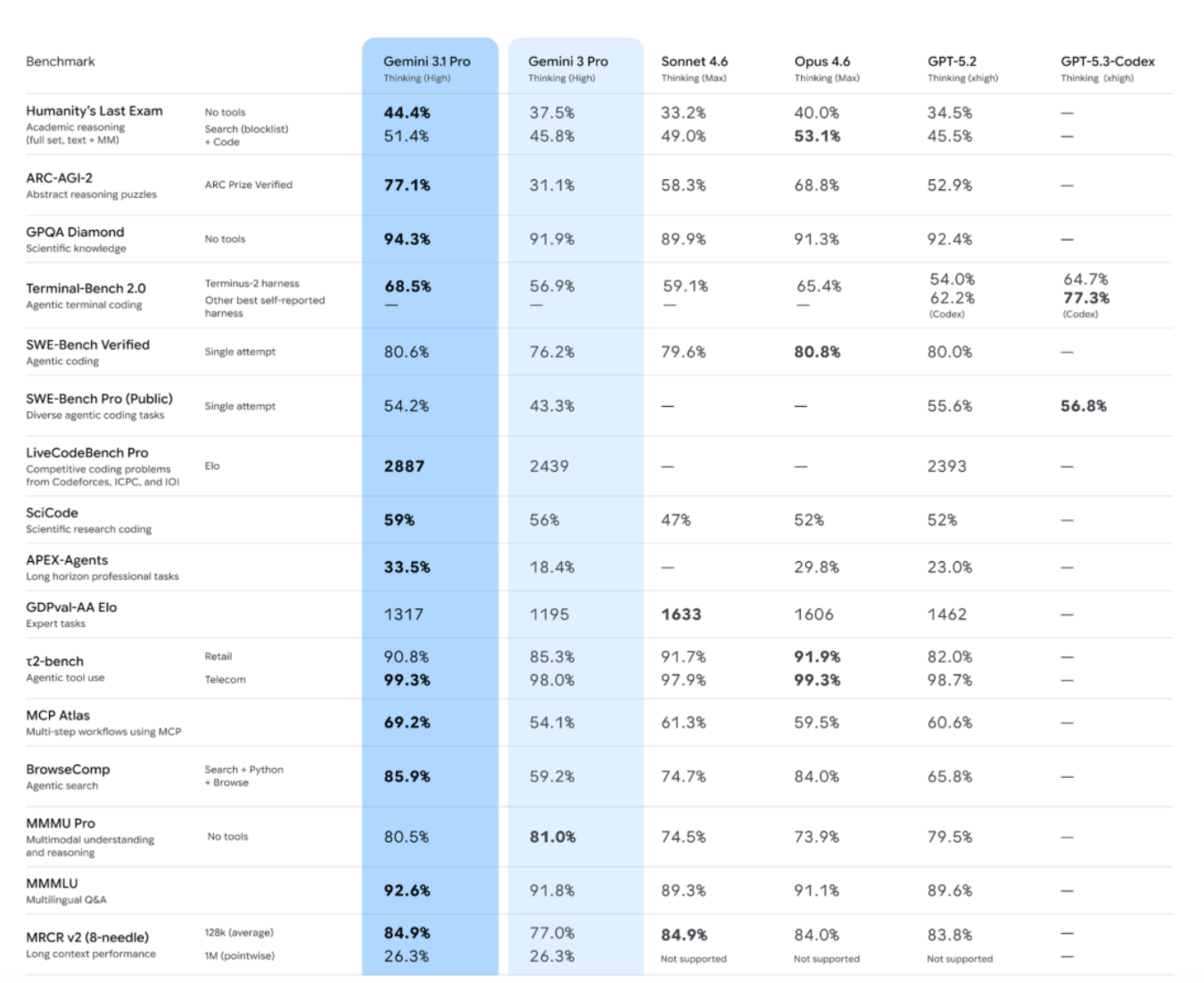
Gemini 3.1 Pro substantially surpasses Gemini 3 Pro across benchmarks that evaluate advanced reasoning, multimodal capabilities, agentic tool use, multi-lingual performance and long-context. The results are illustrated in the following image.
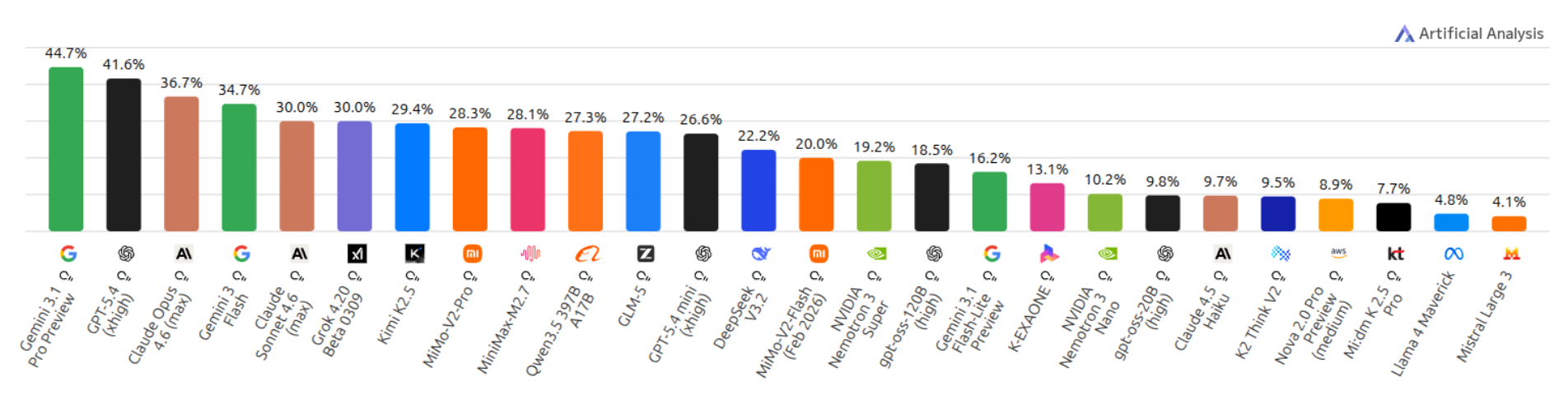
Humanity's Last Exam Benchmark is a frontier-level benchmark of 2,500 expert-vetted questions across mathematics, sciences and humanities, designed to test true understanding rather than information retrieval. In the next chart, we can observe that Gemini 3.1 Pro leads the leaderboard with a score of 44.7%.
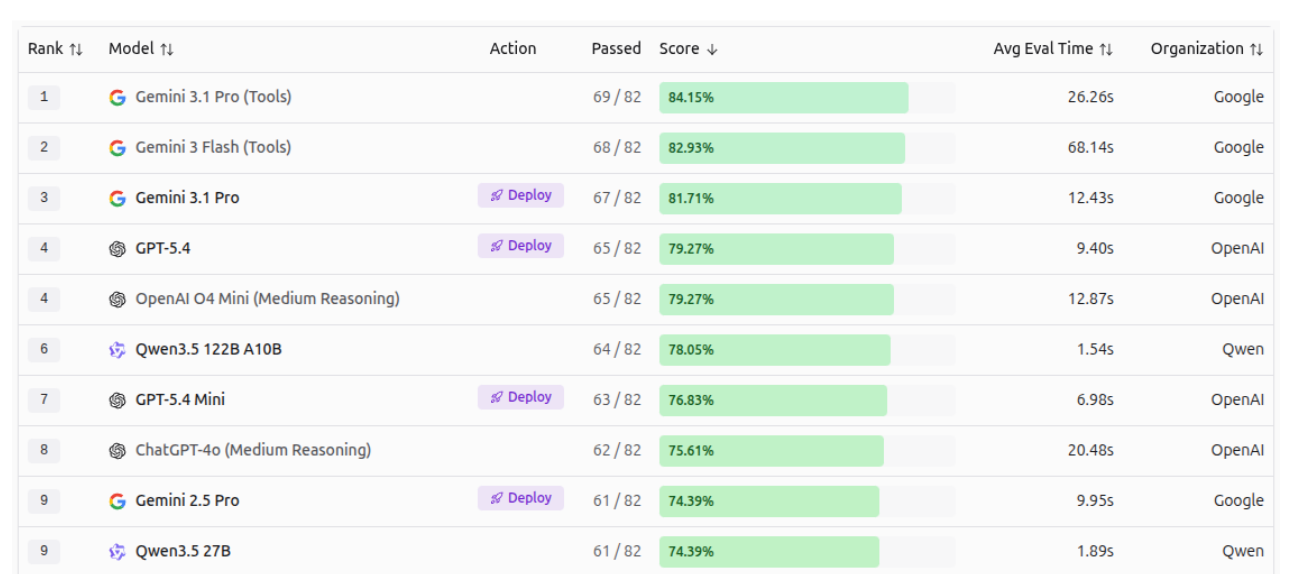
Vision Evals Roboflow benchmarks test 53 AI models on 82 real-world tasks, including reading text, detecting objects, understanding documents, and more. Gemini 3.1 Pro and Gemini 3 Flash outperform all other models, leading in overall score, as illustrated in the image below.
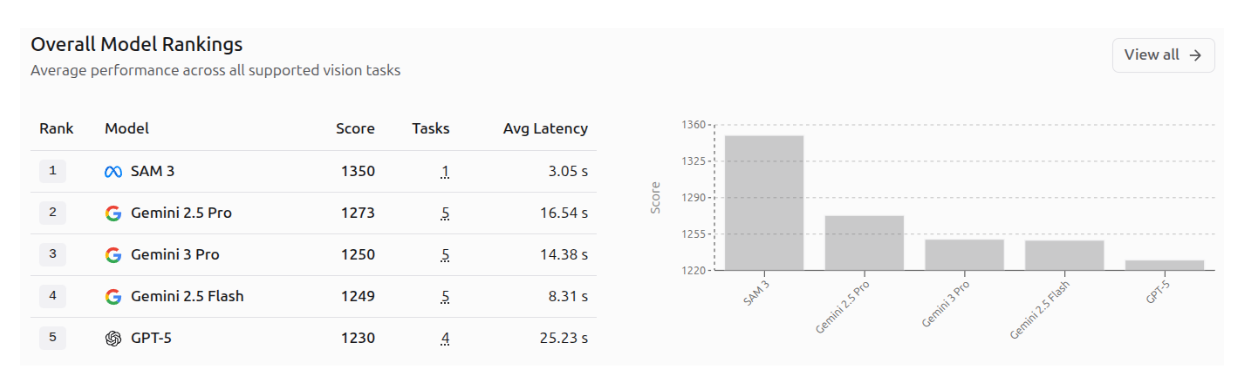
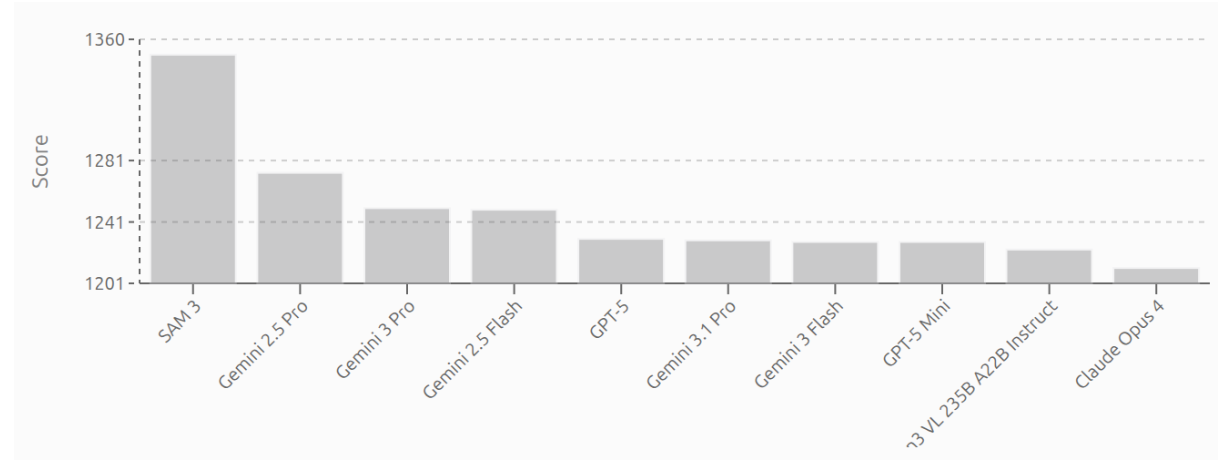
AI Vision Model Rankings by Roboflow highlight top AI vision models, scored by user votes across real-world computer vision tasks. In the rankings, SAM 3 leads with a score of 1350, followed by Gemini 2.5 Pro (1275) and Gemini 3 Pro (1250), while Gemini 3.1 Pro and Gemini 3 Flash appear lower in the ranking, reflecting their position on this leaderboard. The first image shows the top 5 models across all vision tasks, and the second image displays the top 10 models.
Gemini 3 Computer Vision Capabilities
Gemini 3 excels in several computer vision tasks, thanks to its advanced multimodal capabilities. Some of its impressive applications are highlighted below.
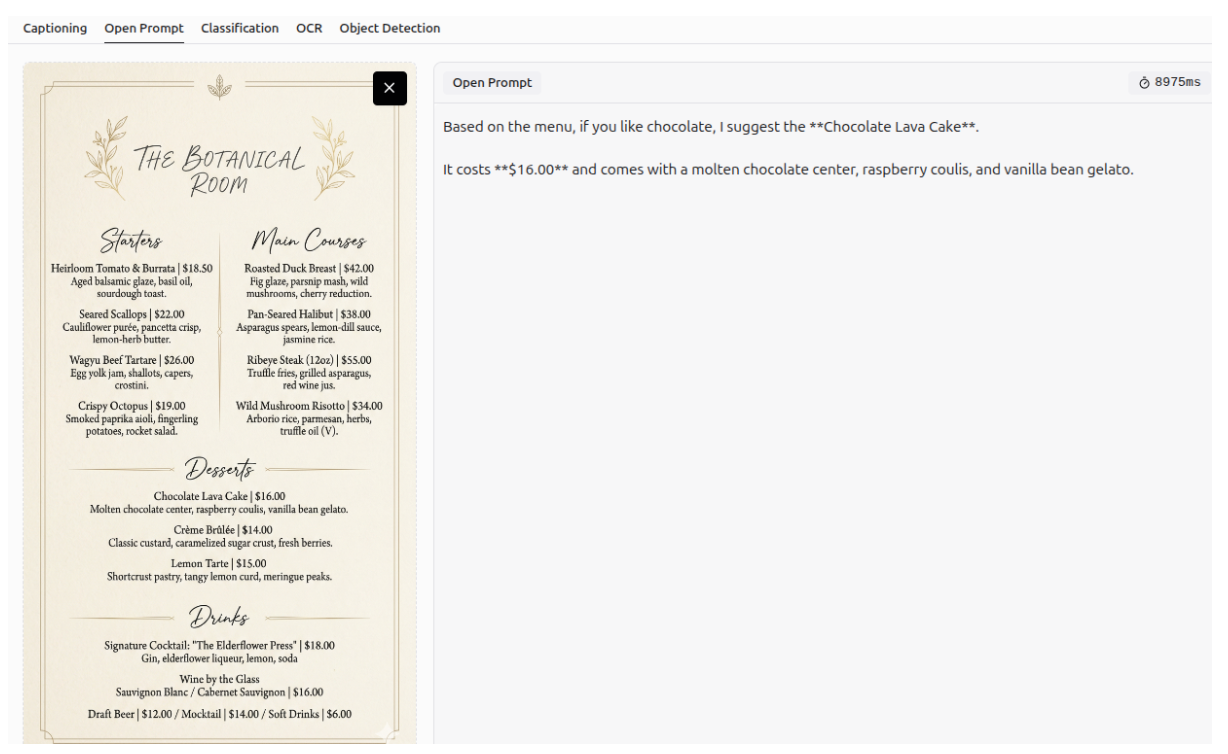
It is worth mentioning that all images in the following examples were generated using Gemini 3.1 Flash Image, also known as Nano Banana 2, showcasing its impressive capabilities in image generation and editing. Additionally, the Roboflow Playground platform was used, where Gemini 3.1 Pro was evaluated on five vision tasks: Captioning, Open Prompt, Classification, OCR, and Object Detection. Further information on using Gemini 3 with Roboflow is provided in the following section.
In this blog, we focus primarily on computer vision tasks and images, but Gemini 3 also unlocks endless possibilities across text, audio and video modalities.
VQA (Visual Question Answering)
Visual Question Answering (VQA), often referred to as an open prompt task, is a computer vision task where a model analyzes an image and answers questions about its content in natural language. It combines image and language understanding to interpret visual details, context and relationships within the scene.
Object Counting
You can use Gemini 3 to count specific objects in an image.
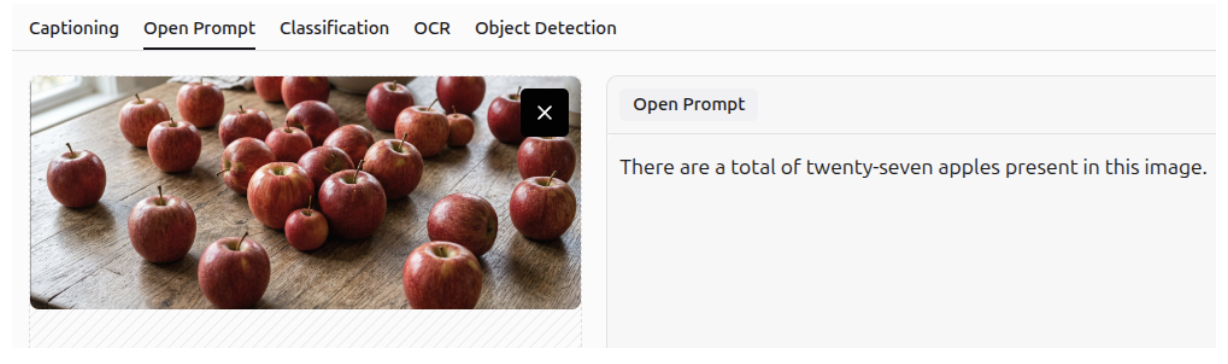
Image Understanding
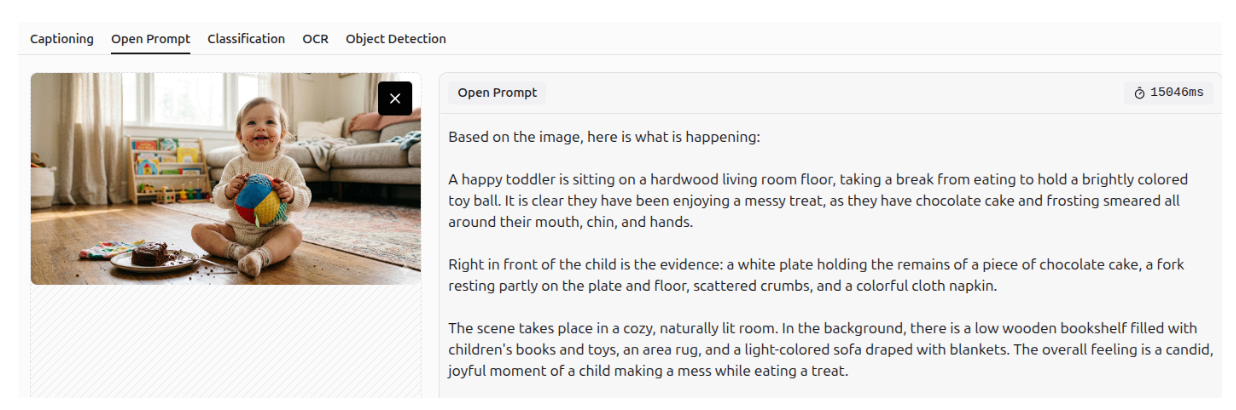
You can generate image descriptions using Gemini 3’s multimodal image understanding and spatiotemporal capabilities.
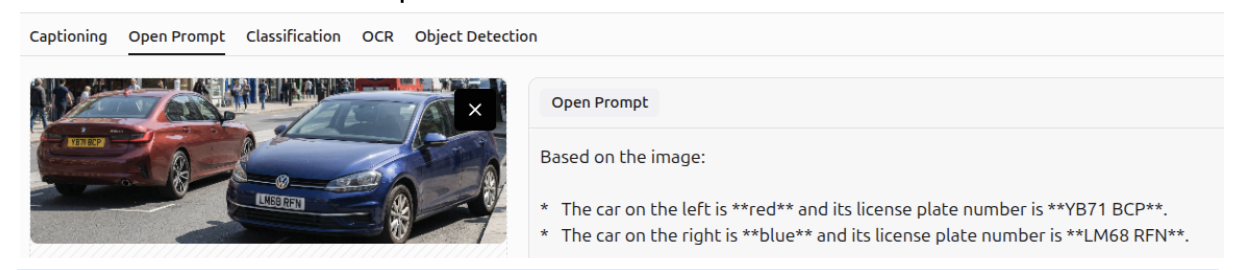
Question Answering
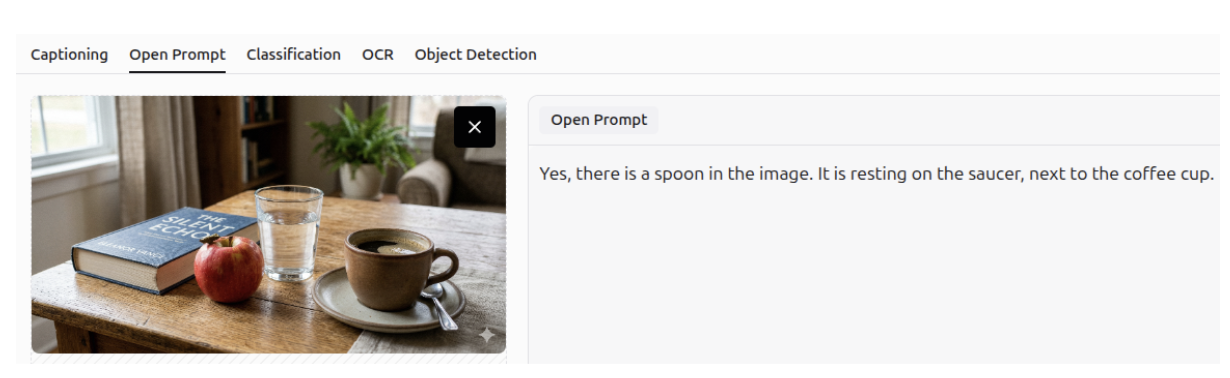
Gemini 3 can accurately answer questions about a specific image, leveraging its strong spatial and visual understanding. It recognizes not only the presence of objects but also their relative positions within the image.
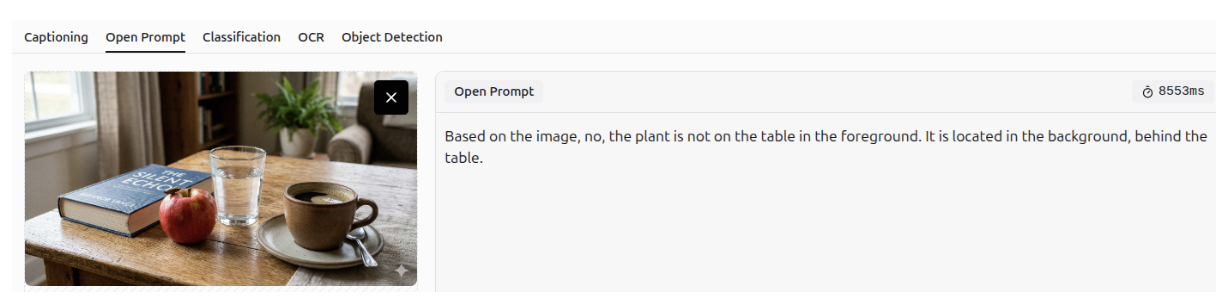
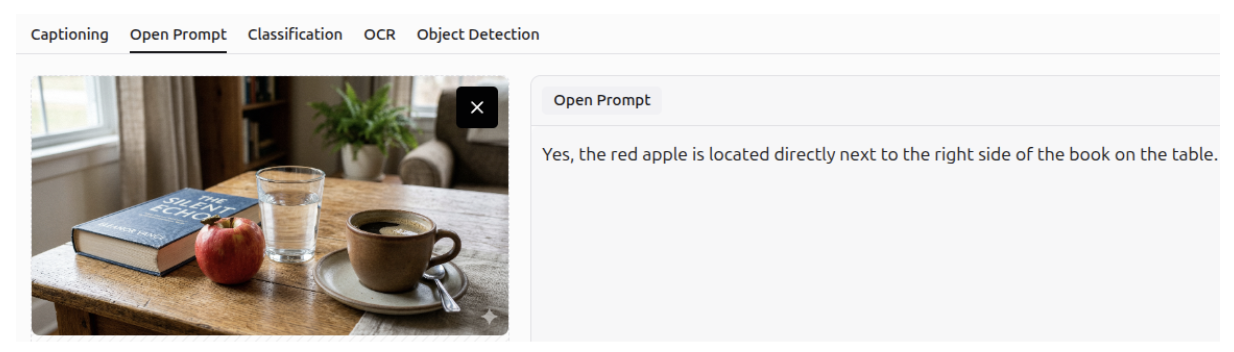
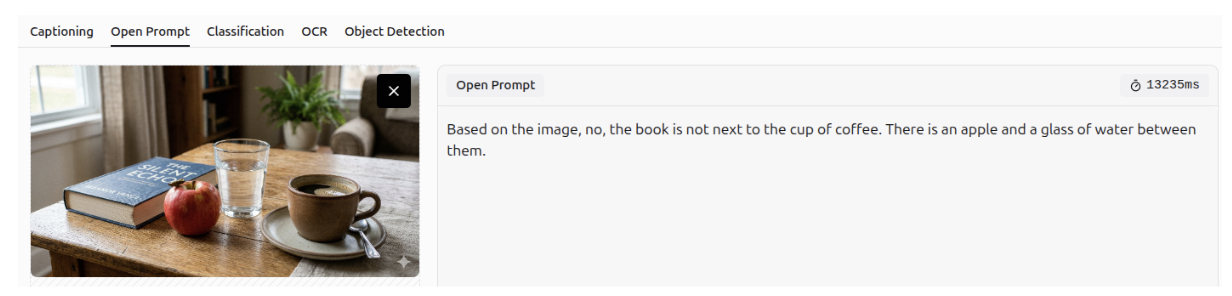
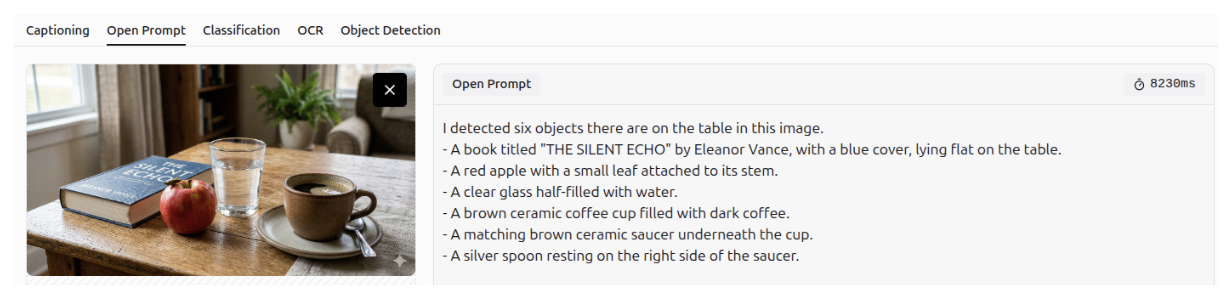
Question Answering - OCR
It can answer questions using optical character recognition (OCR), allowing it to extract information from documents and images.
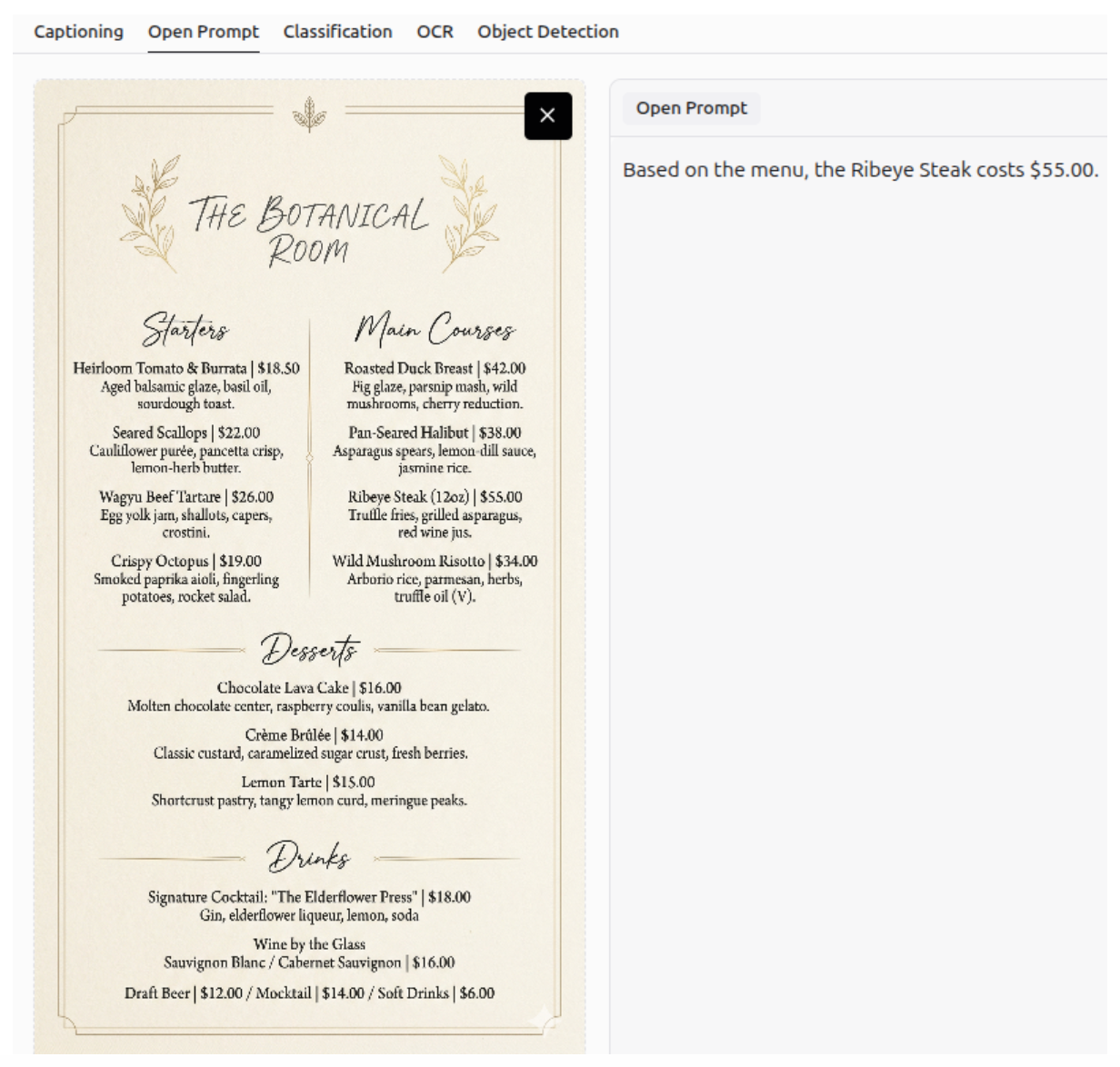
Additionally, Gemini 3 can combine information from images and natural language to provide personalized suggestions.
Defect Detection - Anomaly Detection
Gemini 3 can detect defects or anomalies in an image, and describe them accurately.
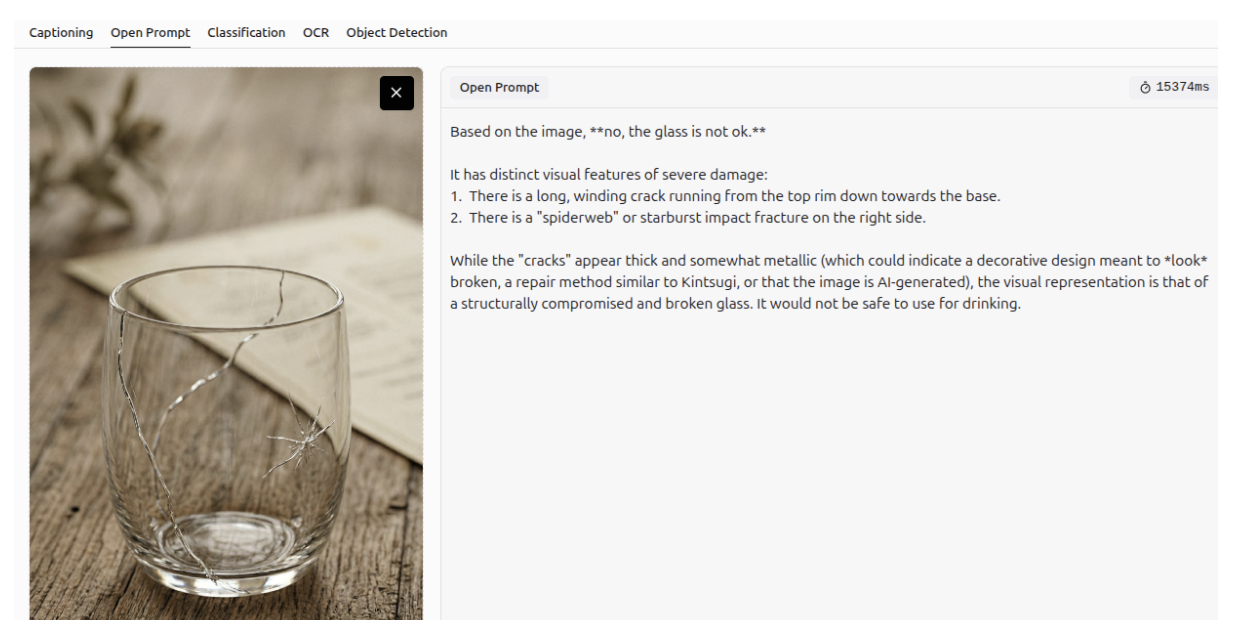
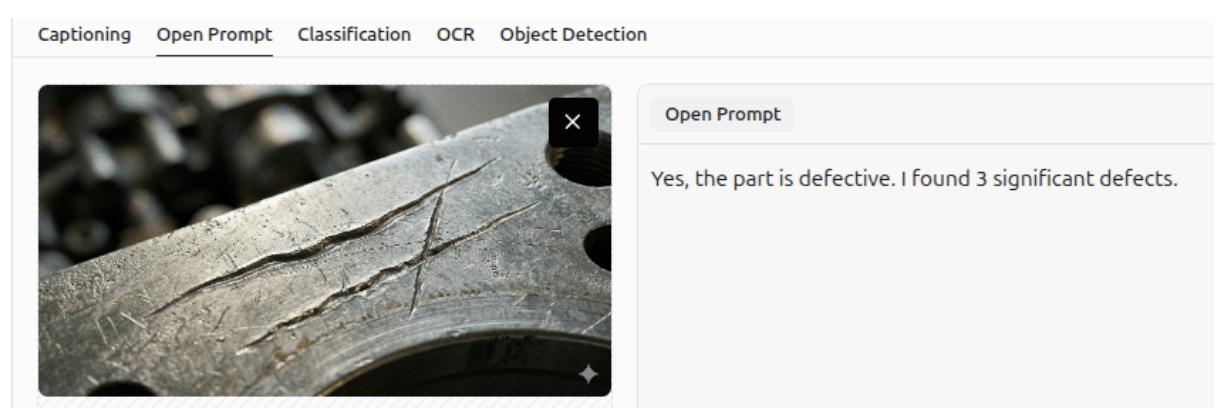
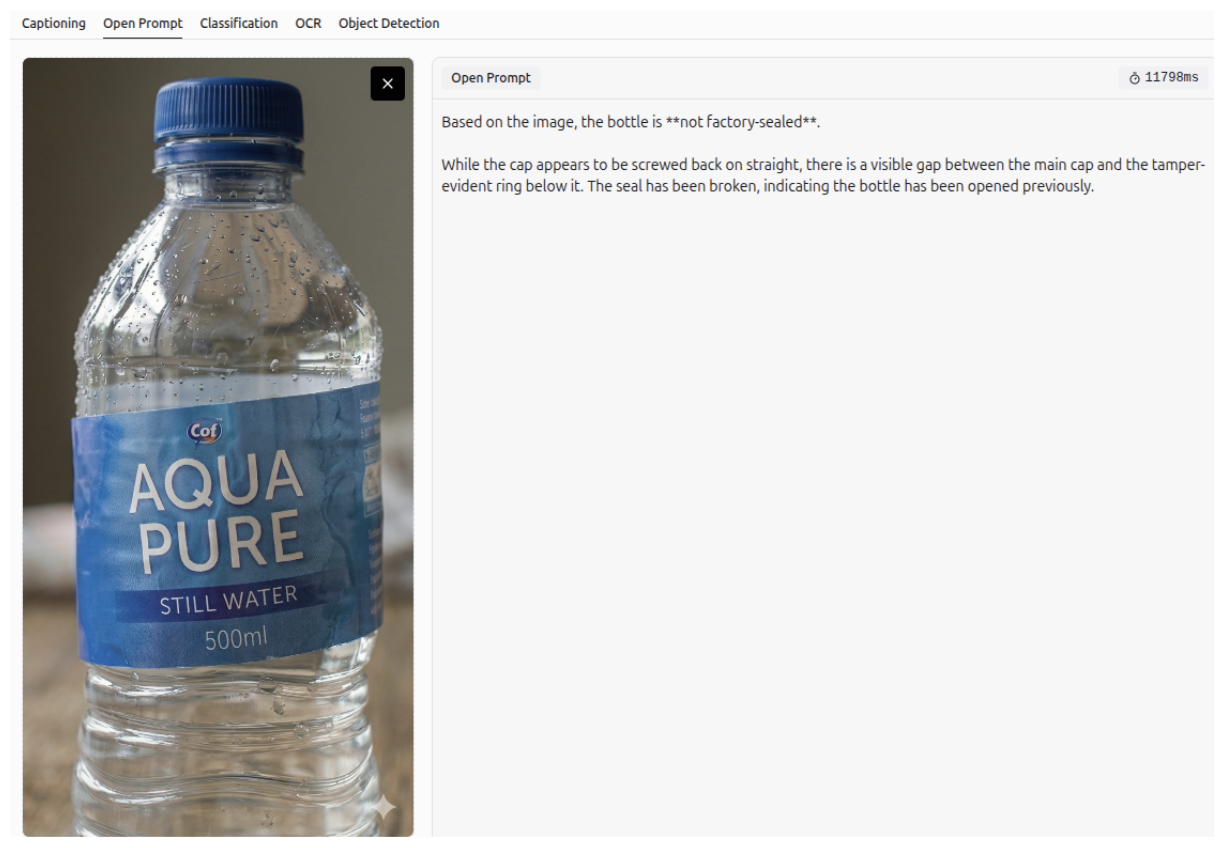
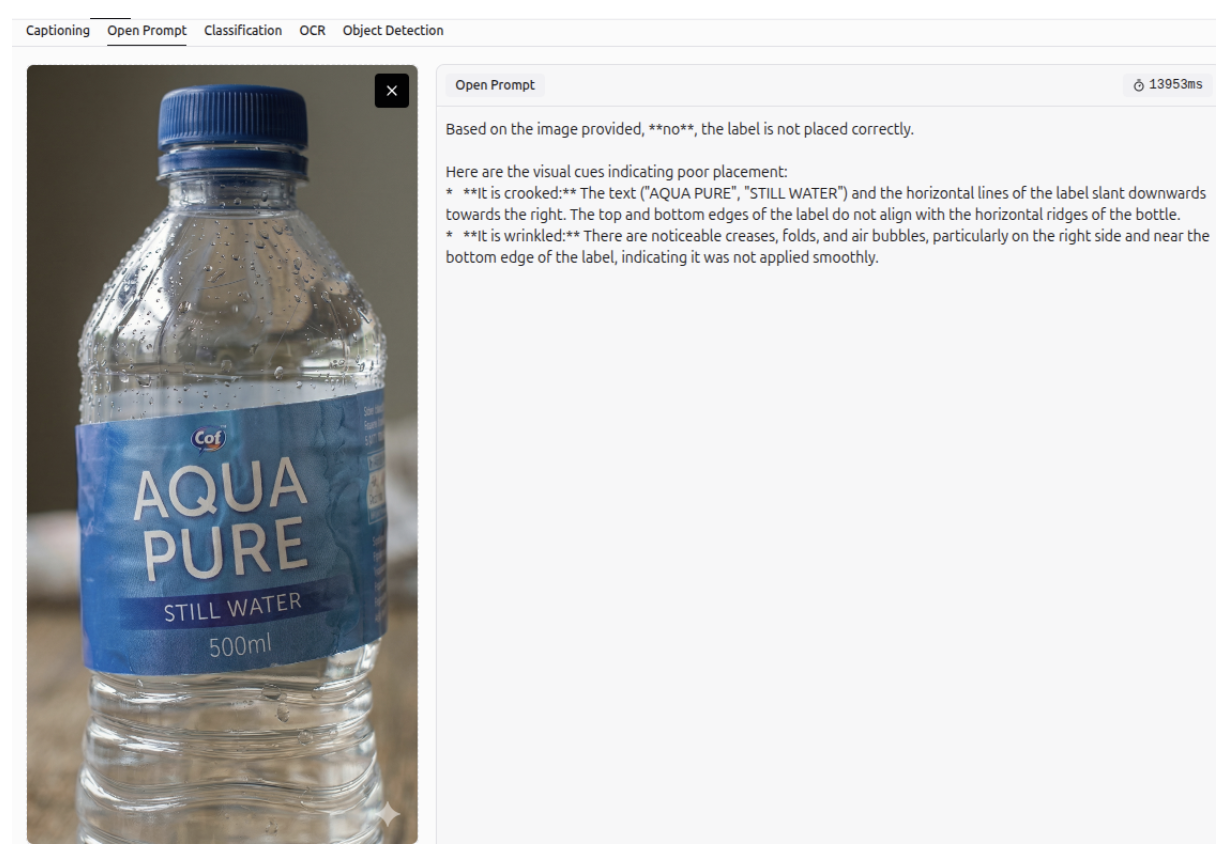
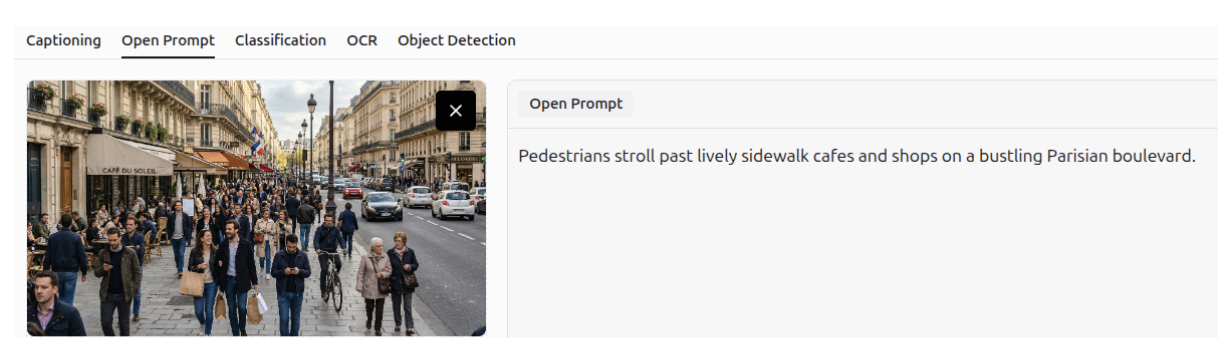
Image Description
Gemini 3 can generate detailed descriptions of images.
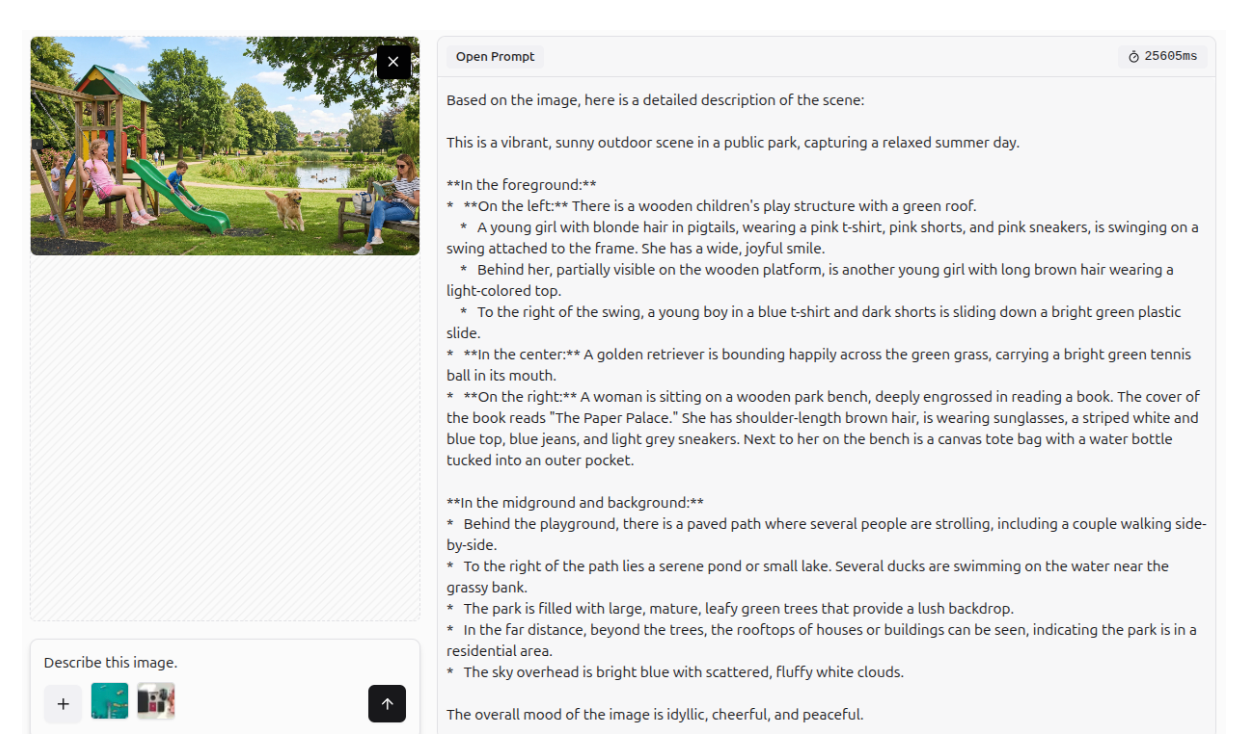
Image Captioning
It can also create accurate captions for images.
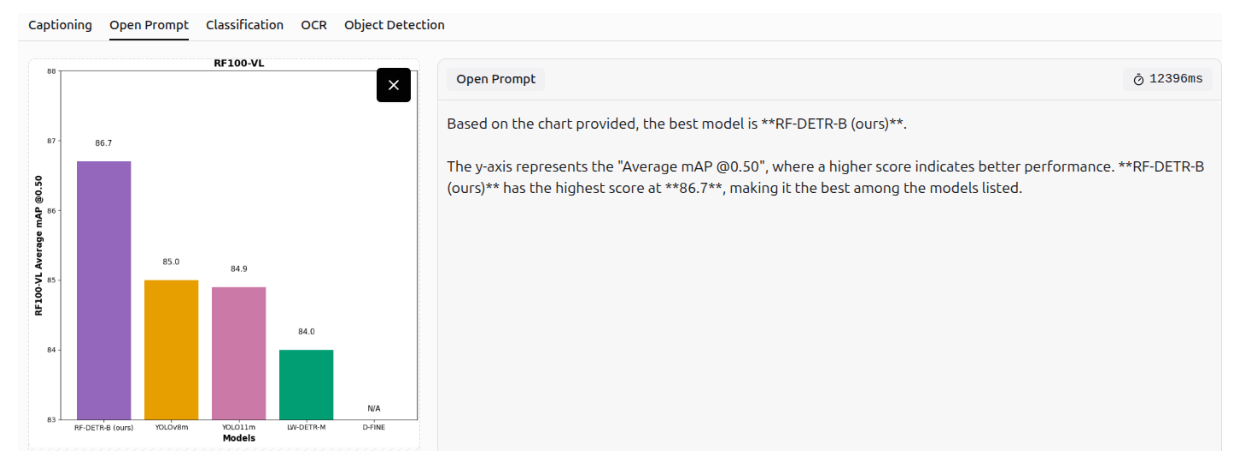
Information Extraction
It can also extract information from charts and graphs.
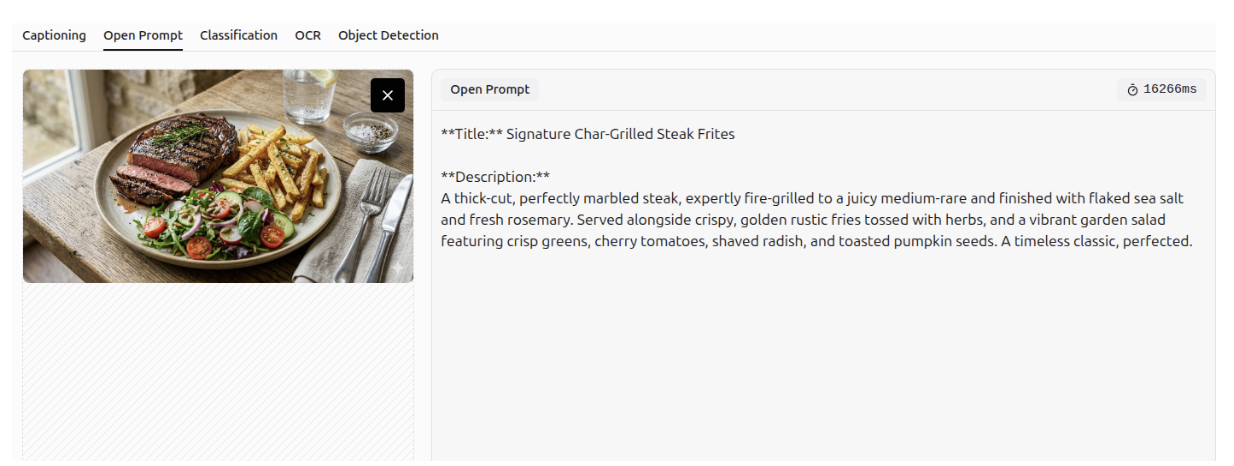
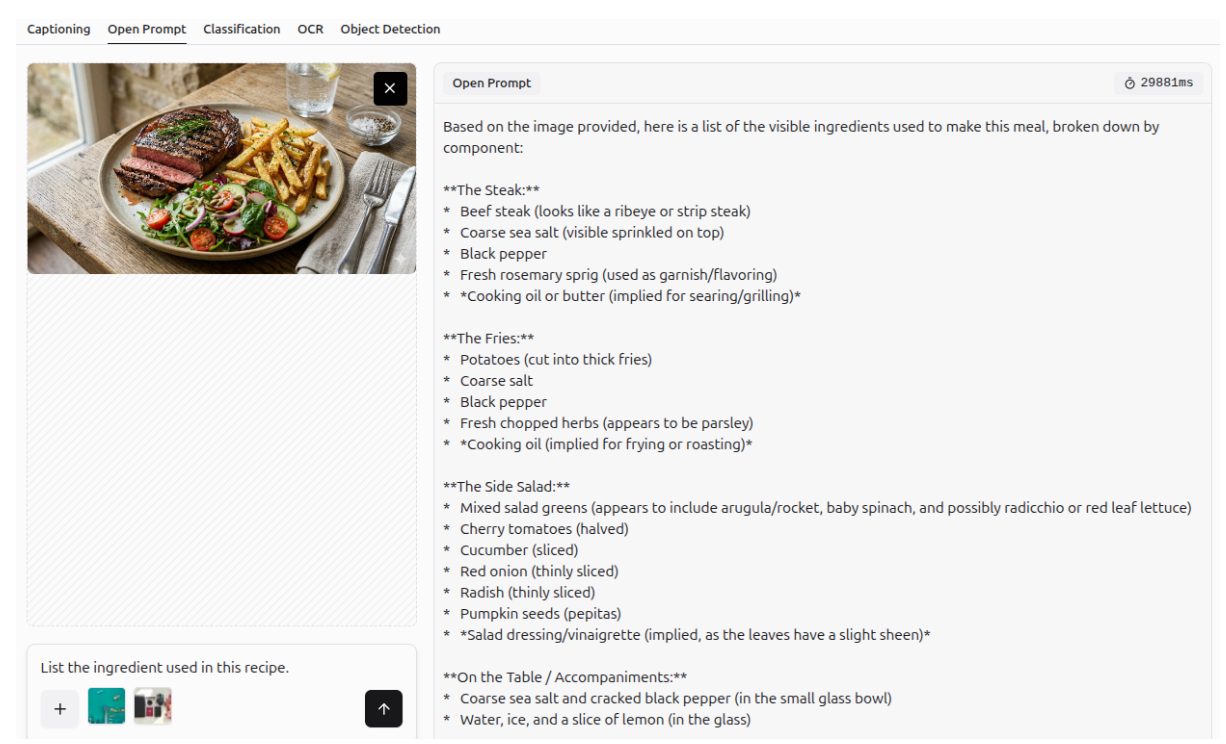
More Examples of VQA
More examples of visual question answering (VQA) are shown below.
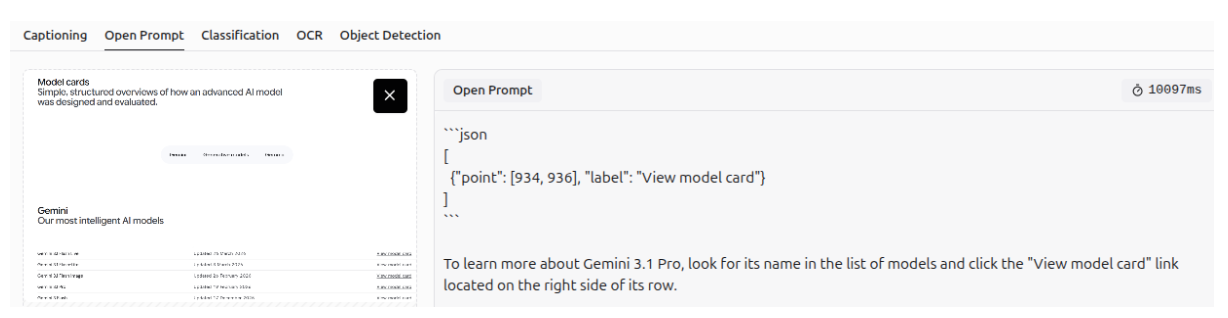
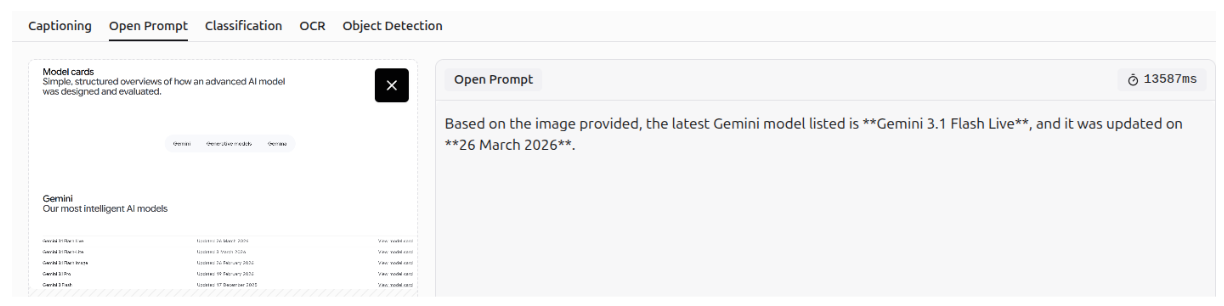
UI Automation: Screen Understanding
Gemini 3 can be used for UI automation, as it can understand web pages and screens.
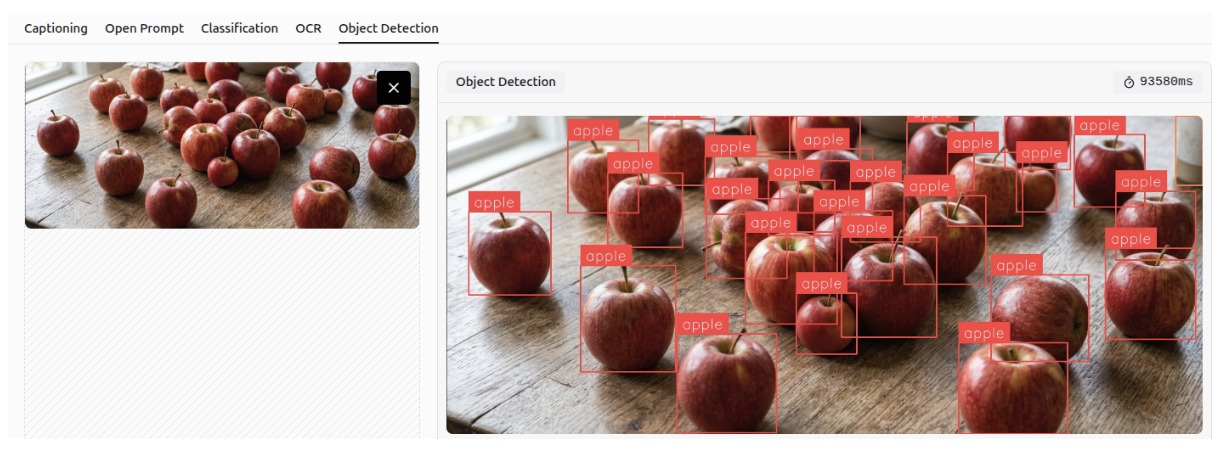
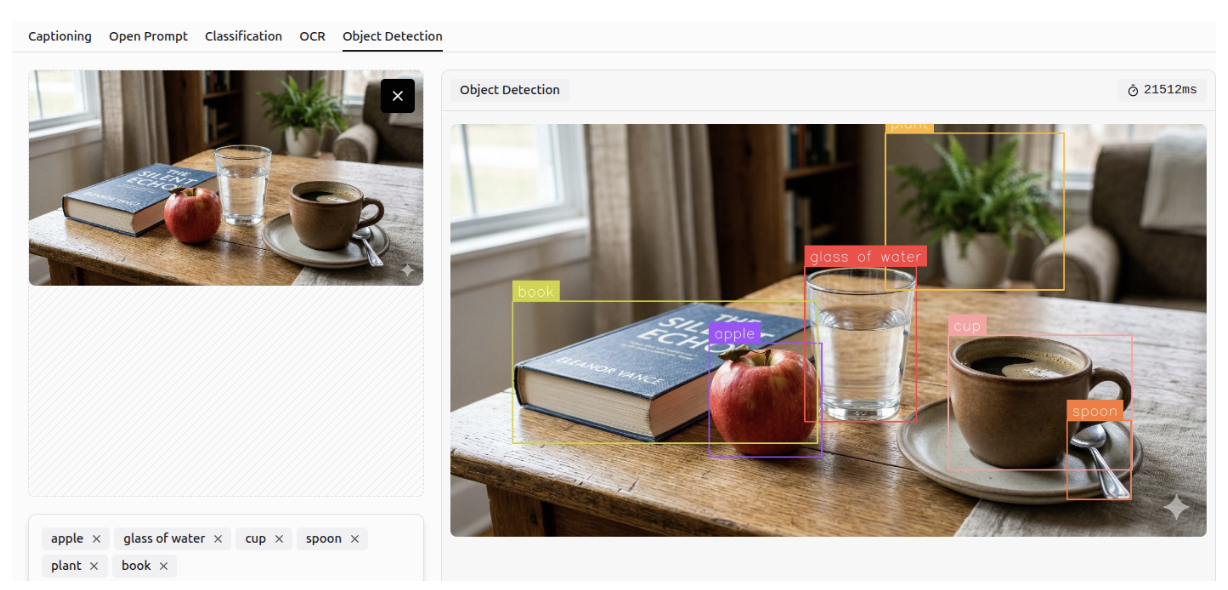
Object Detection
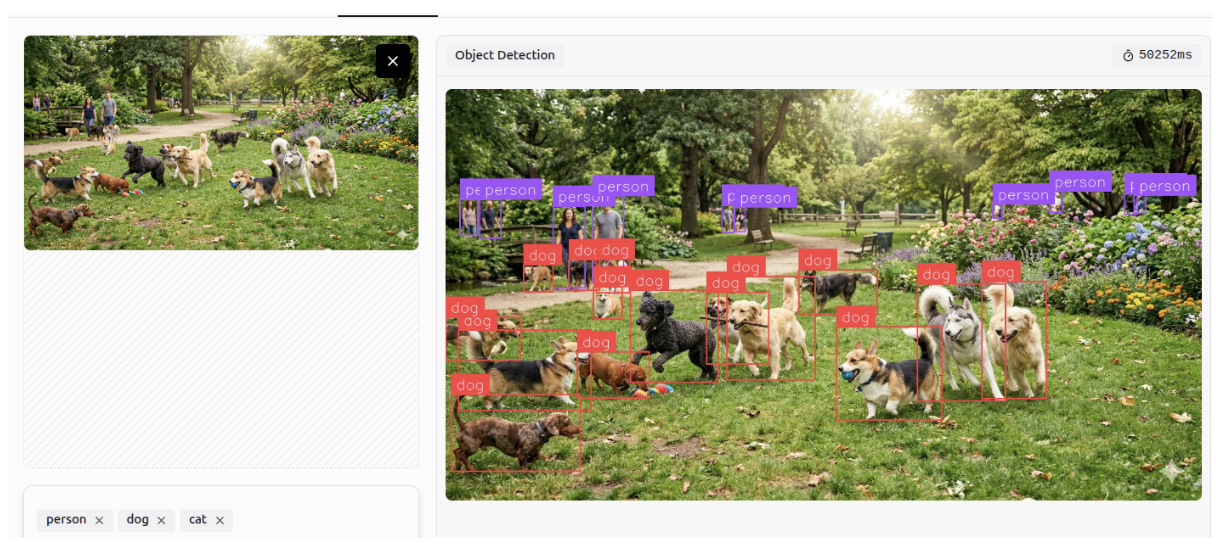
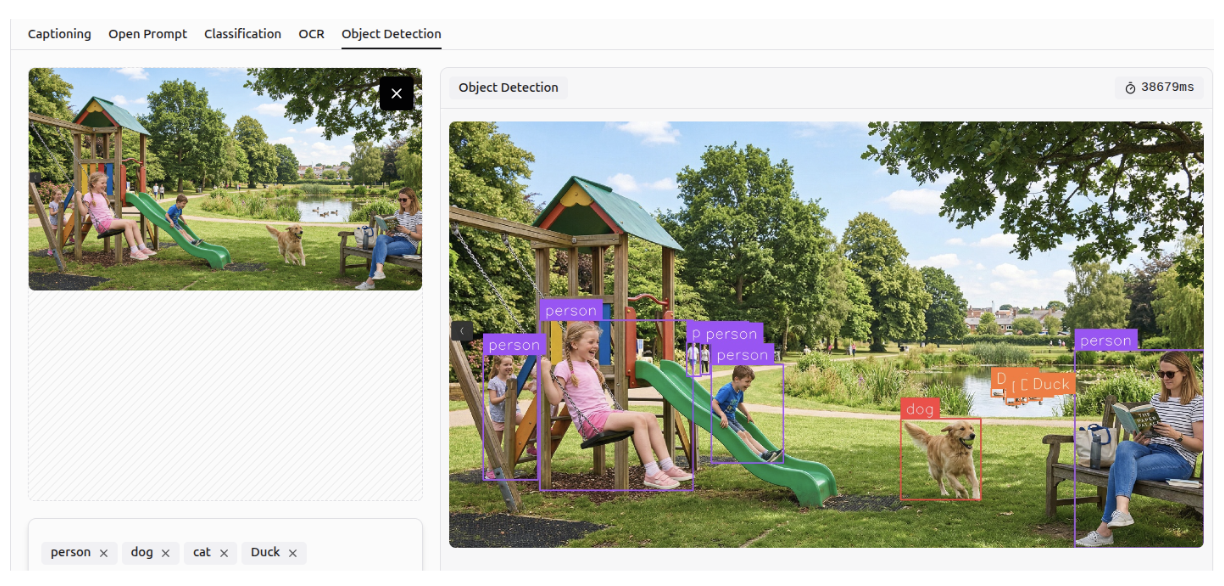
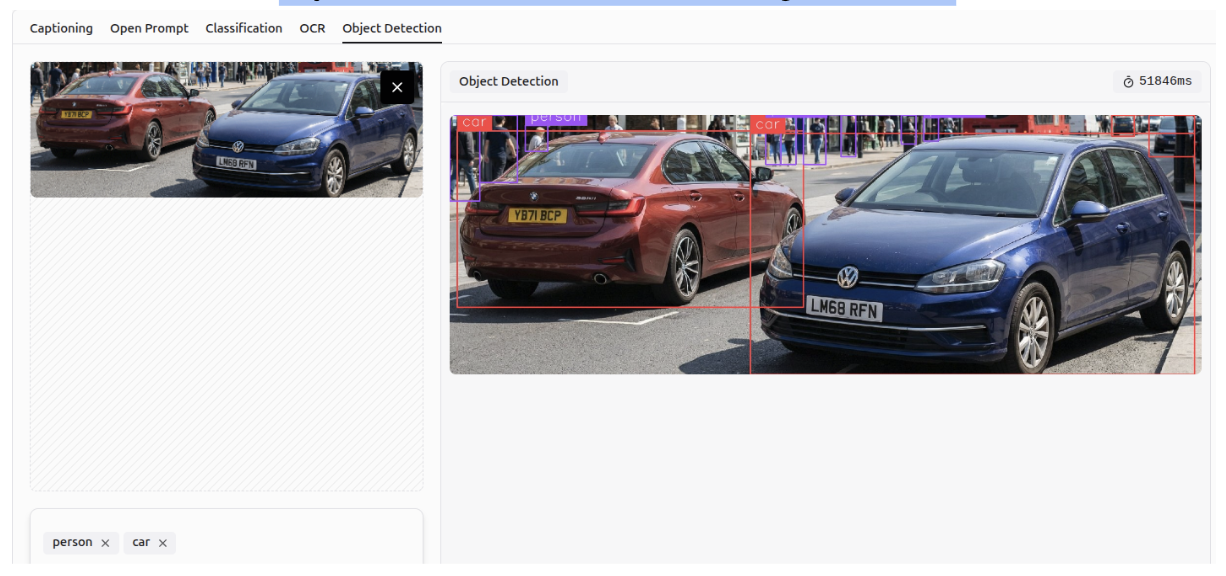
Gemini 3 can detect and identify objects within images according to specified classes, a task known as object detection. It can perform accurately even in crowded scenes and detect small objects.
Multi-Class Classification
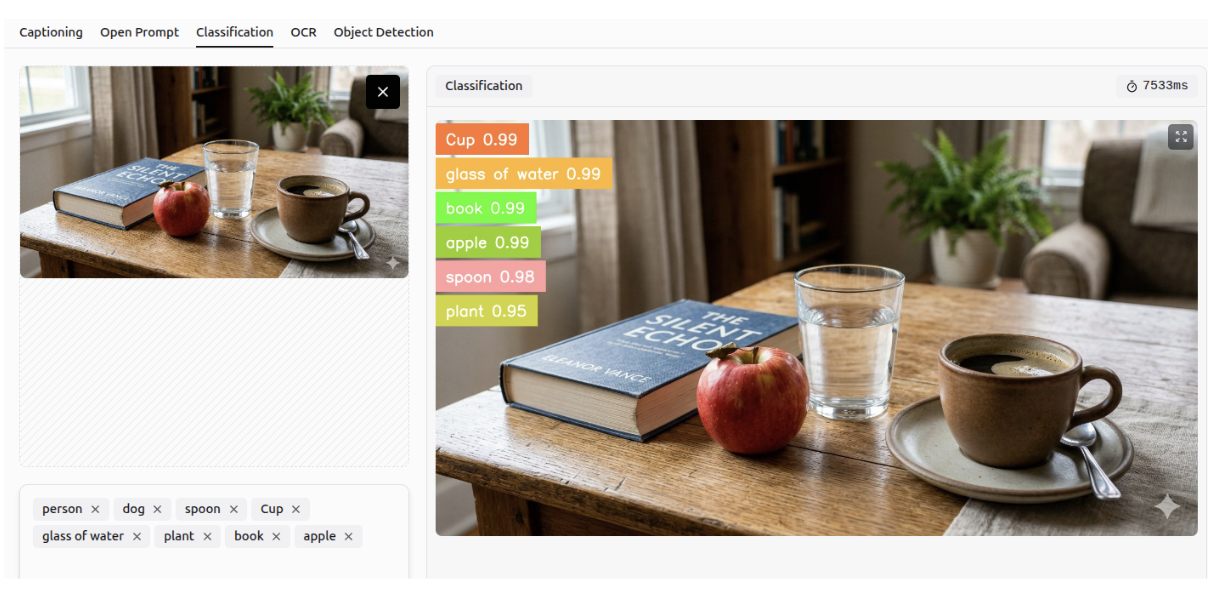
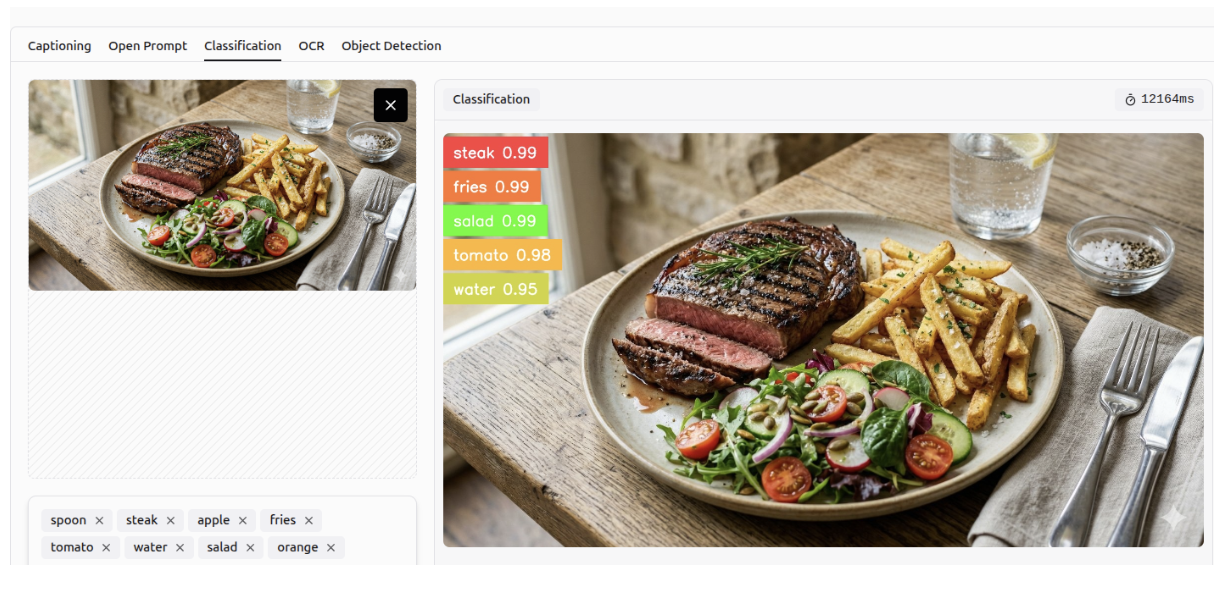
Gemini 3 can predict the likelihood of an object being present in an image based on specified classes, a task known as multi-class classification.
OCR
It can perform OCR to detect all text within an image, unlike before when it only detected text based on a specific question.
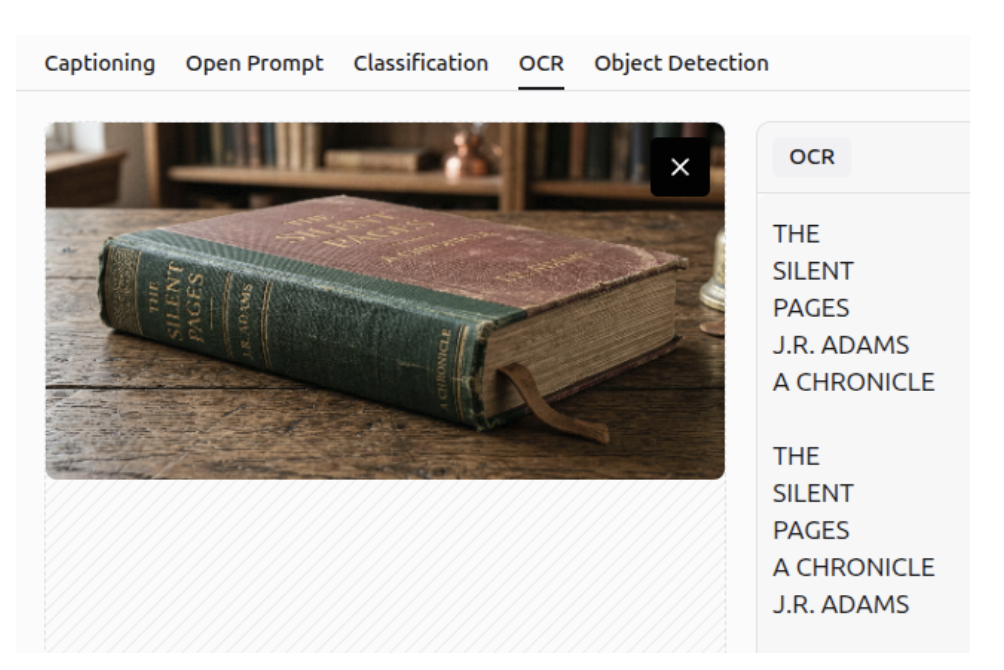
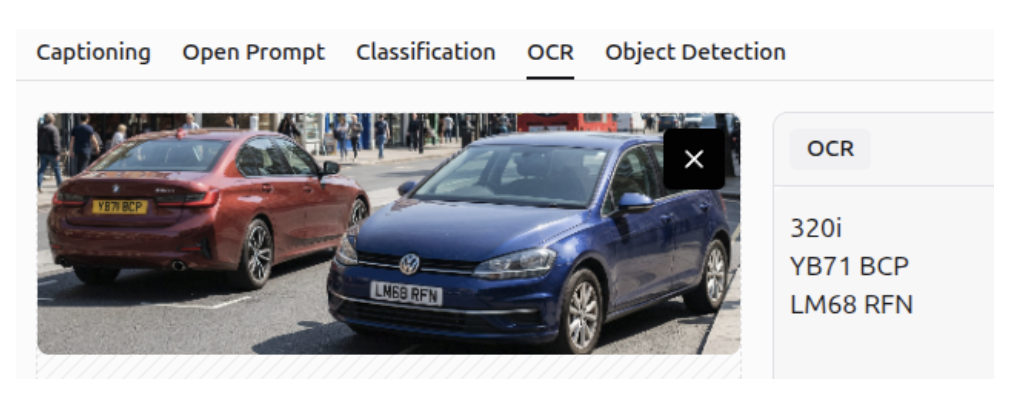
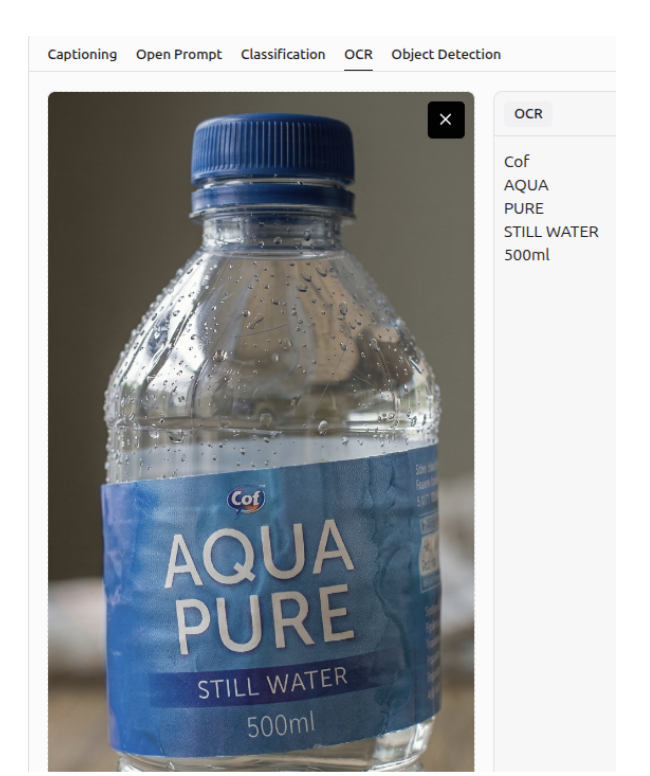
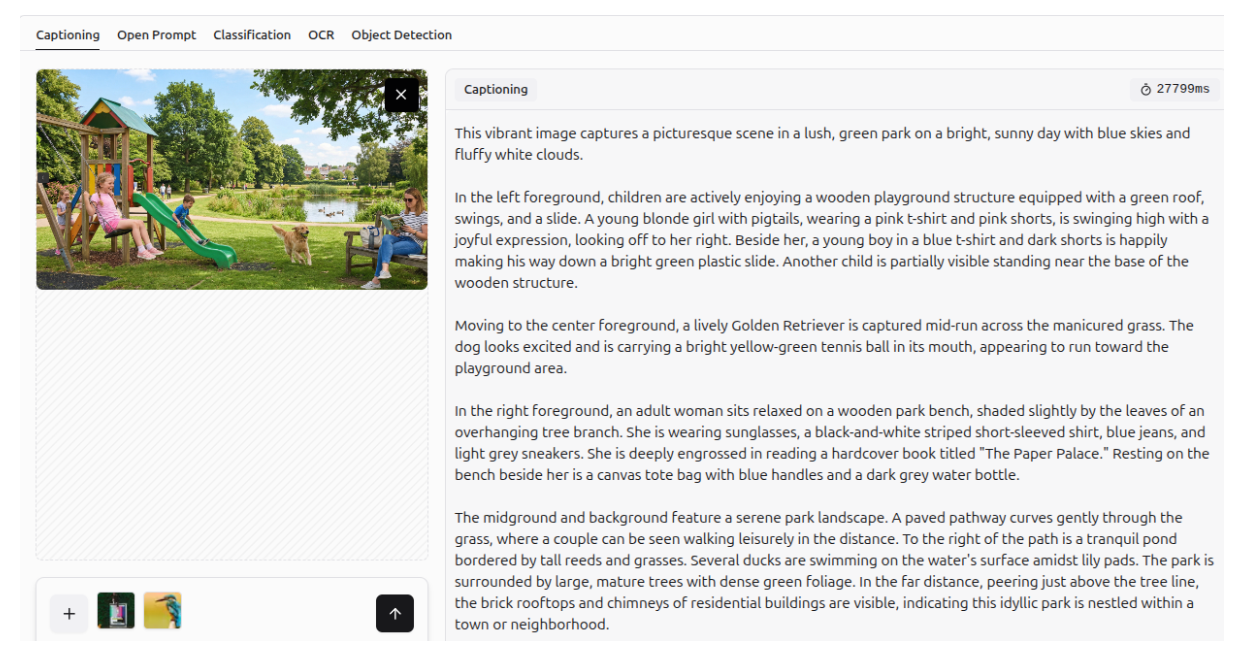
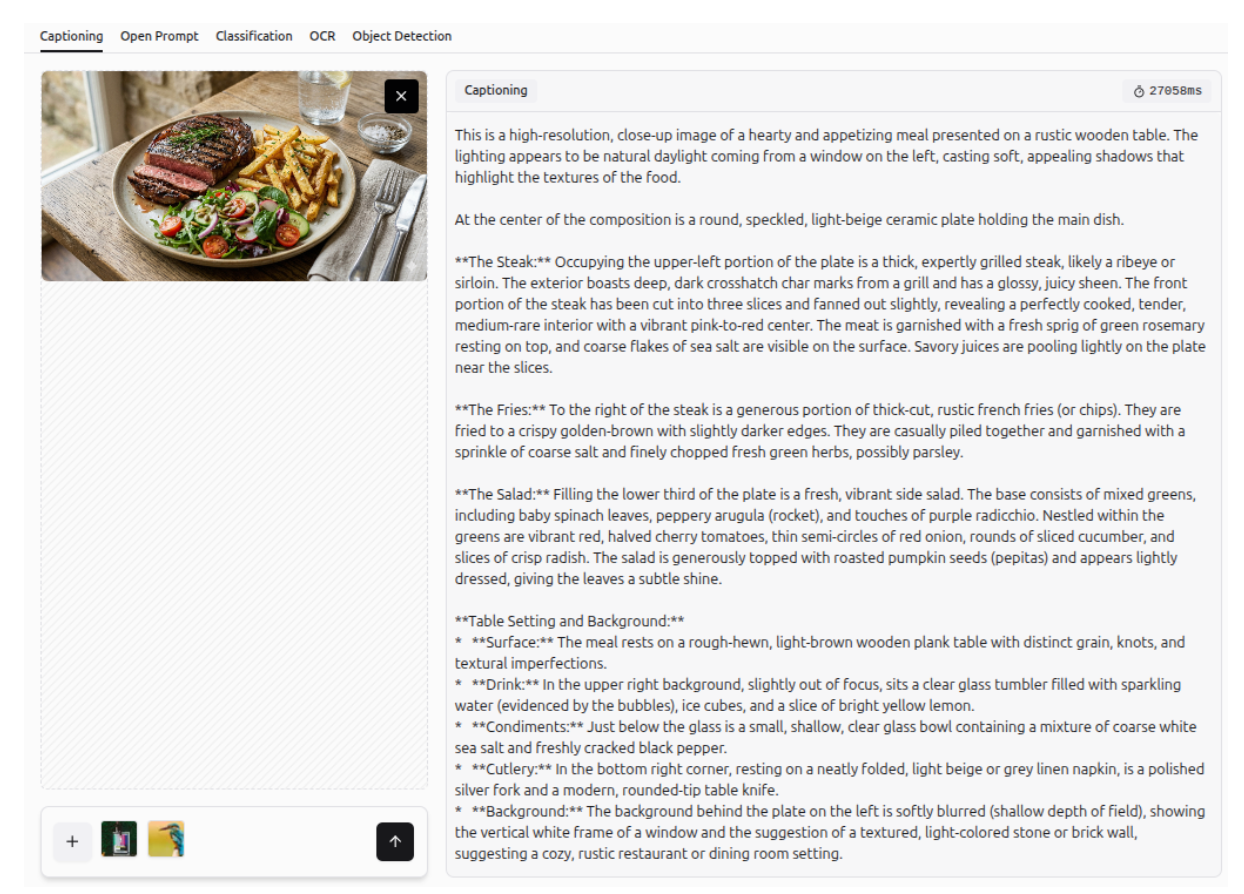
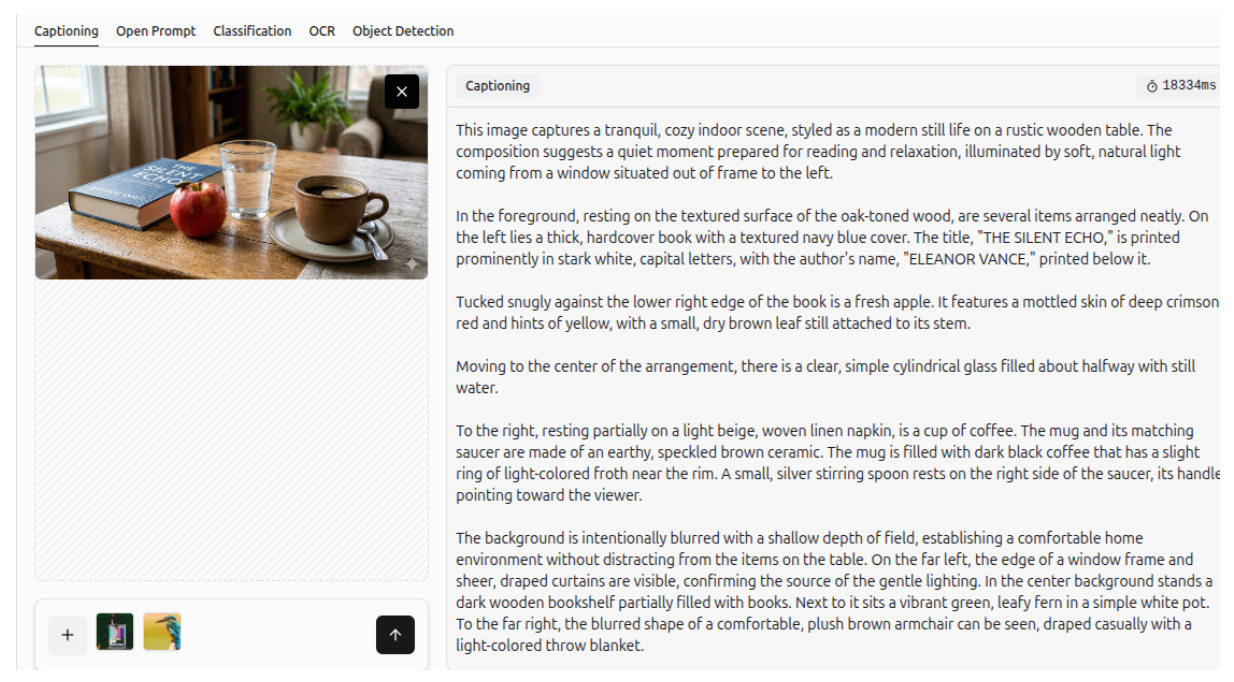
Image Captioning
More examples of Gemini 3 generating descriptive captions for images are shown below.
How to use Gemini 3 with Roboflow
Gemini 3 in Roboflow Playground
Roboflow provides a dedicated web-based interface, called Playground, for evaluating and comparing multiple AI vision models across different tasks. With this link, you can evaluate Gemini 3.1 Pro on 5 vision tasks (Captioning, Open Prompt, Classification, OCR and Object Detection). Examples of Gemini 3.1 Pro on different vision tasks are shown in the images below.
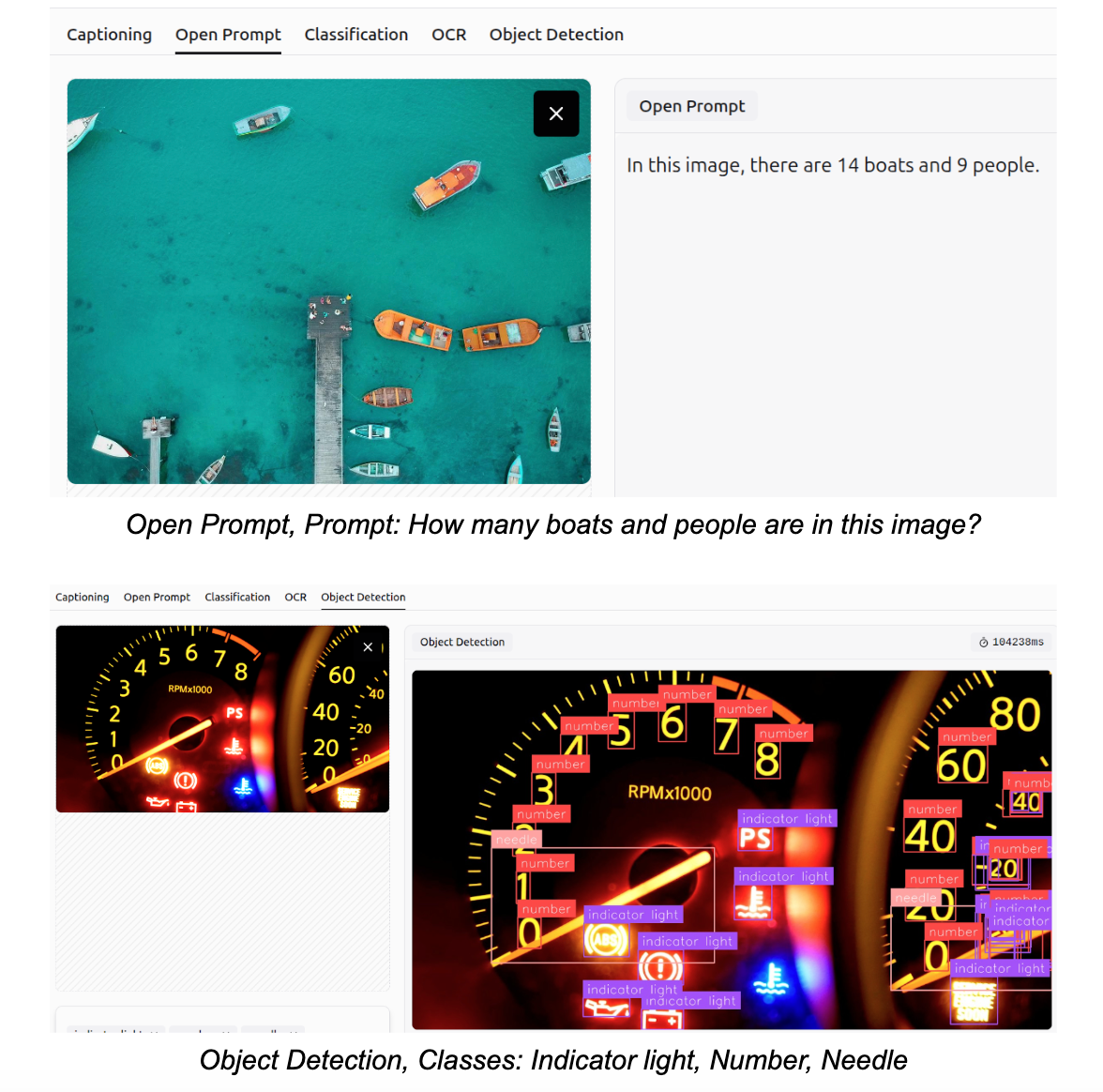
You can also compare different models side by side on Playground. Some examples are illustrated in the following images.
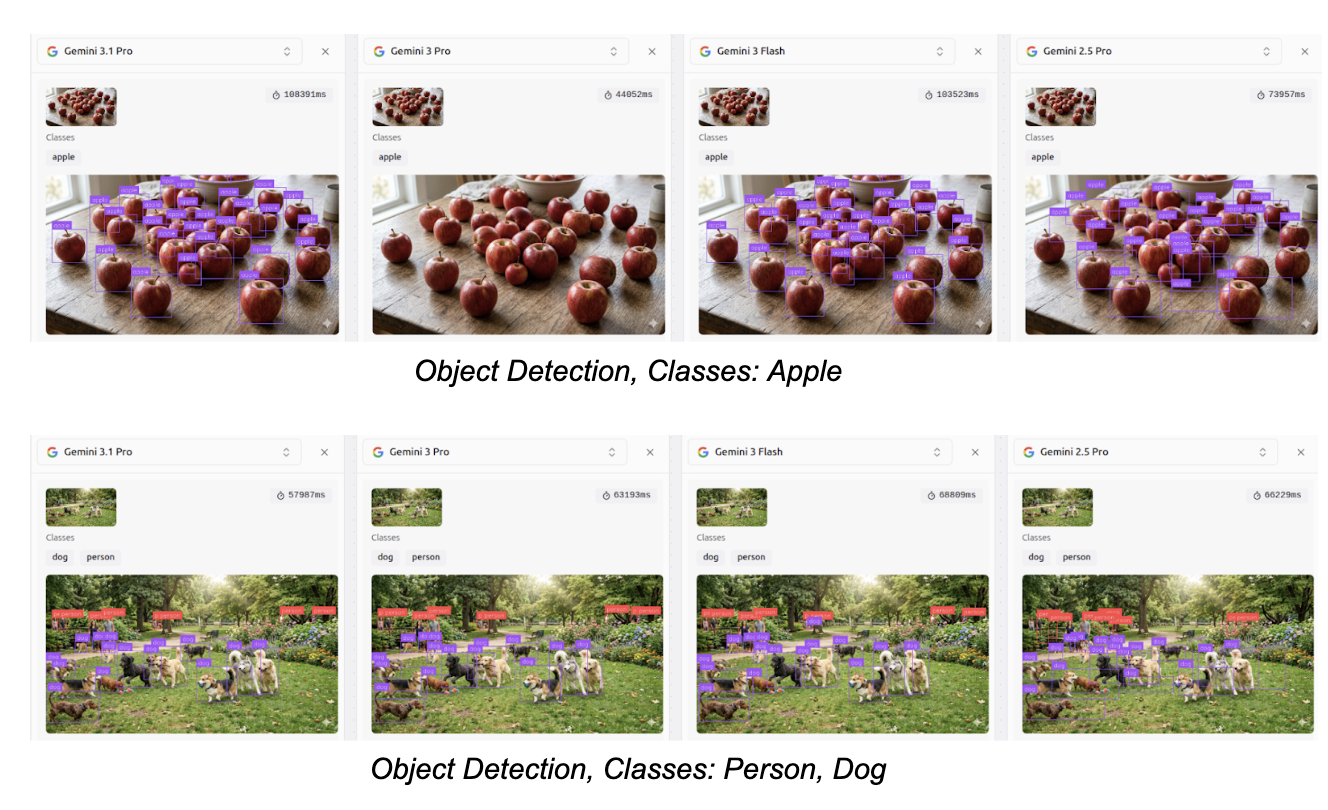
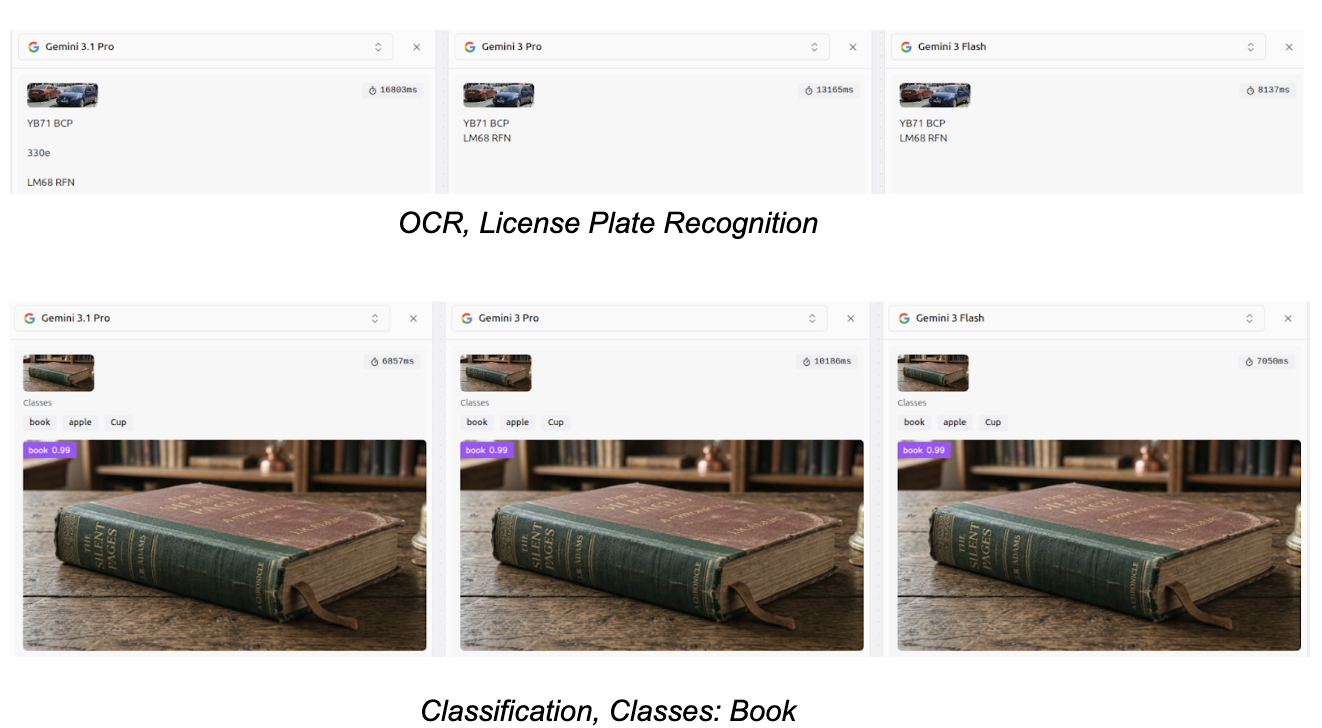
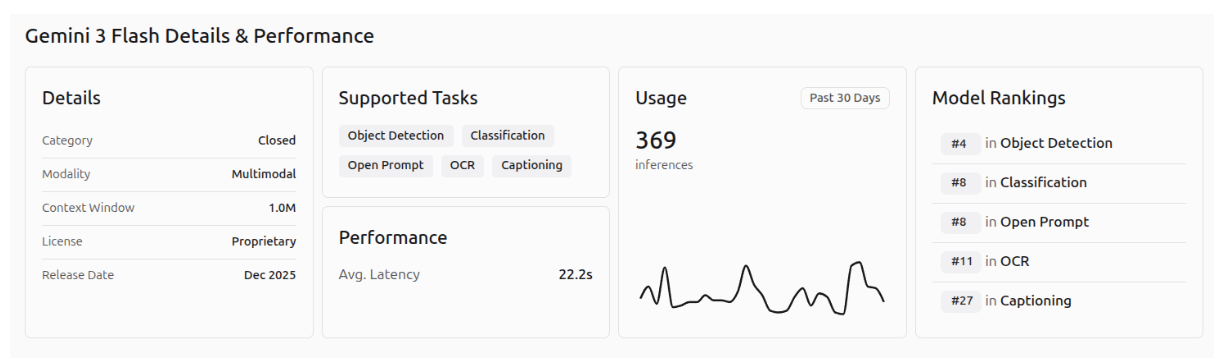
The performance of Gemini 3.1 Pro, Gemini 3 Pro, and Gemini 3 Flash on the different Roboflow playground vision tasks is shown in the images below.
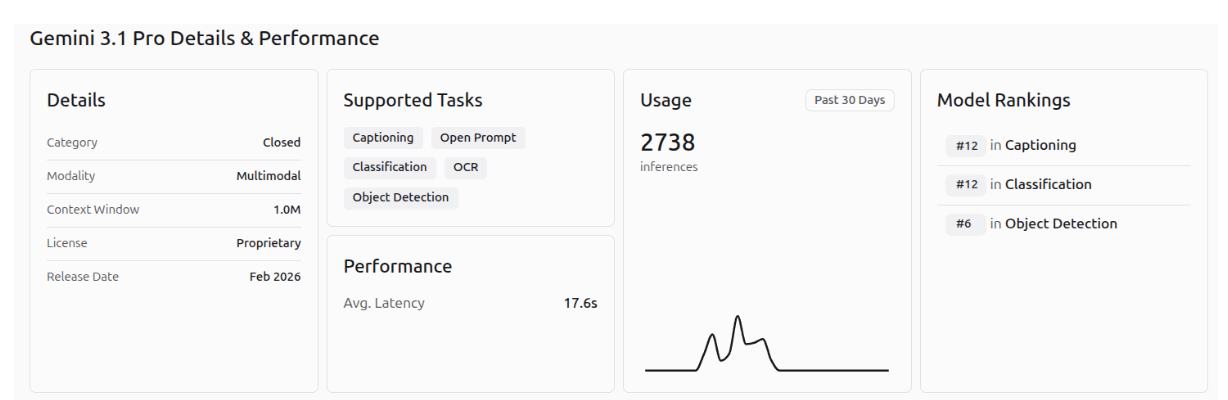
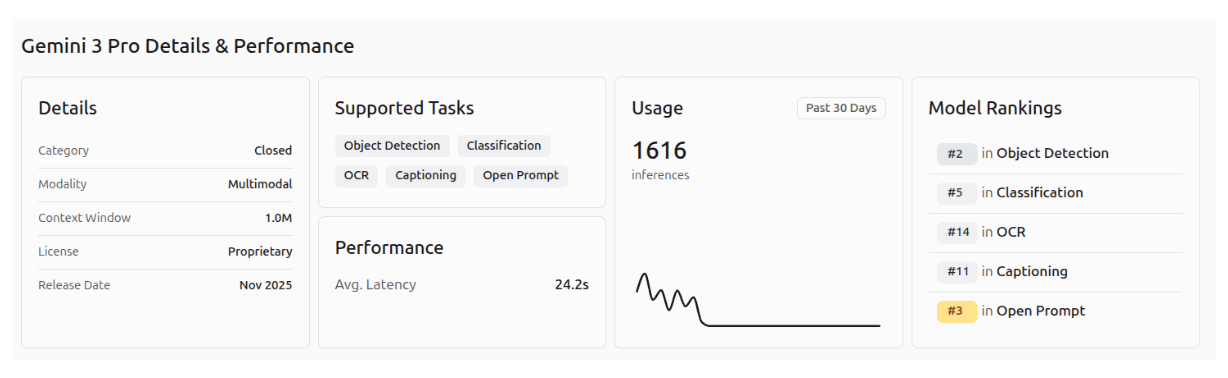
Gemini 3 in Roboflow Workflows
With Roboflow Workflows you can prototype, experiment, test, integrate and deploy pipelines to production. From this link you can evaluate Gemini 3.1 on a production-ready pipeline. Click the button “Deploy with an API” and choose the computer vision task you want.
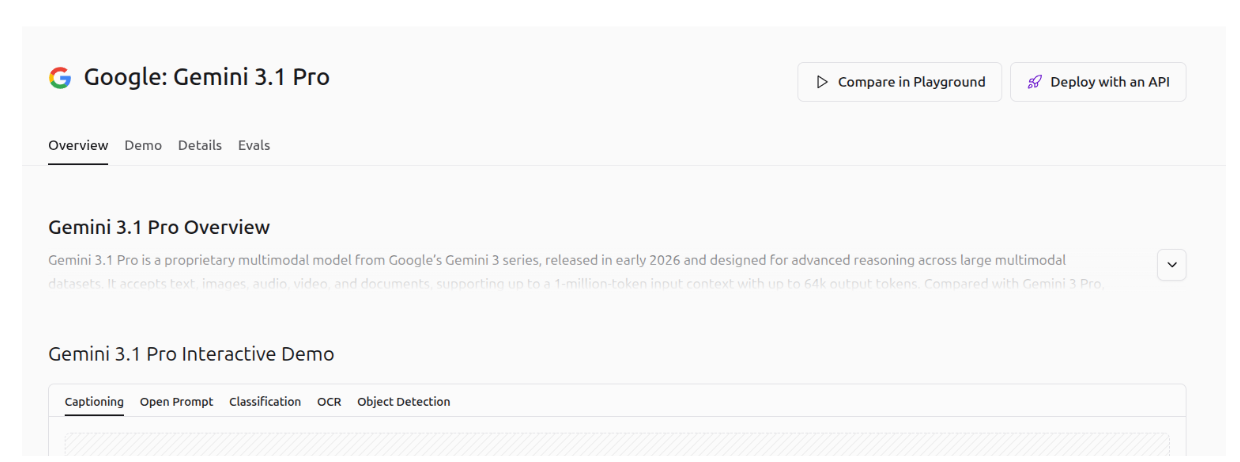
Click the button “Test API” to open Roboflow workflows. It is important to note that a Roboflow account and a Google API key are required. You can generate a Google API key in Google AI Studio.

Click Run, copy your Google API key in the field “model_api_key”, choose an image and the possible classes and finally click Run to run the model on your image. You can see the results in the output field.
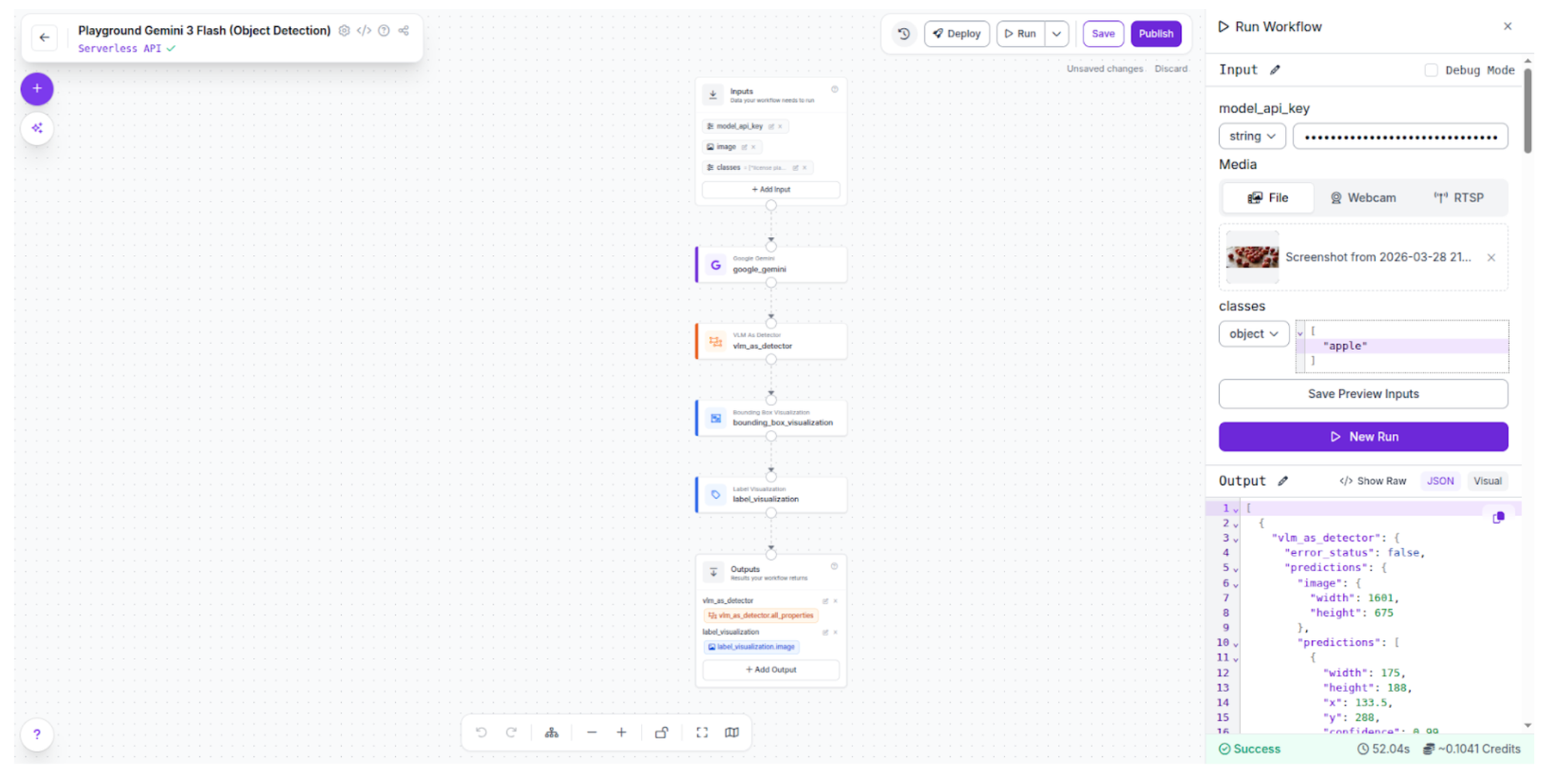
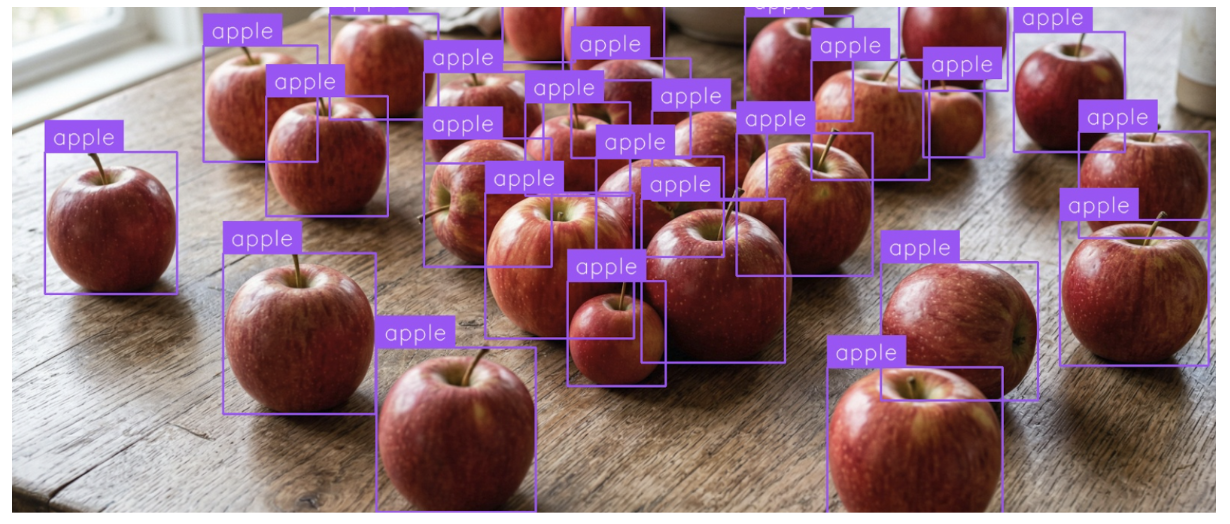
I chose object detection task with the class “apple” and the result with Gemini 3 Flash is highly accurate.
If the following error occurs it means that you have hit the rate limit for the Gemini API or you cannot use this specific model with a free account.

I changed to Gemini 3 Flash for this reason. You can find it in this link.
Gemini 3 with Google Colab: Run Python Code
You can also use Google Colab in this link to run the generated code. Choose the Python programming language when you create the workflow.
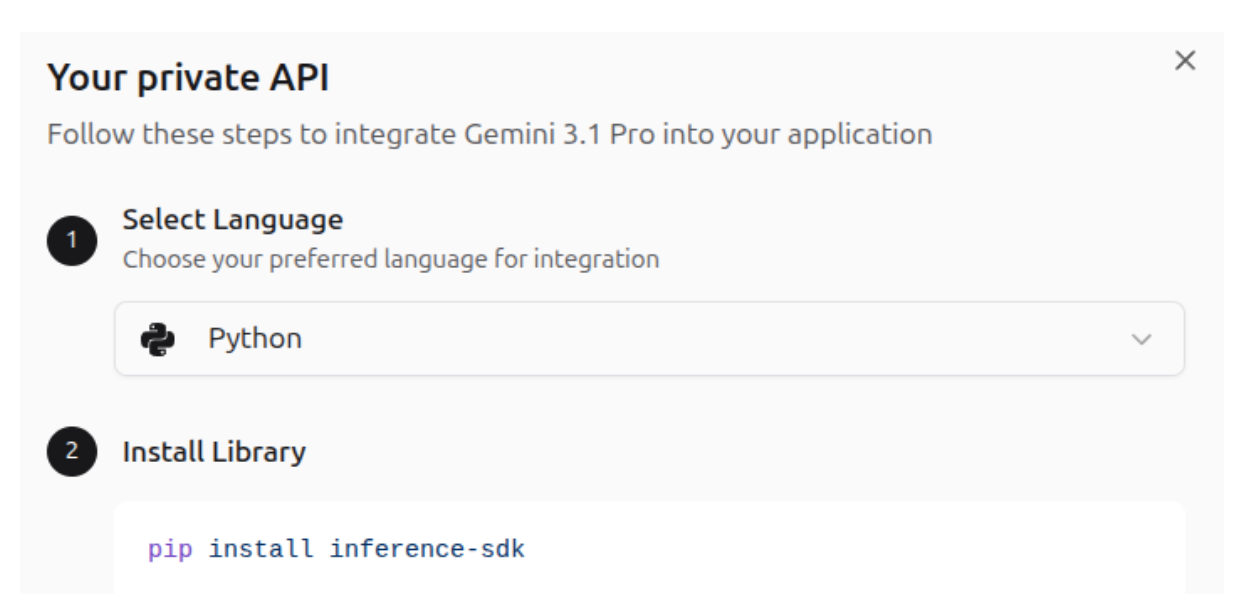
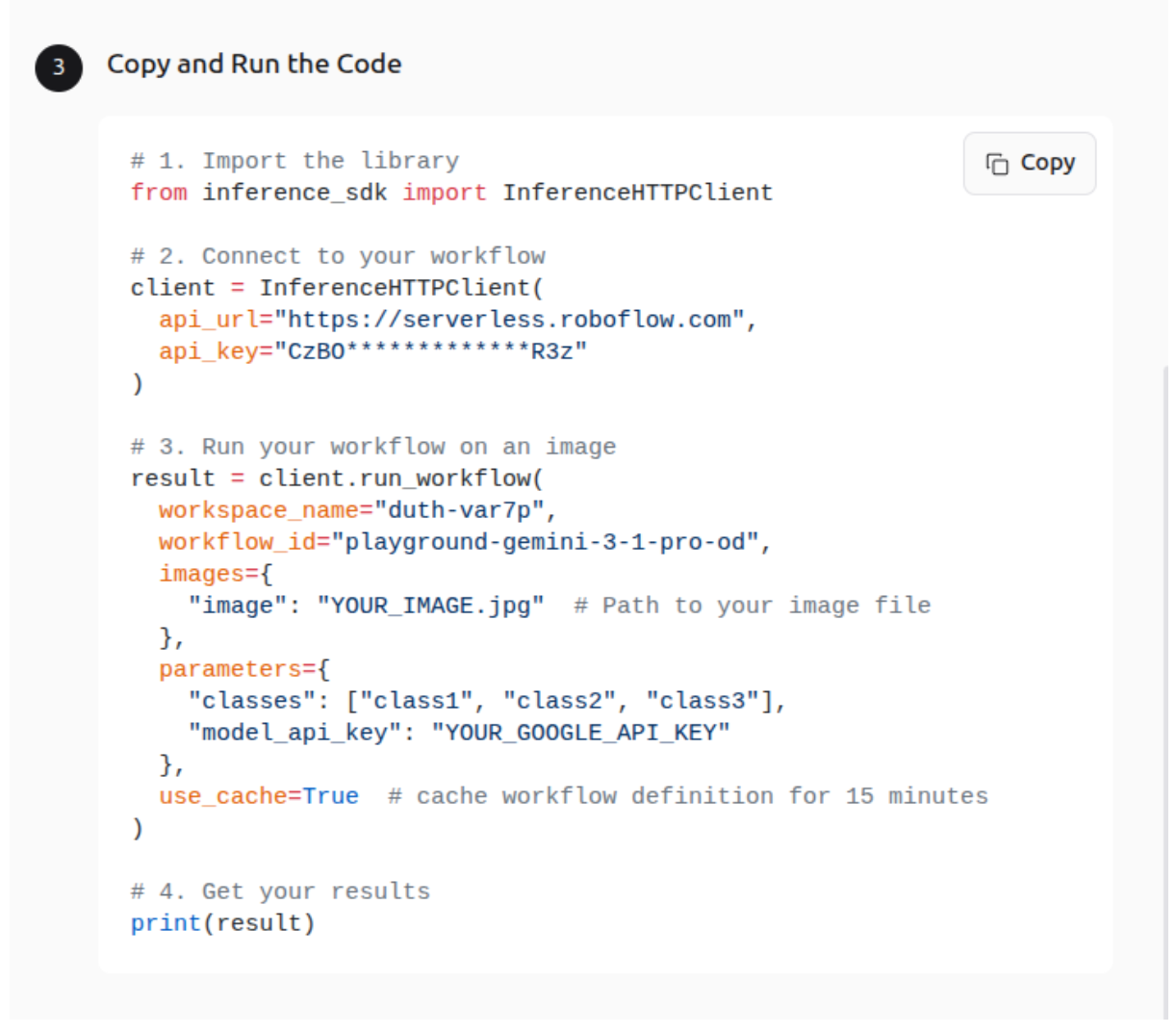
Create a new notebook and paste the following commands.
Install the required Inference SDK Library, which enables you to interact with an Inference Server over HTTP - hosted either by Roboflow or on your own hardware.
!pip install inference-sdk
Upload an image to Google Colab files, inside the notebook. And copy the generated python code. Add your Google API key, your classes and the image name in the corresponding fields.
1. Import the library
from inference_sdk import InferenceHTTPClient
2. Connect to your workflow
client = InferenceHTTPClient(
  api_url="https://serverless.roboflow.com",
  api_key=""
)
3. Run your workflow on an image
result = client.run_workflow(
  workspace_name="",
  workflow_id="",
  images={
    "image": "apples.png"  # Path to your image file
  },
  parameters={
    "classes": ["apple"],
    "model_api_key": ""
  },
  use_cache=True  # cache workflow definition for 15 minutes
)
4. Get your results
print(result)When you run the code the result will be printed after the current cell.
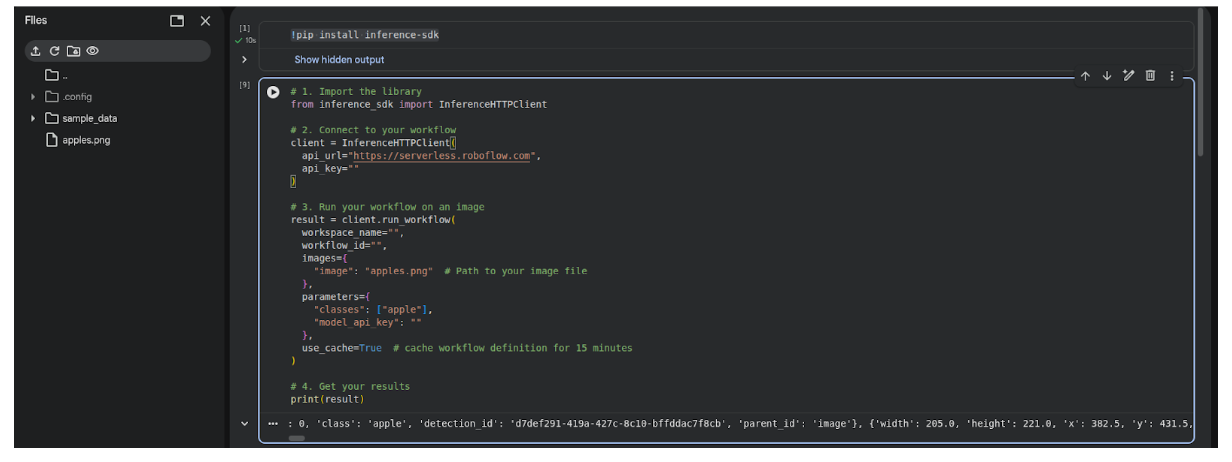
To visualize the image with detections you need to manually read the image in Python, draw the detections and show the image. You can do this using the following code.
5. Load the original image
img = np.array(Image.open("apples.png"))
img_bgr = cv2.cvtColor(img, cv2.COLOR_RGB2BGR)
6. Draw bounding boxes from the result
predictions = predictions = result[0]["vlm_as_detector"]["predictions"]["predictions"]

for pred in predictions:
    x, y, w, h = int(pred["x"]), int(pred["y"]), int(pred["width"]), int(pred["height"])
    x1, y1 = x - w // 2, y - h // 2
    x2, y2 = x + w // 2, y + h // 2

    label = f'{pred["class"]} {pred["confidence"]:.2f}'
    cv2.rectangle(img_bgr, (x1, y1), (x2, y2), (0, 255, 0), 2)
    cv2.putText(img_bgr, label, (x1, y1 - 10),
                cv2.FONT_HERSHEY_SIMPLEX, 0.6, (0, 255, 0), 2)
7. Display the image
img_rgb = cv2.cvtColor(img_bgr, cv2.COLOR_BGR2RGB)
plt.figure(figsize=(12, 8))
plt.imshow(img_rgb)
plt.axis("off")
plt.title(f"Detections: {len(predictions)} apple(s) found")
plt.show()
The image with the detected objects is shown below.
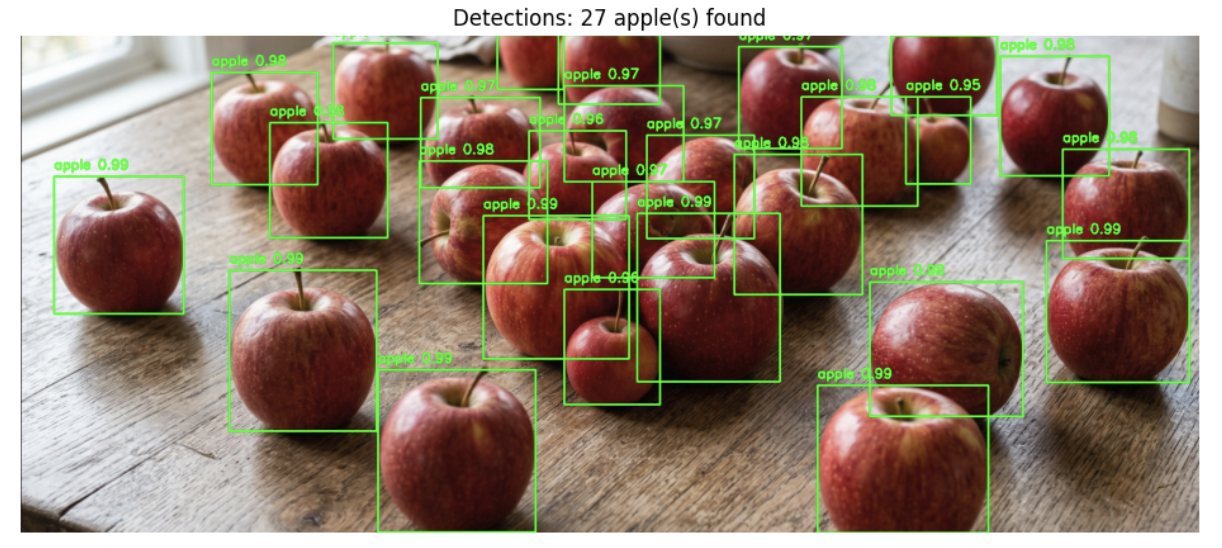
This custom code function is ideal for developing specialized applications.
Conclusion: Gemini 3 Is Redefining Multimodal AI
Gemini 3 is a remarkable AI model with outstanding multimodal capabilities, pushing the boundaries of what we thought AI could achieve. Its ability to understand and process text, images and other modalities makes it highly versatile for real-world applications.
Gemini 3 is now integrated into Google Search (AI Mode) to power AI Overviews with advanced reasoning, deep multimodality, and agentic coding, enhancing complex query understanding. Google has launched a new agentic development platform called Antigravity, which allows developers to delegate complex, end-to-end tasks to autonomous AI agents powered by Gemini 3.1 Pro. These agents can plan, write code, run terminal commands, and use browsers.
Google continues to advance Gemini models rapidly. A particularly notable development is the recent launch of Gemini 3.1 Flash Live, a high-quality audio and voice model released just a few days ago. This model represents a significant step in enhancing the multimodal and interactive capabilities of AI.
Multimodal AI evolves every day with new model releases, continuing to redefine what AI can achieve across industries and applications. Stay tuned to Roboflow to discover the latest AI models. Test Gemini 3.1 Pro on Roboflow Playground today.
Written by Panagiota Moraiti
Cite this Post
Use the following entry to cite this post in your research:
Contributing Writer. (Mar 16, 2026). Gemini 3 Guide: Master Google’s Deep Think Model in Roboflow. Roboflow Blog: https://blog.roboflow.com/use-gemini-3/