

Textile manufacturers must continuously inspect fabric for defects such as holes, stains, and thread irregularities. Traditional inspection processes often rely on human operators, making it difficult to maintain consistent quality at high production speeds. Computer vision systems can automate this process by continuously monitoring fabric, detecting defects, and triggering downstream actions in real time.
Even small defects can lead to rejected products, customer complaints, production delays, and material waste if they are not identified early. Automated inspection systems help manufacturers detect quality issues as soon as they occur, allowing operators to remove defective material before it reaches downstream production stages or customers.
Once a defect is detected, the result is typically forwarded to another system that records the incident, notifies operators, or triggers a physical response. To understand how these systems fit into manufacturing environments, it helps to distinguish between three common components: PLCs, MES systems, and webhooks.
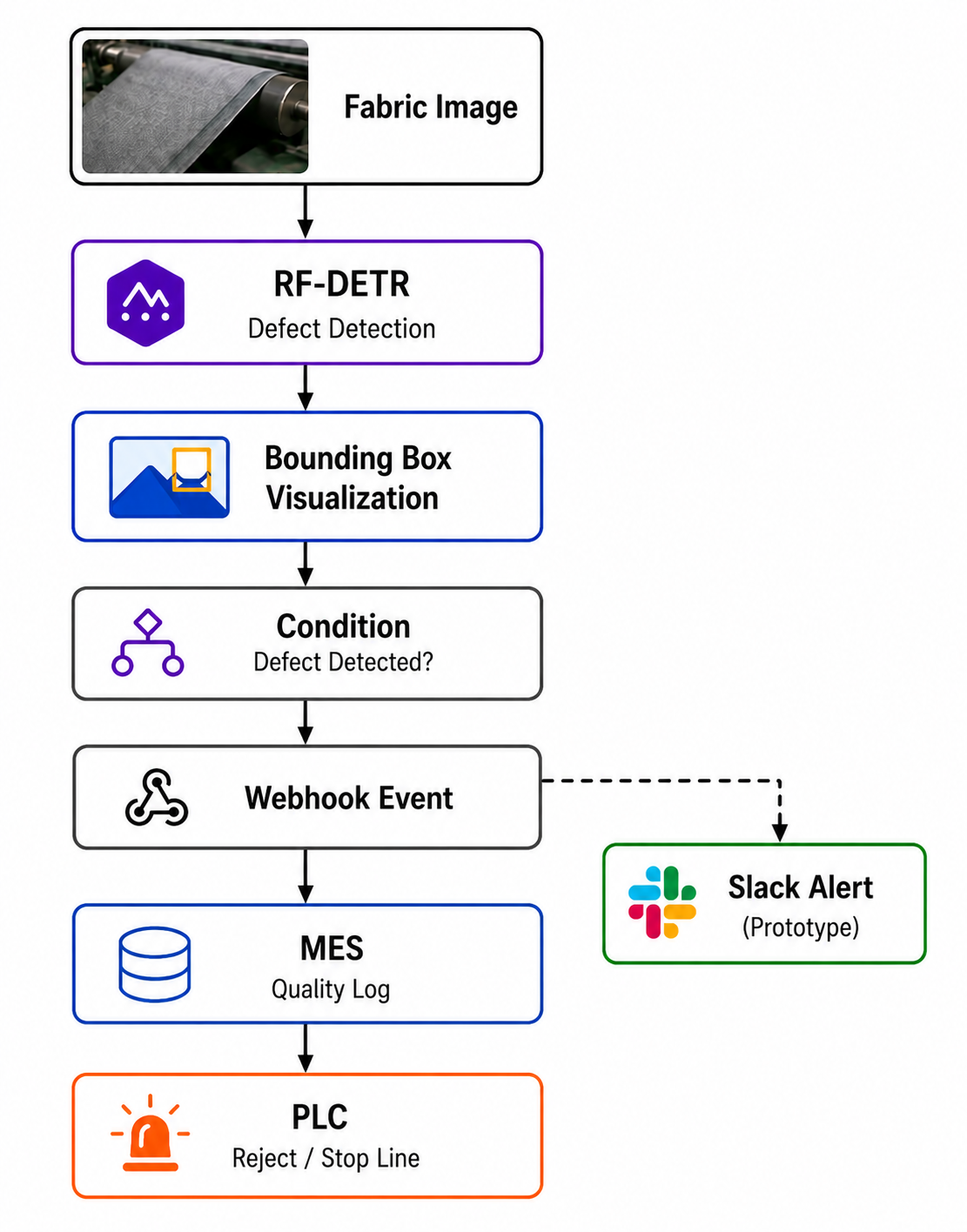
A Programmable Logic Controller (PLC) is an industrial controller used to connect software decisions to physical actions. For example, if a fabric defect is detected during inspection, a computer vision system could send a signal to a PLC, which then stops the production line, activates a warning light, or diverts the defective material for further inspection.
A Manufacturing Execution System (MES) is software used to track production events, quality incidents, and operational workflows. When a defect is detected, the MES can record information such as the defect type, production batch, machine identifier, timestamp, and inspection result, creating a traceable quality record.
A webhook is an HTTP request automatically sent when a predefined event occurs. Webhooks are commonly used to integrate computer vision systems with notification platforms, operational software, and other downstream services.
Triggering PLC, MES, Slack from a Vision Model
In this tutorial, we will build a prototype that uses a webhook to send textile defect alerts directly to Slack whenever a hole, stain, or thread defect is detected in the inspected fabric. Here's the workflow we'll build.
Step 1: Prepare a Textile Defect Dataset
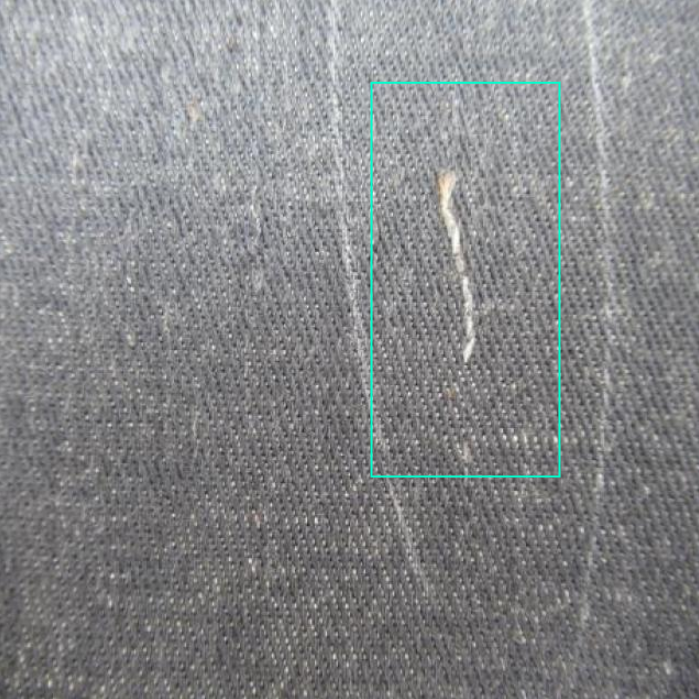
To train the defect detector, use the Textile Computer Vision Model dataset from Roboflow Universe. The dataset contains fabric images annotated with four defect classes:
- holes
- stains
- thread
- null (no defect)
These annotations allow the model to learn the visual characteristics of common textile defects that can impact product quality.
Step 2: Train a Textile Defect Detection Model
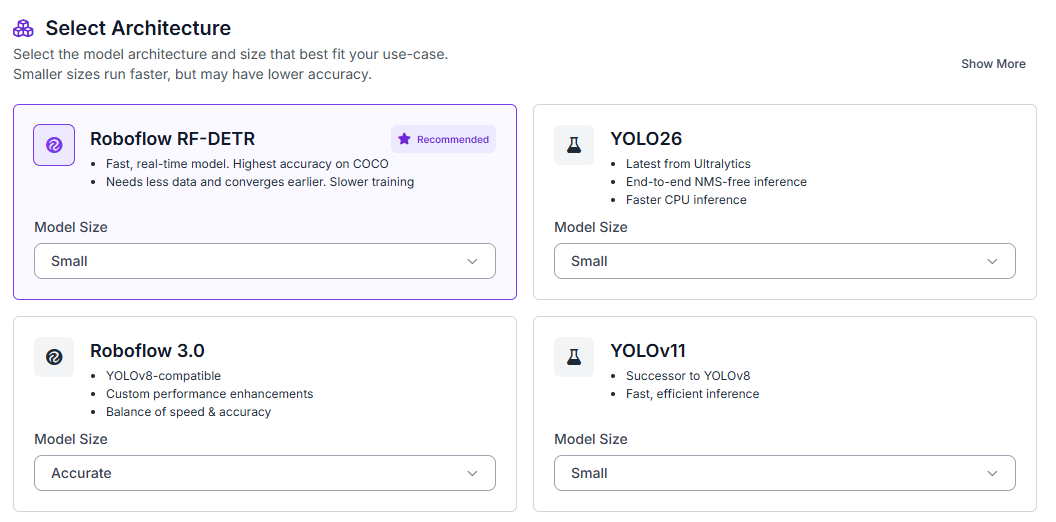
Start by navigating to the Train tab in your Roboflow project, then select Custom Training. From the available architectures, choose Roboflow RF-DETR and set the model size to Small.
Once the model architecture is selected, Roboflow will prompt you to generate a dataset version before starting the training job. Configure a 70/15/15 split for training, validation, and testing directly inside the version generation screen.
Enable preprocessing steps such as:
- Auto-orientation
- Resize preprocessing
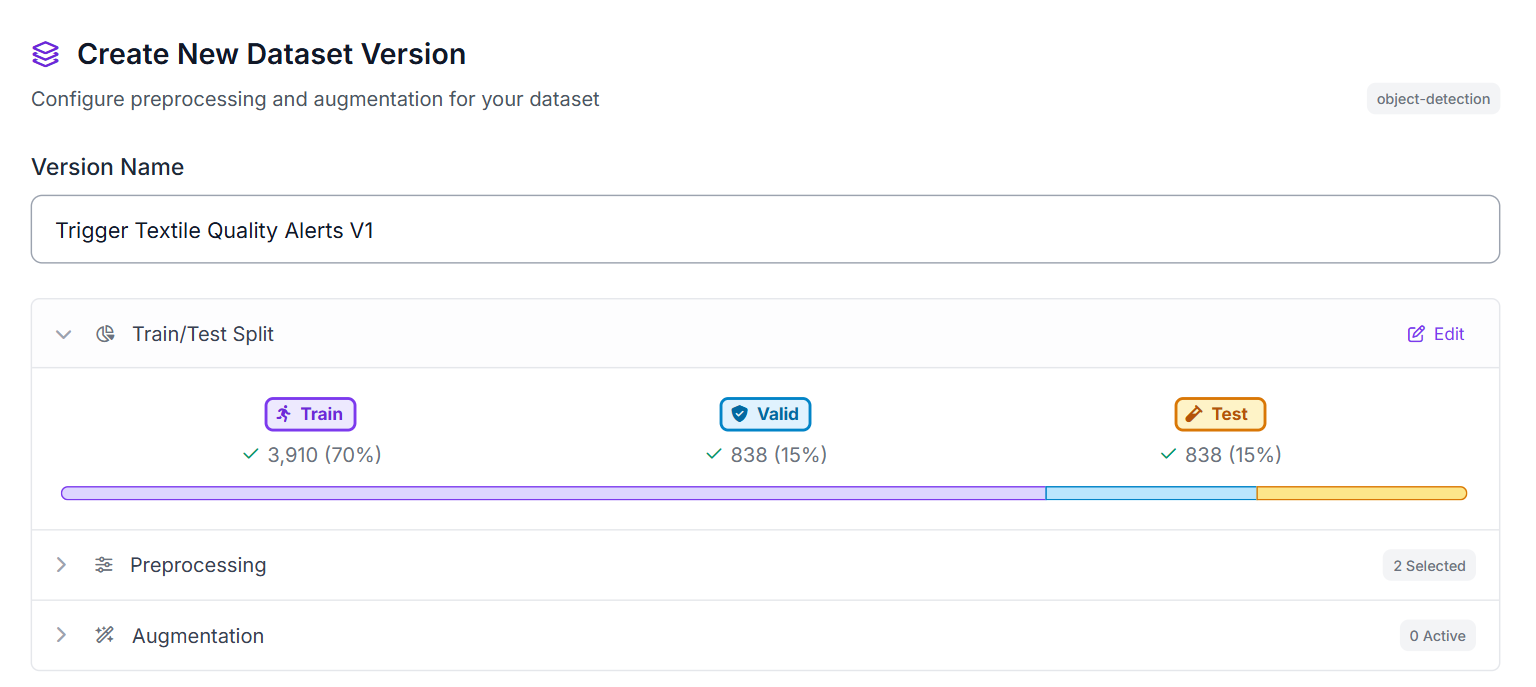
These preprocessing steps help standardize textile images captured under different lighting conditions, fabric textures, and camera setups while ensuring a consistent input resolution for RF-DETR training.
After configuring the training job and generating the dataset version, Roboflow will begin training the RF-DETR model on the annotated fabric images.
Step 3: Build the Roboflow Workflow
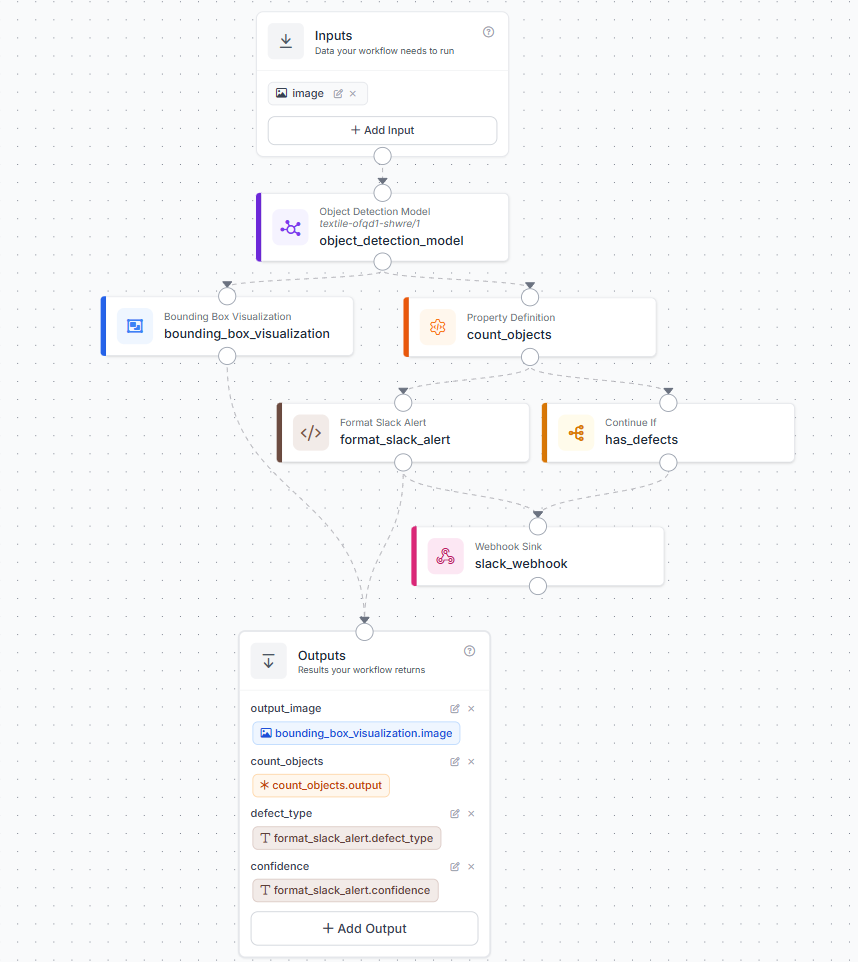
After training the textile defect detection model, create a Roboflow Workflow that connects defect detection, visualization, defect counting, conditional alerting, and Slack delivery.
The workflow contains the following blocks:
- Input: receives the fabric inspection image.
- RF-DETR Object Detection Model: detects textile defects such as holes, stains, and thread defects.
- Bounding Box Visualization: overlays detected defects on the image for visual inspection.
- Property Definition (count_objects): counts the total number of detections returned by the model.
- Format Slack Alert: receives the model predictions and defect count, extracts the detected defect type and confidence score, and formats them into a readable Slack message.
- Continue If (has_defects): checks whether count_objects is greater than zero before allowing the webhook to run.
- Slack Webhook: sends the formatted alert to Slack only when defects are present.
- Outputs: returns the annotated image, defect count, defect type, and confidence score.
This workflow separates detection, visualization, counting, and alert delivery into clear stages. RF-DETR identifies defects, the visualization block makes the results easy to inspect, the count block determines whether a defect exists, and the Slack blocks notify operators only when action is needed.
The completed workflow should resemble the configuration shown below.
Step 4: Configure Slack Alerting Logic
The workflow uses a combination of Property Definition, Continue If, and Format Slack Alert blocks to ensure alerts are only generated when defects are detected.
The count_objects Property Definition block counts the total number of defects returned by the RF-DETR model. This value is then passed to the has_defects Continue If block, which acts as a simple filter. If no defects are detected, the workflow stops, and no notification is sent. When one or more defects are found, the workflow continues to the alerting stage.
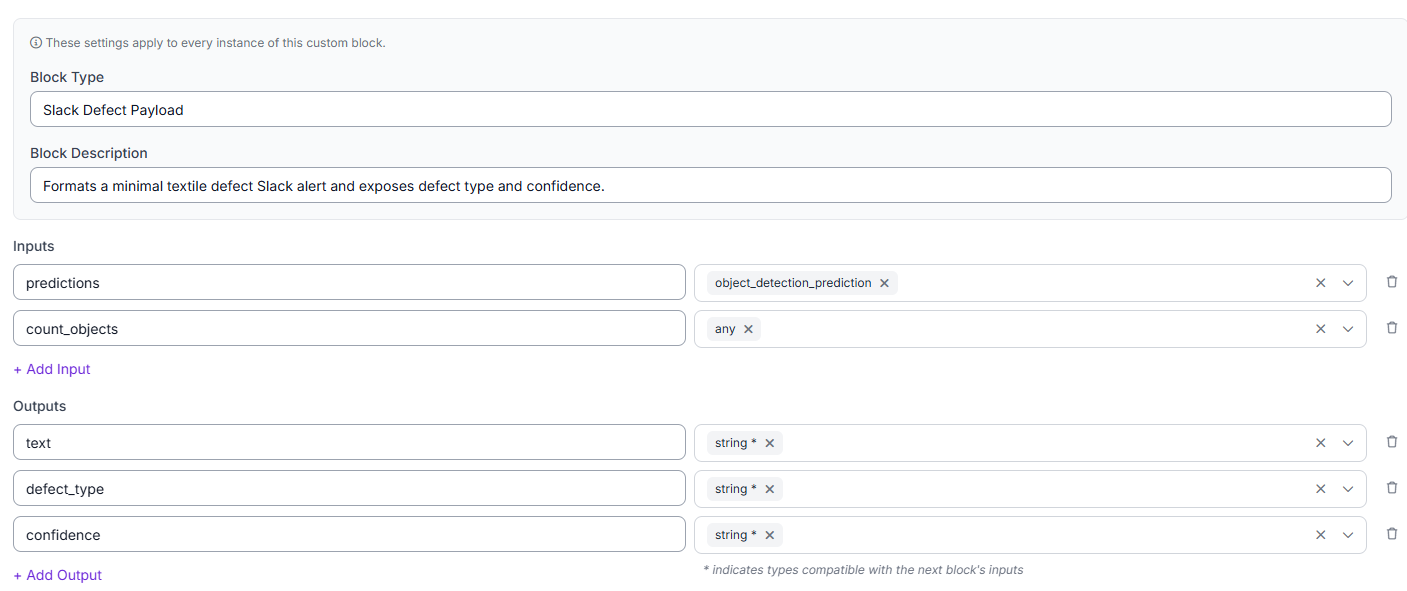
Next, configure the Format Slack Alert block. This custom block receives the model predictions and total defect count, then extracts the detected defect type and confidence score and formats them into a human-readable Slack alert. The alert includes:
- Defect type
- Detection confidence
- Total defect count
This provides enough information for operators to quickly understand what was detected without needing to inspect the raw model output.
Step 5: Send Textile Quality Alerts to Slack
Create a Slack webhook URL and configure the Roboflow Webhook block to send notifications directly to this endpoint.
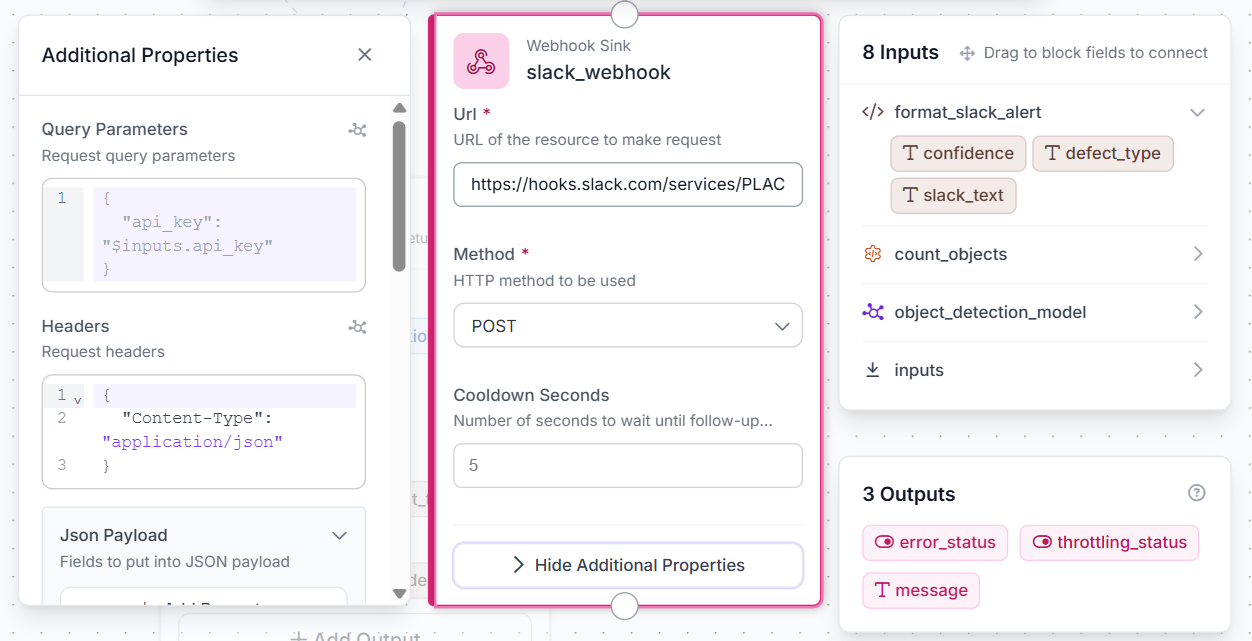
When a defect is detected, Slack receives a quality-control alert containing the defect count, defect type, and confidence score. This provides a simple way to notify operators, quality engineers, or production supervisors without requiring additional infrastructure.
A typical alert might contain information such as:
- Defect count: 1
- Defect detected: Thread
- Confidence: 64%
Although Slack is used in this tutorial, the same webhook payload could later be forwarded to MES platforms, quality databases, production monitoring tools, or PLC-based automation systems that trigger alarms or remove defective products from the production line.
Expected Alert:

Step 6: Test the Workflow
With the workflow configured, run inference on multiple textile images to verify that the system behaves correctly under different inspection scenarios. Test both defect-free fabric and images containing holes, stains, or thread defects.
For each image, review three outputs:
- The image with the detected defect boxes.
- The detected defect type and confidence score.
- The generated Slack alert when defects are present.
Testing a variety of fabric samples helps validate both the detection model and the alerting workflow before integrating the system into a production inspection process.
Defect detected:
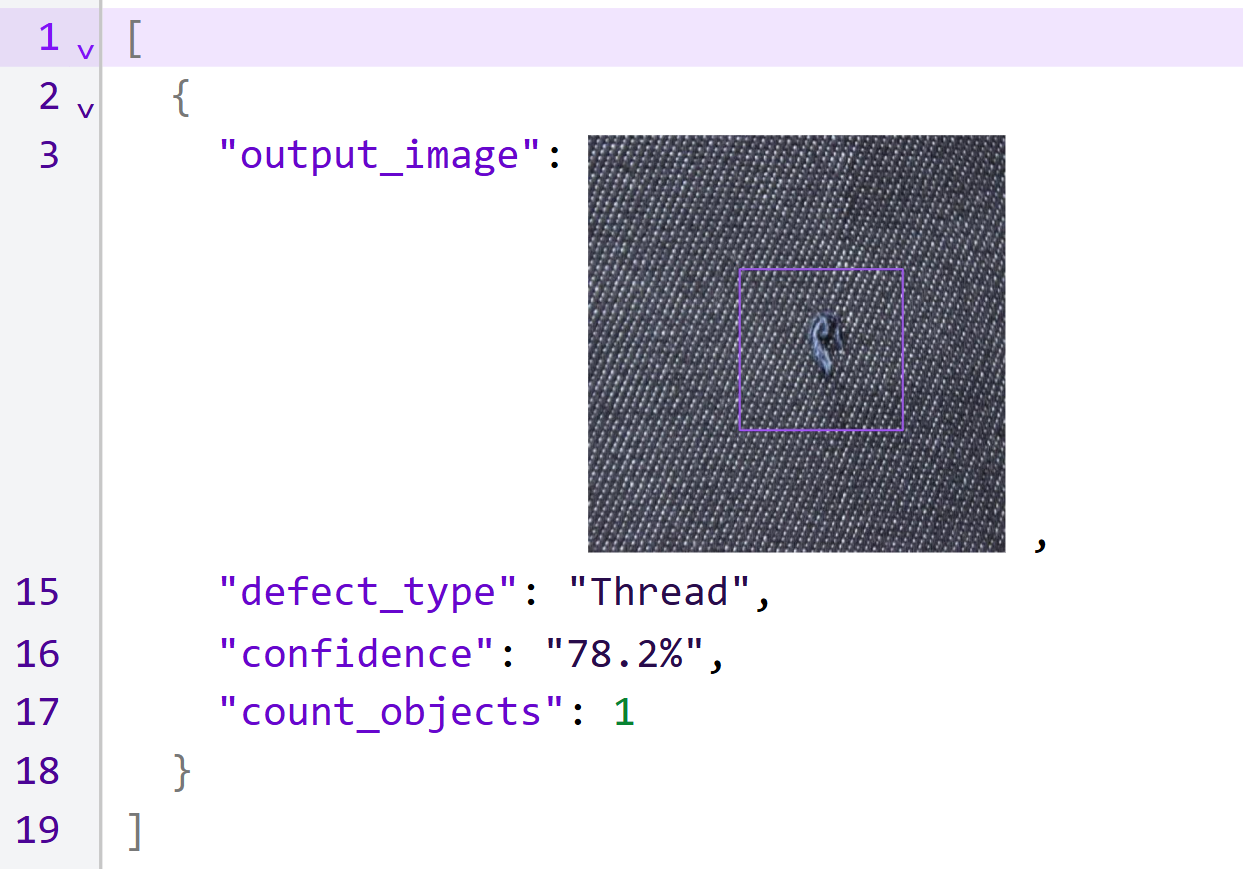
Image by author
No defects detected:
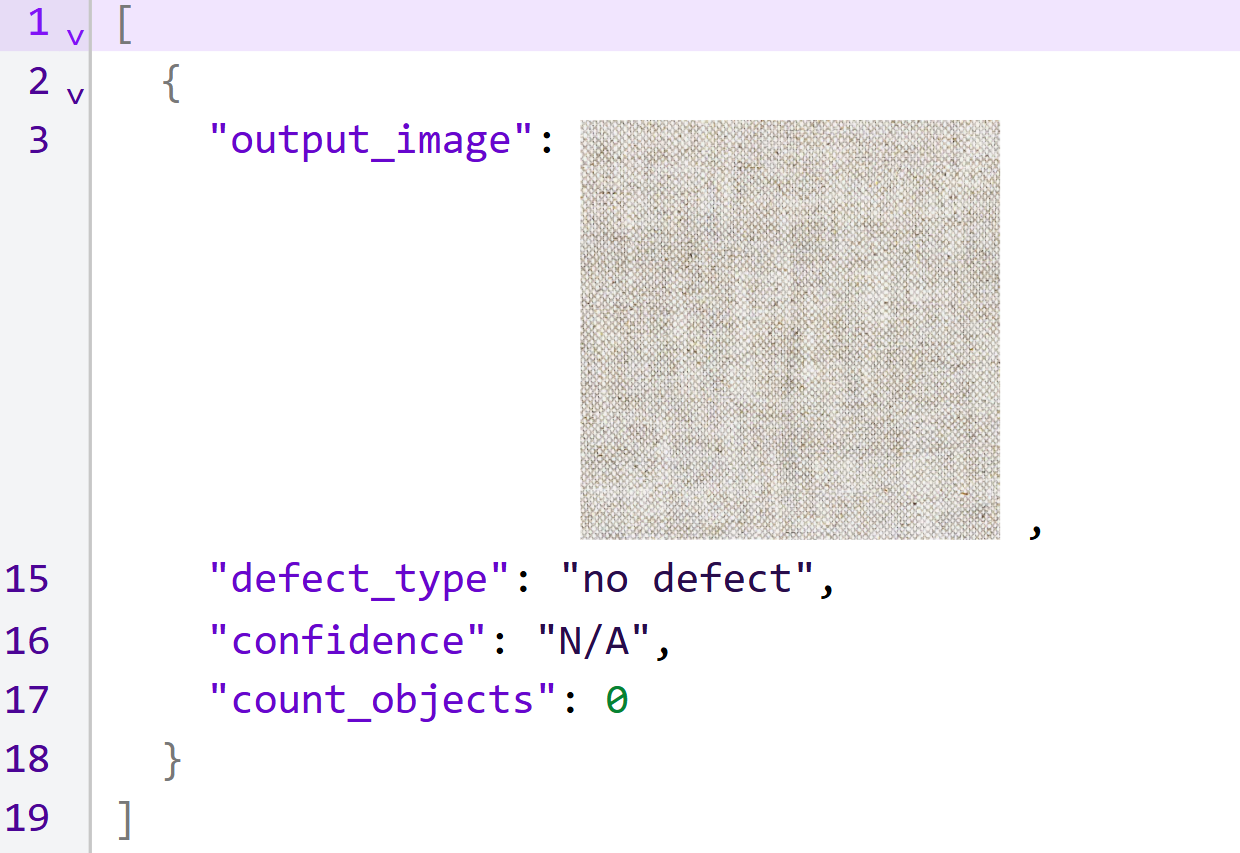
Image by author
Building the Workflow with Roboflow Agent
The workflow in this tutorial can also be created using Roboflow Agent. Instead of manually adding and connecting each block, you can describe the workflow in natural language and have the Agent generate the workflow structure automatically. The generated workflow can then be reviewed, modified, and deployed.
How to Connect Quality Alerts to Operational Systems
The workflow you built is the core quality-control loop: detect textile defects, generate structured quality events, and notify operators. In this tutorial, those events are delivered to Slack. In production environments, the same event is typically routed into operational systems that can track incidents and trigger automated responses.
A common next step is integrating the workflow with a Manufacturing Execution System (MES). Instead of simply notifying operators through Slack, each defect is recorded as a quality event that can be tracked, assigned, reviewed, and audited. The MES can store information such as the defect type, confidence score, production batch, machine identifier, and inspection timestamp. This creates a traceable quality history that helps manufacturers identify recurring issues and monitor production performance over time.
Once quality events are being managed through an MES, teams often connect the system to Programmable Logic Controllers (PLCs). While the MES manages quality records and workflow coordination, the PLC controls physical equipment on the production line. A detected defect could automatically trigger a warning light, stop a conveyor, activate a reject mechanism, or divert defective material for further inspection. The computer vision workflow identifies the defect, the MES manages the event, and the PLC executes the physical response.
As deployments expand from a single inspection camera to multiple production lines, alerts should include identifiers such as:
- production_line_id
- machine_id
- camera_id
This allows quality events to be routed to the correct team while maintaining a consistent event structure across the facility.
The important point is that the detection pipeline remains unchanged. Roboflow Workflows continues to generate the same structured quality event, while the operational layer evolves from a simple Slack notification into a production system capable of tracking defects and automating quality-control actions.
Triggering Downstream Systems from a Vision Model: PLC, MES, Slack Conclusion
In this tutorial, we built a textile defect detection workflow using RF-DETR and Roboflow Workflows. The system identifies fabric defects, generates structured quality events, and automatically sends alerts through a Slack webhook.
Although this tutorial uses Slack for notifications, the same workflow can be integrated with MES platforms, PLCs, and other manufacturing systems without changing the core computer vision pipeline.
Further reading:


Cite this Post
Use the following entry to cite this post in your research:
Mostafa Ibrahim. (Jun 8, 2026). Turn Vision AI Detections Into Alerts: PLC, MES, Slack. Roboflow Blog: https://blog.roboflow.com/vision-detections-into-plc-mes-slack-alerts/