

Model rankings shift with every release, so static lists go stale fast. This post explains how AI data labeling works, shows how to compare 25 current models on the Roboflow Playground object detection leaderboard, and walks through the top models now: Qwen3.8-Max, Gemini 3.5 Flash, and more.
Every fine-tuned vision model starts with labeled data. But before it can detect items from images, someone has to annotate them and train the model. That used to be manual work, but it can now be done using the best models for AI data labeling.
This post explains what AI data labeling is and why it works, shows you how to compare the latest models yourself in Roboflow Playground, and walks through what the current leaderboard says about which models sit at the top for accuracy, speed, and cost.
What Is AI Data Labeling?
Supervised computer vision models learn by example. To train a detection model, you collect images for your specific use-case and annotate them. You can place bounding boxes around each object, and add a class label saying what it is.
Classification tasks need a tag per image, segmentation needs polygons or masks, and keypoint tasks need marked landmarks. The annotated set becomes your training data, and the model learns to reproduce those judgments on images it has never seen once it’s trained.
The issue comes with volume. Our benchmark's samples show what a single image demands. One basketball broadcast frame carries 19 annotations across seven classes: eight players, five jersey numbers, two referees, a rim, a ball in the basket, and a player mid-layup.
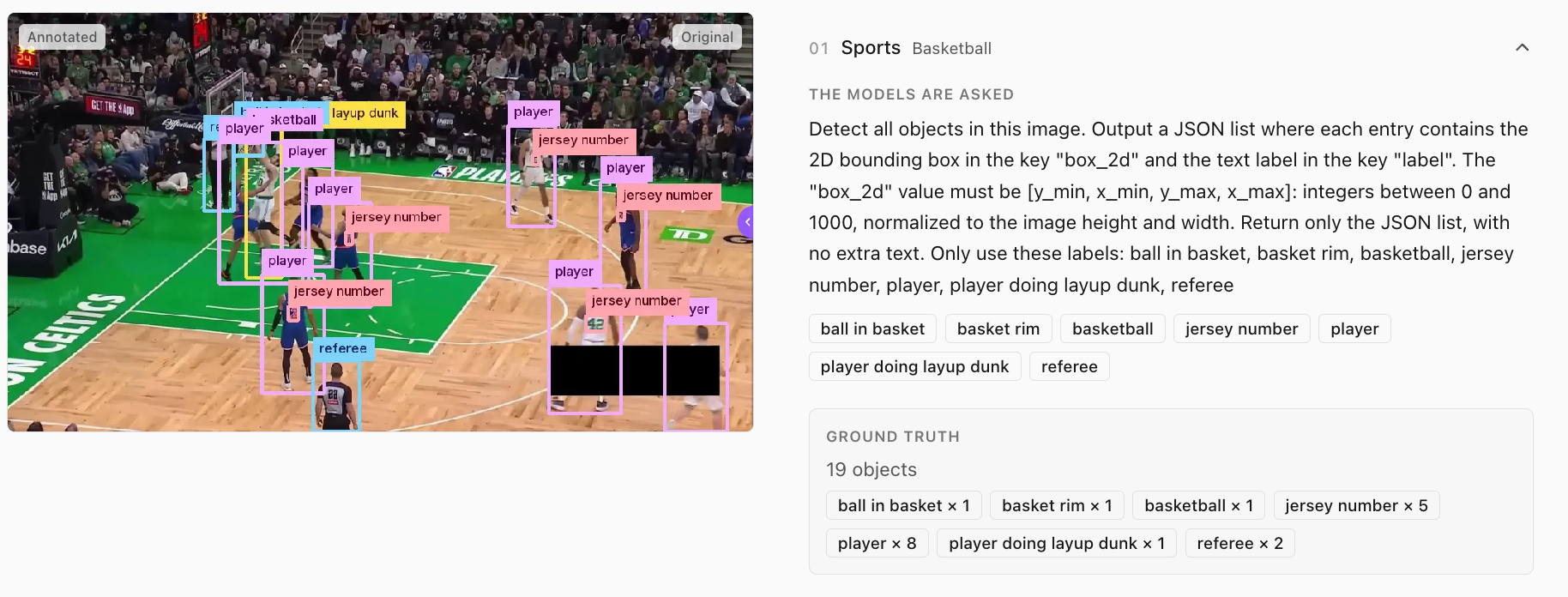
Now multiply by a production dataset, which runs from thousands of images. Drawing all of that by hand is the slowest and most expensive step in the entire pipeline.
Let a Model Label First
Auto-labeling makes this much easier. Instead of drawing every box from scratch, you hand your images and your class list to a foundation model, and it proposes the annotations. A human then reviews to approve the good ones, fix the close misses, and catch what the model skipped - shifting their role from drawing to judging, which is way quicker.
This works because modern vision language models can do open-vocabulary detection. You can give them a plain-language class list (solar panel hot spot, banana tree, jersey number) and they return boxes and labels for arbitrary objects without training.
The pre-labels don't need to be perfect. They just need to be good enough that they can save the human some time. A model at 70% mAP@50 gets the majority of your boxes right on the first try, and every correct box is one a human never has to draw. What's left for the reviewer is the near misses which take seconds each to fix. Roboflow Annotate is built around exactly this loop with AI-assisted labels first, human review second, dataset done sooner.
How to Compare AI Data Labeling Models
Roboflow Playground is a free tool for testing and comparing vision models, and it gives you three ways to answer that question for your own data.
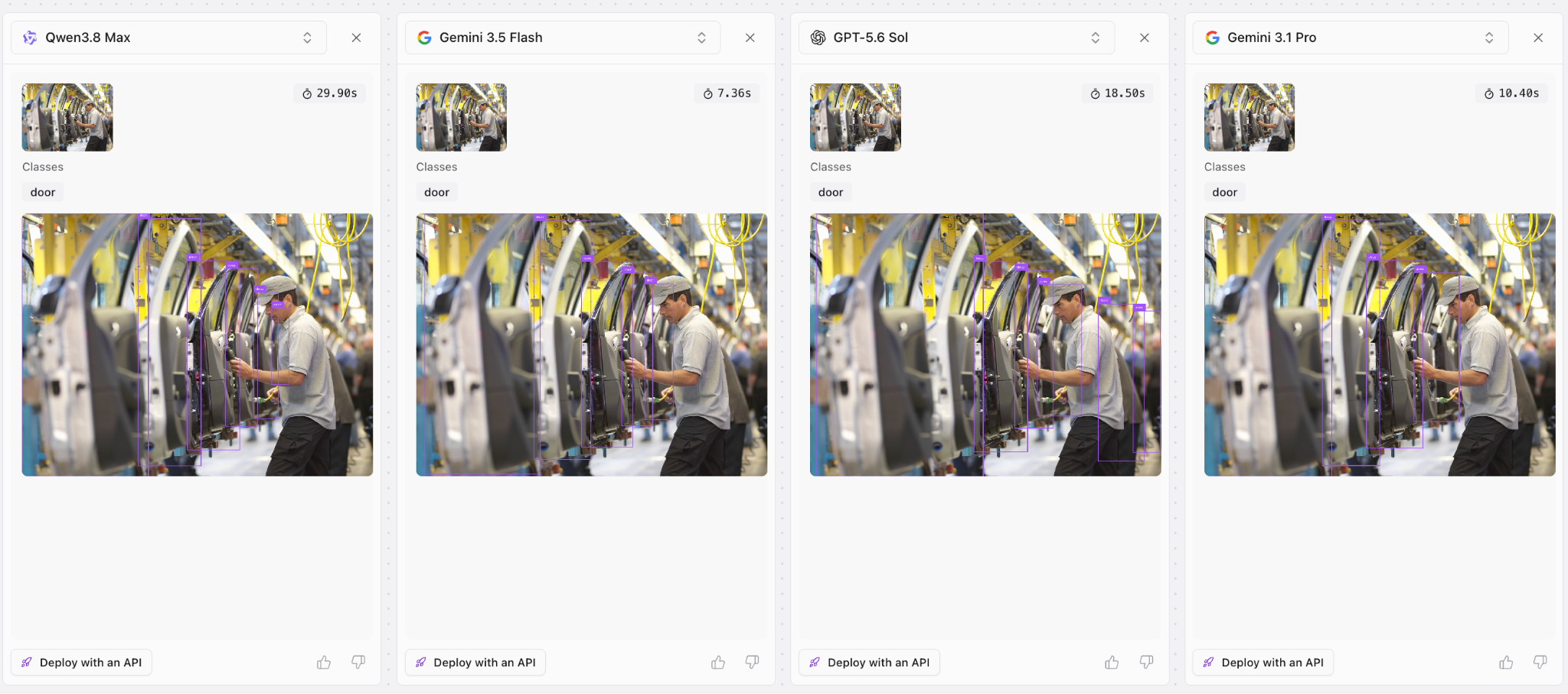
Run models on your own images. Upload an image, pick several models, and see their detections side by side. This matters because detection performance is very use-case specific. A model that nails retail shelves can fail at thermal drone imagery. Testing on your own images is the fastest way to find out what works for your use case.
Four AI data labeling models detecting objects in the same image, compared side by side
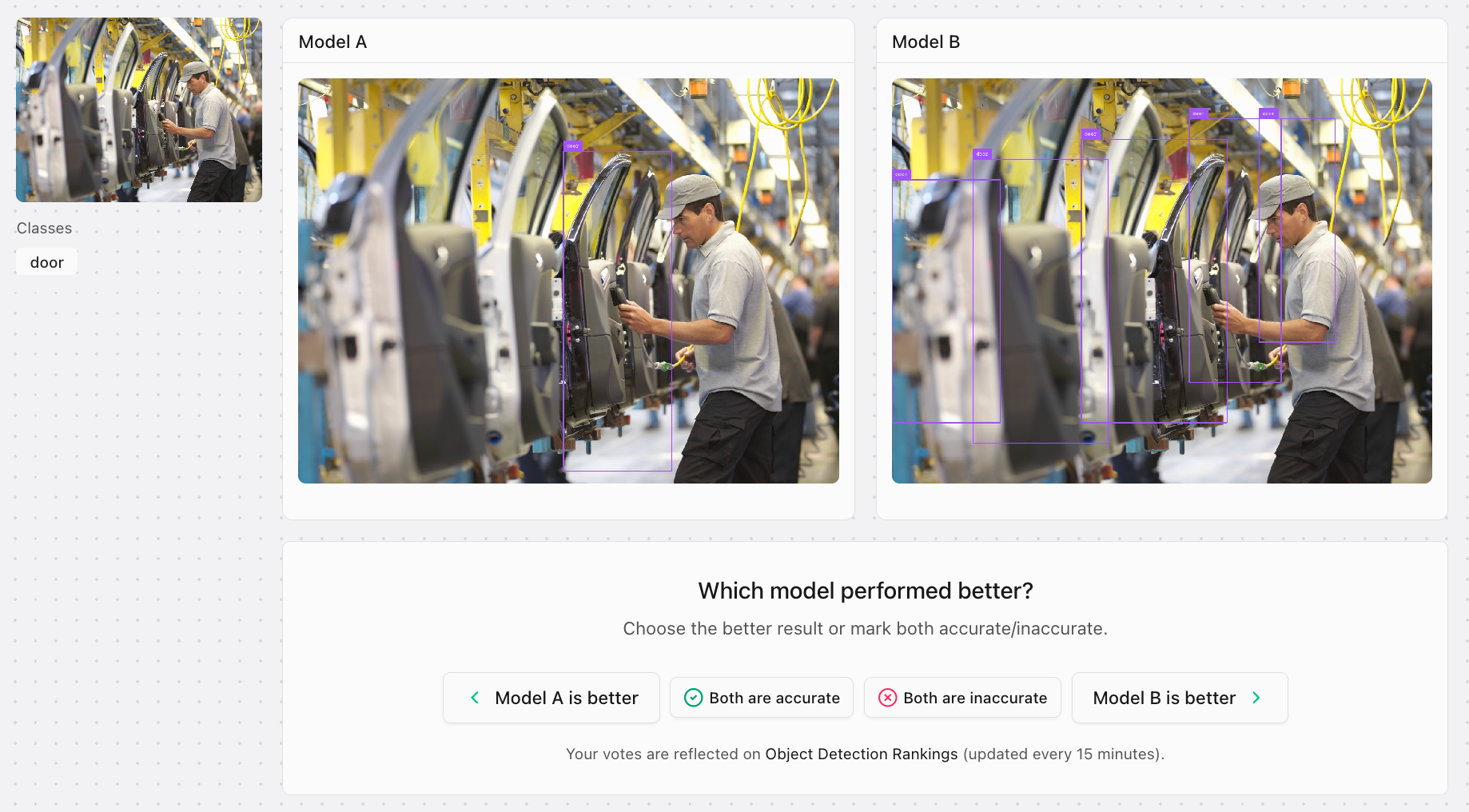
Vote in the Arena. The Arena runs blind battles between two anonymous models on the same image. You vote for the better result before the names are revealed, and your votes, along with everyone else's, power the crowd-sourced rankings.
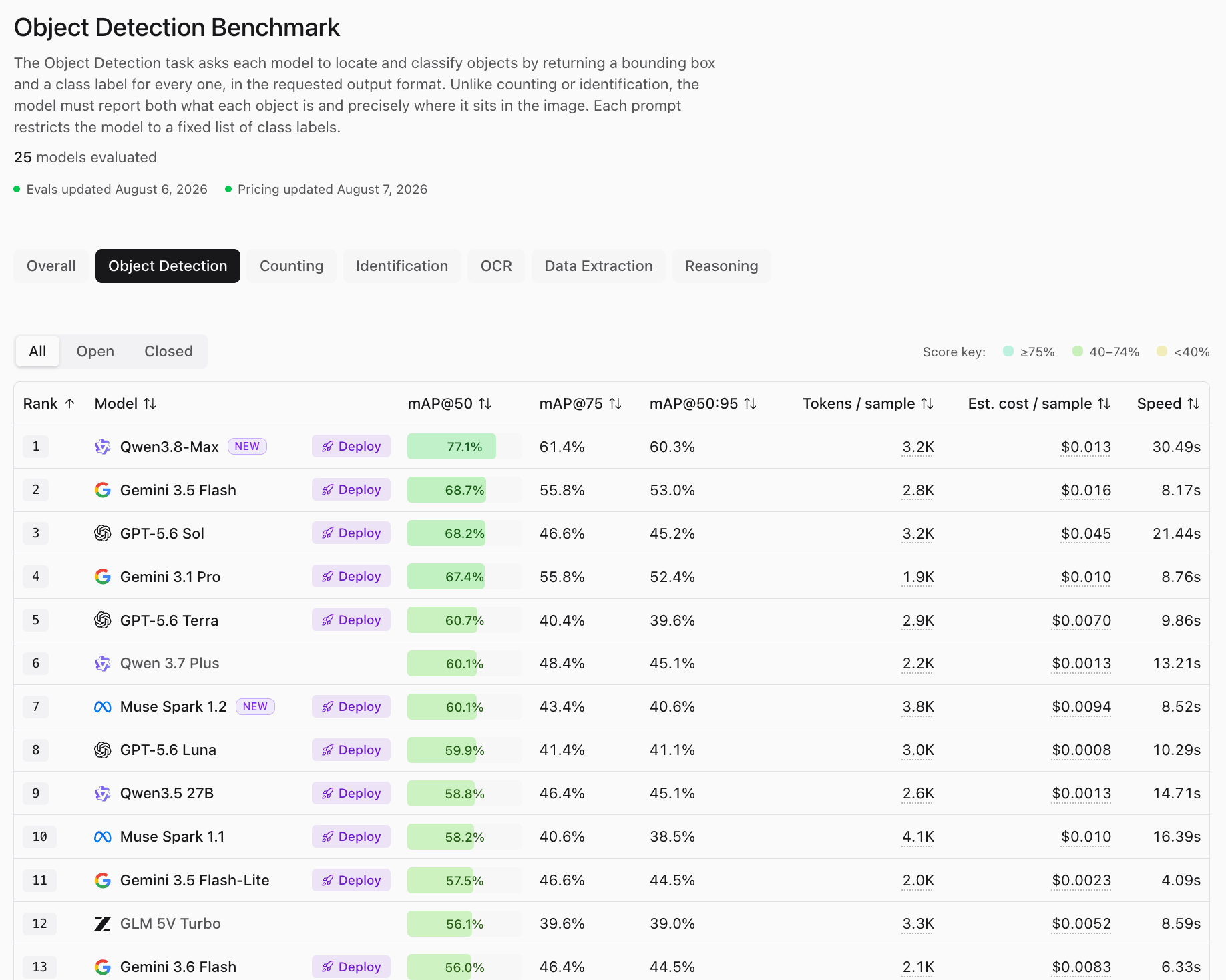
Review Vision Evals. Evals is the objective benchmark. That’s because every model runs the same sample set with the same instruction, scored by mean Average Precision. mAP@50 counts a prediction when its box overlaps the ground truth by at least 50%, with stricter mAP@75 and mAP@50:95 also reported. Evals also track measured token usage and estimated cost per sample which is useful when you’re planning a high-volume labeling run.
The Top 5 Models for AI Data Labeling
As of August 6, 2026, here's the top of the object detection leaderboard, from 25 models evaluated.
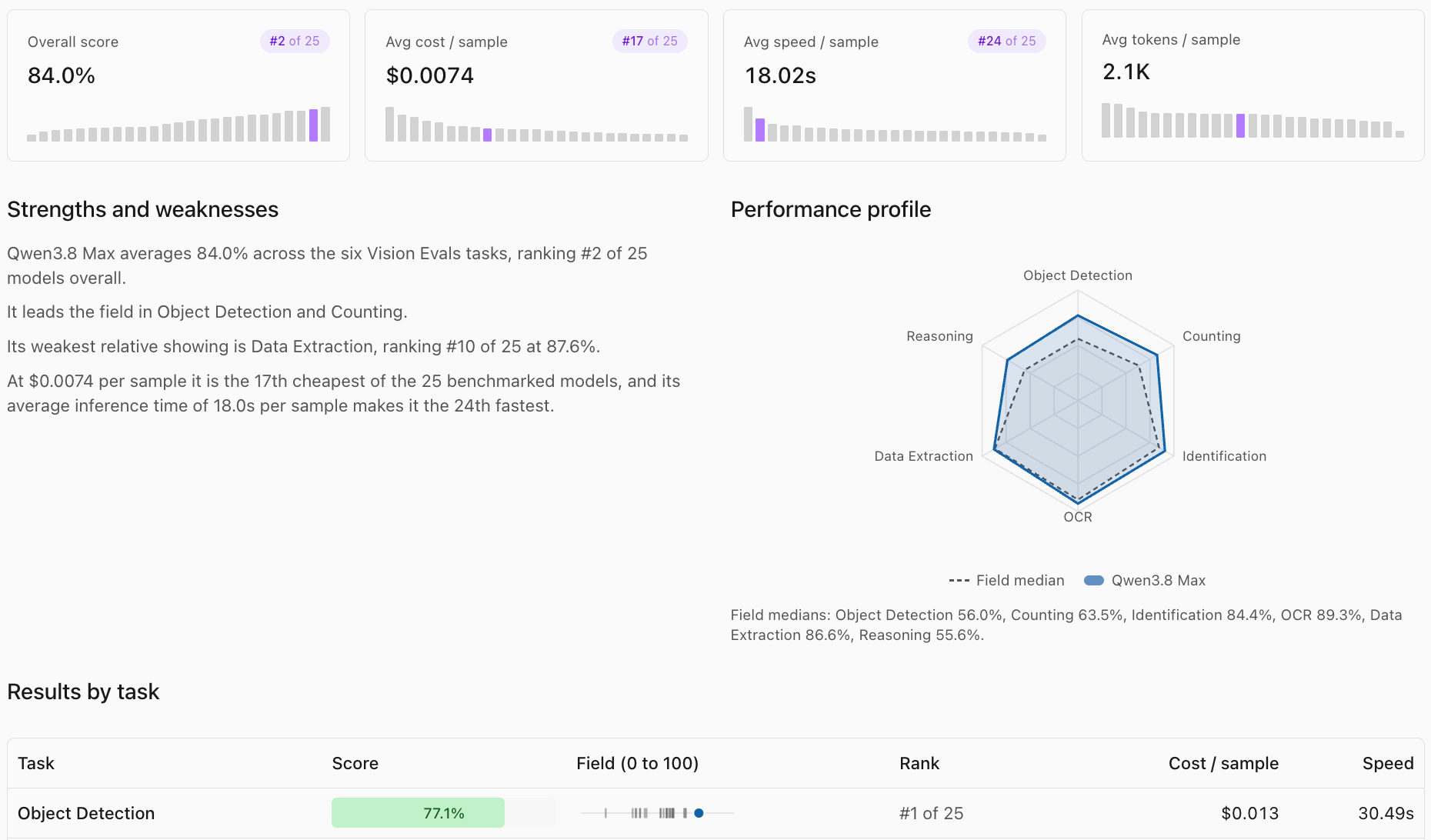
1. Qwen3.8-Max
Qwen3.8-Max has a 77.1% mAP@50, a full eight points clear of second place, and it holds the lead at stricter thresholds too (61.4% mAP@75, 60.3% mAP@50:95). In our testing, it handled satellite imagery, crowded scenes, and small objects that trip up other VLMs, and an open-weight release lands August 12 (a big deal for anyone who wants this quality self-hosted!). The bigger trade-off is speed: at 30.5 seconds per image, it's the slowest model in the top five.
2. Gemini 3.5 Flash
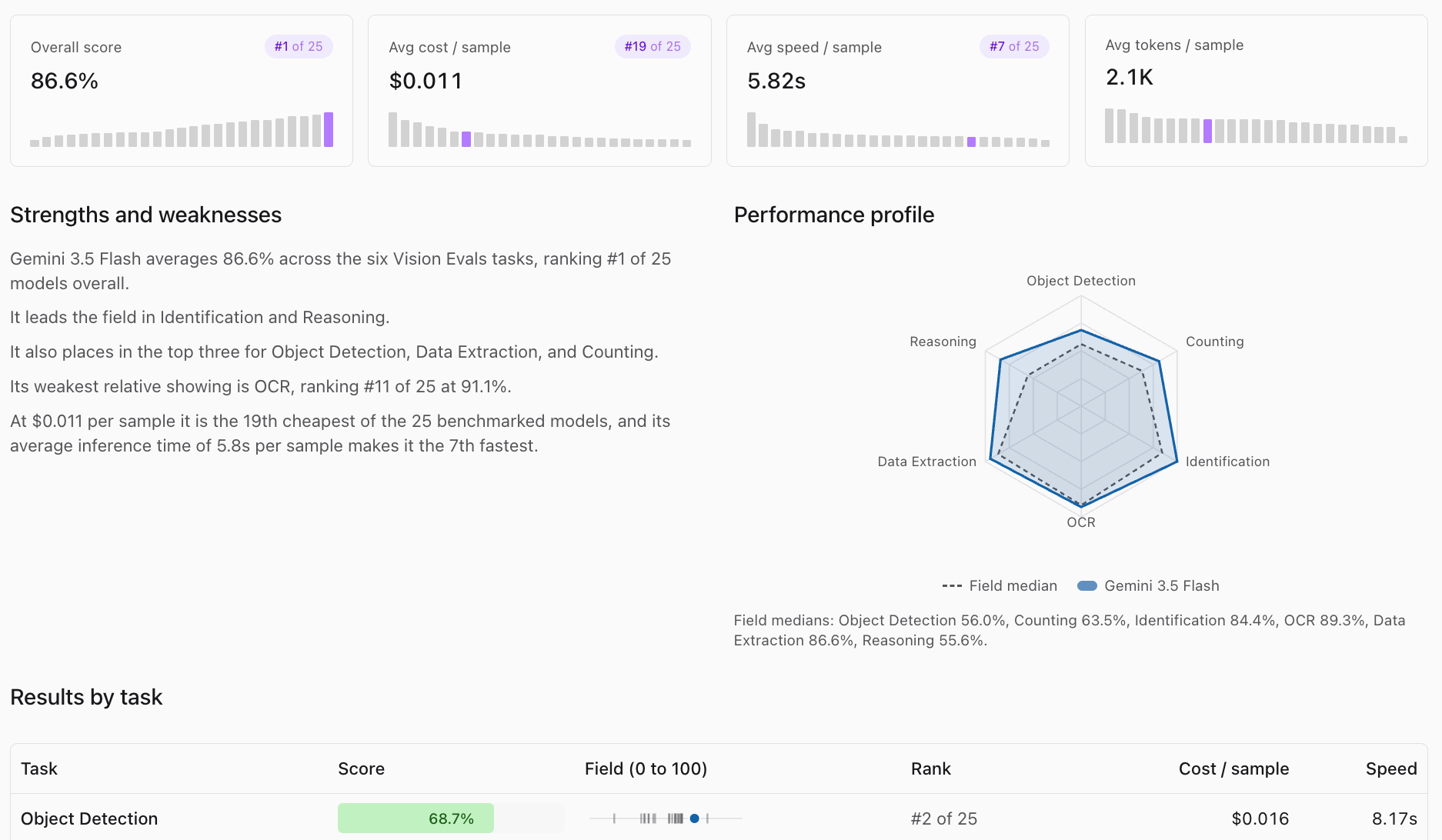
Gemini 3.5 Flash has a 68.7% mAP@50 in 8.2 seconds at $0.016 per sample. It's the best balance of quality, speed, and cost on the board, which is why it's a great model for vision tasks since its release. When a labeling job has thousands of images and a deadline, this is optimal to use.
3. GPT-5.6 Sol
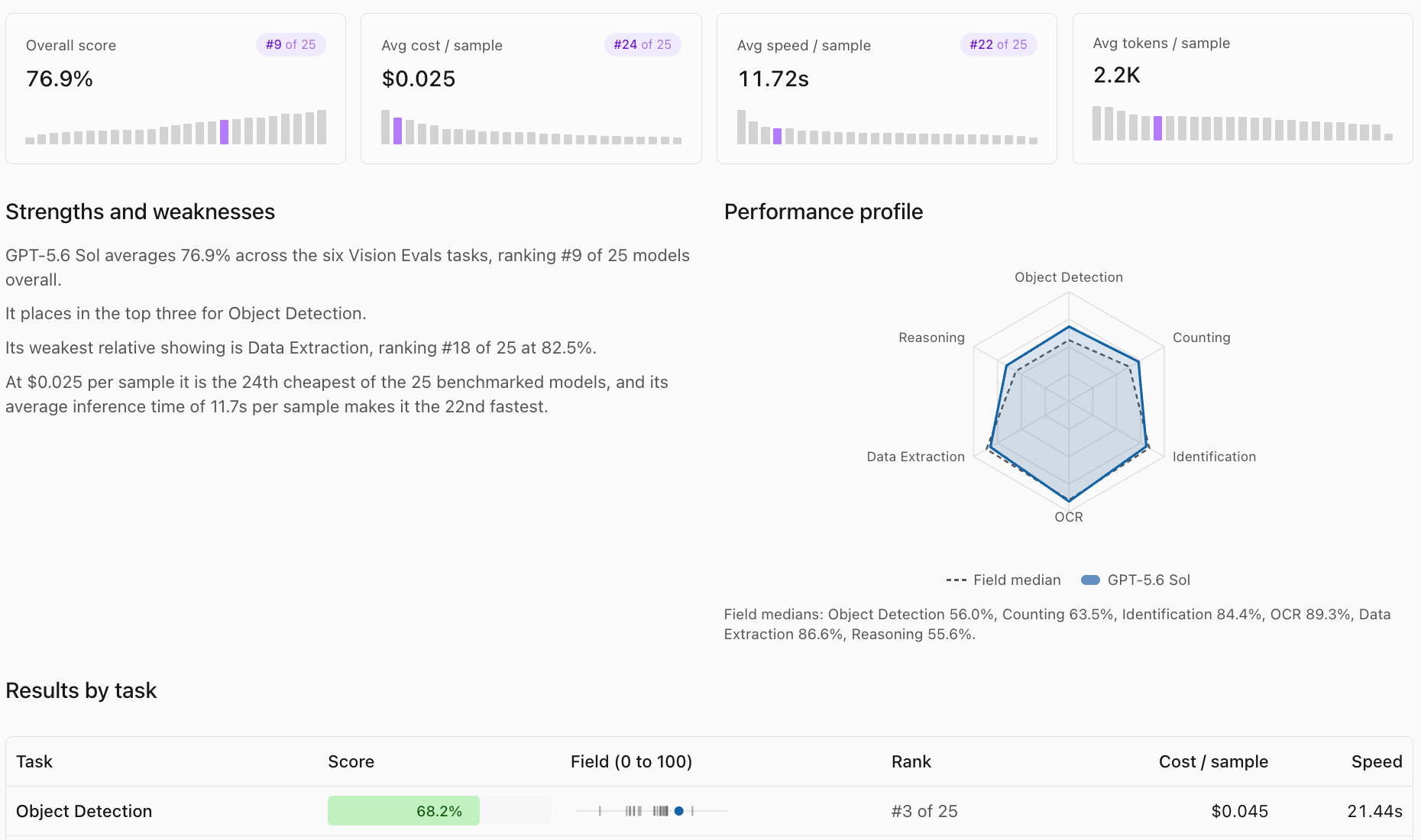
GPT-5.6 Sol has a 68.2% mAP@50 which is very close to Flash, and we called it the best vision model OpenAI ever released. The problem is the cost: $0.045 per sample and 21.4 seconds per image means it costs roughly triple Flash and runs at a third the speed for the same accuracy.
4. Gemini 3.1 Pro
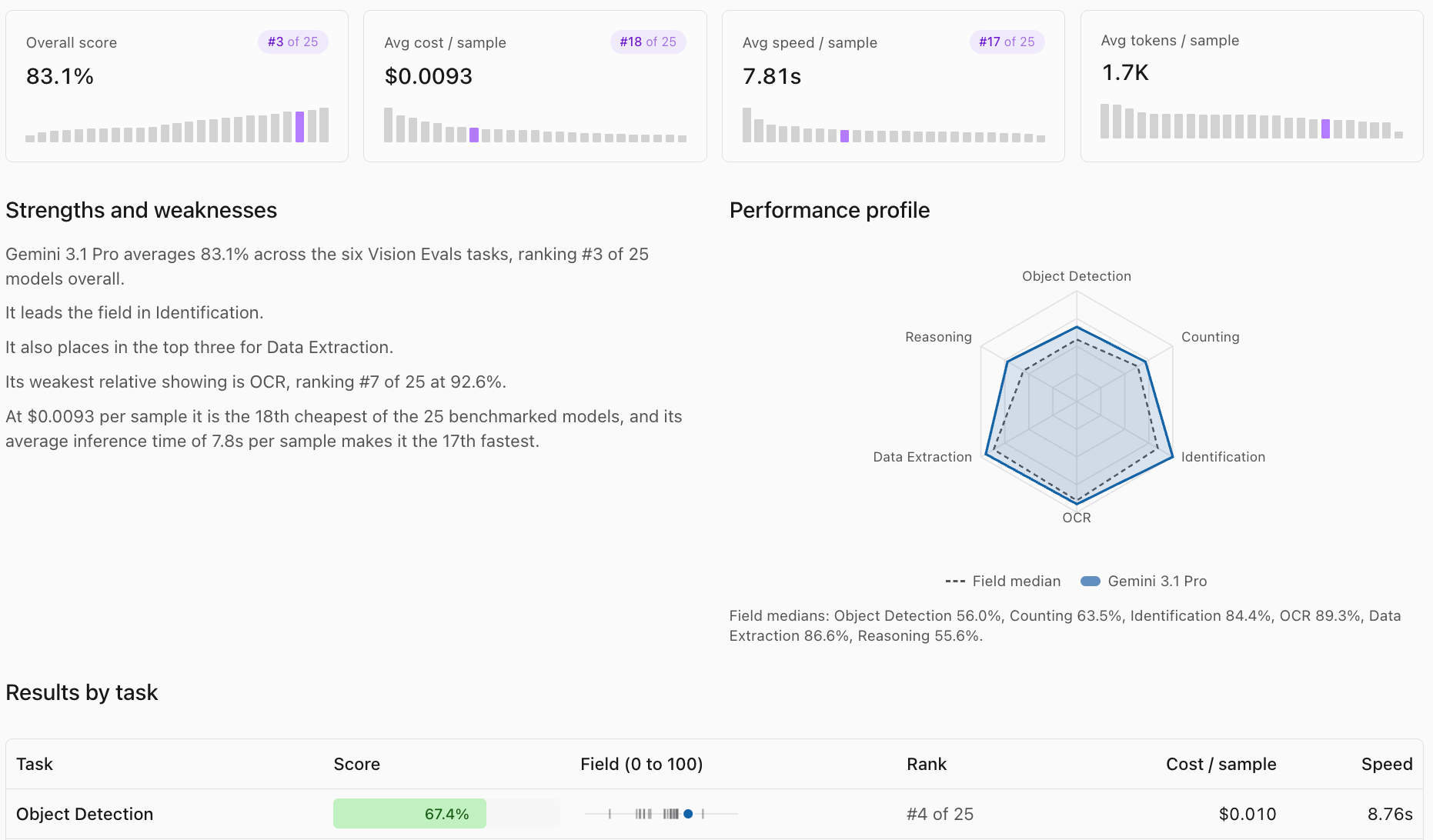
Gemini 3.1 Pro has a 67.4% mAP@50 and it ties Flash for the best tight-box score in the top five (55.8% mAP@75). Tight boxes matter more for labeling than for most tasks, because your labels become training data and box quality compounds downstream.
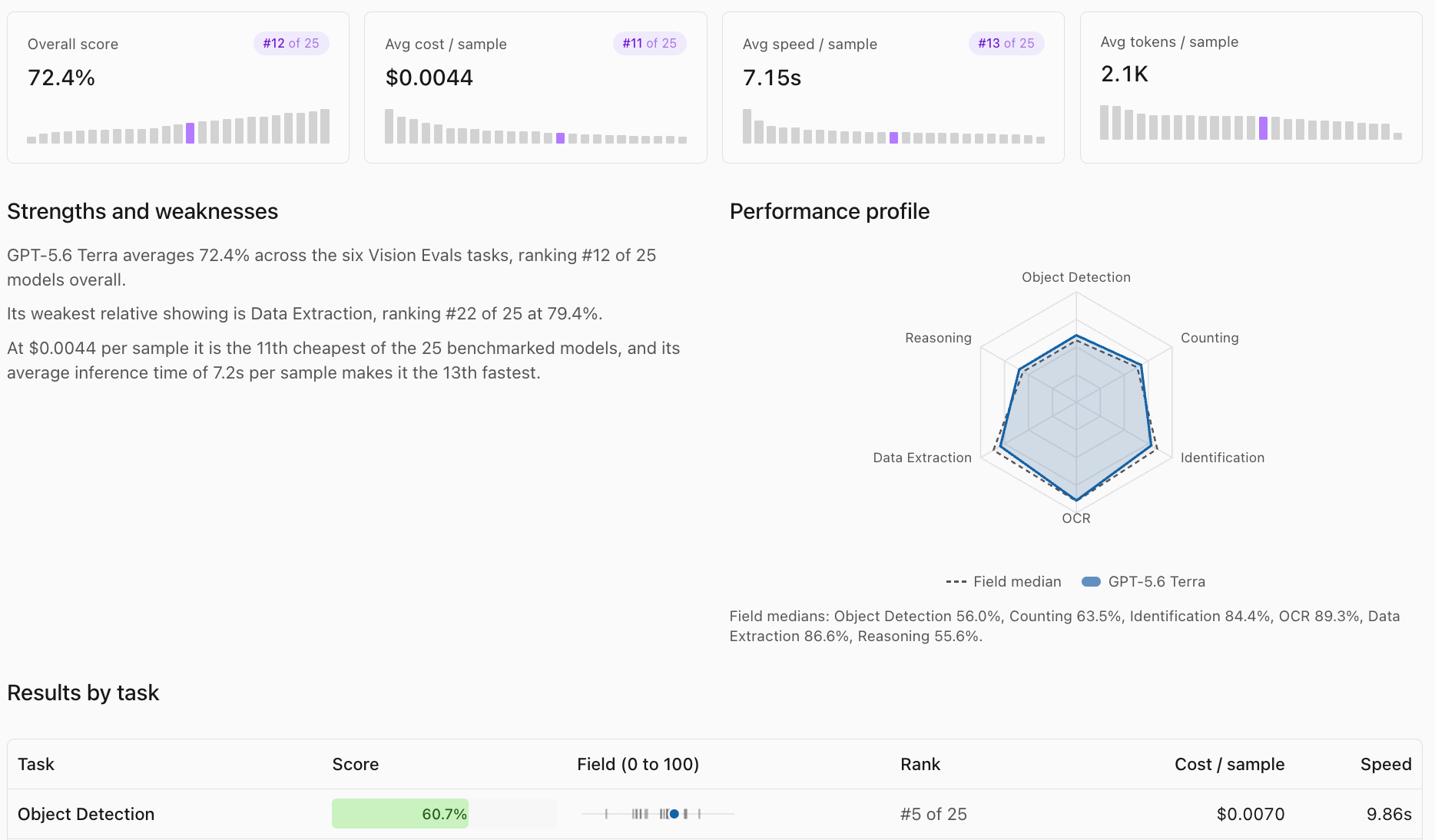
5. GPT-5.6 Terra
GPT-5.6 Terra has a 60.7% mAP@50 at $0.0070 per sample, which is the cheapest of the five. For high-volume pre-labeling where a reviewer catches the misses, it stretches your credits the furthest.
Why VLMs win at labeling
All five are general-purpose vision language models, and they take plain class names straight from your ontology with no prompt engineering. That's not true of purpose-built open-vocabulary detectors.
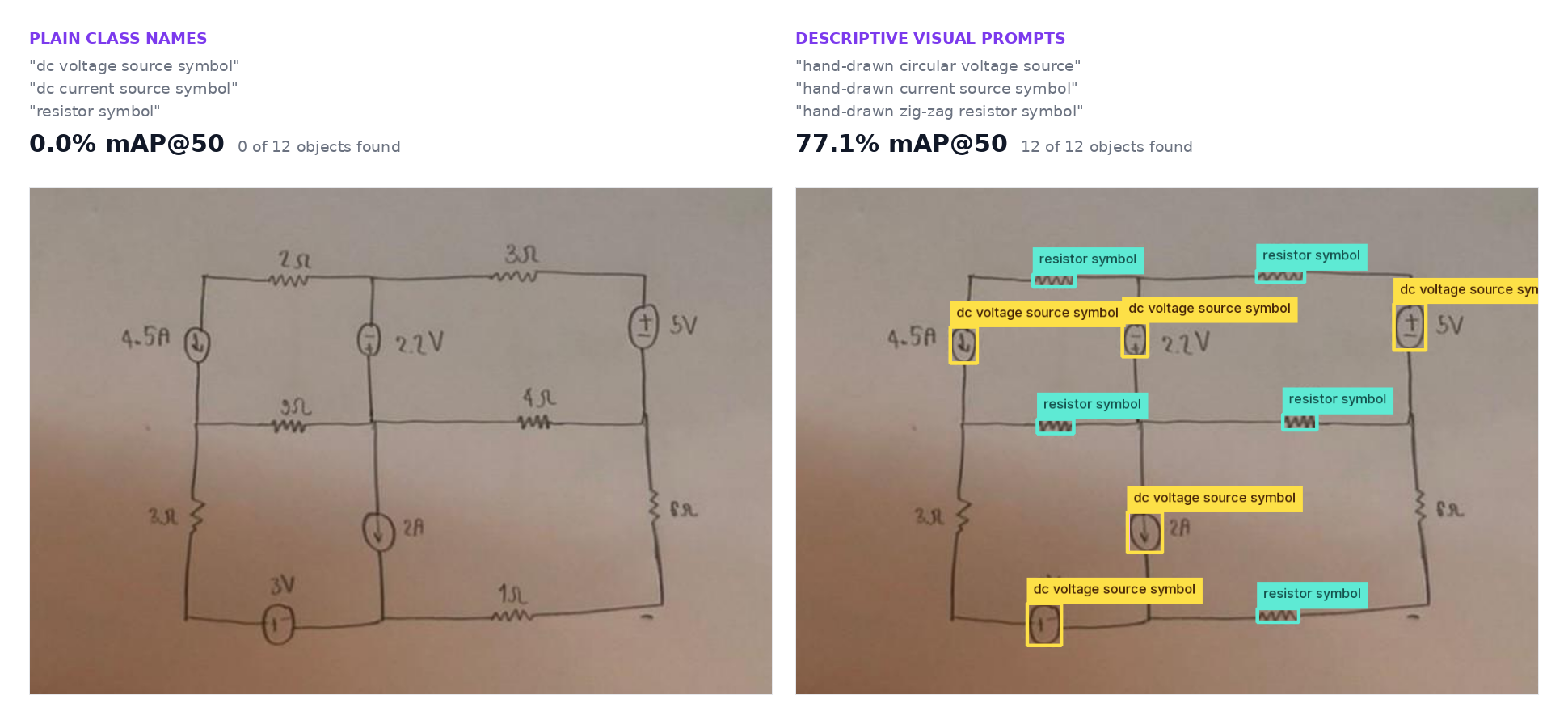
In our internal benchmark of 250 images across 50 Roboflow Universe projects, YOLO-E 26x scored 9.8% mAP@50 with the plain class names a labeler would naturally type, things like "safety helmet" and "nand gate symbol". Detectors don't understand plain names the way VLMs do, so we had Gemini rewrite every class into a short visual phrase: "safety helmet" became "blue plastic safety helmet", and "nand gate symbol" became "D-shaped logic gate with output bubble".
That more than doubled YOLO-E 26x to 23.4%, and it still scored below all five models above. For language-driven auto-labeling pipelines, VLMs are the strongest and most practical option.
How to Read the Numbers
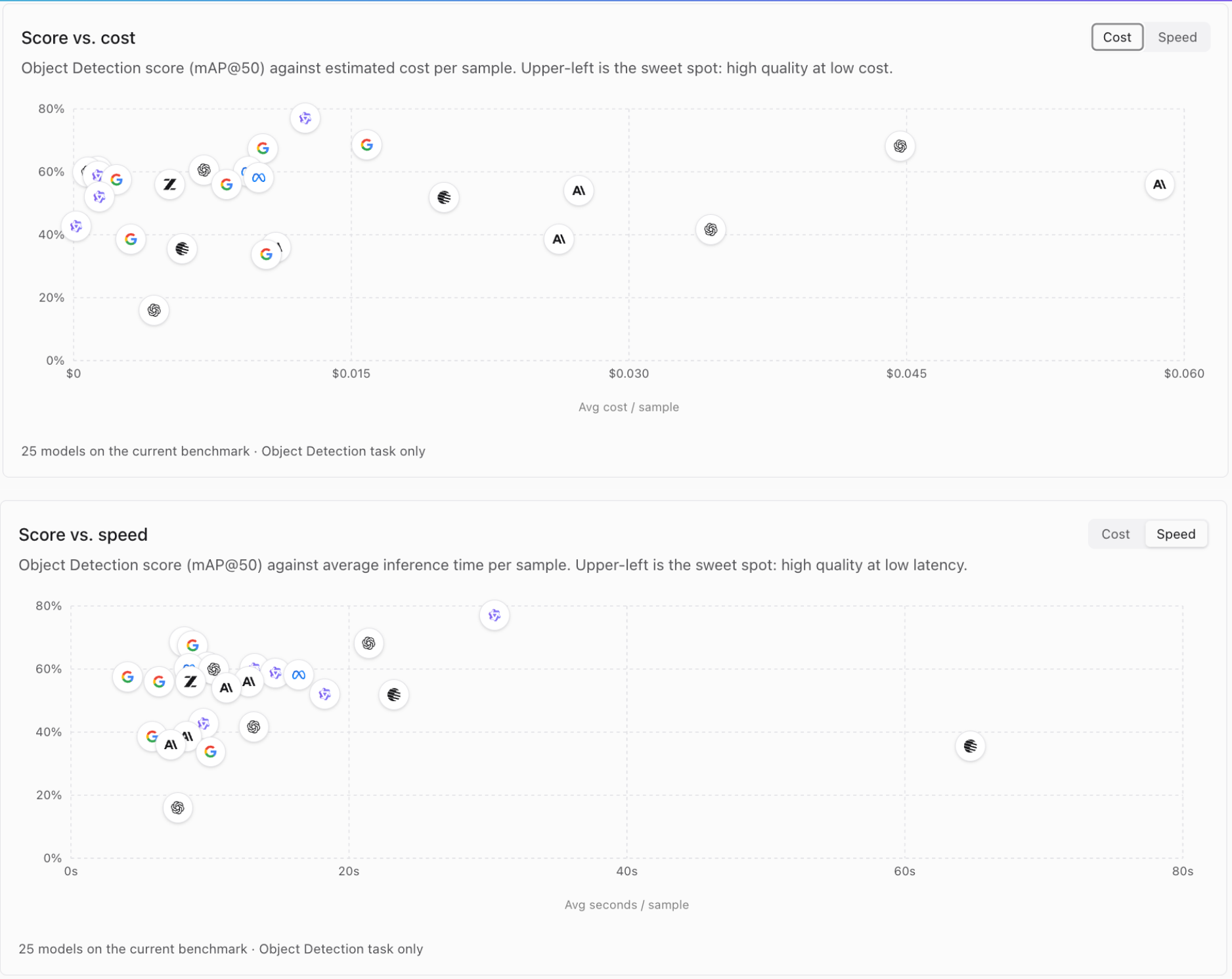
Accuracy alone doesn't pick your labeling model. Three other numbers decide whether it should be used in production. Cost per sample scales linearly with dataset size, so small differences can really become major price differences. Labeling 10,000 images uses about $70 on Terra, $100 on Gemini 3.1 Pro, $160 on Flash, and $450 on Sol.
Speed is also a major deciding factor. At 8 seconds per image, an overnight run labels tens of thousands of images. At 30 seconds, the same run labels a quarter of that. If your labeling pipeline holds off your training pipeline, the fast model wins even when it scores a few points lower.
Lastly, mAP@75 tells you how tight the boxes are. A model can score well at mAP@50 with boxes that are 20% too loose, and loose boxes make loose training data. If your task needs precise localization, use the model with the better mAP@75.
Test on Your Own Data
Leaderboard scores are averages across 50 domains. Your project is one domain, and the ranking on your images can differ from the ranking on ours. Before committing a large labeling budget to one model, pull 20 to 50 representative images, run the top candidates side by side in Playground, and count which one produces the fewest corrections. An hour of testing saves a week of re-labeling.
Rankings also reshuffle with every model release, and that's usually every few weeks. The most reliable answer to "which model labels best" is a live one, so check the leaderboard for the current standings before you start.
Ready to put a model to work on your dataset? Create a free Roboflow account to auto-label your images, review the results in Annotate, and train your first model on the output.


Cite this Post
Use the following entry to cite this post in your research:
Aarnav Shah. (Aug 7, 2026). Top Models for AI Data Labeling. Roboflow Blog: https://blog.roboflow.com/top-models-for-ai-data-labeling/