

The Microsoft Common Objects in Context (COCO) dataset is the standard computer vision benchmark, with over 330,000 images across 80 object classes labeled for detection, segmentation, and keypoints, all shown in natural context rather than isolated. Its biggest practical use is transfer learning: start from a COCO-pretrained RF-DETR checkpoint, fine-tune on your own images in Roboflow, and reach an accurate custom model with less labeled data than training from scratch.
The computer vision research community benchmarks new models and enhancements to existing models to test model performance. Benchmarking happens using standard datasets which can be used across models. With this approach, the efficacy of various models can be compared, in general, to show how one model is more or less performant than another.
Common Objects in Context (COCO) is one such example of a benchmarking dataset, used widely throughout the computer vision research community. It even has applications for general practitioners in the field, too.
In this post, we will dive into the COCO dataset, explaining the motivation for the dataset and exploring dataset facts and metrics. Let's start by talking about what the COCO dataset is.
What Is the Microsoft COCO Dataset?
The Microsoft Common Objects in Context (COCO) dataset is the gold standard benchmark for evaluating the performance of state of the art computer vision models. COCO contains over 330,000 images, of which more than 200,000 are labelled, across dozens of categories of objects.
COCO is a collaborative project maintained by computer vision professionals from numerous prestigious institutions, including Google, Caltech, and Georgia Tech.
You can explore the dataset without downloading it on Roboflow Universe, where you can browse the images, run semantic search over them, and check the class distribution through the dataset health check.
Why Should I Use the COCO Dataset?
The COCO dataset is designed to represent a vast array of things that we regularly encounter in everyday life, from vehicles like bikes to animals like dogs to people.
The COCO dataset contains images from over 80 "object" and 91 generic "stuff" categories, which means the dataset can be used for benchmarking general-purpose models more effectively than small-scale datasets.
In addition, the COCO dataset contains:
- 121,408 images
- 883,331 object annotations
- 80 classes of data
- The median image ratio is 640 x 480
You can use semantic search to query inside COCO to better understand the data or take a look at the mix of classes. We found some weird images in COCO, which served as a good reminder that you should always have an in-depth understanding of your training data.
The COCO dataset is labeled, providing data to train supervised computer vision models that are able to identify the common objects in the dataset.
Of course, no computer vision model is perfect by all metrics. The COCO dataset provides a benchmark for evaluating the periodic improvement of these models through computer vision research. Practitioners and researchers can benchmark models to see how they have evolved with changes, allowing the community to chart the growth of specific models over time. Entirely different models can be benchmarked on COCO, too.
A Checkpoint for Transfer Learning
The COCO dataset also provides a base dataset to train computer vision models in a supervised training method. Once the model is trained on the COCO dataset, it can be fine-tuned to learn other tasks, with a custom dataset. Thus, you can think of COCO like a springboard: it will help you build a generic model, and you can customize it with your own data to improve performance for specific tasks.
In the video below, we discuss how to get started with transfer learning from the COCO dataset. This video dives deep into what objects are in the COCO dataset and how well different objects are represented.
What Is the COCO Dataset Used For?
The COCO dataset can be used for multiple computer vision tasks. COCO is commonly used for object detection, semantic segmentation, and keypoint detection. Let's discuss each of these problem types in more detail.
Object Detection with COCO
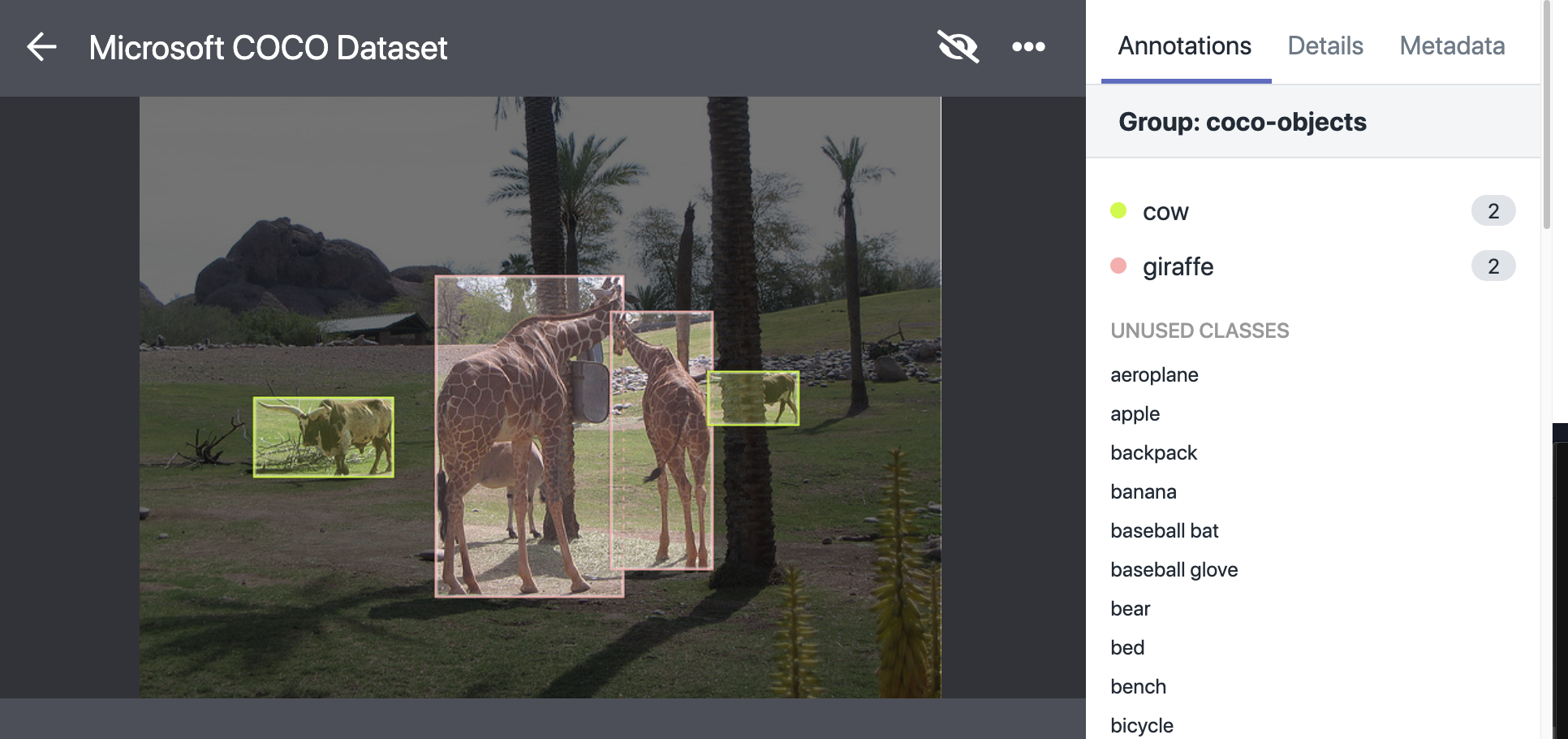
Objects are annotated with a bounding box and class label. This annotation can be used to identify what is in an image. In the example below, giraffes and cows are identified in a photo of the outdoors.
Semantic Segmentation with COCO
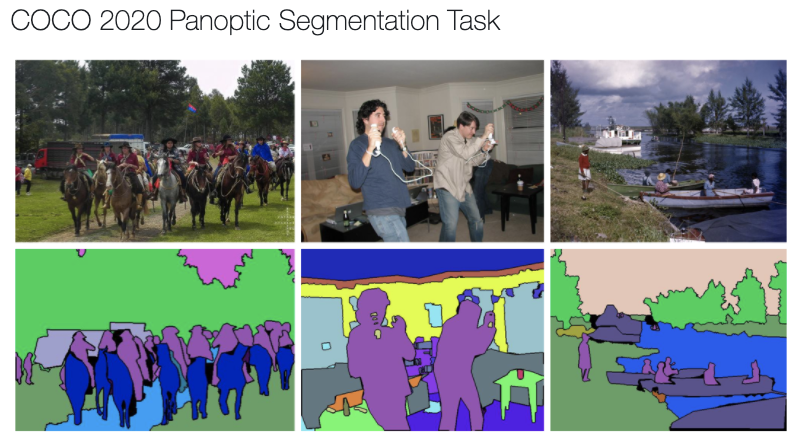
In semantic segmentation, the boundary of objects are labeled with a mask and object classes are labeled with a class label. You can use this to identify more exactly where different objects are in a photo or video.
Keypoint Detection with COCO
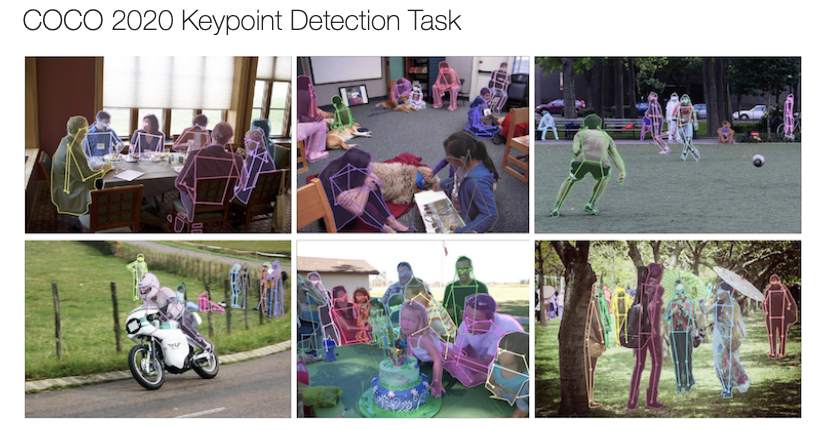
In keypoint detection, humans are labeled with key points of interest (elbow, knee, etc.). You can then use this to track specific movements such as whether a person is standing or sitting down. COCO contains over 250,000 people with keypoints labelled.
COCO Dataset Class List
Are you curious about what exactly is in the dataset? Here's a breakdown of all of the class labels provided in annotations in the COCO dataset:
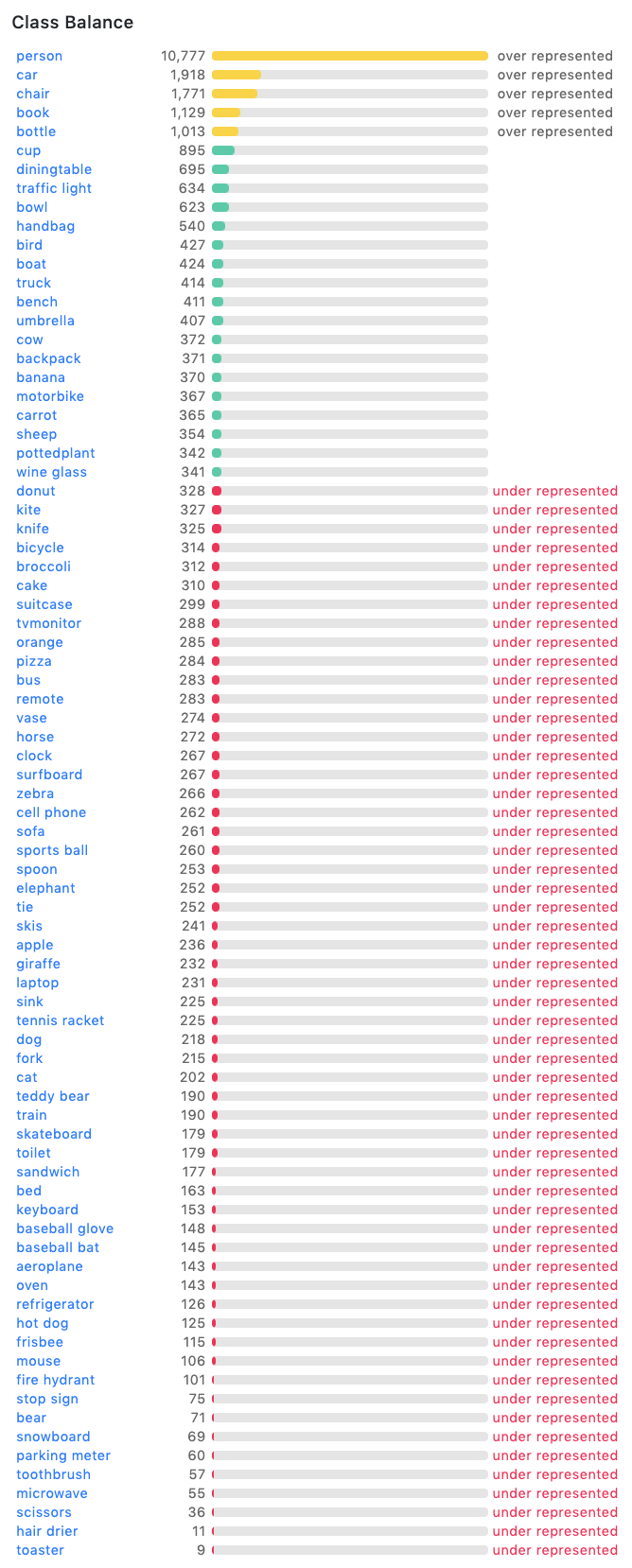
In the COCO dataset class list, we can see that the COCO dataset is heavily biased towards major class categories - such as person, and lightly populated with minor class categories - such as toaster. There are many classes of objects that are annotated hundreds of times in the dataset, from dogs to skateboards to laptops. Some objects are not well represented, such as toasters. There are only 9 annotations corresponding to toasters in the dataset.
It is hard to train models on the COCO dataset to recognize classes that are under exposed. Thus, COCO is not a one-stop, complete dataset for all computer vision model needs. If an object you want to identify is not in COCO, you will need to add your own data to improve representation of the object.
Getting the COCO Dataset
The simplest way to get COCO is through Roboflow Universe, which hosts the dataset with more than 121,000 images and lets you download it in any supported format or fork it directly into a project. There is nothing to unzip and no download script to maintain: pick the format your training pipeline expects and export.
The COCO Dataset Format
The dataset comes in a format called COCO JSON, which stores images, categories, and annotations in a single JSON file. COCO JSON is not universal, so if you want to extend COCO with your own images, you may need to convert your annotations into it, or convert COCO out to another format such as YOLO Darknet TXT for a specific pipeline.
Roboflow handles this conversion in both directions across 30+ computer vision formats, including COCO JSON, so you can move data between formats without writing a parser or managing a label map by hand.
Train a Model with COCO
Once you understand the dataset, using it is straightforward inside Roboflow, entirely in the browser with no local setup:
- Fork the COCO dataset from Universe, or create a project and upload your own images alongside it.
- Label any new images with Roboflow Annotate. Auto Label drafts annotations with foundation models so you review boxes instead of drawing them from scratch.
- Generate a dataset version with preprocessing and augmentation, and an automatic train, validation, and test split.
- Train RF-DETR with Roboflow Custom Training. It fine-tunes from the COCO-pretrained checkpoint on hosted GPUs, no local environment required.
- Evaluate with mean average precision, precision, and recall, then iterate on the classes that underperform.
When the model is trained, run it through the Serverless Hosted API:
pip install inference-sdk supervisionimport os
import cv2
import supervision as sv
from inference_sdk import InferenceHTTPClient
client = InferenceHTTPClient(
api_url="https://serverless.roboflow.com",
api_key=os.getenv("ROBOFLOW_API_KEY"),
)
result = client.infer("image.jpg", model_id="your-project/1")
image = cv2.imread("image.jpg")
detections = sv.Detections.from_inference(result)
box_annotator = sv.BoxAnnotator()
label_annotator = sv.LabelAnnotator()
annotated = box_annotator.annotate(scene=image.copy(), detections=detections)
annotated = label_annotator.annotate(scene=annotated, detections=detections)
cv2.imwrite("annotated.png", annotated)For a COCO-pretrained sanity check before training your own model, set model_id="rfdetr-base". For the full walkthrough, see how to train RF-DETR on a custom dataset.
Get Started Using the COCO Dataset
COCO is the right starting point when you need a general-purpose benchmark or a pretraining checkpoint, and your own data is what turns it into a model for your specific problem. Create a free Roboflow account to fork the COCO dataset, add your images, and train a model that works on the objects you care about.
What is the main differentiator of COCO?
COCO annotates objects in their natural context, such as a television in a room or a person on a tennis court, rather than isolating them against plain backgrounds. Because the images cover many contexts, models trained on COCO tend to generalize better to varied real-world environments.
Is COCO used for benchmarking?
Yes. COCO is one of the standard benchmarks for object detection and segmentation, and there are public leaderboards where you can compare how different computer vision models perform on COCO tasks.
How many classes are in the COCO dataset?
The object detection portion of COCO has 80 object classes. The full dataset also defines 91 stuff categories used for panoptic segmentation.
Can I train a custom model on the COCO dataset?
Yes. The most common approach is transfer learning: start from a COCO-pretrained checkpoint and fine-tune on your own labeled data. In Roboflow you can fork COCO from Universe, add your own images, and train RF-DETR from the COCO checkpoint without leaving the browser.
What format does the COCO dataset use?
COCO uses the COCO JSON format, which stores images, categories, and annotations in a single file. Roboflow can convert COCO JSON to and from 30+ other formats if your pipeline needs a different one.
Cite this Post
Use the following entry to cite this post in your research:
Jacob Solawetz. (Feb 4, 2026). An Introduction to the COCO Dataset. Roboflow Blog: https://blog.roboflow.com/coco-dataset/