

When choosing a machine learning model based on its size, there is a trade-off between inference speed and accuracy. Larger models, with more parameters, generally achieve higher accuracy, at the cost of slower inference and higher compute requirements, while smaller models, with fewer parameters, offer faster inference and lower compute requirements, at the cost of reduced accuracy.
Depending on the task or deployment target, Roboflow offers different model sizes across various machine learning models. Once you choose a model size, it directly determines the model’s performance characteristics.
In this blog, we will explore what you should consider when selecting a model size to strike the right balance between speed and accuracy.
Selecting Your Model Size
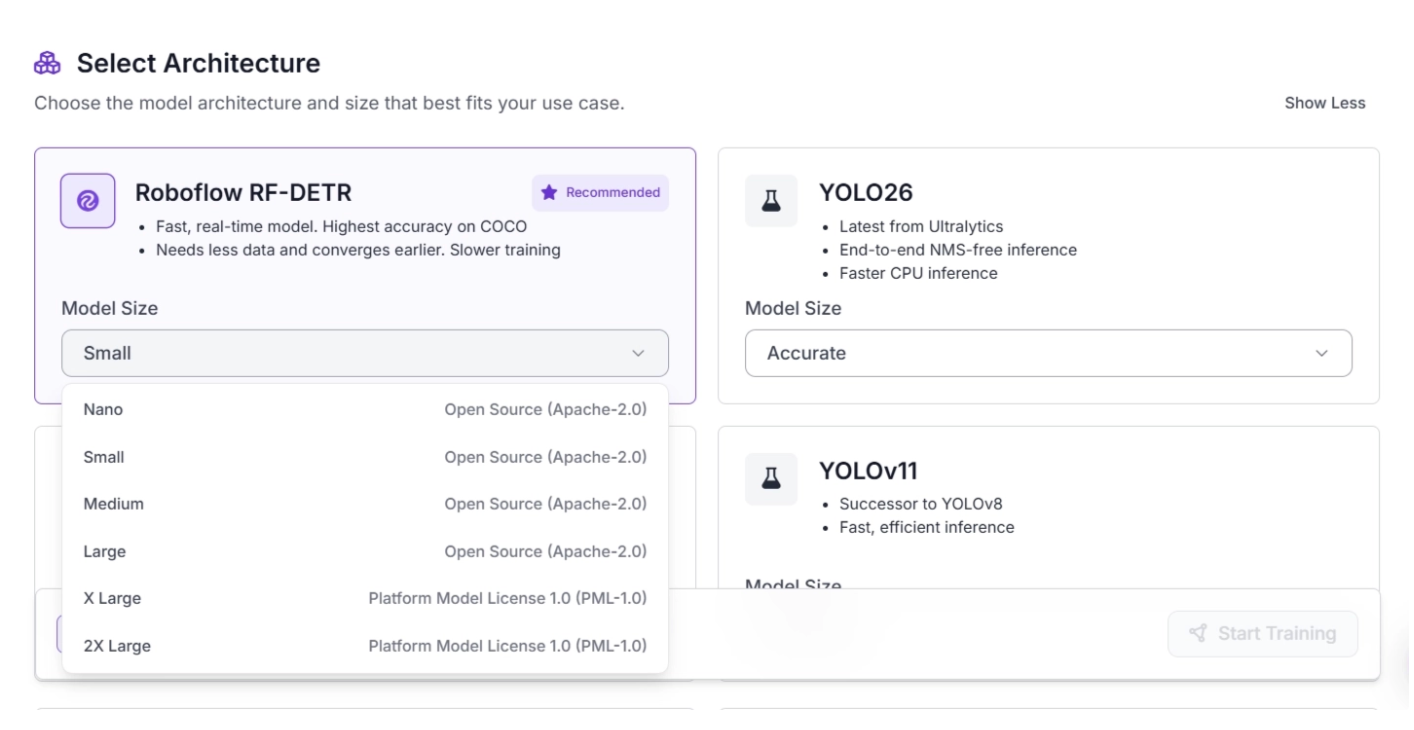
Depending on the task, Roboflow offers different architectures and model sizes for training custom models. The video below demonstrates the available architectures you can choose from when training an object detection model.
Once you select an architecture, you can choose the model size, which directly determines the model’s performance characteristics and licensing tier.
How Do Different Model Sizes Compare in Speed and Accuracy?
For example, within the Roboflow RF-DETR architecture, you can choose from model sizes ranging from Nano, designed for fast training and inference in low-compute deployments, to 2X Large, which provides the highest level of accuracy but is slower during inference, as shown below.
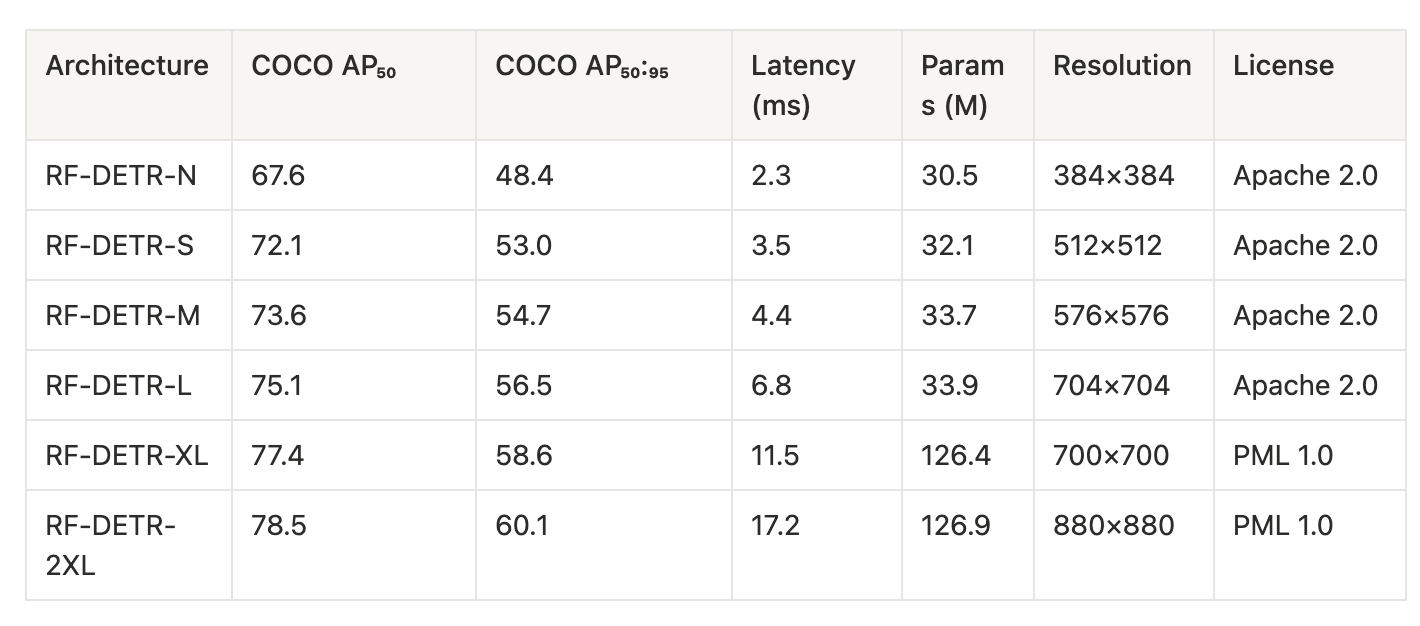
Based on the above table we observe:
- Accuracy increases with model size: COCO AP scores steadily improve from Nano to XL model size, where COCO AP indicates improved object detection accuracy
- Inference latency increases with model size: Processing time rises from 2.3 ms (Nano) to 17.2 ms (2XL), making larger models slower
- Diminishing accuracy gains at higher scales: Performance improvements become smaller from XL to 2XL compared to earlier jumps while latency continues to increase more noticeably at these larger sizes
- Parameter count jumps at larger models: Models stay around ~30M parameters up to L, then increase sharply to ~126M in XL and 2XL
- Resolution scales upward with model size: Input resolution increases from 384×384 to 880×880 as models get larger
To better understand evaluation metrics, read about COCO AP in this blog.
When to Use Small Model Sizes?
Small models (e.g., Nano) are built for efficiency, making them a good choice when speed and resource constraints matter more than maximizing accuracy.
Use them when:
- You need real-time inference (for example, live video streams or robotics).
- You are deploying on edge devices like mobile phones, drones, or embedded systems.
- You have limited GPU/CPU resources or strict cost constraints.
- You want faster training iterations for experimentation and prototyping.
- Your task is relatively simple, with clear objects and less variability.
- Latency is critical, such as in safety systems or interactive apps.
- You need to scale across many instances where compute cost adds up quickly.
When to Use Larger Model Sizes ?
Larger models (e.g., RF-DETR-L, XL, 2XL) prioritize accuracy and robustness, making them better suited for complex or high-stakes tasks.
Use them when:
- Maximum accuracy is the priority, especially for production-critical systems.
- Your dataset is complex, with small objects, cluttered scenes, or high variability.
- You can afford higher latency in exchange for better predictions.
- You have access to powerful hardware (GPUs, cloud inference).
- The application is offline or batch-based, where speed is less important.
- You need better generalization across diverse or unseen data.
- Errors are costly or risky, such as in medical, industrial, or security use cases.
How to Run the Benchmark on Your Model Size
Benchmarking helps you measure latency, throughput, and consistency, allowing you to directly compare model sizes and understand the speed–accuracy trade-off in practice.
In Roboflow, benchmarking can be easily done using the Inference package. Start by installing the required Python package:
pip install inference
Make sure the ROBOFLOW_API_KEY is set before running the benchmark. Then, run the following command in your terminal:
inference benchmark python-package-speed \
  -m {your_model_id} \
  -d {pre-configured dataset name or path to directory with images} \
  -o {output_directory}
Example:
inference benchmark python-package-speed \
  -m rfdetr-base \
  -d coco-128.v1i.coco/test \
  -o benchmark_results
Here, ‘rfdetr-base’ is a public model from Roboflow. You can run the benchmark on any publicly available model from Roboflow Universe or on your own model.
The ‘coco-128.v1i.coco/test’ path points to the directory of images on which the benchmark will run, and benchmark_results specifies the output file.
An example of the JSON content in the benchmark_results file is shown below:
{
  "benchmark_parameters": {
    "datetime": "2026-04-22T19:16:14.124378",
    "model_id": "rfdetr-base",
    "dataset_reference": "coco-128.v1i.coco/test",
    "benchmark_inferences": 1000,
    "batch_size": 1,
    "model_configuration": null
  },
  "benchmark_results": {
    "inferences_made": 1000,
    "images_processed": 1000,
    "average_inference_latency_ms": 1104.9,
    "std_inference_latency_ms": 743.5,
    "average_inference_latency_per_image_ms": 1104.9,
    "average_execution_time_per_image_ms": null,
    "p50_inference_latency_ms": 517.2,
    "p75_inference_latency_ms": 1868.8,
    "p90_inference_latency_ms": 1966.6,
    "p95_inference_latency_ms": 2026.7,
    "p99_inference_latency_ms": 2163.4,
    "requests_per_second": 0.9,
    "images_per_second": 0.9,
    "error_rate": 0.0,
    "error_status_codes": "",
    "avg_remote_execution_time": null
  },
  "platform": {
    "python_version": "3.12.0.final.0 (64 bit)",
    "architecture": "AMD64",
    "bits": 64,
    "cpu_count": 22,
    "cpu_model": "Intel(R) Core(TM) Ultra 7 155H",
    "gpu_count": 0,
    "gpu_names": []
  }
}
The generated JSON report includes metrics such as inference latency, throughput (images per second), percentile latency distribution, total images processed, and error rate, along with details about the model, dataset, and hardware environment.
The process automatically adapts to your system, so you can evaluate performance on your own CPU or GPU and compare results across different devices or model sizes.
You can learn more about benchmarking in the inference documentation.
What to Think About When Choosing Model Sizes?
Smaller models are best when low latency, real-time performance, or limited compute resources are important, especially for edge devices. They are also ideal for prototyping because they enable faster iteration at a lower compute cost.
Larger models deliver higher accuracy and better generalization, making them suitable for complex datasets, offline or batch processing, and high-stakes applications where errors are costly, though they require more compute and have higher latency.
Accuracy generally improves with model size, but gains become smaller when moving from mid-sized models to very large ones (such as XL or 2XL), so it is important to evaluate whether the extra compute and latency are worth the limited improvement.
Happy building! And of course, try Roboflow for the best computer vision solutions!
Cite this Post
Use the following entry to cite this post in your research:
Jacob Solawetz, Paul Guerrie. (Mar 1, 2026). What to Think About When Choosing Vision Model Sizes. Roboflow Blog: https://blog.roboflow.com/computer-vision-model-tradeoff/