

An inference provider for computer vision hosts your vision model behind an API and takes on the work that GPU rentals and LLM APIs leave to you: custom weights, image preprocessing, NMS, video streams, and cloud, edge, or on-prem deployment. Six criteria (custom model support, latency for video, deployment targets, pricing, model formats, and pipeline support) matter most; Roboflow Inference covers all six, and the same SDK call moves from serverless to dedicated to self-hosted by swapping the endpoint URL.
An inference provider is a service that runs a machine learning model on managed infrastructure so that your application can send an input to an endpoint and receive predictions back. The provider handles servers, scaling, and uptime while you write a few lines of code. Most inference providers for computer vision models, however, were designed with large language models in mind. They serve foundation models well but stop short when you arrive with your own trained detector or segmenter.
Vision AI has different constraints. Inputs are images and video rather than text, latency budgets are set by frame rates, and production often spans cloud, edge, and on premise hardware. This guide defines what an inference provider means for computer vision, lays out the criteria that matter, compares the main options, and walks through deploying a custom model to production with Roboflow Inference, the provider built specifically for this gap.
What Is An Inference Provider for Computer Vision?
An inference provider for computer vision hosts a vision model behind an API. You send an image or a video frame, the provider runs the model on its hardware, and you receive structured predictions such as bounding boxes, masks, class labels, or embeddings. You never provision a server, install CUDA, or patch a container. It helps to contrast this with two neighboring categories.
- GPU rental services: Platforms such as Lambda and RunPod rent you raw machines by the hour. They solve the hardware problem but leave the serving problem entirely to you. You still write the API layer, manage model loading, handle scaling, and keep the box alive.
- LLM API providers: Services such as OpenAI, Together AI, and Groq expose ready made foundation models behind polished APIs. They are excellent when the model you need is the model they host and serve. They rarely accept the custom weights that most production computer vision projects depend on, and their interfaces are built around tokens rather than pixels.
Computer vision inference involves more than sending an image to a model and getting a prediction back. Before inference, images may need to be resized, letterboxed, or normalized in the same way they were during training. After inference, predictions may need confidence filtering, coordinate scaling, or non maximum suppression (NMS) to remove overlapping detections. Video adds even more work. The system may need to read frames from video files, webcams, URLs, or RTSP streams, process frames continuously at a target FPS, track objects between frames, and manage visualization or other application logic.
A computer vision inference provider handles much of this work for you. Roboflow Inference includes model loading, preprocessing and post-processing, CPU and GPU execution, image and video processing, APIs, and support for multi-step computer vision Workflows. This keeps the application code smaller and lets you focus on what happens after the prediction.
How to Choose an Inference Provider
When comparing inference providers for computer vision models, the following six criteria are important to consider.
1. Support for custom-trained models
Most real computer vision applications use models trained on their own data. A quality inspection system, for example, may need to detect defects that do not exist in any public model or foundation model. Make sure the inference provider also allows to deploy a custom-trained object detection, classification, or segmentation model, rather than only offering a fixed list of foundation models.
Roboflow supports custom model training and hosting directly on the platform as well as it also allows to upload weights for supported model architectures.
2. Latency and throughput for images and video
Computer vision applications are often much more sensitive to latency than text applications. A camera running at 30 FPS produces a new frame roughly every 33 milliseconds. If inference and the rest of the processing pipeline cannot keep up, frames may need to be dropped, queued, or processed at a lower rate. When evaluating a provider, check:
- inference latency for your model
- image throughput
- performance under continuous video workloads
- GPU and CPU options
- and support for multiple simultaneous streams
The important number is not only how quickly the model runs on one image, but how well the complete application pipeline performs under sustained load. Roboflow provides several computer vision deployment options for different performance requirements.
3. Deployment targets
A project may begin with a cloud API and later need to run closer to the camera. For example, an application may move on-premise because of privacy requirements, or onto an NVIDIA Jetson because sending every video frame to the cloud creates too much latency or bandwidth usage. Look for a provider that gives you multiple deployment choices.
Roboflow Inference can run on cloud infrastructure as well as supported local and edge hardware. For local deployments, see the Roboflow Inference Server documentation. Browser applications can also use Roboflow's web browser SDK for supported deployment patterns. Having several targets matters because you can change where inference runs as the application grows instead of rebuilding the whole system around another provider.
4. Pricing model
The right pricing model depends on request volume, inference frequency, and how continuously the model is used.
- Usage-based or per-inference pricing is suitable for low-volume or asynchronous inference workloads, where requests arrive only at certain times and compute does not need to remain active continuously.
- Hourly compute pricing is better for sustained inference workloads, such as real-time video processing, multi-camera systems, or applications that run models continuously.
- Dedicated deployment is useful when the application requires reserved CPU or GPU resources, predictable latency, and consistent throughput under production load.
When comparing providers, check whether you can move between these deployment models as inference demand increases. A project may begin with serverless inference and later move to dedicated infrastructure when request volume, throughput requirements, or latency constraints increase.
5. Model formats and open model support
An inference provider should support the model architectures your application uses, especially if you train models outside the provider and want to deploy your own weights. With Roboflow, it is useful to distinguish between three capabilities:
- models you can train in Roboflow
- models whose custom-trained weights you can upload
- models you can run for inference or inside a Workflow
Roboflow supports computer vision models across object detection, instance and semantic segmentation, classification, keypoint detection, multimodal vision, and other tasks. The current supported models include families such as RF-DETR, YOLO26, ViT, ResNet, DINOv3, Cosmos 3 Edge, Florence-2, PaliGemma 2, Qwen3-VL, SAM3 etc. Roboflow Workflows expands this further. In addition to deployable custom models, Workflows can use models such as SAM 2, CLIP, and other vision and multimodal models as part of a larger computer vision pipeline. If you already train models using your own infrastructure, check whether the provider accepts weights for that specific architecture. Roboflow's custom model weight upload feature lets you upload weights from supported model families and then deploy them with Roboflow Inference.
6. Support for complete computer vision pipelines
A production computer vision application rarely ends with:
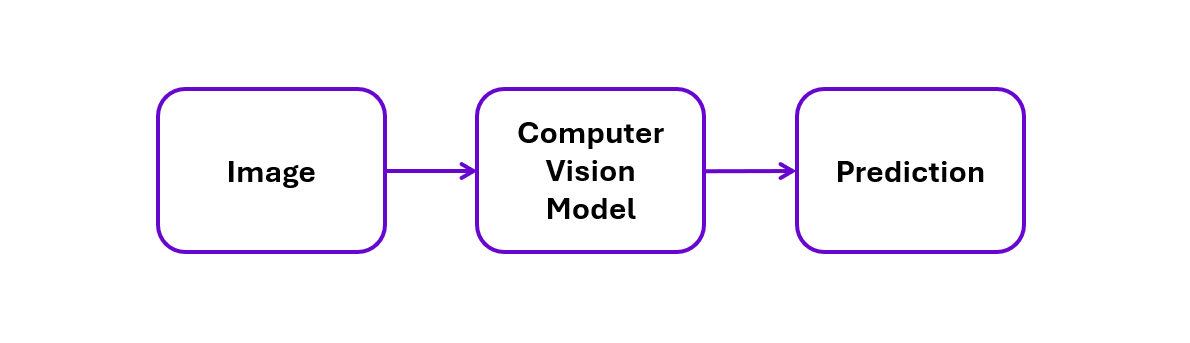
You may need to detect an object, track it between frames, crop it, classify it with another model, count it when it crosses a line, and then trigger an API or machine action. For example:

Without pipeline support, your team has to build and maintain the services connecting all of these steps. Roboflow Workflows provides a visual pipeline layer where models can be combined with tracking, filtering, measurements, conditions, visualizations, integrations, and custom logic. This is an important difference between simply hosting a model and deploying an actual computer vision application.
Hosted API for Custom Models
Training a computer vision model is only one part of putting it into production. Once the model is trained, you still need infrastructure that can load the weights, run inference on CPU or GPU, receive requests, preprocess images, post-process predictions, authenticate users, scale compute, and monitor the model after deployment. This is often where deploying a custom model becomes more difficult. Some inference providers offer a catalog of pretrained or foundation models, while general-purpose cloud platforms give you compute and expect you to build the serving layer yourself.
A hosted API for custom models removes much of this infrastructure. You deploy your model to the provider, then your application sends images to an endpoint and receives predictions. With Roboflow, the basic flow is:
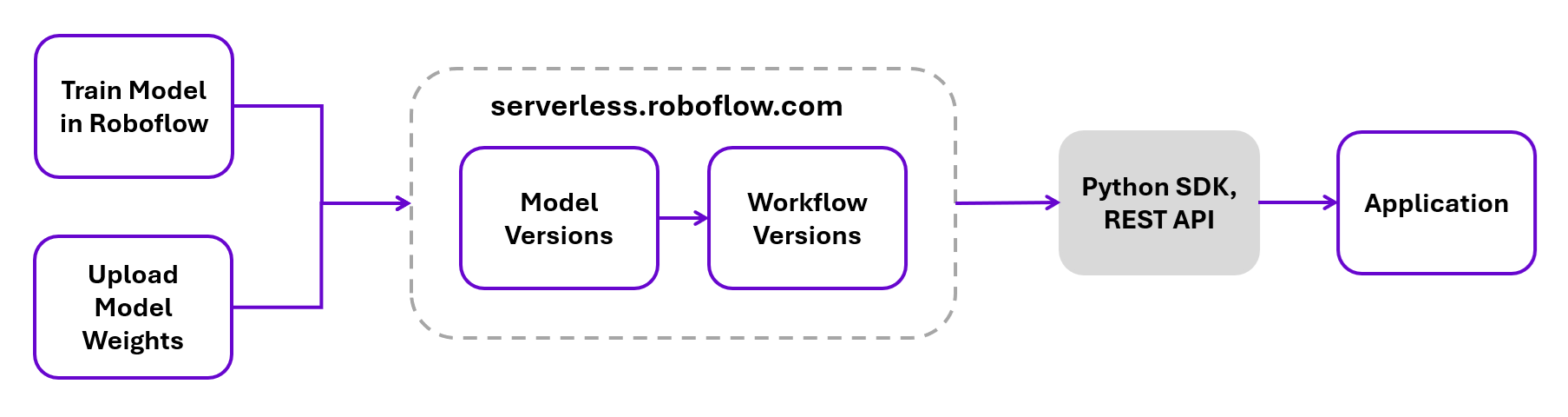
Train a model or upload your own weights
If you train a model directly in Roboflow, the trained model can be deployed through the Serverless Cloud API without creating your own inference container or provisioning a GPU server. For example, you can train a custom RF-DETR model on your dataset and then use the resulting model version through Roboflow's deployment options.
You are not limited to models trained on the Roboflow platform. If you already trained a compatible model elsewhere, Roboflow also provides a custom weights upload process for supported architectures. This is important because the model you need to deploy in production is often not a general pretrained model. It may be a detector trained to identify your products, defects, equipment, components, or other domain-specific objects.
Once the model is available in Roboflow, it can be called through the Serverless Cloud API. The service runs model inference on managed GPU-accelerated infrastructure, so you do not need to create and maintain an inference server for the hosted deployment.
Call the model through the Inference SDK
For Python applications, install the Roboflow Inference SDK:
pip install inference-sdk
Then create a client and send an image to your model:
from inference_sdk import InferenceHTTPClient

client = InferenceHTTPClient(
    api_url="https://serverless.roboflow.com",
    api_key="ROBOFLOW_API_KEY"
)

result = client.infer(
    "image.jpg",
    model_id="your-project/model-version"
)
The model_id tells Roboflow which project and model version should process the request. The SDK handles the request to the inference endpoint and returns the model predictions to your application. The same model can also be called over REST, which is useful when the application is written in another programming language or when you want to integrate inference directly with an existing service. For example:
base64 image.jpg | curl -d @- \
  "https://serverless.roboflow.com/your-project/model-version?api_key=$ROBOFLOW_API_KEY"
See the REST API reference for current endpoints and request options. This gives you a relatively simple application architecture:
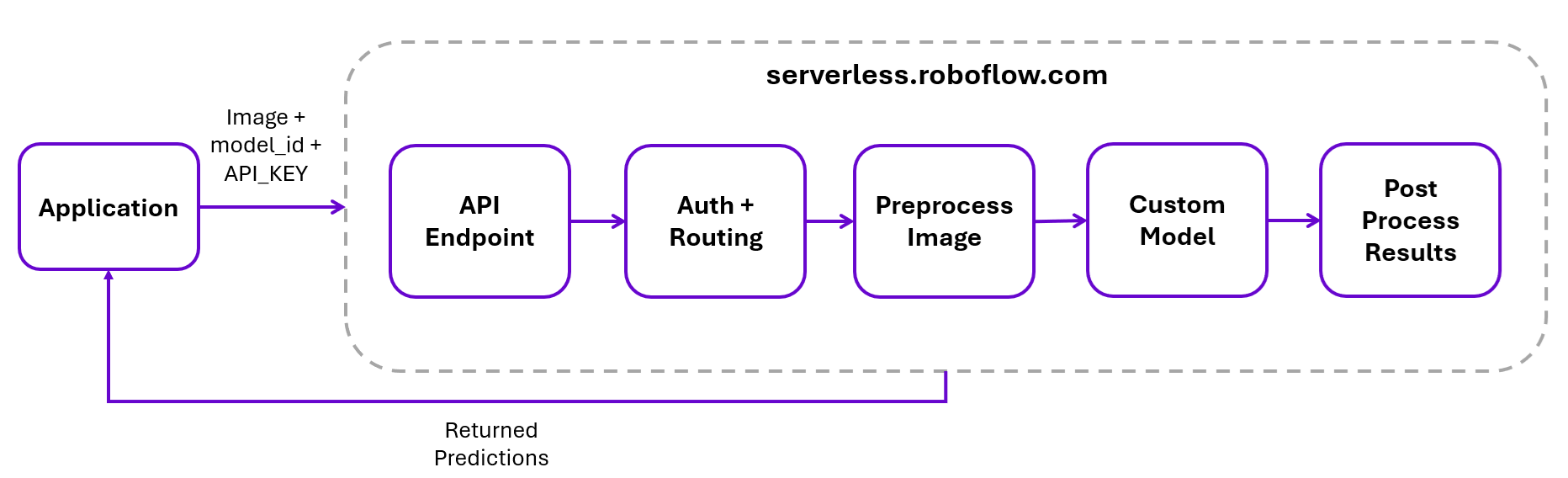
The infrastructure required to load and serve the model remains outside your application.
Authentication
Production inference endpoints need authentication, particularly when they provide access to private models. Roboflow uses API keys to authenticate requests. Private API keys are associated with a workspace and can be used to access its private models, Workflows, and other API resources. You can specify key with following line of code:
api_key="ROBOFLOW_API_KEY"
For production systems, store private credentials in environment variables or your application's secret-management system. If a private key is exposed, it should be revoked or rotated.
Model versioning and rollback
A production inference API should also make it possible to control exactly which model version is running. Roboflow model IDs include a version number:
package-detector/1
package-detector/2
package-detector/3
Suppose version 3 is the current production model:
result = client.infer(
    "image.jpg",
    model_id="package-detector/3"
)
You can train or upload a newer model as another version and evaluate it before changing the production application. For example:
package-detector/3  → Production
package-detector/4  → New model being evaluated
After validation, the application can be changed to:
model_id="package-detector/4"
Keeping model versions separate is useful for reproducibility because you know exactly which model produced each set of predictions. It also provides a simple rollback path. If version 4 introduces an accuracy regression or behaves poorly on production data, the application can point back to:
model_id="package-detector/3"
instead of rebuilding the serving infrastructure or redeploying an entire inference container. Versioning is particularly important when models are updated regularly as new training data becomes available.
Monitoring inference in production
Getting an endpoint online does not mean deployment is finished. Once a model receives real production data, you need visibility into how it behaves over time. Roboflow's Model Monitoring provides metrics and inference information for supported deployments. The monitoring dashboard can track metrics such as:
- total inference requests;
- average prediction confidence;
- average inference time;
- detections by class;
- individual inference results;
- custom inference metadata.
For example, a drop in average confidence may indicate that incoming images are becoming different from the data used during training. Likewise, an increase in inference time can indicate a change in workload or deployment performance. Custom metadata can also add application context to an inference. A manufacturing system, for example, could associate predictions with information such as:
Production line: Line-3
Camera: Camera-07
Shift: Morning
Expected result: Pass
This makes it easier to investigate predictions in the context of the system that generated them. Monitoring can also be combined with alerts so teams can be notified when selected model metrics cross configured thresholds. Model Monitoring availability depends on the Roboflow plan and deployment configuration.
Serverless Inference
Serverless inference lets you run a model without provisioning or managing a CPU or GPU instance. The infrastructure scales automatically with requests and can scale down to zero when it is not being used. You pay for inference execution rather than keeping a server running continuously. This makes serverless a good starting point for:
- prototypes and development
- applications with low or intermittent inference volume
- image-processing APIs where request volume changes over time
- production applications that do not require continuously reserved compute
For workloads that run continuously, particularly high-throughput video, multi-camera systems or applications with strict latency requirements, a dedicated GPU resources are usually a better fit because compute remains allocated to the application.
How Roboflow Serverless inference works
The Serverless Cloud API runs models and Workflows on GPU-accelerated, auto-scaling infrastructure. You can call an individual model or execute a complete Workflow using the REST API or Roboflow Inference SDK.
Model availability depends on the architecture. Roboflow supports Serverless deployment for many object detection, segmentation, classification, keypoint, and multimodal models. The supported models table shows whether a specific architecture can run through the Serverless Cloud API. Models that are not supported there can instead run on a GPU Dedicated Deployment or self-hosted Roboflow Inference.
Cold starts
Because Serverless compute can scale down when it is idle, a model may no longer be loaded in GPU memory when the next request arrives. When this happens, the model must be loaded again before inference can run. This is known as a cold start and can add up to a few seconds to that request. Requests made while the model remains loaded avoid this model-loading delay. For applications where this occasional additional latency is acceptable, Serverless avoids the cost of continuously allocated compute. If the application requires consistently low latency, dedicated resources are a better choice.
Pricing and limits
Serverless Cloud API uses usage-based pricing based on inference processing time rather than a fixed cost per request. As a general reference, 1 credit represents about 500 seconds of inference processing, but billing uses the measured processing time for each request with a minimum charge of 100 ms. For Workflows, model inference and general Workflow processing are measured separately.
The Serverless Cloud API accepts file uploads up to 20 MB. Larger images should be resized before sending them. The Roboflow Python SDK can automatically resize images to the model's required input size. For requests-per-second limits, production throughput should be benchmarked using the specific model or Workflow you plan to deploy.
Moving beyond Serverless
Serverless does not have to be the final deployment architecture. As inference volume increases, you can move to a Dedicated Deployment to reserve CPU or GPU resources for workloads that need sustained throughput and more predictable latency. For applications that need to run on your own infrastructure, Roboflow Inference can run on local servers, edge devices, or other supported hardware. This is useful when data must remain on-premise, internet connectivity is limited, or inference needs to happen close to the camera.
The transition does not require rewriting the inference integration because the Serverless Cloud API and self-hosted deployments are both powered by Roboflow Inference. With the Python SDK, the main change is the endpoint:
# Serverless
api_url="https://serverless.roboflow.com"

# Self-hosted Inference Server
api_url="http://localhost:9001"
The model call can otherwise use the same InferenceHTTPClient interface.
Comparison of Inference Providers for Computer Vision
The best inference provider depends on how much of the deployment stack you want the platform to manage. Some providers are primarily GPU infrastructure platforms. Others provide general-purpose ML endpoints. A smaller set handles computer-vision-specific requirements such as image and video processing, custom detection models, tracking, and multi-step pipelines. The table below compares the main options against the criteria discussed earlier.
| Provider | Custom models | Image / video inference | Deployment options | Pricing / scaling | Pipeline support |
|---|---|---|---|---|---|
| Roboflow | Models trained on the platform, plus uploaded weights for supported architectures including RF-DETR and YOLO variants | Object detection, classification, instance segmentation, semantic segmentation, and keypoint detection. Video processed over WebRTC through the Serverless Video Streaming API | Serverless Cloud API, Dedicated Deployments, Batch Processing, self-hosted Inference server, edge devices, and browser via inferencejs | Serverless metered per inference in credits, with one credit covering roughly 500 seconds of inference. Dedicated Deployments billed in 1 minute intervals at 1 credit per hour for GPU and 0.25 credit per hour for CPU | Workflows, available as API endpoints on the serverless API and runnable on dedicated and self-hosted deployments |
| Hugging Face Inference Endpoints | Models from the Hub, private repositories, and custom containers with user-written handler code | Preprocessing and postprocessing defined in the model repository or custom handler | Dedicated managed cloud endpoints on CPU and GPU hardware tiers | Billed per minute of running compute by hardware tier. Setting minimum replicas to zero enables scale to zero | Multi-step logic implemented in handler code |
| Replicate | Custom models packaged with Cog, an open source tool that builds OCI container images | Preprocessing and postprocessing defined inside the model's Cog container | Managed cloud GPU inference | Billed per second of compute. Idle models are spun down | Multi-step logic written in the model container or the calling application |
| Amazon SageMaker AI | Custom models served through prebuilt or bring-your-own containers with custom inference code | Payload and processing limits differ by option. Real-time supports up to 25 MB and 60 seconds, serverless up to 4 MB and 60 seconds, asynchronous up to 1 GB and one hour | Real-time, serverless, asynchronous, and batch transform inference | Instance-based billing for real-time and asynchronous, usage-based for serverless. Asynchronous endpoints can scale down to zero | SageMaker Pipelines for general ML orchestration |
| Google Vertex AI | Custom-trained models with prebuilt or custom serving containers | Serving logic defined in the prebuilt or custom container. Dedicated endpoints add native streaming inference support | Shared public endpoints, Dedicated Public Endpoints, and Private Service Connect endpoints | Node-based billing with configurable autoscaling | Vertex AI Pipelines for general ML orchestration |
| Azure Machine Learning | Registered models with a scoring script and a custom environment or container | Inference logic defined in the scoring script. Online endpoints run on CPU and GPU machines | Managed online endpoints, Kubernetes online endpoints, and batch endpoints | Billed for allocated compute, with autoscaling on online endpoints | Azure Machine Learning pipelines for general ML orchestration |
| Modal | Custom code, weights, and container images defined in Python | Preprocessing and postprocessing defined in user code | Serverless cloud CPU and GPU compute | Usage-based compute billing with scale to zero | Multi-step logic composed in Python code |
| Baseten | Custom models packaged with Truss, plus any Docker image through Custom Servers | Preprocessing and postprocessing defined in the Truss package or Chainlet code | Managed CPU and GPU deployments | Billed per minute for each running replica. A default minimum of 0 replicas enables scale to zero | Chains for multi-model systems, with separate hardware and autoscaling per step |
| NVIDIA Dynamo-Triton | TensorRT, PyTorch, ONNX, OpenVINO, Python, and RAPIDS FIL backends | Real-time, batched, ensemble, and audio or video streaming workloads | Self-hosted on NVIDIA GPUs, non-NVIDIA accelerators, and x86 or ARM CPUs | Open source software. Infrastructure and compute are self-managed | Model ensembles executed server side |
Hugging Face Inference Endpoints and Replicate are good choices for teams that want managed model serving without building the underlying infrastructure themselves. Hugging Face fits naturally with Hub-based workflows, while Replicate is better suited to packaging custom model code into a hosted API.
AWS SageMaker AI, Google Vertex AI, and Azure Machine Learning are broader cloud ML platforms. They offer strong control over deployment and scaling, but most computer-vision-specific processing still needs to be implemented within your own serving code or pipelines.
Modal and Baseten provide flexible managed compute for custom models. They simplify GPU provisioning and autoscaling, while leaving more of the vision application logic to developers.
NVIDIA Dynamo-Triton is different from the hosted services above. It is a self-hosted inference server for teams that want direct control over model runtimes, batching, ensembles, and hardware deployment.
Where Roboflow is different
Roboflow covers the full computer vision lifecycle in one platform. You can manage data, train or upload models, build multi-step vision pipelines, and deploy them to cloud or self-hosted infrastructure without switching platforms. Roboflow combines model development and production computer vision deployment in one CV-focused product.
Deploy a Custom Vision Model with Roboflow
Let's now see how to deploy a custom vision model. Here is a simple path from a trained computer vision model to a production inference endpoint.
Step 1: Pick or train your model
Start with a model in your Roboflow project. You can train a model from a dataset version by selecting Custom Training, choosing an architecture and model size, and starting the training job. Roboflow recommends RF-DETR for object detection when accuracy is the priority.
If you already trained a supported architecture elsewhere, you can upload the model weights instead of training again. Just checkout these guides:
Training RF-DETR CUstom Model in Roboflow
Step 2: Deploy the model with the Serverless API
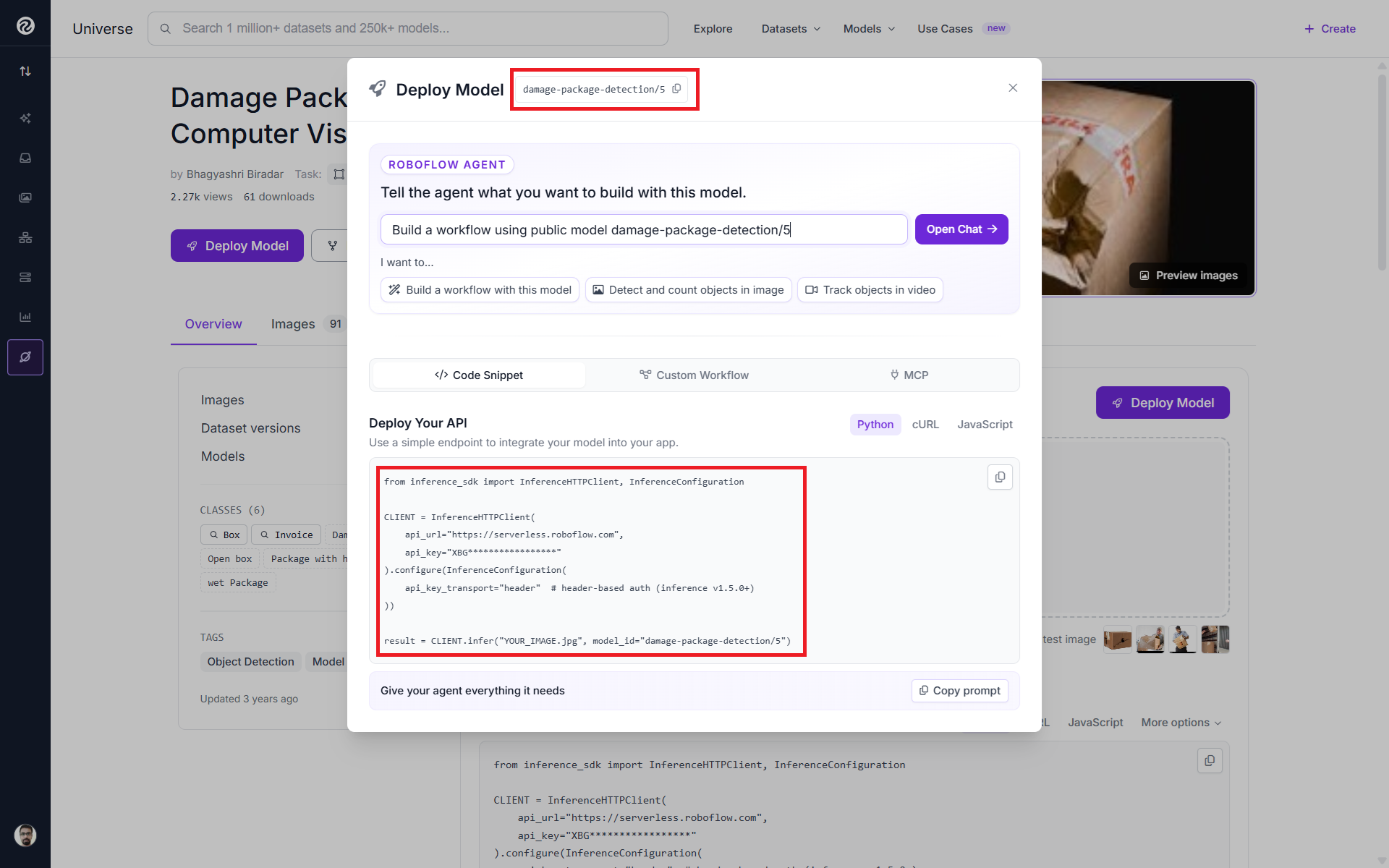
Once the model is trained or uploaded, open its deployment options and use the Serverless Cloud API. Models deployed to Roboflow can be called through the Serverless API using their model ID, for example:
damage-package-detection/5
where 5 is the model version. The Serverless API runs the model on Roboflow-managed GPU infrastructure. Here's the Serverless Cloud API guide.
Step 3: Call the Serverless endpoint
Install the Inference SDK:
pip install inference-sdk
Then send an image to your model:
from inference_sdk import InferenceHTTPClient, InferenceConfiguration

CLIENT = InferenceHTTPClient(
    api_url="https://serverless.roboflow.com",
    api_key="ROBOFLOW_API_KEY"
).configure(InferenceConfiguration(
    api_key_transport="header"  # header-based auth (inference v1.5.0+)
))

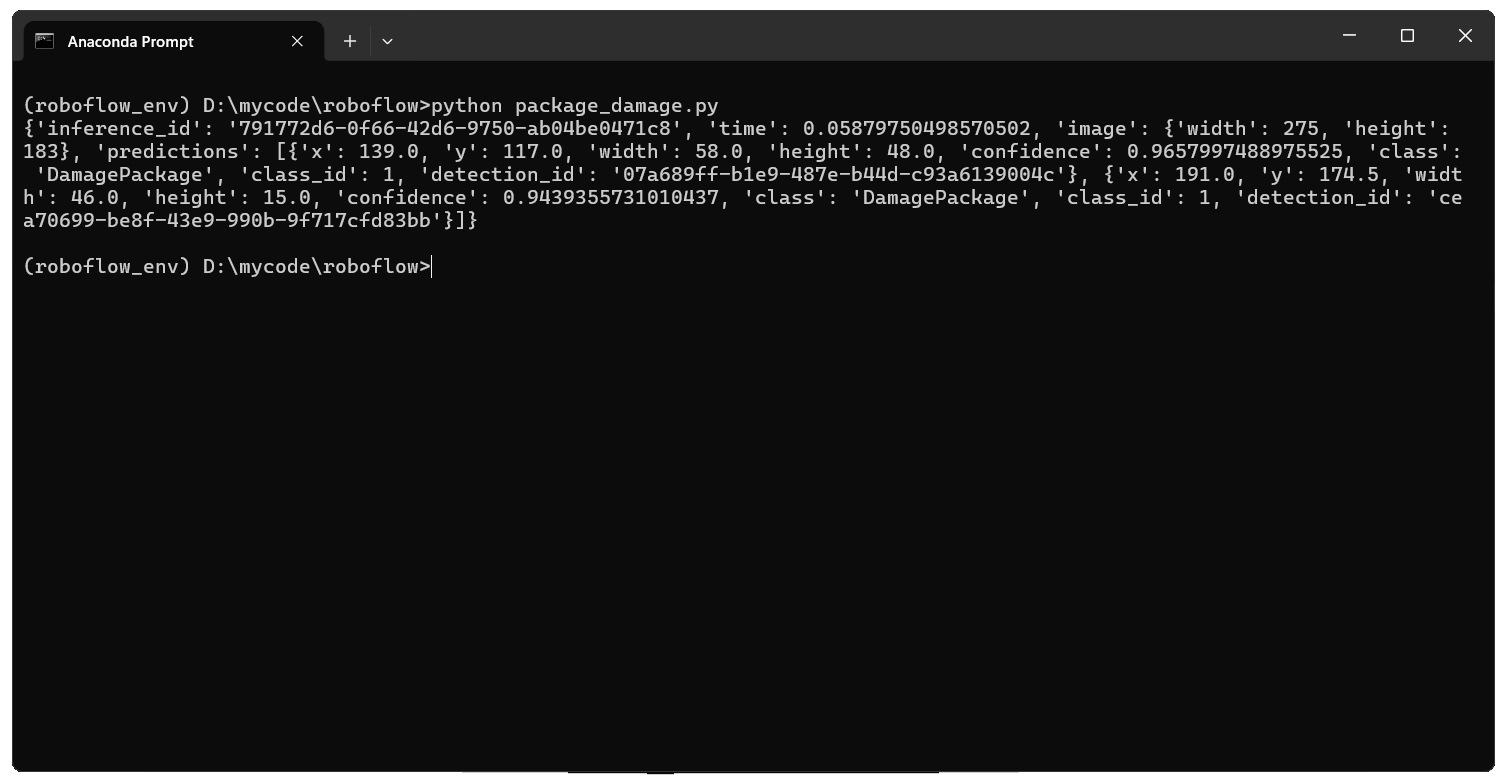
result = CLIENT.infer("YOUR_IMAGE.jpg", model_id="damage-package-detection/5")

print(result)
InferenceHTTPClient can send local image paths, image URLs, PIL images, and NumPy arrays to a Roboflow-hosted or self-hosted Inference Server. You can also call the same endpoint directly through REST if your application is not written in Python. Check out following guides:
Step 4: Add the model to a Workflow
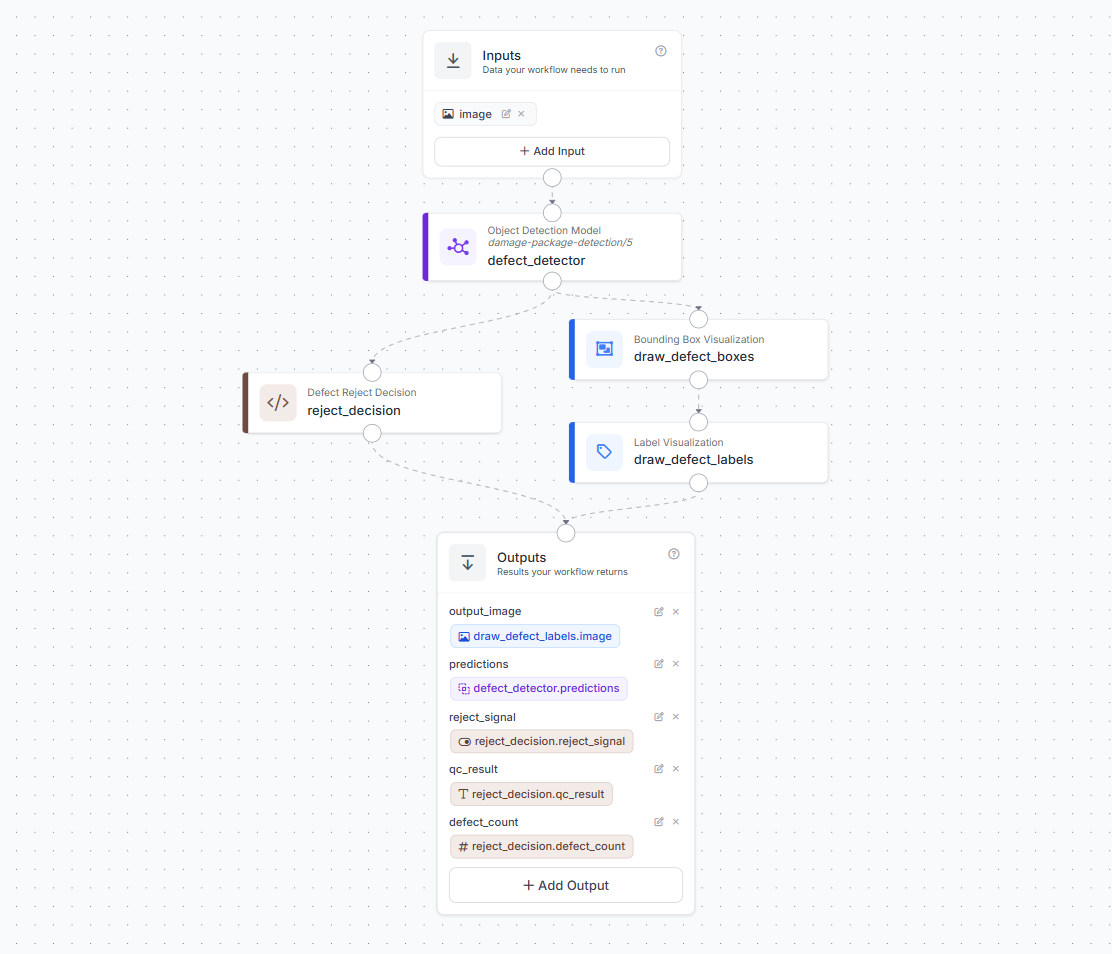
If your application needs more than a single prediction, add the model to a Roboflow Workflow. In the Workflow editor:
- Add a Model block.
- Select your trained model under Your Models.
- Connect the input to the model.
- Add the processing blocks your application needs.
- Connect the final result to the output.
Workflows let you combine models with operations such as tracking, filtering, counting, measurements, and application logic. The Serverless API is available as a Workflow runtime and is the default option for supported Workflows. Checkout Build with Roboflow Workflows.
Step 5: Move to dedicated or edge deployment when needed
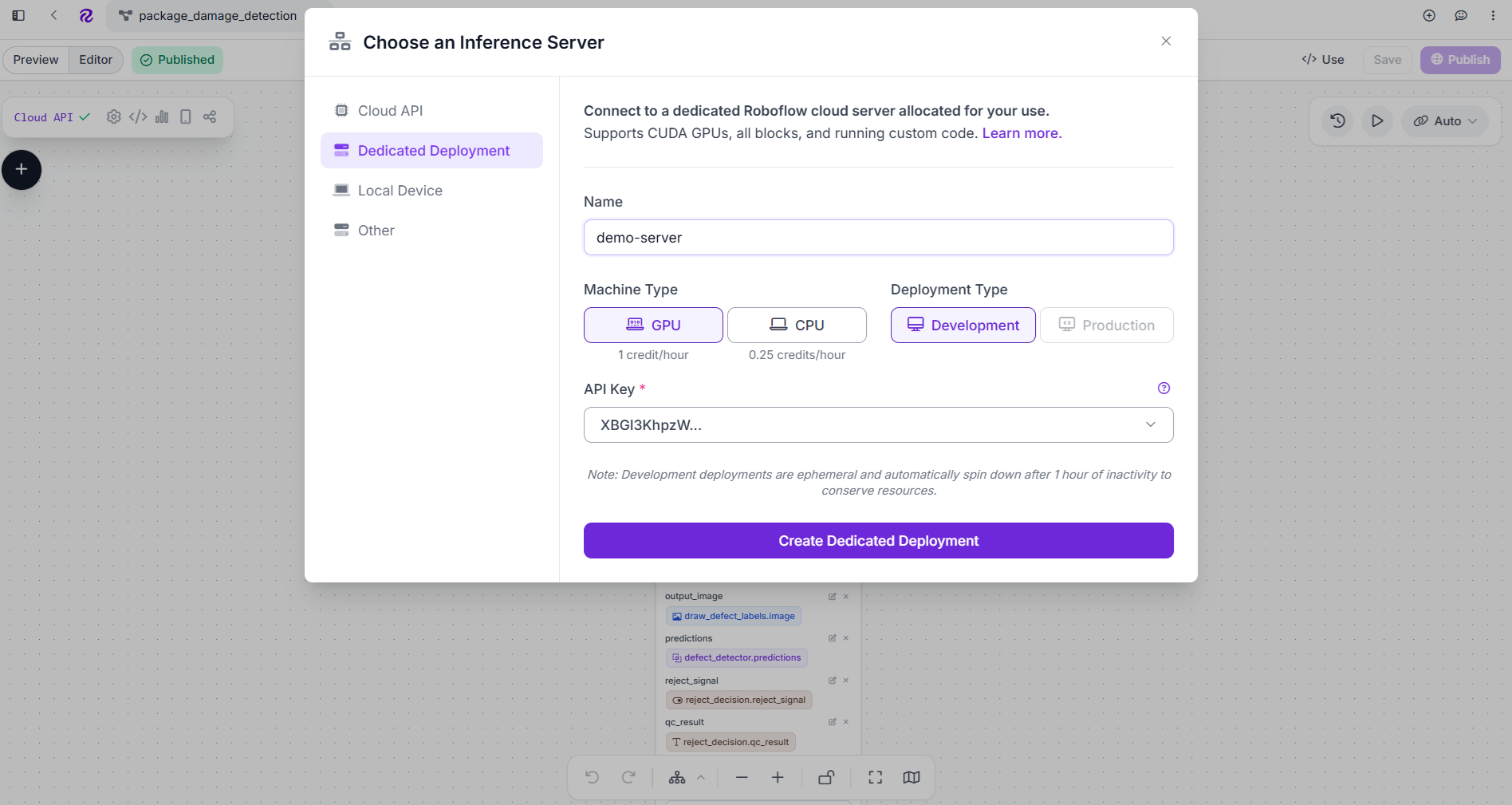
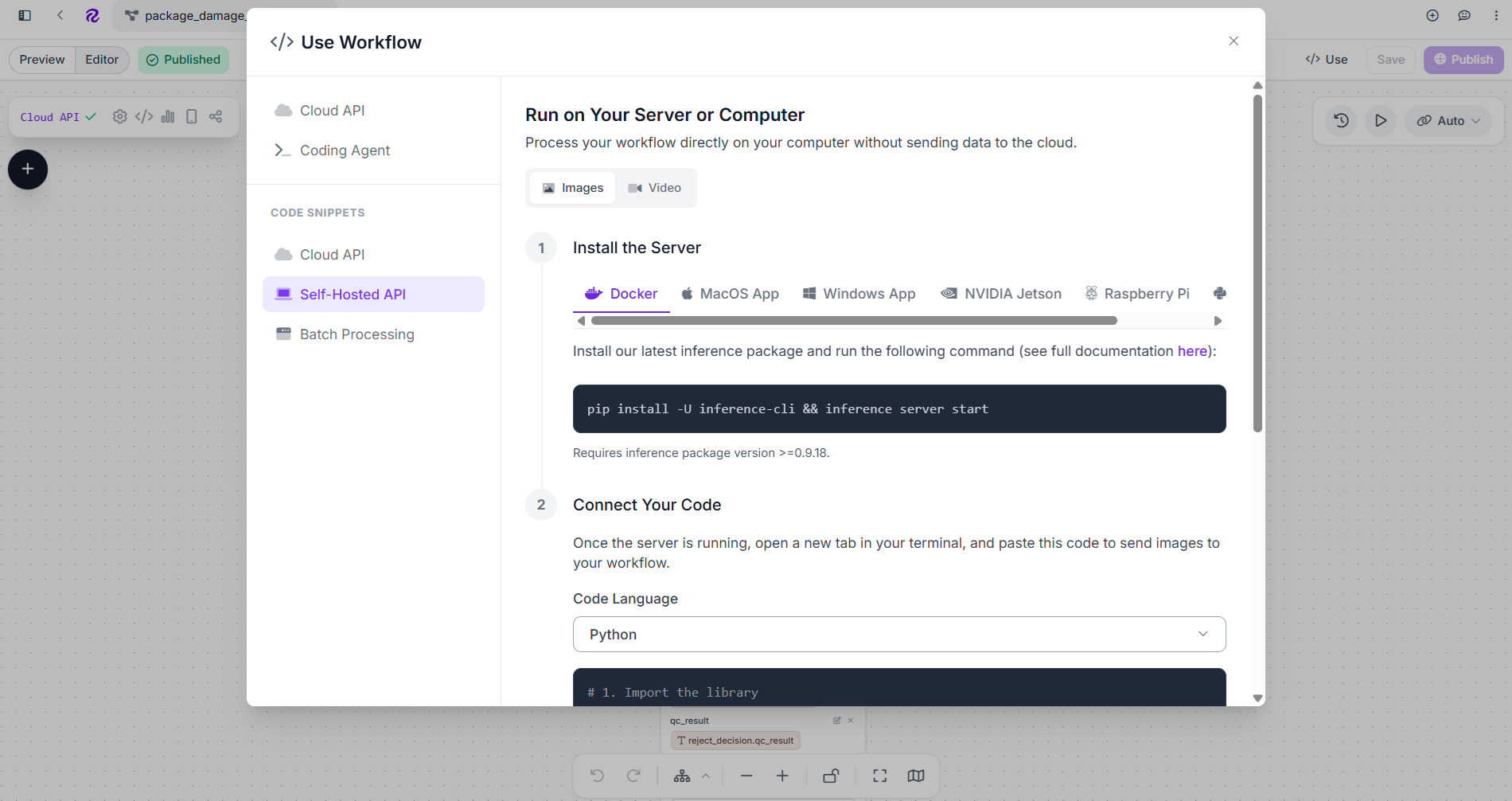
You can keep the Serverless deployment while it meets your application's requirements. If you later need reserved compute, deploy the same model or Workflow on a Dedicated Deployment with dedicated CPU or GPU resources. For on-premise or edge inference, run Roboflow Inference on your own hardware:
pip install inference-cli
inference server start
The local server runs on port 9001 by default. Then change the client endpoint:
# 1. Import the library
from inference_sdk import InferenceHTTPClient, InferenceConfiguration

# 2. Connect to your local server
client = InferenceHTTPClient(
    api_url="http://localhost:9001", # Local server address
    api_key="ROBOFLOW_API_KEY"
).configure(InferenceConfiguration(
    api_key_transport="header"  # header-based auth (inference server v1.5.0+)
))

# 3. Run your workflow on an image
result = client.run_workflow(
    workspace_name="tim-4ijf0",
    workflow_id="packagedamagedetection",
    images={
        "image": "YOUR_IMAGE.jpg" # Path to your image file
    },
    use_cache=True # Speeds up repeated requests
)

# 4. Get your results
print(result)
The same Inference SDK can communicate with both Roboflow-hosted and self-hosted Inference Servers, so the deployment target can change without replacing the application interface. Checkout following guides:
Conclusion
Choosing between inference providers for computer vision models starts with three questions:
- Can it serve your custom model?
- Can it meet your image or video performance requirements?
- Can it run where your application ultimately needs to operate?
Generic inference platforms provide flexible compute, but computer vision adds image and video handling, model-specific preprocessing, post-processing, streaming, tracking, and application logic. Roboflow brings these pieces together with custom training, Serverless Hosted APIs, Dedicated Deployments, Workflows, browser deployment, and self-hosted Inference.
Start with Roboflow Inference to deploy a custom vision model, then use the Roboflow deployment options to choose between serverless, dedicated, streaming, or self-hosted deployment for production.


Cite this Post
Use the following entry to cite this post in your research:
Timothy M. (Aug 3, 2026). Inference Providers for Computer Vision Models. Roboflow Blog: https://blog.roboflow.com/inference-providers-for-computer-vision-models/