

In computer vision annotation, a missing annotation and a null annotation are not the same thing: a missing annotation is an image that contains objects which were never labeled (introducing false negatives into training), while a null annotation is an image with no objects present that is intentionally included to teach a model that not every frame contains a target. How each case is represented differs by format: PASCAL VOC XML and COCO JSON handle the absence of bounding boxes differently, and understanding that distinction is important when auditing dataset quality before training.
In a dataset, a missing annotation occurs when an image contains objects that should be labeled but are not. This is problematic because the model learns from these unlabeled objects as false negatives, which can negatively impact detection performance.
In contrast, a null annotation occurs when an image genuinely contains no instances of the target objects, meaning no bounding boxes need to be recorded. Null annotations are not inherently problematic and can even be beneficial, helping the model learn that target objects are not always present in an image.
As a result, one of the most challenging dataset quality issues is identifying images with missing annotations, whether the omissions are accidental or intentional.
In this guide, you'll learn how to differentiate missing annotations from null annotations, how each is represented in common annotation formats such as COCO JSON and Pascal VOC XML, and how to prevent dataset quality issues caused by their misidentification.
What Differentiates Missing and Null Annotations?
Consider the example below from a chess pieces dataset, where chess pieces must be annotated to train a model to detect pieces on a chessboard.
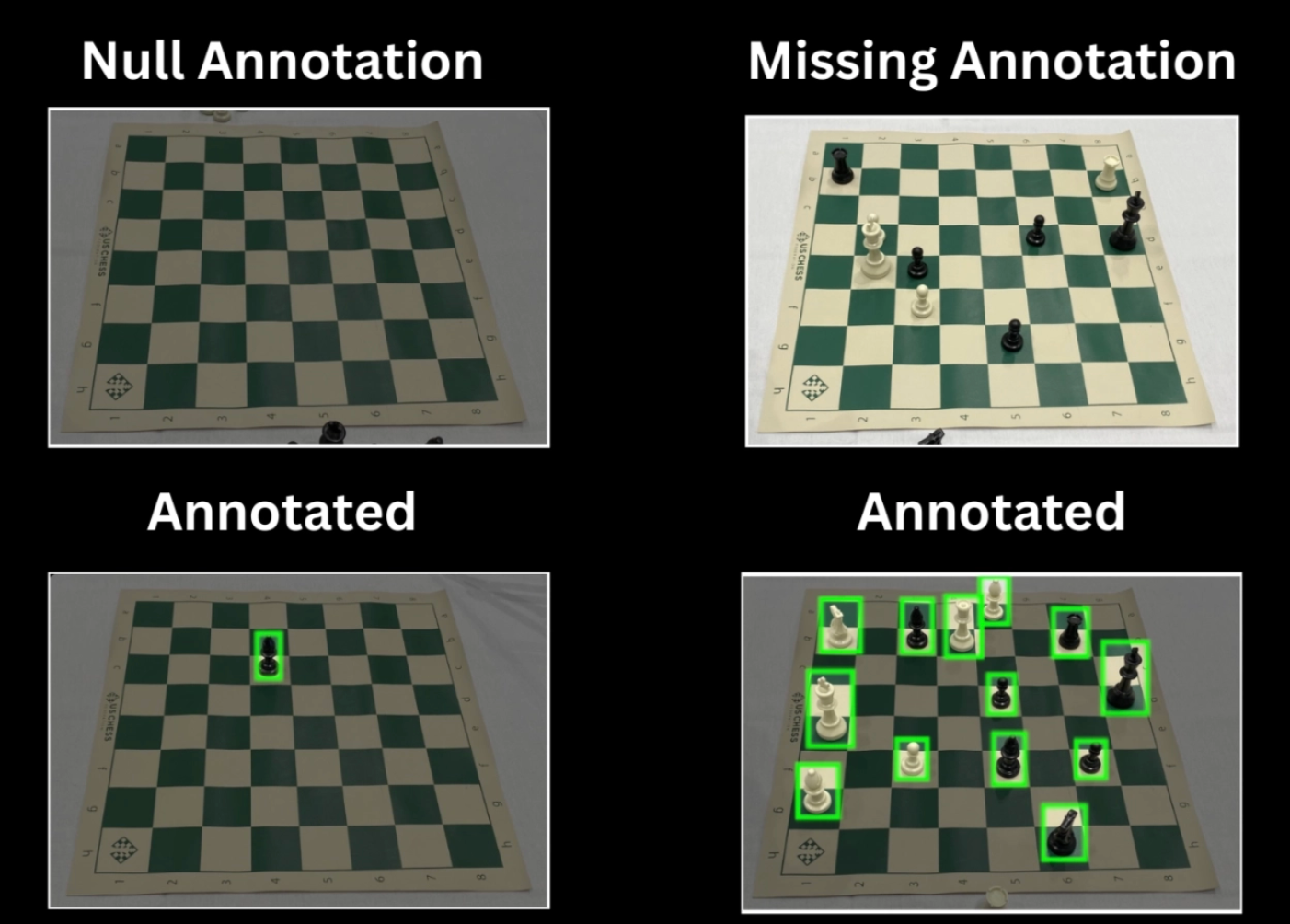
In the first image, no chess pieces are present on the board. This is a null annotation because no annotations are required. The absence of annotations is expected since there are no objects of interest in the image.
In the second image, chess pieces are present but have not been annotated. This is a missing annotation because objects of interest exist in the image, yet the corresponding annotations are absent. An image can still be considered to have missing annotations even if some objects are annotated, as long as one or more objects of interest remain unannotated.
The remaining images are then marked as annotated, as all the pieces present on the board are annotated.
Missing annotations are problematic because the model may learn to treat these unannotated objects of interest as background, while null annotations are generally not problematic, as they correctly represent images that contain no objects of interest and can help the model learn that target objects are not always present.
Representation of Null Annotations Across Different Annotation Formats
A null annotation example, such as a chessboard with no pieces, does not require any bounding boxes. However, such images may still be included in a dataset to help the model learn that target objects are not always present.
This raises an important question: how are image with no objects represented in different annotation formats?
Null Annotation in PASCAL VOC XML
PASCAL VOC XML is a computer vision annotation format for tasks such as object detection, image classification, and segmentation. It comes from the PASCAL Visual Object Classes (VOC) challenge, originally created as a benchmark competition to advance research in visual object recognition in images, and it stores labels in a structured XML file.
It is mostly used in academic research datasets and in legacy deep learning frameworks or tools that still rely on XML-based annotations.
In PASCAL VOC, object annotations are stored in XML files, with one XML file corresponding to each image. These files contain image metadata such as the filename, path, dimensions, and any annotated objects.
For example, an annotated image containing multiple objects of interest would have an XML file similar to the one below:
<annotation>
    <folder />
    <filename>8d6f722eadc015a393bd490f9b7a85e6_jpg.rf.9LqxqONQj4fs54vwnZyj.jpg</filename>
    <path>8d6f722eadc015a393bd490f9b7a85e6_jpg.rf.9LqxqONQj4fs54vwnZyj.jpg</path>

    <source>
        <database>roboflow.com</database>
    </source>

    <size>
        <width>2284</width>
        <height>1529</height>
        <depth>3</depth>
    </size>

    <segmented>0</segmented>

    <object>
        <name>white-king</name>
        <pose>Unspecified</pose>
        <truncated>0</truncated>
        <difficult>0</difficult>
        <occluded>0</occluded>
        <bndbox>
            <xmin>705</xmin>
            <xmax>857</xmax>
            <ymin>326</ymin>
            <ymax>623</ymax>
        </bndbox>
    </object>

    <object>
        <name>black-king</name>
        <pose>Unspecified</pose>
        <truncated>0</truncated>
        <difficult>0</difficult>
        <occluded>0</occluded>
        <bndbox>
            <xmin>1124</xmin>
            <xmax>1298</xmax>
            <ymin>629</ymin>
            <ymax>939</ymax>
        </bndbox>
    </object>

    <object>
        <name>white-pawn</name>
        <pose>Unspecified</pose>
        <truncated>0</truncated>
        <difficult>0</difficult>
        <occluded>0</occluded>
        <bndbox>
            <xmin>516</xmin>
            <xmax>650</xmax>
            <ymin>935</ymin>
            <ymax>1115</ymax>
        </bndbox>
    </object>

    <metadata> </metadata>
</annotation>
The <object> tag contains the class name and bounding box coordinates for each annotated object in the image.
In contrast, a null-annotated image contains no labeled objects. Its XML file includes only the image metadata and does not contain any <object> tags:
<annotation>
    <folder/>
    <filename>e0d38d159ad3a801d0304d7e275812cc_jpg.rf.aY6JYvadoOJir28Cs0X2.jpg</filename>
    <path>e0d38d159ad3a801d0304d7e275812cc_jpg.rf.aY6JYvadoOJir28Cs0X2.jpg</path>

    <source>
        <database>roboflow.com</database>
    </source>

    <size>
        <width>2284</width>
        <height>1529</height>
        <depth>3</depth>
    </size>

    <segmented>0</segmented>
    <metadata> </metadata>
</annotation>
Null Annotation in COCO JSON
COCO JSON is an annotation format used in computer vision datasets, defined by the Common Objects in Context (COCO) dataset, to store image labels in a structured JSON file for tasks like object detection, segmentation, and pose estimation.
A COCO JSON dataset typically includes a separate annotation file for each split, such as train, validation, and test, where each file contains all annotations for the images in that specific split.
The annotation file is organized into several main sections:
- The images section lists all images in the dataset split and assigns a unique ID to each image.
- The annotations section contains all object annotations for that split, with each annotation linked to an image through its image_id.
- Multiple annotations sharing the same image_id indicate that the image contains multiple labeled objects (bounding boxes or masks).
- The categories section defines the set of object classes available in the dataset.
For a null annotation example, the image is still present in the images section, but there are no corresponding entries for that image in the annotations section.
For example, an annotation COCO JSON file might look like the following:
{
  "info": {
    "description": "Exported from roboflow.com",
    "version": "1.0",
    "year": 2026
  },
  "licenses": [],
  "images": [
    {
      "id": 1,
      "file_name": "image1.jpg",
      "width": 1280,
      "height": 720
    },
    {
      "id": 2,
      "file_name": "image2.jpg",
      "width": 1280,
      "height": 720
    },
    {
      "id": 3,
      "file_name": "image3.jpg",
      "width": 1280,
      "height": 720
    }
  ],
  "categories": [
    {
      "id": 1,
      "name": "person"
    },
    {
      "id": 2,
      "name": "car"
    }
  ],
  "annotations": [
    {
      "id": 1,
      "image_id": 1,
      "category_id": 1,
      "bbox": [120, 80, 220, 400],
      "area": 88000,
      "iscrowd": 0,
      "segmentation": []
    },

    {
      "id": 2,
      "image_id": 2,
      "category_id": 1,
      "bbox": [100, 120, 180, 360],
      "area": 64800,
      "iscrowd": 0,
      "segmentation": []
    },
    {
      "id": 3,
      "image_id": 2,
      "category_id": 2,
      "bbox": [400, 200, 260, 150],
      "area": 39000,
      "iscrowd": 0,
      "segmentation": []
    },
    {
      "id": 4,
      "image_id": 2,
      "category_id": 2,
      "bbox": [700, 300, 200, 120],
      "area": 24000,
      "iscrowd": 0,
      "segmentation": []
    }
  ]
}
In the above example:
- Image 1 (id: 1) has one annotation.
- Image 2 (id: 2) has three annotations, indicating three labeled objects in the image.
- Image 3 (id: 3) appears in the images section but has no corresponding entries in the annotations section.
Because image_id: 3 has no associated annotations, it is interpreted as a null annotation example.
Detecting null annotations in COCO is therefore a matter of identifying image IDs that appear in the images list but do not appear in any annotation's image_id field.
In this way, both PASCAL VOC and COCO allow the inclusion of images without objects, but they represent them differently.
Supported Dataset Annotation Formats in Roboflow
Through Roboflow, you can export your annotated dataset in a wide range of formats, including COCO JSON, OpenAI JSON, YOLO Darknet TXT, TensorFlow Object Detection CSV, and many others.
Exporting the same dataset in different formats is a useful way to see how annotations are represented across various computer vision frameworks and training pipelines, allowing you to explore and compare each format in a practical, hands-on manner.
The below video demonstrates how to export a dataset and the many available annotation formats in Roboflow.
Learn more about various computer vision annotation formats here.
How to Create High-Quality Annotations Using Roboflow Annotate
Roboflow Annotate is an image annotation tool built into Roboflow. It is used to create labeled datasets for computer vision tasks such as object detection, segmentation, classification, and pose estimation detection as quickly as possible, as shown below.
Each annotated image is added to the dataset. You can upload a batch of images, label them individually, and continuously add them to build a larger dataset for training and evaluation.
Roboflow Annotate also makes it easy to create Null Annotations using the ‘∅’ option available in the floating menu on the right, as demonstrated below.
When an image is marked with ‘∅’, it indicates that no object of interest is present. The image can then be marked as complete (‘✓’) and included in the dataset, helping the model learn that target objects may not appear in every image.
Roboflow Annotate also offers various AI labeling features that reduce the manual effort required for annotation, such as:
- Label Assist: Auto-labels images using your existing trained model. Best used after you already have a model (e.g., continuing annotation on a partially labeled dataset).
- Smart Polygon (SAM): Creates polygon masks with a single click. Best for initial dataset labeling or refining annotations (e.g., outlining objects like cars, people, or animals).
- Box Prompting: Finds and labels similar objects after you mark examples. Best for images with many repeated objects (e.g., labeling dozens of screws on a tray).
- Auto Label (Grounding DINO): Automatically labels images using text prompts. Best for large-scale labeling of common objects (e.g., vehicles, furniture, or everyday items in bulk datasets).
The example below demonstrates Box Prompting, where I label one chess piece and the tool automatically detects and labels the remaining pieces.
Since I need more fine-grained, piece-level detection in the chess dataset image above, I can use the generated bounding boxes and simply rename the incorrect detections to make them more specific. This saves time compared to drawing bounding boxes from scratch.
This approach is unnecessary for simpler cases (e.g., labeling dozens of screws on a tray), where the detections generated by Box Prompting and the labels are already sufficient without further refinement.
How to Prevent Missing Annotations in Roboflow Annotate
Roboflow provides a Dataset Analytics feature that acts as a dataset health check. It offers key statistics about your dataset, including:
- Number of images in the dataset
- Number of annotations
- Average image size
- Median image ratio
- Number of missing annotations
- Number of null annotations
- Image dimension distribution
- Object count histogram
- Heatmap of annotation locations
You can use Dataset Analytics to identify ****null annotations, where you can review each ‘∅’-flagged image to confirm whether it is truly null or simply missing labels.
From there, you can correct missing annotations by adding the appropriate labels back into the dataset.
A sample health check for our full chess data.
In the demonstration video above, four images were flagged as null annotations. After review, only the third image was confirmed to be truly null, as it contained no chess pieces.
The remaining three images, however, were missing annotations and required labeling before being added back to the dataset. In this way, you can detect missing annotations before they are passed on to training.
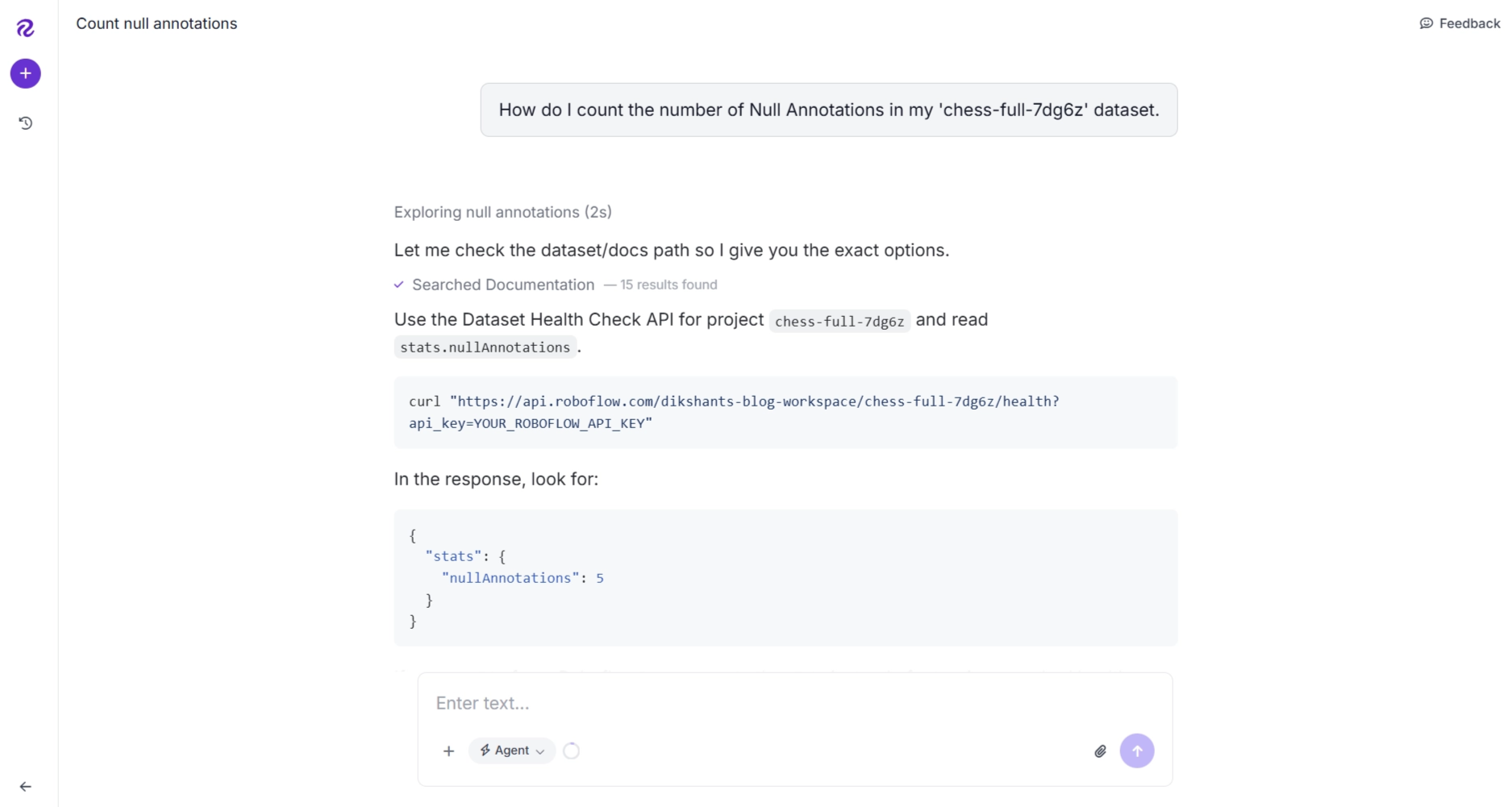
You can also use the Roboflow Agent (available in your workspace after login) to simplify Dataset Analytics tasks. It acts as a conversational interface on top of Roboflow tools such as Workflows and Rapid. You can describe what you want in plain English, and it will take care of building it for you. It can also guide you through any of the Roboflow tools step by step.
For example, you can ask:
“How do I count the number of null annotations in my 'chess-full-7dg6z' dataset?”

It then generated me a cURL command that, when executed, returns detailed dataset analytics, including the count of null annotations.
Conclusion: Missing and Null Annotations in a Dataset
Missing and null annotations may look similar at first glance, but they have very different impacts on model training.
Null annotations correctly represent images where no target objects are present, helping the model learn when it should not produce any detections. Missing annotations, however, introduce silent labeling errors by leaving real objects unlabeled, which can cause the model to treat valid objects as background and ultimately reduce detection accuracy and reliability.
Tools like Roboflow help address these issues through a complete annotation solution in Roboflow Annotate, along with Dataset Analytics features that surface potential null and missing annotation cases for review. This makes it easier to detect labeling inconsistencies early and maintain dataset quality at scale.
Ultimately, strong model performance starts with clean labeling. Being able to distinguish between valid empty images and genuinely missing labels is a key step toward building more accurate and trustworthy computer vision systems.
To put these practices into action, you can start building and cleaning your own datasets using Roboflow for free.


Cite this Post
Use the following entry to cite this post in your research:
Joseph Nelson. (Jun 11, 2026). The Difference Between Missing and Null Annotations. Roboflow Blog: https://blog.roboflow.com/missing-and-null-image-annotations/