

Segmentation is about pixel-perfect precision: the difference between seeing a car and understanding every curve of the chassis. However, traditional segmentation models were rigid. If you trained a model on city streets and showed it a satellite map or a medical scan, it would fail to generalize. You were locked into a fixed set of object classes, forced to manually draw masks or spend weeks retraining on new datasets just to get the model to "see" a new object.
In 2023, the game changed.
Meta AI introduced Segment Anything (SAM), and the "fixed vocabulary" era officially ended. Think of SAM as the foundation model for the visual world.
SAM 3 Capabilities
Instead of hard-coding object classes, SAM can be guided with simple prompts such as points, boxes, or rough masks. You tell the model what to segment, and it figures out how. SAM can handle new image types, unfamiliar objects, and ambiguous scenes without fine tuning.
Eager to try SAM 3? Drag and drop an image into our interactive playground below with your own text prompt:
Segment Anything Models
Since its release, Segment Anything has continued to evolve. Meta has released three versions: the original SAM model is an image-only model, SAM 2 is a video-aware version, and SAM 3 is a text-driven, concept-level model.
Each new version builds on the same core idea - promptable segmentation - while extending it to handle new data types, richer prompts, and more complex visual understanding. Here's how the Segment Anything models have progressed over time, and what each generation adds to the overall system.
SAM 1: The Zero-Shot Foundation
SAM 1 demonstrated that promptable, task-agnostic vision models could achieve strong zero-shot transfer across diverse visual domains. The real value wasn't just strong segmentation performance: it was the decoupled, promptable architecture.
- Amortized Inference: By running the heavy Vision Transformer (ViT) encoder once per image, the resulting embedding can be queried by a lightweight prompt encoder and mask decoder in real-time (~50ms per prompt on CPU).
- Ambiguity Handling: It returns multiple mask candidates. Click a person's arm, and SAM 1 provides masks for the "arm," the "upper body," and the "whole person" simultaneously.
- The Data Engine: Trained on SA-1B (11M images with 1.1B masks), SAM learns general boundary detection and 'object-ness' without requiring predefined categories. It can segment a "surgical scalpel" without ever being told what one is.
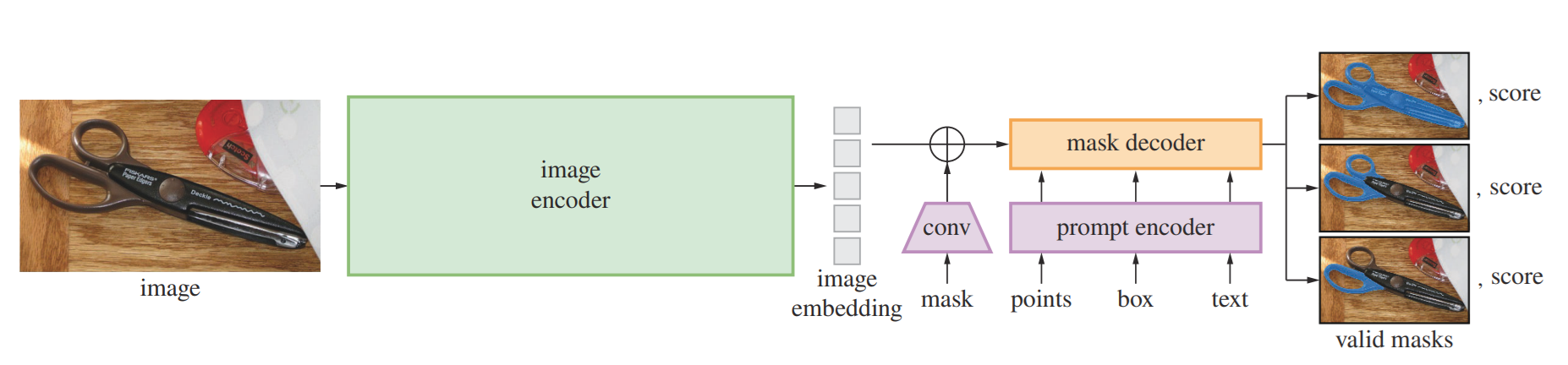
The model, code, and SA-1B dataset are released under the Apache 2.0 license.
Resources:
- Research Paper: Segment Anything
- Code: Segment Anything
- Dataset: SA-1B
- Segment Anything breakdown
SAM 2: Temporal Intelligence (Video)
SAM 2 isn't just SAM 1 run on every frame, that would lack temporal consistency and fail to preserve object identities. SAM 2 introduces memory-based tracking for the Promptable Visual Segmentation (PVS) task.
- Memory Bank & Attention: It stores spatial memories of past frames, previous predictions, and user prompts in separate FIFO queues. This allows tracking objects through occlusions (e.g., a car driving behind a tree) while preserving identity.
- Point-to-Masklet: You prompt any frame, and the model propagates a spatio-temporal "masklet" across the entire video.
- Streaming Inference: Frames are processed sequentially with a streaming architecture, enabling real-time processing of arbitrarily long videos without loading the entire video into memory.
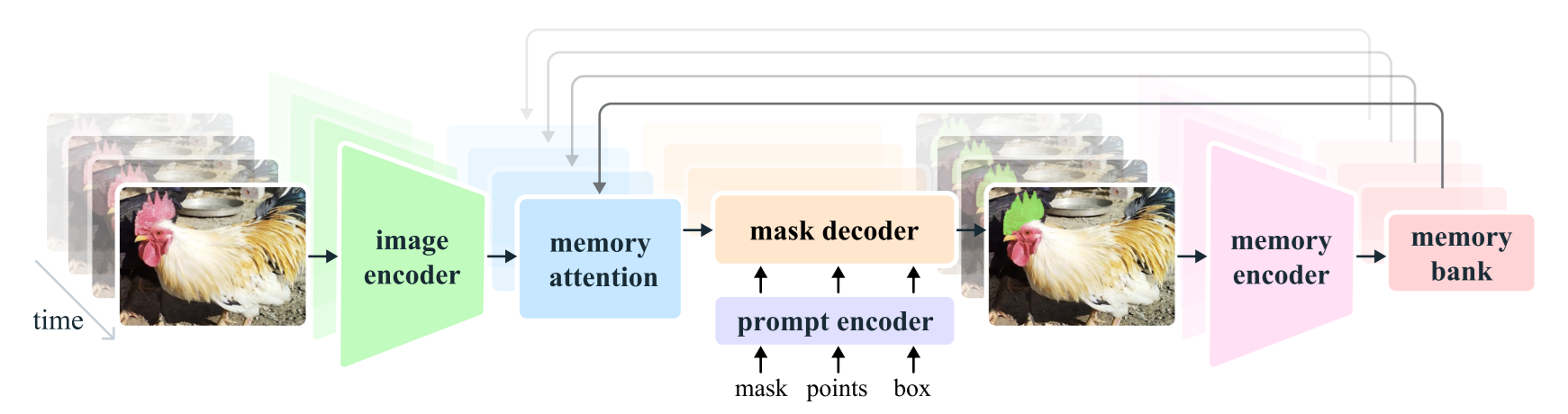
The model, code, datasets (SA-V), and demos are released under permissive open licenses (Apache 2.0, CC BY 4.0).
Resources:
- Research Paper: SAM 2: Segment Anything in Images and Videos
- Code: Segment Anything 2
- Dataset: SA-V
SAM 3: The End of Labeling (Open-Vocabulary)
SAM 3 represents the shift from Geometric Prompts (points/boxes) to Concept Prompts (language).
- Promptable Concept Segmentation (PCS): You no longer need to click every dog in a frame. You type "Golden Retriever," and SAM 3 segments all instances.
- The Perception Encoder: Unlike previous versions, SAM 3 uses a unified backbone that aligns vision and language features. It understands "yellow school bus" as a semantic concept, not just a shape.
- AI-in-the-Loop: Developed using SA-Co, a dataset where LLMs acted as "AI Annotators" to describe complex scenes. This gives the model a much higher "Visual IQ" for rare objects and complex backgrounds.
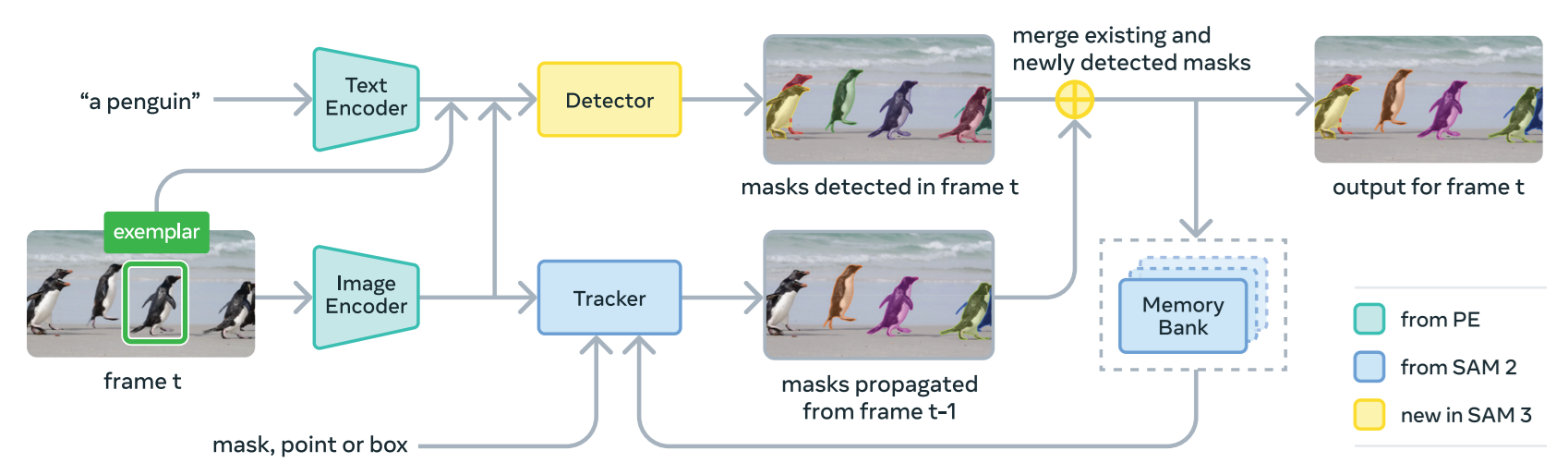
The model, code, and checkpoints are released to support research and development.
Resources:
- Research Paper: SAM 3: Segment Anything with Concepts
- Code: Segment Anything 3
- Dataset: HuggingFace host (SA-Co/Gold, SA-Co/Silver and SA-Co/VEval), Roboflow host (SA-Co/Gold, SA-Co/Silver and SA-Co/VEval)
Segment Anything Playground
The Segment Anything Playground is an interactive web demo that lets you try Meta’s advanced segmentation models right in your browser. It’s powered by the latest SAM 3 foundation models and provides an easy way to upload your own images or videos, then guide the AI to isolate, cut out, or experiment with different parts of the media using prompts like text phrases, clicks, or visual boxes.
To try SAM 3 open the playground, you will see following window:
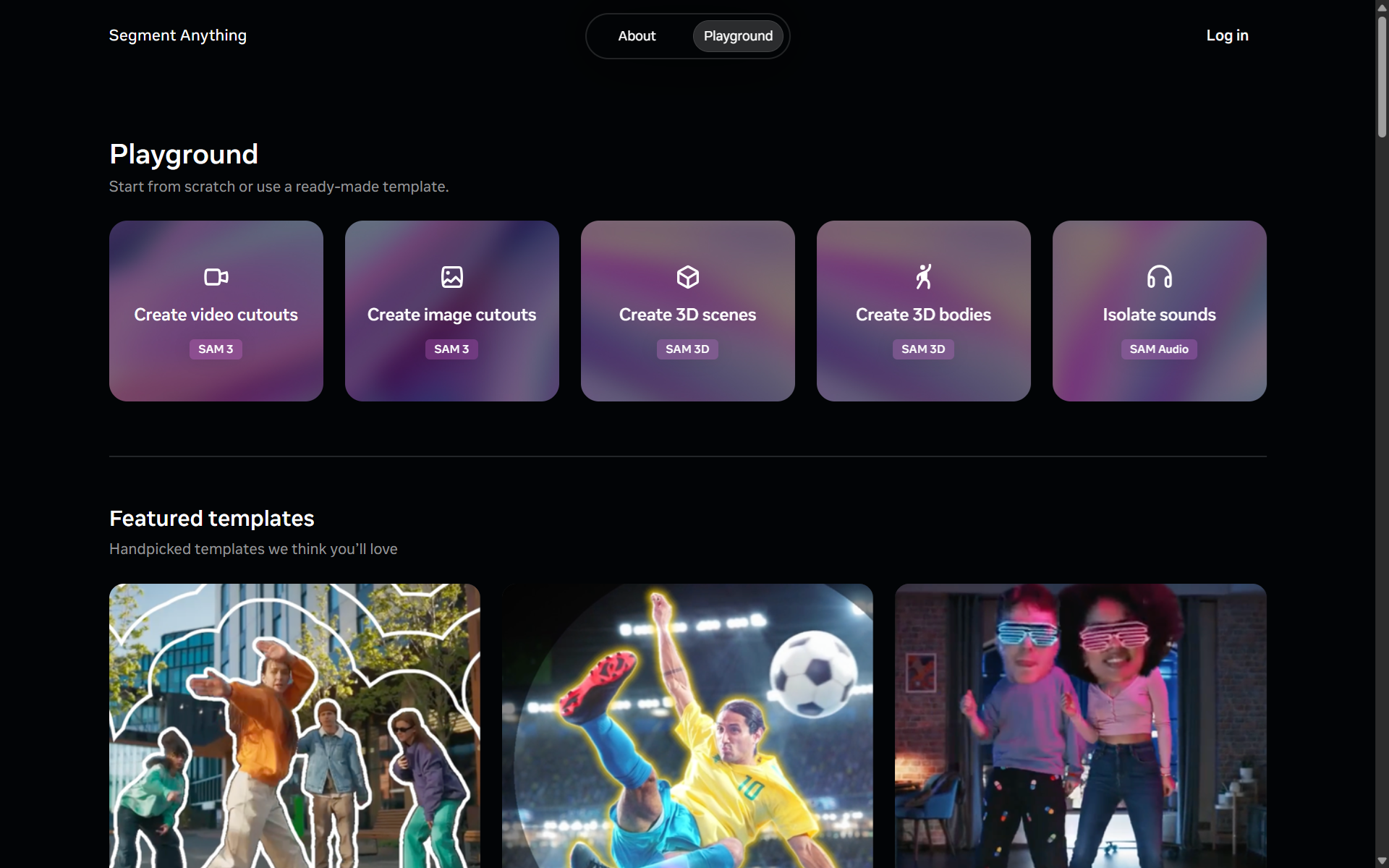
For image segmentation, click on create image cutouts you will see following interface that you can try.
Segment Anything Image Playground
To try video segmentation, click on create video cutouts, upload or select video and start segmenting.
Segment Anything Video Playground
How to Use Segment Anything with Roboflow
Roboflow makes it easy to use Segment Anything models.
Roboflow Rapid
Roboflow Rapid is a new prompt-driven vision model creation engine that lets you go from a simple idea to a deployed computer vision model in minutes without manual labeling. Start by uploading a few images or a short video and providing a text prompt that describes the object or concept you want the model to learn.
Roboflow Rapid
Roboflow Playground
You can also try SAM 3 on Roboflow Playground and deploy with an API.
SAM 3 on Roboflow Playground
Roboflow Workflows
Roboflow Workflows supports SAM 2 and SAM 3 models directly. You can use SAM 2 and SAM 3 blocks within a workflow. Let's look at how to use both models to segment objects in images.
Example Workflow 1
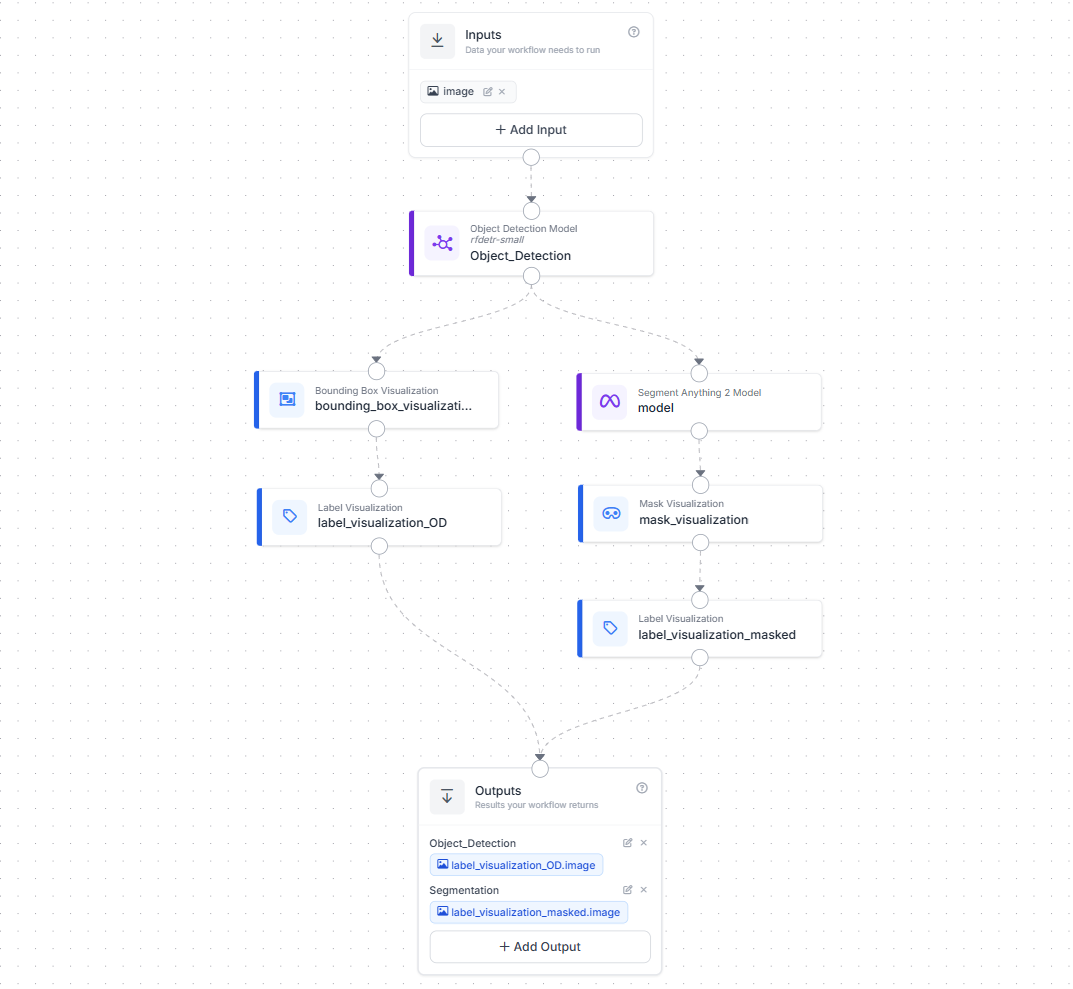
This workflow shows how SAM 2 is used together with an object detection model to produce precise instance masks.
The workflow starts with an image input, which is passed into an object detection model (for example, RF-DETR). The detector identifies objects of interest and outputs bounding boxes. These boxes are then fed into the Segment Anything 2 model, which uses them as prompts to generate high-quality segmentation masks for each detected object.
Once masks are generated, the workflow branches into visualization steps. One branch renders bounding boxes and labels, while the other renders segmentation masks with labels. Both outputs are returned at the end of the workflow as shown below.
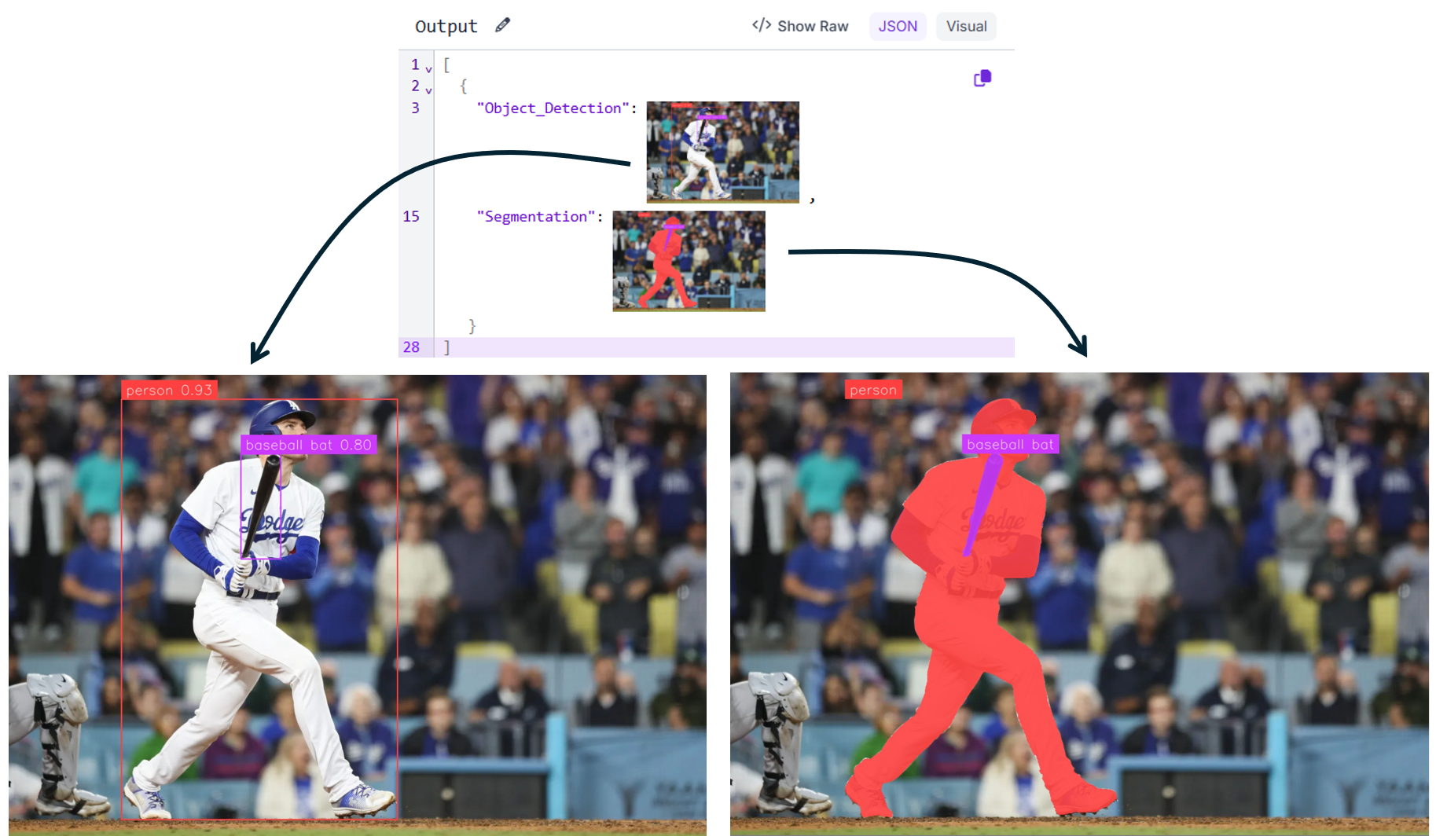
This pattern is useful when you already know what objects you want to segment and need accurate instance-level masks. It is commonly used for dataset annotation, quality inspection, and downstream measurement tasks.
Example Workflow 2
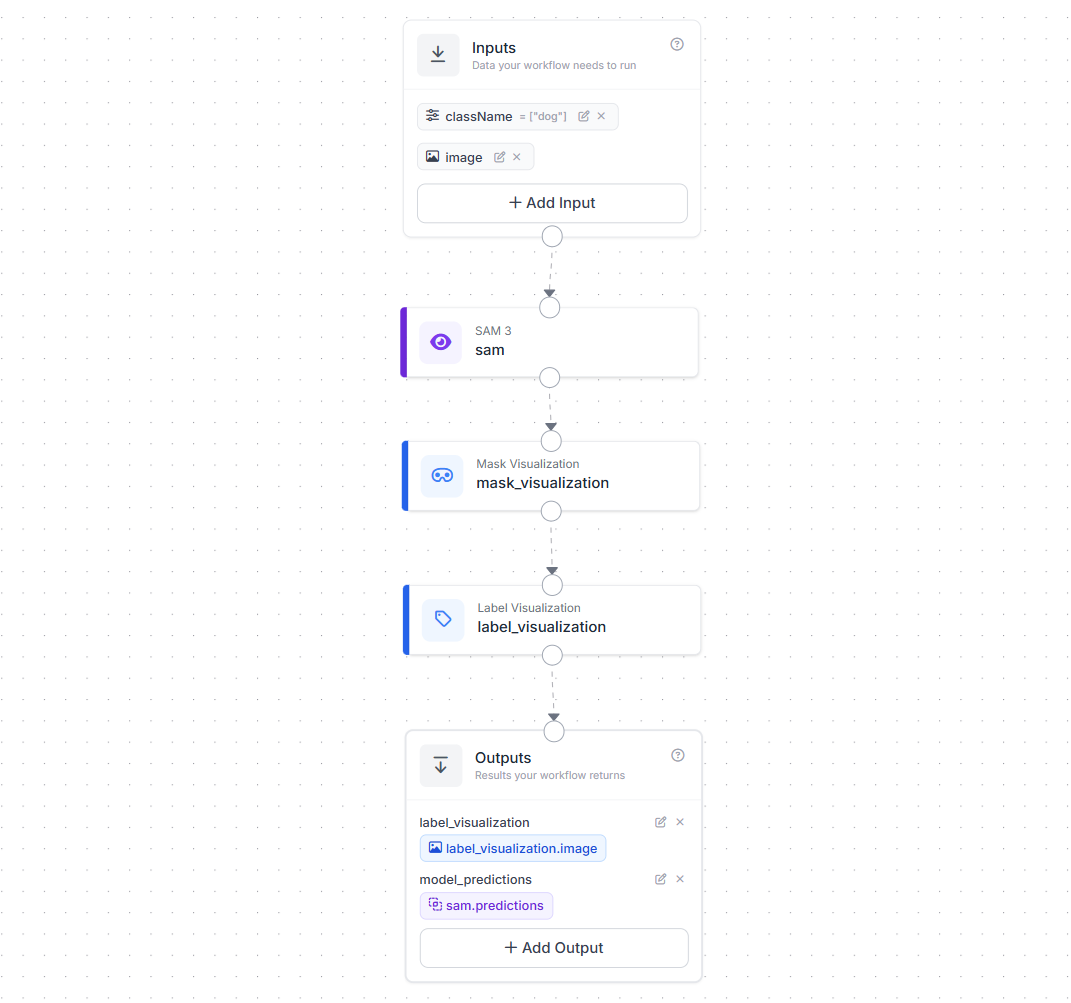
This workflow demonstrates SAM 3 used directly. The inputs include an image and a class name (for example, "dog"). These inputs are passed directly to the SAM 3 model, which performs Promptable Concept Segmentation (PCS). Here, SAM 3 uses the text prompt to find and segment all instances of the concept in the image.
The resulting masks are then visualized using mask and label visualization blocks, and both the rendered image and raw model predictions are returned as outputs as shown below.
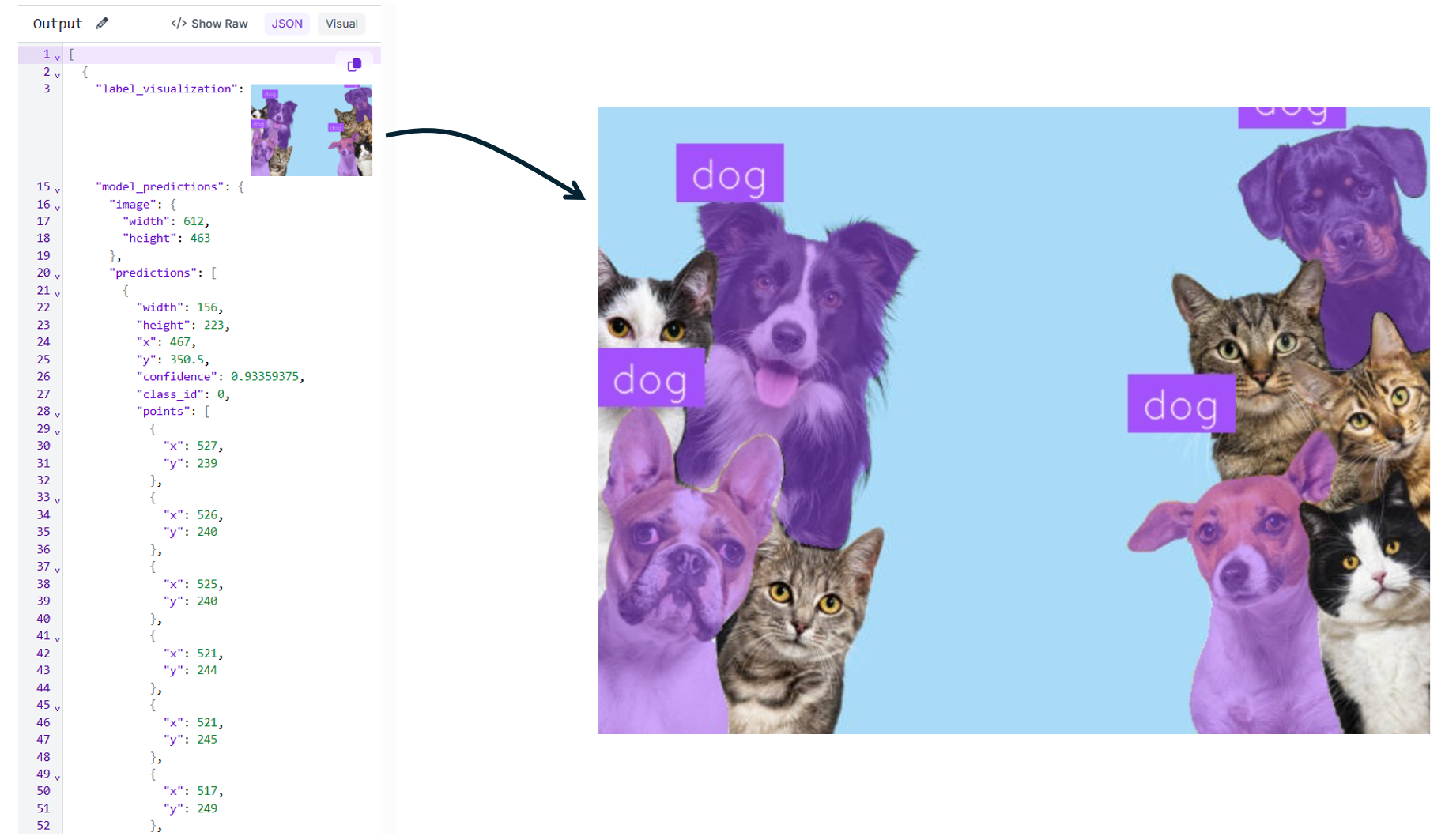
This approach is ideal for open-vocabulary segmentation, rapid exploration, and zero-shot workflows where you may not have a trained detector or labeled data. It is especially useful for early dataset creation, interactive analysis, and concept discovery.
Read more about how to use SAM model with Roboflow in our blogs:
Segment Anything Conclusion
Segment Anything has reshaped how segmentation models are built and used. Starting with promptable image segmentation, expanding to video understanding, and now enabling concept-level segmentation, the SAM family shows how foundation models can move beyond fixed labels and rigid pipelines. With SAM 2 and SAM 3 integrated into practical tools like Roboflow Workflows and Rapid, these capabilities are no longer just research ideas, they can be applied directly to real-world vision problems.
Cite this Post
Use the following entry to cite this post in your research:
Timothy M. (Feb 4, 2026). Segment Anything. Roboflow Blog: https://blog.roboflow.com/segment-anything/