

Once a parcel hub has one camera model running with Roboflow, carriers ask for the same five add-ons: safety compliance, yard traffic, theft detection, belt fray, and headcount by zone. All five run on the cameras already on the ceiling, in one Workflow, on one edge box.
Your parcel hub probably already has the hardware you need for computer vision. It's your cameras on the ceiling, over the belts, above the dock doors, and out in the yard.
Computer vision is software that looks at that video feed and answers questions about it. Is there a person in zone A? How many parcels went past this point in the last hour? Is that trailer door open or closed?
Years ago each of those questions needed a purpose-built system. Today, they are answered by a vision AI model trained on your own footage, running on a small computer in your hub.
When carriers first ask Roboflow about this, they usually want help with sorting - which includes reading labels, catching mis-sorts, and counting throughput. Then, they walk the floor with us and the list grows.
The five additions below come up consistently. Let's take a look at the ways you may want to consider using computer vision in your parcel hub.
Five Carrier Computer Vision Use Cases
Once a hub has one model running, these are the five use cases that come up next, in roughly the order operators ask for them.
1. Safety and compliance
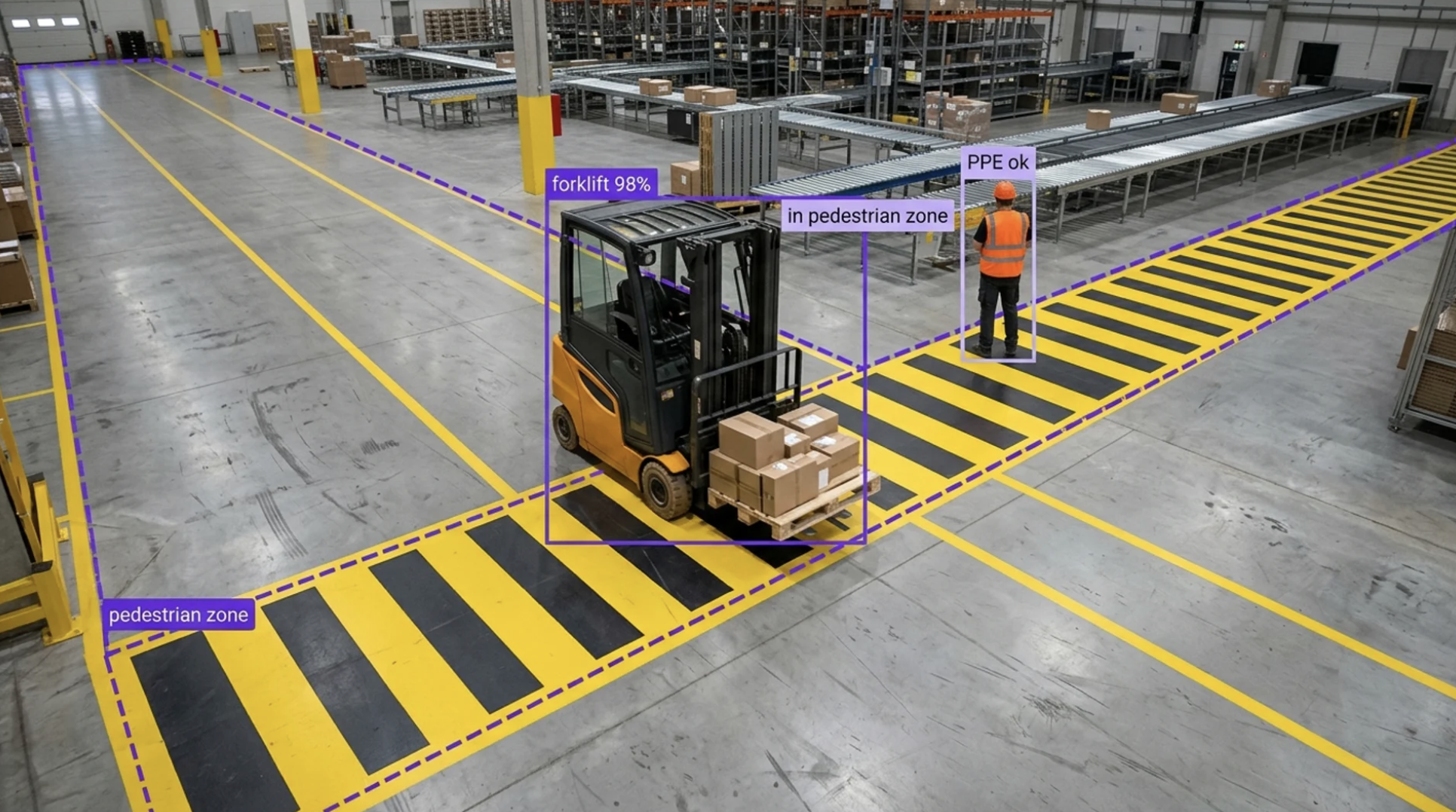
For example, a forklift crossing a pedestrian walkway, someone on the belt line without a hi-vis vest, a fire door propped open on night shift. Computer vision can take your footage and flag each of these within seconds. That way your safety lead gets a short clip rather than an incident report after the fact. See PPE detection and safety zone monitoring for how this works.
2. Yard traffic
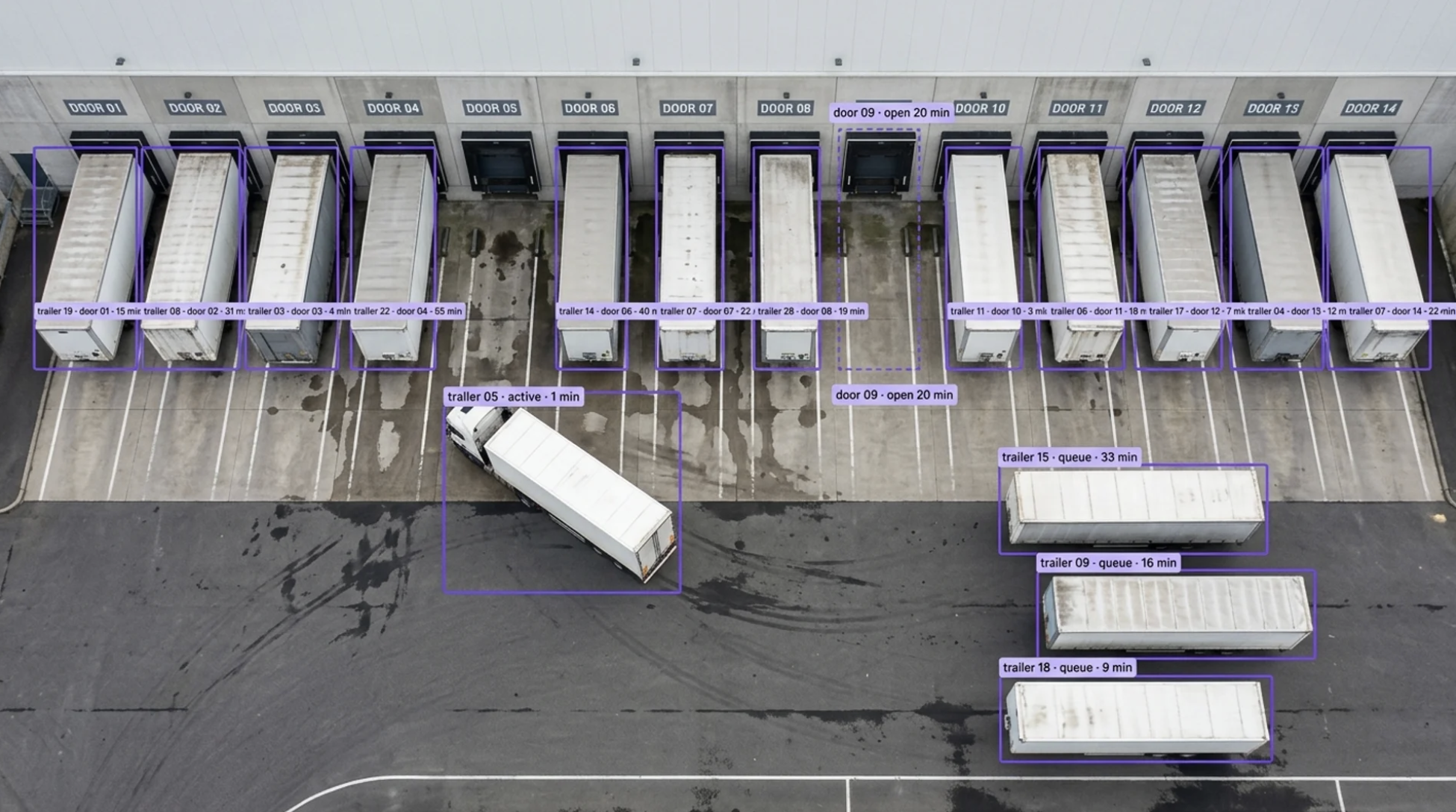
Which trailers are on which doors, how long a driver has been waiting, whether a bay has sat open for twenty minutes with nothing backed into it. This is harder than it may sound, because the software has to recognize that the trailer at door 14 now is the same trailer that was in the queue ten minutes ago. That's referred to as tracking, and it essentially turns a camera into a live yard management board.
3. Theft detection
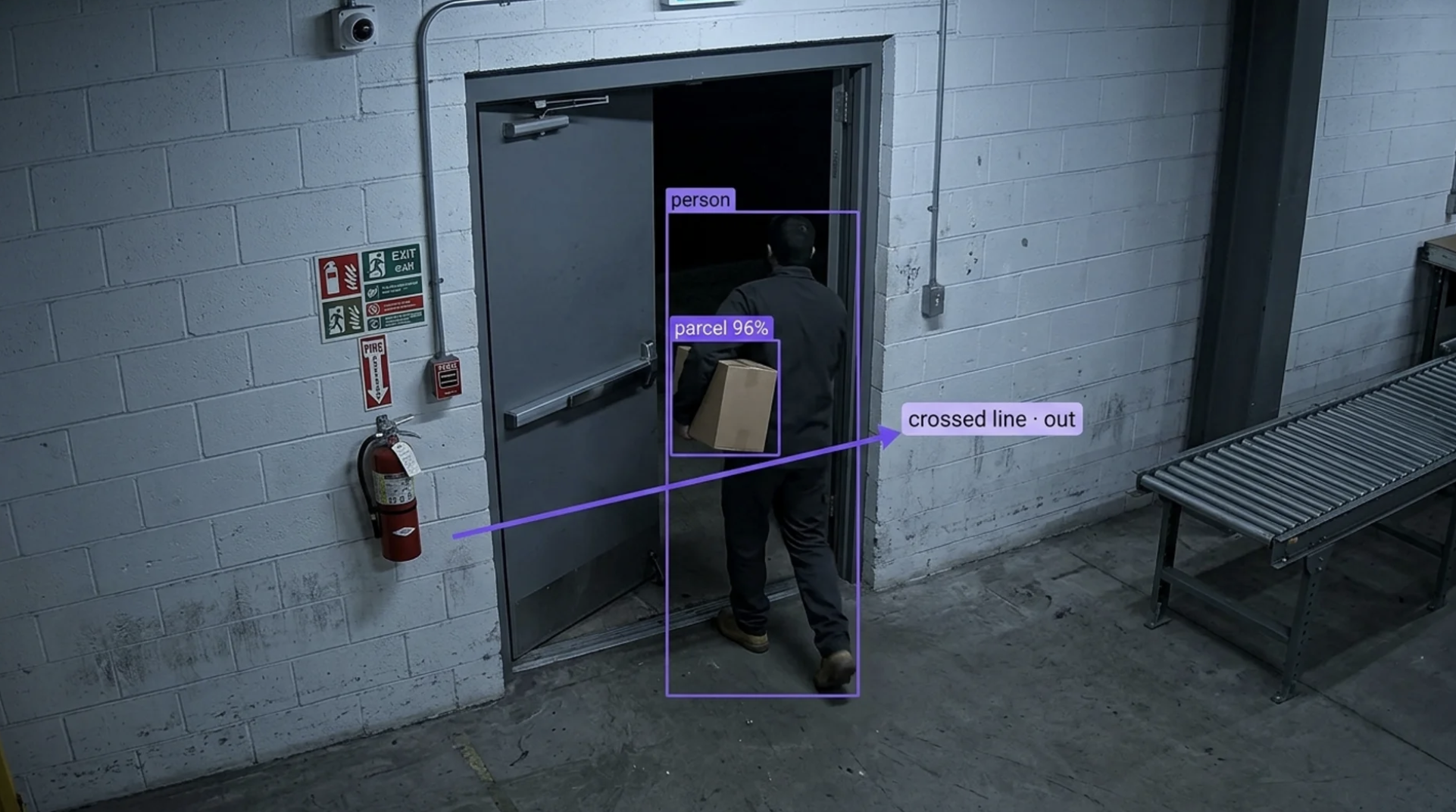
Parcels going out a door that isn't a dock door, a package entering a zone and never leaving it, a bag opened on a belt nobody should be touching. There's no off-the-shelf product for this, and there doesn't need to be. Your hub can train a model to recognize its own packages from its own footage, then set a simple rule, like alert when a parcel crosses this line in this direction. That way you're catching it as it happens, not reconciling a missing-parcel report a week later.
4. Belt fray
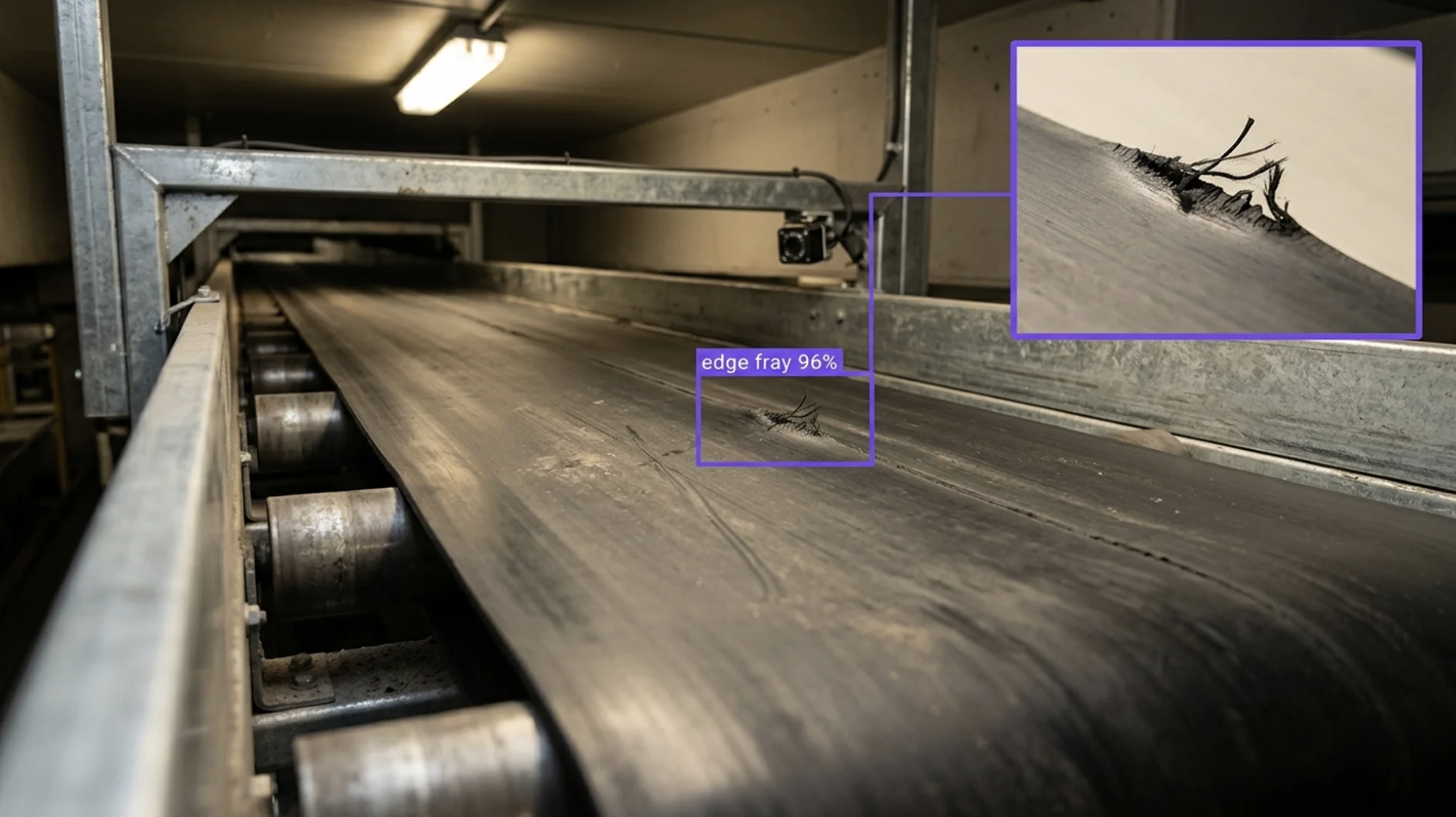
The conveyor is your hub. A frayed edge or a slipping seam on the main sorter takes down every door downstream, so maintenance teams want to know about wear before the belt lets go. A camera on the belt's return run can flag a fraying edge the same way a factory camera spots a defect on a part, just pointed at rubber instead. See conveyor belt monitoring for how this works.
5. Headcount by zone
How many people are on the primary sort right now versus the plan, and where the induction line is short-staffed. Computer vision can count the people in each zone from your existing overhead cameras and update the number continuously. Shift leads use this for staffing, and the same count feeds the safety zone logic in use case one. That way one model ends up serving two teams in the building.
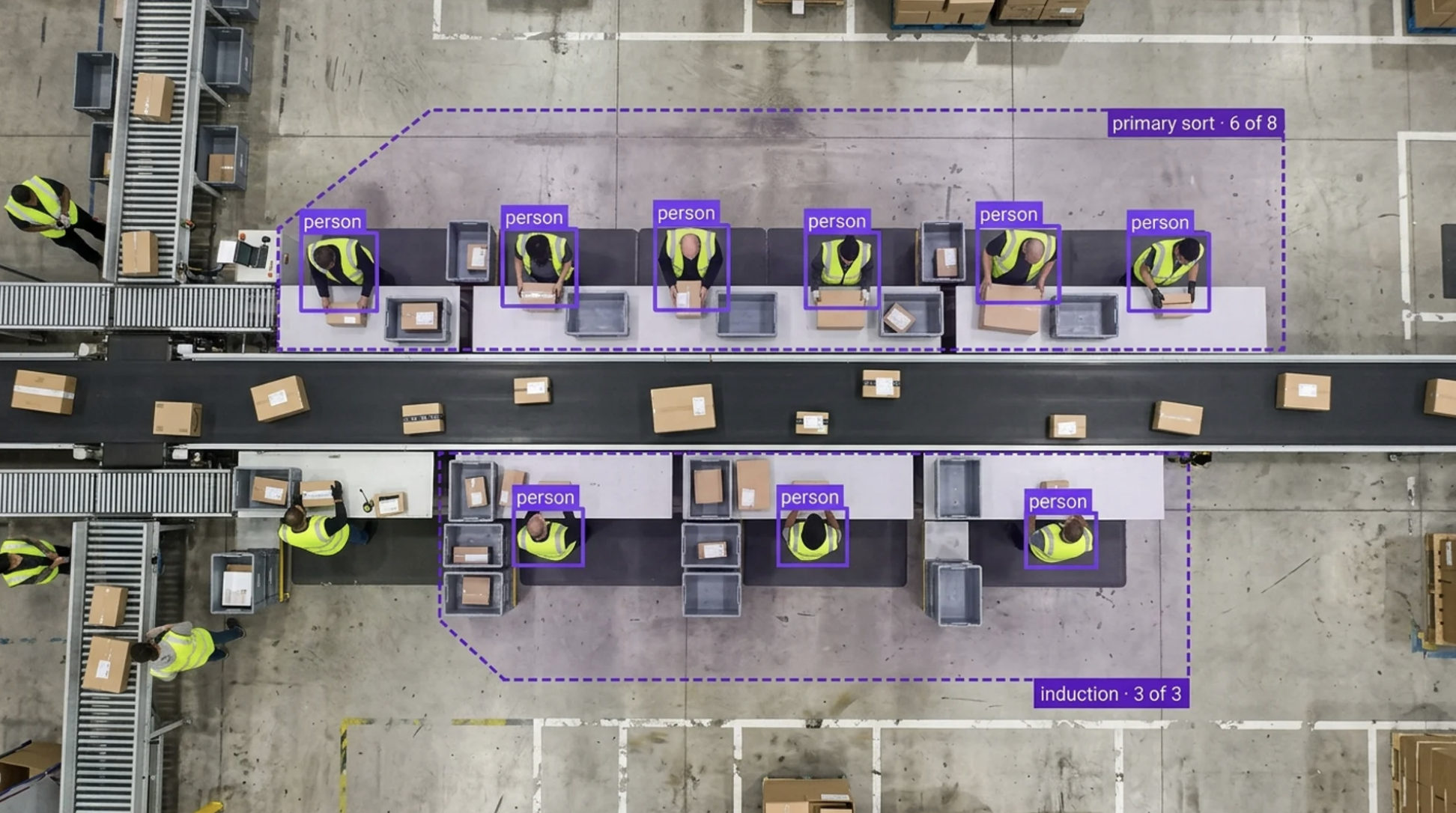
What Runs in the Hub
A typical deployment looks like this: A computer sits in your hub, wired to the same network as your cameras. It pulls the video feeds and runs the models locally, so nothing leaves the building and it keeps working if the internet goes down.
Each use case you want to track is set up as a Workflow: a short chain of steps you assemble in a visual editor. Take a frame, find the objects in it, follow each one from frame to frame, check whether it crossed a line or entered a zone, then send an alert. The alert can be a text to the shift lead, a row in a spreadsheet, or a message into whatever system you already use.
Adding a fifth use case to a hub that runs four is adding another chain of steps to the same computer. It is not another vendor, another camera install, or another project. Learn more about turning vision AI into an owned, scalable capability in the Roboflow Center of Excellence Report.
Where Parcel Hub First Deployments Go Wrong
We've seen three things that can trip up a parcel hub on its first attempt.
- First, they plan for one use case and one camera. Our site walk will surface five. Size the hardware for five from day one, because the computer that runs one model runs all of them.
- Second, they pick the technology before they pick the alert. A theft model that fires 400 times a night is worse than no model, because people stop reading it by day three. Decide what the shift lead should do when the alert lands, then work backwards to what the camera needs to see.
- Third, they wait for the perfect camera install. Many hubs have cameras they're not happy with, a few years old. Start with those. Footage from the cameras you have beats a plan for the cameras you want.
Deploying Vision AI to a Parcel Hub
If you want to see whether this works in your hub, all you need is one camera, one question, and about a week of footage.
Start with the use case that has an owner. Safety usually wins, because the safety lead already knows which walkway or which door worries them, and they can tell you exactly what an alert should trigger. Pick one camera that already covers that spot.
Pull a week of footage from it and label a few hundred frames in Roboflow Annotate. The model can be trained from the same screen once the labels are in.
Then run it where the cameras are. Inference installs on a small computer in the hub, or on an all-in-one device like the AI1 camera if you'd rather not wire anything into your existing network. Either way, the footage stays in the building and the model keeps running if the internet doesn't.
Finally, decide what working means before you switch the alerts on. For a safety use case that might be: every walkway incursion on this camera gets a clip to the shift lead within ten seconds, with fewer than a handful of false alarms per shift.
If you'd like help scoping it, get in touch with us here. We've walked enough hubs to know where the best opportunities are.


Cite this Post
Use the following entry to cite this post in your research:
Erik Kokalj. (May 8, 2026). Vision AI in Parcel Hubs. Roboflow Blog: https://blog.roboflow.com/vision-ai-in-parcel-hubs/