

Computer vision (CV) has two dominant paradigms for teaching machines to see. Traditional computer vision relies on handcrafted rules and explicit mathematical operations; deep learning on the other hand, learns visual representations automatically from data. Traditional CV encodes domain knowledge directly into algorithms such as edge filters, color thresholds, and geometric transforms. Deep learning models, in contrast, learn these features through exposure to thousands or millions of examples. Understanding when to use each approach is one of the most practical decisions a computer vision engineer can make.
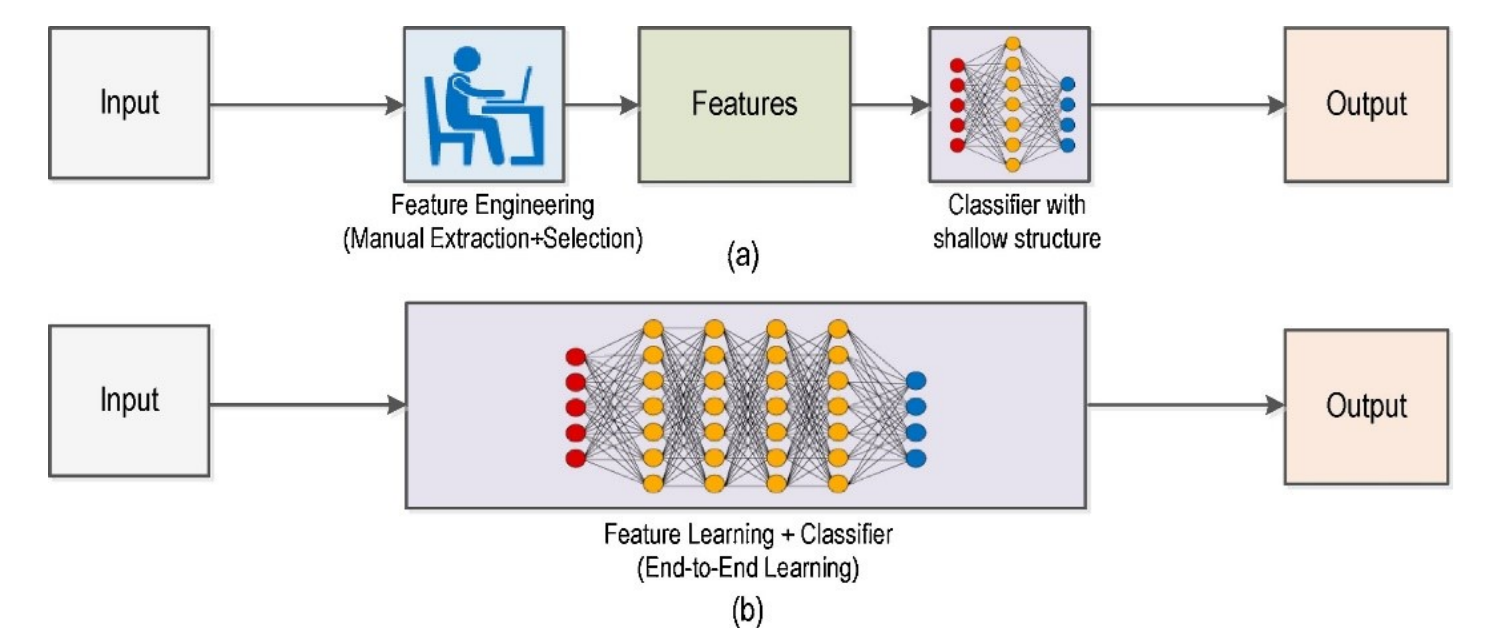
What Is Deep Learning for Computer Vision?
Deep learning (DL) is a subset of machine learning that uses multi-layered neural networks to automatically learn hierarchical feature representations from data, eliminating the need for manual feature engineering. The following core architectures form the building blocks of modern deep learning for computer vision.
- CNN: A neural network architecture that uses convolutional layers to automatically learn spatial features like edges, textures, and shapes directly from image pixels.
- Encoder-Decoder Architectures: A network design in which an encoder compresses an image into a compact feature representation and a decoder reconstructs a detailed output from that representation. This pattern is widely used in segmentation and is also common in reconstruction-based anomaly detection.
- Vision Transformer (ViT): A transformer-based model that divides an image into fixed-size patches and processes them as a sequence using self-attention. This allows the model to learn relationships across image regions and capture global context effectively.
- Hybrid Architectures: Models that combine convolutional layers for local feature extraction with transformer attention for global reasoning, balancing accuracy and computational efficiency.
What Is Traditional Computer Vision?
Traditional computer vision is a way of making machines understand images by using explicitly defined rules. Instead of learning patterns from large datasets, computer vision follows instructions set by an AI engineer or developer, such as detecting edges, separating colors, or identifying shapes. It uses established mathematical methods in a step-by-step process, and each part of the pipeline is chosen directly, and can be clearly explained. Following are some popular concepts used in traditional CV:
- Image Filtering: Applies filters across an image to reduce noise, such as Gaussian or median blur, or to enhance fine details using methods like Laplacian. This step improves image quality before further processing.
- Histogram Equalization: Adjusts the brightness distribution so the full range of tones is used. It is used to perform adjustment in small local regions to produce more natural results for images with uneven lighting.
- Geometric Transformations: Corrects issues such as camera tilt, lens distortion, and changes in viewpoint using rotation, scaling and resizing, and perspective adjustments. This is important for tasks like document scanning and creating overhead views.
- Edge Detection: Finds object boundaries by identifying places where pixel brightness changes sharply.
- Thresholding: Converts a grayscale image into a black and white mask by separating foreground from background based on brightness.
- Morphological Operations: Improves binary masks after thresholding. Erosion removes small noise, dilation fills small gaps, and operations such as opening and closing help smooth object boundaries.
- Contour Detection and Shape Analysis: Traces the outlines of regions in a binary mask and measures properties such as area, perimeter, aspect ratio, and circularity.
- Color Space Analysis: Changes an image from RGB into formats such as HSV or LAB to separate color information from brightness. This makes it easier to isolate objects by color even when lighting varies.
- Feature Detection and Description: Finds distinctive points in an image, such as corners, blobs, or unique textures, and represents them with compact descriptors. Methods such as SIFT, ORB, and SURF allow these points to be matched across images for tasks like stitching, recognition, and tracking without requiring model training.
- Template Matching: Searches for a reference pattern by sliding it across an image and measuring how closely it matches at each location. This is useful for finding fixed objects such as logos, icons, or specific parts on a circuit board.
- Corner Detection: Detects corner points where brightness changes strongly in more than one direction. These points are stable and repeatable, which makes them useful for tracking, motion estimation, and camera calibration.
- Camera Calibration: Estimates a camera’s internal properties, such as focal length, optical center, and lens distortion. This makes it possible to correct image distortion and improve accuracy in tasks such as measurement, stereo vision, and augmented reality.
Deep Learning vs. Traditional Computer Vision
Both approaches can solve vision problems, but they make very different tradeoffs. The table below breaks down how they compare across the factors that matter most when choosing between them.
|
Parameter |
Traditional
CV |
Deep
Learning |
Real-World
Example |
|
Feature
Extraction |
Features
are defined using explicit rules such as edges, corners, or color ranges. |
Features
are automatically learned from data during training. |
Barcode
detection: A
rule-based pipeline searches for stripe patterns, while a DL model learns
to detect barcodes in cluttered scenes. |
|
Data
Requirements |
Can work
with little or no labeled data, though parameter tuning is often needed. |
Usually
requires labeled data, but transfer learning and foundation models can reduce
the amount needed. |
PCB
inspection: A
threshold-based pipeline can work without annotations, while a CNN improves
with labeled defect examples. |
|
Compute
Requirements |
Often runs
on CPUs or lightweight edge hardware. |
Training
usually needs a GPU, while inference can run on optimized edge devices. |
Item
counting: A
contour-based method can run on simple hardware, while deep learning models
benefit from more capable edge devices. |
|
Accuracy
on Simple Tasks |
Performs
very well in controlled environments with stable lighting and backgrounds. |
May not
provide significant benefits for simple tasks with limited variation. |
Cap
detection on bottles: HSV thresholding can achieve very high accuracy under controlled
lighting. |
|
Accuracy
on Complex Tasks |
Performance
drops with occlusion, lighting variation, or similar-looking objects. |
Handles
detection, segmentation, and classification well in real-world conditions. |
Pedestrian
detection at night:
Traditional methods struggle, while a trained model remains more reliable. |
|
Interpretability |
Each step
is clear and easy to explain. |
Decisions
are harder to interpret, though visualization tools can help. |
Medical
inspection: A
rule-based system can be fully explained, while a model may require
additional documentation. |
|
Generalization |
Usually
tuned for a specific environment and may need retuning when conditions
change. |
Pretrained
models can adapt better across environments with additional data. |
License
plate recognition:
A traditional pipeline may need tuning for each region, while a model adapts
with limited retraining. |
|
Development
Speed |
No dataset
collection or labeling is required, so development can begin quickly. |
Requires
data preparation, training, and validation before deployment. |
Color
sorting prototype:
A rule-based solution can be built quickly, while a model needs labeled data
first. |
|
Robustness
to Variation |
Sensitive
to lighting changes, scale, rotation, and occlusion. |
More
robust when trained with diverse data and augmentation. |
Weed
detection outdoors:
Lighting changes affect rule-based methods, while trained models remain more
stable. |
|
Deployment
Footprint |
Can be
deployed with minimal dependencies and low resource usage. |
Requires
model files and runtime support, increasing storage and system requirements. |
Smart
camera system: A
simple blob detector uses minimal resources, while a deep learning model
needs more memory and compute support. |
When to Use Traditional Computer Vision
Traditional computer vision is often the better choice when the task is clearly defined, the environment is stable, and the solution depends on measurable visual rules such as shape, size, position, or color. Choose traditional CV when:
- Lighting, background, and object appearance stay consistent.
- The task is based on clear visual rules or fixed conditions.
- The goal is counting, measuring, detecting color, or checking shape.
- The system must run on lightweight or resource-constrained hardware.
- High interpretability and easy debugging are important.
- A simple and reliable solution is needed quickly.
Example Workflow for Label Color QA Inspection in Roboflow
This example shows how a simple Roboflow Workflow can be used for label color QA inspection in a controlled environment. The goal is to check whether a target label color is present in the image and then return a readable inspection result. The workflow uses four blocks:
- Inputs
- Pixel Color Count
- Format Response
- Outputs
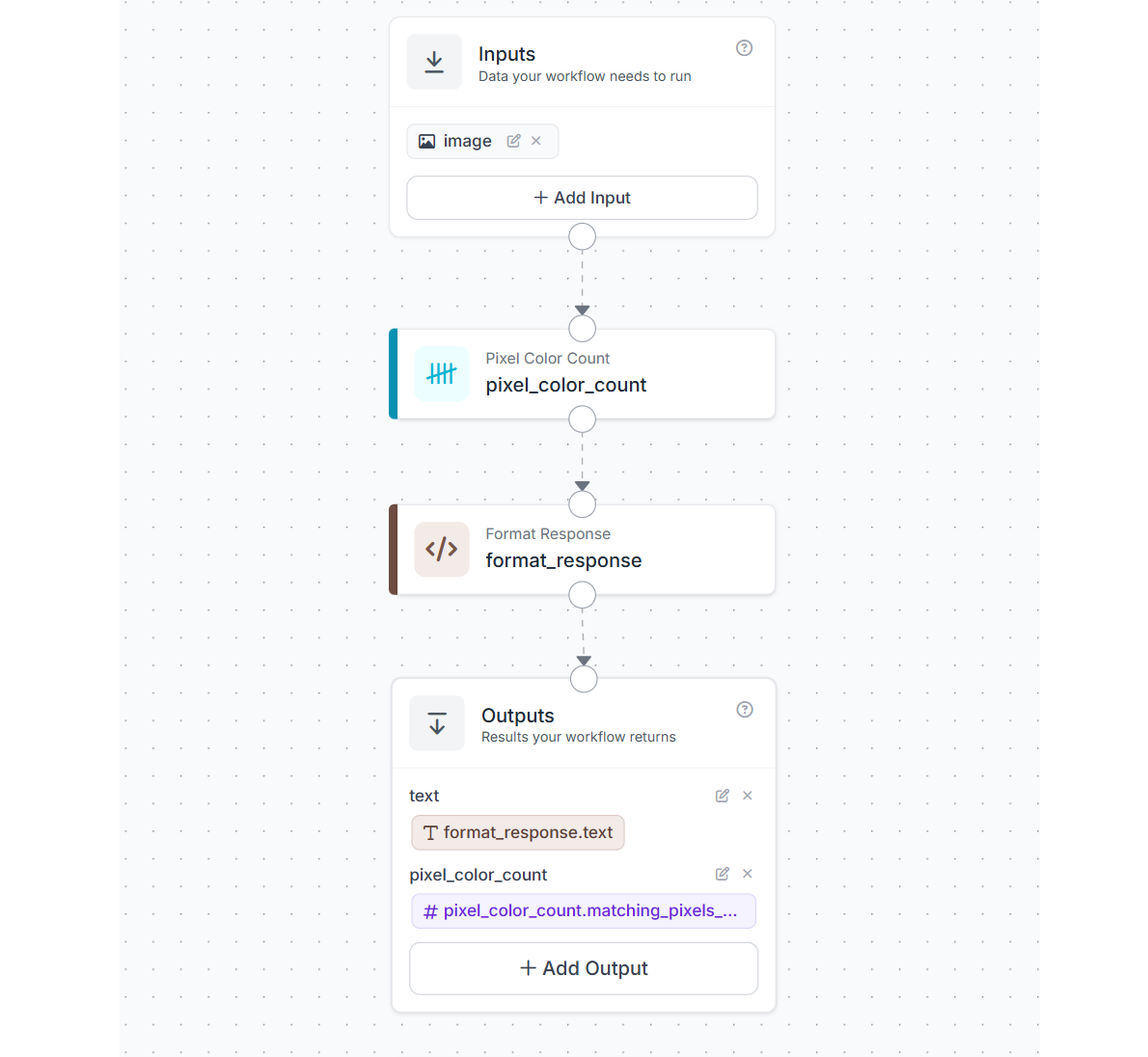
How the workflow works
The input image is passed to the Pixel Color Count block. This block checks the image for pixels that match the target RGB value e.g. (63, 59, 87) and returns the total number of matching pixels.
That count is then sent to a Format Response custom block. In this block, the pixel count is compared against a threshold of 1000. If the count is greater than or equal to the threshold, the workflow returns a positive result. If the count is below the threshold, it returns a negative result.
Finally, the Outputs block returns both the formatted text result and the raw matching pixel count.
What each block does
- Inputs: Provides the image that will be inspected.
- Pixel Color Count: Counts how many pixels in the image match the target label color.
- Format Response: Compares the matching pixel count with the threshold and converts the result into a readable QA response. Following is the custom python code for this block.
def run(self, matching_pixels_count) -> BlockResult:

    result_str = "FALSE"
    if matching_pixels_count >= 1000:
        result_str = "TRUE"

    output_str = f"{matching_pixels_count} pixels match rgb(63, 59, 87). Greater than 1000 matching pixels: {result_str}"
return {"text": output_str}- Outputs: Returns the text response and the numeric pixel count.
Why this works for QA inspection
This workflow is useful for tasks where the expected color is known in advance and the inspection setup is stable. For example, it can help verify whether a label contains the correct printed color, whether a colored area is present, or whether the color coverage drops below an acceptable level.
Because it relies on direct pixel matching rather than model training, it is simple, fast, and easy to understand. This makes it a good example of a traditional computer vision approach inside Roboflow Workflows.
When to Use Deep Learning
Deep learning is a better choice when the visual task becomes more complex and the system must handle variation in appearance, lighting, background, scale, or viewpoint across real-world conditions. Choose deep learning when:
- Objects look different across images or environments.
- The task involves cluttered scenes or changing backgrounds.
- Similar-looking classes need to be separated accurately.
- The problem requires detection, segmentation, keypoint estimation, or fine-grained classification.
- Strong performance is needed across varied real-world conditions.
- The system is expected to improve over time with more training data.
- Deployment is planned on cloud systems, GPU servers, or modern edge AI hardware.
Example Workflow for Tire Safety Inspection using Deep Learning
This example shows how a deep learning model can be used in Roboflow Workflow to inspect tire condition and classify them as bad tires or normal tires. Unlike rule-based approaches, this system learns visual patterns such as worn tread, uneven surfaces, and damage directly from data. The model use here was trained on tire images with two classes:
- bad tires
- normal tires
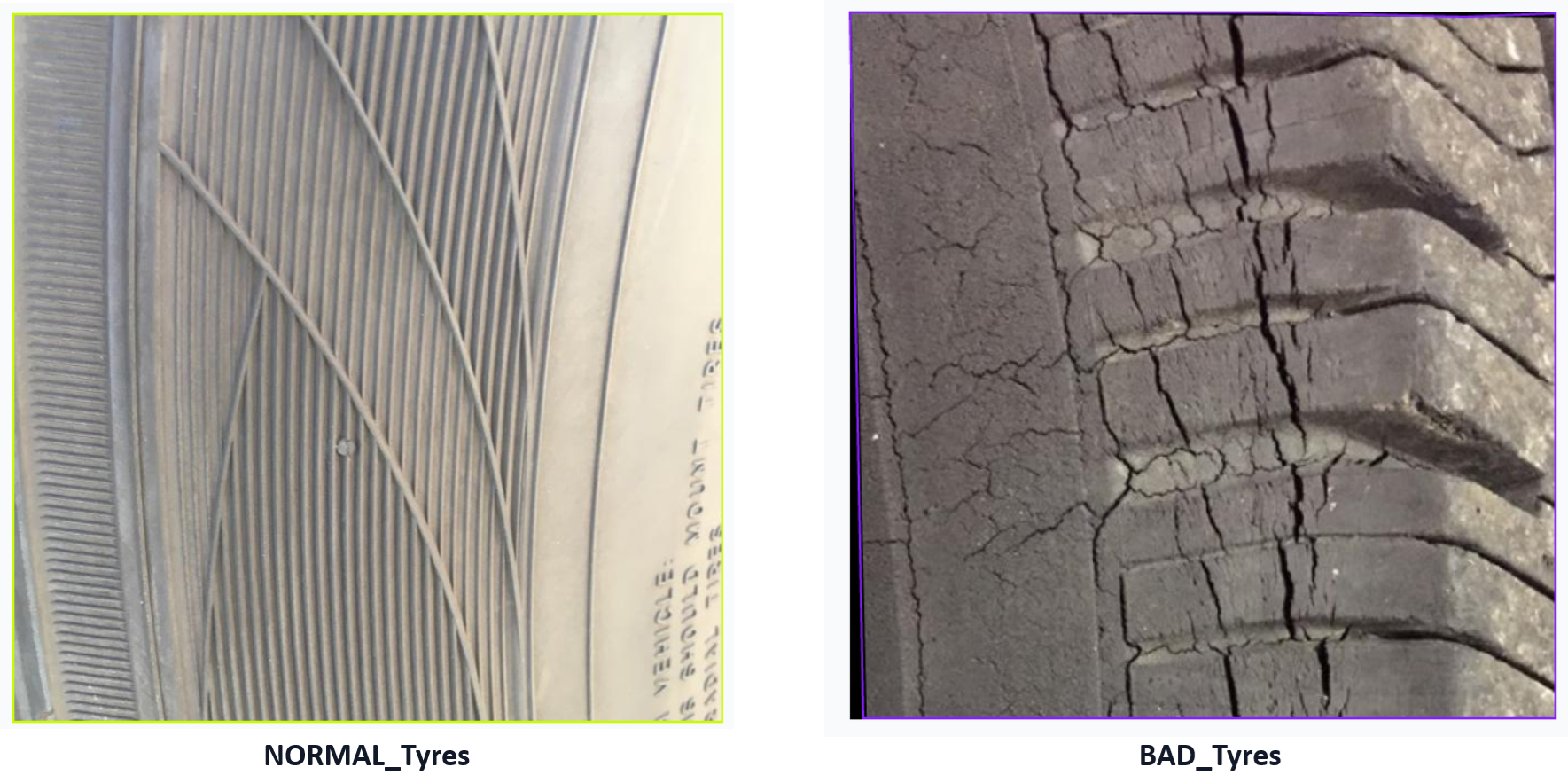
The trained model is capable of detecting tire quality.
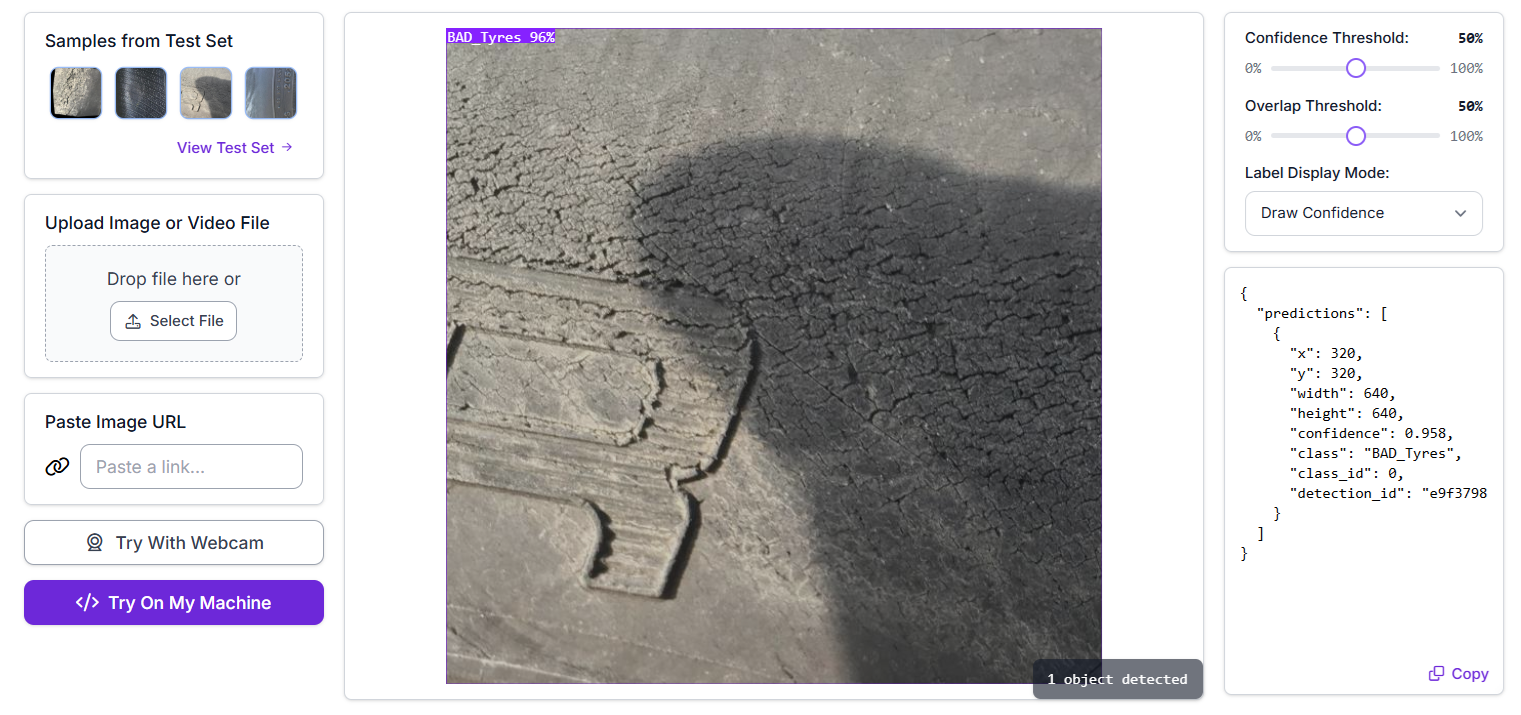
How the workflow works
The image enters through the Inputs block and is passed to the trained detection model. The model analyzes the image and predicts bounding boxes along with class labels. The predictions are then visualized using bounding box and label visualization blocks. Finally, the workflow returns both the annotated image and the raw model predictions.
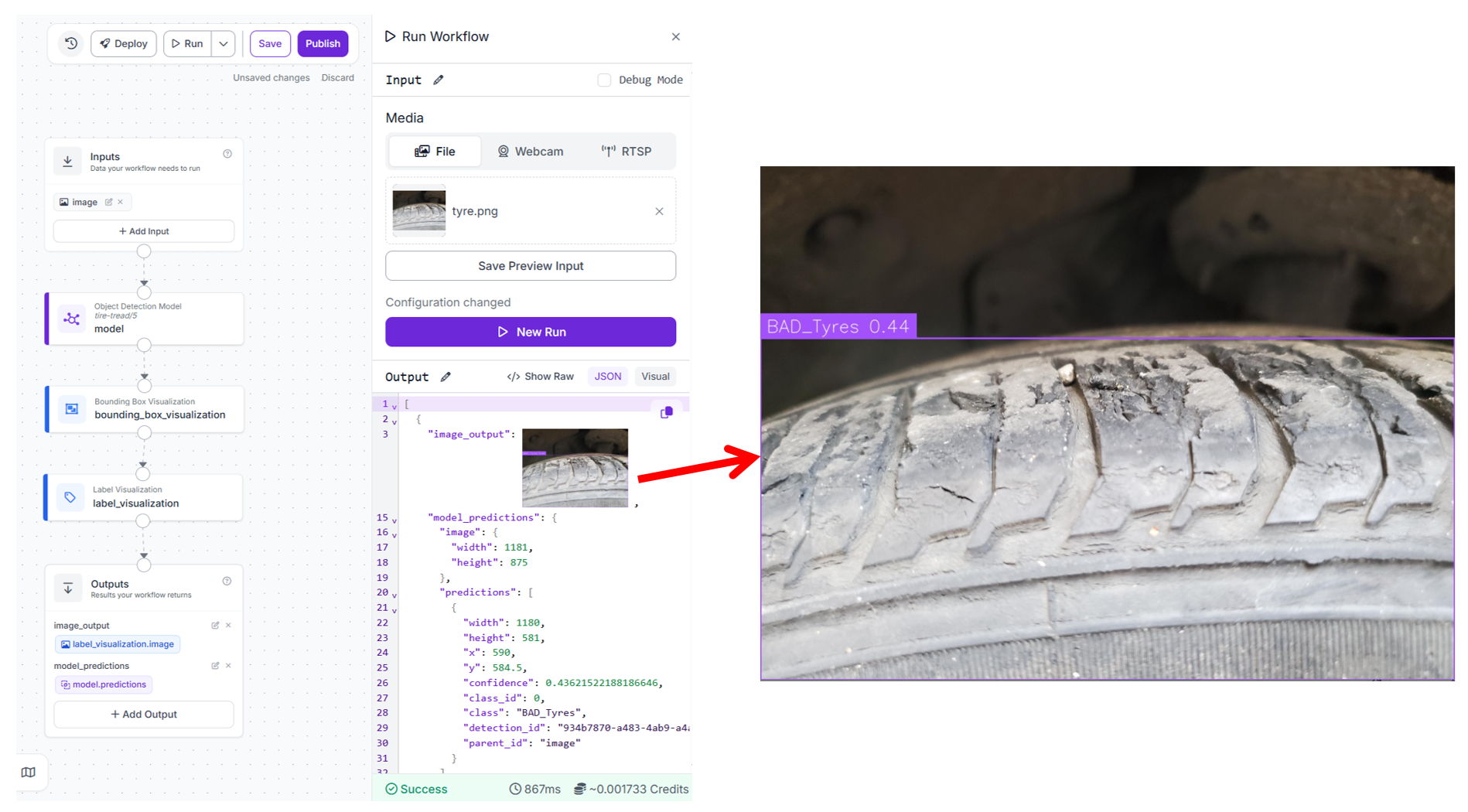
What each block does
- Inputs: Provides the tire image for inspection.
- Object Detection Model: This block runs the trained RF-DETR model on the input image. It detects tires and classifies them as either bad or normal based on learned visual features such as tread depth and surface condition.
- Bounding Box Visualization: Draws boxes around detected tires in the image.
- Label Visualization: Adds class labels such as bad tire or normal tire on top of the bounding boxes.
- Outputs: Returns the annotated image along with the structured predictions from the model.
Why deep learning is used here
Tire inspection is not a simple rule-based problem. The appearance of tire wear can vary due to lighting, angle, dirt, and manufacturing differences. A traditional approach based on edges or color would struggle to capture these variations.
Deep learning models such as RF-DETR learn these patterns from data, making them more reliable in real-world conditions where variability is high.
Training the RF-DETR model
The model used in this workflow was trained in Roboflow using a standard object detection pipeline. Use the following steps to train an RF-DETR object detection model:
- Collect and upload tire images to a Roboflow project.
- Annotate tires with classes such as bad tire and normal tire.
- Generate a dataset version with preprocessing and augmentation.
- Train an RF-DETR model using Roboflow’s training interface.
- Evaluate model performance using validation metrics.
- Deploy the trained model into a workflow.
Example use case
In a vehicle inspection system, a camera captures images of tires as vehicles pass through a checkpoint. The workflow processes each image and classifies the tyre condition.
- If a tire is classified as normal, it passes inspection
- If a tire is classified as bad, it can be flagged for maintenance or replacement
This can be integrated into automated inspection lanes, fleet maintenance systems, or safety monitoring setups.
Production considerations
For reliable deployment:
- maintain consistent camera angle and distance
- ensure sufficient lighting to capture tread patterns clearly
- include diverse training data with different tire types and wear conditions
- periodically retrain the model with new data to improve performance
This example highlights how deep learning enables inspection tasks that are difficult to solve using fixed rules, especially when visual variation is high.
Decision Framework for Choosing the Right Approach
Before building a vision system, it helps to step back and ask a few simple questions. In most cases, the answers will make the right direction fairly obvious.
1. Is the environment controlled?
If the scene is stable with fixed lighting, fixed backgrounds, and predictable object appearance, traditional computer vision is often the best place to start.
If the environment changes across locations, time of day, camera angles, or operating conditions, deep learning is usually a better fit.
2. Can the task be solved with clear visual rules?
If the task depends on measurable properties such as color, edges, contours, size, shape, or position, traditional computer vision can work very well.
If the task depends on more complex patterns, texture, context, or semantic understanding, deep learning is generally more suitable.
3. How much variation does the task involve?
Low variation usually points toward traditional computer vision. This includes cases with one object type, fixed orientation, limited background change, or consistent scale.
High variation usually points toward deep learning. This includes multiple classes, viewpoint changes, cluttered scenes, occlusion, and changing lighting.
4. What compute resources are available?
If deployment is planned on lightweight hardware such as a CPU-only device or a highly resource-constrained system, traditional computer vision is often the more practical option.
If the system can run on a GPU, NPU, edge accelerator, or cloud infrastructure, deep learning becomes much more viable.
5. How important is interpretability?
If each step in the pipeline must be easy to inspect, explain, and debug, traditional computer vision has a clear advantage.
If the priority is strong performance across complex conditions, and lower interpretability is acceptable, deep learning is often the better choice.
6. Does the system need to improve over time?
If the task is narrow and unlikely to change much after deployment, traditional computer vision may be enough.
If the system needs to adapt to new examples, changing environments, or expanding requirements, deep learning usually offers a better long-term path.
7. Does a hybrid approach work?
Many production systems use both approaches together. Traditional computer vision may handle preprocessing, region selection, measurement, or filtering, while deep learning handles detection, classification, or segmentation. This often gives a good balance of speed, control, and robustness.
Example Workflow for a Hybrid Computer Vision Approach
This example shows how traditional computer vision and deep learning can be combined in a single workflow. The goal is to improve consistency and performance by applying a simple preprocessing step before running a deep learning model. The workflow uses three main blocks
- Inputs
- Image Preprocessing
- Object Detection Model
- Outputs
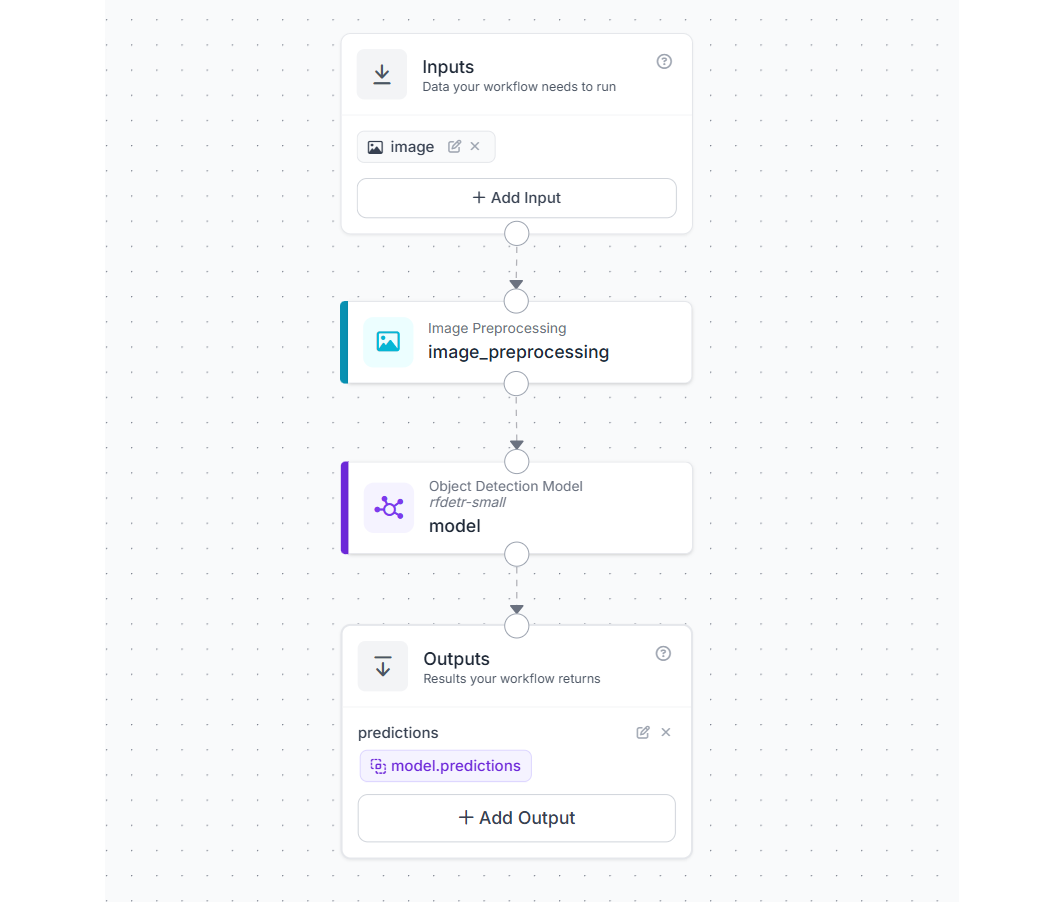
How the workflow works
The image enters through the Inputs block and is first passed to an Image Preprocessing block. In this step, the image is resized to a fixed resolution such as 512 × 512.
The resized image is then passed to a deep learning model for inference. The model processes the standardized input and returns predictions such as object detections or classifications.
Finally, the Outputs block returns the model predictions.
What each block does
- Inputs: Provides the raw image for processing.
- Image Preprocessing: Resizes the image to a fixed size. This ensures that all inputs follow a consistent format before being passed to the model.
- Object Detection Model: Runs inference on the preprocessed image and generates predictions based on learned features.
- Outputs: Returns the structured predictions from the model.
Why combine traditional CV and deep learning
This workflow demonstrates a hybrid design where
- traditional computer vision handles deterministic transformations
- deep learning handles pattern recognition and decision making
This combination is widely used in real-world systems because it improves reliability without adding unnecessary complexity.
Why preprocessing is important
- Consistent input format: Deep learning models expect images of a fixed size. Resizing ensures that every image matches the expected input dimensions.
- Stable model behavior: When input images vary in size or scale, predictions can become inconsistent. Preprocessing reduces this variation.
- Better performance on edge systems: Smaller, standardized images reduce computation and improve inference speed.
- Alignment with training conditions: Models perform best when inference data matches the format used during training. Resizing ensures this consistency.
Example use cases
- resizing images before object detection in surveillance systems
- standardizing inputs from multiple cameras in a production line
- preprocessing images before running classification models in mobile or edge applications
Hybrid workflows are often the most practical approach in production. Simple traditional CV steps such as resizing, cropping, or normalization can significantly improve the performance and stability of deep learning models.
Deep Learning vs. Traditional Computer Vision Conclusion
Traditional computer vision and deep learning are not competing approaches. They are different tools suited to different kinds of vision problems. The best approach is usually the simplest one that can meet the requirements reliably. Start with a method that is easy to test and understand, then move to a more advanced approach only when the task truly requires it. Roboflow supports both paths in one platform.
Cite this Post
Use the following entry to cite this post in your research:
Timothy M. (Mar 9, 2026). Deep Learning vs. Traditional Computer Vision. Roboflow Blog: https://blog.roboflow.com/deep-learning-vs-traditional-computer-vision/