

Scrap isn’t inevitable: it’s invisible. In most factories, defects aren’t discovered when they start, but hours later at end-of-line inspection, after hundreds or thousands of bad parts are already made. The root cause isn’t people or materials, it’s timing.
Computer vision changes that timeline. By inspecting every unit in real time at every stage of production, vision systems catch problems in minutes instead of hours. This article shows how manufacturers use vision workflows to turn scrap from a post-mortem metric into a preventable, data-driven outcome.
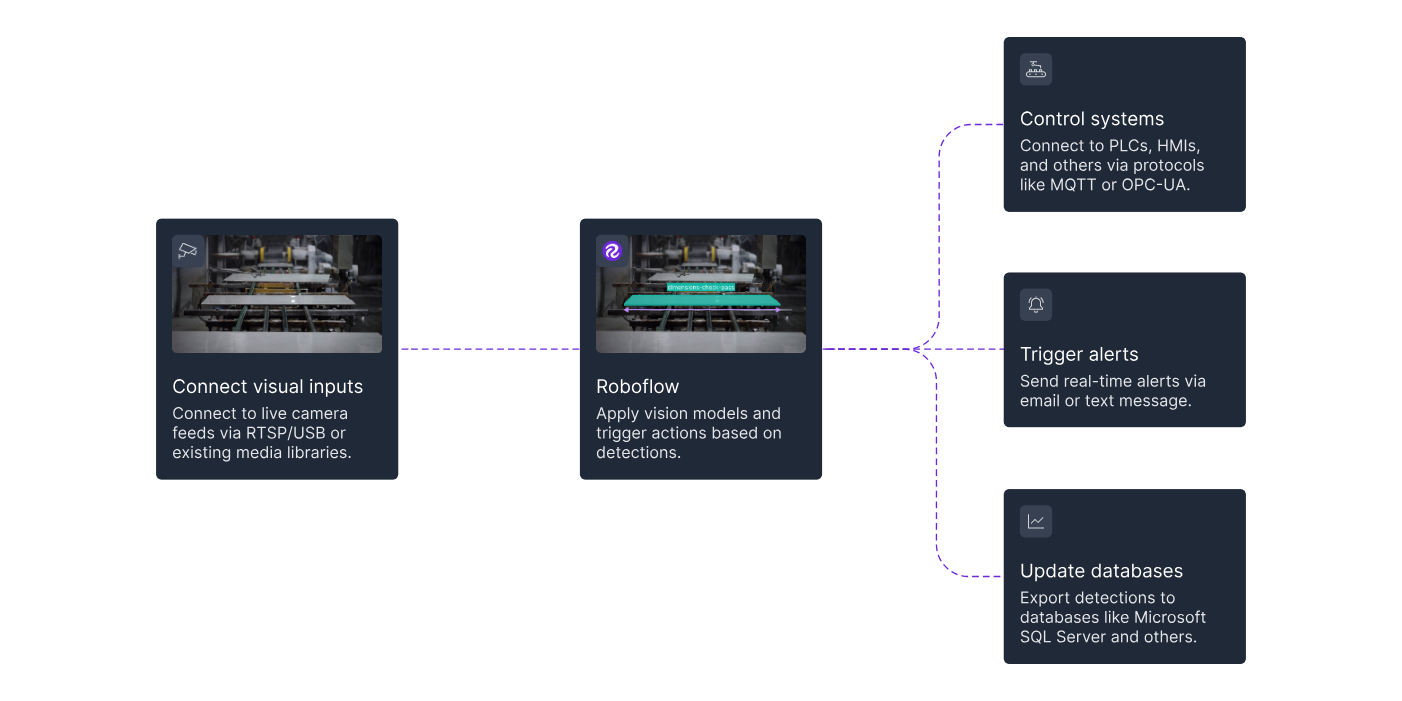
What Scrap Really Costs
Most teams think scrap is just wasted material. It isn’t. A 3% scrap rate doesn’t mean 3% higher costs: it triggers a cascade of hidden losses across the entire operation.
Scrap stops lines while issues are diagnosed, forcing unplanned downtime that ripples through schedules. It creates rework that burns skilled labor, often on overtime.
When defects escape, recalls add emergency shipping, customer fallout, and brand damage, sometimes costing millions. And to recover lost output, teams pay for rush materials, premium freight, and extended shifts. Scrap is a system-wide tax, not a line-item expense.
Why Traditional Scrap Tracking Doesn’t Work
Some factories still manage scrap with end-of-line checks, spot sampling, and spreadsheets. These tools explain yesterday’s problems, but they’re blind to what’s happening now:
- The End-of-Line Problem: Quality checks happen after production is finished. When a defect is found, hours of bad parts may already be produced. The problem is detected only after the damage is done.
- Sampling Misses the Pattern: Sampling assumes defects are random. Checking one part in a hundred misses early warning signs and finds issues long after they start.
- Spreadsheets Are Always Behind: Even when data is logged carefully, it sits in spreadsheets waiting for review. By the time trends are noticed, the same errors have already repeated many times.
Where Scrap Really Starts
Scrap almost never starts with a sudden breakdown. It begins with small changes that slowly turn into bigger problems. Some of the most common upstream causes include:
- Mislabels and mismatches: Label errors are a common hidden cause of scrap. The product may be correct, but the label is wrong or the label is correct, but on the wrong product. Manual checks usually confirm that a label is present and readable. They rarely verify that the label actually matches the product. By the time a mismatch is discovered, entire batches may already be unusable.
- Equipment Drift: Machines rarely fail all at once. They slowly drift. Alignment shifts, tools wear down, temperatures change. Each part still looks acceptable, but the process is moving toward failure. Traditional inspection catches the first bad part, not the early drift that caused it.
- Setup changes: Changeovers are high-risk moments. New materials, new settings, and new products introduce small errors that may not appear right away. A setup that is slightly off can produce parts that look fine at first but fail after extended runs. By the time the issue is visible, scrap has already accumulated.
- Upstream defects: Upstream defects start early in the process. A small issue, like a slightly misaligned hole or an incomplete weld, can move through several stages before anyone notices it.
- Human variability: Even skilled operators vary slightly in positioning, timing, and handling, especially under pressure.
Scrap usually begins minutes or hours before it is discovered. Vision systems shine precisely in this gap.
How Computer Vision Catches Defects Early
Using computer vision, defects are discovered within minutes often after just a few bad parts instead of hours later at final inspection. It works as follows:
Every Unit Is Inspected
Vision systems inspect every product as it moves down the line. There is no sampling and no human fatigue. Each unit is checked using the same rules, from the first part of the shift to the last. This continuous inspection makes it possible to notice changes as soon as they begin. If a label starts drifting out of position, the system flags it almost immediately instead of waiting for the problem to grow.
Inspection at Multiple Points Without Slowing the Line
Traditional inspection adds bottlenecks. Adding more checkpoints usually means more people and more delays. Vision cameras can be placed at multiple points along the line without slowing production. Incoming materials, assembly steps, labeling, and final packaging can all be inspected in parallel. The data from each point connects together, making it easier to see how one issue affects another. This connected view often reveals causes that single-point inspection would miss.
Detecting Problems Before They Become Scrap
Manual inspection is usually pass or fail. Computer vision goes further by spotting trends. Vision systems learn what normal variation looks like. When parts begin to drift away from that normal, even while still within limits, the system raises an early warning. This allows teams to investigate and correct issues before defects appear, turning emergency stops into planned adjustments.
Why Vision Pipelines Beat Point Solutions
Many manufacturers use separate vision tools for separate tasks. One camera checks for surface defects. Another reads barcodes. Another system counts parts. Each tool may work on its own, but they operate in isolation. The data is split, systems must be maintained separately, and results cannot easily be compared.
Vision pipelines work differently. They combine detection, OCR, tracking, and decision logic into one workflow that runs at the edge. This creates several clear advantages.
Contextual understanding
By combining detection, OCR, tracking, and logic in one workflow, the system understands both the product and its printed information. As each pack moves through packaging, the system verifies lot numbers and dates, confirms correct matching, detects defects, and flags any issue immediately.
Real-time decision making
Vision pipelines apply rules directly during production. If a defect is detected, a date is invalid, or the wrong pack enters a carton, the system can alert operators or trigger an automated response immediately before scrap builds up.
Simpler deployment and maintenance
Defect detection, OCR, tracking, and verification all run inside one workflow with shared logic and configuration. Teams manage a single system instead of maintaining separate tools for inspection and scrap checks.
Scalable data for analysis
Defects, inspection results, images, and metadata are logged together. This makes it easy to trace scrap back to specific defect types, machines, shifts, or product runs and understand why it occurred.
Roboflow Workflows follow this pipeline approach. They let teams combine detection, OCR, and logic into one workflow that runs on the device and sends results for action or analysis.
Building a Vision Pipeline with Roboflow Workflows
The power of modern computer vision for manufacturing comes from combining multiple AI capabilities into a single, integrated workflow. Instead of using separate point solutions for different inspection tasks, Roboflow Workflows enables you to build complete inspection pipelines that run in real-time at the edge.
A Complete Package Inspection and Label Verification System
Consider a common manufacturing challenge: ensuring products are packaged correctly without defects and properly labeled with accurate information like product names and batch numbers. Traditional approaches would require separate inspection systems, one for package quality, another for label verification. Roboflow Workflows handles both in a single integrated pipeline.
What a Package Inspection Workflow Can Detect?
A comprehensive package inspection system verifies multiple quality aspects simultaneously:
- Package integrity - Torn boxes, damaged containers, dented packaging
- Seal quality - Improperly sealed packages that could compromise products
- Label condition - Smudged, misaligned, or illegible labels
- Label accuracy - Correct batch numbers, and other product information
- Component presence - Missing parts or accessories
The key advantage is that detection model can include both product classes and defect classes. Instead of just detecting "package," your model identifies "package," "damaged_package," "good_seal," "weak_seal," and other relevant categories—enabling comprehensive quality inspection without separate systems.
The Package Inspection Workflow Pipeline:
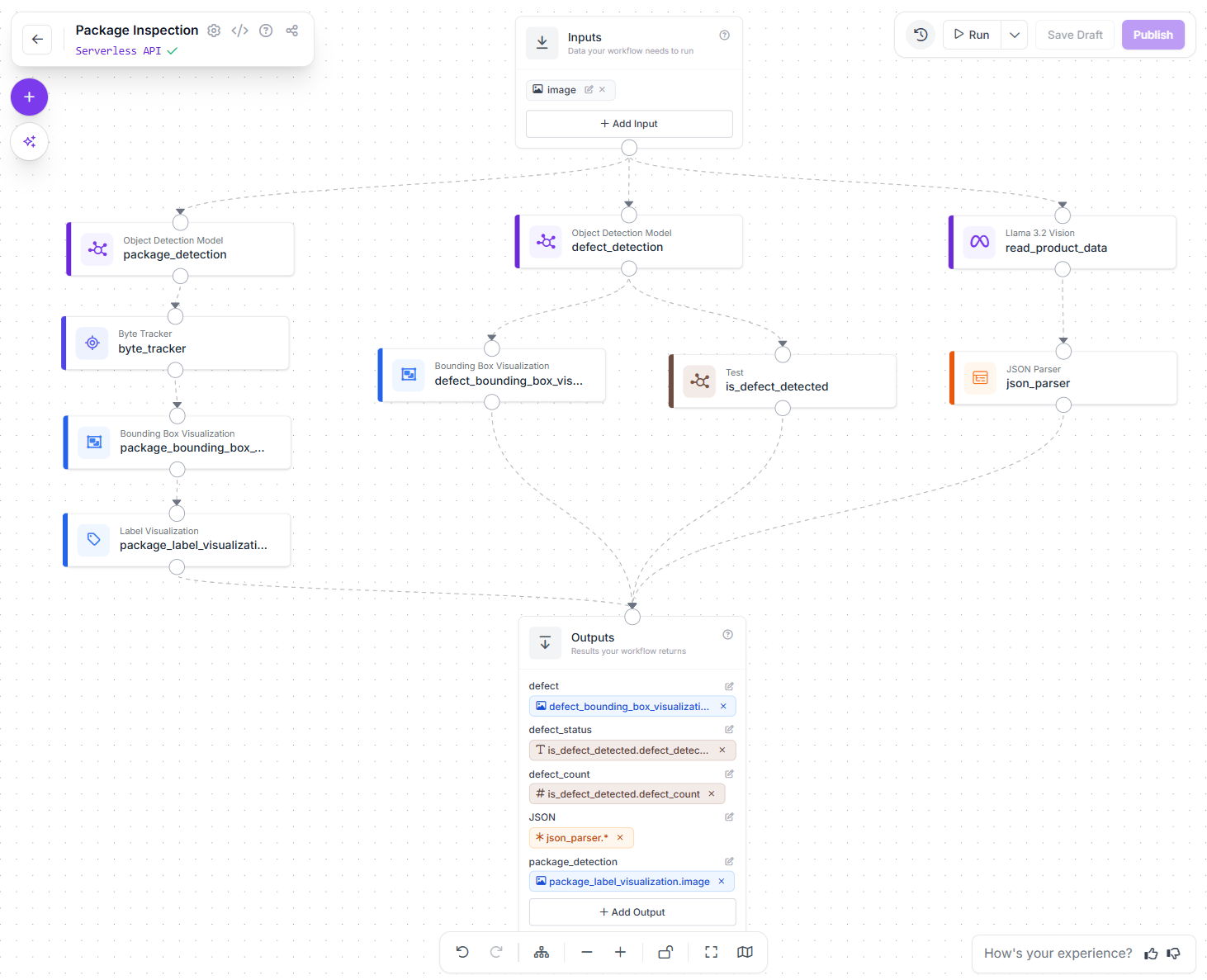
The package inspection workflow shown above demonstrates a complete label verification pipeline:
- Detect the product type and defects - A custom object detection model identifies the product and any visible defects
- Read the label text - Llama 3.2 Vision extracts text from labels, including product names, dates and batch numbers
- Verify the information - Logic blocks check if defects are detected and parse the extracted data (i.e. produce name or batch no. etc)
- Visualize results - Bounding box visualization shows detection results for operators
- Output structured data - The workflow returns defect status, count, OCR results, and parsed JSON data
This integrated approach handles the complete inspection process in a single workflow rather than requiring multiple disconnected systems.
Why Do Integrated Workflows Beat Point Solutions?
Building this as separate tools would require:
- A system for defect detection
- Another system for OCR
- Custom code to connect them
- Separate logic for validation
- Additional integration for alerts and logging
With Roboflow Workflows, all these components work together in one pipeline. When a defect is detected or a label mismatch occurs, you don't just know "something's wrong", you know exactly what product, what failed, the specific batch number, and when it happened.
How to Build A Package Inspection System
Here's how to build a similar system for your production line:
Step 1: Collect Training Data
Capture images of packages on your production line, including:
- Good packages from multiple angles and lighting conditions
- Examples of each defect type (torn packaging, damaged labels, weak seals)
- Various product types and package sizes you manufacture
Use Roboflow's annotation tools to label both packages and defects in your images.
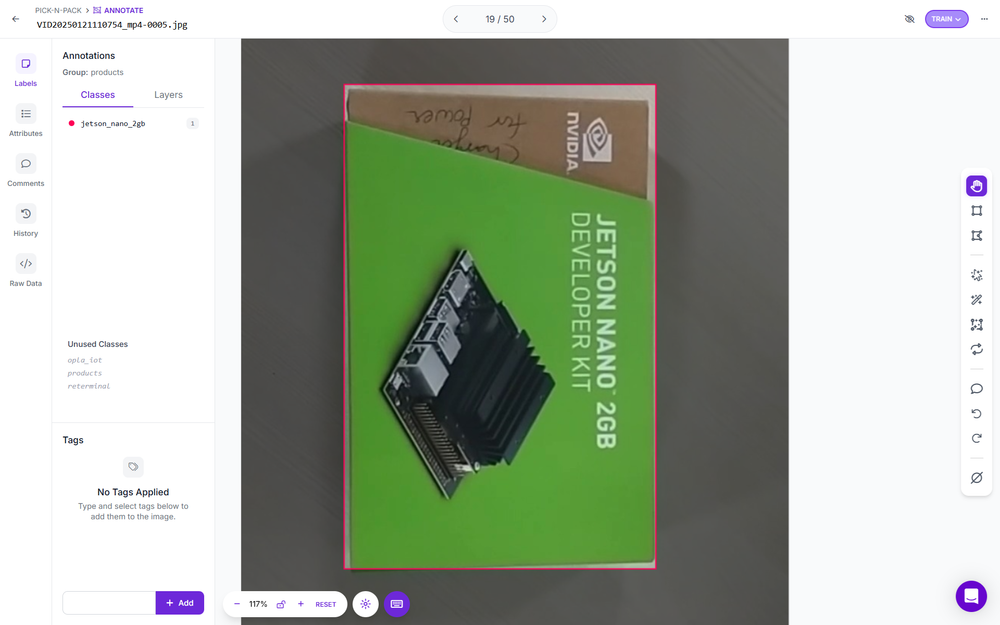
Step 2: Train Your Detection Model
Train a custom object detection model that recognizes:
- Package types (for tracking and counting)
- Specific defect types (PCB holes, torn_box, damaged_label, weak_seal, etc.)
Roboflow Train handles the training process, optimizing for your specific packaging and defect types.
Step 3: Build Your Workflow
In Roboflow Workflows, combine your trained detection model with additional blocks:
- Your custom package detection model for identifying products and defects
- Llama Vision for OCR to read label text
- Logic blocks to validate dates and batch numbers, names etc.
- Visualization blocks to display results for operators
- Output blocks to log inspection results and trigger alerts
Step 4: Test Workflow
Run your workflow on test images and production samples to verify:
- Defects are accurately detected
- OCR correctly reads label information
- Logic properly validates dates and produce names and batch numbers
- False positives are minimized
Step 5: Deploy and Scale Workflow on Edge Devices
Once you've built your workflow in the Roboflow platform, deployment to edge devices is straightforward. Here's how to deploy the package inspection workflow shown above:
# 1. Import the InferencePipeline library
from inference import InferencePipeline
import cv2

def my_sink(result, video_frame):
    if result.get("output_image"):
        # Display the workflow visualization
        cv2.imshow("Workflow Image", result["output_image"].numpy_image)
        cv2.waitKey(1)

    # Access workflow outputs
    print(result)

# 2. Initialize a pipeline object
pipeline = InferencePipeline.init_with_workflow(
    api_key="ROBOFLOW_API_KEY",
    workspace_name="tim-4ijf0",
    workflow_id="package-inspection",
    video_reference=0, # Camera device ID, video file, or RTSP stream
    max_fps=30,
    on_prediction=my_sink
)

# 3. Start the pipeline
pipeline.start()
pipeline.join()
This code runs your complete workflow on an edge device, processing video from a production line camera in real-time. The workflow inspects every frame, runs all detection and OCR models, applies business logic, and returns structured results.
Step 6: Take Action on Workflow Results
The workflow outputs structured data that drives automated responses. Available output data are:
- Tracking and Visualization of package types for counting
- Visualization of detected defects with bounding boxes
- defect_status - Boolean indicating if any defects were detected
- defect_count - Number of defects found in the current frame
- JSON - Parsed product information including product name, batch numbers and dates
These outputs enable automated actions such as:
- Immediate Line Stops: When defect_status is true or defect_count exceeds a threshold, trigger an emergency stop signal to prevent further defective production.
- Quality Alerts: Send notifications to operators or supervisors when defects are detected, including defect type, count, and an image of the issue.
- Batch Tracking: Log the JSON output containing names, batch numbers and dates for every inspected product, creating complete traceability records.
- Trend Analysis: Aggregate defect_count over time to identify process drift before it causes major quality issues.
- Conditional Routing: Use extracted batch numbers to verify products are entering the correct packaging line or shipping container.
- Automated Rejects: Trigger pneumatic reject mechanisms when defects are detected, removing bad products from the production stream without stopping the entire line.
This is where vision pipelines deliver transformative value, they don't just detect problems, they automatically respond to them, creating closed-loop quality systems that prevent defects from reaching customers.
Why Use Real-Time Processing at the Edge?
Manufacturing environments require immediate responses. When a vision system detects a defect, the line may need to stop within milliseconds. Cloud processing introduces latency that's incompatible with production speeds.
Roboflow Workflows run on edge devices, hardware located directly at the production line that processes images locally and makes decisions in real-time. This architecture provides the speed manufacturing demands while maintaining connectivity for data analysis and continuous improvement.
Key Advantages of This Approach
Following are some of the key advantages of this computer vision pipeline:
- Single Workflow, Multiple Capabilities: Object detection, OCR, and business logic work together seamlessly without custom integration code.
- Real-Time Edge Processing: All processing happens locally on edge hardware, eliminating cloud latency for immediate response.
- Structured Output Data: Workflow results are formatted for easy integration with MES systems, databases, and alert mechanisms.
- Visual Feedback: Operators see detection results overlaid on live video, providing immediate visual confirmation of inspection results.
- Scalable Architecture: The same workflow can be deployed across multiple production lines and facilities with minimal configuration changes.
This integrated approach represents the future of manufacturing quality control: comprehensive inspection powered by AI, running in real-time at the production line, with automated responses that prevent defects from accumulating.
Tracing Scrap to Root Causes with Vision Data
Computer vision doesn't just detect defects, it creates detailed records that reveal why scrap happens. Every inspection generates data that may include timestamp, product SKU, inspection result, machine ID, shift information, and material lot numbers. This data becomes the foundation for identifying root causes.
Machine-Specific Patterns
Vision systems that log which machine produced each inspected unit can identify machine-specific defect patterns. This enabled condition-based maintenance instead of arbitrary schedules, reducing both scrap and maintenance costs.
Product Variation Analysis
Some products are inherently harder to manufacture. Vision data quantifies this by showing which SKUs have elevated defect rates and what types of defects they generate.
Shift and Time-Based Trends
Vision data can show defect clustered around specific task and time. Correlating defect rates with shifts and time periods often reveals training gaps or process issues.
Supplier and Material Tracking
When vision systems use OCR to read supplier lot codes on incoming materials, they can correlate defects with specific material batches.
Closing the Quality Loop
The ultimate goal is using defect detection data to prevent recurrence. It helps in:
- Immediate Detection - Catch defects in real-time to minimize current scrap
- Root Cause Analysis - Use vision data to identify why defects occurred
- Process Improvement - Implement changes that prevent the root cause from recurring
This closed-loop approach transforms quality control from inspection to prevention, using vision data to continuously improve manufacturing processes.
How to Reduce Scrap in Manufacturing with Computer Vision Conclusion
Scrap is not unavoidable. It happens because problems are detected too late. End-of-line inspection only shows what already went wrong, after defective parts have already been produced. Computer vision shifts this timeline.
Issues are detected as soon as they appear, allowing teams to act after the first few defective units instead of hours later. With tools like Roboflow, building vision workflows is practical today. Teams can start with one high-impact defect, prove value quickly, and scale across the line.
Cite this Post
Use the following entry to cite this post in your research:
Timothy M. (Jan 26, 2026). How to Reduce Scrap in Manufacturing with Computer Vision. Roboflow Blog: https://blog.roboflow.com/reduce-scrap-with-computer-vision/