

Retrain a computer vision model when production evidence shows it no longer represents the task: a measured performance decline, changed production images, repeated failure patterns, new requirements, or annotation errors, not because a set amount of time has passed. Before retraining, rule out the camera, the confidence threshold, and the workflow logic, then train a candidate on targeted failure examples and deploy it only if it beats the deployed model on the metrics that matter.
Knowing when to retrain a computer vision model comes down to production evidence. A model should be retrained when its training data or performance no longer represents the task, not because a certain amount of time has passed.
A computer vision model can perform well on familiar evaluation data and still fail on real-world images it was not prepared to handle. In one study, a DenseNet-121 model achieved around 2% accuracy on ImageNet-A, a benchmark of difficult, naturally occurring images selected to expose model weaknesses, a drop of roughly 90%. Its ability to identify out-of-distribution images on ImageNet-O was close to random chance. The examples in both datasets were real, unmodified images rather than artificially corrupted inputs.
The same gaps appear after deployment. Lighting changes, cameras are repositioned, products are redesigned, and previously rare edge cases become part of normal operations. Retraining a vision model on evidence from those failures is how teams close the gap. What follows: the signs that justify retraining, the problems retraining will not fix, and a five-question framework for deciding.
What Does Retraining a Computer Vision Model Mean?
Retraining a computer vision model means updating it with new, corrected, or more representative training data. The goal is to help the model handle conditions that were missing or underrepresented in the original dataset.
A typical retraining process includes:
- Collecting recent production images and reviewing failure cases
- Correcting annotations and labeling new examples
- Creating a new dataset version
- Training a candidate model and comparing it with the deployed model
Retraining does not always mean starting from scratch. In many cases, teams can fine-tune an existing model so it keeps what it has already learned while adapting to new products, environments, or edge cases.
Dataset versioning is important because it preserves the images, annotations, preprocessing settings, and augmentations used for each training run. This makes it easier to compare model versions and deploy the updated model only when it produces a meaningful improvement.
When to Retrain a Computer Vision Model
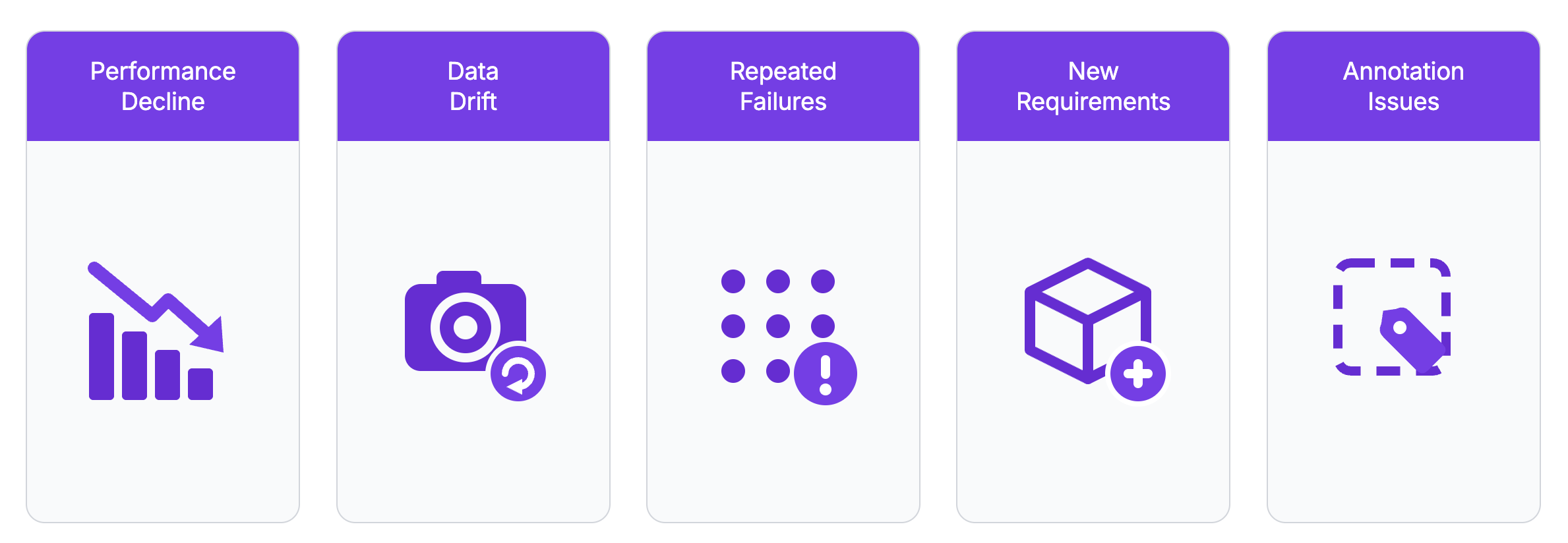
A computer vision model does not need retraining every time it makes a mistake. Isolated errors are expected, especially in complex environments. Retraining becomes more useful when teams see a measurable decline in performance, repeated failure patterns, or a clear gap between current production conditions and the data used during training.
Production Performance Has Declined
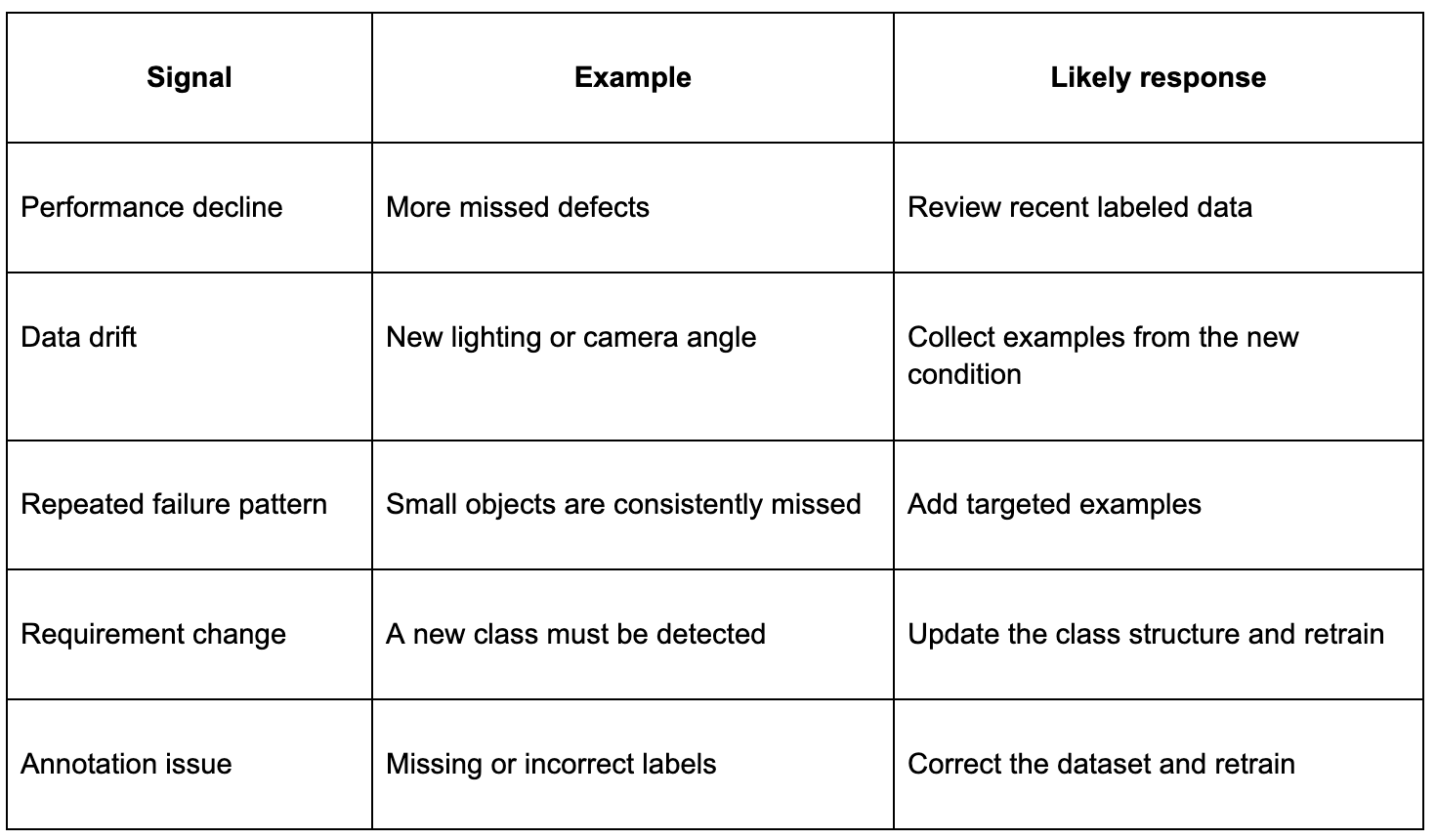
The strongest signal is a measurable drop in performance on recent production data. This may appear as more missed defects, more false safety alerts, lower recall, incorrect classifications, or a growing number of cases that require manual review.
Teams should confirm the decline using reviewed production examples such as Vision Events marked incorrect through operator feedback. A model can assign high confidence to an incorrect prediction, so recent images should be labeled and compared with the model output. If performance falls below the level required by the operation, retraining may be justified.
Production Images Have Changed
Production environments rarely remain fixed. A camera may be moved, lighting may change, or a different camera model may be installed. Products can also be redesigned with new colors, shapes, materials, or packaging.
The system may be deployed at another facility where backgrounds and camera positions are different. Objects may also appear smaller, farther away, or more heavily occluded than they did in the original dataset.
These changes are examples of data drift: the images the model sees no longer match the images it was trained on. A related problem, concept drift, occurs when the meaning of the target changes rather than the inputs, such as a new defect definition or a product that has been reclassified.
Both are retraining signals, but a visual change alone does not mean the model must be retrained. Retraining is needed when the new conditions cause a meaningful decline in performance.
New Failure Patterns Are Appearing
Repeated errors are more important than individual mistakes. A model may consistently miss small objects, produce false positives on reflective surfaces, confuse two defect classes, or fail when objects appear near the edge of the image.
Before collecting more data, teams should group failures by factors such as:
- Class and object size
- Camera or deployment location
- Lighting and background conditions
- Occlusion, angle, and distance
This makes it easier to build a targeted dataset that addresses a specific weakness instead of adding large amounts of unrelated data.
The Task or Business Requirements Have Changed
A model may still perform its original task correctly while no longer meeting current operational needs. A new product or defect class may need to be detected, or two classes that were previously grouped together may need to be separated.
The required performance threshold may also change. For example, a quality inspection system may need a higher recall after a missed defect reaches a customer. Deployment at a new facility can also introduce operating conditions that were not covered by the original model.
Annotation Problems Have Been Found
Retraining may also be necessary after problems are found in the dataset itself. Missing bounding boxes, incorrect class labels, inconsistent box sizes, poor segmentation masks, and conflicting labeling guidelines can teach the model the wrong patterns.
In this case, the first step is to correct the annotations and create a clean dataset version. The model can then be retrained using more consistent examples.
When Retraining Is Not the Right Solution
Not every production issue is caused by the trained model. Before collecting more data or starting another training run, teams should check whether the problem can be solved elsewhere in the vision system.
The Confidence Threshold Needs Adjustment
A model may detect the correct objects but return too many low-confidence predictions or false alerts. In this case, adjusting the confidence threshold may improve the final output without changing the model itself.
The Camera or Image Pipeline Is the Problem
Poor image quality can make a reliable model appear inaccurate. Common causes include:
- Dirty lenses, motion blur, or incorrect focus
- Heavy compression or incorrect image resizing
- Broken preprocessing or poor camera placement
Retraining on poor-quality images may make the model more tolerant, but it can also hide the underlying issue. Fixing the camera or image pipeline is usually the better first step.
Workflow Logic Needs Improvement
The model may detect objects correctly while the surrounding workflow produces the wrong result. In Roboflow Workflows, these fixes are configuration changes rather than training runs. A zone block can limit detections to a region of interest, the ByteTrack block can track objects across frames before they are counted, and filter blocks can remove duplicate or low-confidence detections. An alert can also be required to persist across several frames before it fires. If one of these blocks solves the problem, the deployed model can stay as it is.
A Practical Framework for Deciding When to Retrain
Deciding whether to retrain a computer vision model requires more than noticing that a few predictions are wrong. Teams should first confirm that performance has declined, identify the source of the problem, and determine whether new training data is likely to improve the model.
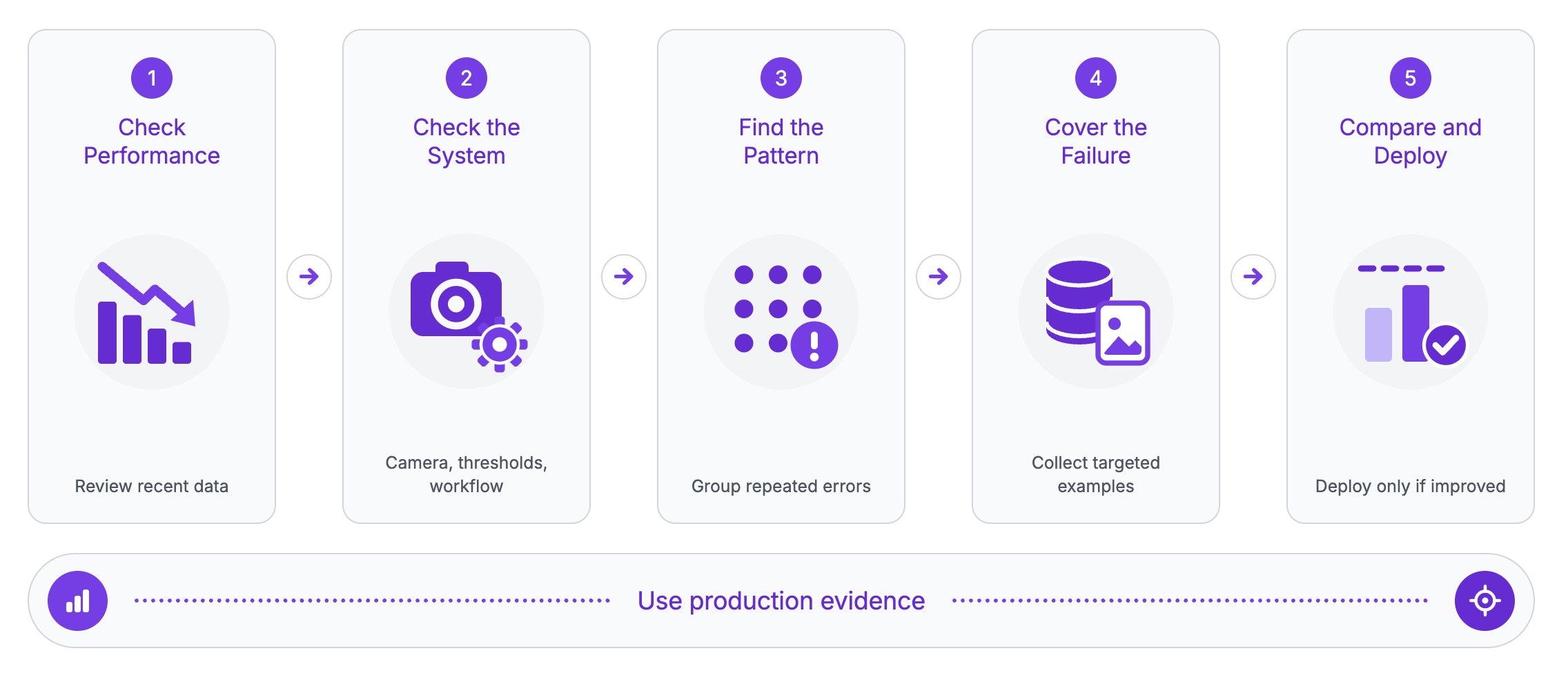
A practical decision process can follow five questions:
- Has production performance fallen below the required threshold? Review recent labeled production data and compare it with the performance level required by the operation. If performance remains acceptable, continue monitoring. If it has declined, investigate the cause.
- Is the problem caused by the model or the surrounding system? Check the camera, preprocessing, confidence thresholds, tracking, and workflow logic. If the issue comes from the surrounding system, fix it before retraining. If the model or training data is responsible, continue.
- Do the failures follow a repeated pattern? Group errors by class, camera, lighting, object size, angle, or occlusion. If no clear pattern is visible, collect and review more examples. If a pattern exists, build a targeted dataset around it.
- Does the new data cover the failure pattern? The data should cover the failure condition across different environments, positions, and variations. If coverage is limited, continue collecting and labeling. If it is sufficient, train a candidate model.
- Does the candidate outperform the deployed model? Compare both models on the same evaluation set and recent production data. Keep the existing model if the candidate does not improve the required metrics. If it does, deploy gradually and continue monitoring.
Collecting Production Evidence with Vision Events
Most of the signals in this article depend on a reviewable record of what the model did in production. Roboflow Vision Events provides that record. Each event is a timestamped entry created when a production model processes an image, and it can store the original image, the annotated output, the predictions, the device that generated it, and custom metadata such as a line number or product SKU.
Events are grouped into use cases, such as quality checks, inventory counts, or safety alerts, so events from different cameras and facilities can be filtered and queried the same way.
Teams can pull recent events from one camera to confirm a performance decline, group failures by metadata to find a repeated pattern, and mark individual events as correct, incorrect, or inconclusive through operator feedback.
Event images also feed the next training run. Images captured as events can be moved into a project, reviewed in Annotate, and included in the next dataset version, so the production images that exposed a weakness become the training data that fixes it. Events are retained for a configurable lookback window, 14 days by default, so failure cases should be moved into a project before they expire.
How to Prepare Data for Retraining
The value of new training data depends more on its relevance and diversity than the total number of images. Teams should focus on examples that reveal where the deployed model struggles, including:
- False positives, false negatives, and low-confidence predictions
- New products, classes, environments, or camera conditions
- Rare but operationally important edge cases
- Negative images that closely resemble the target class
Adding thousands of nearly identical frames from the same video is unlikely to address a model weakness. A better dataset includes meaningful variation in lighting, object position, angle, distance, background, and occlusion.
Teams should also preserve examples that the model already handles correctly. Focusing only on one new failure condition can improve that case while reducing performance elsewhere.
Collecting these examples does not have to be manual. Active learning samples production images against rules a team defines, such as predictions below a confidence threshold or a percentage of all traffic, and adds them to a project for review. Combined with Vision Events, the images most likely to improve the model collect themselves: the model flags what it finds hard, and annotators correct it.
In Roboflow, these production images can be reviewed and corrected in the Annotate tab before a new dataset version is generated. Dataset versions preserve the images, labels, preprocessing steps, augmentations, and dataset splits used for a training run, making later comparisons more reproducible.
Training the Candidate Model
Once the new dataset version is ready, the candidate can be trained in Roboflow Train without managing training infrastructure. RF-DETR, Roboflow's detection model family, is the default choice for object detection: smaller variants train quickly for iteration, and larger variants trade speed for accuracy. Training from an existing checkpoint keeps what the deployed model already learned, which fits the fine-tuning approach described earlier. The candidate adapts to the new failure examples without relearning the whole task.
Each training run is tied to the dataset version that produced it, so the candidate and the deployed model can both be traced back to their training data.
How to Evaluate a Retrained Model
A retrained model should be compared directly with the currently deployed model before it replaces it. Both models should be evaluated on the same fixed test set, as well as recent production images that represent the conditions that triggered retraining.
Technical metrics may include precision, recall, F1 score, mean average precision, and per-class performance. Operational metrics are equally important because they show whether the model improves the actual process.
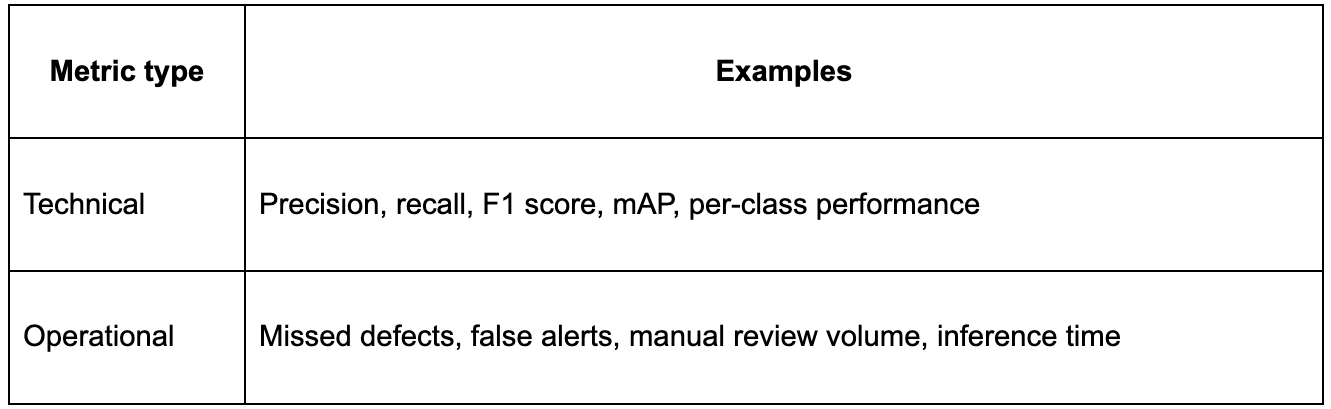
Roboflow training results provide metrics such as precision, recall, and mAP for object detection models. Model Evaluation provides additional tools, including performance by class, confidence-threshold analysis, a confusion matrix, and vector analysis for identifying groups of images where the model performs well or poorly.
A higher overall score does not automatically make the candidate better. For example, average mAP may improve while recall declines for a safety-critical defect class. The updated model should only replace the deployed version when it improves the metrics that matter most to the operation.
Conclusion
Production evidence, not a fixed schedule, should drive retraining. Teams should monitor performance, verify failures with reviewed data, identify repeated patterns, and collect targeted examples before training a candidate model. The candidate should replace the deployed model only when it improves the metrics the operation depends on.
Vision Events gives this loop a concrete home in Roboflow. Production images, predictions, and operator feedback accumulate as searchable events, failure cases move into Annotate for correction, a new dataset version trains the candidate, and Model Evaluation compares it with the deployed model. A reasonable first step is turning on event capture for one camera and reviewing a week of flagged failures, which is usually enough to show whether a retraining case exists.
Further reading:


Cite this Post
Use the following entry to cite this post in your research:
Mostafa Ibrahim. (Aug 3, 2026). How Often Should You Retrain a Computer Vision Model?. Roboflow Blog: https://blog.roboflow.com/when-to-retrain-a-computer-vision-model/