

Agentic computer vision is a system where a vision model's output feeds a reasoning step that decides what to do next and takes an action, instead of stopping at a box or a label. In practice, that means a detector such as RF-DETR for perception, a vision language model for judgment, and tool calls or integrations for action, chained in a loop that can check its own result, using Roboflow Workflows.
Computer vision has traditionally been built around prediction. An image enters a model and the system returns an object class, bounding box, segmentation mask, keypoint, count, or another structured result. That model output is useful, but it does not necessarily answer the operational question. For example:
- A warehouse camera may detect a forklift
- A manufacturing camera may identify a damaged carton
- A security camera may find a person in a restricted area
A conventional system then needs application code around the model to decide whether the observation matters and what should happen next. Agentic computer vision extends this architecture.
Instead of treating perception as the endpoint, it treats perception as the first step in a system that can interpret what it sees, use additional context, select an allowed action, observe what happened, and continue from there. The result is not simply a computer vision model. It is a closed-loop computer vision application.
What Is Agentic Computer Vision?
Agentic computer vision is a computer vision architecture in which visual perception feeds a reasoning layer that can use context and tools to decide what action to take, execute that action, and verify the result.
The idea closely follows the broader development of AI agents. Research such as ReAct showed how reasoning and actions can be interleaved rather than handled as isolated stages, while Toolformer demonstrated the value of language models invoking external tools through APIs. Reflexion explored another important part of the pattern, using feedback from an environment to improve the next decision.
For vision applications, the environment is physical rather than purely textual. Cameras provide observations, vision models convert those observations into structured evidence, multimodal models interpret situations, and integrations connect the resulting decision to software or industrial systems.
A useful way to think about agentic computer vision is as a four-step loop:
- Perceive: A detector, segmenter, classifier, OCR model, tracker, or other vision model converts pixels into structured observations such as
person detected,forklift at x=420,defect present, orthree pallets counted. - Reason: A vision language model or other reasoning model combines the visual evidence with context such as time, location, policy, previous observations, production state, or external data and determines what the situation means.
- Act: The system invokes an approved tool for example, send a Slack notification, call a webhook, create a maintenance ticket, write an event to a database, update an MES, send a value to an OPC UA server, or request human review.
- Verify: The system checks whether the action succeeded or whether the visual situation changed as expected. If not, it can retry, choose another allowed path, or escalate.
The last step is important because an agent is different from a one-shot multimodal prompt.
Consider a camera monitoring a pedestrian area. A traditional object detector might return:
forklift - confidence: 0.97
The output is accurate but incomplete from an operational perspective. An agentic system could instead establish that the forklift overlaps a pedestrian-only zone, retrieve the current shift or area policy, determine whether the condition requires escalation, send a message containing the relevant image or video clip to the supervisor responsible for that shift, record the incident, and later verify whether the forklift left the restricted area.
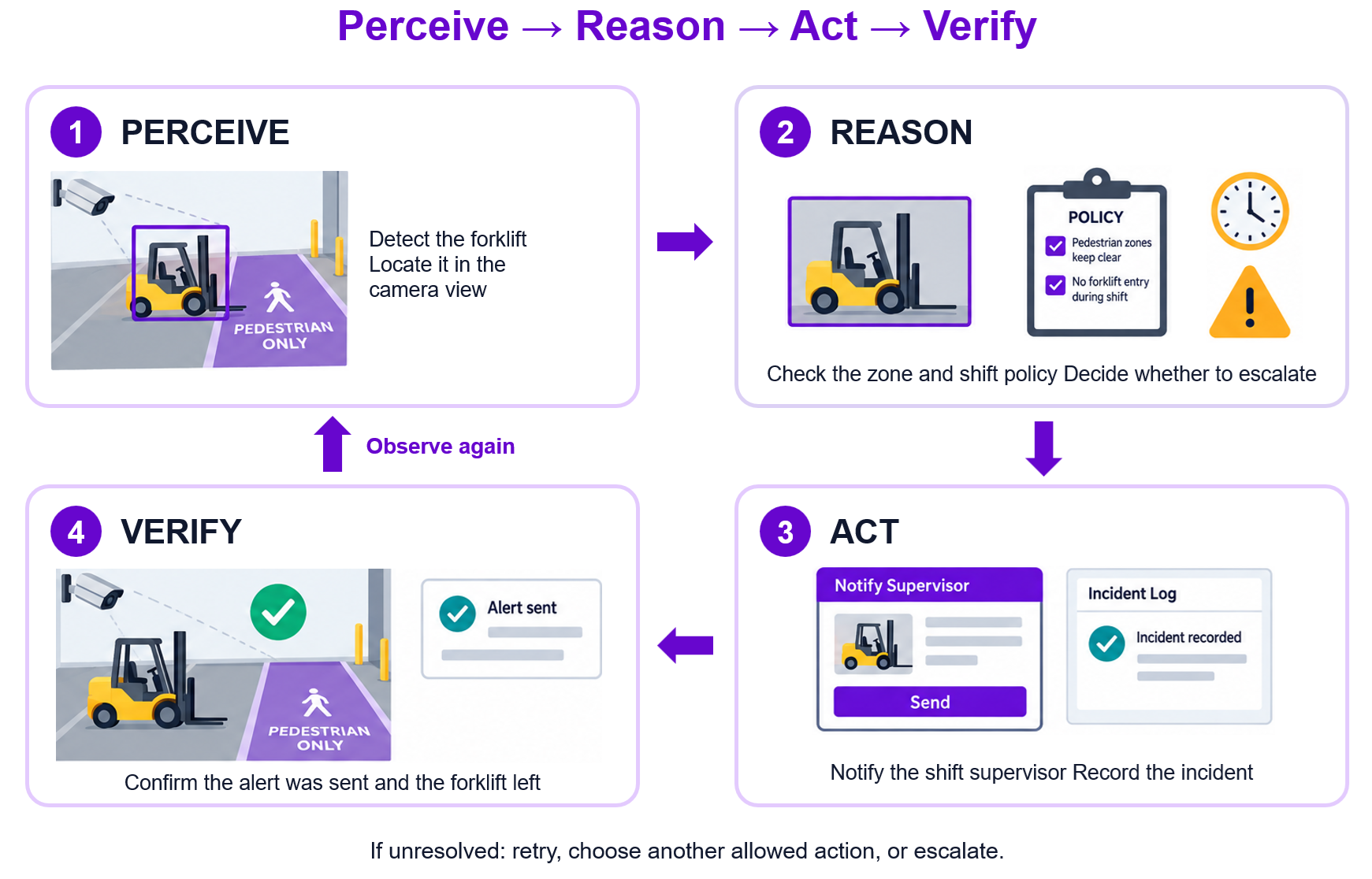
That is the difference between seeing an object and using visual evidence to complete a task.
The Four Components of an Agentic Vision System
The perceive, reason, act, and verify loop can be implemented as four practical system components.
1. Perception: turn pixels into structured facts
The first component is the perception layer. For most production systems, this should still be a specialized computer vision model such as an object detector, instance segmentation model, classifier, keypoint model, or OCR model.
For object detection, a model such as RF-DETR can turn an image into structured predictions containing classes, confidence scores, bounding boxes, and coordinates. For example:
{
  "class": "forklift",
  "confidence": 0.97,
  "x": 614,
  "y": 355,
  "width": 281,
  "height": 214
}
The important architectural decision is that the reasoning model does not necessarily need to inspect every full-resolution frame. A specialist model can first answer narrow questions extremely efficiently:
- Is a person present?
- Is a trailer present?
- Is there a defect?
- Did an object enter a polygon?
- How many boxes crossed a line?
- Has an object remained in a region for more than 30 seconds?
Only observations that satisfy those conditions need to move to the more expensive reasoning layer. This architecture is especially useful for video. A 30 FPS stream produces 30 opportunities for inference every second. Asking a VLM to independently reason about every frame is unnecessary for many applications. Instead:
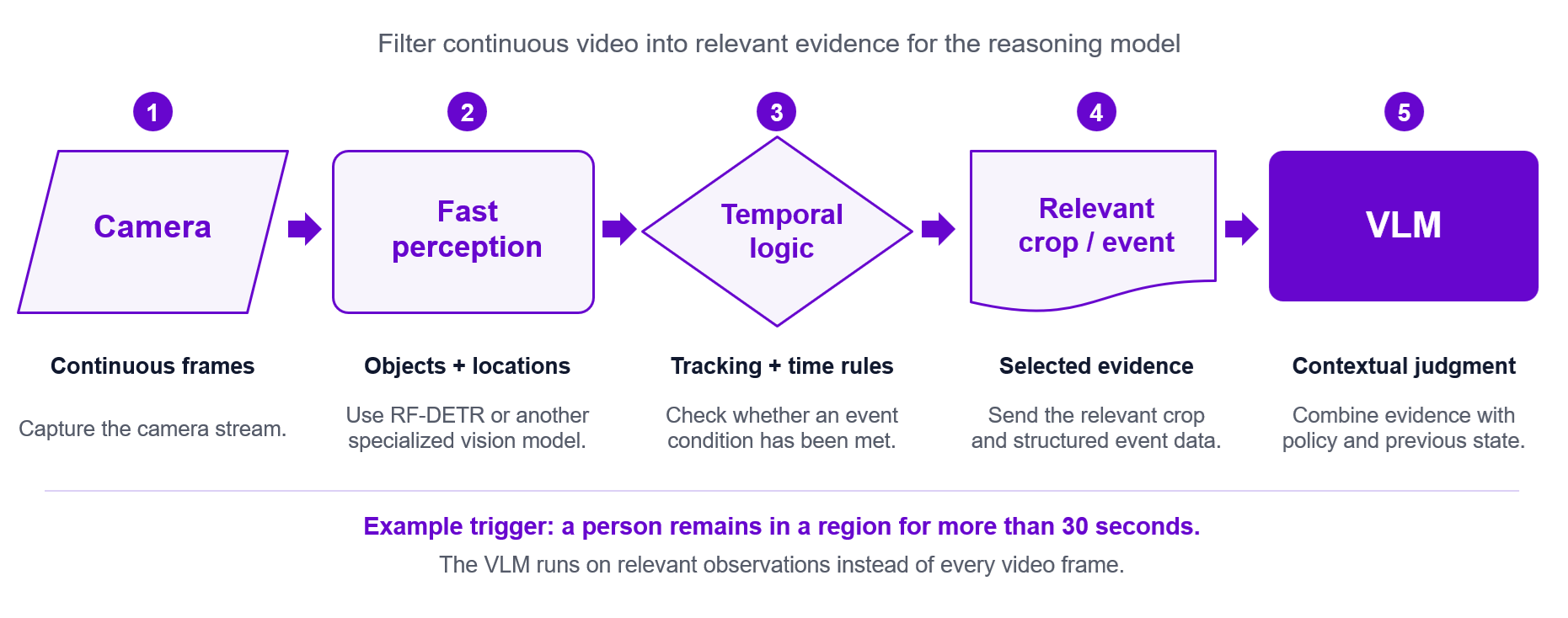
The perception layer acts as a visual filter. RF-DETR was designed around the accuracy-latency trade-off required by this kind of workload. The RF-DETR provides a family of lightweight specialist detection transformers that can be fine-tuned to generate specialist detectors. Hence it provide better deployment trade-offs than relying on heavyweight vision-language models for every domain-specific detection problem.
There is another reason to separate perception from reasoning. Current VLMs are powerful but should not automatically be treated as perfect localization engines. Research continues to identify visual hallucination and localization failure modes in multimodal models.
HallusionBench, published at CVPR, demonstrated that visual reasoning models can produce answers influenced by language priors rather than the evidence in an image. More recent CVPR work such as ORIC similarly finds that unusual object-context combinations can degrade object recognition in large vision-language models.
That's why a strong production pattern is to use a specialist model for evidence and then a VLM for ambiguous interpretation, rather than using a VLM for every visual operation. The detector provides the agent's eyes. The reasoning model decides what the evidence means.
2. Reasoning: interpret the scene in context
Perception tells the application what is visible. Reasoning determines why it matters. A vision language model can receive some combination of the image, cropped regions, detector output, temporal state, textual policies, sensor values, or data retrieved from external applications. Models from families such as Gemini, Qwen-VL, and GPT can perform tasks that are difficult to represent using fixed detection classes alone. For example, a detector might identify:
person
forklift
pallet
door
A reasoning prompt can ask:
A forklift and a person have been detected inside the loading area.

Using the supplied crop and zone information, determine whether:
1. normal loading is occurring,
2. the pedestrian is safely separated from the forklift,
3. the scene is ambiguous and requires human review.

Return only structured JSON.
The VLM is not replacing the detector in this architecture. It is receiving a much smaller and better-defined reasoning problem. That distinction matters.
A model that must first search an entire frame for every relevant object, remember which objects matter, determine their relationships, interpret a policy, and produce a decision has more opportunities to fail than a model receiving already-localized evidence and a constrained task.
A production architecture should therefore not assume that a persuasive natural-language answer is necessarily a correct visual judgment. Evaluate the reasoning model on your own task.
Vision Playground and Vision Evals are useful starting points because models can be compared across standardized visual tasks rather than selected solely from general language-model benchmarks. The current evaluation covers object detection, counting, identification, OCR, data extraction, and reasoning using the same samples and ground truth.
The production choice may not be the model with the highest overall benchmark score. A warehouse application may prioritize reasoning accuracy and cost. A document workflow may prioritize OCR and structured extraction. A near-real-time monitoring application may value response speed more heavily. The reasoning layer should therefore be benchmarked against your actual visual decisions, not just a generic leaderboard.
3. Action: give the system controlled tools
A reasoning model becomes operationally useful when its decision can cause something to happen. This is the action layer. An action can be entirely digital such as:
send_slack_alert()create_ticket()post_webhook()write_database_record()send_email()request_human_review()
Or it can interact with an industrial system:
write_opcua_tag()write_plc_value()publish_mqtt_event()
Roboflow Workflows supports integration patterns including webhooks, Slack notifications, email, SQL Server, MQTT, OPC UA, and PLC-oriented blocks. The precise integrations available depend on deployment and plan.
For example, the output of the reasoning layer could become:
{
  "status": "blocked",
  "severity": "medium",
  "reason": "pallet obstructing loading path",
  "action": "create_ticket"
}
The system can then map create_ticket to a specific approved integration. This is preferable to giving a model unrestricted control over arbitrary APIs. The agent should choose from a small set of actions that the application explicitly exposes. A good action contract might allow:
NO_ACTION
NOTIFY_SUPERVISOR
CREATE_MAINTENANCE_TICKET
REQUEST_HUMAN_REVIEW
but not arbitrary commands. This principle becomes even more important when computer vision interacts with physical equipment.
Roboflow supports industrial integrations such as an OPC UA Writer Sink, PLC Writer, and Modbus-oriented workflow integrations. An OPC UA workflow can, for example, convert a vision result into a Boolean, count, status, or defect code and publish that value to an OPC UA server used by PLCs, SCADA applications, or dashboards.
The reasoning model, however, should not become the machine's safety controller. For industrial systems, an agent can recommend or publish a bounded state such as:
inspection_result = REVIEWwhile deterministic PLC logic retains responsibility for machine timing, interlocks, watchdogs, safety conditions, and physical actuation. Agentic reasoning should expand what the vision system understands, not remove the safeguards already built into the control system.
4. Memory and verification: know what happened before and what happened next
A single frame has no memory, a real operational process does. Suppose a camera sees a trailer at a dock door. One frame cannot tell you whether the trailer arrived one second ago or has remained idle for 45 minutes. Similarly, detecting a person inside a region does not tell you whether that person just entered, has been there continuously, or has crossed the same area repeatedly. This is where tracking and state become part of the agent.
Roboflow Workflows includes tracking and temporal-processing components that can maintain object identity and compute events across frames. The available block ecosystem includes Byte Track, BoT-SORT, Time in Zone, counters, caches, filters, and other stateful processing blocks. A tracked observation might evolve like this:
Frame 120:
truck_17 enters dock_zone_4

Frame 1,920:
truck_17 still present
time_in_zone = 60 seconds

Frame 10,920:
truck_17 still present
time_in_zone = 360 seconds
Only after the temporal condition is satisfied does the reasoning layer need to run. Memory can also include non-visual state:
{
  "camera": "dock_04",
  "track_id": 17,
  "first_seen": "14:03:11",
  "time_in_zone_seconds": 367,
  "previous_state": "loading",
  "previous_action": "none",
  "shift": "afternoon"
}
The second part of this component is verification. After the agent acts, ask a simple question:
Did the intended result actually occur?
Verification might be digital. A ticket API returns a ticket ID. Slack returns a successful response. An OPC UA write reports success. A database confirms that the event was inserted. Or verification can be visual.
The system sends an alert because an access route is obstructed. Thirty seconds later, it inspects the next observation. If the obstruction remains, it escalates. If it disappears, it closes the event. That closes the loop:
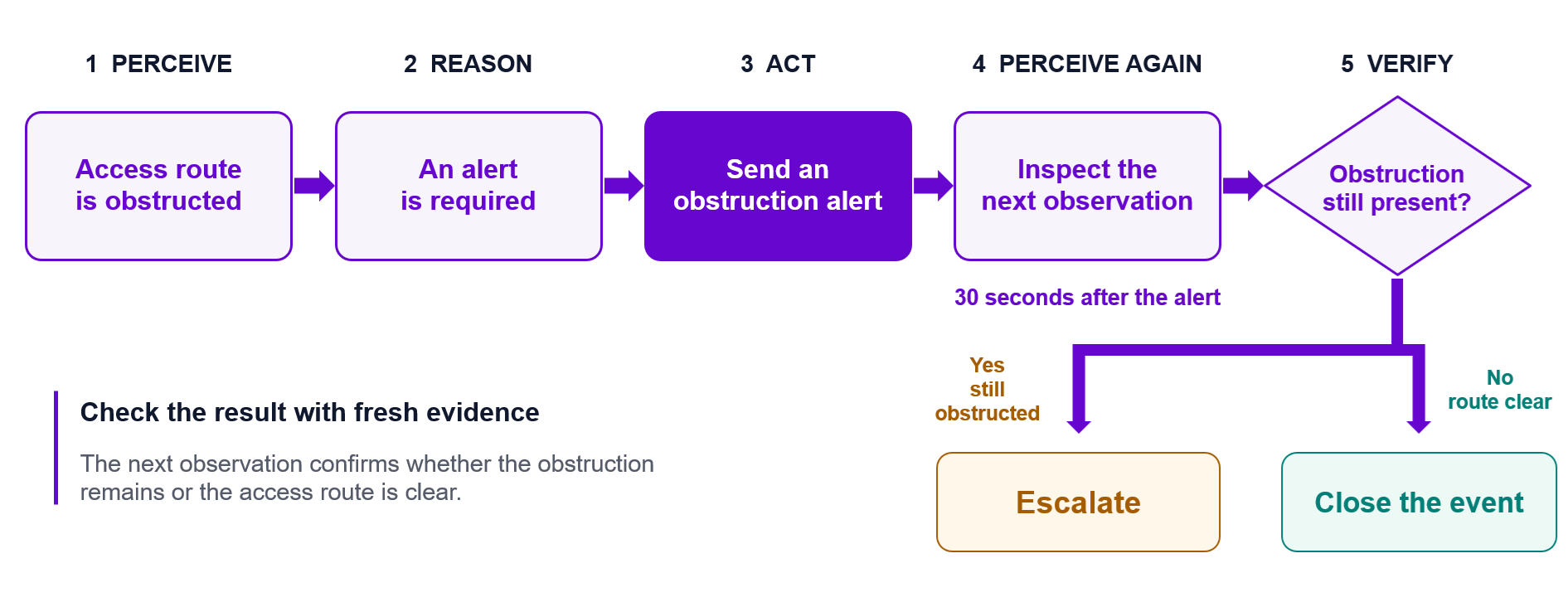
Research on agent architectures has repeatedly shown the value of feedback rather than assuming the first generated action is final. Reflexion, for example, formalizes the use of environmental feedback and memory to guide later decisions.
For production vision systems, the implementation can be much simpler than a research agent. Verification may be nothing more than checking an API status code, querying an acknowledgement flag, or looking at the next relevant camera frame.
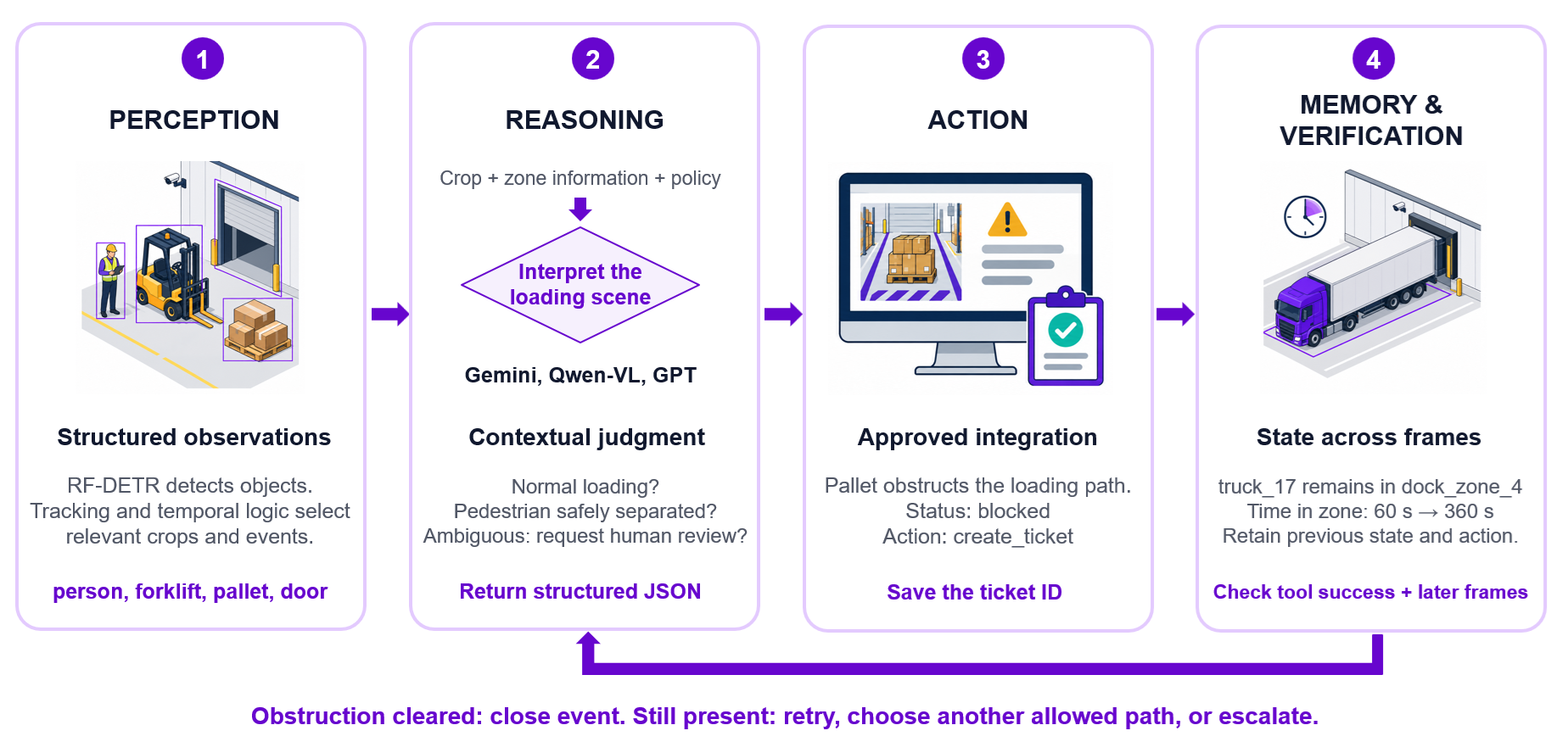
Why Agentic Computer Vision Is Possible Now
Agentic computer vision combines these components (i.e. object detection, tracking, workflow automation, multimodal reasoning, and APIs) into one deployable system.
Vision language models can reason about visual context
Modern VLMs can answer open-ended questions about images, extract structured information, compare visual evidence, interpret text inside scenes, and reason about relationships that would otherwise require many narrowly trained classes.
Roboflow's current Vision Evals compares dozens of models across six grounded visual tasks and records accuracy, token usage, estimated cost, and speed. This makes model selection increasingly measurable rather than anecdotal.
At the same time, research on hallucinations makes an important limitation clear i.e. VLM output must still be evaluated and constrained. The existence of strong reasoning does not eliminate the need for reliable perception, structured output, and verification.
This is exactly why the hybrid architecture works well. Use a specialist model to establish visual facts, then let the VLM reason about the part that is difficult to hard-code.
Detectors are fast enough to gate VLM reasoning
The second enabling technology is fast local perception. A specialist detector can run continuously while the slower reasoning model runs only when needed.
RF-DETR demonstrated single-image detection latency in the low-millisecond range on the specified T4/TensorRT configuration, allowing perception to operate at a fundamentally different cadence from VLM reasoning.
This creates an architecture such as:
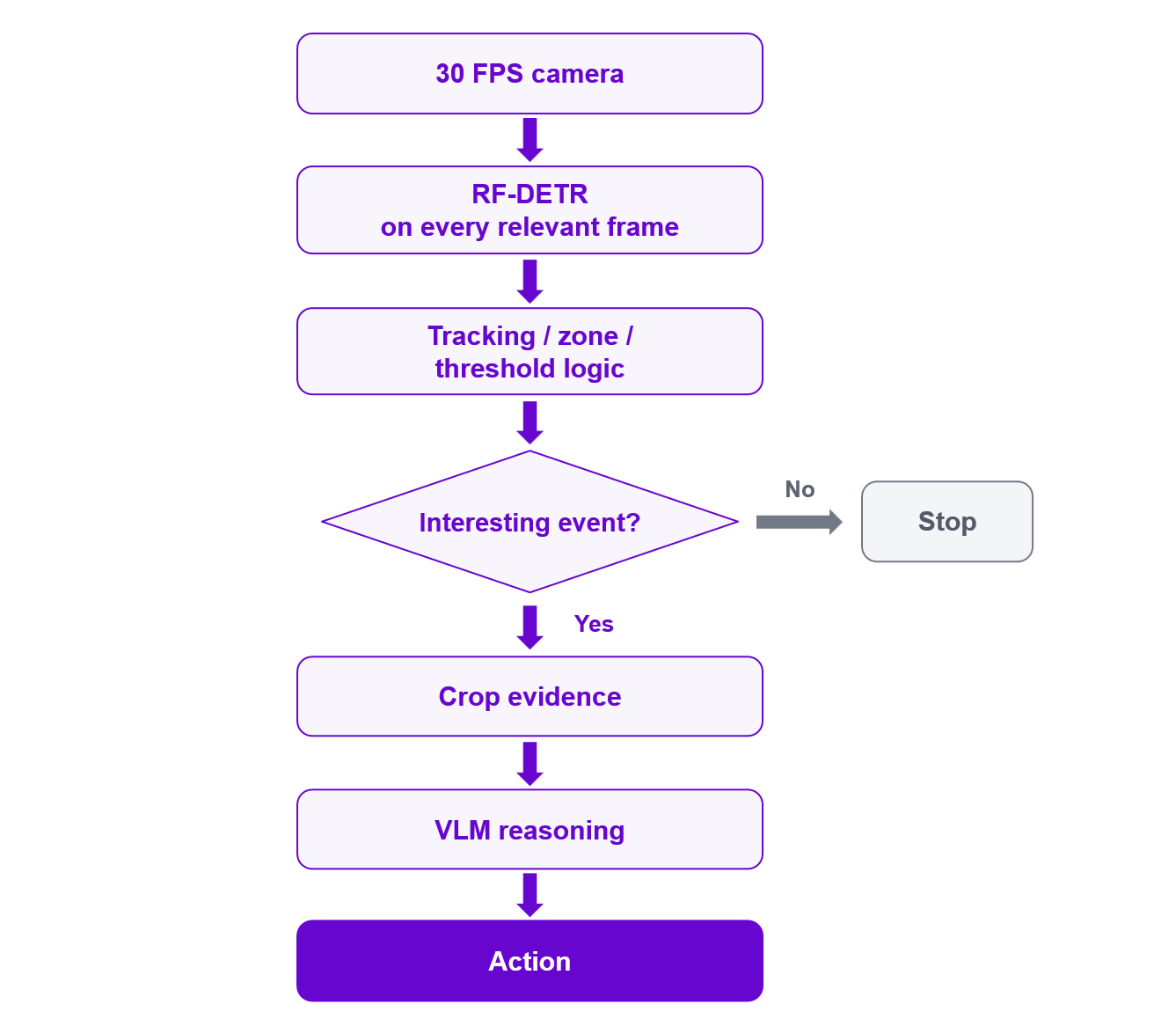
This gating step is also what makes the economics more practical. VLM APIs are generally priced per input and output token or equivalent model usage. If a camera generates 108,000 frames per hour at 30 FPS, sending every frame to a remote reasoning model is usually unnecessary. If the detector and temporal logic reduce that stream to a handful of meaningful events, the VLM is paying attention only when semantic reasoning is useful. The detector therefore acts not only as a perception layer, but also as a cost and latency gate.
Workflows can orchestrate the system without custom glue code
The third change is orchestration. Building this system required developers to separately implement video capture, model serving, tracking, event logic, VLM APIs, JSON parsing, retry behavior, webhooks, notification services, and deployment.
Roboflow Workflows provides a visual environment for chaining these operations into a multi-step computer vision application. A Workflow can then be deployed in the cloud or on compatible local hardware using Roboflow Inference and can process images, videos, and live streams.
The available Workflow block ecosystem includes object detection, tracking, conditions, dynamic crops, VLMs, JSON parsing, Slack and email notification, webhooks, databases, MQTT, and industrial integrations. The architecture can therefore be represented directly:
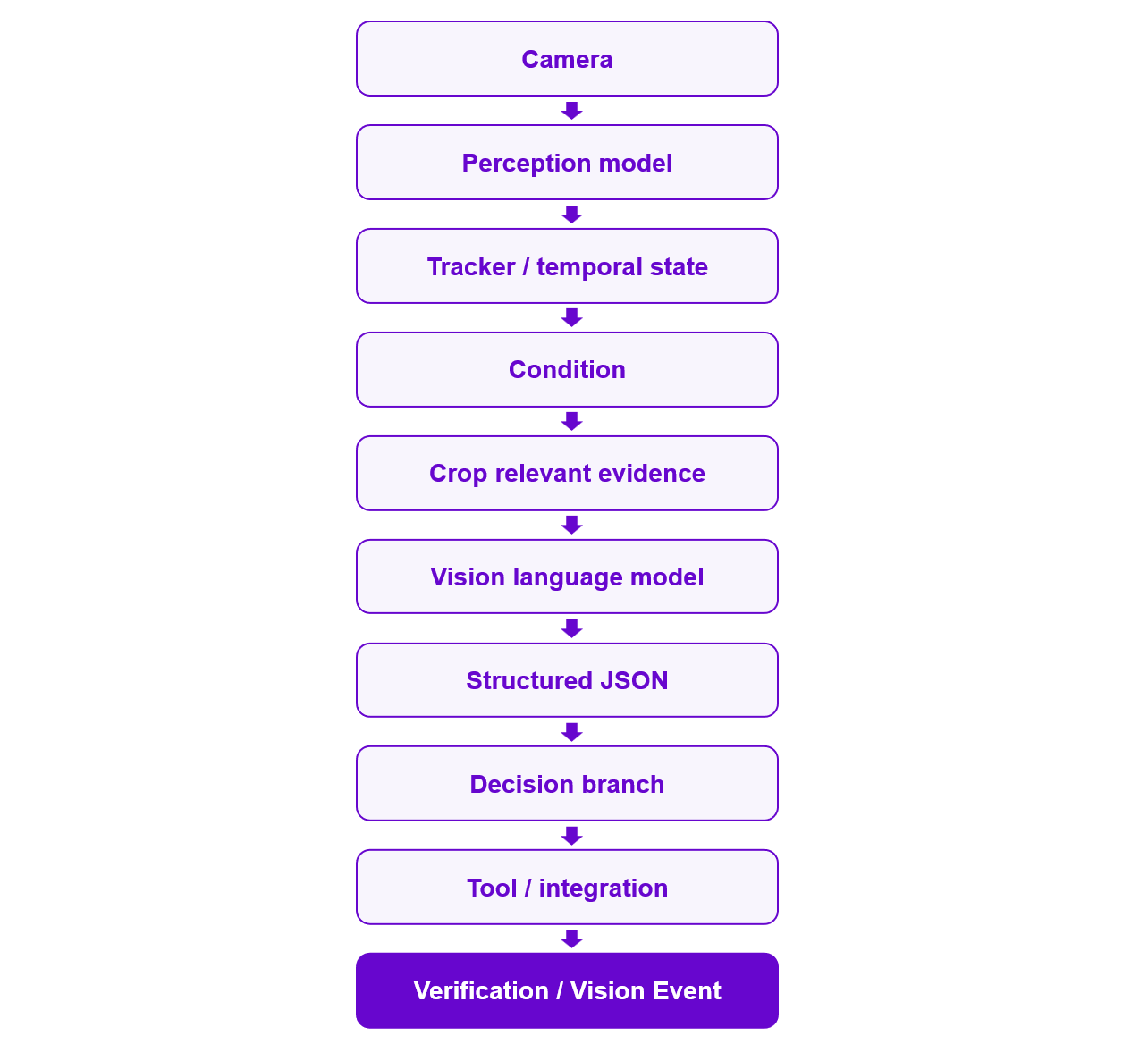
This makes agentic vision useful for applications where the visual observation itself is straightforward but interpreting its operational significance is not. Examples include safety-event triage, logistics exception monitoring, maintenance assessment, retail shelf exceptions, visual inspection escalation, site monitoring, asset condition reporting, document workflows, and situations where an operator currently has to look at an image before deciding what business process should happen next.
Building An Agentic Computer Vision System in Roboflow Workflows
Roboflow Workflows provides the orchestration layer needed to connect perception, reasoning, structured outputs, control flow, actions, and deployment into one computer vision application.
The Roboflow Vision Agents tutorial demonstrates the general vision-agent pattern using a specialist perception model, conditional gating, Gemini-based reasoning, JSON parsing, and an automated notification.
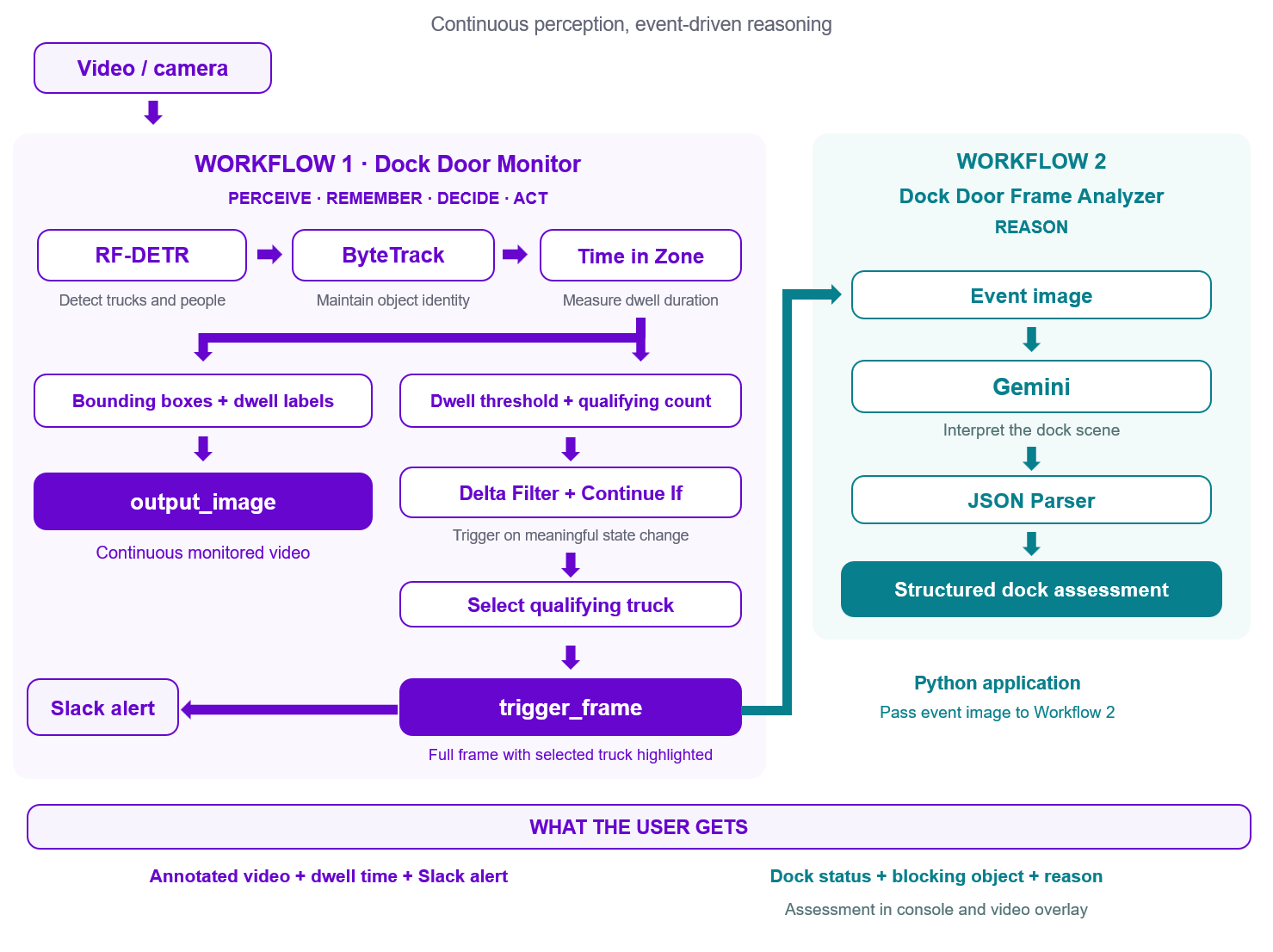
To demonstrate this architecture, we will build a dock-door monitoring system that watches a video feed, detects trucks and people, tracks how long each truck remains near the loading bay, and triggers an AI assessment when a truck exceeds a configurable dwell-time threshold. The completed system uses two Roboflow Workflows:
- Dock Door Monitor processes the video, detects and tracks trucks, measures dwell time, and emits a single trigger frame.
- Dock Door Frame Analyzer sends that trigger frame to Gemini and returns a structured assessment of whether the dock is active, idle, or blocked.
A small Python application connects the two Workflows:
Workflow 1: Detect, track, and decide when an event is worth investigating
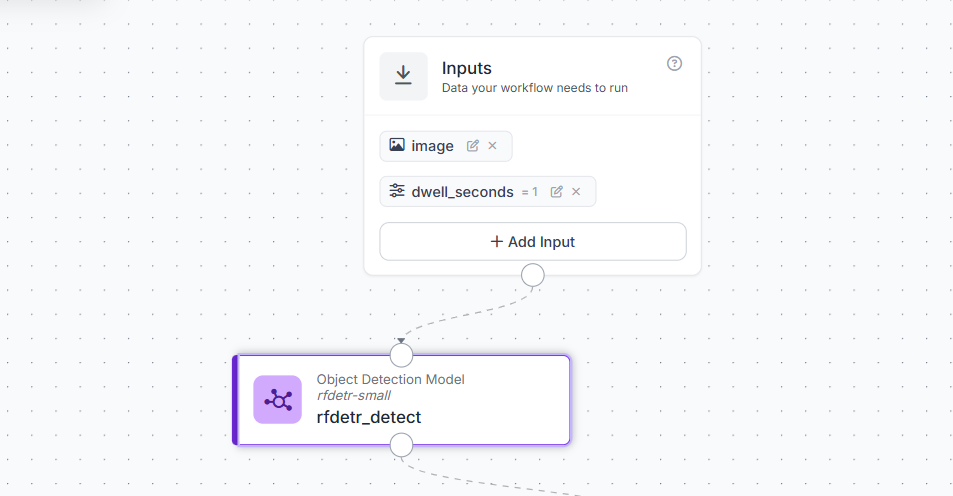
The first Workflow, Dock Door Monitor, is responsible for the fast perception and memory parts of the agent. It starts with two inputs:
- an
image, which receives each video frame, - and a
dwell_secondsparameter.
The second input makes the dwell threshold configurable at runtime, so the same published Workflow can be tested with a one-second threshold or deployed with a much longer production threshold without rebuilding the graph.
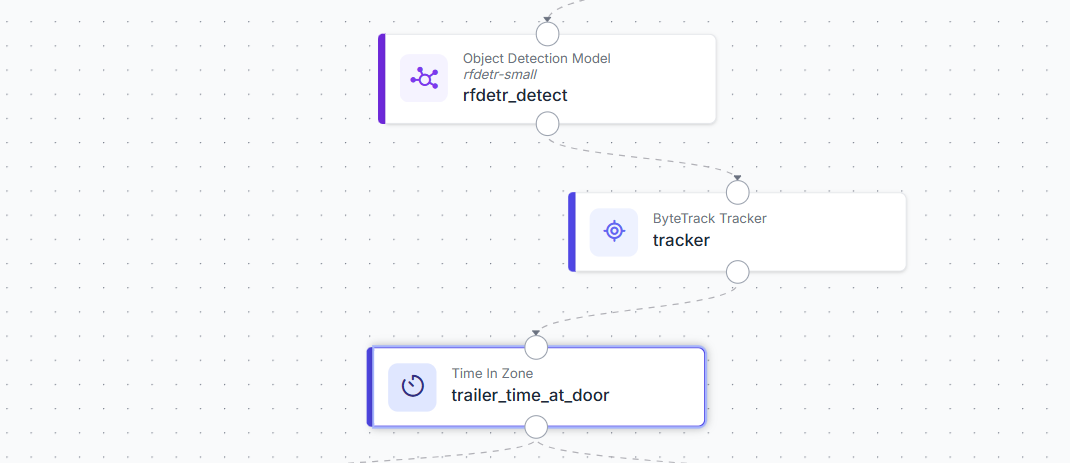
RF-DETR Object Detection
The first processing block is an Object Detection Model using rfdetr-small. For this example, the model is configured with a confidence threshold of 0.4 and restricted to the classes:
truck
person
RF-DETR therefore answers the first question in the system:
What objects are visible in this frame?
Filtering to trucks and people also prevents unrelated detections from being passed through the rest of the Workflow. The pipeline begins as:
ByteTrack Tracker
Object detection works frame by frame. It can detect a truck in two consecutive frames, but by itself it does not know that both detections represent the same truck. The ByteTrack Tracker solves this by assigning a persistent tracker_id to objects as they move through the video. This gives the Workflow memory across frames.
The example uses a minimum of two consecutive frames before establishing a track, a lost-track buffer of 30 frames, and detection thresholds of 0.4. The buffer allows an object's identity to survive short detection gaps caused by blur or temporary occlusion. This persistent identity is what makes dwell-time measurement possible.
Time in Zone
Next, the tracked detections are passed to Time in Zone. A polygon is drawn around the dock-door region. When the center of a tracked object's bounding box enters that polygon, the block begins measuring how long it remains there. For the example camera, the polygon is:
[
  [267, 173],
  [48, 464],
  [337, 552],
  [506, 250]
]
These coordinates are camera-specific and should be redrawn for a different dock view. The block uses the bounding-box CENTER as the triggering anchor and resets the timer after an object leaves the zone. The agent can now answer a second question:
How long has this particular truck been at the dock?
The sequence has become:
Detections Filter
The Detections Filter determines when a truck becomes operationally interesting. It retains a detection only when:
class_name == "truck"
AND
time_in_zone >= dwell_seconds
The runtime dwell_seconds value may arrive as a string, so the comparison uses a ToNumber operation to cast it to a float before comparing it with time_in_zone. This block therefore answers:
Has a truck remained at the door long enough to require attention?
Instead of asking Gemini to inspect every truck immediately, the deterministic pipeline waits until the dwell condition has actually been met.
Property Definition: count qualifying trucks
The filtered detections are then passed to a Property Definition block using the SequenceLength operation. This produces:
qualifying_truck_countFor example:
0 → no truck is currently over the dwell threshold
1 → one truck is over the threshold
2 → two trucks satisfy the condition
SequenceLength is important here because the task is to count detections, rather than extract one of their properties.
Delta Filter and Continue If
Without another control step, the Workflow would continue triggering on every subsequent frame while the same truck remained over the threshold. That would result in repeated Gemini requests. A Delta Filter watches qualifying_truck_count and allows the next branch to execute only when the value changes. A Continue If block then checks whether:
qualifying_truck_count > 0Together, these blocks convert a continuous condition into an event. For example:
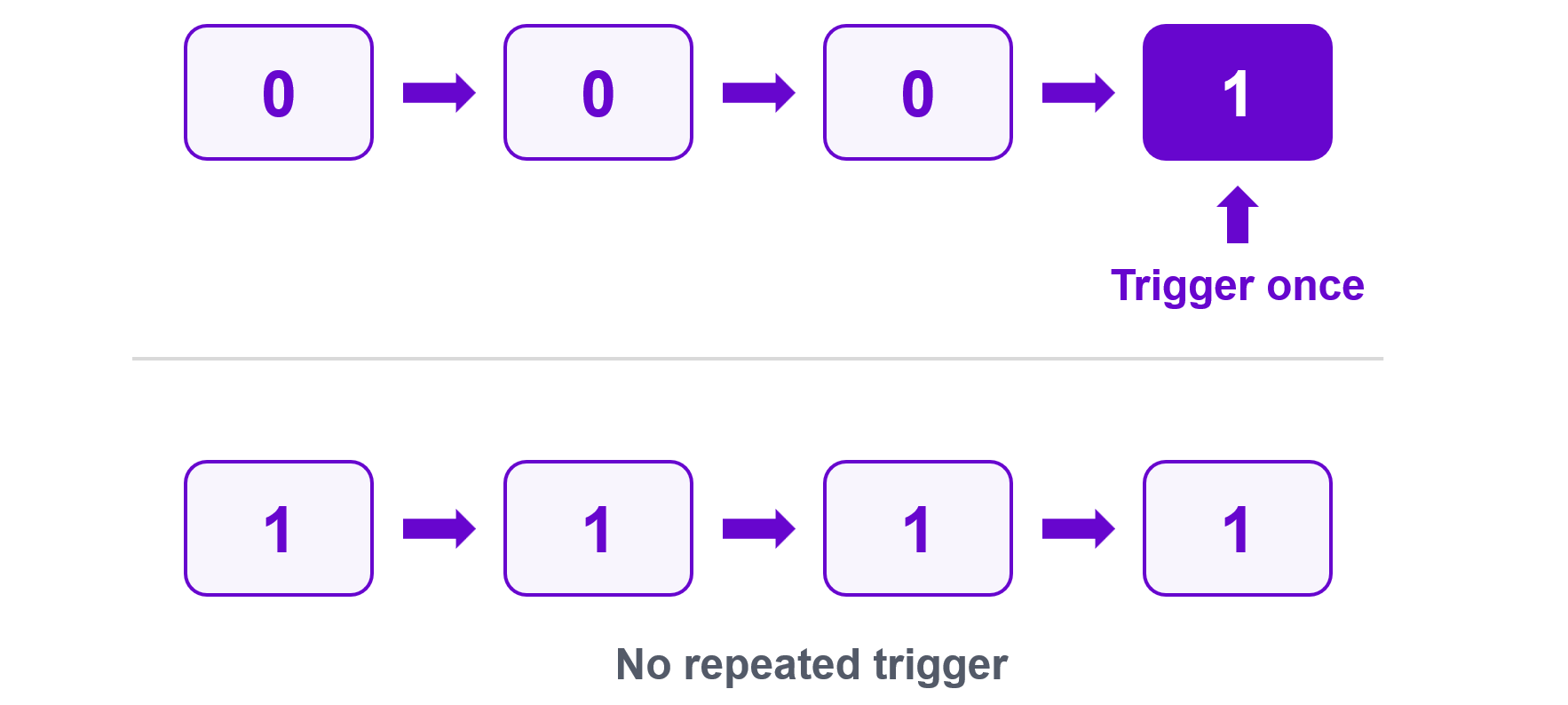
This is an important part of the agentic architecture. The perception system does not simply report detections continuously; it identifies when a meaningful change has occurred and only then allows the reasoning or action stage to continue.
Select the qualifying truck
Once the event branch is triggered, a Detections Transformation block selects the first truck that satisfies the dwell-time condition.
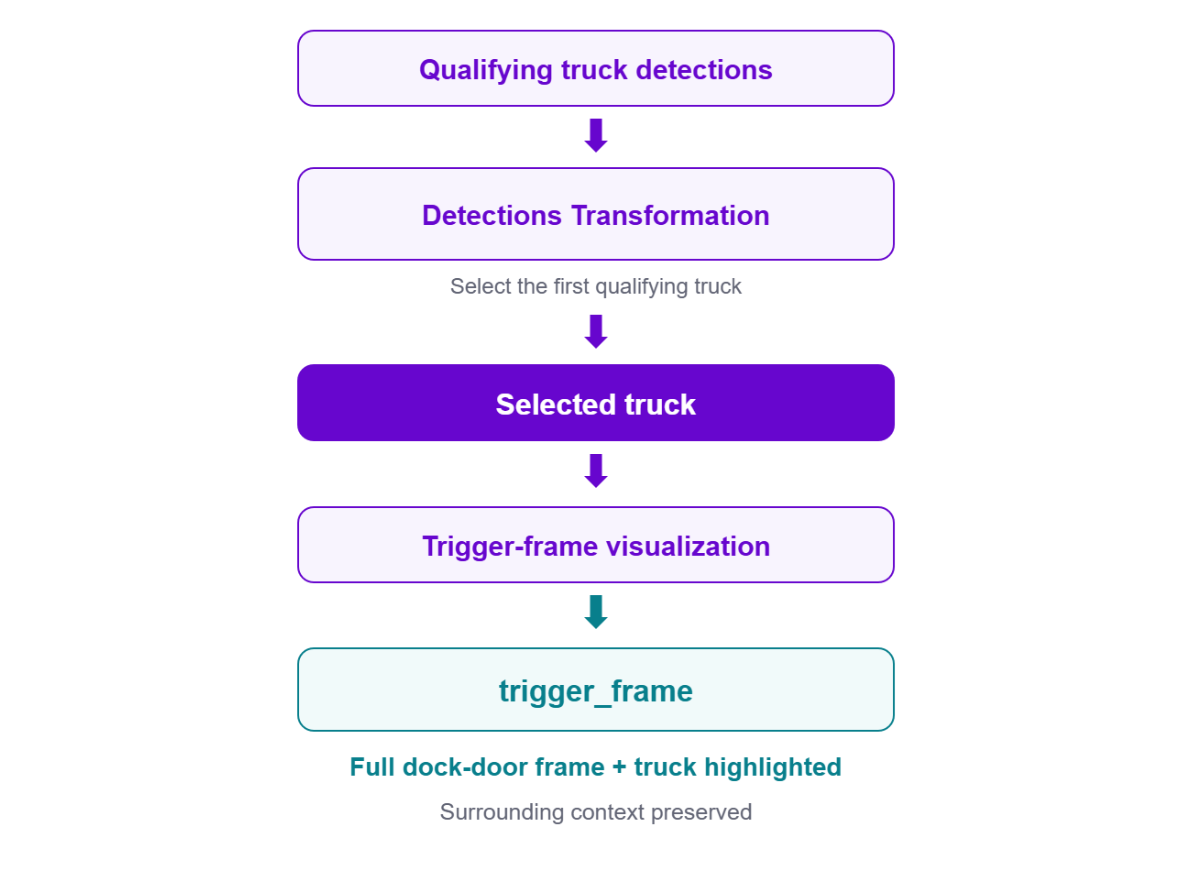
This selected detection identifies the specific truck that caused the event and is passed to the trigger-frame visualization. There is no separate truck crop in this version of the Workflow. Instead, the complete dock-door frame is preserved so that the later reasoning stage can see both the truck and its surrounding environment.
Create the trigger frame
A Bounding Box Visualization block creates the event image called:
trigger_frameIt uses the annotated dwell-time frame as the image and highlights the selected qualifying truck. The full trigger frame is particularly useful for VLM reasoning because the operational cause of a delay may not be inside the truck's bounding box. For example, the surrounding scene may contain a person, forklift, pallet, equipment, closed access point, or another condition affecting dock activity. The event path is therefore:
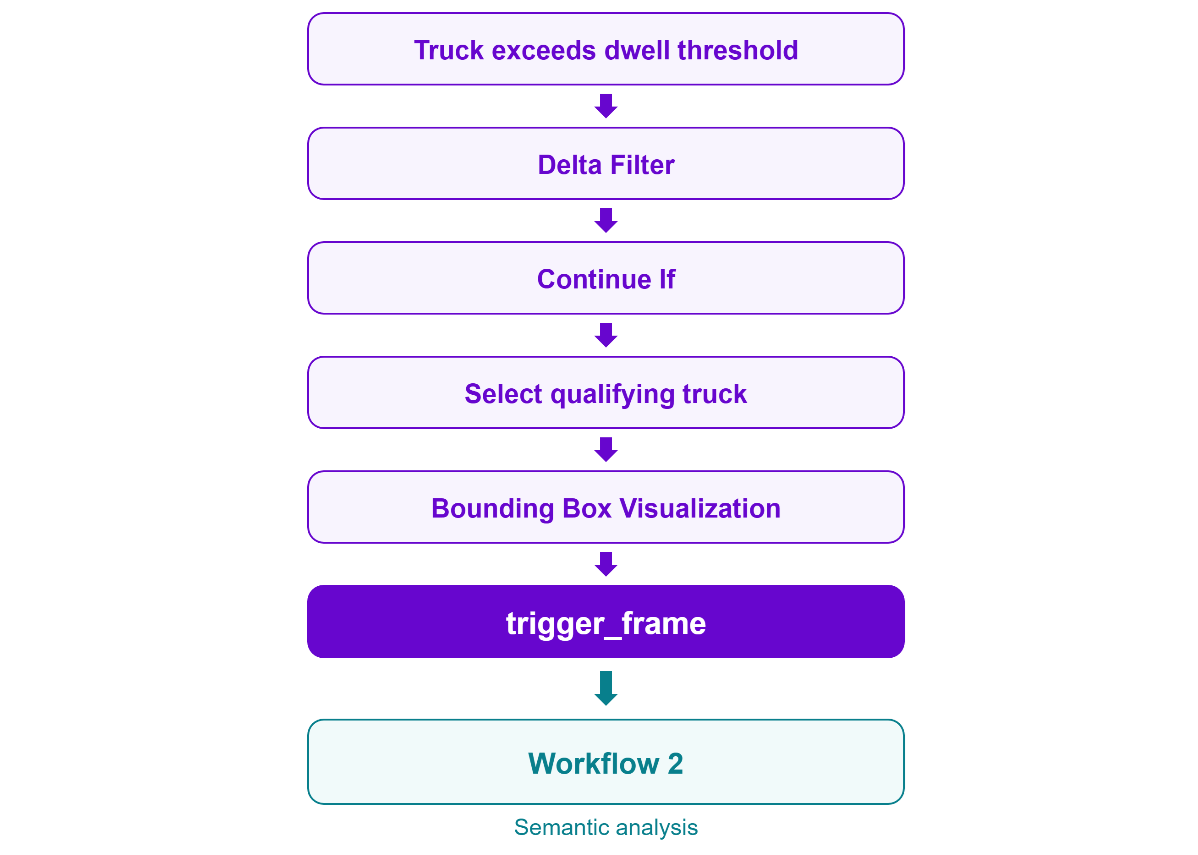
This trigger_frame becomes the visual evidence sent to the second Workflow for semantic analysis.
Continuous video visualization
The trigger frame is intentionally sparse: it is produced only when the event branch executes. The Workflow therefore has a separate visualization path that remains populated during normal video processing. A Bounding Box Visualization draws the objects returned by Time in Zone, and a Label Visualization displays their Time In Zone values. Using the tracker ID as the color axis also makes it easier to visually follow the same object across frames. This produces the continuously available:
output_imageThe two visualization paths therefore serve different purposes:
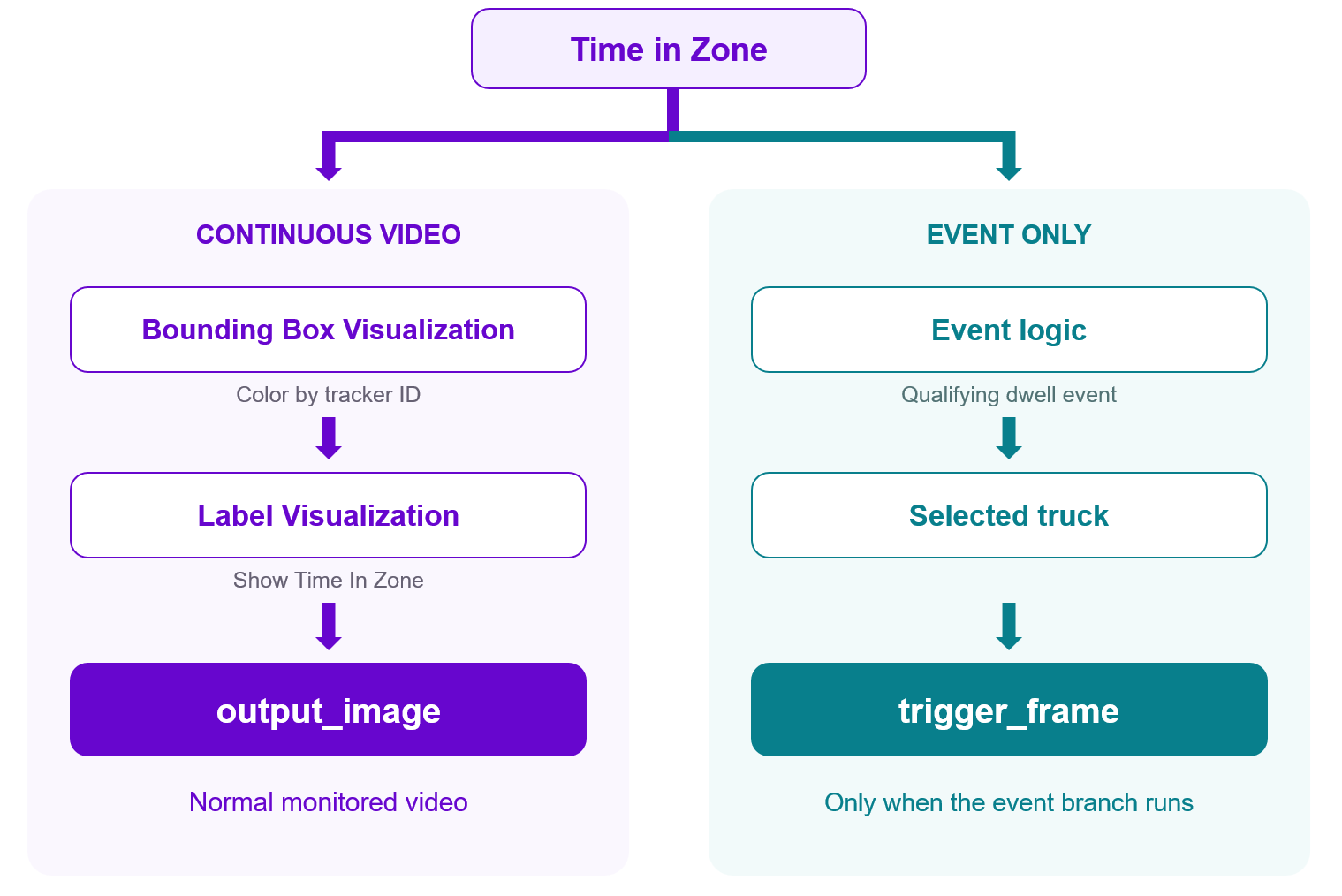
output_image is the normal monitored video, while trigger_frame is generated only when a qualifying dwell event occurs.
Workflow outputs
The updated Dock Door Monitor workflow exposes:
- Continuous video with detections and dwell-time labels
- ByteTrack tracked detections
- Time in Zone detections
- Trucks satisfying the dwell-time rule
- Number of trucks currently satisfying the rule
- Context-rich event frame highlighting the qualifying truck
- Error status returned by the optional Slack action
- Message produced by the optional Slack action
The distinction between continuous and event-driven outputs is important. output_image remains available on every processed frame, whereas trigger_frame is populated only when the Delta Filter and Continue If branch execute. For this reason, output_image should remain the primary video output. The sparse trigger_frame is used as evidence for the reasoning Workflow.
Optional Slack action
The Workflow also contains a Slack Notification block connected to the event path. A notification could contain information such as:
Dock-door alert:
1 truck exceeded the configured 60-second dwell threshold.
Review the trigger frame in the monitoring application.
The message can use qualifying_truck_count and the configured dwell_seconds value, with a cooldown to prevent excessive notifications. When Slack integration is required in production, the block can be enabled after providing the appropriate Slack credentials and destination channel. The first Workflow now represents the perceive → remember → decide → trigger action part of the agent:
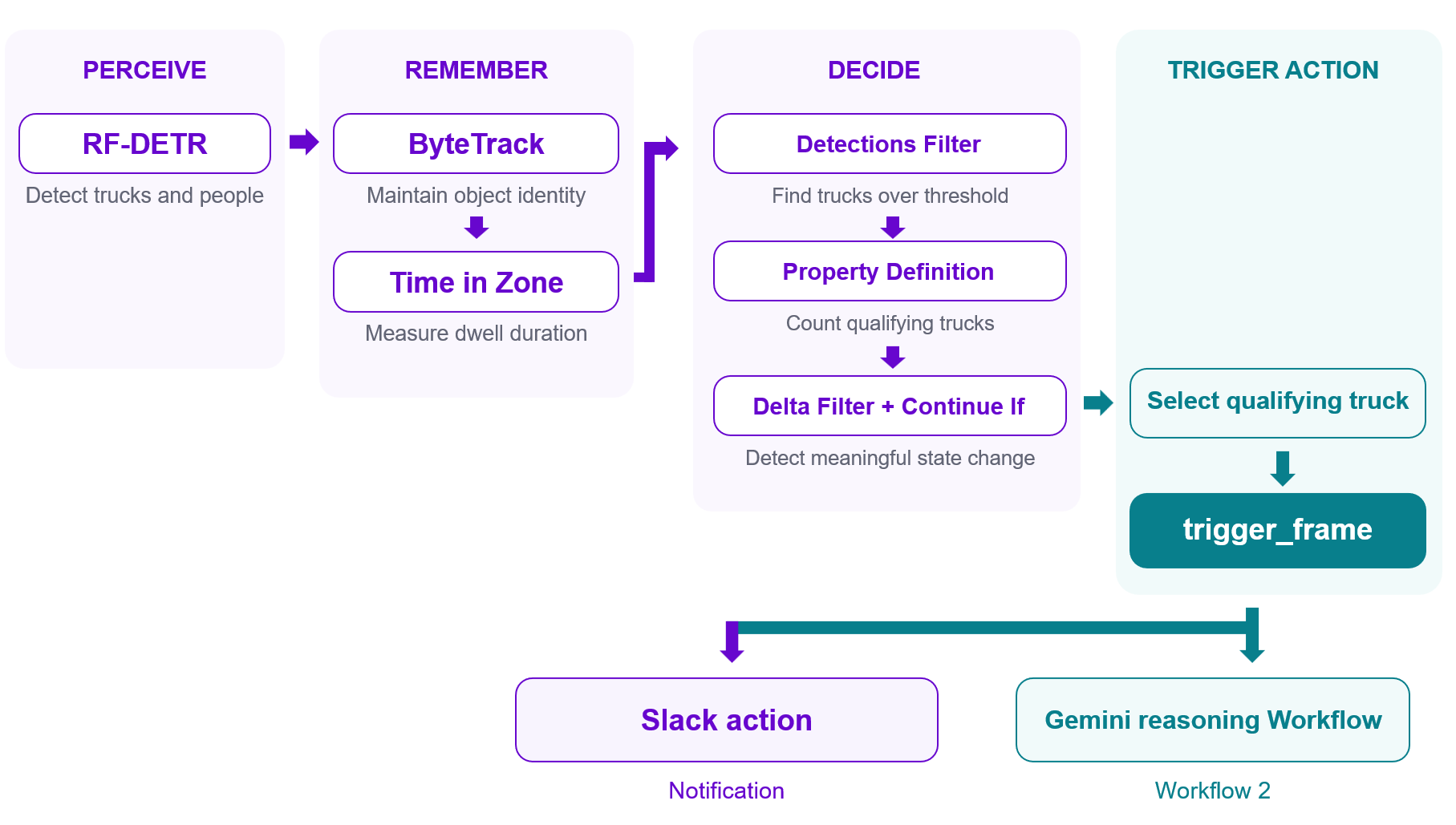
This design keeps continuous perception fast and deterministic. Gemini/ VLM is not called for every frame. The first Workflow detects and tracks activity, maintains temporal state, applies the dwell-time rule, and produces a single context-rich trigger frame only when an event becomes important enough to investigate.
Workflow 2: Let Gemini interpret the event
The second Workflow, Dock Door Frame Analyzer, is deliberately much smaller. It processes only the event image produced by the first Workflow.
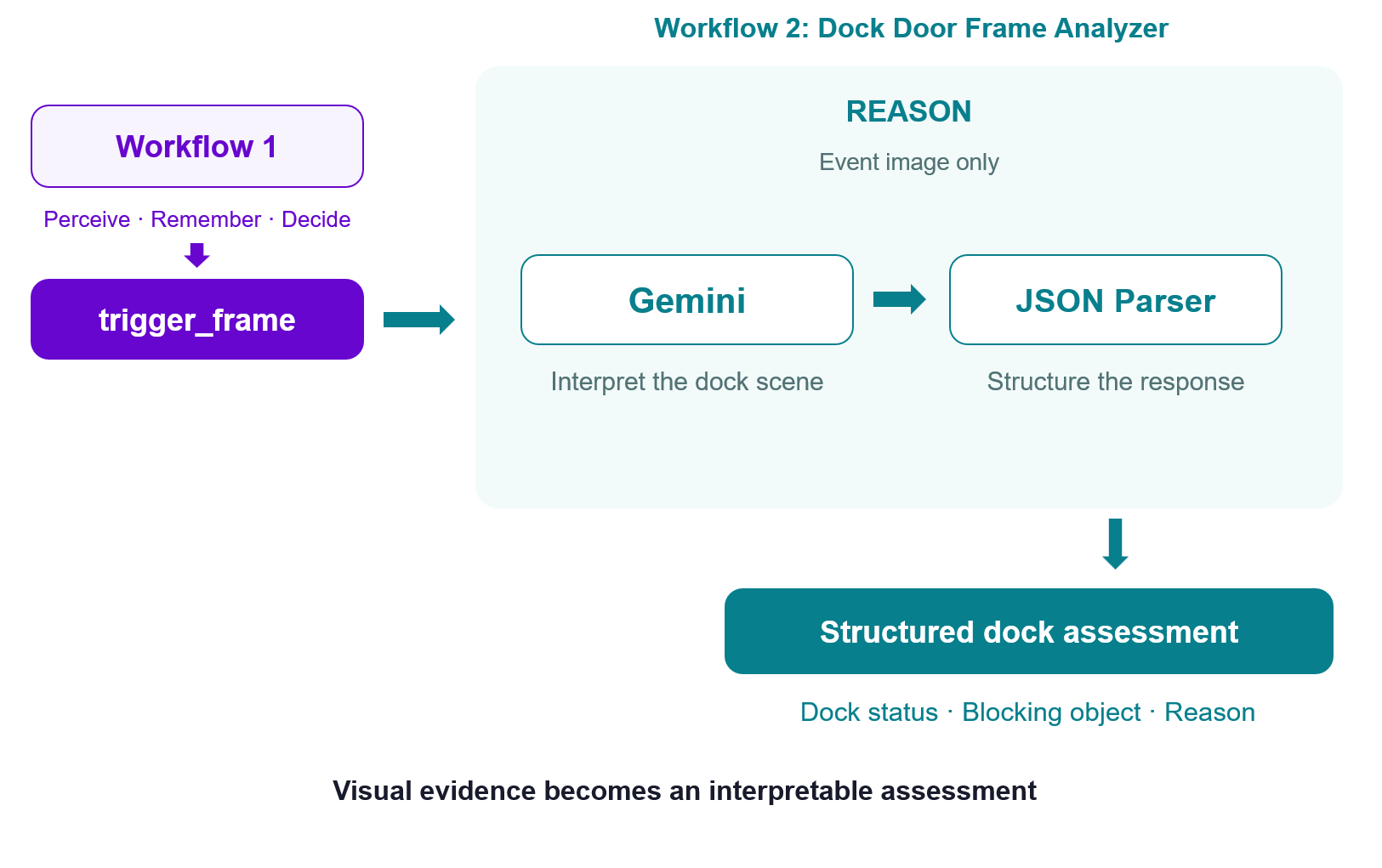
This Workflow receives one image input and passes it to a Google Gemini block configured for visual question answering using gemini-2.5-flash. The prompt asks Gemini to determine whether the trailer is:
loaded
idle
blocked
and return only:
{
  "status": "loaded|idle|blocked",
  "blocked_by": "short description or none",
  "reason": "one concise sentence"
}
The instructions further define the meanings:
loadedmeans visible loading or unloading activity is occurring.idlemeans the trailer is docked but there is no visible work or obstruction.blockedmeans a visible person, vehicle, object, equipment, closed access point, or another condition appears to prevent work.
The explicit schema is important because the output is intended for software, not just human reading.
JSON Parser
Gemini's text response is passed directly to a JSON Parser. The parser extracts:
status
blocked_by
reason
and exposes them as:
dock_status
blocked_by
assessment_reason
The Workflow also returns gemini_raw_output and json_parse_error. These are useful when validating the application because they make malformed or incomplete VLM responses visible instead of silently hiding them. The final result can therefore look like:
{
  "dock_status": "blocked",
  "blocked_by": "person standing between trailer and dock",
  "assessment_reason": "A worker appears to obstruct access to the loading area.",
  "json_parse_error": false
}
This illustrates the reasoning layer clearly.
Connecting the two Workflows
A small Python application connects Dock Door Monitor and Dock Door Frame Analyzer. The first Workflow runs continuously over the video using WebRTC. It performs RF-DETR detection, ByteTrack tracking, dwell-time measurement, and event gating. The application displays the continuous output_image stream and listens for the sparse trigger_frame output.
When trigger_frame is produced, Python sends that single image to Dock Door Frame Analyzer. Gemini interprets the scene, the JSON Parser converts the result into structured fields such as dock_status, blocked_by, and assessment_reason, and the application prints the result, stores it as JSON, and overlays the latest assessment on the video.
The Gemini request runs in a background thread so the slower reasoning step does not block the continuous video-processing callback. This preserves the separation between fast, stateful perception and event-driven reasoning.
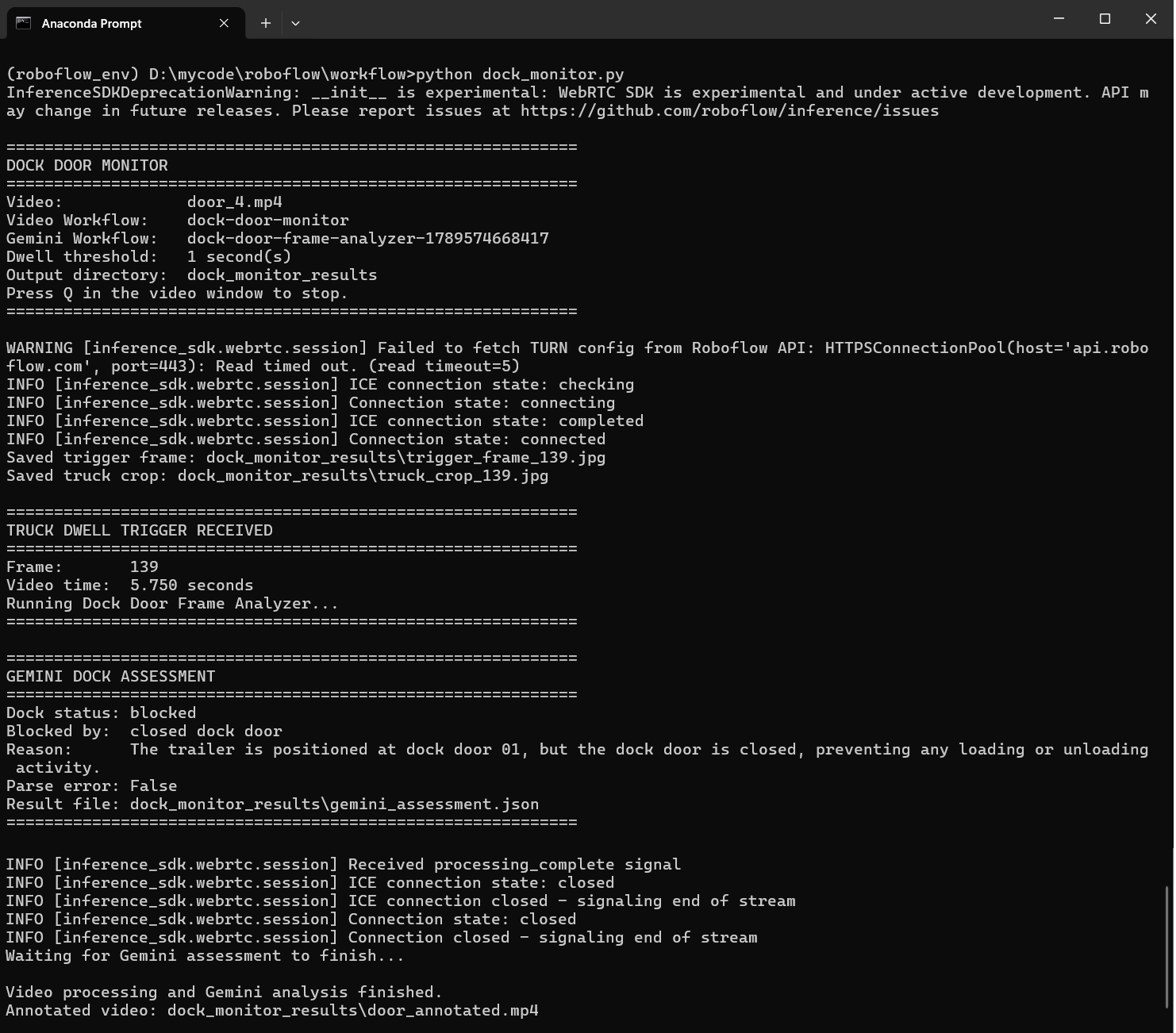
Outputs generated by the application
Live annotated video: Displays the continuous output_image from Dock Door Monitor, with tracked detections, dwell-time information, and the latest Gemini assessment overlaid on the video.
Live video output
Trigger frame: Saves trigger_frame_<frame_id>.jpg when a truck first exceeds the configured dwell-time threshold; this is the same contextual frame sent to Dock Door Frame Analyzer.
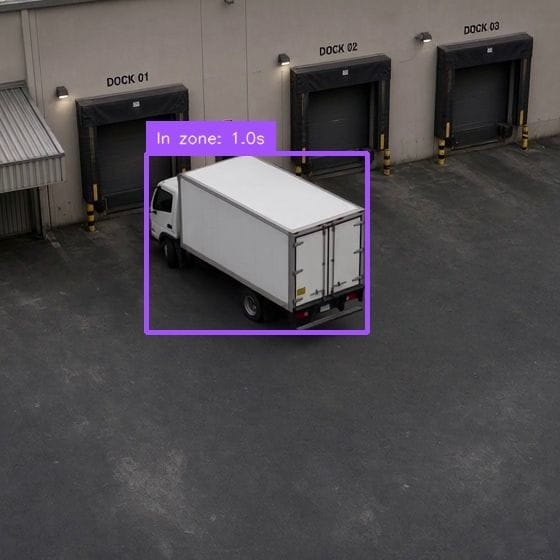
Gemini assessment JSON: Saves gemini_assessment.json containing the structured dock_status, blocked_by, assessment_reason, parse status, frame ID, and video timestamp.
{
  "source_frame_id": 139,
  "video_time_seconds": 5.75,
  "dock_status": "blocked",
  "blocked_by": "closed dock door",
  "assessment_reason": "The trailer is positioned at dock door 01, but the dock door is closed, preventing any loading or unloading activity.",
  "json_parse_error": false,
  "gemini_raw_output": "```json\n{\n  \"status\": \"blocked\",\n  \"blocked_by\": \"closed dock door\",\n  \"reason\": \"The trailer is positioned at dock door 01, but the dock door is closed, preventing any loading or unloading activity.\"\n}\n```"
}
Annotated output video: Saves door_annotated.mp4, containing the Workflow visualization together with the Gemini assessment displayed after analysis completes.
Startup console output: Prints the input video, Dock Door Monitor Workflow ID, Dock Door Frame Analyzer Workflow ID, dwell threshold, and output directory when the program starts.
Trigger console output: Reports the frame number and video timestamp when the dwell-time condition generates a trigger_frame and starts Gemini analysis.
Saved-frame console output: Prints the path of the saved trigger image, for example dock_monitor_results/trigger_frame_245.jpg.
Gemini console output: Prints the returned dock status, blocking object or condition, reasoning text, and JSON parsing status.
Completion console output: Reports whether a trigger was detected and confirms the location of the final annotated video after processing finishes.
When Not to Use an Agentic Approach
The fact that a task can use a VLM does not mean that it should. The easiest way to over-engineer a computer vision application is to put reasoning into a decision that is already well defined.
Agentic systems introduce additional latency, cost, variability, failure modes, external dependencies, and validation requirements. Those costs are justified only when model reasoning solves genuine ambiguity.
Hard real-time machine decisions
Suppose a production line gives the vision system 200 ms from image acquisition to a reject decision. The system does not need philosophical reasoning about whether a component appears acceptable. It needs a deterministic answer before the product reaches the reject mechanism. That path should remain something like:
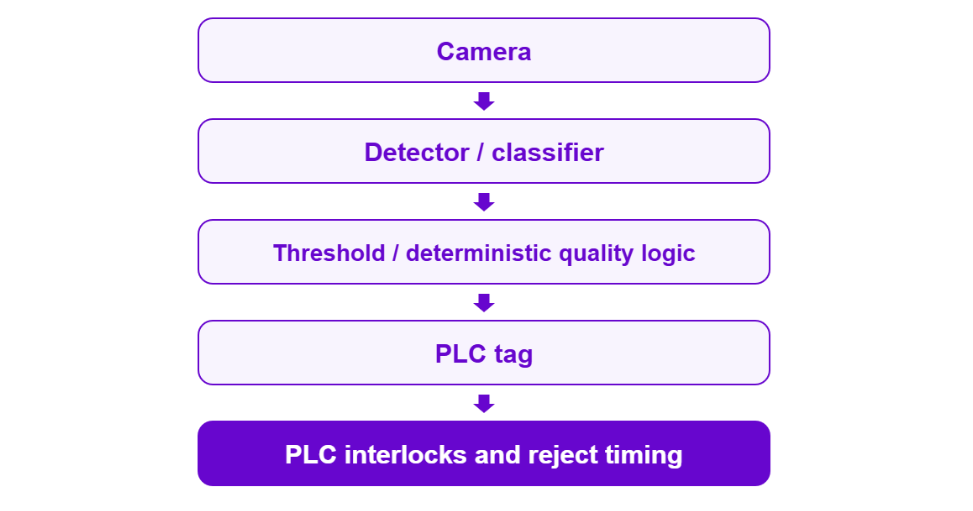
Roboflow's edge-inference architecture is designed for this type of problem: keep inference close to the camera and hand the resulting machine-readable decision to the control system without putting a remote language-model request in the critical timing path.
An agent might still operate above that system. For example, the deterministic pipeline rejects the defective product immediately. Separately, an agent sees that ten similar defects occurred in five minutes, reviews representative images, summarizes the pattern, and opens a maintenance ticket. The agent is valuable because it reasons about the event history. It is not responsible for firing the reject gate.
Regulated or tightly validated inspections
Some inspection environments require outputs that are reproducible, auditable, and validated against a defined procedure. Open-ended VLM reasoning can make this harder because the output may vary with model version, prompt wording, sampling parameters, API changes, or visual ambiguity.
Where compliance requires a fixed inspection procedure, the validated model and deterministic decision logic should remain the system of record.
A reasoning model may still assist with explanation, operator support, report generation, or escalation, but it should not silently redefine the acceptance criteria.
High-volume, low-ambiguity tasks
Counting boxes does not require an agent if a detector, tracker, and line counter already solve the problem. Neither does:
- detect whether a helmet is present
- count cars entering a parking lot
- read a barcode
- measure an object's width
- reject products containing a known defect
- count pallets crossing a line
If the problem can be described as a stable mathematical rule over structured predictions, implement the rule. Adding a language model creates complexity without adding useful intelligence. The practical rule is:
Put the agent above the line, not in it.
Keep deterministic, high-frequency, safety-critical operations in the fast vision pipeline. Use the agent above that layer to interpret exceptions, combine evidence, coordinate software systems, explain unusual events, and decide when a human should become involved.
Evaluating and Guardrailing an Agentic Vision System
An agentic vision system contains several stages, so one overall accuracy number is not enough. Evaluate perception, reasoning, actions, and verification separately.
Evaluate perception separately from reasoning
First evaluate the perception model using metrics such as mAP50:95, precision, recall, false positives, and false negatives on data similar to the real deployment environment. Then evaluate the VLM on a separate labeled set using the actual task classes, for example:
NORMAL
BLOCKED
IDLE
UNCERTAIN
Measure accuracy, precision, recall, confusion between classes, and how often the model gives unsupported answers. An UNCERTAIN option is useful because the system can request human review instead of forcing a confident answer when the evidence is weak.
Evaluate the complete decision path
After testing perception and reasoning separately, test the whole system. For an alerting application, measure things such as:
- correct actions
- false alerts
- missed events
- incorrect actions
- human escalations
- action failures
- time from event to action
The system should be judged by the final operational result. Correct detection is not enough if the alert, ticket, or other action fails.
Log the evidence behind every important decision
Important agent decisions should be traceable. Store the image or frame, model predictions, VLM response, prompt version, selected action, action result, and any later verification. Roboflow Vision Events can store production observations together with timestamps, images, predictions, Workflow information, and custom metadata.
For example:
{
  "camera_id": "dock_04",
  "decision": "BLOCKED",
  "action": "CREATE_TICKET",
  "verification": "OPEN"
}
This makes it easier to review what the system saw and why it acted.
Constrain the action space
The VLM should not be allowed to perform arbitrary actions. Instead, define a small allowlist such as:
NO_ACTION
SEND_NOTIFICATION
CREATE_TICKET
REQUEST_HUMAN_REVIEW
The application defines which actions are allowed, the model selects one, and the system executes it. This makes the agent easier to test and limits the effect of incorrect reasoning.
Use thresholds before consequential actions
Do not let every VLM response immediately trigger an external action. A practical rule can require:
detector confidence > threshold
AND
event duration > minimum duration
AND
reasoning result != uncertain
AND
action is allowlisted
For higher-risk actions, require human confirmation or use stricter thresholds. Also, do not assume a confidence value produced by a language model is a calibrated probability unless you have tested it on your own data.
Keep humans in the loop for consequential decisions
Human review is appropriate when an action can have important financial, operational, safety, or regulatory consequences. The agent can still reduce workload by collecting the evidence and presenting only the important events, for example:
Camera: Dock 04
Event: Possible blocked loading path
Duration: 8 min 12 sec
Agent assessment: obstruction likely
Recommended action: inspect Dock 04
The system performs the repetitive monitoring, while the operator makes the final high-impact decision. The core principle remains simple:
Perceive what happened. Reason about what it means. Take an allowed action. Verify what happened next.
The goal is not to replace deterministic computer vision, but to add reasoning only where it provides useful context.
Conclusion
Agentic computer vision extends vision systems beyond detection by combining perception, reasoning, action, and verification in a controlled loop. The strongest designs keep fast, deterministic vision in the critical path and use VLM reasoning only when context or judgment is actually needed.
Build your own vision agent with Roboflow Workflows today by combining detection, tracking, VLM reasoning, and integrations in a single deployable pipeline.


Cite this Post
Use the following entry to cite this post in your research:
Timothy M. (Sep 22, 2026). Build Agentic Computer Vision with Roboflow Workflows. Roboflow Blog: https://blog.roboflow.com/agentic-computer-vision/