

OpenAI released GPT 5.5 on April 23, 2026, introducing significant improvements in capabilities to the multimodal AI landscape. While the initial conversation surrounding this foundation model focused heavily on code generation and multi-step agentic execution, its architectural transition to a 32x32 patch-based grid offers substantial utility for computer vision teams. Specifically, changes to its vision processing stack improve how it interprets high-resolution documents, complex charts, and structural layouts within agentic workflows.
If you want to dive straight into the integration tools, here are the essential resources:
- Test GPT 5.5 in Roboflow Playground
- Build with GPT 5.5 in Roboflow Workflows
- Review the OpenAI GPT 5.5 System Card
GPT-5.5 Performance Analysis within Roboflow Vision Evals
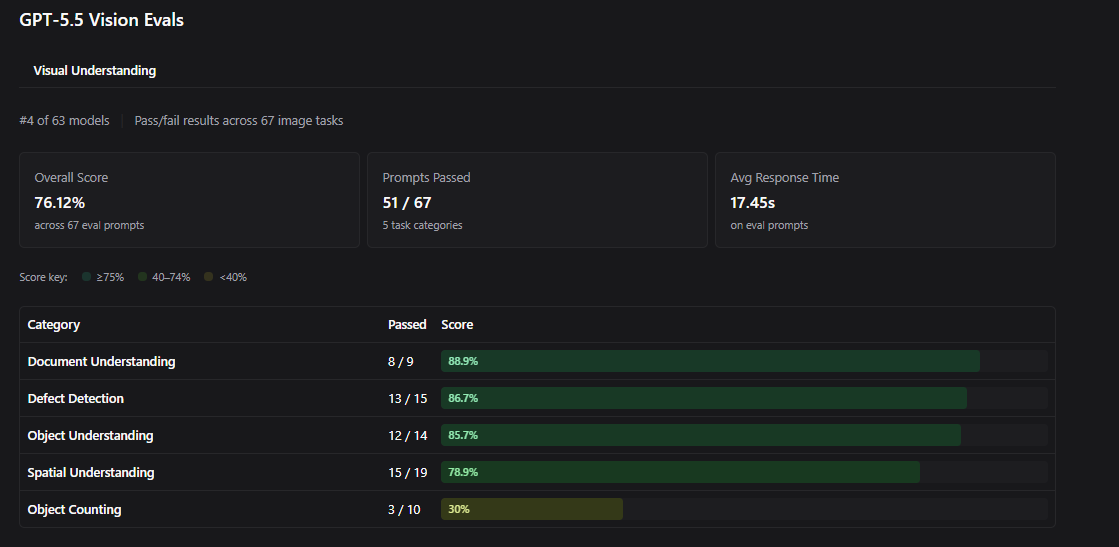
To understand how GPT 5.5 handles real-world visual tasks, we tested it against the Roboflow Vision Evals suite. The model performed exceptionally well, securing the #4 spot out of 63 models on the leaderboard. It achieved an overall accuracy of 76.12%, successfully clearing 51 out of 67 visual prompt evaluations.
The evaluation data shows that GPT 5.5 handles qualitative and text-heavy environments with high reliability:
- Document Understanding: 88.9% accuracy (8 out of 9 prompts passed). The model easily extracts data from dense forms, low-contrast text, and variable structural layouts.
- Defect Detection: 86.7% accuracy (13 out of 15 prompts passed). This makes it highly useful for quality control processes where identifying subtle surface anomalies or assembly errors is critical.
- Object Understanding: 85.7% accuracy (12 out of 14 prompts passed). The model identifies obscure objects and effectively summarizes ambient context.
- Spatial Understanding: 78.9% accuracy (15 out of 19 prompts passed). It demonstrates strong performance when evaluating relative positional relationships between objects.
Operational Constraints
The evaluation data also highlights clear limitations. Precise Object Counting is a distinct weak point, with the model passing only 30% of dense quantification prompts (3 out of 10 passed). Additionally, its average server-side response latency sits at 17.45 seconds.
These metrics indicate that GPT 5.5 is well-suited for deep, asynchronous evaluation. Teams building low-latency, real-time video processing pipelines at the edge will achieve better efficiency with smaller, task-specific architectures such as RF-DETR.
Changes in the Vision Stack
The model's strong benchmark scores stem from several updates OpenAI introduced to its underlying vision processing architecture:
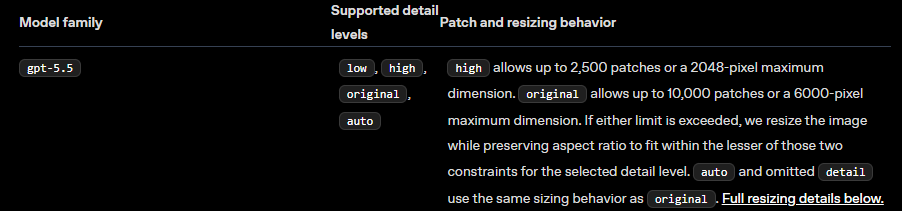
- Patch-Based Image Tokenization: GPT 5.5 processes images by breaking them down into a grid of independent 32x32 pixel patches. High-detail mode supports up to 2,500 total patches, allowing fine visual structures (like serial numbers or chart labels) to pass through the encoder without losing definition.
- Adaptive Resolutions: The vision encoder scales large images dynamically while preserving the native aspect ratio. It maintains a maximum dimension of 2,048 pixels on the long edge, preventing downsampling artifacts from obscuring critical fine details.
- Token Reduction Efficiency: Tweaks to the tokenizer allow the model to represent intricate visual layouts using fewer total input tokens. This optimization helps control operational expenses when running large image batches through the API.
As a framework, GPT 5.5 acts as a high-level visual reasoning tool. Traditional computer vision architectures focus on outputting precise pixel coordinates or bounding boxes. GPT 5.5 operates as an analysis tool, transcribing text, explaining complex charts, and making decisions based on visual context.
Using GPT 5.5 into Roboflow Workflows
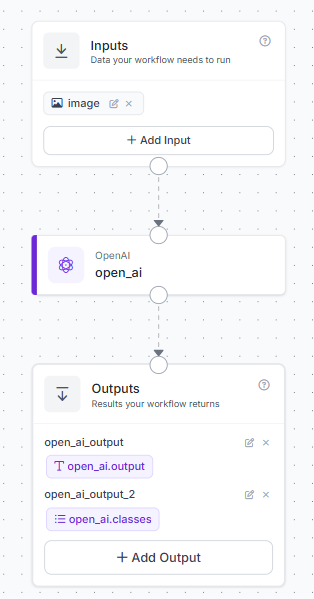
You can implement GPT 5.5 into your data pipelines using Roboflow Workflows, a block-based application builder. Here's a simple workflow that can be created.
Here is the step-by-step setup:
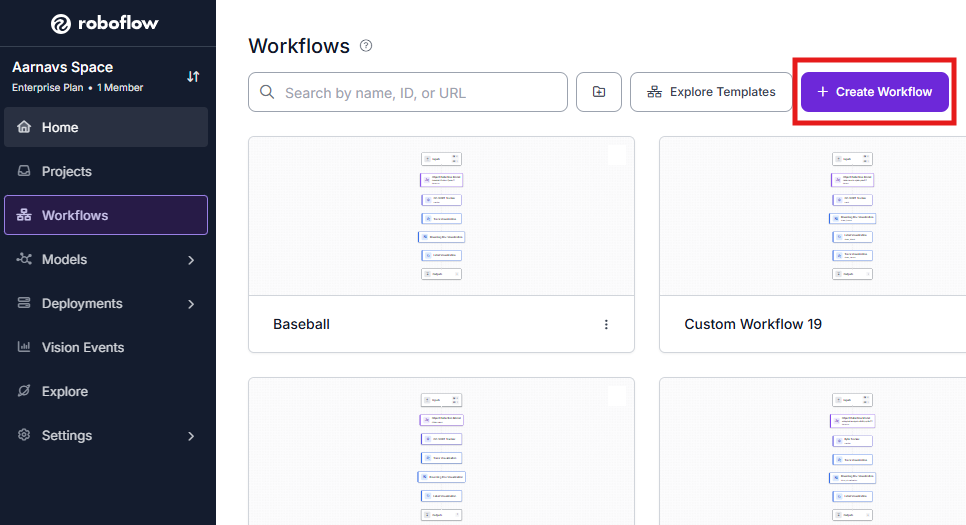
- Open your Roboflow dashboard, navigate to the Workflows tab, and click Create Workflow. Select Build My Own to launch a blank workspace.
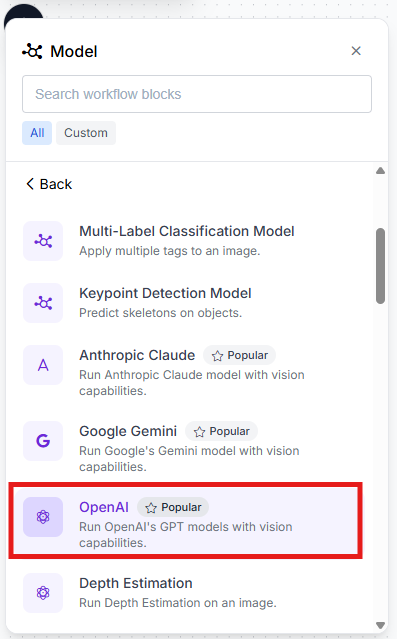
- Select the + Add Block button in the upper-left menu, locate the OpenAI GPT block, and add it to the canvas.
- Route the output of the default Inputs block directly into the image input parameter of the OpenAI GPT block. Connect the text output of the GPT block to your final Outputs block.
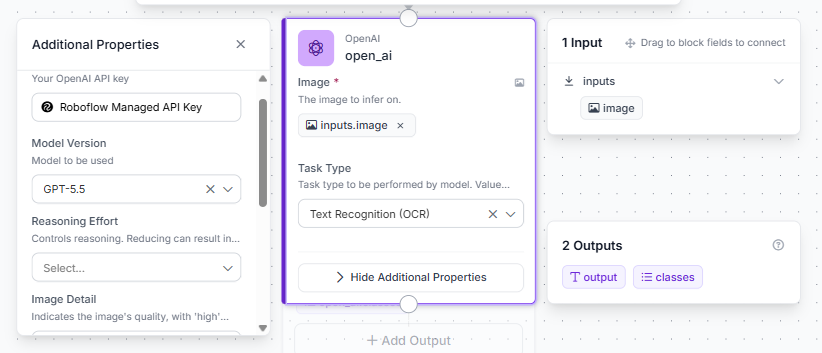
- Click on the OpenAI GPT block to open its configuration settings. For now, choose text recognition (OCR) as the task. In the Model Version dropdown menu, select gpt-5.5.
This workflow can be executed directly via the cloud API or hosted on your local infrastructure using our containerized Inference Server.
When Should I Use GPT-5.5?
Because GPT 5.5 operates as a large, server-scale foundation model, running it locally on low-power edge devices is impractical. Querying a cloud VLM API for every individual frame of a 30 FPS video feed also introduces unsustainable operating costs.
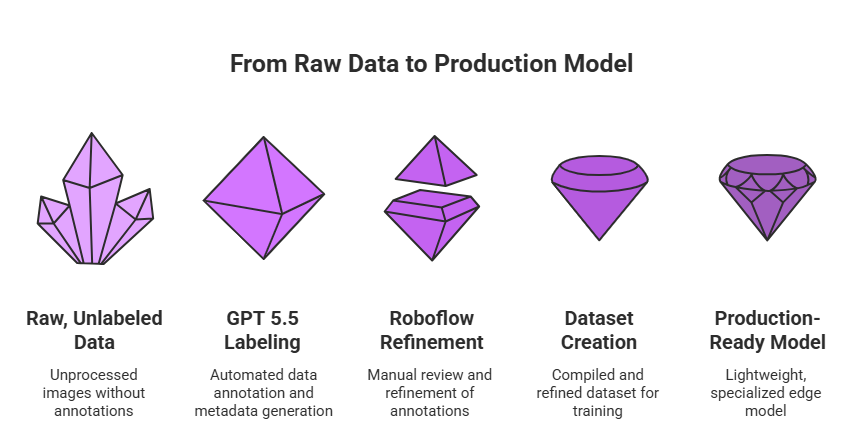
The most practical architecture uses GPT 5.5's zero-shot capabilities during the data engineering phase, leaving runtime execution to smaller, highly specialized models.
GPT 5.5 functions as an exceptional automated data labeling engine. You can pass raw, unlabeled images to the model to generate descriptive metadata, categorize visual classes, or provide loose localization hints. Once these automated annotations are compiled, you can refine them within the Roboflow platform and use the resulting dataset to train lightweight, production-ready edge models such as RF-DETR or YOLOv 11.
This strategy balances cost and performance: high-tier cloud intelligence handles the heavy lifting of dataset creation, while compact, specialized models take over for high-speed production inference.
GPT 5.5 API Pricing
GPT 5.5 is accessible via OpenAI's developer API under a usage-based consumption structure:
- Input Tokens: $5.00 per million tokens
- Output Tokens: $30.00 per million tokens
Image processing token costs depend directly on the number of 32x32 pixel patches utilized by your visual inputs. If you want to optimize your API spend, a great practice is to crop out irrelevant backgrounds or isolate specific regions of interest before sending the data to the model. This can be done by using blocks like dynamic crop in Roboflow Workflows.
GPT 5.5 Conclusion
GPT 5.5 provides a substantial upgrade for multimodal applications, showing its greatest utility in document processing, unstructured visual reasoning, and zero-shot dataset generation. If your computer vision workflows involve complex layouts or high-resolution text analysis, the model offers a valuable addition to your data pipeline.
To evaluate the model's performance on your own datasets, visit Roboflow Playground.


Cite this Post
Use the following entry to cite this post in your research:
Aarnav Shah. (May 13, 2026). GPT-5.5: Vision Benchmarks & Use Cases. Roboflow Blog: https://blog.roboflow.com/gpt-5-5-vision-benchmarks-use-cases/