

A 2024 RAND Corporation study found that more than 80% of AI projects fail to reach production - twice the failure rate of traditional IT initiatives. A core driver of this statistic is insufficient model deployment infrastructure. In production machine learning, executing a flawless YOLO ONNX export sequence is a textbook infrastructure challenge.
Getting a trained YOLO model from a PyTorch checkpoint to something that actually runs on your hardware is harder than it looks. You are navigating ONNX opsets, hardware-specific compilers, and dependency versions that can each break independently, and most teams only find out how fragile that chain is when something stops working in production.
This guide provides a deep technical breakdown of the YOLO ONNX export pipeline, analyzes common compilation failure points, and demonstrates how to bypass manual infrastructure friction using the Roboflow Inference SDK.
Why Model Weights Are Tied to Their Framework
When you finish training a YOLO model, what you have on disk is two things stored together:
- The architecture, which defines how data flows through the network layer by layer
- The weights, which are the learned numerical values that give the model its ability to detect objects
The architecture lives in framework-specific code, while the weights are just floating-point values. The problem is that they are tightly bound together. Without the original framework, that pairing is not truly portable.
PyTorch saves models as .pt files. Tensorflow uses SavedModel or .h5. PaddlePaddle has its own format. None of these is interchangeable because the architecture definition is coupled to the framework that produced it. A .pt file is a serialized Python object that carries three hard dependencies:
- PyTorch must be installed in the target environment
- The correct version of PyTorch must be installed
- In some cases, the exact version of the library that defined the model class must also match
On a cloud server, this is usually manageable. But on edge devices, embedded systems, or production environments with strict dependency constraints, it quickly becomes a blocker. A .pt file trained on PyTorch 1.x can fail to load on PyTorch 2.x, and teams run into this issue often after routine upgrades to their environment.
Throughout this article, the PCB Defect Detection model on Roboflow Universe serves as the concrete example. It is a YOLOv11 object detection model trained on 24,898 images across six defect classes.
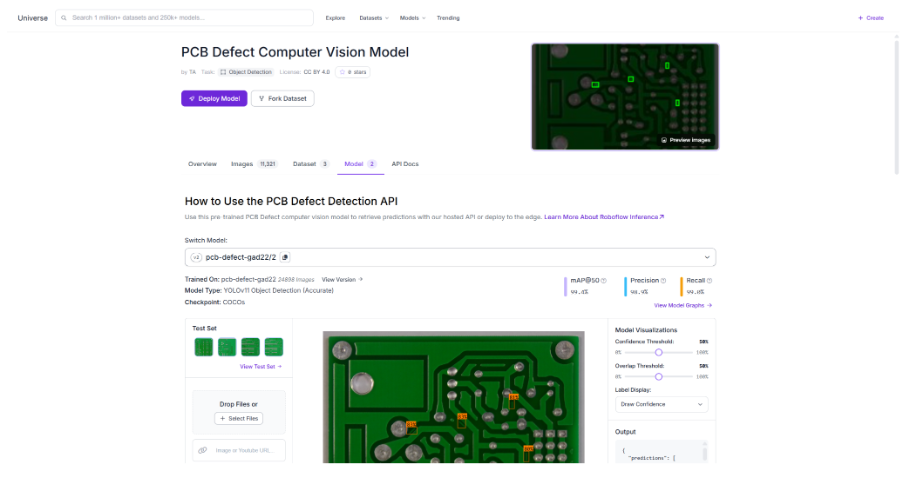
The core problem is that the model file and the runtime environment stay tightly coupled after training. Once you move the model, you have to move its entire dependency stack with it. Every step away from the original training setup adds another point where things can break.
The Mechanics of a YOLO ONNX Export
ONNX, Open Neural Network Exchange, was built to break the framework lock described above. The idea is to define a common intermediate format that sits between training frameworks and deployment runtimes, so instead of every framework needing to talk directly to every runtime, everything routes through a single shared language.
What an ONNX file contains is a computation graph where every operation the model performs gets mapped to a standardized ONNX operator. Every node carries its parameters, input shapes, and output shapes, and the graph itself is frozen and framework-agnostic by design.
The export process works by tracing the model through a sample input. In PyTorch, torch.onnx.export runs the model with that input and records every operation called. Those operations get translated into their ONNX equivalents and written into the graph. If every operation has a matching equivalent at the opset version you targeted, the export completes. If one does not, the process fails with an unsupported operator error.
What a successful export gives you is portability across:
- Operating systems, the same file runs on Windows, Linux, and macOS without modification
- Hardware, no recompilation needed when moving between machines
- Runtime environments, nothing needs to match the original training setup
What it does not give you is performance. ONNX Runtime has no knowledge of whether you are on an NVIDIA A100 or an Intel Xeon, and for production inference where latency matters, that gap is real.
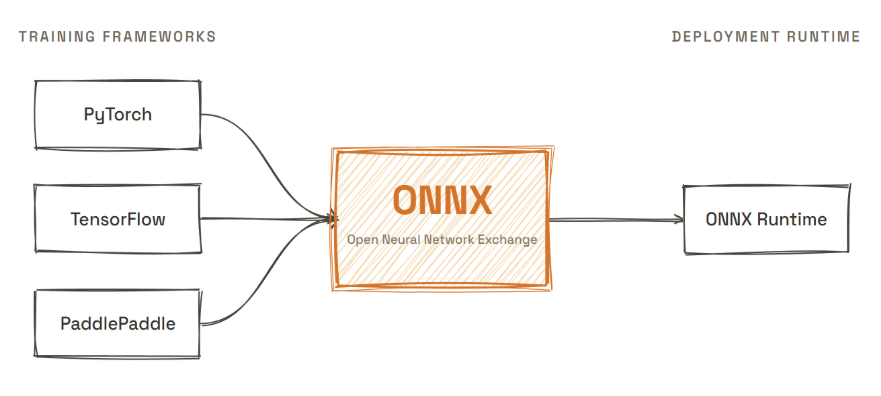
ONNX gives you a file that travels. The performance gap it leaves behind is what TensorRT and OpenVINO were built to close, and that is where the export chain starts to get complicated.
Hardware-Specific Compilation: TensorRT and OpenVINO
ONNX gives you a model that runs anywhere. TensorRT and OpenVINO give you a model that runs fast on specific hardware. Each one introduces a tradeoff that matters in production.
TensorRT is NVIDIA's inference optimization compiler. You give it an ONNX file, and it produces an engine file compiled specifically for the GPU it runs on. During compilation, it applies three optimizations:
- Layer fusion, combining operations that can be computed together into a single kernel
- Kernel selection, picking the most efficient CUDA implementation for each operation on your specific GPU
- Precision calibration, reducing weights from 32-bit floats to 16-bit or 8-bit integers to cut memory and increase throughput
The result can be two to five times faster than ONNX Runtime, depending on the architecture and hardware.
OpenVINO is Intel's equivalent, targeting Intel CPUs, integrated GPUs, and Vision Processing Units. Provide an ONNX file, OpenVINO converts it to its own Intermediate Representation, and the runtime executes it with hardware-specific optimizations for Intel silicon. If your deployment target is an Intel NUC, an industrial PC, or a Movidius VPU, OpenVINO is the path to production-level performance.
The tradeoff both introduce is that the compiled artifact is no longer portable:
- A TensorRT engine built on an NVIDIA A100 will not run on a T4
- A driver update on the same machine can break an existing engine file
- An OpenVINO IR compiled for one CPU generation may behave differently on another
You are trading portability for performance, and every compiled artifact you produce is a maintenance liability waiting for a dependency to move.
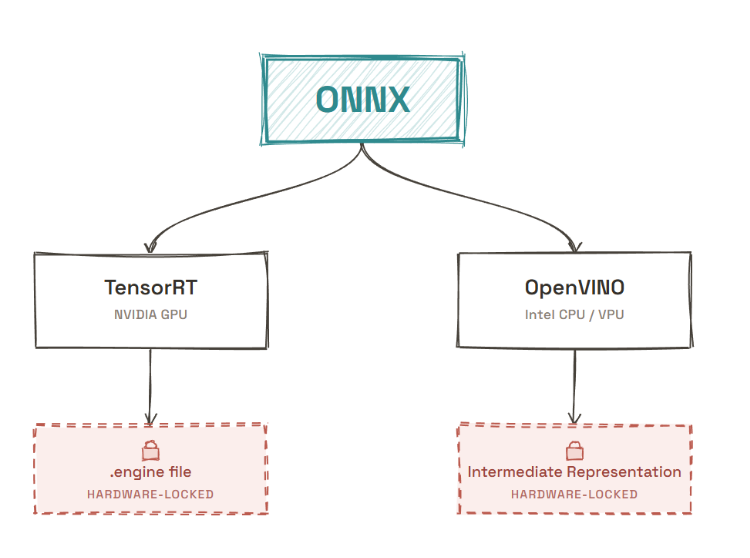
You are trading portability for performance, and that trade comes with a maintenance cost that only shows up after the first deployment break caused by an update. It is not just an architectural inconvenience. Every compiled artifact becomes a liability you have to maintain, and the real cost appears the moment something in the dependency chain changes.
Why the Manual Process Breaks in Practice
The export chain looks clean on paper, but in practice it breaks in unpredictable ways, and those failures are often difficult to trace or debug afterward.
Opset Versioning
ONNX is versioned. Each version touches operator definitions, adding some, modifying others, dropping support for a few. When the runtime on your deployment machine was built against a different opset than the one you exported to, the two do not talk to each other. Fixing it means going back to the training environment and re-exporting, assuming that environment is still intact.
Unsupported Operators
PyTorch has operations without clean ONNX equivalents. This causes failures in two ways:
- The explicit failure: the export stops with an unsupported operator error, and you know where to look
- The silent approximation: the export completes, the model loads, and the outputs drift just enough to matter with no indication that the conversion changed the model's behavior
With Roboflow Inference, the runtime is managed and tested against the model before it reaches your environment, which means the operator translation layer is not something you own or debug.
TensorRT Engine Invalidation
A compiled TensorRT engine is tied to the specific GPU, CUDA version, and TensorRT version it was built on. Change any one of those, and the engine file is dead. NVIDIA's own documentation estimates 30 to 60 minutes to build a first optimized engine in a clean environment. That clock resets every time a dependency changes, and the environment is rarely as clean the second time.
None of these failures is an exotic edge case. These are the normal costs of owning this pipeline.
| Deployment Phase | Manual YOLO ONNX Export Pipeline | Roboflow Inference SDK Workflow |
| Graph Serialization | Manual torch.onnx.export with strict opset tracking | Automated; framework abstraction handles graph translation |
| Hardware Compilation | Manual TensorRT/OpenVINO build environments (30–60 mins) | Just-in-time (JIT) hardware execution target optimization |
| Dependency Risk | High; engine files break on CUDA/driver micro-updates | Zero; runtimes are isolated and managed upstream |
| Edge Portability | Compiled artifact is locked to a specific device architecture | Universal; same Python codebase runs on x86, Jetson, and ARM |
The Roboflow Inference SDK
The PCB Defect Detection model used throughout this article is a YOLOv11 model sitting in a .pt file. Getting it from that file to a running inference runtime manually means everything covered in the last four sections: opset selection, runtime compilation, hardware detection, and engine lifecycle management. With Roboflow Inference, all of that is handled automatically. You give it the model ID, and it resolves the rest.
When you call get_model, Roboflow Inference detects the hardware available in your environment, selects the fastest compatible runtime, applies the appropriate optimizations, and loads the model ready to run. On an NVIDIA GPU, it uses TensorRT. On an Intel CPU, it uses OpenVINO. On ARM, it falls back to ONNX Runtime. None of that selection logic is yours to write or maintain.
The manual chain vs the SDK
# The manual chain
from ultralytics import YOLO
model = YOLO("pcb-defect.pt")
model.export(format="onnx", opset=17)
# Then TensorRT compilation
import tensorrt as trt
# ... 40 more lines of engine building,
# version pinning, and calibration setup
First, install the package:
pip install inferenceThen run inference with three lines:
from inference import get_model
model = get_model("pcb-defect-gad22/2")
results = model.infer("pcb-image.jpg")
print(results)
# [{"class": "spurious_copper", "confidence": 0.835, "x": 1186.5, "y": 792, "width": 67, "height": 76}, # {"class": "spurious_copper", "confidence": 0.830, "x": 760, "y": 852.5, "width": 90, "height": 61}]
The manual chain requires an intact training environment, a matching CUDA setup, and a compiled engine file that is valid for your exact hardware. The SDK requires a model ID, runs on NVIDIA GPUs, Intel CPUs, Jetson devices, and Raspberry Pi out of the box, and selects the fastest available runtime automatically. On a Jetson Orin Nano, Roboflow Inference delivers 25 FPS on an RF-DETR model without any manual compilation or runtime configuration.
The model ID does not have to come from your own training run. Roboflow Universe hosts over 200,000 pre-trained models across manufacturing, agriculture, medical imaging, and security use cases. Every one of them runs with the same three-line call. That means you can go from finding a model to running inference on your hardware without touching an export pipeline at all, no ONNX file, no compiler, no calibration dataset.
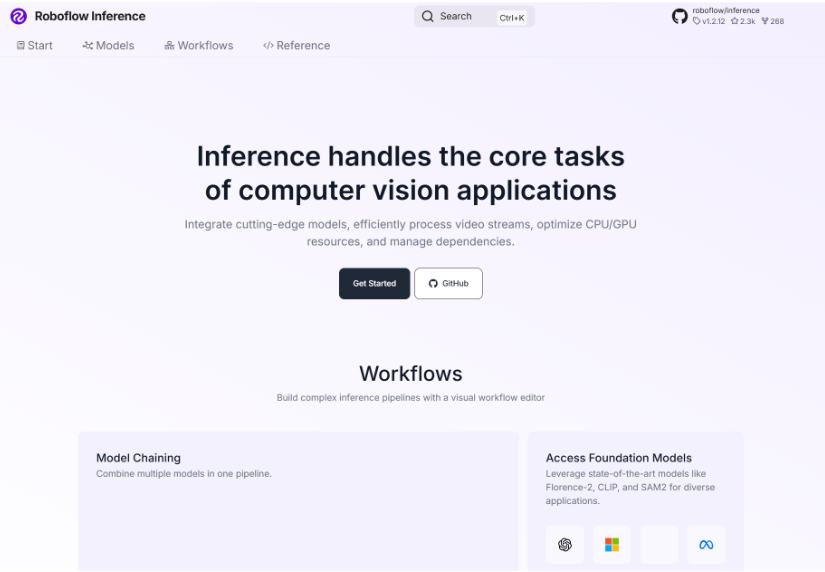
When you switch to Roboflow Inference, driver compatibility, opset pinning, engine invalidation after a CUDA update, and recompilation when you update the model all disappear from your list of concerns.
YOLO ONNX Export Conclusion
The export chain looks manageable until you are three dependency updates deep, and a compiled engine that worked yesterday no longer loads. Framework lock, opset mismatches, TensorRT invalidation, these are not edge cases. They are what model deployment actually looks like when you own the pipeline yourself.
The cost is not only time. When you spend hours fixing broken engine files or searching for calibration datasets, you lose time that could go into improving the model itself. That is the real hidden cost of a manual workflow, and it keeps growing every time something in the system changes.
Roboflow Inference removes that overhead entirely. You install it once, write a few lines of code, and the runtime selection, hardware optimization, and engine lifecycle are handled for you. Your model runs efficiently on whatever hardware you have, and it keeps working even when drivers or infrastructure change.
The moment you switch, you stop owning the export chain and start owning the model. That is the trade worth making. Get started with the Roboflow Inference documentation.


Cite this Post
Use the following entry to cite this post in your research:
Mostafa Ibrahim. (May 18, 2026). YOLO ONNX Export. Roboflow Blog: https://blog.roboflow.com/yolo-onnx-export/