

Plant diseases cost the global economy around $220 billion annually, and late detection is a core reason damage spreads. This tutorial builds an automated crop disease detection system using Roboflow Workflows that combines an RF-DETR model trained on a 1,900-image tomato fruit disease dataset (covering Anthracnose, Bacterial Spot, Blossom End Rot, Healthy Tomato, and Spotted Wilt Virus) with Claude Sonnet 4.5 to turn raw detections into structured treatment plans that include severity assessments, organic and chemical options, and economic impact analysis.
Plant diseases cost the global economy around $220 billion annually, often going undetected until damage spreads across entire fields. Early identification enables targeted intervention, reducing both crop loss and unnecessary pesticide application.
This tutorial demonstrates how to build an automated disease detection system that combines Roboflow's RF-DETR model with Claude's AI reasoning to deliver actionable treatment recommendations. You'll learn to train a custom detection model, deploy it through Roboflow Workflows, and integrate Claude Sonnet 4.5 to transform disease detections into comprehensive agricultural guidance, including treatment options, cost analysis, and prevention strategies.
Building Your Crop Disease Detection System
In this tutorial, we'll build a complete automated disease detection system that combines RF-DETR's object detection capabilities with Claude's advanced reasoning to deliver actionable treatment recommendations.
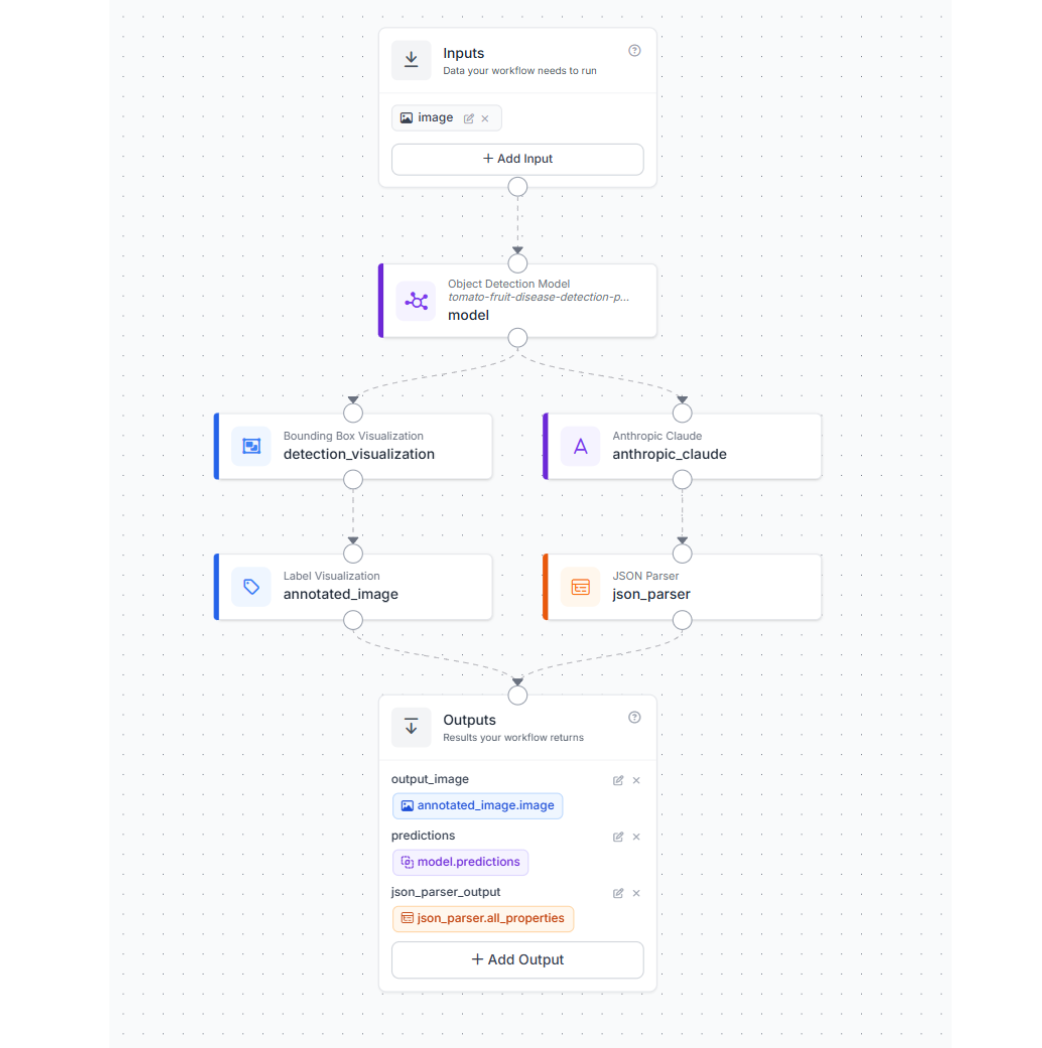
The workflow processes tomato fruit images through multiple stages: detecting disease instances with RF-DETR, analyzing those detections with a vision language model, and outputting structured treatment plans that farmers can implement immediately. By the end, you'll have a production-ready system that transforms raw crop images into comprehensive agricultural guidance, including severity assessments, organic and chemical treatment options, and economic impact analysis. Here's our completed workflow.
Step 1: Prepare the Dataset
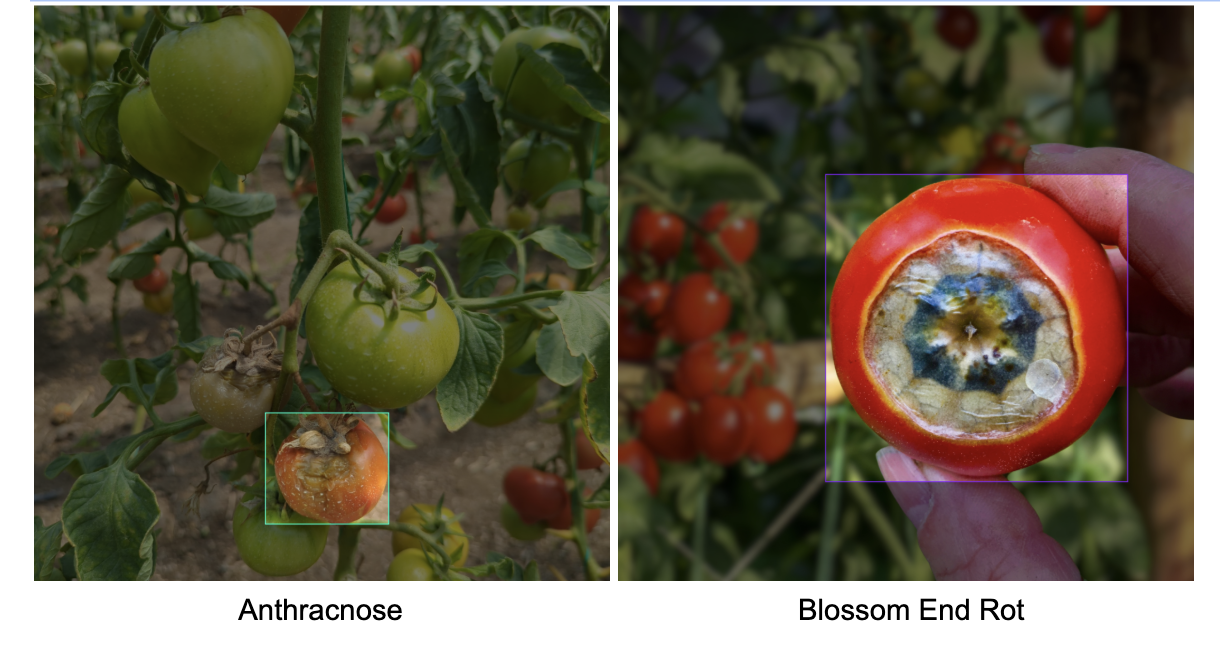
We'll use the Tomato Fruit Disease Detection dataset from Roboflow Universe, which contains 1,900 annotated images across five classes: Anthracnose, Bacterial Spot, Blossom End Rot, Healthy Tomato, and Spotted Wilt Virus. This dataset focuses on fruit-level disease detection rather than leaf analysis, making it particularly valuable for commercial growers who need to assess marketable yield.
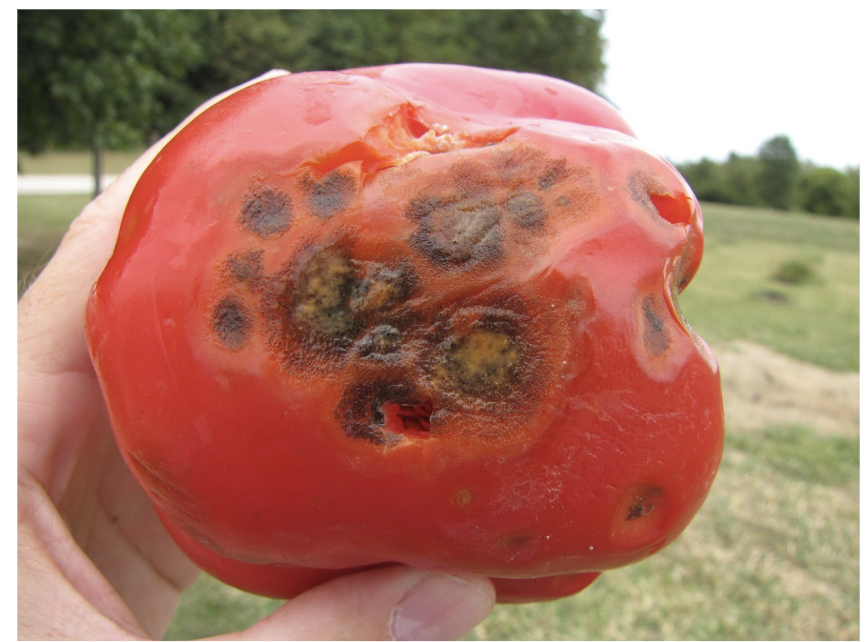
The images capture real-world growing conditions with varying lighting, backgrounds, and disease severity levels. Here are examples of two common tomato diseases from the dataset:
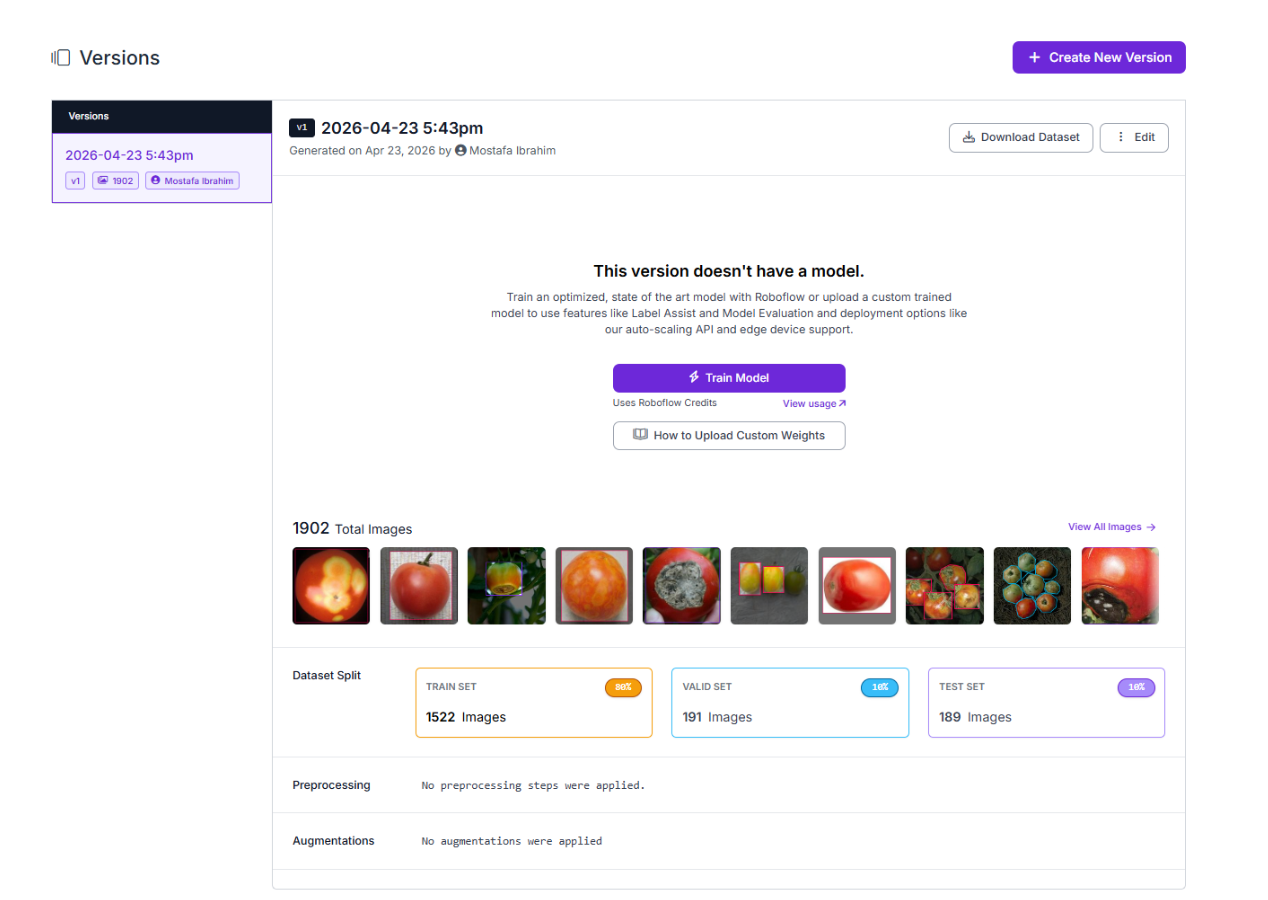
To begin training, navigate to the dataset in your Roboflow workspace and create a new version. Configure an 80/10/10 split, allocating 80% of images for training, 10% for validation, and 10% for testing. This split ensures we have sufficient data for training while reserving enough examples to properly evaluate model performance. You can apply preprocessing steps like auto-orientation and resizing if needed, though the dataset images are already well-formatted for training.
Step 2: Train the RF-DETR Model
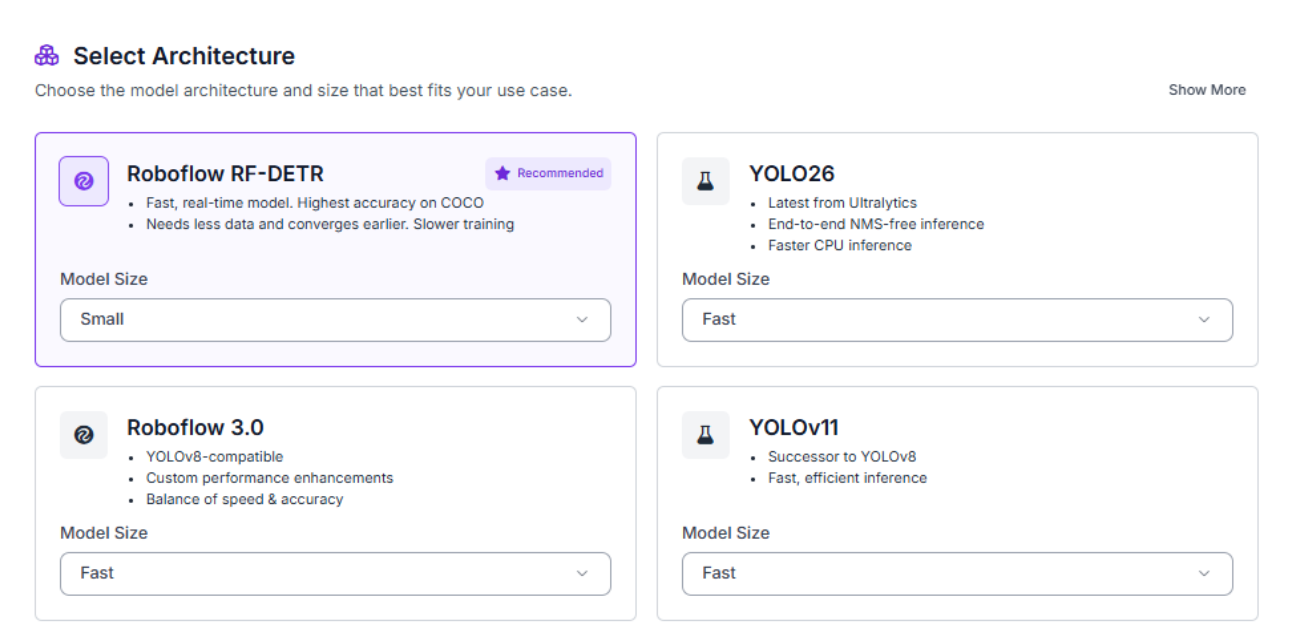
With your dataset version ready, click the "Train Model" button to configure your training job. Select RF-DETR as your model architecture, Roboflow's state-of-the-art object detection model that delivers exceptional accuracy while maintaining real-time inference speeds suitable for agricultural deployment.
For model size, choose Small. While larger models might achieve slightly higher accuracy, Small provides an excellent balance between performance and computational efficiency. This size trains quickly, runs smoothly on mid-range hardware, and still delivers strong detection results on agricultural disease identification tasks. For edge deployment scenarios like field-deployed cameras or drone-mounted systems, Small offers the responsiveness farmers need for real-time crop monitoring.
Training typically completes within 30-45 minutes, depending on your dataset size and Roboflow's current GPU availability. The platform will email you when training finishes.
Step 3: Evaluate Metrics
Once training completes, review your model's performance metrics to understand how well it identifies tomato diseases. Our RF-DETR Small model achieved solid results on this agricultural detection task:

The 74.8% mAP@50 demonstrates reliable overall detection performance across all five disease classes. The balanced precision (71.9%) and recall (75.9%) indicate the model doesn't heavily favor false positives or false negatives, catching most diseased fruits while maintaining reasonable confidence in its predictions.
These metrics are particularly strong considering we're using the Small model variant on a complex real-world agricultural dataset. For production deployment, this performance level means farmers can trust the system to identify diseased tomatoes while accepting that some manual verification may be needed for borderline cases. The 73.8% F1 score confirms the model achieves a good harmony between precision and recall, making it suitable for practical field deployment.
Step 4: Deploy to Workflows
After validating your model's performance, it's time to deploy it as an interactive workflow. Roboflow Workflows provides a visual interface for building complete computer vision applications that combine detection, analysis, and automated decision-making.
Our final workflow architecture connects four key components: the RF-DETR detection model identifies diseases on tomato images, a Claude VLM block analyzes those detections to generate comprehensive treatment recommendations, a JSON Parser extracts structured data from the VLM response, and visualization blocks display annotated results. This pipeline transforms raw images into actionable agricultural insights.
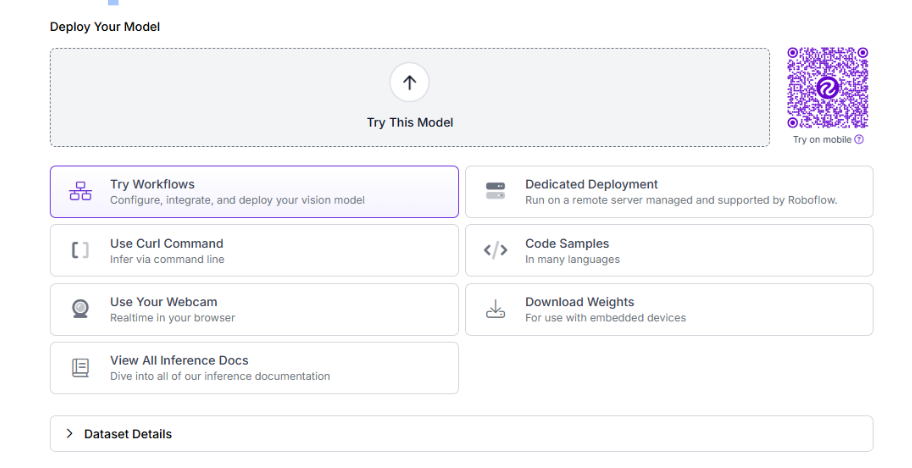
To create this workflow, click "Try Workflows" when viewing your trained model's deployment options.
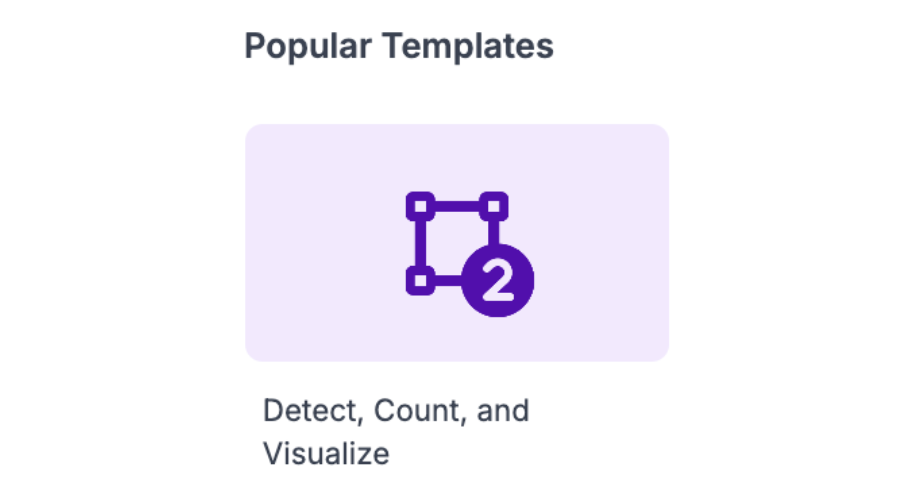
From the template gallery, select "Detect, Count, and Visualize" as your starting point. This template provides the core detection and visualization blocks we need.
Remove the Count Property Definition block from the template. We won't need counting functionality for disease diagnosis; instead, we'll add AI-powered treatment recommendations.
Step 5: Configure the VLM Block
Add a Claude VLM block after your detection model to transform disease detections into actionable treatment plans. Click the "+" button in your workflow, search for "Claude," and select the Claude VLM block.
Configure the block with these settings:
- Image: Pass the original image to Claude
- Model: Choose Claude Sonnet 4.5, Anthropic's flagship production model that excels at structured reasoning and detailed analysis. For agricultural treatment recommendations, Sonnet 4.5 provides the depth and nuance needed to generate reliable guidance that farmers can act on. Its advanced reasoning capabilities ensure treatment plans account for disease severity, organic vs. chemical options, and economic considerations.
- Task Type: Select "Structured Output Generation" to receive machine-readable JSON responses
- Output Structure:
{
  "summary": "Based on the model predictions {$steps.model.predictions}, provide a brief overview of all detected diseases and overall crop health status",
  "treatments": "A list of objects, each containing disease_name, severity, immediate_actions, organic_treatments, chemical_treatments, cultural_practices, recovery_timeline, prevention_strategies, and economic_impact"
}
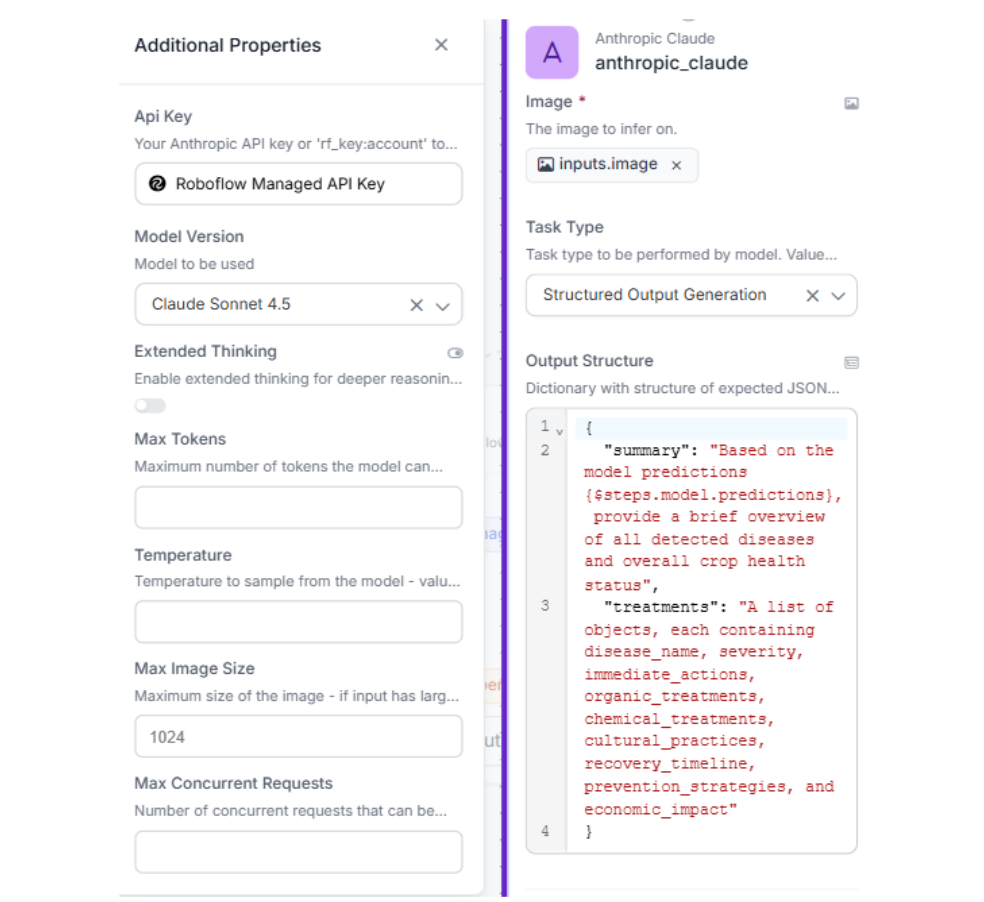
This configuration instructs Claude to analyze the model's disease predictions and generate comprehensive treatment plans with specific fields for severity assessment, organic and chemical treatment options, cultural practices, recovery timelines, prevention strategies, and economic impact analysis.
Step 6: Configure the JSON Parser
Add a JSON Parser block immediately after the Claude VLM block to extract structured data from Claude's response. This parser converts the VLM's text output into individual fields that can be accessed by downstream blocks or displayed in your application interface.
Configure the parser to accept the Claude VLM output as its input source, then specify these expected fields: summary, treatments. The parser will validate that Claude returns both the overall summary and the detailed treatments array, making the data ready for display or further processing.
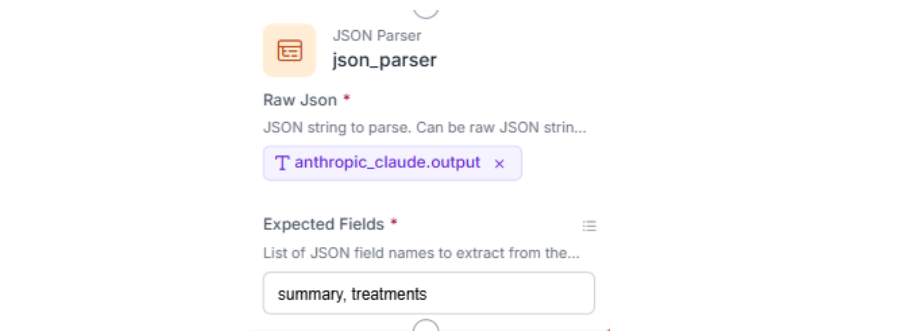
With the parser configured, your workflow can now access the VLM's response as structured JSON data rather than unformatted text, making it ready for display or further processing in downstream blocks.
Step 7: Test the Workflow
Click "Run" in the top-right corner to validate your complete disease detection and diagnosis pipeline. Upload a test image of a diseased tomato fruit from your test set.
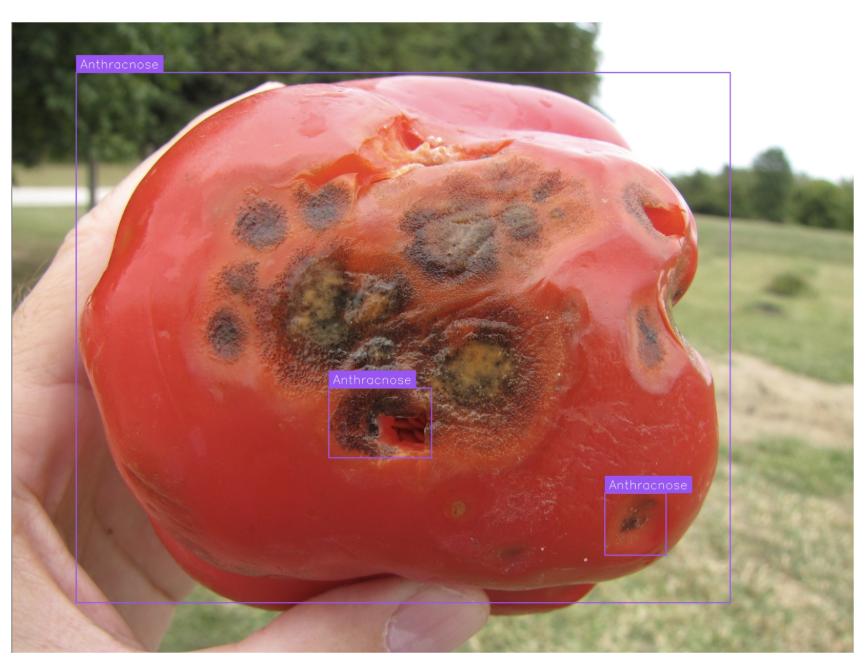
Click "Run" to execute the workflow. Within seconds, you'll receive three outputs: the annotated image with bounding boxes around detected diseases, the raw model predictions with confidence scores, and Claude's structured treatment analysis.
The JSON Parser output contains Claude's comprehensive agricultural guidance:
"json_parser_output": {
      "summary": "The tomato fruit displays visible signs of fungal infection, likely anthracnose or late blight, characterized by dark brown to black lesions with concentric patterns on the fruit surface. The affected areas show tissue degradation and potential secondary soft rot. The crop health status is compromised, requiring immediate intervention to prevent spread to other fruits and plants. The severity appears moderate to severe based on the extent of lesion development and tissue damage visible.",
      "treatments": [
        {
          "disease_name": "Anthracnose (Colletotrichum spp.)",
          "severity": "Moderate to Severe",
          "immediate_actions": [
            "Remove and destroy all infected fruits immediately to prevent spore spread",
            "Avoid overhead irrigation and water only at the base of plants",
            "Improve air circulation by pruning lower leaves and spacing plants adequately",
            "Sanitize all tools and equipment used in the affected area"
          ],
          "organic_treatments": [
            "Apply copper-based fungicides (copper sulfate or copper hydroxide) as foliar spray",
            "Use neem oil at 2-3% concentration weekly",
            "Apply Bacillus subtilis biological fungicide",
            "Spray compost tea to enhance plant immunity",
            "Use sulfur-based organic fungicides"
          ],
          "chemical_treatments": [
            "Apply chlorothalonil-based fungicides at labeled rates",
            "Use mancozeb or maneb as protective fungicides",
            "Apply azoxystrobin or other strobilurin fungicides",
            "Rotate between different fungicide classes to prevent resistance",
            "Follow 7-14 day spray intervals depending on disease pressure"
          ],
          "cultural_practices": [
            "Implement crop rotation with non-solanaceous crops for 2-3 years",
            "Use drip irrigation instead of overhead watering",
            "Mulch around plants to prevent soil splash",
            "Maintain proper plant spacing (18-24 inches)",
            "Remove plant debris and fallen fruits regularly",
            "Stake or cage plants to keep fruits off the ground",
            "Harvest during dry conditions only"
          ],
          "recovery_timeline": "With proper treatment, new fruit development can remain healthy within 2-3 weeks. Existing infected fruits will not recover and should be removed. Full crop recovery expected in 4-6 weeks with consistent management practices.",
          "prevention_strategies": [
            "Select disease-resistant tomato varieties",
            "Use certified disease-free seeds and transplants",
            "Apply preventive fungicide sprays before symptoms appear",
            "Maintain optimal soil pH (6.0-6.8) and nutrition",
            "Monitor plants regularly for early disease detection",
            "Avoid working with plants when foliage is wet",
            "Disinfect tools between plants with 10% bleach solution"
          ],
          "economic_impact": "Without treatment, yield losses can reach 40-60% due to unmarketable fruits and reduced plant vigor. Treatment costs including fungicides and labor range from $150-300 per acre. Early intervention can reduce losses to 10-15% and preserve 85-90% of potential harvest value."
        }
      ],
      "error_status": false
    }
This structured response demonstrates the power of combining Roboflow's RF-DETR detection with Claude's reasoning capabilities. Farmers receive not just disease identification, but immediate, actionable treatment plans with specific organic and chemical options, economic impact estimates, and prevention strategies, transforming computer vision from a diagnostic tool into a complete agricultural decision support system.
AI Crop Analysis Conclusion
You've built a complete crop disease detection system that combines RF-DETR's accurate object detection with Claude Sonnet 4.5's advanced reasoning to deliver actionable agricultural guidance. This workflow transforms raw tomato images into structured treatment plans with severity assessments, organic and chemical options, economic impact analysis, and prevention strategies.
For production deployment, consider scaling to additional crops and diseases, integrating automated alerts when high-severity conditions are detected, and connecting the system to farm management platforms for seamless workflow integration. Automated disease monitoring enables faster intervention, reduced crop losses, and more efficient use of treatment resources.
Further reading
Below are a few related topics you might be interested in:
- How to Build a Vision App with Claude and Roboflow
- Tomato Leaf Disease Detection and Diagnosis using Computer Vision
- AI in Farming: 5 Ways Computer Vision Is Transforming Agriculture
How do I perform crop analysis with AI?
To perform AI crop analysis and build an automated disease detection system, you can use Roboflow to combine a computer vision object detection model with a Vision Language Model (VLM).


Cite this Post
Use the following entry to cite this post in your research:
Contributing Writer. (Apr 27, 2026). AI Crop Analysis with Roboflow. Roboflow Blog: https://blog.roboflow.com/ai-crop-analysis/