

Training a good YOLO model is not just about choosing the newest architecture. Most accuracy gains come from better data, cleaner annotations, realistic preprocessing, careful augmentation, and testing the model in conditions close to deployment.
You can train the latest YOLO version on a dataset with messy labels, unbalanced classes, and images that do not match the real-world environment. The validation results may still look good. The model may pass every test in your notebook. But when you deploy it, it may miss simple objects that a human would notice immediately.
This guide focuses on the choices that matter most for real-world performance such as good data, consistent labeling, correct preprocessing, and a clear process for improving the model over time. These best practices apply whether you train YOLO in Roboflow or in your own setup. They also apply across different YOLO versions.
Training YOLO Versions in Roboflow
Roboflow supports a wide range of YOLO-family models for computer vision projects, including object detection, instance segmentation, classification, and keypoint detection. The right model depends on what you want the system to predict.
For example, object detection works well when you need bounding boxes around objects, segmentation is better when you need pixel-level masks, classification works when the whole image needs one label, and keypoint detection is useful when you need to locate specific points on a person, an object, or a part.
Here is a short overview of YOLO model families and the tasks they support in Roboflow:
- YOLO26: Works with object detection, keypoint detection, and instance segmentation.
- YOLOv12: Works with object detection. Instance segmentation is available through the YOLO-seg (v8/10/11/12) variant rather than the base YOLOv12 model.
- YOLO11: Works with object detection, instance segmentation, and classification workflows.
- YOLOv10: Works with object detection and instance segmentation training workflows via YOLO-seg.
- YOLOv9: Works with object detection. Training is not supported on Roboflow for YOLOv9. Weight upload and hosted API deployment are supported.
- YOLOv8: Works with object detection, and instance segmentation workflows.
- YOLOv7: Works with object detection and instance segmentation. Training is not supported on Roboflow for YOLOv7. Weight upload and deployment are supported.
- YOLOv5: Works with object detection and instance segmentation. Training is not supported on Roboflow for YOLOv5. Weight upload and deployment are supported.
- YOLO-seg (v8/10/11/12): Works with instance segmentation when pixel-level masks are needed instead of standard bounding boxes.
- YOLO-cls (v8/11): Works with image classification when the model needs to assign a label to the full image.
- YOLO-pose: Works with keypoint and pose detection tasks.
- YOLO-NAS: Works with object detection and can be useful when comparing YOLO-style detectors for speed and accuracy.
Best Practices for Training a YOLO Model
The following best practices will help you build a YOLO model that performs well beyond the validation set.
Start With the Right Data
Adding more images does not always improve a YOLO model. The data must match the real environment where the model will run.
If your model will be used on a factory floor, do not train only on clean studio images. Your dataset should match the real camera view, lighting, object size, angles, and background.
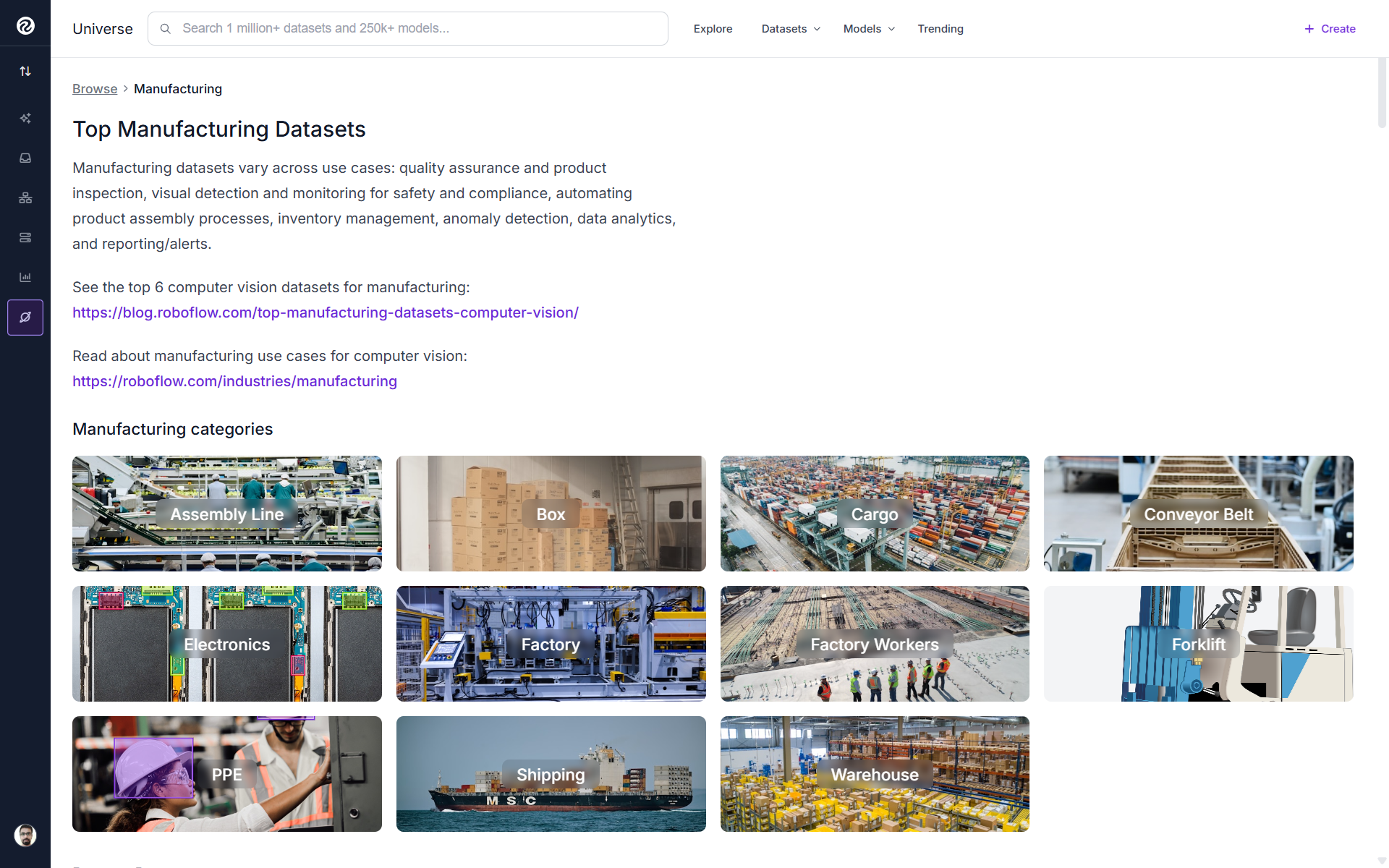
Add more data only where the model is weak. For example, if one class has far fewer examples than others, the model may miss that class even when the overall mAP looks good. You may find Roboflow Universe useful for finding public datasets that can support your project.
Improve Annotation Quality
Label quality has an impact on model performance. Before anyone starts drawing boxes or masks, write clear labeling rules. Define each class in simple words. Explain what should be labeled, what should be ignored, and what to do when two classes look similar. Also define how to handle edge cases such as heavy occlusion, partial objects, or unusual camera angles. When different labelers follow different rules, the model learns that disagreement instead of learning the object.
Draw tight and consistent boxes. A bounding box should cover the visible object closely without cutting off the object or including too much background. If some boxes are tight and others are loose, the model learns inconsistent object boundaries, which reduces localization accuracy.
For hard cases, consistency matters more than the exact rule. Decide whether occluded objects should be labeled only around the visible part or around the full estimated object. Decide whether objects cut off by the image edge should be labeled. Decide whether unclear examples should be skipped, labeled, or placed in an uncertain class. Write the rule down and review the dataset against it.
Roboflow Annotate can speed up labeling with AI assisted labeling and auto labeling. These tools suggest boxes or masks, but they should still be reviewed. A human reviewer should confirm that each label matches the written class definition before it becomes part of the dataset.
Run Dataset Health Check Before Training
Roboflow Health Check gives you an analysis of your dataset before you spend a single GPU minute on training. It reports class balance, image dimension spread, annotation counts per class, and missing or null annotations.
Dataset Health Check
Read it before every training run. If Health Check shows a class with far fewer examples than the others, gather or borrow more examples for that class first. If image dimensions vary wildly across the dataset, decide on a resize strategy and apply it consistently. If some images have no annotations when they should, investigate whether they represent a labeling gap or whether they are legitimately negative examples that should be flagged as such.
Catching these problems before training is cheap. Discovering them after a 12 hour training run that you then have to repeat is not.
Preprocessing
Preprocessing prepares images into a consistent state for training by applying the same image transformations across a dataset version. Useful preprocessing options include Auto-Orient, Resize, Grayscale, Auto-Adjust Contrast, Static Crop, Tile, and Isolate Objects.
For most YOLO projects, start with Auto-Orient and Resize. Auto-Orient fixes images that contain EXIF rotation metadata, while Resize creates consistent input dimensions. Use a larger resize resolution when small objects need more detail, or a smaller resolution when inference speed and memory use are more important. Use Grayscale, Auto-Adjust Contrast, Crop, or Tile only when they match the real deployment environment.
Preprocessing is configured when you generate a Roboflow dataset version, creating a reproducible snapshot for training and comparison.
Augmentation Done Right
Augmentation helps a YOLO model handle real-world variation without collecting every possible image. Use it only for conditions the deployed camera is likely to see. Train the first dataset version without augmentation to create a baseline.
Then create new Roboflow dataset versions with small changes and compare the results. Choose augmentations that match the deployment environment. A fixed camera may benefit from brightness, exposure, blur, or noise. A handheld camera may also need rotation, flip, crop, or scale variation. Avoid aggressive augmentations when they create unrealistic images.
Roboflow supports augmentations such as flip, rotation, crop, shear, grayscale, hue, saturation, brightness, exposure, blur, noise, cutout, mosaic, motion blur, and camera gain. Keep augmentation conservative on small datasets and use the Maximum Version Size setting to control how many augmented training images are generated.
Splits and Versioning Discipline
Use separate train, validation, and test splits so model evaluation remains reliable. The training set teaches the model, the validation set helps guide training decisions, and the test set should stay untouched until final evaluation. A common starting split is 70% train, 15% validation, and 15% test.
Roboflow lets you set the train, validation, and test split when creating a dataset version. Each version is a point-in-time snapshot of the images, labels, preprocessing, and augmentation settings, which makes experiments reproducible. Create a new version for every meaningful change and use descriptive version names such as v3-flip-brightness instead of only v3.
Dataset Split
Choosing Model Size
YOLO models commonly come in Nano, Small, Medium, Large, and Extra Large variants. The main difference is the tradeoff between accuracy, inference speed, and memory use.
Start with a Nano or Small model to build a fast baseline. These variants train quickly, use less memory, and are often suitable for edge devices such as Raspberry Pi, Jetson Nano, and other resource-constrained hardware.
Move to Medium, Large, or Extra Large only when the smaller model does not provide enough accuracy. Larger models can learn more complex visual patterns, but they require more compute, increase inference latency, and use more memory. Always test the model on the actual deployment hardware. A model that performs well on a cloud GPU may be too slow for a live camera or edge device.
Training Paths
To train a YOLO model with Roboflow Train, open a dataset version, click Custom Train, then choose a supported model architecture, model size, and training checkpoint. For initial model, start from a public COCO checkpoint. If a previous model version already performs well, use that checkpoint to continue improving it.
Prefer transfer learning from a relevant checkpoint instead of random initialization. It usually reduces training time and helps the model reach useful accuracy with less data.
Evaluation Beyond a Single mAP Number
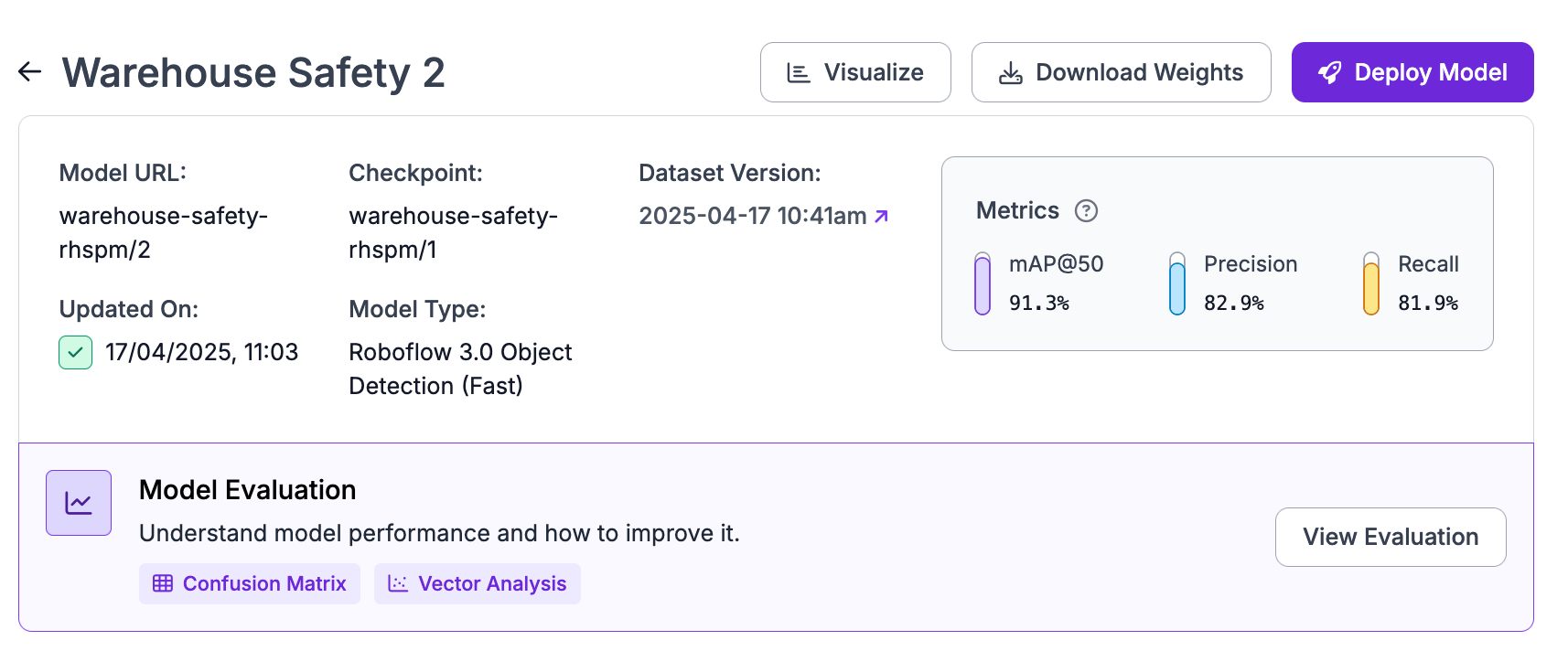
A single mAP score tells you very little about where to go next. Two models can post identical mAP while one handles all classes well and the other handles most classes perfectly and one class not at all. The aggregate hides the problem. Roboflow Model Evaluation provides several views into what is actually happening.
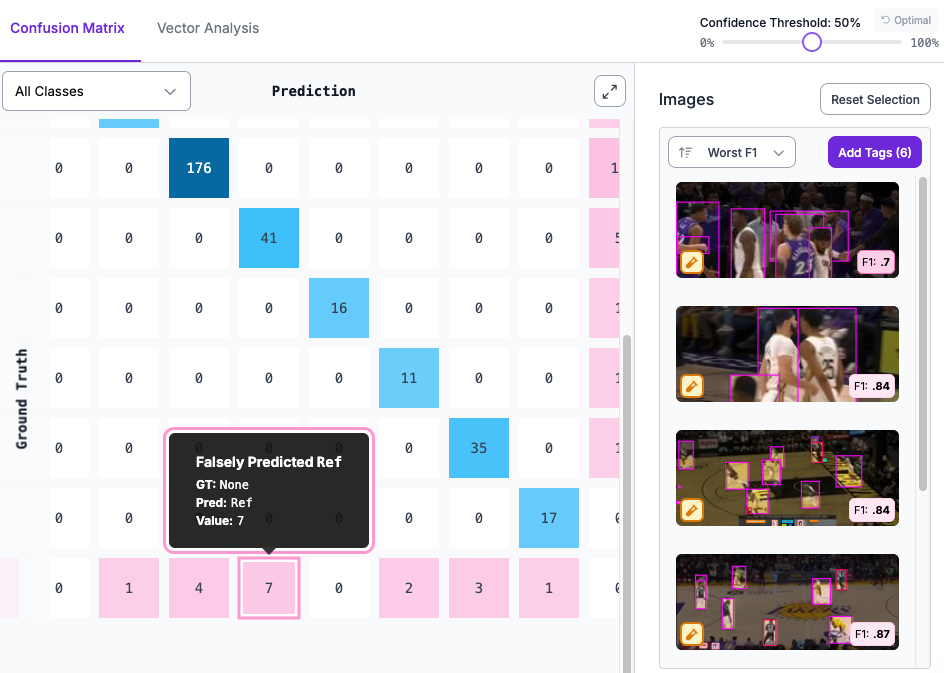
The confusion matrix shows you which classes get predicted as which. If you have two visually similar classes and the matrix shows heavy off diagonal counts between them, the model is confusing them. The fix is usually more examples of each class in more distinguishable conditions, or rethinking whether those two classes need to be separate at all.
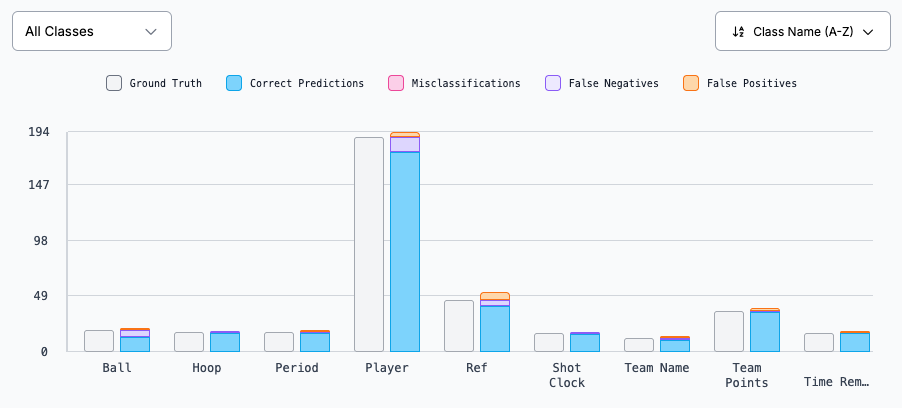
The performance by class breakdown shows correct predictions, misclassifications, false negatives, and false positives per class. This is where you catch the class that overall mAP was hiding. If one class has a false negative rate of 40 percent while all others are under 10 percent, that class needs attention.
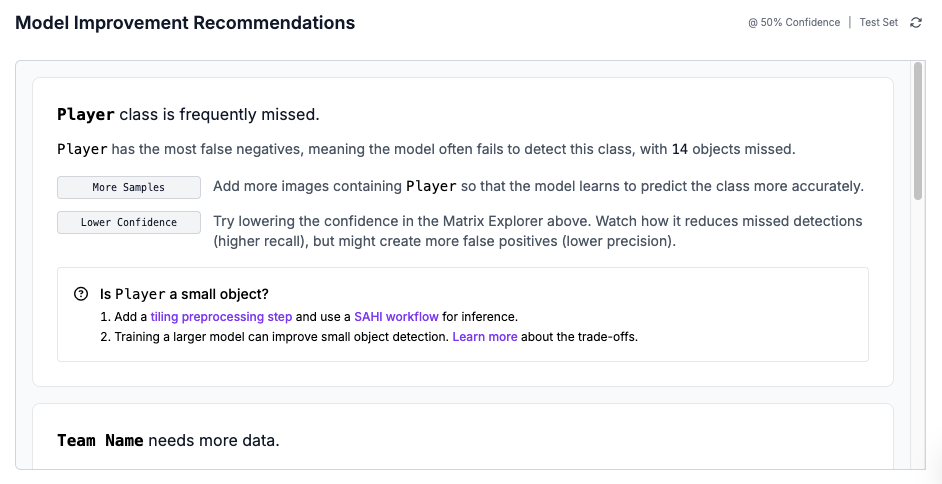
The model improvement recommendations section reads the confusion matrix and proposes specific actions. It will tell you if a class needs more data, if predictions for a class show too many false positives, or if your test or validation set is too small to give reliable measurements.
Use Roboflow Vision Events to review what your deployed model sees in production. It stores timestamped inference records with images, predictions, source information, and custom metadata such as line number, shift, or part number. This makes it easier to investigate unexpected predictions, track changes across cameras or locations, and collect real production examples for retraining. Model Monitoring is being deprecated in favor of Vision Events.
Turn Images into Insights with Vision Events
Iterate With Active Learning
Model improvement usually comes from better data. After deployment, the most useful images are often the ones where the model is uncertain, wrong, or seeing something new. Roboflow supports active learning through Workflows. A Smart Sampling workflow can run on production images, select a configurable portion of them, and prioritize examples where the model has lower confidence. These images can be routed back into your dataset for review and labeling.
Active Learning in Computer Vision
You can also use the Roboflow Dataset Upload block to control how much production data is captured. It supports probabilistic sampling and usage limits, so you can collect useful examples without overwhelming storage or annotation work. The active learning loop is simple, collect production images, review and label the selected samples, add them to a new dataset version, retrain, compare against the previous model, and repeat. Each cycle improves the model using data from the exact environment where it is deployed.
Deployment Considerations That Impact YOLO Training
Plan for deployment before training. The target hardware should guide your model size, image resolution, and preprocessing choices. Before training, ask following questions:
- What FPS is required?
- How much memory is available?
- Will the model run on CPU, GPU, or edge hardware?
- What resolution does the camera produce?
Roboflow supports serverless hosted API, dedicated deployments and self-hosted deployment with Roboflow Inference. For edge use, Roboflow Inference can run models and Workflows on your own hardware, including devices such as NVIDIA Jetson, Luxonis OAK, and GPU-based systems. For edge deployment, start with a smaller model and a practical input resolution. For cloud deployment, you can consider larger models when accuracy matters more than latency.
Common Pitfalls to Training a YOLO Model
Even a strong YOLO model can fail if the training workflow has basic data or deployment mistakes. Watch for these issues before starting a long training run.
- Over-augmenting a small dataset can make the model learn unrealistic synthetic variation instead of real visual patterns. For small datasets, keep augmentation light.
- Leaking test images into training makes validation numbers look better than real performance. Keep the test set separate from the start and never include it in training versions.
- Chasing a newer model before fixing the data wastes time. If error analysis shows bad labels, missing edge cases, or class imbalance, fix those before switching architectures.
- Ignoring class imbalance causes the model to perform well on common classes and fail on rare ones. Use Roboflow Health Check to find imbalance before training.
- Training at the wrong resolution can create deployment problems later. Check whether the target hardware can run the model at the chosen resolution before committing to training.
YOLO Training Best Practice Conclusion
A strong YOLO model comes from good data, consistent annotations, and a clear improvement cycle. For hands-on practice, Roboflow’s training notebooks provide runnable examples you can adapt to your own YOLO project.
Learn more:


Cite this Post
Use the following entry to cite this post in your research:
Timothy M. (Apr 1, 2026). Best Practices for Training YOLO. Roboflow Blog: https://blog.roboflow.com/best-practices-for-training-yolo/