

Instance segmentation is a computer vision task where models detect objects in an image and precisely outline each individual object at the pixel level.
Instance segmentation enables models to understand not only what objects are present, but also exactly which pixels belong to each object, even when multiple objects overlap or belong to the same class.
It is essential in applications like autonomous driving, medical imaging, robotics, and quality inspection, where precise object boundaries and separation of individual objects are required.
In this guide, you will learn the key concepts and practical tools behind instance segmentation. We will cover:
- What instance segmentation is
- What output from an instance segmentation model looks like
- How instance segmentation compares to object detection and semantic segmentation
- Common real-world use cases of instance segmentation
- How to label, train, and deploy instance segmentation models using Roboflow tools
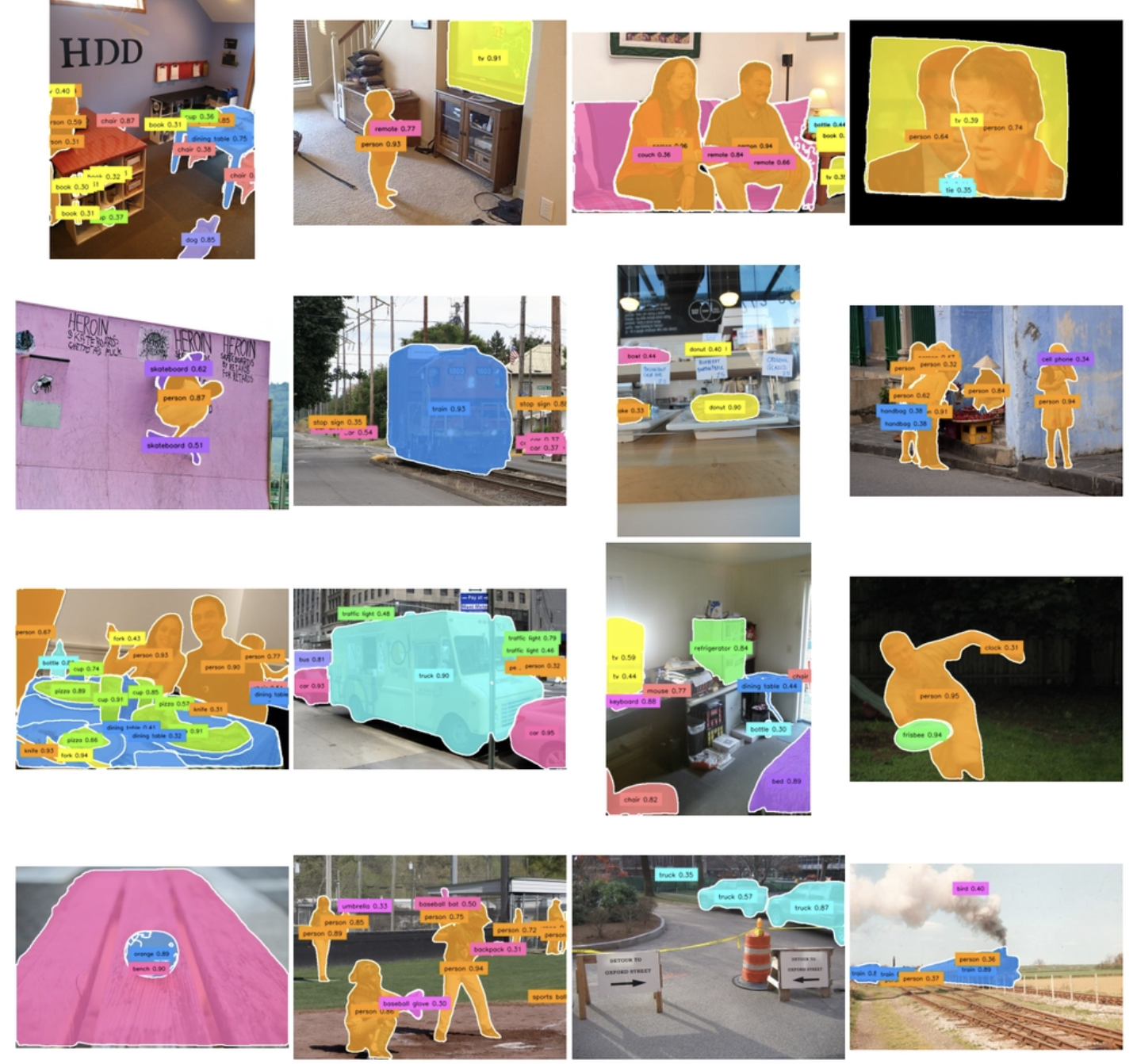
What Is Instance Segmentation?
Instance segmentation is a computer vision task where a model detects, classifies, and precisely outlines every individual object in an image or video frame, unlike object detection, which represents objects using rectangular bounding boxes, instance segmentation produces detailed object masks that follow the exact shape of each object.
A mask is a pixel-level outline that shows the exact shape and area occupied by an object in the image. This allows models to distinguish between multiple objects of the same class, even when they overlap or appear close together.
This additional level of detail provided by masks makes instance segmentation especially useful in scenarios where object boundaries and shapes are important.
Object detection bounding boxes often include background pixels and do not accurately represent the true shape of an object. Instance segmentation improves on this by providing pixel-accurate masks for every detected object, enabling more precise scene understanding and spatial analysis.
For example: Object detection can determine that a person exists in an image.
- Instance segmentation can determine the exact pixels occupied by that specific person.
- Because of this precision, instance segmentation is commonly used in applications where accurate object boundaries matter.
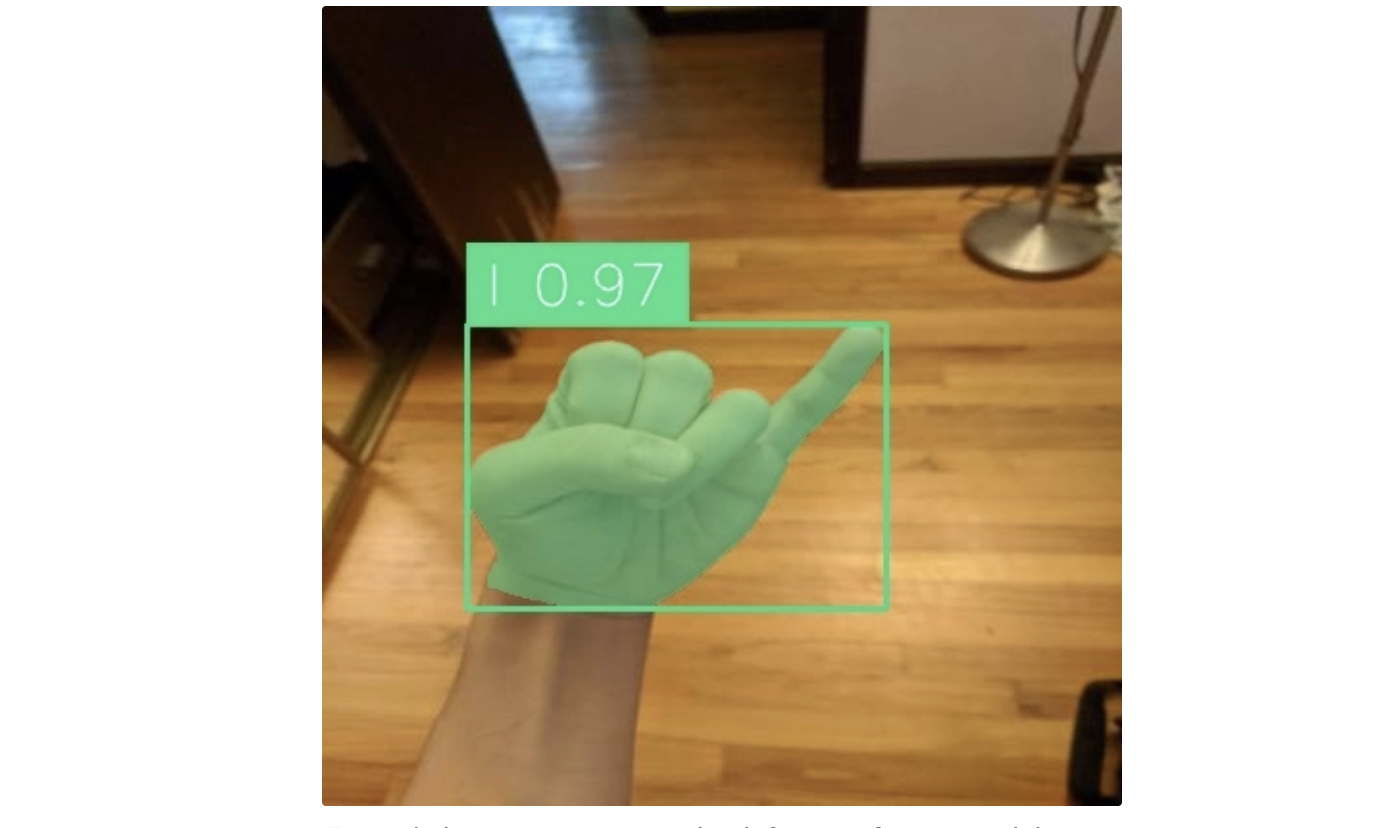
Instance Segmentation Inference Output
An instance segmentation model detects objects in an image and produces both bounding boxes and precise pixel-level masks for each instance, along with a class label and confidence score for each detection.
Common Use Cases of Instance Segmentation
Instance segmentation is widely used across many industries and applications, including:
- Autonomous Driving: Separating individual cars, pedestrians, cyclists, and road signs to support safe perception and navigation.
- Medical Imaging: Segmenting tumors, organs, or cells to measure size, shape, and boundaries in scans like MRI, CT, and microscopy images.
- Robotics: Helping robots identify and isolate individual objects for grasping, picking, and manipulation tasks.
- Manufacturing and Quality Inspection: Detecting and outlining defects, parts, or products on production lines for automated inspection.
- Agriculture: Segmenting individual fruits, crops, or plants for counting, yield estimation, and health monitoring.
- Video Editing and Augmented Reality: Removing backgrounds or isolating subjects for visual effects and real-time overlays.
- Satellite and Aerial Imaging: Segmenting buildings, roads, water bodies, and land use regions for mapping, urban planning, and environmental analysis.
- Sports Analytics: Tracking individual players, balls, and equipment in real time to analyze performance and movement patterns.
How Instance Segmentation Compares to Other Computer Vision Methods
Instance segmentation is one of several computer vision approaches, alongside object detection and semantic segmentation. To understand when it is the right choice, it is helpful to compare it with these two methods.
Instance Segmentation vs Object Detection
Object detection is a computer vision task that identifies objects in an image and draws bounding boxes around them. It also assigns each detected object a class label (such as person, car, or dog) along with a confidence score.The table below highlights the key differences between object detection and instance segmentation:
Aspect | Object Detection | Instance Segmentation |
|---|---|---|
Output type | Bounding boxes with class labels and confidence score for each individual object instance | Pixel-level masks with class labels, confidence score, and optional bounding boxes for each individual object instance |
Object localization | Rectangle around object | Precise (exact object shape) |
Ability to separate overlapping objects | Limited (boxes may overlap) | Strong (each object has its own mask) |
Annotation effort | Relatively low | High (pixel-wise labeling required) |
Model complexity | Lower | Higher |
Computation cost | Faster and lighter | Slower and more resource-intensive |
Best use cases | Object counting, detection, tracking | Area measurement in satellite imagery, precise segmentation, medical imaging |
Example output | “There is a car here” (box around car) | “This exact region is the car” (car-shaped mask) |
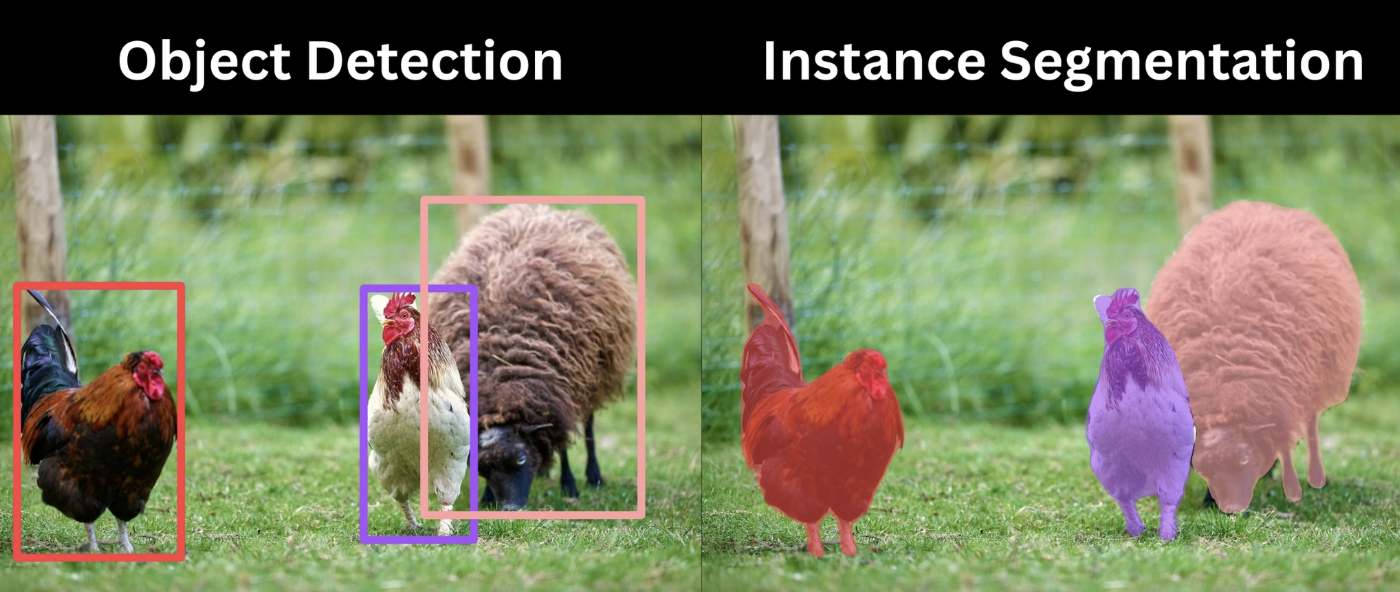
The examples below show that object detection uses rectangular bounding boxes to identify objects, while instance segmentation provides precise pixel-level masks that capture the exact shape and boundaries of each object.
Instance Segmentation vs Semantic Segmentation
Semantic segmentation is a computer vision task where every pixel in an image is assigned a class label. It classifies each pixel into categories such as road, car, person, sky, or background. However, it does not distinguish between individual objects of the same class.
For example, multiple cars in an image will all be labeled as “car” without separating them as unique instances.
Aspect | Semantic Segmentation | Instance Segmentation |
|---|---|---|
Output type | Pixel-level class labels with per-pixel confidence scores and no separation of object instances. | Pixel-level masks with class labels, confidence score, and optional bounding boxes for each individual object instance |
Object distinction | Does not separate individual objects | Separates each object instance even within the same class |
Level of understanding | Recognizes what class each pixel belongs to | Recognizes what class and which object each pixel belongs to |
Handling multiple objects of same class | Treats them as one group | Treats them as separate instances |
Overlapping objects | Cannot distinguish overlapping objects | Can separate overlapping objects |
Model complexity | Lower than instance segmentation | Higher |
Computation cost | Generally lower | Generally higher |
Output granularity | Class-level segmentation map | Instance-level segmentation masks |
Best use cases | Scene understanding, land cover mapping, road segmentation | Area measurement in satellite imagery, precise segmentation, medical imaging |
Example output | All cars are labeled as one class region | Each car is outlined separately with its own mask |
Open-source datasets | Stanford Background Dataset, Microsoft COCO Dataset, MSRC Dataset, KITTI Dataset, and Microsoft AirSim Dataset. | LiDAR Bonnetal Dataset, HRSID (High-Dimension SAR Images Dataset), SSDD (SAR Ship Detection Dataset), Pascal SBD Dataset, and iSAID (A Large Scale Aerial Images Dataset). |
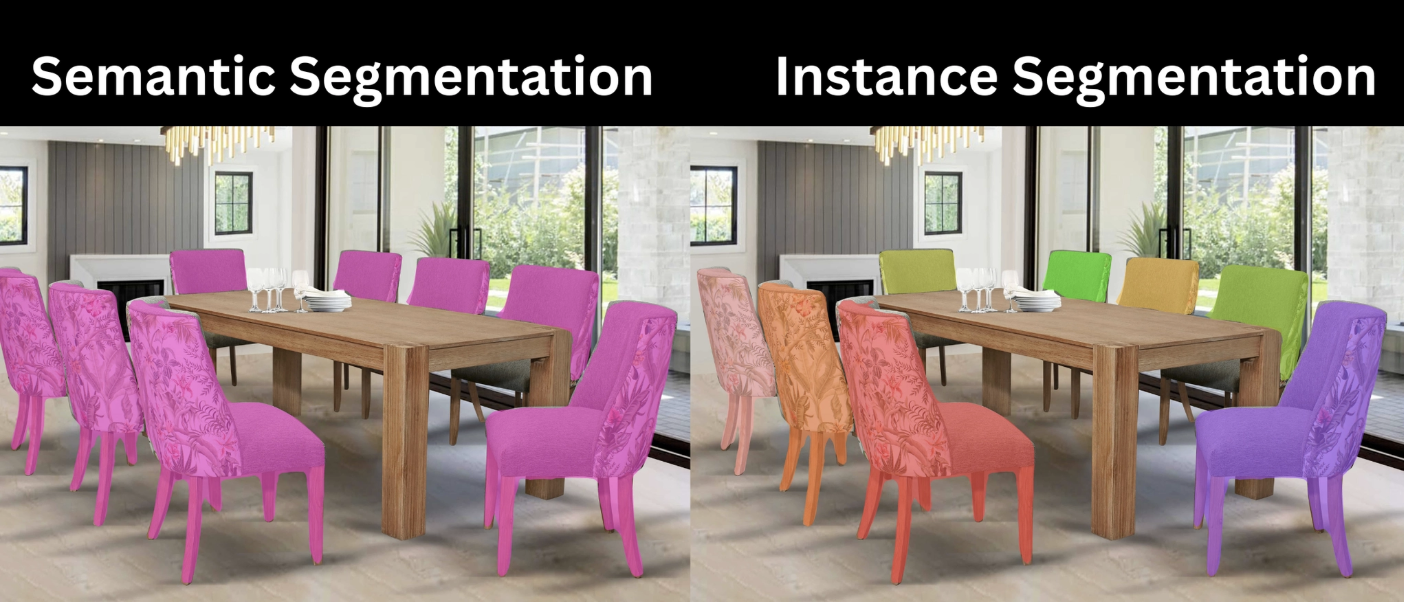
The example below shows that semantic segmentation groups all objects of the same class into one mask, while instance segmentation separates each object individually with its own mask.
RF-DETR Segmentation: Real-Time Instance Segmentation with Transformers
Instance segmentation is typically performed using machine learning models such as SAM 3, and Florence-2. Among them, RF-DETR stands out for its balance between segmentation quality and inference efficiency.
RF-DETR-Seg is built on a real-time transformer architecture for instance segmentation, developed as an extension of RF-DETR for object detection.
RF-DETR first achieved state-of-the-art results in object detection, outperforming widely used models such as YOLO. Building on this, RF-DETR-Seg extends the same performance level to real-time instance segmentation, delivering strong accuracy across a wide range of model sizes while keeping inference latency practical.
Across all model sizes, RF-DETR-Seg outperforms other real-time instance segmentation models in accuracy while maintaining competitive latency.
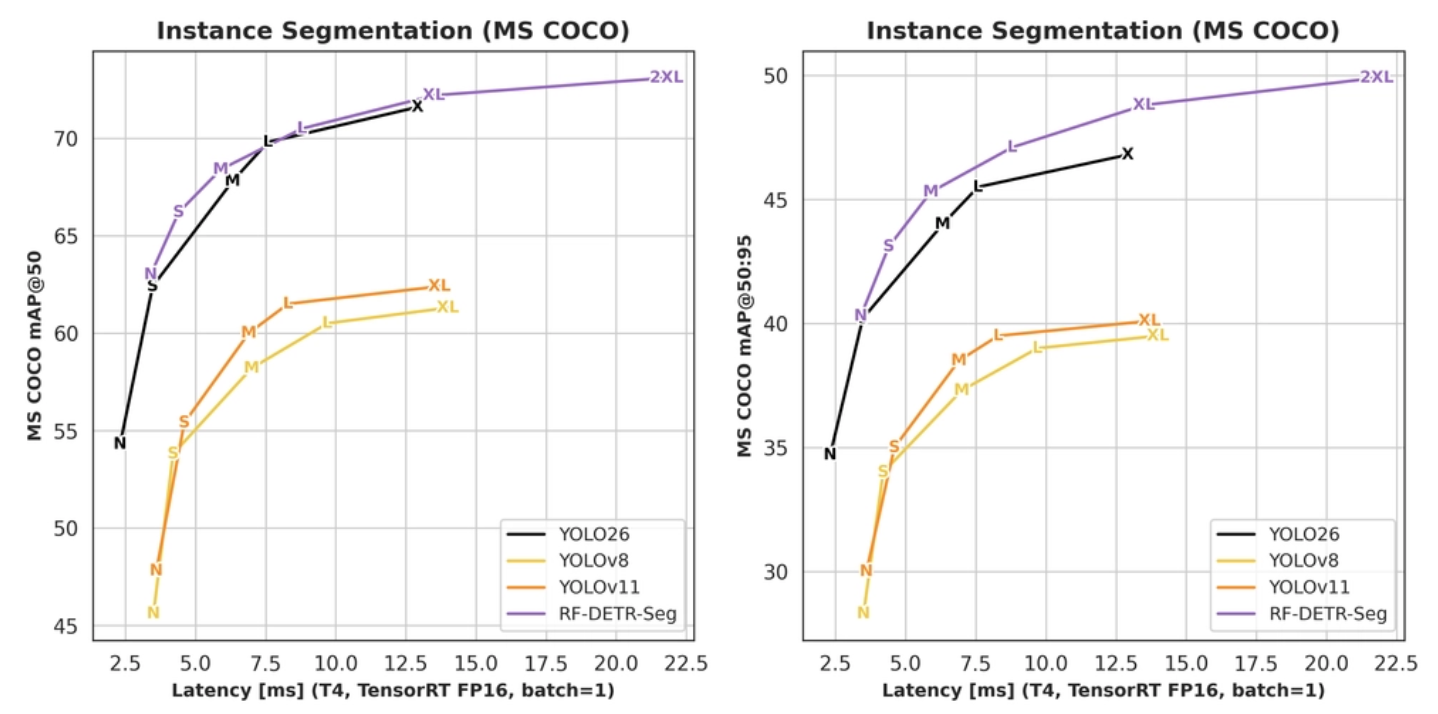
The example below demonstrates RF-DETR-Seg performing instance segmentation in real time:
To learn how to use RF-DETR-Seg directly through Python code, read this blog.
How to Label Images for Instance Segmentation
Roboflow Annotate is a web-based annotation tool used to label images and videos for computer vision projects.
It helps users create training datasets for a variety of tasks, including object detection, instance segmentation, semantic segmentation, image classification, and keypoint detection.
In the case of instance segmentation, with the help of Roboflow Annotate, users can:
- Draw precise polygon masks around individual objects
- Create pixel-level segmentation annotations
- Separate overlapping or touching object instances
- Assign class labels to each object independently
- Annotate images and videos frame-by-frame
- Generate high-quality datasets for training instance segmentation models
The video below demonstrates how to create segmentation annotations using Roboflow Annotate for an instance (in this case, an ASL gesture) to train an instance segmentation model.
Annotating the outline of a hand making the letter “P” in Roboflow Annotate
Roboflow Annotate helps solve instance segmentation challenges, where annotations must be highly precise, by providing polygon-based labeling tools, zoom controls, edge-aware annotation workflows, and AI-assisted labeling features that enable accurate pixel-level object masks.
How to Speed up Annotation with AI-Assisted Labeling for Instance Segmentation
Roboflow Annotate also provides a Smart Polygon feature which is an AI-assisted labeling tool that helps users create accurate instance segmentation masks with minimal manual effort.
It works using a segmentation model (Segment Anything Model, SAM) running in the browser to automatically detect object boundaries when you click on an object.
Smart Polygon reduces manual work while improving the accuracy of instance segmentation annotations.
How does Smart Polygon work?
- You click on an object in the image
- Roboflow Annotate automatically generates a precise segmentation mask around it
- You can hover before clicking to preview the mask
- You can refine the mask by adding or removing areas
- For difficult objects, you can combine clicks to improve results
Why it is useful for instance segmentation?
- Produces pixel-accurate object boundaries instead of rough shapes
- Speeds up annotation compared to manually drawing polygons
- Helps separate closely packed or overlapping objectsImproves dataset quality for training instance segmentation models
The video below demonstrates how quickly the Smart Polygon feature generates instance segmentation annotations.
Annotating the outline of a hand making the letter “P” in Roboflow Annotate using AI Assist
How to Train an Instance Segmentation Model
Roboflow Train is a model training platform by Roboflow that lets you train computer vision models using your annotated datasets without needing to manage complex machine learning infrastructure.
Roboflow Train supports training computer vision models for tasks such as object detection, instance segmentation, semantic segmentation, classification, and keypoint detection.
With Roboflow Train, you can:
- Upload and version datasets
- Apply preprocessing and augmentations to entire datasets
- Train state-of-the-art models
- Evaluate model performance
- Deploy models for inference
For example, after annotating an American Sign Language (ASL) instance segmentation dataset (also available for download on Roboflow Universe) as shown below, you can use Roboflow Train to train a segmentation model that predicts sign language based on detected hand masks in new, unseen images.
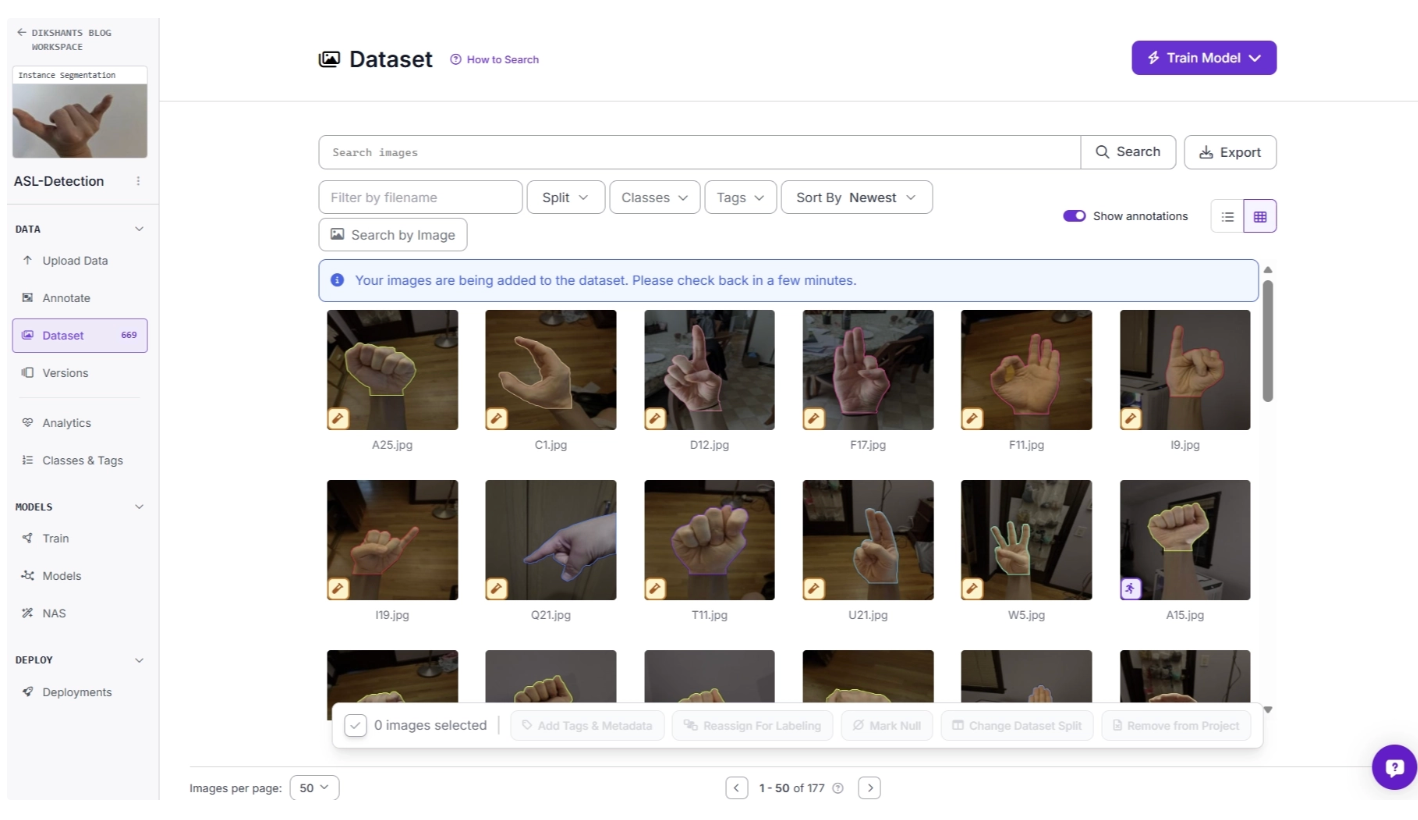
Once you decide to Train Model it should ask you to spilt the dataset into Train, Valid and Test as shown below:
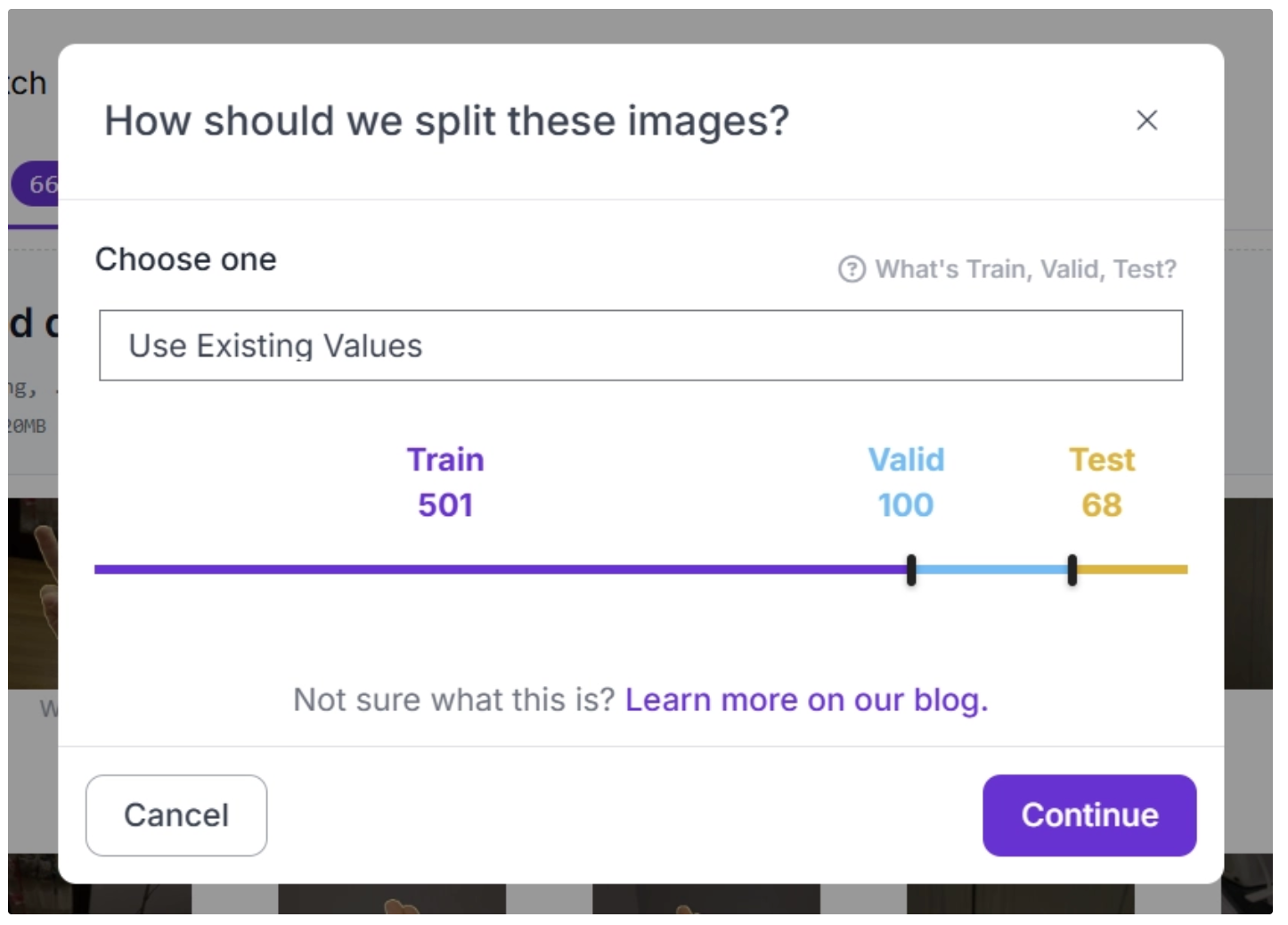
Then, you will be prompted to create a new dataset version as shown below. With Roboflow Train, you can apply various preprocessing and augmentation techniques to the dataset to improve variability and enhance training performance with just a few clicks.
Creating a dataset version after applying preprocessing and augmentations for training a segmentation model in Roboflow Train.
Once you have created a dataset version, you can use it to train an instance segmentation model with Roboflow Train. Here, you can choose a model architecture such as SAM 3, Roboflow RF-DETR, and more, and then initiate training as shown below.
Selecting the model architecture and initiating model training in Roboflow Train.
Once the model training is complete, Roboflow Train will send you an email with details about the training results and model performance.
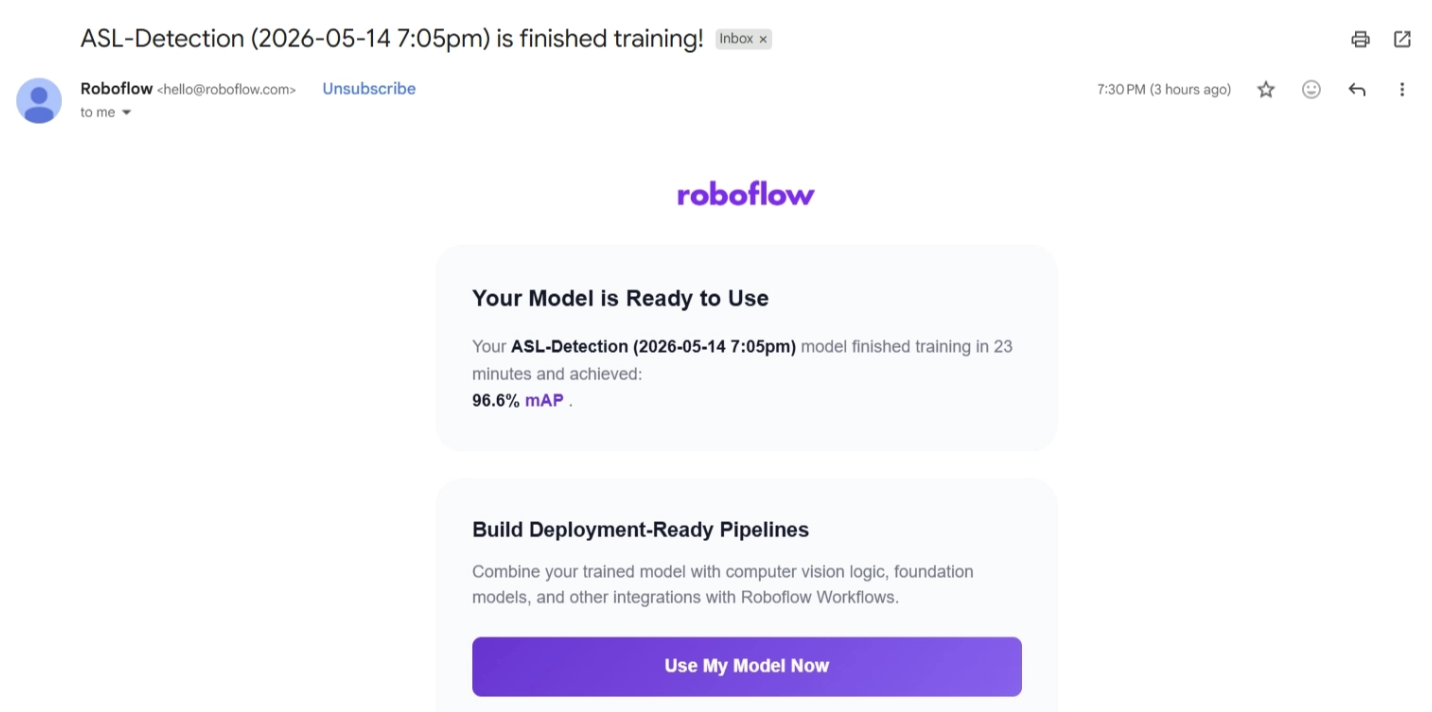
The trained model will be available in your workspace under Projects, where you can test it, as shown below.
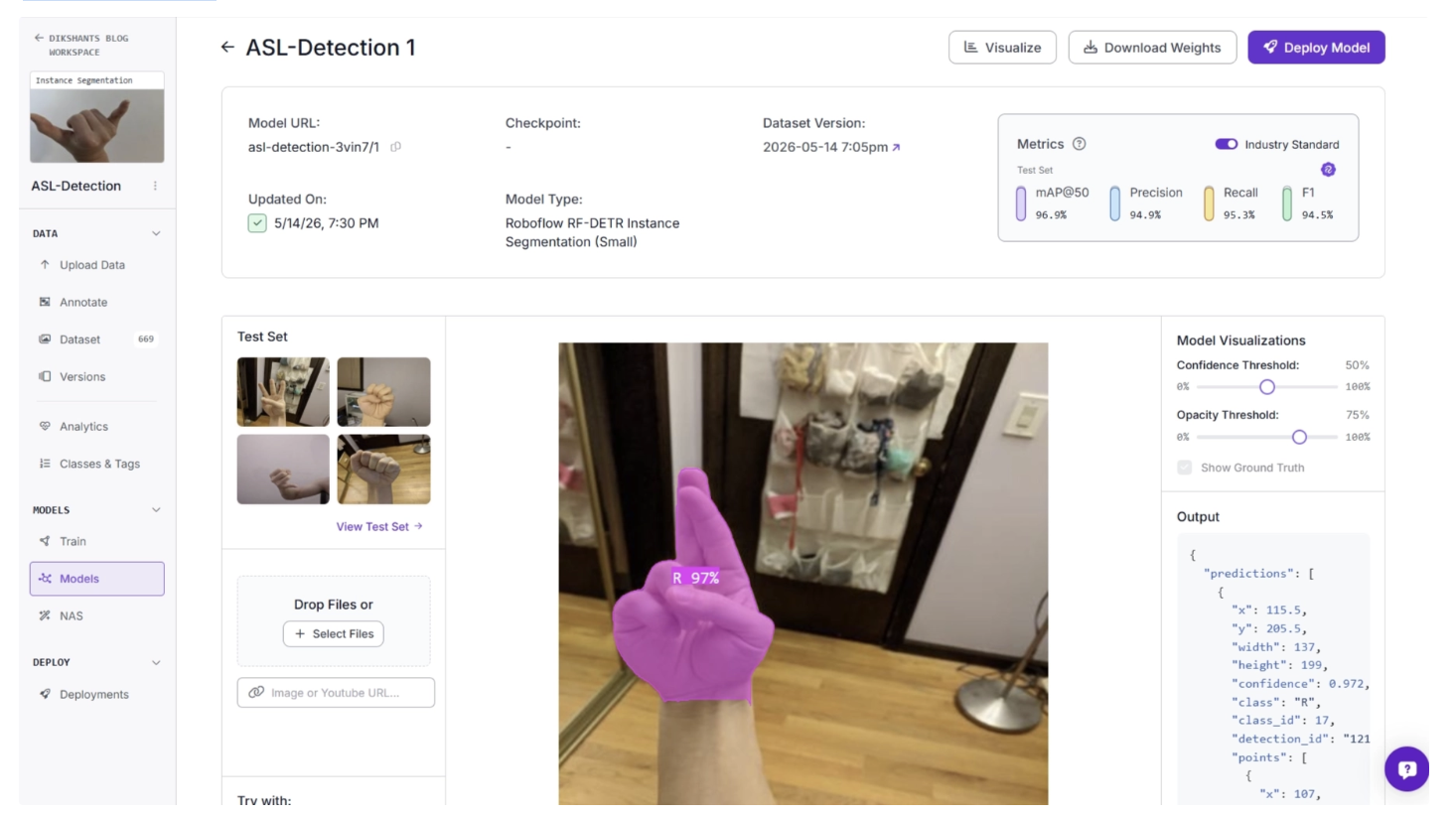
Above, we trained an RF-DETR-Seg model on the ASL dataset using Roboflow Train. Similarly, if you want to train segmentation models on your own device by exporting your dataset, you can follow the guides below.
- How to Train YOLOv11 Instance Segmentation on a Custom Dataset
- How to Train YOLOv8 Instance Segmentation on a Custom Dataset
- How to Train Detectron2 for Custom Instance Segmentation
Where Can I Get Instance Segmentation Datasets for my Models, and in What Format?
Roboflow Universe offers a wide range of datasets for various segmentation tasks that are readily available.
Various instance segmentation datasets available in Roboflow Universe.
You can fork, clone, or download datasets as ZIP files in formats such as COCO, SAM, and many more.
Among these, the most commonly used format for instance segmentation is the COCO format. It stores segmentation data as a series of x, y coordinate pairs, as shown below:
{
    "id": 4,
    "image_id": 1,
    "category_id": 2,
    "bbox": [
        273,
        451,
        98.81642999999997,
        119.86870800000003
    ],
    "area": 11844.99779327244,
    "segmentation": [
        [
            294.526515,
            451.00638,
            273.495847,
            518.689734,
            372.312277,
            570.875088,
            295.413657,
            452.786753,
            294.526515,
            451.00638
        ]
    ],
    "iscrowd": 0
}
You can easily import and export instance segmentation datasets in COCO format using Roboflow.
How to Use Instance Segmentation Models in Roboflow Workflows
Roboflow Workflows is a visual, low-code, drag-and-drop, web-based application that lets you build end-to-end computer vision applications by connecting different blocks such as AI models, image processing steps, and logic rules.It allows you to design, test, and deploy computer vision pipelines for tasks like object detection, tracking, and automation without needing to write complex code.
You can use Roboflow Agent to easily generate workflows for instance segmentation use cases.
Roboflow Agent acts as a conversational layer on top of Roboflow’s tools, such as Workflows. You can describe what you want in plain English, and it will handle the process of building it for you.
It provides a solid starting point while also giving you the ability to adjust workflows to fit your specific use case.
For example i asked it to generate a instance segmentation workflow using the prompt:
“Create me a workflow that uses RF-DETR Segmentation to segment cars in an image, visualize the segmented car with a colored mask.”
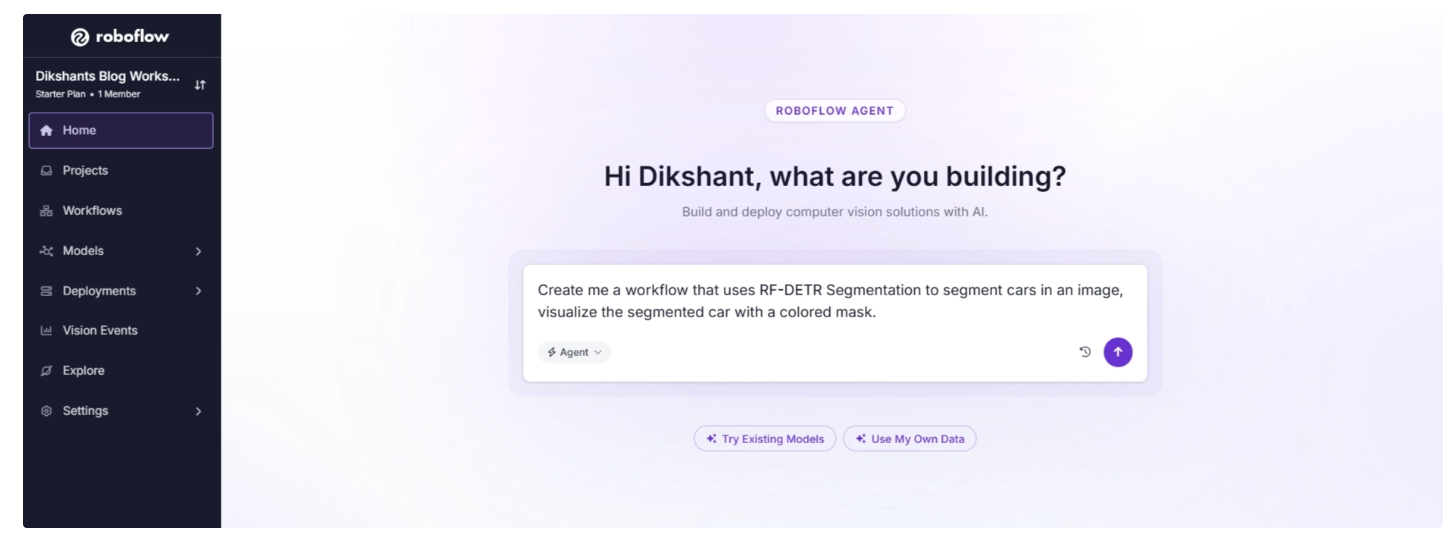
It generated the complete workflow as shown below. Based on the output produced by the agent on the test image, you can further customize the workflow using additional prompts or by clicking the blocks and configuring the parameters of individual blocks.
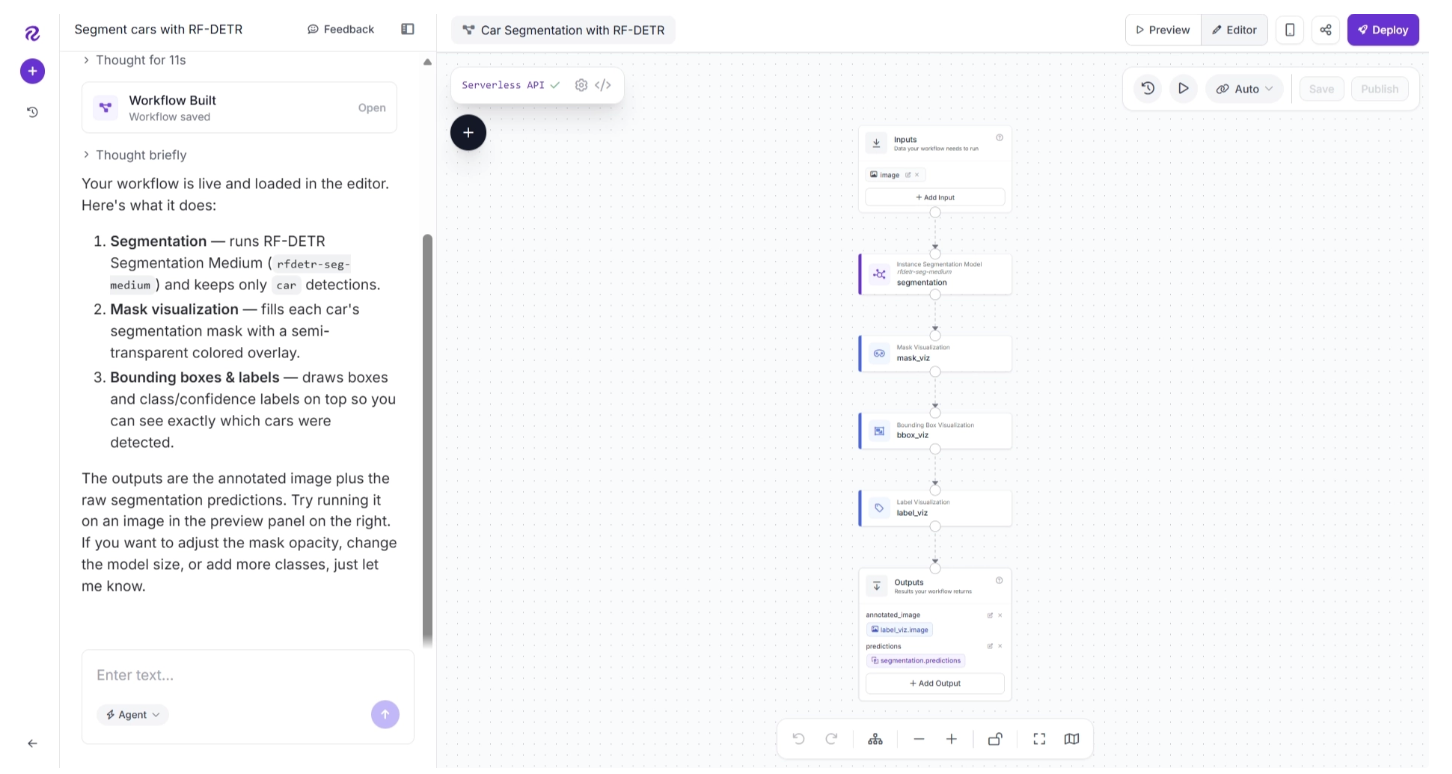
You can also ask the Agent which block is responsible for what in the output to understand where to focus when configuring the parameters.
The agent also provides a UI for you to evaluate and use the workflow directly.
Testing the car instance segmentation workflow generated by Roboflow Agent.
You can also use the previously trained ASL detection model in the agent-generated segmentation workflow by prompting the agent to switch the model used in the workflow. By default, the agent uses the RF-DETR-Seg model for segmentation.
For example i used the prompt:
“Now, instead of segmenting cars in images, use the newly trained ASL detection model in your workspace.”
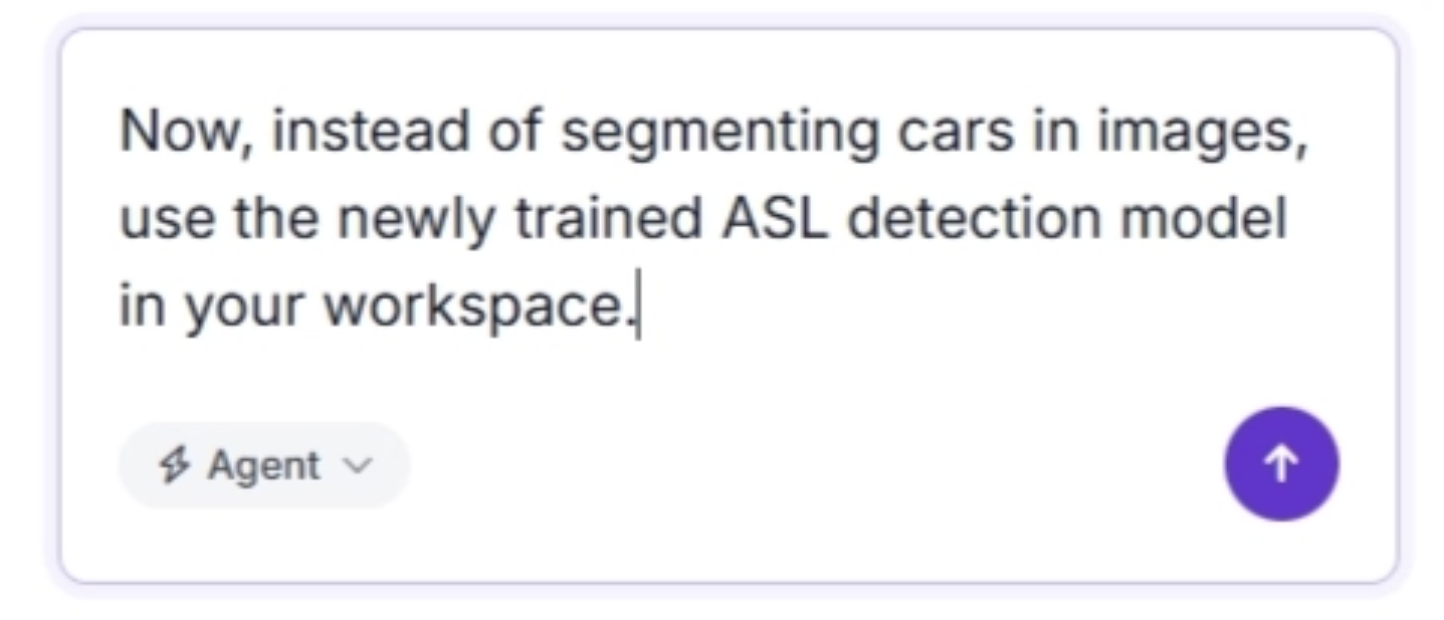
It changed the model with the ASL detection model we trained earlier.
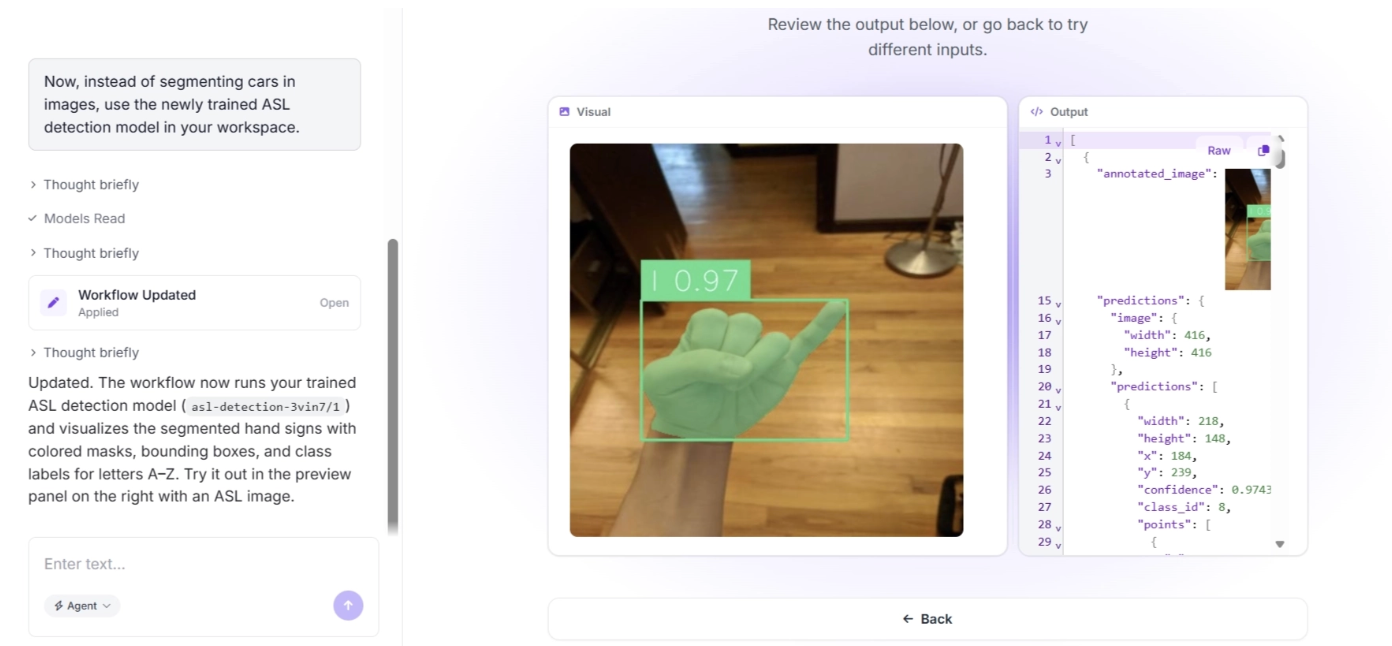
In this way, you can utilize Roboflow Agent to create workflows around your instance segmentation models. It provides a solid starting point while also giving you the ability to adjust workflows to fit your specific use case.
How to Train Instance Segmentation Models Without Labeling Data Using Roboflow Rapid
Roboflow Rapid is a tool that lets you quickly build and deploy custom computer vision models using just a few images or a short video along with text prompts.
Instead of manually annotating hundreds of images or video frames, you can simply enter prompts like “truck,” “helmet,” or “person,” and Rapid will automatically find and label those objects for you.
You can use it to train custom instance segmentation models tailored to specific use cases. It is especially useful for segmenting objects that are not included in standard COCO classes, which are typically the only classes supported by general-purpose segmentation models.
For example, the video below demonstrates the process of training a segmentation model with Rapid on a video containing bottle caps (here's the example I'll use), which we will later use in a workflow to generate instance segmentation masks for bottle caps.
Training a segmentation model in Roboflow Rapid to detect bottle caps.
Once trained, you can also access it in Workflows. Similarly, as demonstrated above, you can use Roboflow Agent to build a workflow using the trained Roboflow rapid model.
For example I used the prompt:
“I trained a model called ‘cap detector’ in roboflow rapid, create a instance segmentation workflow using the model.”
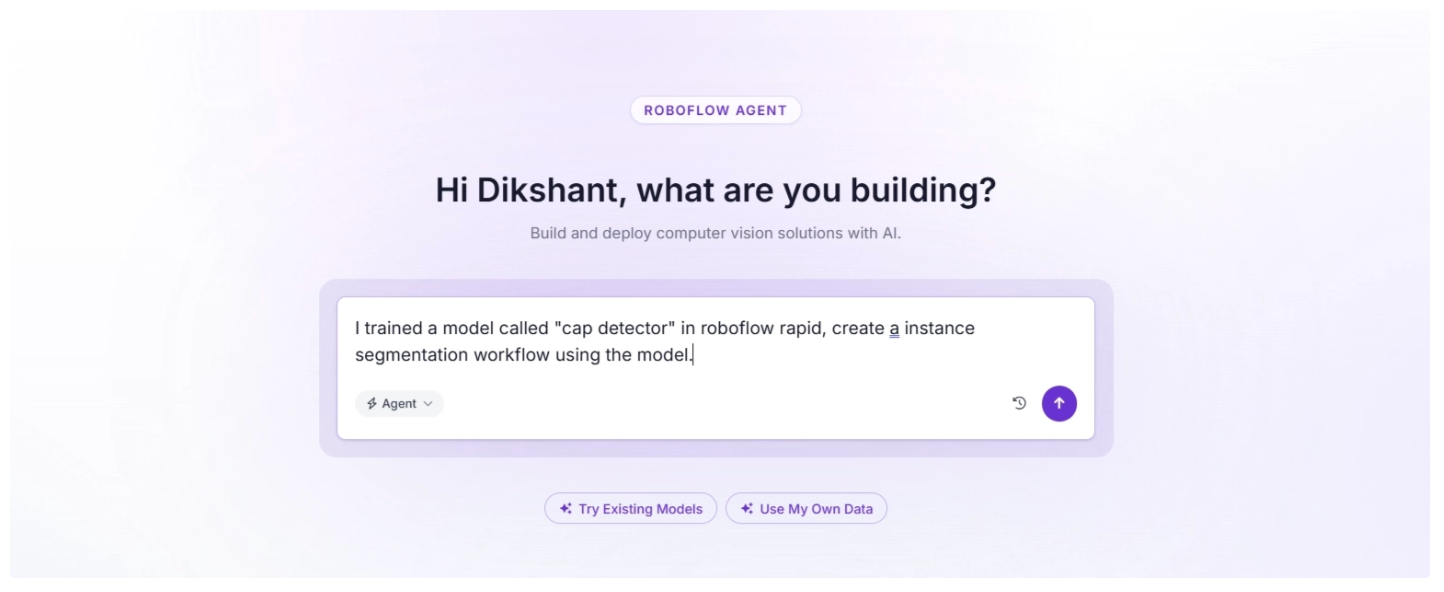
The workflow below was generated by the agent and uses the Rapid model trained above to segment bottle caps.
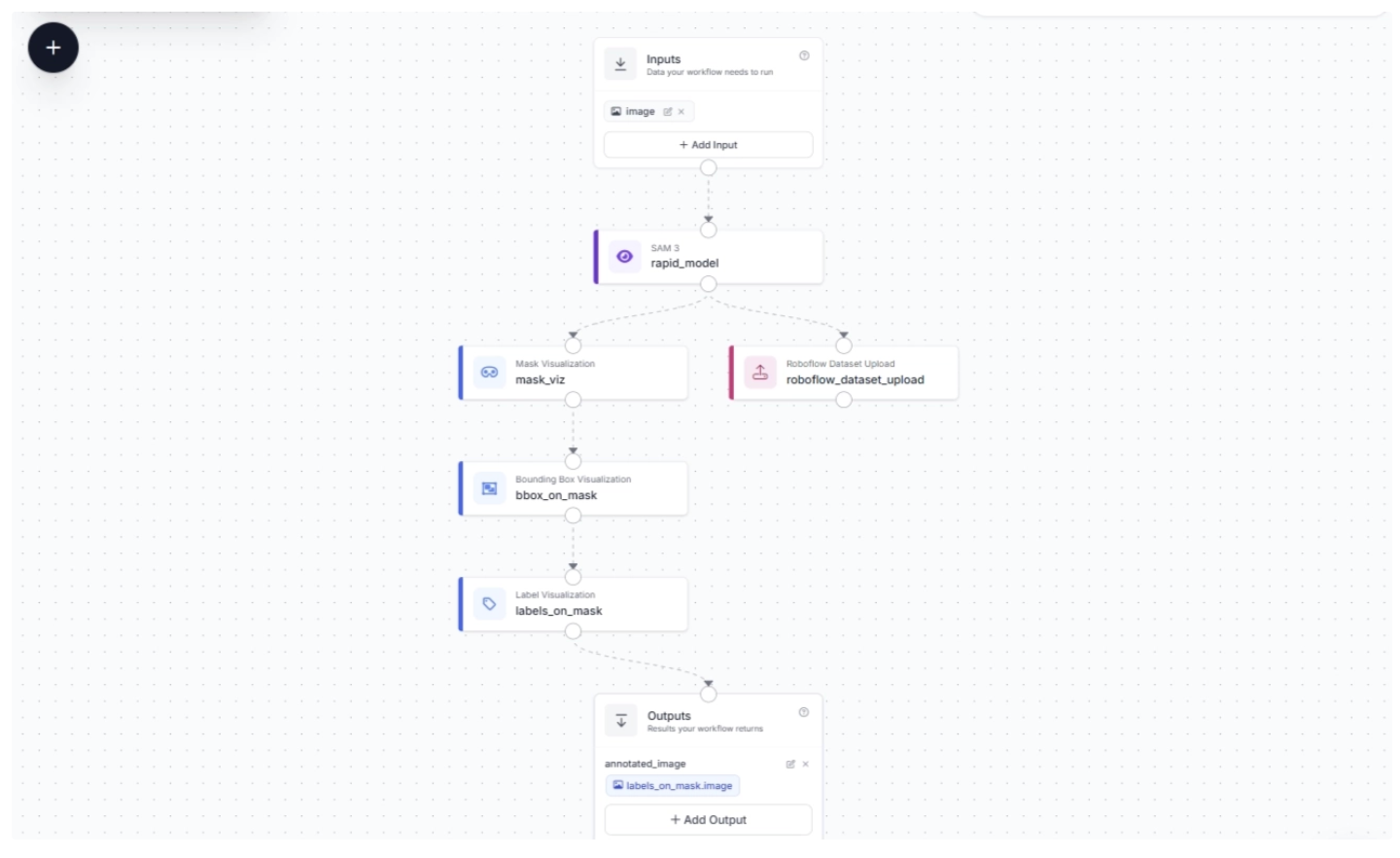
You can then run the workflow directly through the Agent UI to test its instance segmentation capability on an unseen image, as shown below.
The trained Roboflow Rapid model for instance segmentation of bottle caps correctly segments all bottle caps with high accuracy.
Roboflow Rapid works well for training segmentation models on a variety of objects outside the standard COCO classes covered by most segmentation models, without requiring labeled data for many use cases.
However, it may not cover every scenario. For example, in American Sign Language (ASL) detection, it may successfully segment hands, fists, and individual fingers, but it may not determine what those gestures actually represent. In such cases, a custom model trained on labeled images is necessary.
How to Deploy Instance Segmentation Pipelines Using Roboflow
Above, we explored various ways to train or use instance segmentation models through Roboflow. All of these models can be easily deployed in your projects using Roboflow Deploy.
Roboflow Deploy provides various self-hosted and Roboflow Cloud options for deploying models for inference.You can access the deployment code directly from all Roboflow tools by clicking the Deploy button, as shown below.
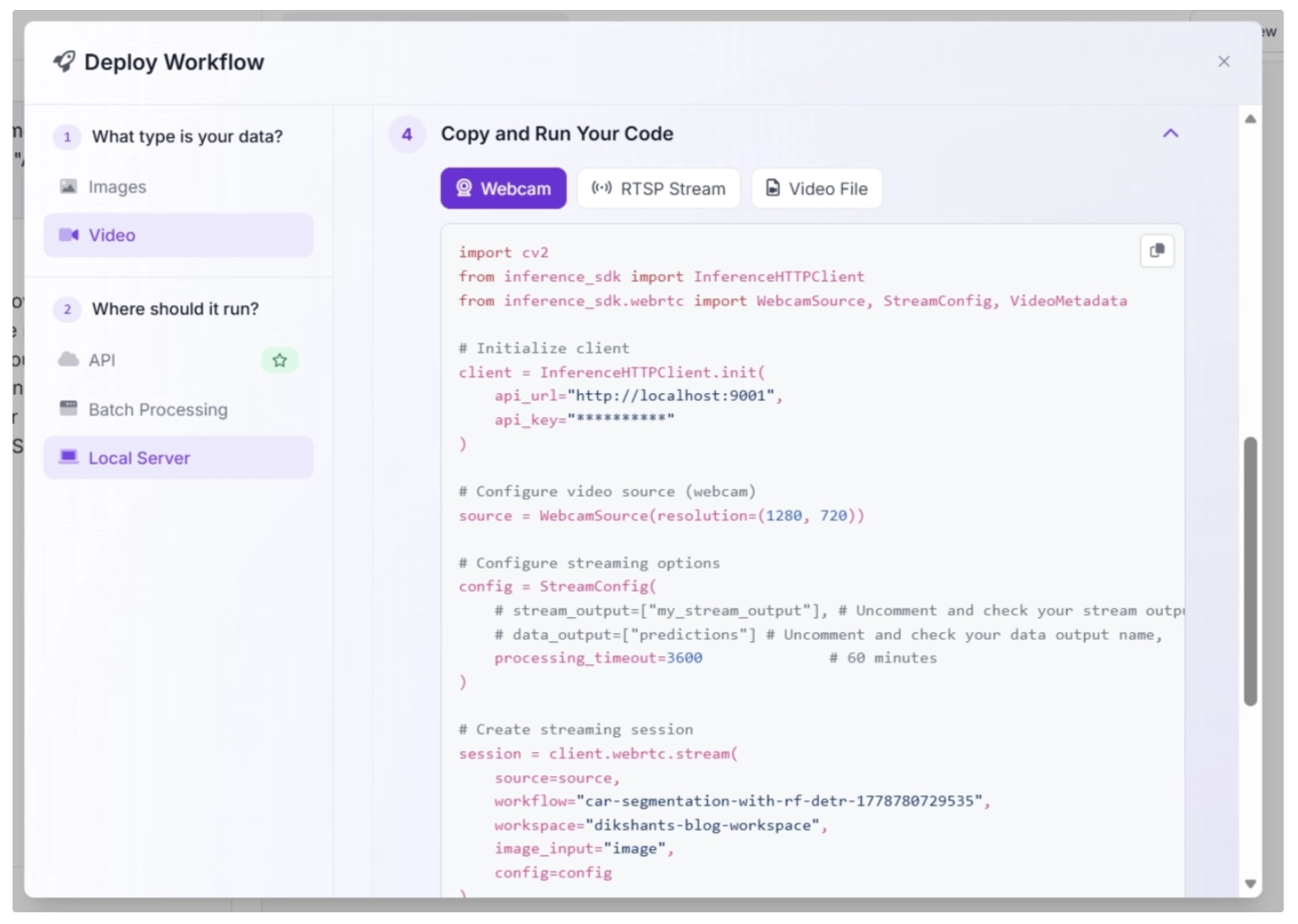
Check out this blog to learn more about deploying computer vision models and the various tools Roboflow provides to simplify deployment.
Why Use Roboflow for Instance Segmentation?
Instance segmentation is essential in computer vision because it gives precise, pixel-level understanding of each object in an image. But building a working pipeline for instance segmentation is difficult.
The main problems come from slow and inconsistent labeling, complex dataset formatting, heavy training setup, and extra engineering needed for deployment. Roboflow solves this by providing a complete end-to-end solution in one place.
With Roboflow Annotate, you can quickly create accurate segmentation masks using tools and AI assistance that reduce manual effort. Data can also be organized and versioned easily.
With Roboflow Train, you can train instance segmentation models without managing infrastructure or writing complex model architecture code.
Roboflow Universe helps you start faster by providing ready-to-use datasets, while Roboflow Workflows lets you turn models into full applications by adding logic and connecting processing steps with a drag-and-drop interface, reducing the need for code.
For faster prototyping, Roboflow Rapid helps generate labeled data quickly, Roboflow Agent enables you to build complete workflows and train models using natural language prompts, and Roboflow Deploy makes it easy to run models in production.
Overall, Roboflow removes the need to juggle multiple tools by offering a single pipeline for annotation, training, workflows, and deployment, making instance segmentation faster and more practical to build.
Get started for free, log in to your Roboflow account, create a new project, and choose the Instance Segmentation project type.


Cite this Post
Use the following entry to cite this post in your research:
Dikshant Shah. (Mar 25, 2026). A Complete Guide to Instance Segmentation. Roboflow Blog: https://blog.roboflow.com/instance-segmentation/