

Putting a computer vision system into production involves more than just building a prototype. A model may perform well in controlled settings, but real-world deployment introduces challenges such as infrastructure constraints, latency, reliability, and cost.
These practical hurdles create what is known as the deployment gap, which highlights the effort required to move from a functioning model to a production-ready system, and helps explain why 80% of computer vision projects fail after the training phase.
To address this gap, platforms like Roboflow provide end-to-end deployment solutions, supporting a wide range of models including SAM 3, RF-DETR, and YOLO.
How to Deploy Computer Vision
In this blog, I’ll walk you through the essential concepts for deploying computer vision systems with Roboflow, showing how to achieve reliable performance in production.
1. Choosing Your Inference Architecture
Choosing an inference architecture means deciding where your computer vision system will run its models.
Modern systems typically use one of three approaches: cloud, edge, or a hybrid of both. Each option comes with its own trade offs in latency, cost, scalability, and operational complexity.
Cloud Inference
Cloud inference involves running a machine learning or computer vision model on remote servers hosted by providers like Roboflow, AWS, Google Cloud, or Azure.
Instead of processing data locally, the system sends it over the internet to remote servers or model APIs, where the computation is performed and the results are returned.
When to Use Cloud Inference?
- Foundation Models: Use the cloud to access large, compute-intensive models that cannot run efficiently on local devices. Examples include SAM 3, Florence-2, visual language models (VLMs), and large language models (LLMs).
- High-Variability Workloads: The cloud is ideal for handling unpredictable or constantly changing data at scale.
- Rapid Experimentation & Prototyping: You can quickly test new models and iterate without provisioning local hardware.
- Massive Ensemble Reasoning: Cloud inference allows running multiple models in parallel to improve overall accuracy.
- Zero-Shot / Few-Shot Generalization: Cloud-based models available through APIs, such as GPT-5 and Google Gemini 3, can recognize new or unseen data without requiring retraining.
Advantages of Cloud Inference: Cloud inference lets you scale from a few images to millions without extra hardware, eliminates device maintenance, and provides easy access to cutting-edge models like Qwen3-235B that are impractical to run locally.
The Hidden Costs of Cloud Inference: Cloud inference incurs costs that grow with scale, poses privacy and compliance challenges under GDPR and the EU AI Act, can have unpredictable latency for real-time tasks, and adds expenses for transferring large volumes of data.
Roboflow Cloud Inference can be implemented in several ways:
- Serverless API: Run Workflows and model inference on GPU-accelerated, auto-scaling cloud infrastructure. Deployed models are accessible via a REST API for image inference.
- Serverless Video Streaming API: Process live video in the Roboflow Cloud by streaming from webcams, RTSP cameras, or video files via WebRTC, with inference results returned directly to your application.
- Dedicated Deployment: Use private Roboflow cloud servers for running computer vision models, including object detection, segmentation, classification, keypoint detection, CLIP, and low-code Workflows.
- Batch Processing: Efficiently run Workflows on large batches of images or stored videos. Ideal for asynchronous processing of high volumes of data, using CPU or GPU resources in the Roboflow Cloud.
Edge (On-Device) Inference
Edge inference is the process of running a machine learning or computer vision model directly at the edge, where the results are generated, on devices such as smartphones, IoT devices, embedded systems, industrial cameras, or edge computers like NVIDIA Jetson and Raspberry Pi, instead of sending the data over the internet to remote cloud servers for processing.
When to Use Edge Inference?
- Real-Time Robotics: Use edge inference when machines must react instantly to their environment, where even small network delays could cause failure or safety risks.
- Industrial Automation: Deploy models directly on factory hardware to ensure low-latency decision-making and uninterrupted operation, even if connectivity is unstable.
- Remote IoT Applications in Agriculture and Mining: In remote locations with limited or unreliable internet access, edge inference enables autonomous operation without constant cloud connectivity.
- High-Security Environments: Keep inference on-device when data cannot leave the premises due to security policies, regulatory requirements, or operational sensitivity.
- High-Resolution Streaming Constraints: Run detection locally when continuously streaming high-resolution video (e.g., 4K at 30 FPS) to the cloud would be too costly or bandwidth-intensive.
Advantages of Edge Inference: Edge inference offers near-instant decisions with sub-10ms speeds, works offline for reliability, avoids per-request cloud fees, and handles high-resolution data locally, making 4K streaming from many devices feasible.
Costs of Edge Inference: Edge deployment requires regular hardware maintenance, comes with high upfront costs for powerful devices, and adds management complexity such as monitoring device health, updating software, and ensuring consistent model performance across all devices.
You can run models and workflows on edge devices using Roboflow Inference, an open source package that manages model serving, video streams, preprocessing, and hardware optimization for efficient local deployment.
Hybrid Inference
Hybrid inference combines cloud and edge deployments to take advantage of both real-time processing and powerful cloud-based reasoning.
In this setup, edge devices handle immediate decisions using lightweight models, while uncertain or low-confidence cases are sent to the cloud for deeper analysis. The cloud can also retrain models with these cases, then updates edge devices, creating a continuous learning loop.
Roboflow enables this through inference-agnostic workflows, allowing the same workflow logic to run on any device or cloud instance without modification.
Advantages of Hybrid Inference
- Low Latency for Critical Decisions: Edge devices handle real-time tasks locally, ensuring near-instant responses.
- Reduced Bandwidth Usage: Only uncertain or complex data is sent to the cloud, lowering network load and data transfer costs.
- Continuous Learning: Edge devices send low-confidence cases to the cloud for retraining, keeping models updated automatically.
A modern License Plate Recognition pipeline is a clear example of how edge and cloud inference work together in a hybrid architecture.
The workflow below demonstrates this end-to-end pipeline: edge-based object detection identifies vehicles and license plates, crops the relevant regions, and forwards them to the cloud, where advanced language-vision model (Open AI’s GPT-4 Vision) extract and interpret the license plate text:
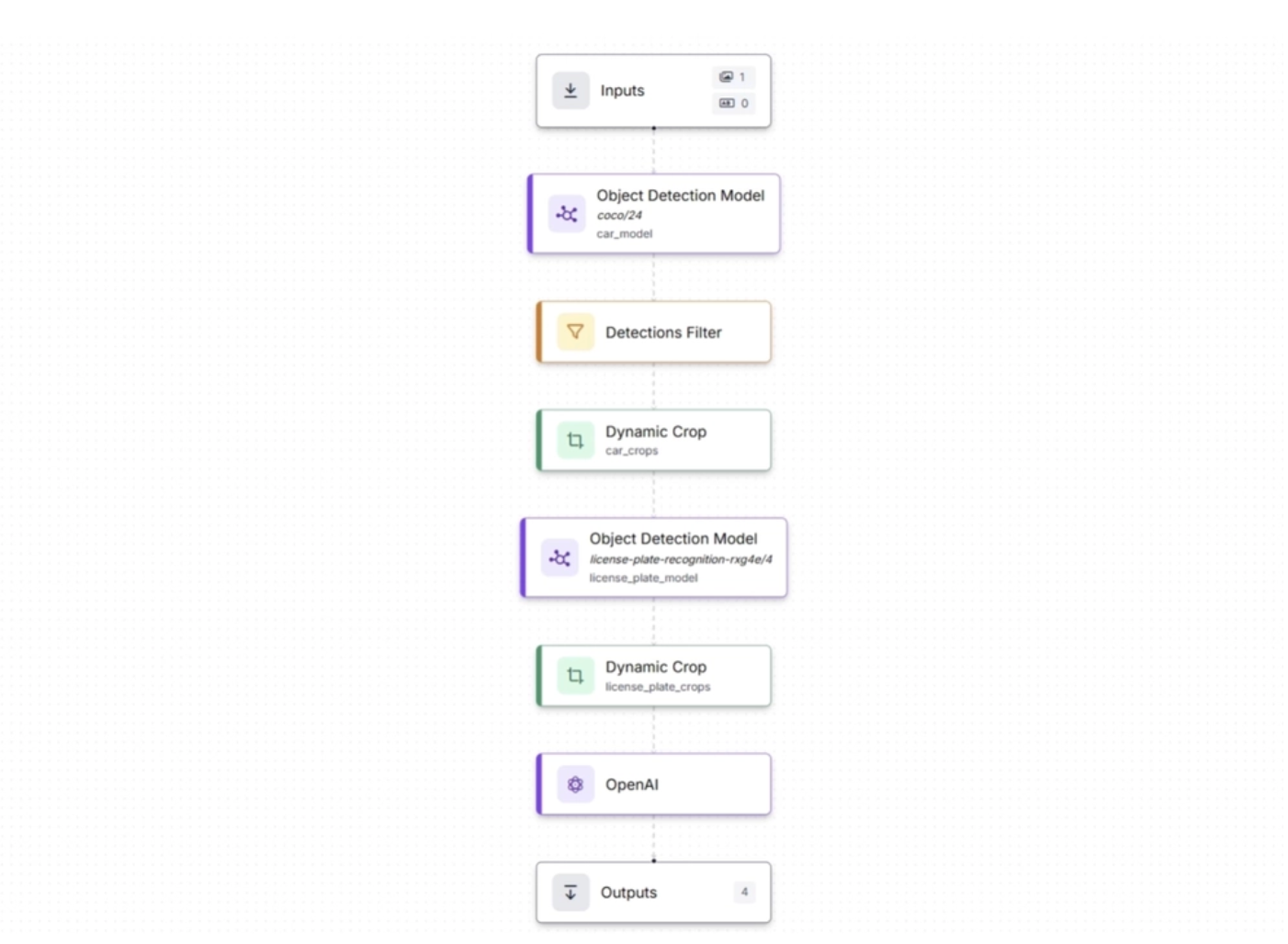
This system preserves bandwidth by sending only cropped license plate images, reduces costs by minimizing data transfer and cloud compute usage, and maintains high detection quality through local high-resolution processing. You can read more about the above workflow in this blog.
Rather than choosing between edge and cloud, hybrid inference combines fast on-device processing with deeper cloud-based reasoning.
2. The Hardware Stack
Roboflow Inference is designed for edge environments and supports a wide range of hardware, allowing you to balance performance, cost, and power efficiency based on your use case.
Some supported device types include:
- NVIDIA Jetson series: Compact and power-efficient edge AI modules from NVIDIA that combine GPU, CPU, and dedicated accelerators. They are well suited for real-time robotics, drones, and smart cameras. Roboflow provides optimized Docker containers with TensorRT to maximize inference performance.
- Roboflow Flowbox: A Jetson-based device built for manufacturing and logistics environments. It comes preconfigured with Roboflow Inference, supports industrial cameras such as Basler and Lucid over GigE, integrates with PLCs and HMIs via OPC or MQTT, and includes enterprise-grade device management.
- Raspberry Pi: A low-cost single-board computer powered by an ARM CPU. Roboflow Inference can run on Raspberry Pi 4 (64-bit Ubuntu). While it does not match GPU performance, it works well for lightweight models in cost-sensitive or space-constrained deployments.
- Luxonis OAK cameras: Embedded vision devices that integrate a neural compute engine (Intel Myriad X VPU) directly into the camera. This allows on-device inference without requiring a separate compute unit, making them ideal for compact and efficient deployments.
3. Optimizing for Speed
Once a model is deployed in production, computer vision systems need to be optimized for both speed and efficiency. Several techniques can help achieve this:
Optimize Your Input
A highly effective strategy for improving inference speed is to process only the data that is necessary.
For instance, if a camera captures video at 4K resolution (3840×2160) but the model was trained on 640×640 images, additional computational resources are expended resizing frames during inference. Each extra pixel increases the number of operations required by the model, thereby reducing overall processing efficiency.
To address this, input resolution should be aligned with the model’s training resolution. Most detection models, including RF-DETR and YOLO variants, are generally trained on images approximately 640×640 in size.
Transmitting full 4K frames only to downscale them introduces unnecessary overhead, as significant computational effort is devoted to processing pixels that do not contribute to improved model performance.
Choose the Right Model Architecture
Model selection is one of the biggest factors affecting performance. Every architecture involves a trade-off between accuracy and speed.
Most model families offer a range of sizes, typically spanning from Nano to Large, to accommodate different performance and resource requirements.
- Smaller models (RF-DETR Nano) run much faster with a slight drop in accuracy
- Larger models (RF-DETR Large) improve accuracy but reduce FPS
A practical strategy is to start with Nano or Small models, such as YOLO26 or RF-DETR Nano, and increase the size only if accuracy is insufficient. This approach avoids unnecessary computation and helps maintain real-time performance.
Hardware Acceleration
Software optimization alone is not enough because hardware ultimately determines how fast your system can run. GPU is the most common Hardware Acceleration in Computer Vision.
While CPUs can handle basic tasks, they quickly become a bottleneck as model complexity or data throughput increases.
Running inference on a CPU is feasible for simple models or low-throughput applications, but for real-time performance, a GPU is almost always necessary.
NVIDIA GPUs with CUDA cores are the industry standard for computer vision inference. The parallelism of GPU architecture, thousands of cores running matrix operations at the same time, is a natural fit for neural network computation.
For example, a YOLOv8-Nano model might run at 5-10 FPS on a modern laptop CPU, while the same model on an NVIDIA T4 GPU achieves 60+ FPS.
This represents not a marginal improvement but a difference between a system that is impractical for real-time use and one that is production-ready.
If local GPU hardware is unavailable or scalable infrastructure is required, Roboflow Cloud options provide a reliable alternative.
Model Quantization and Compilation
Optimizing a model before deployment with quantization and compilation makes it smaller, faster, and more power-efficient, ensuring efficient performance on target hardware for real-time or edge applications.
Model Quantization
Quantization reduces the precision of the model’s weights and activations, typically from 32-bit floating-point numbers (FP32) to 16-bit (FP16) or 8-bit integers (INT8). This has several benefits:
- Smaller model size: Less storage and memory usage.
- Faster inference: Integer operations are quicker than floating-point.
- Lower power consumption: Useful for mobile, embedded, or battery-powered devices.
There are different types of quantization:
- Post-training quantization: Apply quantization after the model is trained.
- Quantization-aware training: The model is trained while considering lower precision, which usually preserves accuracy better.
Roboflow provides automated tools to perform quantization on supported models for deployment on CPUs, GPUs, and edge devices like NVIDIA Jetson or Luxonis OAK cameras.
Model Compilation
Compilation is the process of transforming a trained model into a hardware-optimized format so it can run efficiently on specific devices. This often involves:
- Converting the model into formats like ONNX, TensorRT, CoreML, or TFLite.
- Applying device-specific optimizations such as layer fusion, operator simplification, and memory optimization.
Benefits include:
- Reduced latency: Faster execution on the target device, with a 2× to 5× speed boost using TensorRT or ONNX.
- Better hardware utilization: Leverages GPU cores, TPUs, or NPUs effectively.
- Deployment readiness: Creates a single optimized file for the target hardware.
In Roboflow, compilation is often combined with quantization to get the fastest and smallest models ready for production.
For example, a YOLOv8 model could be quantized to INT8 and compiled to TensorRT for deployment on a Jetson device, allowing real-time inference at high FPS.
Optimize the Software Pipeline
Even with the fastest GPU and most efficient model, FPS can drop if your software pipeline becomes the bottleneck. Roboflow provides tools to maximize throughput and maintain smooth performance such as:
Parallel Processing
Roboflow Parallel Processing is designed to fully utilize your hardware by running multiple models concurrently and efficiently managing each step of inference. Specifically:
- Multiple models can run simultaneously with Roboflow Inference Parallel, which processes requests asynchronously.
- Preprocessing, batching, inference, and post-processing operate in separate threads to boost server FPS.
- Requests to the same model are automatically grouped when possible, while responses are handled independently. Images are shared in memory to improve efficiency.
- Benchmarks show up to 76% faster performance and higher FPS compared to standard setups.
Inference Pipeline for Video
The Inference Pipeline for Video lets you handle live streams and video files efficiently, ensuring real-time performance even when processing multiple video sources. Specifically:
- This asynchronous interface is designed for real-time video streaming, supporting webcams, RTSP streams, video files, and other sources.
- Frames are captured, buffered, processed, and delivered asynchronously, with older frames automatically skipped to maintain accuracy in real time.
- The system ensures stable performance by managing processing speed to prevent overload.
Batched Inference
Roboflow Batch Inference provides an easy way to process large volumes of images or videos efficiently, handling infrastructure and scheduling automatically. Specifically:
- Ideal for large sets of images or stored videos, Batch Processing leverages Roboflow Workflows to automatically provision the infrastructure needed.
- Jobs can be configured through the web interface or API, providing a fully managed solution for both small and large workloads.
- The interface combines a simple UI for quick tasks with a powerful API for automated pipelines, allowing high-volume processing without writing code.
4. Building the Logic Layer with Roboflow Workflows
Most computer vision systems need a logic layer to define how model outputs translate into real-world actions and to manage any preprocessing required before inputs reach the model.
This is where workflow orchestration becomes essential. It connects models, decisions, and actions into a structured pipeline that can run reliably without constant manual intervention.
With Roboflow Workflows, this logic layer can be built visually. Instead of writing complex orchestration code, you create pipelines by chaining modular blocks using a drag-and-drop interface.
Each block represents a specific step in the decision-making process, making the system easier to build, understand, and scale.
These modular, prebuilt components in Roboflow Workflows, known as workflow blocks, can be grouped into the following categories:
- Models: Run a fine-tuned or foundation model, such as SAM 3, YOLO26-Pose, Depth Anything 3, etc.
- Visualizations: Visualize the output of a model using techniques like Keypoint Visualization, Polygon Visualization, Crop Visualization, etc.
- Logic and Branching: Control the flow of your workflow with blocks such as Continue If, Detections Filter, etc.
- Data Storage: Save data in a Roboflow dataset or an external database.
- Notifications: Send alerts, such as an SMS message or email.
- Video Processing: Analyze the contents of videos with tracking algorithms, time-in-zone analysis, and line-crossing checks.
- Transformations: Manipulate image and prediction data using transformations like Detection Offset, Detections Merge, etc.
- Classical Computer Vision: Run classical computer vision tasks, such as edge detection, template matching, and size measurement.
- Enterprise: Connect Roboflow to your enterprise systems using protocols such as MQTT, OPC UA, or Modbus TCP.
- Advanced: Advanced blocks for specific use cases, like PASS/FAIL analysis, data caching, and embedding similarity.
- Custom: Create and run custom blocks using Python.
Together, these blocks allow you to turn raw model predictions into a complete, automated system that can make decisions and take action in real time.
For example, the workflow below takes an image of bottles in a crate and counts them. It first uses a Vision Language Model (VLM) to estimate the number of bottles, then runs RF-DETR to count them again. The results are compared to create a consensus.
If both models return the same count, the result is accepted. If the counts differ, the image is flagged for review and an email (or alternatively a Slack notification, etc.) is automatically sent.
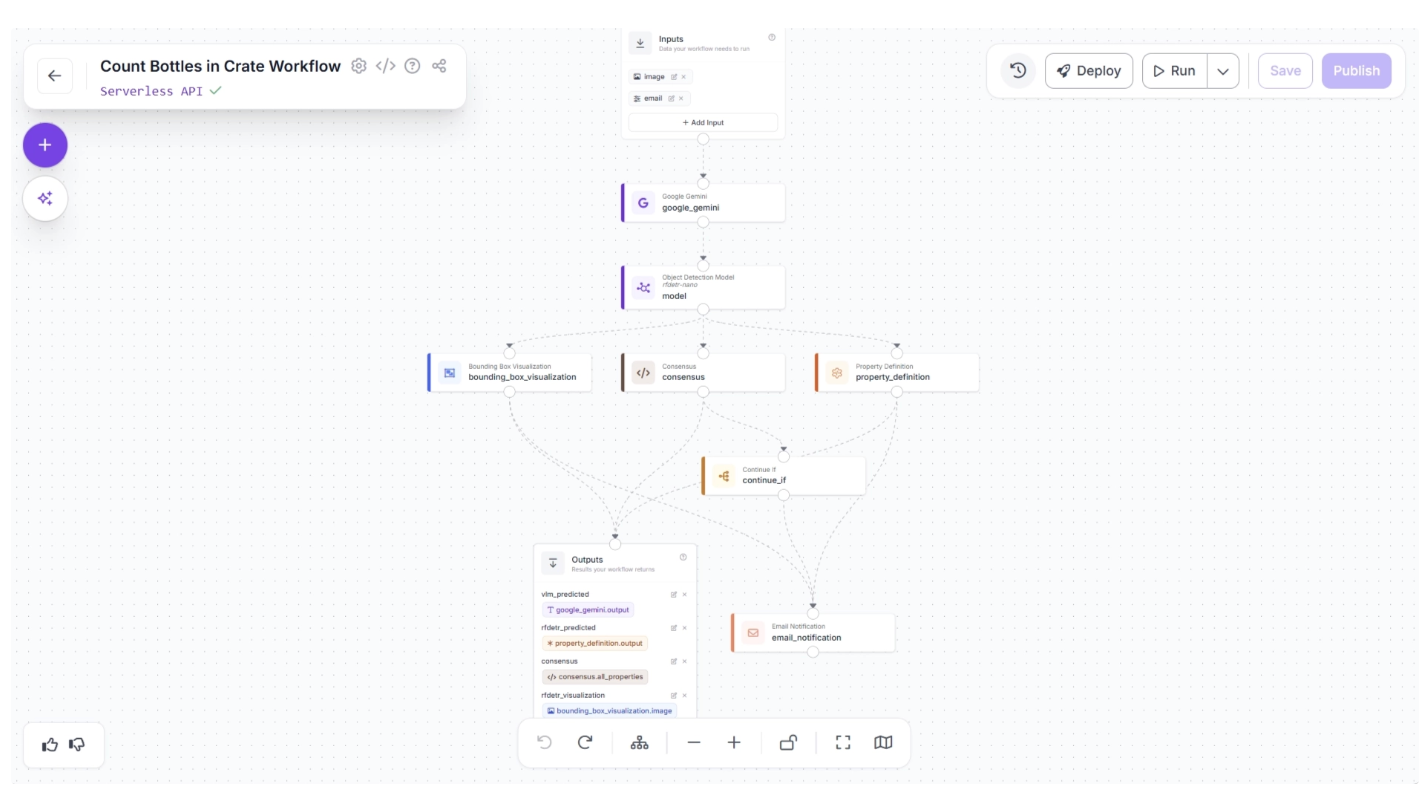
The output received when consensus between the models is not met is shown below in the email.
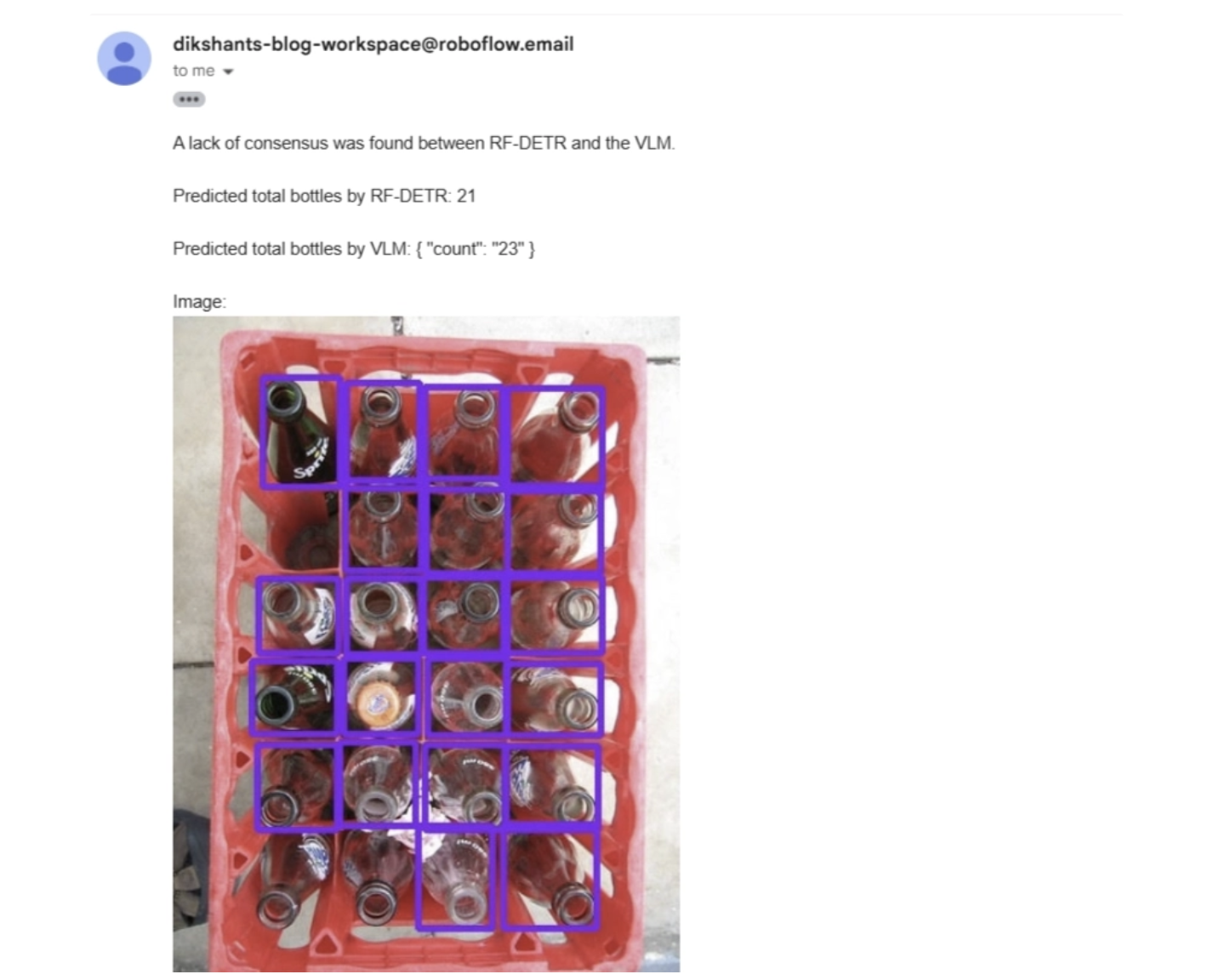
All of this happens within a single workflow, which you can build in minutes. Without Roboflow Workflows, creating the same system would typically take about a week of engineering work and require a lot of boilerplate code.
5. Maintaining Operations (MLOps)
To keep a computer vision system running smoothly in production, it is crucial to implement processes for ongoing monitoring, continuous improvement, and scalable management.
These processes include monitoring model drift, employing active learning, and enabling remote deployment across multiple devices:
Monitoring Model Drift
Detecting drift requires continuous monitoring of predictions, confidence levels, and error rates. When model performance drops, teams must identify whether the cause is changes in data distributions, hardware updates, or shifts in operational conditions.
Without proper monitoring, model degradation can go unnoticed until it begins affecting operations.
To make this process easier and more actionable, Roboflow Model Monitoring provides a dashboard that gives clear insights into how your deployed vision models are performing. You can track overall performance over time or examine individual inference requests to evaluate edge cases.
With Roboflow Model Monitoring, you can:
- Check whether devices are online or offline
- Track the number of inferences from each device
- Monitor the average and median confidence of predictions
- Measure average inference time
- Inspect individual prediction results, including detections
- View the actual images used in inference requests
- Access your custom metadata in the dashboard
- Receive alerts when key events occur or anomalies are detected
The video below demonstrates the Roboflow Model Monitoring dashboard:
Active Learning
Active learning is a strategy for keeping model performance high by automatically flagging uncertain predictions for human review and adding these newly labeled examples back into the training dataset to allow continuous improvement.
Over time, this loop produces increasingly accurate and robust models. The cycle goes: Deploy → Collect Data → Retrain → Redeploy.
In Roboflow Workflows, a Dataset Upload Block can handle this efficiently, for example, uploading just 5 percent of images processed on a production line.
One such active learning workflow example is shown below, where the workflow runs on an edge device and both the predictions and the original images are sent to the cloud and saved as part of a dataset for future model training:
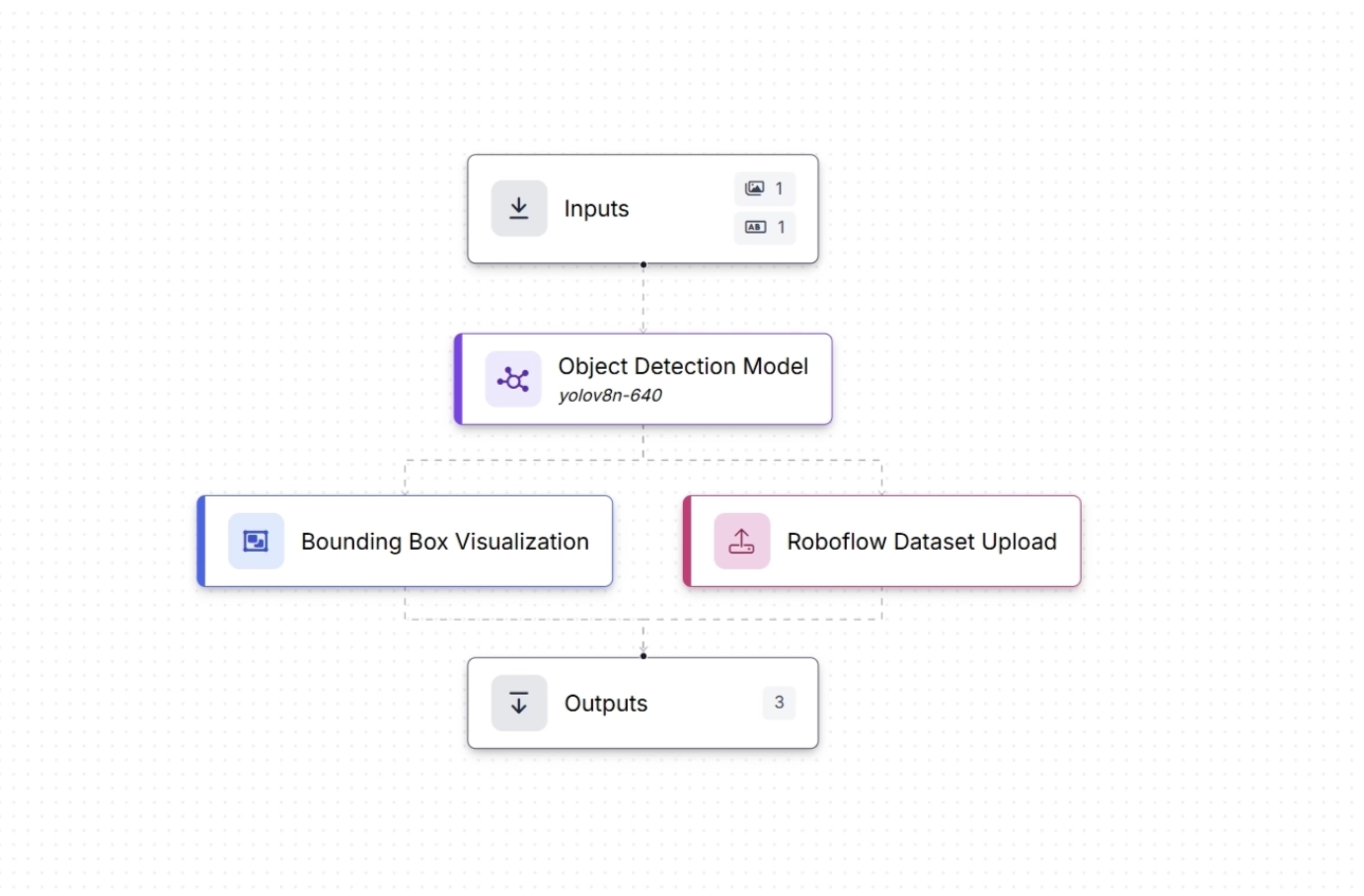
The video below demonstrates the same workflow tested on the Roboflow web app using an image of a container, where both the image and the generated predictions are sent to the cloud (Roboflow Universe) by the workflow and can be used to train new versions of the model.
This blog explains the complete active learning loop shown in the video above.
Remote Deployment at Scale
Remote Deployment at Scale means setting up and running computer vision models across many devices or locations without needing to be physically present at each device.
Instead of deploying a model manually on a single machine, the system can push updates, manage, and monitor models remotely across multiple servers, edge devices, or cameras.
The following Roboflow features allows Remote Deployment at Scale:
Remote Updates and Management
- Models can be updated remotely through Roboflow Deployment Manager and Inference Server. When a new version is pushed, connected edge devices automatically receive the update via polling or configuration pulls.
- Monitoring dashboards show model performance, error rates, and inference logs, letting you track drift or failures across all deployments
Scalable API Endpoints
- Roboflow provides endpoints for your models and workflows, so multiple applications or devices can access the same model simultaneously.
- This avoids the need to manually install models on each device, and can be directly accessed via API making it easier to update models without pushing new app releases.
Versioning and Rollback
- You can deploy multiple versions of a model and switch between them without disrupting operations.
- This is crucial for large-scale deployments where one bad update could affect many devices.
Conclusion: Deployment is a Loop, Not a Destination
Deploying a computer vision system is not a single step; it is a continuous process of improvement. A model progresses from development to deployment, yet its real-world effectiveness depends on ongoing monitoring and refinement.
In production, incoming data, shifting conditions, and evolving requirements ensure that even top-performing models will gradually lose accuracy.
This is why successful systems follow a continuous loop: deploy models into real environments, monitor their performance and behavior, and iterate by retraining and optimizing based on new data.
Roboflow simplifies this entire lifecycle, making it easier to manage, scale, and evolve your computer vision applications. Deploy your first computer vision system in under 5 minutes with Roboflow.
Written by Dikshant Shah
Cite this Post
Use the following entry to cite this post in your research:
Contributing Writer. (Mar 19, 2026). How to Deploy Computer Vision. Roboflow Blog: https://blog.roboflow.com/how-to-deploy-computer-vision/