

This tutorial builds a highlight-cutting pipeline for kids' soccer footage: two RF-DETR models trained in the Roboflow UI (a player/ball/goal detector and a jersey digit detector) run inside a Roboflow Workflow with BoT-SORT tracking, and a local Python pipeline turns those detections into jersey numbers, a single tracked kid, detected goals, and a finished highlight reel. A small FastAPI web app wraps the whole thing so a parent can upload a game, click their kid once, and get clips back.
If you've ever stood on the sideline of a soccer game, you've probably seen a few parents film matches and segments of the game on their phone. Somewhere in there are the eleven seconds grandma actually wants to see.
I wanted to fix that with computer vision. The idea is that clips can be uploaded into a web app and the computer vision system would be able to track the ball and every player, read jersey numbers, find the goals, and hand back a highlight reel with every play your kid was part of.
Detection and tracking run in a Roboflow Workflow on two trained models. Everything downstream (jersey-number voting, identity stitching, goal scoring, and clip cutting) is a local Python pipeline.
I'll show you how you can build it too. Follow along with this github repository.
Using Computer Vision to Make Automatic Highlight Reels
The eyes are a Roboflow Workflow. It runs object detection on every sampled frame, tracks the people with BoT-SORT, and emits per-frame observations: players with stable track ids, the ball, and goal boxes.
The memory is the local pipeline. It runs through the sampled frames once, collects those observations into a list, and every later stage just works off that list. Each stage also caches its output, so re-tuning the goal scoring never re-runs detection. Detection is the expensive part, and I re-tuned everything else constantly, so this saved me a lot of time.
The judgment happens in three stages: reading jersey numbers, deciding which tracks belong to your kid, and scoring goal moments. Each one gets its own section below, because each one broke in an instructive way first.
The output comes from ffmpeg: a combined highlight reel, individual per-goal clips, and an annotated debug video that shows what the models saw on every frame.
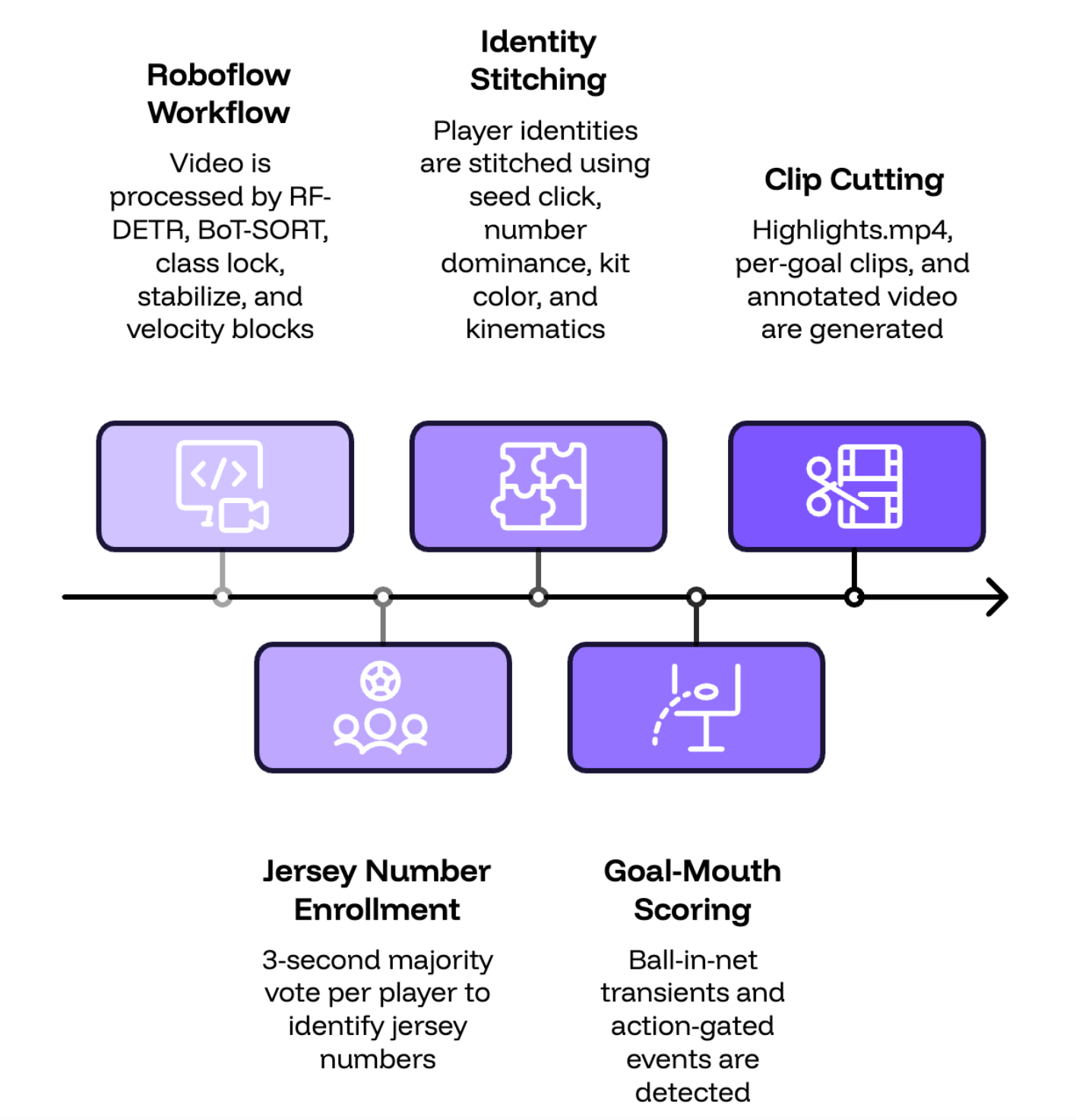
One thing to set upfront is that this is a prototype, not a product. You'll notice in the demo that tracking isn't perfect. Boxes and jersey numbers are occasionally confused in certain frames. That's expected at this stage since the system is built so that every processed video shows you exactly where the models struggled, and every correction you make becomes training data that improves the next run. The interesting engineering is in keeping identity locked on one specific kid despite those imperfections, through occlusions, identical uniforms, camera panning shakiness.
The Two Models
Before starting, you do need two models, and both were trained entirely in the Roboflow UI: fork a Universe dataset, generate a version, hit train.
The detector is RF-DETR-small trained on a futsal dataset from Roboflow Universe, with five classes: player, goalkeeper, referee, ball, goal. Mine sits at mAP50 90.1. Futsal footage transfers to outdoor soccer better than you'd expect for people and balls, and worse than you'd expect for goals, which shapes a threshold decision in the workflow section below. If you really want to go further and rely fully on this, I’d recommend taking some time to add some of your own footage. You upload a few clips of your kid playing, annotate them, and add them to the dataset before training your RF-DETR small model. Here’s an article to help you with that.
The digit detector is RF-DETR-nano with classes 0 through 9, trained on a jersey number dataset. mAP50 95.7. The trick here is that the detections' classes are the characters, so there's no OCR model anywhere in the stack. Reading a number is just object detection plus sorting boxes left to right.
The pipeline treats model ids as config, so retraining either model is a one-line swap and nothing else changes.
Get the Code
Everything lives in one repository at github.com/aarnavshah12/reelcut:
git clone https://github.com/aarnavshah12/reelcut.git
cd reelcut
uv sync
echo 'ROBOFLOW_API_KEY=...' > .env
uv run uvicorn reelcut.webapp:app --port 8008    # → http://localhost:8008
The project uses uv for dependencies, so uv sync is the entire setup. Your Roboflow API key goes in .env, which is gitignored, and the repo ships an .env.example beside it. The bundled ffmpeg comes from imageio-ffmpeg, so there's nothing to install system-wide. The web app and the CLI share one config module, so anything you can do in the browser, you can also do from the terminal.
Build the Workflow, Block by Block
The tracking pipeline is a Roboflow Workflow called reelcut-tracking, assembled visually in the Workflows editor and fetched from my workspace at runtime. The JSON in the repo's workflows/ folder is just the editable mirror I push from, so the workflow you run is always the one saved in the editor. Here's mine block by block, where each one is a block you drag in and configure.
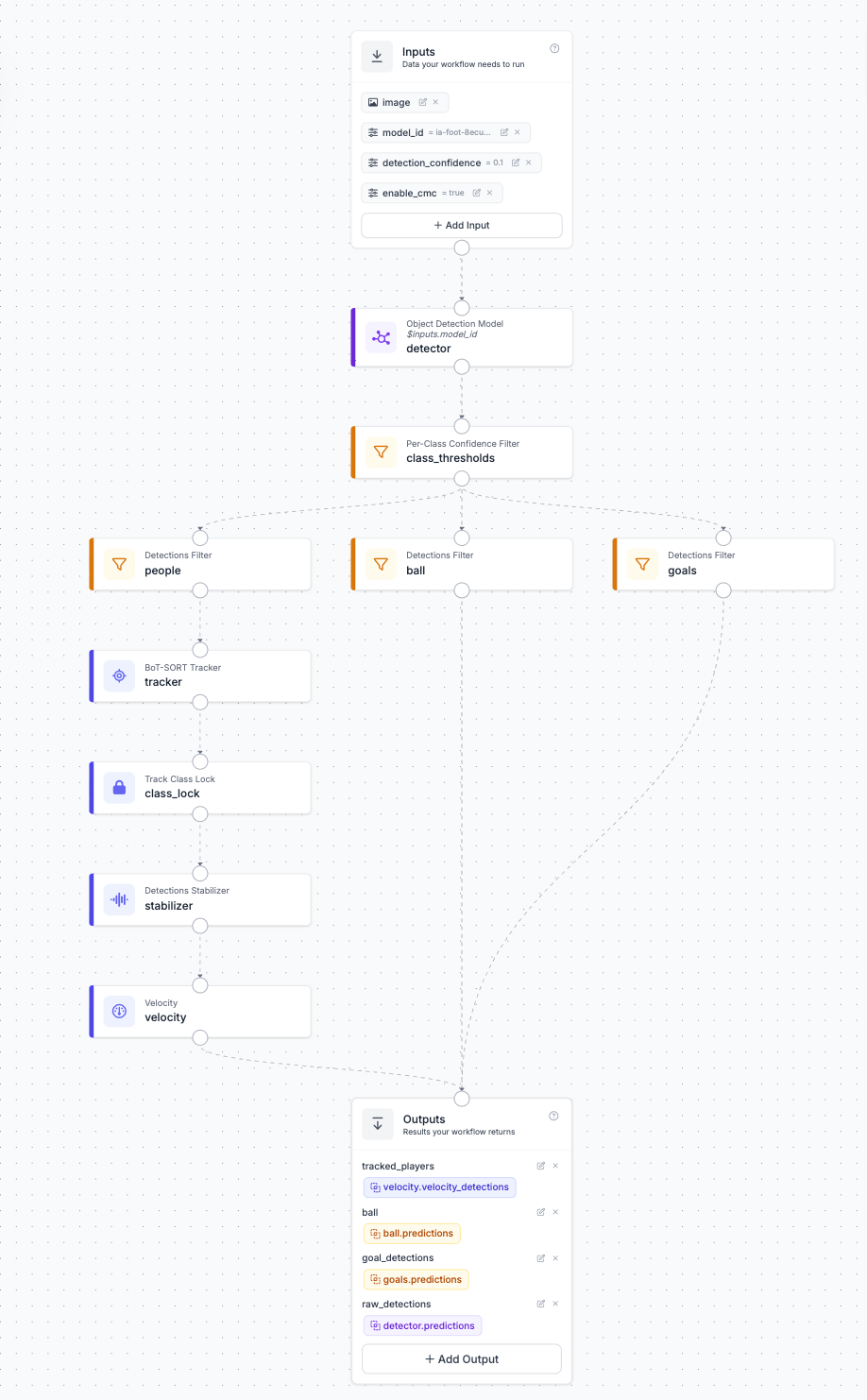
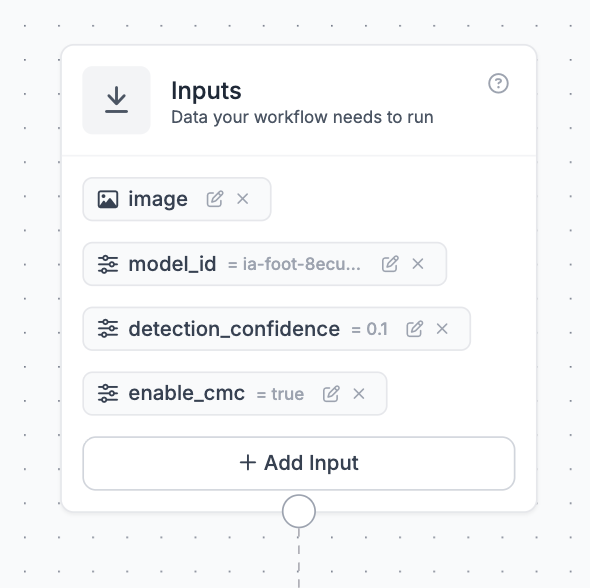
Inputs come first. Alongside the video frame, declare workflow parameters: model_id and enable_cmc. Parameters are values the client sends with every run, which means you can swap detectors after a retrain without ever editing the workflow.
Then comes the object detection model block, pointed at the model_id parameter rather than a hardcoded model. It runs the RF-DETR detector on every sampled frame and outputs raw detections for all five classes.
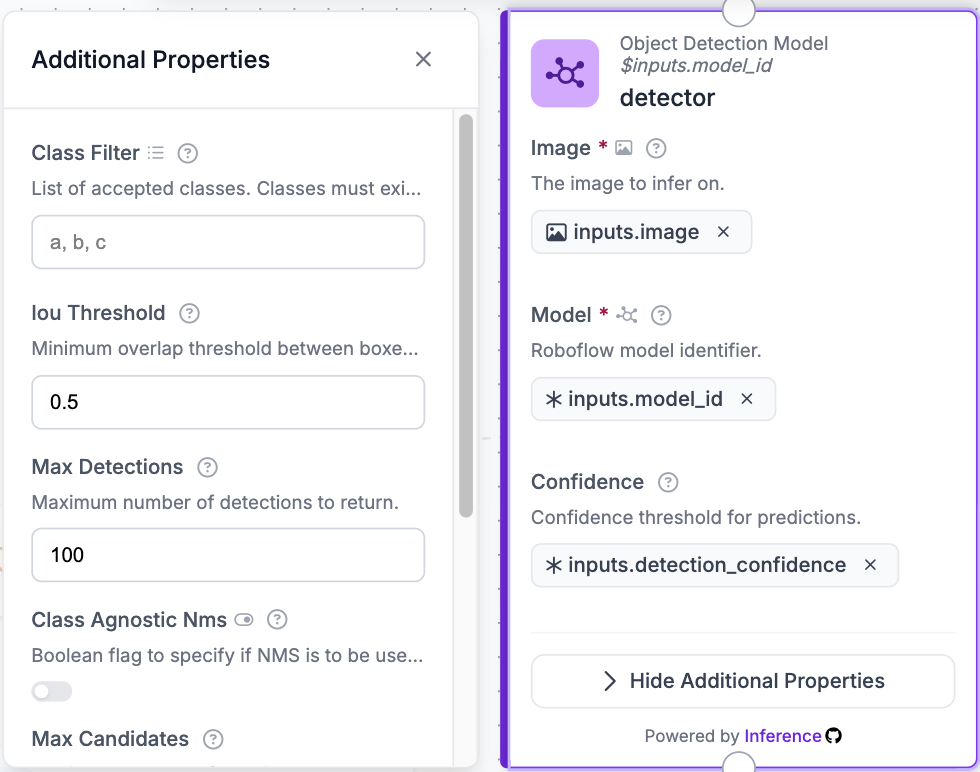
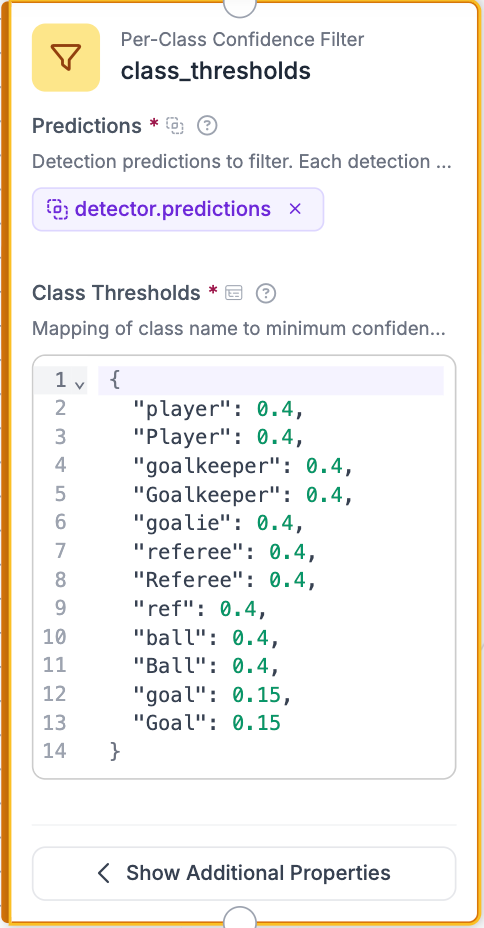
Next is a per-class confidence filter, and the per-class part is where the tuning lives. Players and the ball sit at 0.4 confidence. Goals sit lower at 0.15, because a model trained on futsal scores real-world outdoor goals anywhere from 0.1 to 0.4, and you would much rather filter noise downstream than never see the goal at all.
A class filter split comes next, separating the surviving detections into three streams that get different treatment. People (players, goalkeepers, referees) continue on to the tracker. The ball stream keeps only the single highest-confidence detection per frame, since there is exactly one ball in a soccer game and the model doesn't know that. Goal boxes pass through raw and untracked, because goals don't move and tracking them adds nothing.

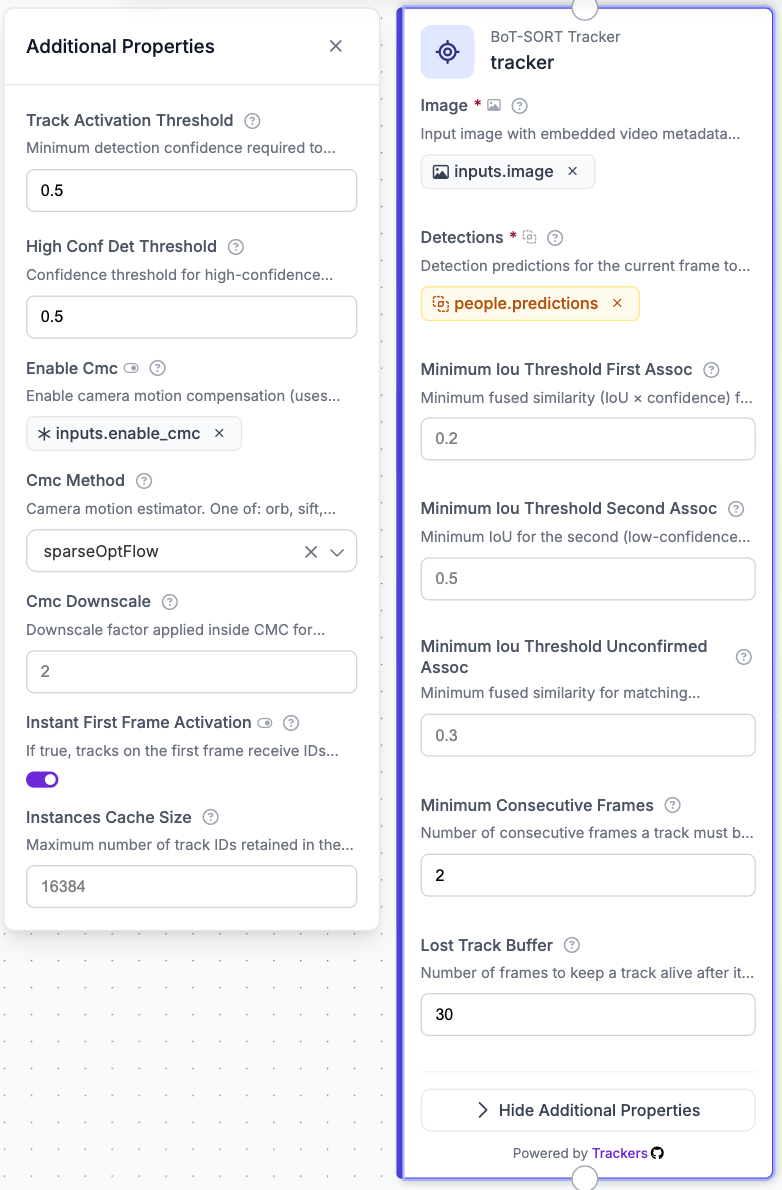
The people stream feeds the BoT-SORT tracking block, which gives each person a track id that stays with them across frames. Camera-motion compensation is wired to the enable_cmc parameter and defaults to off. CMC is meant for shaky handheld footage, so I assumed it would help, but when I tested both on real game video, CMC produced 21 identity switches while plain BoT-SORT produced 5. So it stays off.
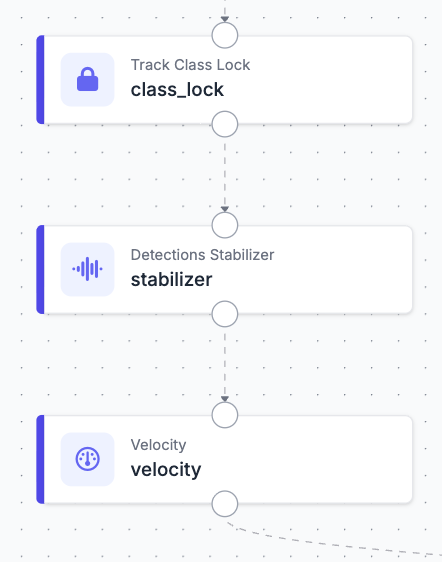
Three small blocks then clean up the tracker's output. A track class lock votes on each track's class over its lifetime and locks the winner, so a goalkeeper doesn't flicker into a player for a frame and back. A box stabilizer smooths each track's boxes over time, which matters for rendering, since jittery boxes make even correct tracking look broken. A velocity block computes per-track speeds, which the goal detection downstream uses to tell a shot from a parked ball.
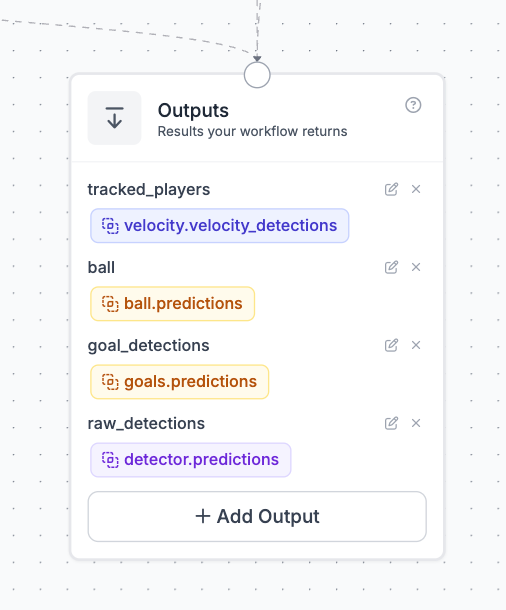
Finally, outputs expose the tracked people, the ball, and the goal boxes as the workflow's per-frame response. That response is the entire contract between the workflow and the local pipeline. Everything after this point is Python operating on those observations.
One platform lesson cost me an afternoon, so I'll save you yours. The tracker blocks are stateful video blocks: they carry memory from frame to frame, which is the whole point of tracking. Stateless serverless execution has no such memory, so calling this workflow through the ordinary serverless endpoint returns a 500. The workflow has to run through InferencePipeline, which executes it in-process over the video, or through a Roboflow Batch Processing job for full games:
pipeline = InferencePipeline.init_with_workflow(
    video_reference=str(video),
    workspace_name="aarnavs-space",
    workflow_id="reelcut-tracking",
    workflows_parameters={"model_id": cfg.model_id, "enable_cmc": False},
    on_prediction=sink.collect,
)
The sink.collect callback appends each frame's observations to a list, and that list is what every downstream stage consumes.
The fix was to stop treating every read as an equal vote. Every new track gets a 3-second enrollment. From a player's first successful read, the digit model reads them on every sampled frame for three seconds. Whatever number wins the majority becomes their number for the rest of the track, and the reads stop, since the tracker carries the identity from there. If a player leaves the frame and comes back, they're a new track and go through a fresh enrollment. This way, labels can't flicker mid-track at all.
The first was overlapping players. When two kids stand close together, the digit model sometimes reads both jerseys as one number, so a 7 next to a 1 becomes "71". To handle this, the vote counts numbers by how often they appear rather than how long they are, and reading pauses whenever two players' boxes overlap.
The second was digits in the background. My test video had a broadcast scoreboard burned into it, and a kid standing in front of the giant "2" got read as #2 thirty-one times. Now a digit only counts if it sits in the torso region of the player crop, since that's where jersey numbers actually are.
The third was tracks getting stolen. Trackers sometimes hand a track from one kid to another during an occlusion, which would carry the locked number onto the wrong player. To catch this, the digit model re-reads each locked track every couple of seconds, and if two audits in a row disagree with the enrolled number, the track gets split and the second half re-enrolls as a new player.
Finding Your Kid
First, I’ll provide some context on why this stage exists at all. The tracker doesn't give you one continuous track per kid for the whole game. Every time a player gets blocked from view or leaves the frame, their track ends, and when they reappear they get a brand new track id. So one kid ends up split across many separate tracklets over a video. The parent's click labels exactly one of those tracklets as "this is my kid," and the job of this stage is to figure out which of the other tracklets belong to the same kid, so all of their moments can go into one highlight reel.
My first attempt was matching by appearance. I used CLIP to turn each track's player crops into embeddings, which are vectors describing what the player looks like, and compared every track against the clicked kid. In theory, tracks of the same kid should look more similar to each other than tracks of different kids. In practice, every kid on the pitch scored between 0.88 and 0.95 similarity to my target, because when everyone wears the same uniform and the faces are only a few pixels tall, the model mostly sees the kit and the grass. The code is still in the repo but disabled, with that measurement noted in the docstring so nobody has to re-test it.
What worked instead was jersey numbers. Any single read can be wrong, but across a whole track the correct number shows up far more often than any misread. My target's three main tracks read "7" 302, 170, and 124 times, with only a few stray misreads mixed in. So a track gets matched to the kid when their number clearly dominates its reads, by a ratio like 5 to 1, and a few scattered mistakes among hundreds of correct reads can't break the match.
Two backup signals handle the tracks where numbers aren't enough. Kit color rules out impossible matches. This means that a track in a red uniform can never be matched to a kid on the blue team, no matter what the digit model reads. For short gaps, position helps as well. If one track ends and another starts a moment later, close enough that a kid could realistically have run between the two spots, those tracks become candidates for being the same player.
When none of these signals are convincing, the system labels the track as UNKNOWN instead of guessing. That matters for a prototype whose tracking still has rough edges. An UNKNOWN track just leaves a small gap in the reel, while a wrong match puts the wrong kid in it.
Finding the Goals
The obvious approach is checking whether the ball is inside the goal box, but that alone doesn't work because video is 2D. A ball rolling in front of the net overlaps the goal box in pixels just as much as a ball inside it. Three rules make it work anyway.
The first is action gating. The ball being at the goal mouth only counts when it's moving fast, using the velocity output from the workflow. A parked ball, or a slow roller passing in front of the net, doesn't score anything.
The second is goal-box persistence. Goal detection tends to drop out at the worst possible time, because a scramble at the goal mouth means players are crowding the net and blocking it from view. So the last good goal box sticks around for about 2.5 seconds across dropouts. On my own footage, the test goal happened entirely inside one of those dropouts, and without persistence the system would have missed it.
The third is using raw frames instead of smoothed scores. For regular highlights, the pipeline smooths its scores over time, averaging each moment with the moments around it, because that produces stable clips instead of ones that start and stop on every noisy frame. But a goal is different. The ball is only in the net for a fraction of a second, so when you average that brief moment with the ordinary frames around it, the score gets dragged down and can slip below the detection threshold. Every smoothing setting I tried ended up erasing at least one real goal this way. So goal detection now skips smoothing entirely: it looks directly at the raw frames where the ball was in the net, groups nearby ones into a single event, and keeps that logic completely separate from the smoothed timeline used for regular highlights.
The last decision about goals is deliberately left to the user, because there's one thing a single 2D camera genuinely cannot tell apart: a goal and a save. When a keeper stops a hard shot right on the line, the ball is at the goal mouth moving fast, exactly like a shot that goes in. Whether it crossed the line is depth information the camera doesn't have. So instead of a classifier making that call, the system collects every goal-like moment as a candidate, ranks them from most to least likely, and a setting (--max-goal-clips) controls how many of the top candidates to keep. If you know your game had two goals, set it to 2 and you get the two strongest ones.
The ranking itself uses a simple observation: after a real goal, the ball sits in the net for a while, through the celebration and until someone fetches it, while a save gets knocked away within a second. So candidates are ranked by how long the ball stayed at the net. This ranking turned out to know my own test clip better than I did. I thought the 60-second clip had one goal, but other candidates kept outranking the one I was sure about. When I checked those moments, the frames right after each one showed both teams lining up for kickoff, which only happens after a goal. The clip actually had three.
The Web App
The pipeline is a CLI, but parents don't use CLIs. A FastAPI app serves one dark page with an easy UI to use. You drag the game video in, scrub to any moment where your kid is visible, and hit find players.
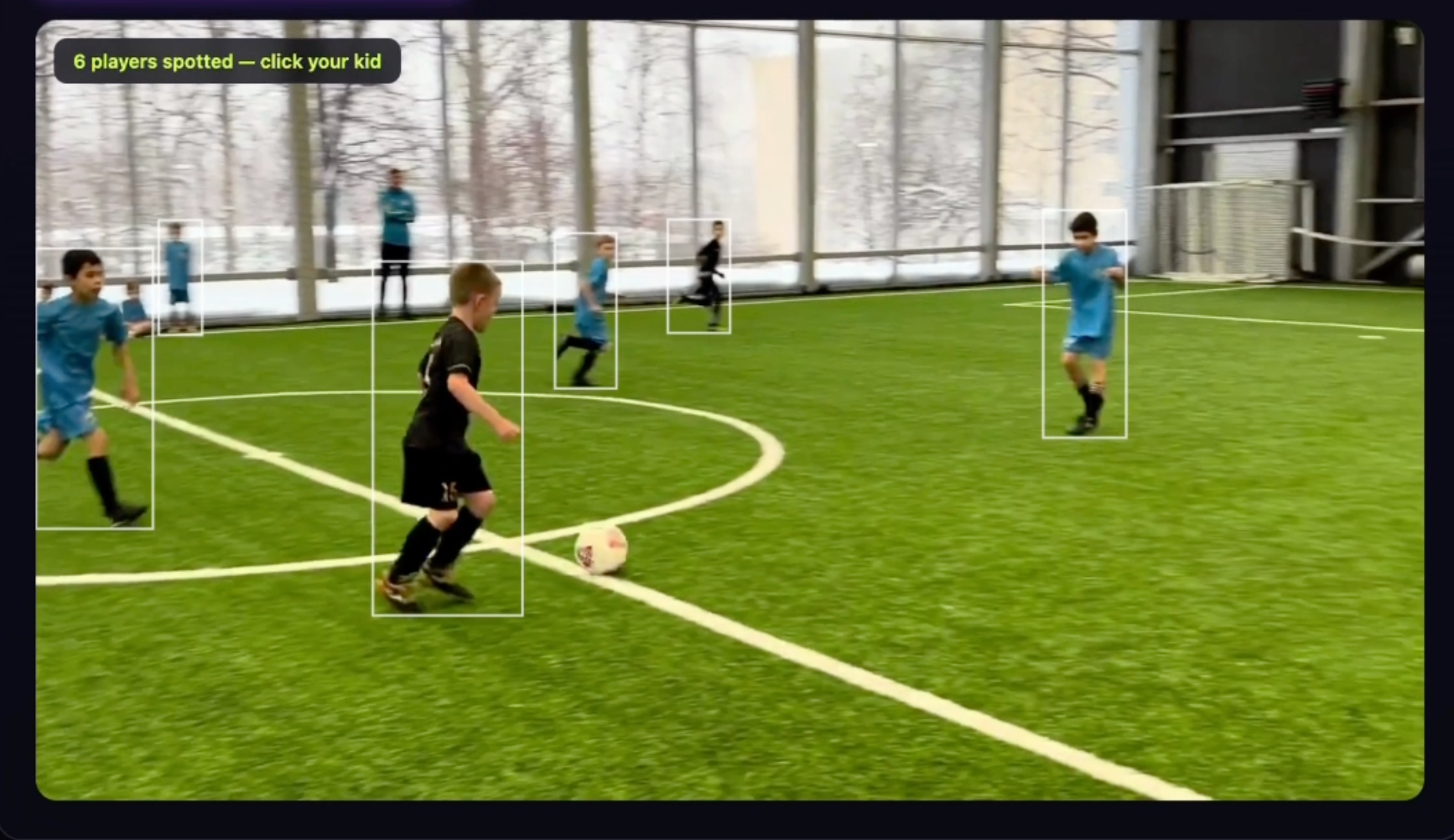
The detector runs on that frame and draws clickable boxes over every player. You click your kid, enter their jersey number and kit color, and hit cut.
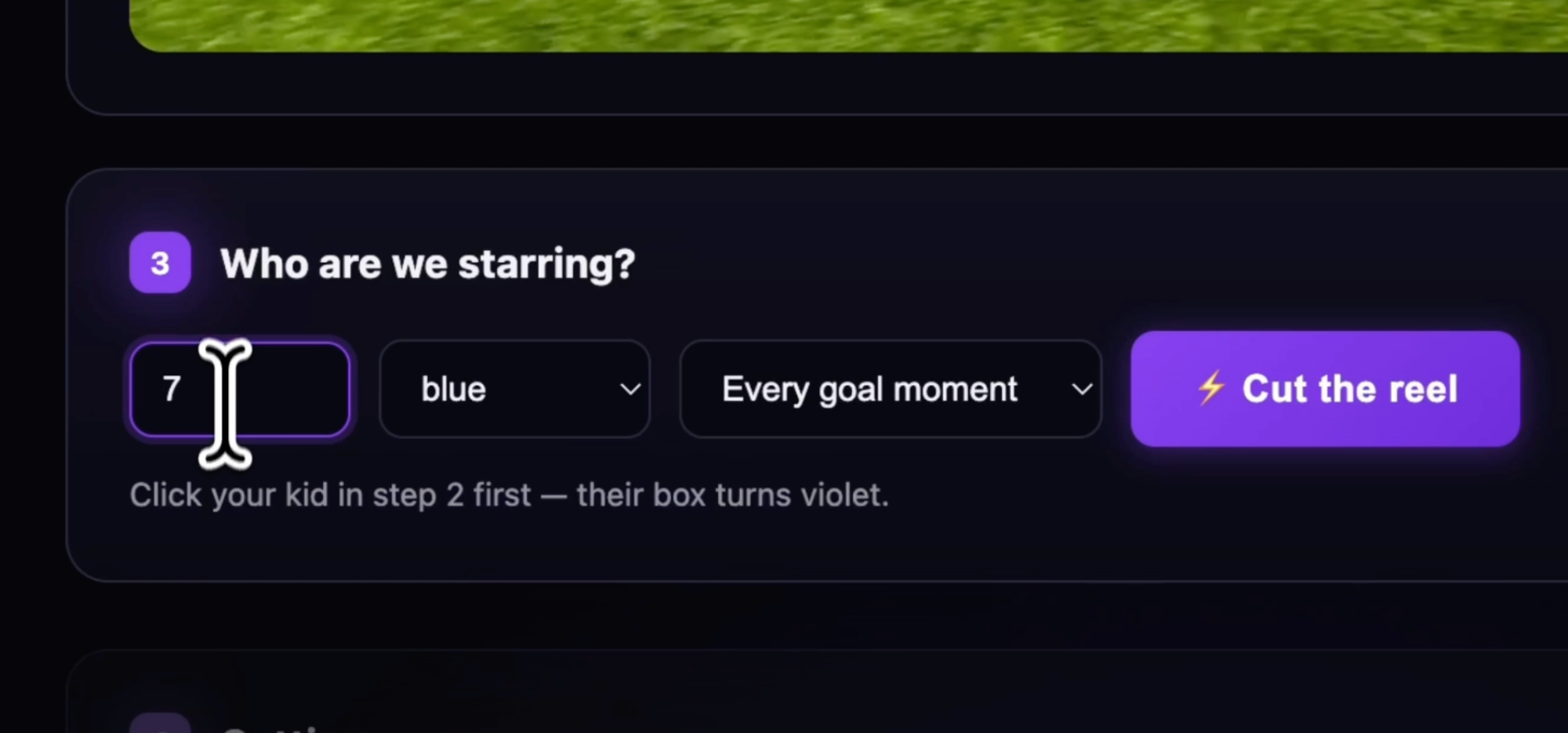
While the pipeline runs, stage progress streams live on the page, and the results show up as an auto-playing highlight reel with a card for each goal clip. Clips are clean by default, and each one has a tracking overlay toggle if you want to see what the models saw, imperfections included. Under the hood the job runner shells out to the same CLI, so the web app and the terminal always behave the same.
What It Costs to Run
Short clips are free to process locally. A 60-second 1080p60 clip takes about 15 minutes on an M-series laptop, and most of that time goes to digit reads and rendering rather than detection. Full games are better suited to a Roboflow Batch Processing GPU job, which costs credits and takes about an hour regardless of whether the video is 1 minute or 90, since most of that hour is queueing and provisioning. Your laptop stays free the whole time, and both models train on the free tier, entirely in the UI.
Build Your Own Soccer Automatic Highlight Reels App
This is a prototype, which is also what makes it a good starting point: the annotated debug video shows you every mistake, and every mistake can be fixed with a labeling session and a retrain. The path, in order:
- Fork a soccer or futsal dataset on Universe and train RF-DETR-small on it. Train the digit detector (classes 0 through 9) the same way from a jersey number dataset.
- Clone the repo, uv sync, drop your API key in .env.
- Build the workflow in the editor, or import workflows/reelcut_tracking.json, and save it to your workspace.
- Run the web app, upload a short clip with a goal in it, and click a kid.
- Watch the annotated video and find what your models get wrong. Export the digit crops, correct them in Roboflow Annotate, retrain, and swap the model id. Every video after that gets better.
The footage stops dying on the phone. The kid gets their highlight reel. And nobody had to watch ninety minutes of shaky video to find eleven seconds of glory.
Further reading:


Cite this Post
Use the following entry to cite this post in your research:
Aarnav Shah. (Jul 22, 2026). How to Make Automatic Highlight Reels from Kids' Soccer Games. Roboflow Blog: https://blog.roboflow.com/make-automatic-highlight-reels-from-soccer-games/