

This guide builds two working pick-and-place robot prototypes using the KUKA IIWA arm, RF-DETR, and the PyBullet simulation environment, covering both an eye-to-hand configuration (fixed overhead camera) and an eye-in-hand configuration (camera mounted on the wrist). Synthetic data generation accelerates the training pipeline, and fine-tuning RF-DETR for the specific camera angle at deployment bridges the gap between simulation and real hardware. Because every downstream step (coordinate conversion, inverse kinematics, motor control) is deterministic, improving model detection accuracy directly improves overall robot reliability, compressing development from months to days.
A vision-guided pick-and-place system is a robot arm that uses a camera and a computer vision model to see its workspace, identify objects, determine their positions, and physically move them from one location to another. The camera is the robot's eyes. The computer vision model is its brain. The arm executes what the model decides.
In this guide we build two working prototypes of this system using the KUKA IIWA robot arm, the Roboflow RF-DETR model, and the PyBullet simulation environment. The difference between our prototypes is where the camera is mounted. The first prototype uses an Eye-to-Hand configuration where a camera is fixed above the workspace and continuously watches the scene while the arm moves underneath it.
Eye-To-Hand System Output
The second uses an Eye-in-Hand configuration where the camera is mounted directly on the robot wrist. It moves with the arm and captures the workspace from a scan pose before each pick.
Eye-In-Hand System Output
Both systems follow the same core pipeline: A camera captures the scene. The Roboflow model detects objects and returns their pixel positions. Those positions are converted to real-world coordinates. An inverse kinematics solver computes joint angles. The arm picks the object and places it in the drop zone. The model is the only non-deterministic component in this chain. Everything downstream of detection such as coordinate conversion, IK, motor control is deterministic. A better model means a more accurate robot. This is why the training process is central to everything that follows.
Building the Pick and Place Robot Prototype
This section walks through the complete build in four sequential steps, from generating training data through to a fully working simulated robot that uses live CV model detections to pick and place objects.
Prerequisites
To run the pick and place simulation, you need a clean Python environment with the required libraries installed. Use Python 3.10 for compatibility. Create and activate a virtual environment (for example, using Anaconda), then install the dependencies below. Install PyBullet:
conda install -c conda-forge pybulletInstall remaining packages:
pip install opencv-python numpy inference-sdkVerify installation, run the following command to confirm PyBullet is working:
python -c "import pybullet as p; print('PyBullet working')"If everything is set up correctly, you should see:
PyBullet workingYour environment is now ready to run the simulation and build the vision guided pick and place system.
Step 1: Generate Synthetic Dataset
In this example we generate the training dataset entirely inside PyBullet as we will be using this virtual simulation environment for our prototyping. The key requirement for synthetic data to transfer is viewpoint consistency. The camera for generating training data must be at the same position and angle as the deployment camera. In both setups in this guide, the camera for training images and the inference camera are identical virtual cameras that have same position, same FOV, same resolution. The model learns object appearance from exactly the viewpoint it will see at inference time.
import os, time, random
import numpy as np
import cv2
import pybullet as p
import pybullet_data

BASE_DIR = "dataset"
IMG_DIR  = os.path.join(BASE_DIR, "images")
LBL_DIR  = os.path.join(BASE_DIR, "labels")
os.makedirs(IMG_DIR, exist_ok=True)
os.makedirs(LBL_DIR, exist_ok=True)

NUM_IMAGES    = 100
CAM_W, CAM_H  = 640, 480
X_RANGE        = (0.35, 0.65)
Y_RANGE        = (-0.25, 0.25)
CLASS_MAP      = {"cube": 0, "sphere": 1, "duck": 2}

p.connect(p.GUI)
p.setAdditionalSearchPath(pybullet_data.getDataPath())
p.setGravity(0, 0, -9.8)
p.loadURDF("plane.urdf")

tc = p.createCollisionShape(p.GEOM_BOX, halfExtents=[0.16,0.30,0.005])
tv = p.createVisualShape(p.GEOM_BOX,    halfExtents=[0.16,0.30,0.005],
                          rgbaColor=[0.74,0.58,0.38,1])
p.createMultiBody(0, tc, tv, [0.50, 0.00, 0.006])

cam_view = p.computeViewMatrix(
    cameraEyePosition   =[0.50, 0.00, 1.20],
    cameraTargetPosition=[0.50, 0.00, 0.00],
    cameraUpVector=[0, 1, 0])
cam_proj = p.computeProjectionMatrixFOV(
    fov=55, aspect=CAM_W/CAM_H, nearVal=0.01, farVal=5.0)

def spawn_objects():
    obj_info = []
    for _ in range(random.randint(2, 5)):
        x = random.uniform(*X_RANGE)
        y = random.uniform(*Y_RANGE)
        t = random.choice(["cube", "sphere", "duck"])
        if t == "cube":
            o = p.loadURDF("cube_small.urdf", [x, y, 0.05])
        elif t == "sphere":
            o = p.loadURDF("sphere_small.urdf", [x, y, 0.05])
        else:
            o = p.loadURDF("duck_vhacd.urdf", [x, y, 0.05], globalScaling=0.7)
        obj_info.append((o, t))
    return obj_info

def capture_and_label(index, obj_info):
    _, _, rgb, _, seg = p.getCameraImage(CAM_W, CAM_H,
        viewMatrix=cam_view, projectionMatrix=cam_proj,
        renderer=p.ER_TINY_RENDERER)
    img = cv2.cvtColor(
        np.array(rgb, dtype=np.uint8).reshape(CAM_H, CAM_W, 4),
        cv2.COLOR_RGBA2BGR)
    seg = np.array(seg).reshape(CAM_H, CAM_W)
    cv2.imwrite(os.path.join(IMG_DIR, f"image_{index:04d}.jpg"), img)
    with open(os.path.join(LBL_DIR, f"image_{index:04d}.txt"), "w") as f:
        for obj_id, obj_type in obj_info:
            mask = (seg == obj_id)
            if np.sum(mask) < 50:
                continue
            ys, xs = np.where(mask)
            cx = ((np.min(xs)+np.max(xs))/2) / CAM_W
            cy = ((np.min(ys)+np.max(ys))/2) / CAM_H
            bw = (np.max(xs)-np.min(xs)) / CAM_W
            bh = (np.max(ys)-np.min(ys)) / CAM_H
            f.write(f"{CLASS_MAP[obj_type]} {cx} {cy} {bw} {bh}\n")
    print(f"  Saved image_{index:04d}")

spawned = []
for i in range(NUM_IMAGES):
    for obj, _ in spawned:
        p.removeBody(obj)
    spawned = spawn_objects()
    for _ in range(80):
        p.stepSimulation()
        time.sleep(1/240)
    capture_and_label(i, spawned)

print("Dataset generation complete.")
p.disconnect()
Run this script once. The dataset/images/ and dataset/labels/ folders are ready to upload to Roboflow.
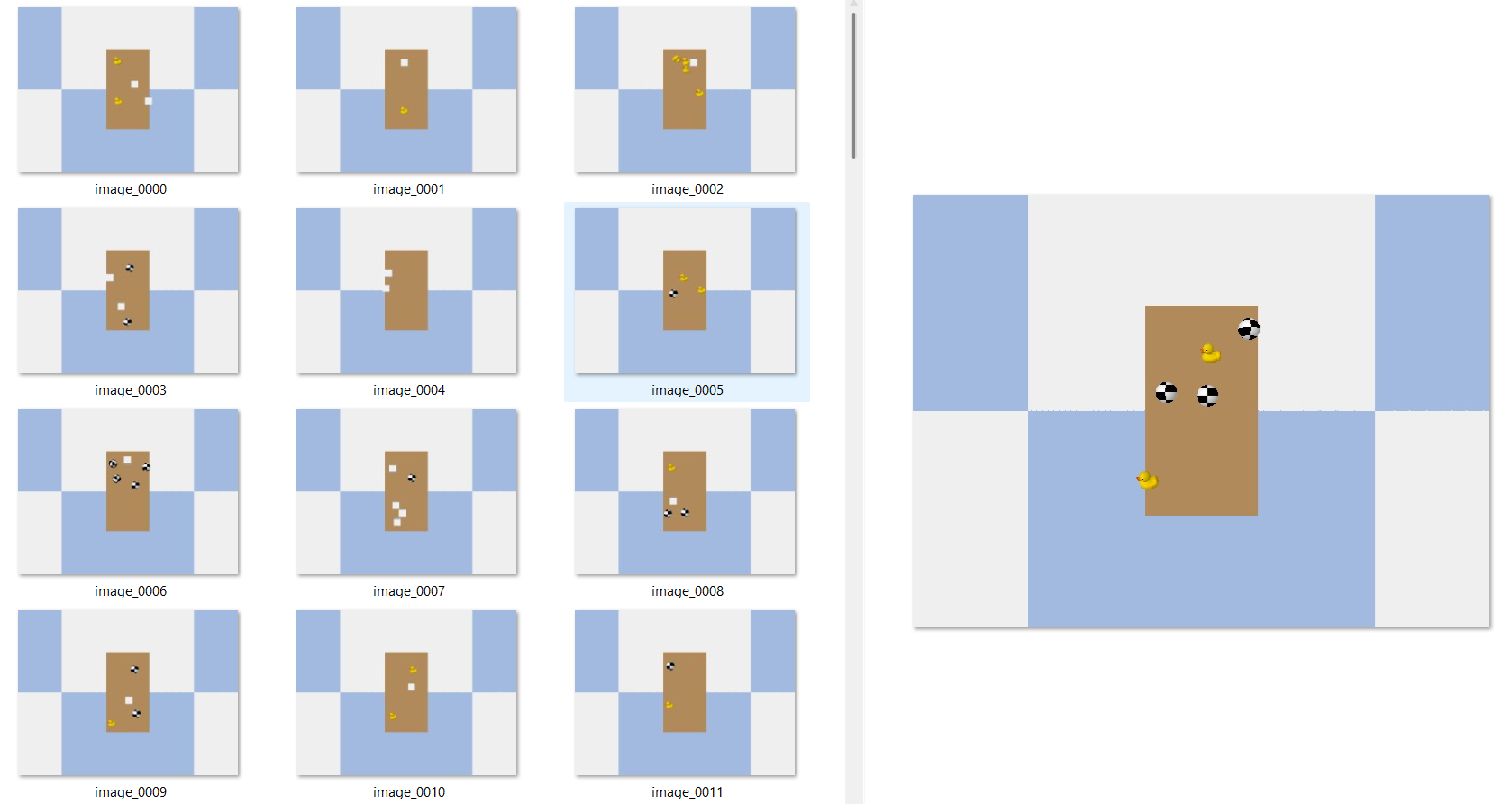
Step 2: Train Roboflow RF-DETR
Upload the generated dataset along with it's labels to Roboflow and train an RF-DETR Object Detection model. Log in to app.roboflow.com and click Create New Project. Select Object Detection as the project type. Click Upload Data and drag in the entire dataset/ folder, or upload images and labels.
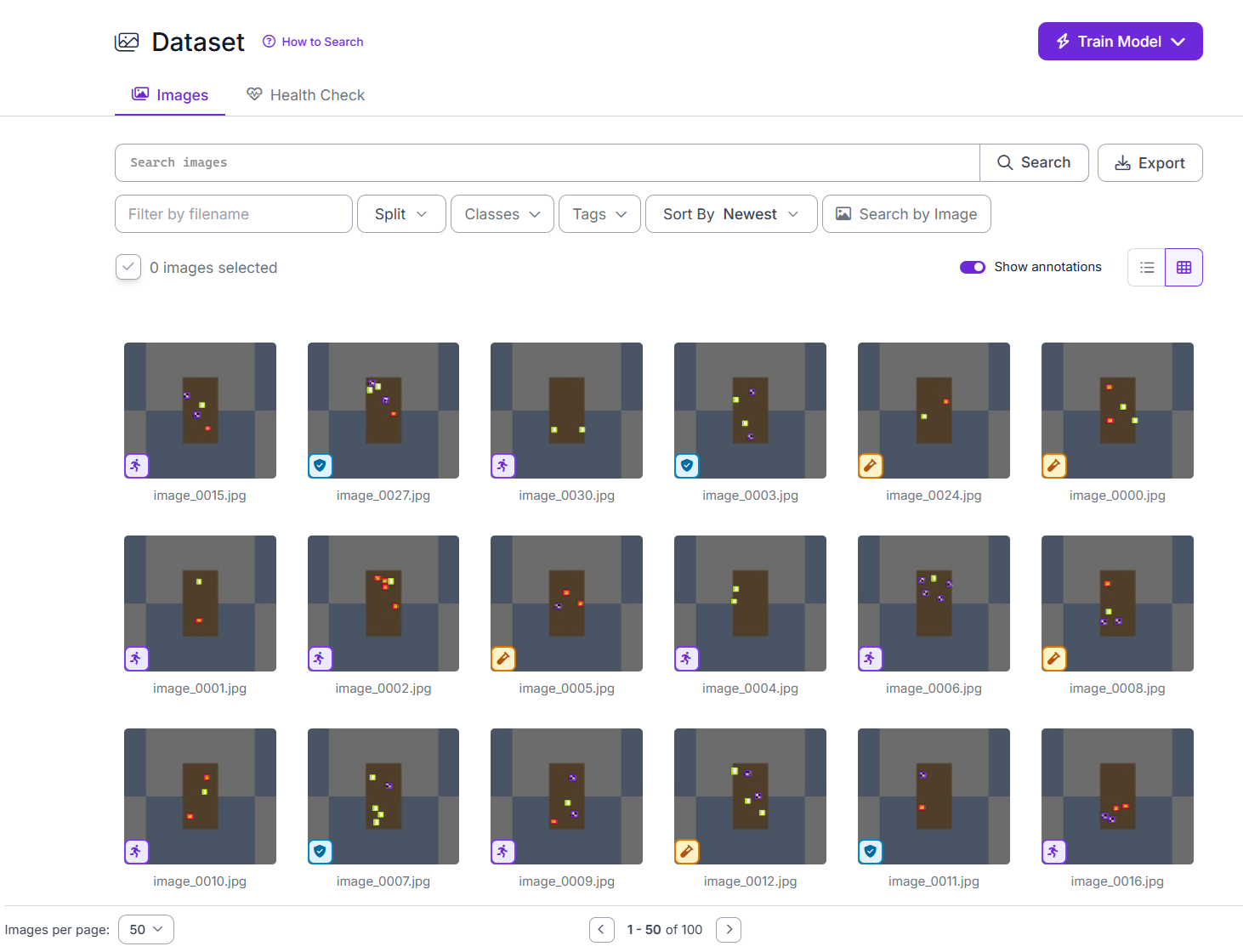
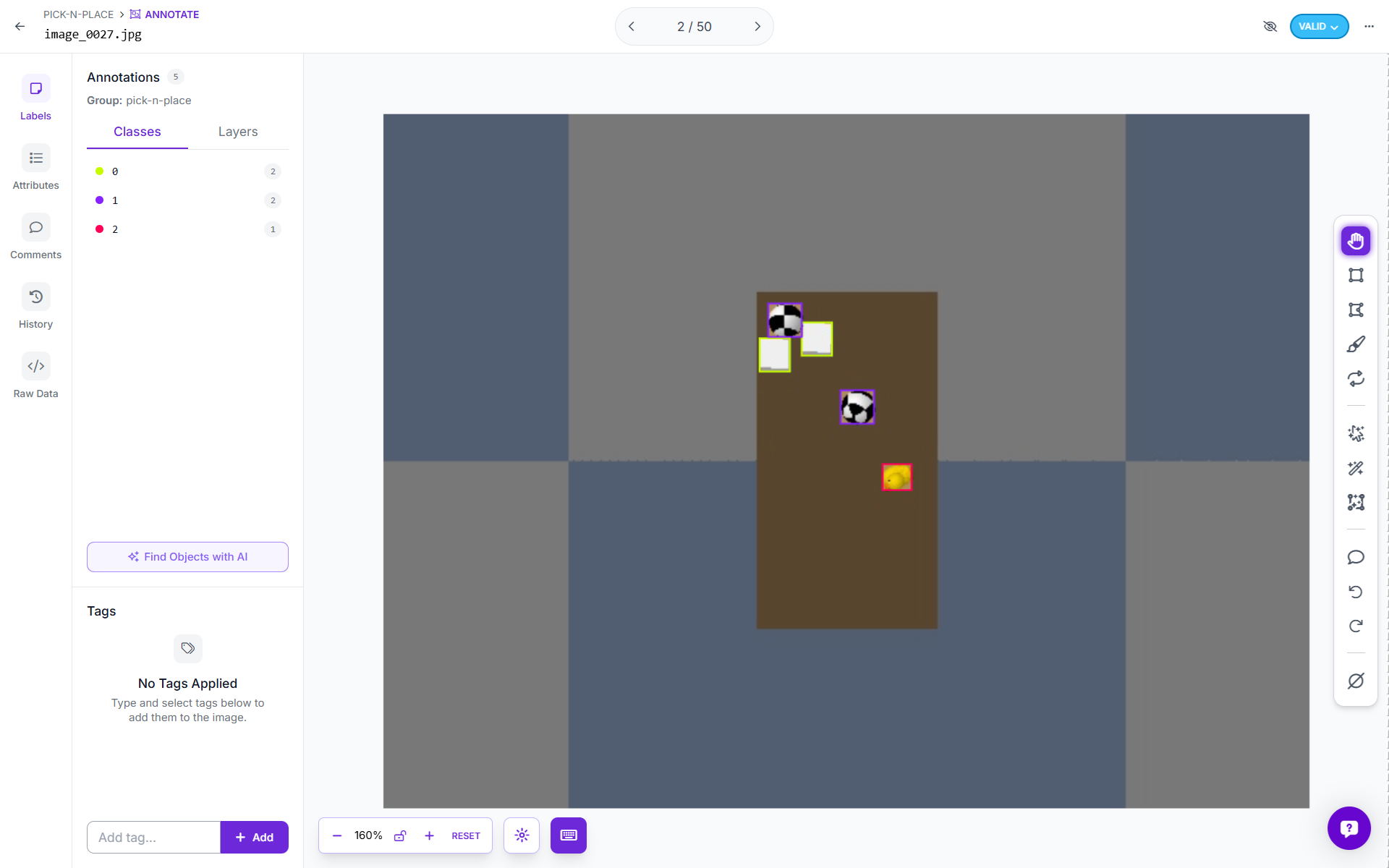
After upload, Roboflow displays each image with its bounding boxes overlaid. Check a few images to confirm the boxes sit correctly around the cube, sphere, and duck. If everything looks correct, proceed.
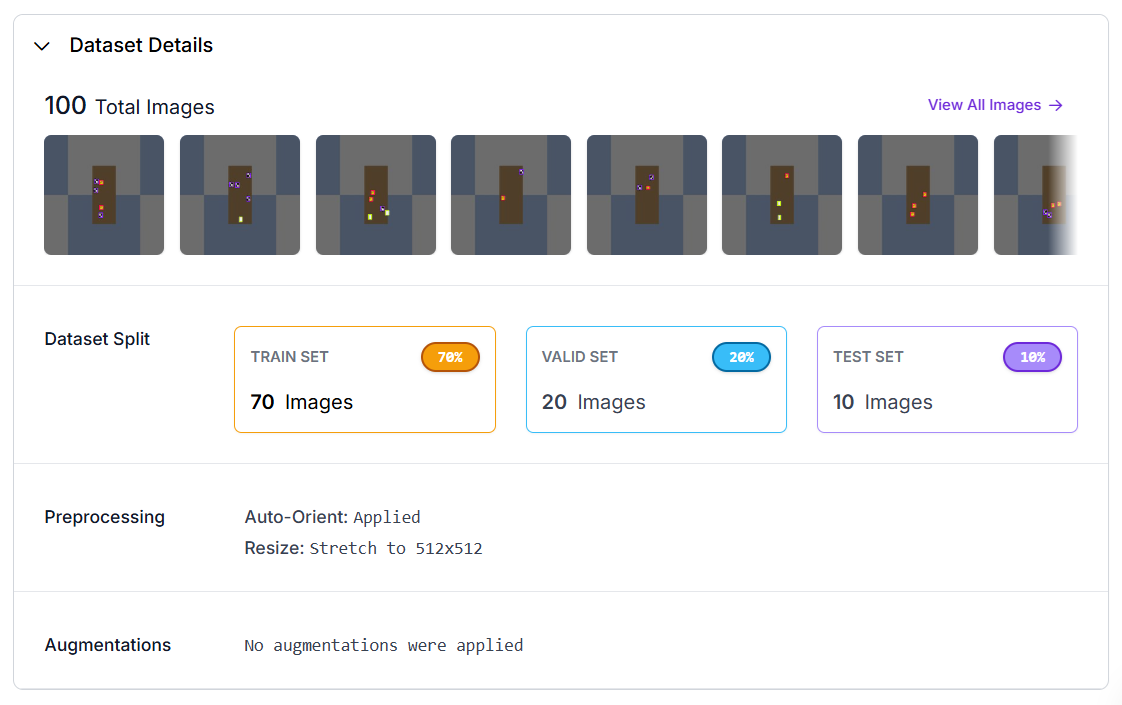
Click Create a New Version.
Open the generated version and click Train Model. Use following settings.
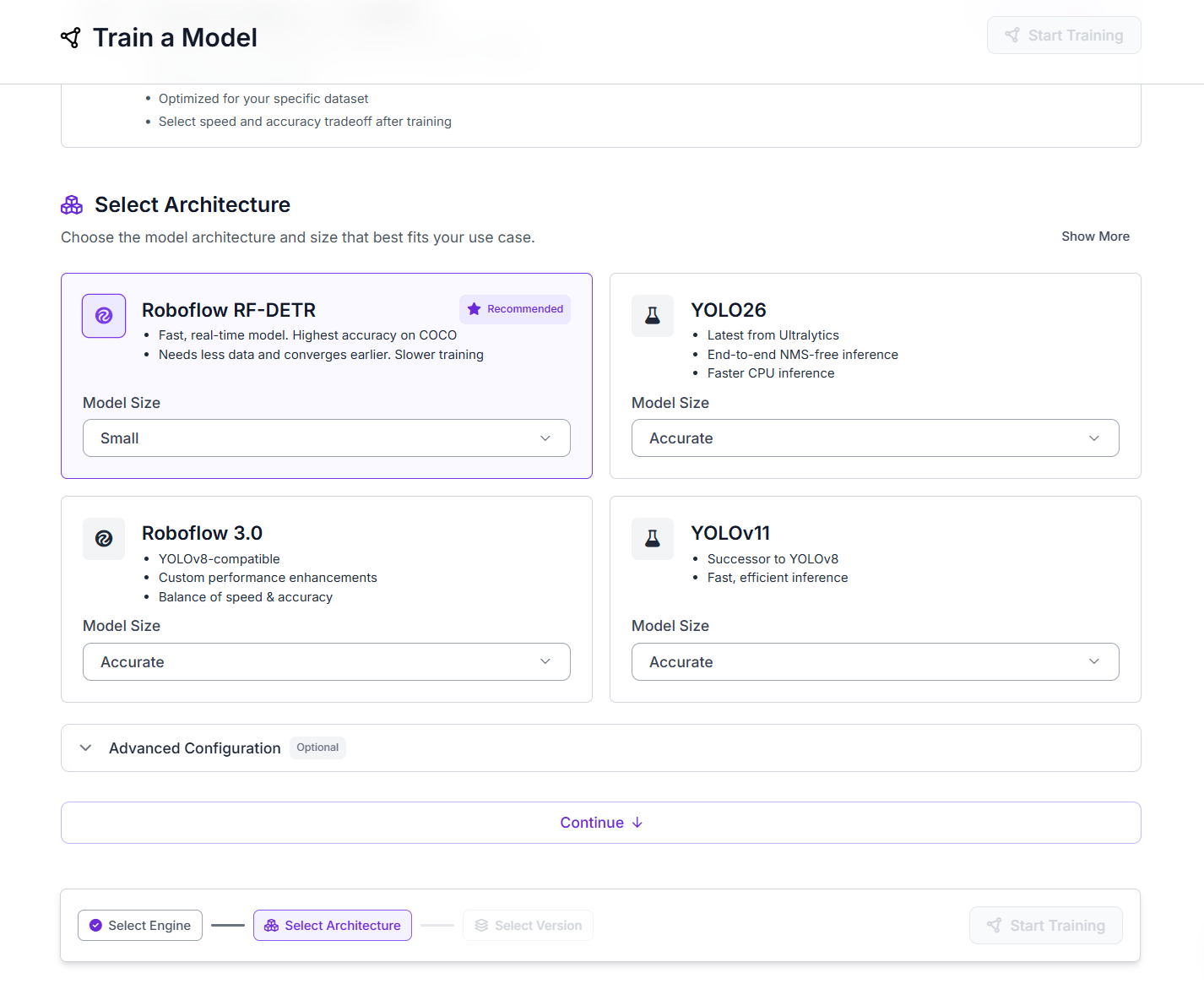
Finally, click start training.
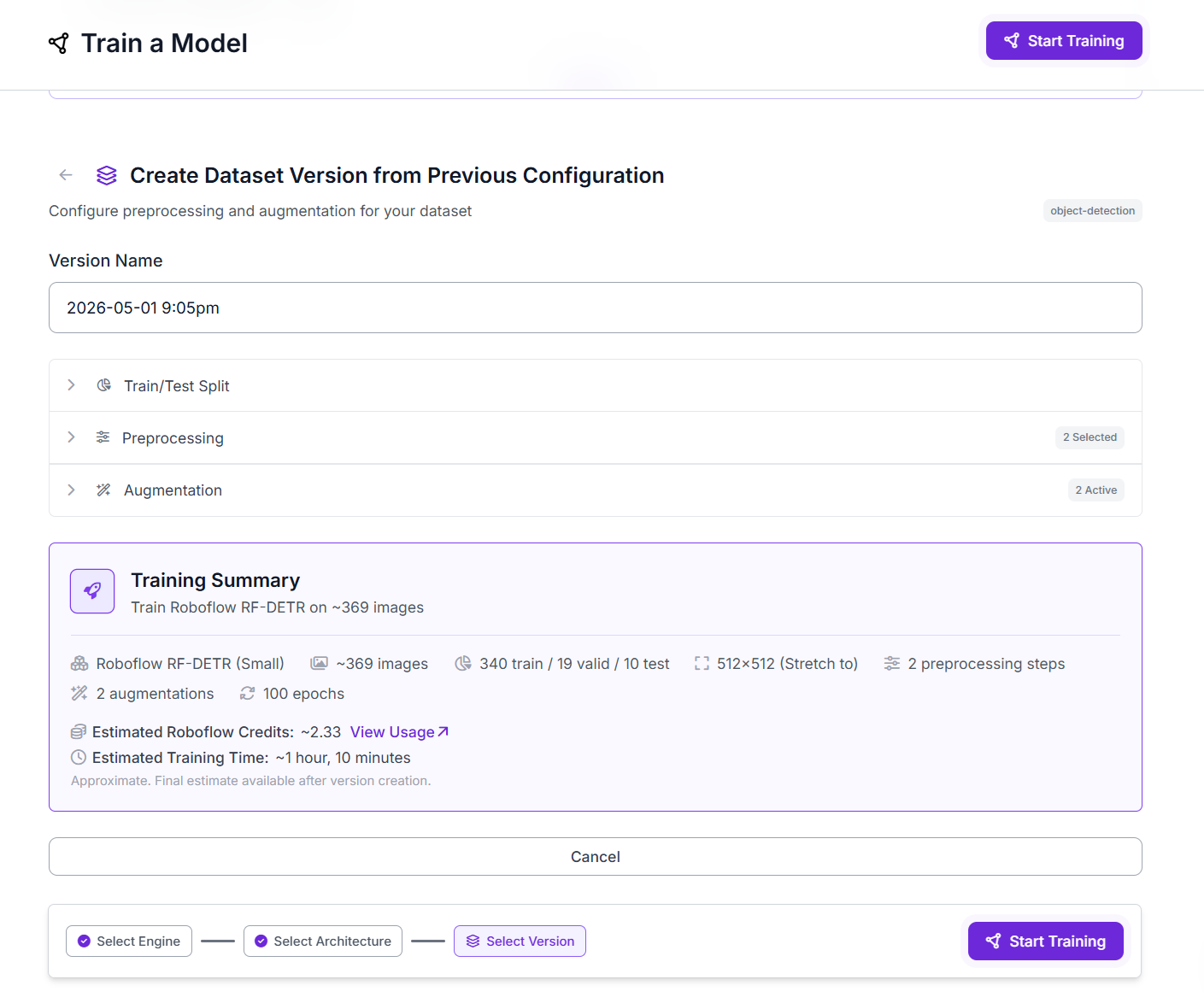
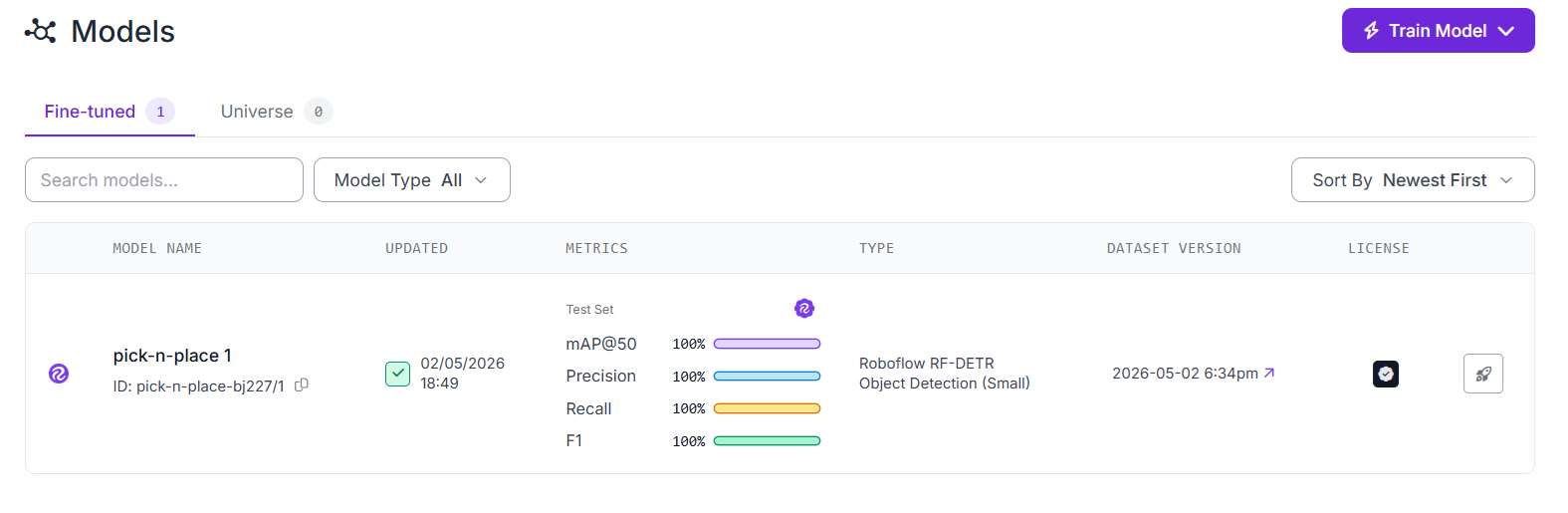
Once training completes, Roboflow shows the evaluation metrics on the test set. The trained model has a model ID visible on the Versions page and in the deployment tab.
Step 3: Prototyping the Eye-to-Hand System
The Eye-to-Hand setup uses a camera fixed above the workspace. The camera remains stationary while the robot arm operates underneath it. This configuration is commonly used in industrial pick-and-place systems.
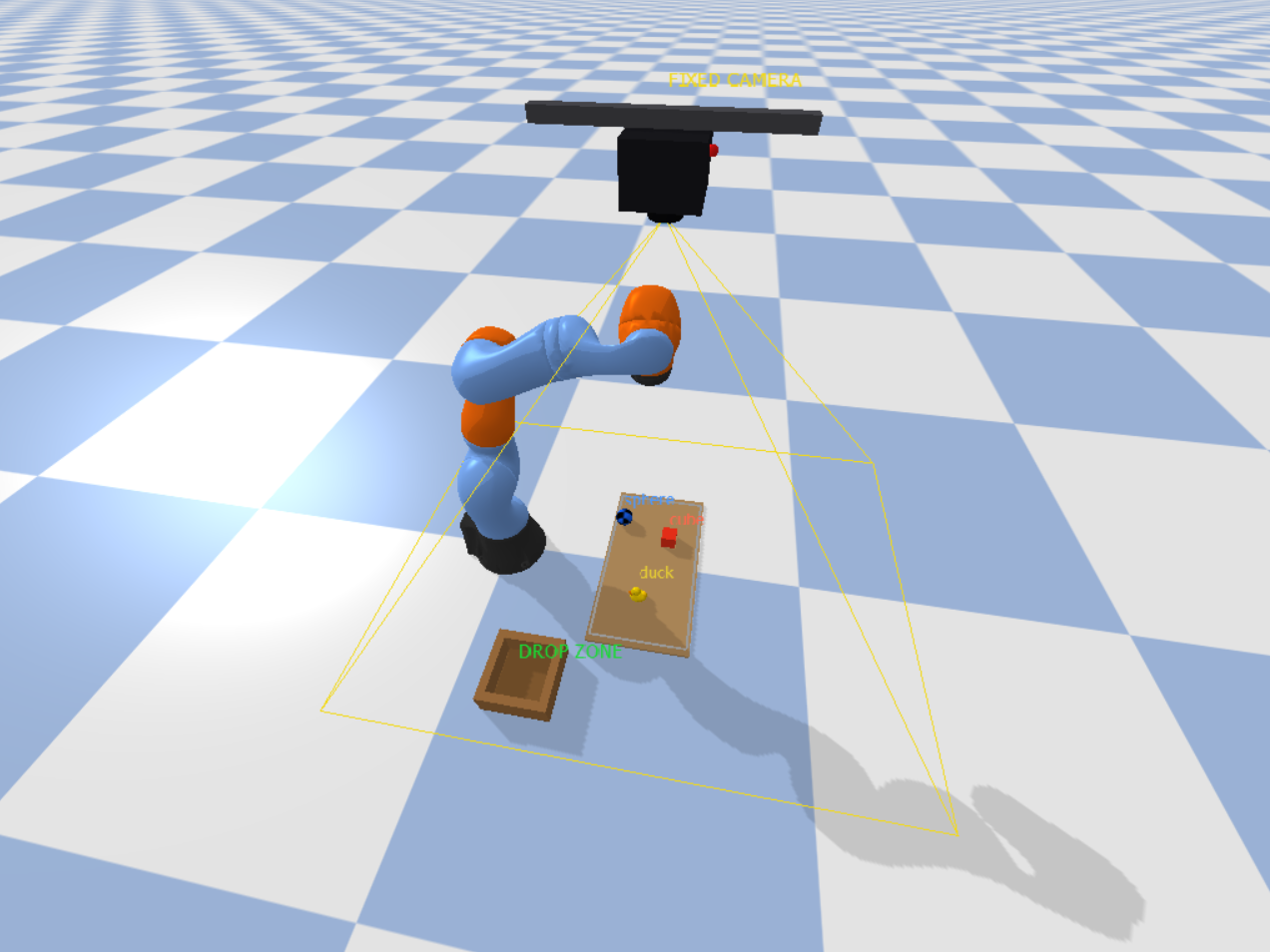
The following pipeline describes how system works.
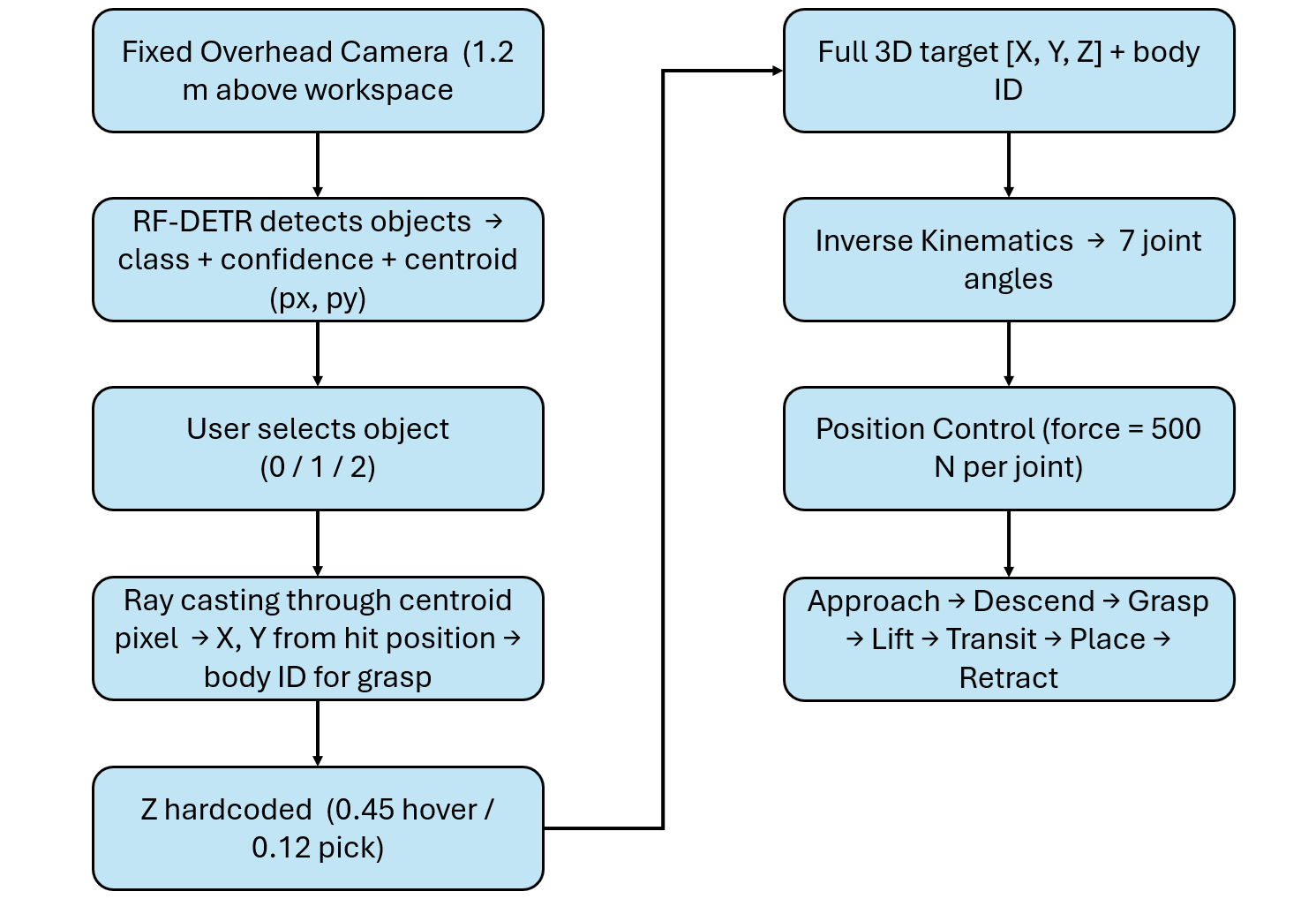
Because the camera does not move, the relationship between image pixels and the workspace remains consistent across frames. In this prototype, instead of using a simple linear pixel-to-world mapping, the system uses camera geometry. The centroid pixel is projected into the 3D scene as a ray, and its intersection with objects is used to determine position. For each prediction the model returns:
- Class name
- Confidence score
- Bounding box
- Centroid (px, py)
The centroid indicates where the object is located in the image. It does not provide orientation, grasp angle, or object size. For symmetric objects such as cubes and spheres, using the centroid as the pick point is sufficient. The model provides X and Y through the centroid. The Z coordinate is defined using known fixed values:
above_pick = [px, py, 0.45]   # hover height — fixed
at_pick    = [px, py, 0.12]   # descend to pick — fixed
This works because the table height and object placement are known and consistent. This approach is widely used in controlled environments such as conveyor belts, tabletop sorting, and palletizing systems. Ray casting converts the centroid pixel into a real-world position:
ray_from, ray_to = pixel_to_ray(cx, cy)
hit     = p.rayTest(ray_from, ray_to)[0]
body_id = hit[0]
hit_pos = hit[3]
The hit position provides the X and Y coordinates of the object in meters. The Z value is applied separately using the known fixed height. Ray casting also returns the object’s body ID, which is used to attach the grasp constraint. It acts as a safety mechanism, ensuring that the robot only attempts to pick valid objects.
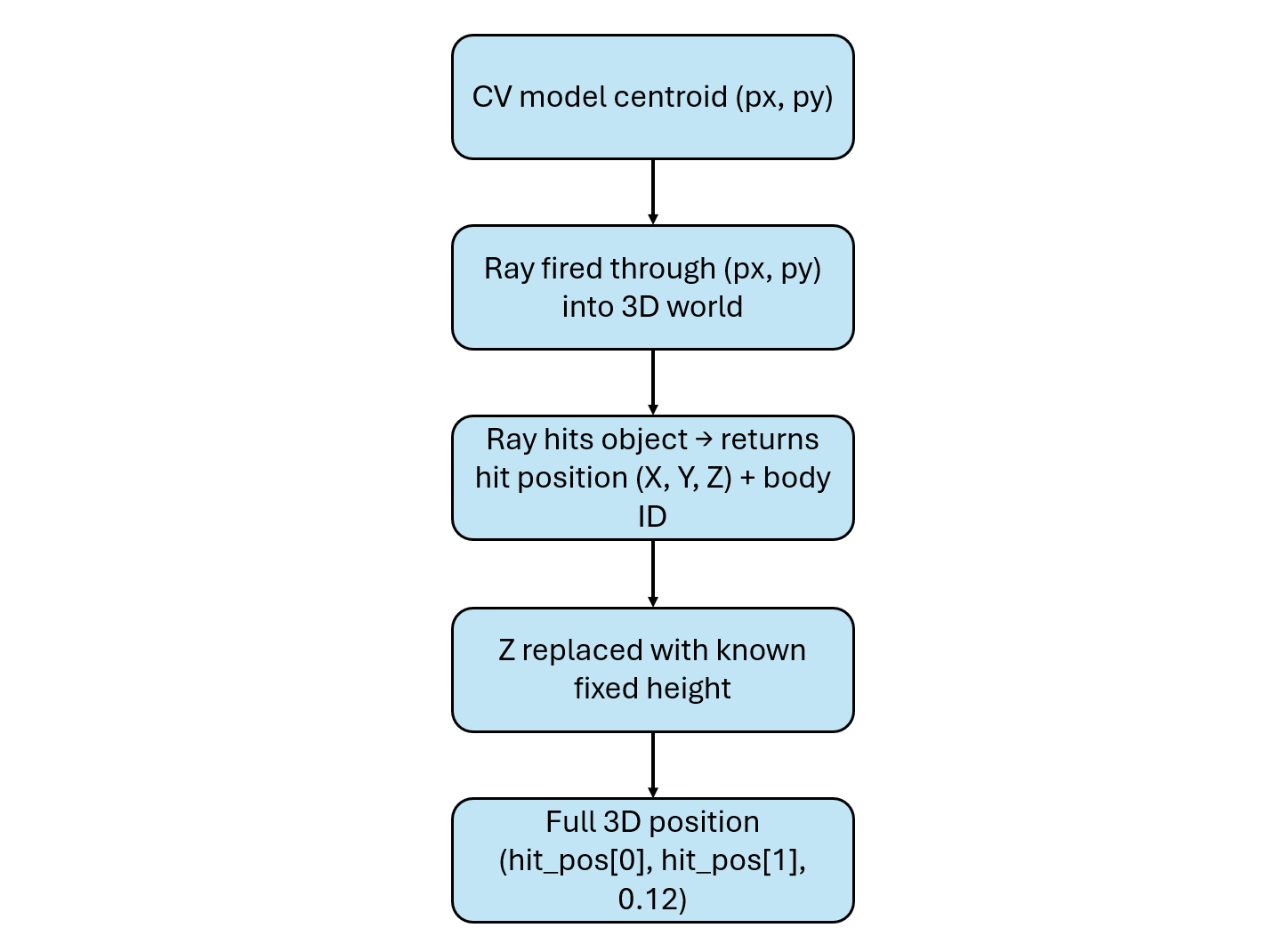
In a real system, the ray test used in simulation is replaced by reading the depth value at the centroid pixel from a depth camera. The pixel coordinates (px, py) together with the depth measurement are then unprojected using camera calibration to obtain the full 3D position (X, Y, Z) in world coordinates.
A depth camera is only required when the object height cannot be assumed, such as in stacked objects, random piles, or scenes with varying heights. For flat conveyor belts, tabletops, or controlled environments where objects always sit at the same height, using a fixed Z value is a simpler and widely used approach. It removes the need for additional hardware and is sufficiently accurate because the environment is known and consistent. However, this approach depends on proper calibration and assumes that the surface and object placement remain stable. In all cases, the centroid from the computer vision model is the common input. What changes is only how the full 3D position is computed.
Inference runs in a background thread, so the PyBullet simulation does not block while waiting for the Roboflow response. Every 80 physics steps, the system captures a fresh camera frame and sends it to the Roboflow Serverless endpoint. The predictions are returned asynchronously and used to update the target selection without interrupting the simulation loop. This keeps the robot responsive while detection runs in parallel. The following code deploys the eye-to-hand system.
# Eye-To-Hand Example

import os, sys, time, math, threading, tempfile
import numpy as np
import cv2
import pybullet as p
import pybullet_data
from inference_sdk import InferenceHTTPClient

Gr="\033[92m"; Bl="\033[94m"; Yl="\033[93m"; Re="\033[91m"
Cy="\033[96m"; Wh="\033[97m"; Mg="\033[95m"; Gy="\033[90m"; RS="\033[0m"
Bo="\033[1m"

def info(m):     print(f"{Bl}[INFO ]{RS}  {m}")
def ok(m):       print(f"{Gr}[ OK  ]{RS}  {m}")
def warn(m):     print(f"{Yl}[WARN ]{RS}  {m}")
def err(m):      print(f"{Re}[ERR  ]{RS}  {m}")
def phase(m):    print(f"\n{Mg}{'─'*55}{RS}\n{Mg}  {Bo}{m}{RS}\n{Mg}{'─'*55}{RS}")
def step(n, m):  print(f"{Cy}[{n:>4}]{RS}  {m}")
def det(m):      print(f"{Wh}  {m}{RS}")
def dim(m):      print(f"{Gy}  {m}{RS}")

API_KEY    = "ROBOFLOW_API_KEY"
API_URL    = "https://serverless.roboflow.com"
MODEL_ID   = "pick-n-place-bj227/1"
CONFIDENCE = 0.70

CAM_W, CAM_H = 640, 480
DISPLAY_EVERY = 6
DETECT_EVERY  = 80

DROP_X, DROP_Y = 0.20, -0.44

CLASS_NAME_MAP = {0: "cube", 1: "sphere", 2: "duck"}
CLASS_COLOURS  = {0: (80,120,255), 1: (255,160,40), 2: (60,210,100)}

client = InferenceHTTPClient(api_url=API_URL, api_key=API_KEY)

_inf_lock        = threading.Lock()
_inf_running     = False
_latest_preds    = []
_latest_frame    = None

def _inference_worker(frame_bgr):
    """Run model on frame in background, update _latest_preds when done."""
    global _inf_running, _latest_preds, _latest_frame
    try:
        dim(f"Sending frame to Roboflow  [{MODEL_ID}]  ...")
        t0 = time.time()

        small = cv2.resize(frame_bgr, (CAM_W//2, CAM_H//2),
                           interpolation=cv2.INTER_AREA)
        ok_enc, buf = cv2.imencode(".jpg", small, [cv2.IMWRITE_JPEG_QUALITY, 85])
        if not ok_enc:
            return
        tmp = tempfile.NamedTemporaryFile(suffix=".jpg", delete=False)
        tmp.write(buf.tobytes()); tmp.close()
        result = client.infer(tmp.name, model_id=MODEL_ID)
        os.unlink(tmp.name)

        preds = [d for d in result.get("predictions", [])
                 if d.get("confidence", 0) >= CONFIDENCE]

        for d in preds:
            for k in ("x","y","width","height"):
                d[k] = d[k] * 2

        elapsed = (time.time() - t0) * 1000
        with _inf_lock:
            _latest_preds = preds
            _latest_frame = frame_bgr.copy()

        if preds:
            ok(f"Inference  {elapsed:.0f} ms  →  {len(preds)} detection(s)")
            for d in preds:
                cid  = int(d["class_id"])
                name = CLASS_NAME_MAP.get(cid, str(cid))
                det(f"  class={cid}:{name:<8}  conf={d['confidence']:.2f}"
                    f"  centroid=({int(d['x'])},{int(d['y'])})px")
        else:
            dim(f"Inference  {elapsed:.0f} ms  →  no detections above {CONFIDENCE}")

    except Exception as e:
        err(f"Inference failed: {e}")
    finally:
        _inf_running = False

def trigger_inference(frame_bgr):
    """Start background inference if none is running."""
    global _inf_running
    with _inf_lock:
        if _inf_running:
            return
        _inf_running = True
    info(f"Triggering background inference  [{MODEL_ID}]")
    t = threading.Thread(target=_inference_worker, args=(frame_bgr,), daemon=True)
    t.start()

p.connect(p.GUI)
p.configureDebugVisualizer(p.COV_ENABLE_RGB_BUFFER_PREVIEW,        0)
p.configureDebugVisualizer(p.COV_ENABLE_DEPTH_BUFFER_PREVIEW,      0)
p.configureDebugVisualizer(p.COV_ENABLE_SEGMENTATION_MARK_PREVIEW, 0)
p.configureDebugVisualizer(p.COV_ENABLE_SHADOWS,                   1)

p.setAdditionalSearchPath(pybullet_data.getDataPath())
p.setGravity(0, 0, -9.8)
p.setTimeStep(1 / 240)
p.setRealTimeSimulation(1)

p.loadURDF("plane.urdf")

robot = p.loadURDF("kuka_iiwa/model.urdf",
                   basePosition=[0,0,0], useFixedBase=True)
EEL = 6

p.resetDebugVisualizerCamera(
    cameraDistance=1.4, cameraYaw=50,
    cameraPitch=-30, cameraTargetPosition=[0.4,0,0.25])

tc = p.createCollisionShape(p.GEOM_BOX, halfExtents=[0.16,0.30,0.005])
tv = p.createVisualShape(p.GEOM_BOX,    halfExtents=[0.16,0.30,0.005],
                          rgbaColor=[0.74,0.58,0.38,1])
table_id = p.createMultiBody(0,tc,tv,[0.50,0.00,0.006])

obj1 = p.loadURDF("cube_small.urdf", [0.55, 0.10, 0.025])
p.changeVisualShape(obj1,-1,rgbaColor=[1,0.2,0.1,1])

obj2 = p.loadURDF("duck_vhacd.urdf", [0.48,-0.12,0.03], globalScaling=0.7)

obj3 = p.loadURDF("sphere_small.urdf", [0.38, 0.16, 0.03])
p.changeVisualShape(obj3,-1,rgbaColor=[0.1,0.4,1,1])

all_objects = [obj1, obj2, obj3]

def make_box(hx,hy,hz,pos,col):
    c=p.createCollisionShape(p.GEOM_BOX,halfExtents=[hx,hy,hz])
    v=p.createVisualShape(p.GEOM_BOX,halfExtents=[hx,hy,hz],rgbaColor=col)
    p.createMultiBody(0,c,v,pos)

cw,ct,ch = 0.10, 0.012, 0.040
make_box(cw,cw,0.005,    [DROP_X,DROP_Y,0.006],            [0.55,0.38,0.20,1])
make_box(cw,ct,ch,       [DROP_X,DROP_Y+cw-ct,ch+0.006],   [0.65,0.45,0.25,1])
make_box(cw,ct,ch,       [DROP_X,DROP_Y-cw+ct,ch+0.006],   [0.65,0.45,0.25,1])
make_box(ct,cw,ch,       [DROP_X+cw-ct,DROP_Y,ch+0.006],   [0.65,0.45,0.25,1])
make_box(ct,cw,ch,       [DROP_X-cw+ct,DROP_Y,ch+0.006],   [0.65,0.45,0.25,1])
p.addUserDebugText("DROP ZONE",[DROP_X,DROP_Y,0.13],
                   textColorRGB=[0.1,0.85,0.2],textSize=1.0)

cam_view = p.computeViewMatrix(
    cameraEyePosition   =[0.50,0.00,1.20],
    cameraTargetPosition=[0.50,0.00,0.00],
    cameraUpVector=[0,1,0])
cam_proj = p.computeProjectionMatrixFOV(
    fov=55, aspect=CAM_W/CAM_H, nearVal=0.01, farVal=5.0)

_view_np    = np.array(cam_view).reshape(4,4).T
_proj_np    = np.array(cam_proj).reshape(4,4).T
_inv_vp     = np.linalg.inv(_proj_np @ _view_np)

def get_frame():
    """Capture overhead camera frame as BGR. Uses GPU renderer if available."""
    try:
        _,_,rgb,_,_ = p.getCameraImage(CAM_W, CAM_H,
            viewMatrix=cam_view, projectionMatrix=cam_proj,
            renderer=p.ER_BULLET_HARDWARE_OPENGL)
    except Exception:
        _,_,rgb,_,_ = p.getCameraImage(CAM_W, CAM_H,
            viewMatrix=cam_view, projectionMatrix=cam_proj,
            renderer=p.ER_TINY_RENDERER)
    frame = np.array(rgb,dtype=np.uint8).reshape(CAM_H,CAM_W,4)
    return cv2.cvtColor(frame, cv2.COLOR_RGBA2BGR)

def pixel_to_ray(px, py):
    """Unproject a camera pixel to a world-space ray using cached VP inverse."""
    x =  (2.0*px/CAM_W) - 1.0
    y = 1.0 - (2.0*py/CAM_H)
    def unproject(xyzw):
        w = _inv_vp @ np.array(xyzw)
        return w[:3]/w[3]
    return unproject([x,y,-1,1]), unproject([x,y,1,1])

picked_class_ids = set()   # class_ids permanently removed from display

def filter_stale_preds(preds):
    """Drop any detection whose class_id has already been picked."""
    return [d for d in preds
            if int(d["class_id"]) not in picked_class_ids]

def draw_frame(frame, preds, selected=None, status="", picked_ids=None):
    out = frame.copy()
    picked_ids = picked_ids or set()

    # Top bar
    cv2.rectangle(out,(0,0),(CAM_W,42),(20,20,20),-1)
    bar = status or "Press  0=cube  1=sphere  2=duck  |  q=quit"
    cv2.putText(out,bar,(8,27),cv2.FONT_HERSHEY_SIMPLEX,0.58,(255,255,255),2,cv2.LINE_AA)

    with _inf_lock:
        inf_active = _inf_running
    if inf_active:
        cv2.circle(out,(CAM_W-16,16),6,(0,200,255),-1)
        cv2.putText(out,"scanning",(CAM_W-96,20),
                    cv2.FONT_HERSHEY_SIMPLEX,0.38,(0,200,255),1,cv2.LINE_AA)

    for d in preds:
        cx,cy = int(d["x"]),int(d["y"])
        bw,bh = int(d["width"]),int(d["height"])
        x1,y1 = cx-bw//2,cy-bh//2
        cid   = int(d["class_id"])
        name  = CLASS_NAME_MAP.get(cid,str(cid))
        col   = CLASS_COLOURS.get(cid,(200,200,200))
        is_sel= (selected is not None and d is selected)
        thick = 3 if is_sel else 2
        bdr   = (0,255,80) if is_sel else col
        cv2.rectangle(out,(x1,y1),(x1+bw,y1+bh),bdr,thick)
        cv2.circle(out,(cx,cy),6,bdr,-1)
        if is_sel:
            cv2.line(out,(cx-18,cy),(cx+18,cy),(0,255,80),2)
            cv2.line(out,(cx,cy-18),(cx,cy+18),(0,255,80),2)
        lbl = f"{cid}:{name} {d['confidence']:.2f}"
        (tw,th),_=cv2.getTextSize(lbl,cv2.FONT_HERSHEY_SIMPLEX,0.52,1)
        ly = max(54, y1-6)
        cv2.rectangle(out,(x1,ly-th-6),(x1+tw+6,ly),bdr,-1)
        cv2.putText(out,lbl,(x1+3,ly-3),cv2.FONT_HERSHEY_SIMPLEX,0.52,(0,0,0),1,cv2.LINE_AA)

    cv2.rectangle(out,(0,CAM_H-26),(CAM_W,CAM_H),(15,15,15),-1)
    placed_names = [CLASS_NAME_MAP.get(cid, str(cid)) for cid in sorted(picked_class_ids)]
    placed_str   = ", ".join(placed_names) if placed_names else "none"
    cv2.putText(out, f"  Placed: {placed_str}  |  Detections: {len(preds)}",
                (6,CAM_H-8),cv2.FONT_HERSHEY_SIMPLEX,0.44,(0,220,220),1,cv2.LINE_AA)
    return out

grasp_con  = None
picked_ids = set()

def step_sim(n, status="", sel=None):
    """Run n physics steps; refresh display every DISPLAY_EVERY steps."""
    for s in range(n):
        p.stepSimulation()
        if s % DISPLAY_EVERY == 0:
            with _inf_lock:
                preds = list(_latest_preds)
            preds = filter_stale_preds(preds)
            frame = get_frame()
            out   = draw_frame(frame, preds, sel, status, picked_ids)
            cv2.imshow("Robot Vision — Pick & Place",out)
            cv2.waitKey(1)

def move_to(pos, steps=240, status="Moving", sel=None):
    jps = p.calculateInverseKinematics(robot,EEL,pos,maxNumIterations=150)
    for i in range(7):
        p.setJointMotorControl2(robot,i,p.POSITION_CONTROL,
                                targetPosition=jps[i],force=500)
    step_sim(steps,status,sel)

def attach(body_id):
    global grasp_con
    grasp_con = p.createConstraint(
        robot,EEL,body_id,-1,p.JOINT_FIXED,
        [0,0,0],[0,0,0.05],[0,0,0])
    p.changeConstraint(grasp_con,maxForce=500)

def release():
    global grasp_con
    if grasp_con:
        p.removeConstraint(grasp_con); grasp_con=None

def pick_and_place(pred):
    cx,cy = int(pred["x"]),int(pred["y"])
    cid   = int(pred["class_id"])
    name  = CLASS_NAME_MAP.get(cid,str(cid))

    info(f"Ray casting through centroid ({cx},{cy})px ...")
    ray_from, ray_to = pixel_to_ray(cx,cy)
    hit = p.rayTest(ray_from, ray_to)[0]
    body_id   = hit[0]
    hit_pos   = hit[3]

    if body_id < 0:
        warn("Ray missed all objects"); return False
    if body_id in (table_id, robot):
        warn("Ray hit table/robot — skipping"); return False
    if body_id in picked_ids:
        warn(f"Body {body_id} already placed — skipping"); return False

    px,py = hit_pos[0], hit_pos[1]
    ok(f"Ray hit  body={body_id}  world=({px:.3f},{py:.3f})m")
    info(f"Z fixed  above_pick=0.45 m  at_pick=0.12 m")

    above_pick  = [px, py, 0.45]
    at_pick     = [px, py, 0.12]
    above_place = [DROP_X, DROP_Y, 0.45]
    at_place    = [DROP_X, DROP_Y, 0.12]

    step("1/8", f"Approach above '{name}'")
    move_to(above_pick,  300, f"Approach above {name}", pred)
    step("2/8", f"Descend to '{name}'")
    move_to(at_pick,     240, f"Descend to {name}",     pred)
    step("3/8", "Grasp — gripper CLOSED")
    attach(body_id)
    step_sim(80, f"{name} grasped", pred)
    step("4/8", f"Lifting '{name}'")
    move_to(above_pick,  240, f"Lifting {name}",        pred)
    step("5/8", "Transit to drop zone")
    move_to(above_place, 300, f"Transiting {name}",     pred)
    step("6/8", "Lower into drop zone")
    move_to(at_place,    240, f"Placing {name}",        pred)
    step("7/8", "Release — gripper OPEN")
    release()
    step_sim(100, f"{name} released", pred)
    step("8/8", "Retract arm")
    move_to(above_place, 240, "Retracting",             None)

    picked_ids.add(body_id)
    picked_class_ids.add(cid)
    ok(f"'{name}'  placed in drop zone  ✓")
    return True

cv2.namedWindow("Robot Vision — Pick & Place", cv2.WINDOW_NORMAL)
cv2.resizeWindow("Robot Vision — Pick & Place", CAM_W, CAM_H)
cv2.moveWindow("Robot Vision — Pick & Place", 10, 10)

phase("Vision-Guided Pick & Place  |  Eye-to-Hand")
info(f"Model    : {MODEL_ID}")
info(f"API      : {API_URL}")
info(f"Conf thr : {CONFIDENCE}")
info(f"Camera   : {CAM_W}×{CAM_H}  FOV 55°  fixed overhead")
print()
det("  Objects in scene:")
det("    [0] cube    — red")
det("    [1] sphere  — blue")
det("    [2] duck    — yellow")
print()
print(f"{Cy}  Controls:{RS}")
print(f"  {Wh}0{RS} = pick cube")
print(f"  {Wh}1{RS} = pick sphere")
print(f"  {Wh}2{RS} = pick duck")
print(f"  {Wh}q{RS} = quit")
print()

frame_count = 0
busy        = False
cur_preds   = []

info("Settling physics (0.75 s)...")
step_sim(180, "Settling...")
ok("Scene ready  -  press 0 / 1 / 2 to pick an object")
print()

while True:
    p.stepSimulation()

    # ── Capture frame ──
    if frame_count % DISPLAY_EVERY == 0:
        frame = get_frame()

        # Trigger background inference periodically
        if frame_count % DETECT_EVERY == 0 and not busy:
            trigger_inference(frame)

        # Read latest predictions (non-blocking) and filter stale ones
        with _inf_lock:
            cur_preds = list(_latest_preds)
        cur_preds = filter_stale_preds(cur_preds)

        out = draw_frame(frame, cur_preds, None, "Ready - press 0/1/2 to pick", picked_ids)
        cv2.imshow("Robot Vision — Pick & Place", out)

    key = cv2.waitKey(1) & 0xFF

    if key == ord("q"):
        break

    if not busy and key in [ord("0"),ord("1"),ord("2")]:
        target_cid  = int(chr(key))
        target_name = CLASS_NAME_MAP[target_cid]
        phase(f"Requested pick  →  [{target_cid}] {target_name}")

        with _inf_lock:
            preds = list(_latest_preds)
        preds = filter_stale_preds(preds)

        matches = [d for d in preds if int(d["class_id"])==target_cid]

        if not matches:
            warn(f"No '{target_name}' in current detections — triggering fresh scan")
            frame = get_frame()
            trigger_inference(frame)
        else:
            target = max(matches, key=lambda d: d["confidence"])
            info(f"Best match  conf={target['confidence']:.2f}"
                 f"  centroid=({int(target['x'])},{int(target['y'])})px")
            busy   = True
            success = pick_and_place(target)
            busy = False
            if success:
                with _inf_lock:
                    _latest_preds[:] = [
                        d for d in _latest_preds
                        if int(d["class_id"]) not in picked_class_ids
                    ]
                remaining = 3 - len(picked_class_ids)
                ok(f"Placed {len(picked_class_ids)} object(s)  —  {remaining} remaining")
                print()
                step_sim(120, "Ready for next command")

    frame_count += 1

cv2.destroyAllWindows()
p.disconnect()
phase("Session complete")
ok(f"Picked and placed: {[CLASS_NAME_MAP.get(c,str(c)) for c in sorted(picked_class_ids)]}")
print()
Step 4: Prototyping the Eye-in-Hand System
The Eye-in-Hand setup mounts the camera on the robot wrist, so the camera moves together with the arm. Before every detection, the robot moves to a fixed scan pose above the workspace, captures a frame, runs the model, stores the coordinate mapping matrix, and then proceeds to pick.
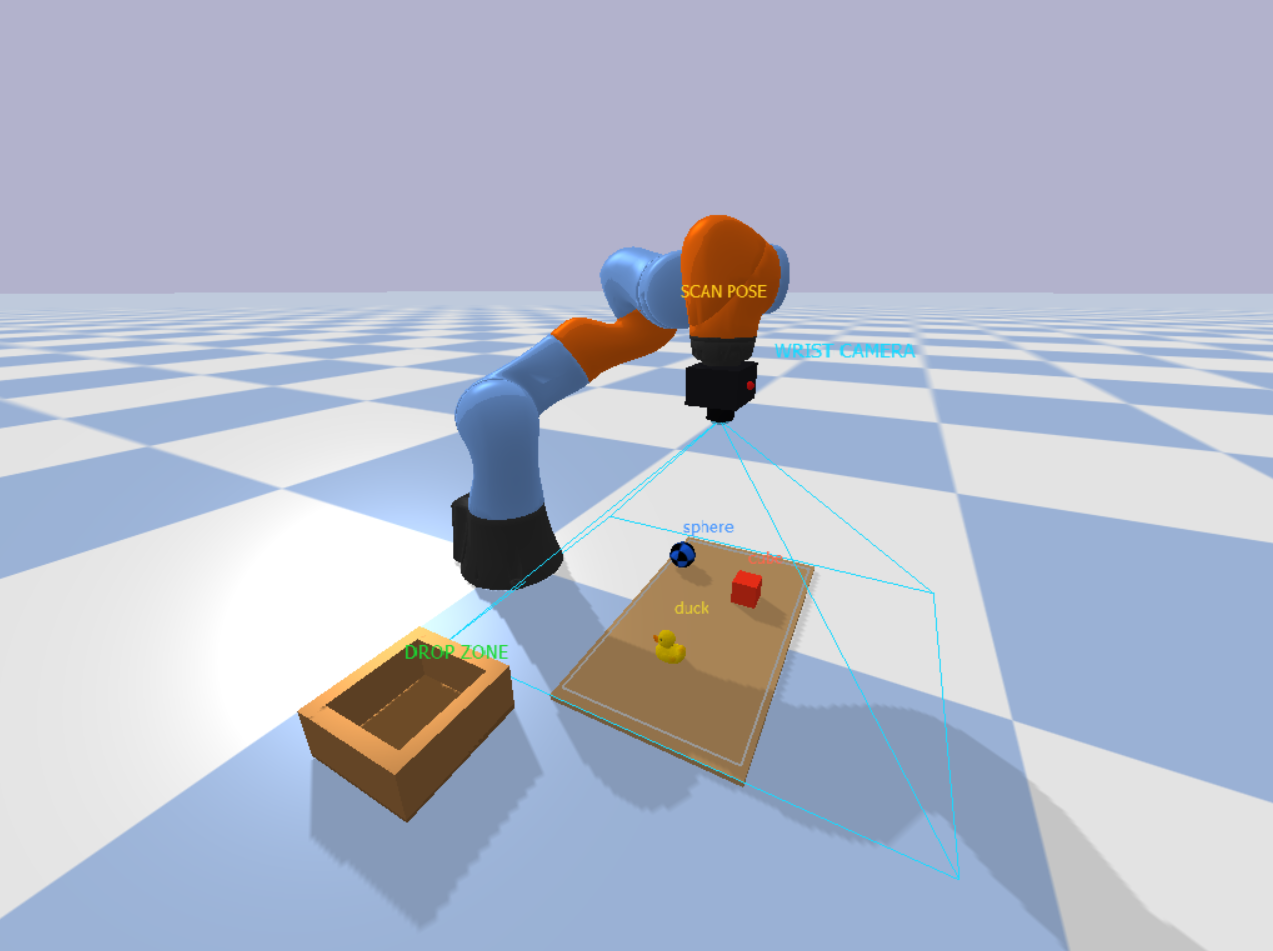
The key difference from Eye-to-Hand lies in coordinate mapping. In Eye-to-Hand, the view-projection matrix is computed once at startup and remains valid because the camera is fixed. In Eye-in-Hand, the matrix is only valid for frames captured at the exact wrist position where the image was taken. As soon as the arm moves, the stored matrix becomes invalid. The following image shows the complete Eye-in-Hand pipeline.
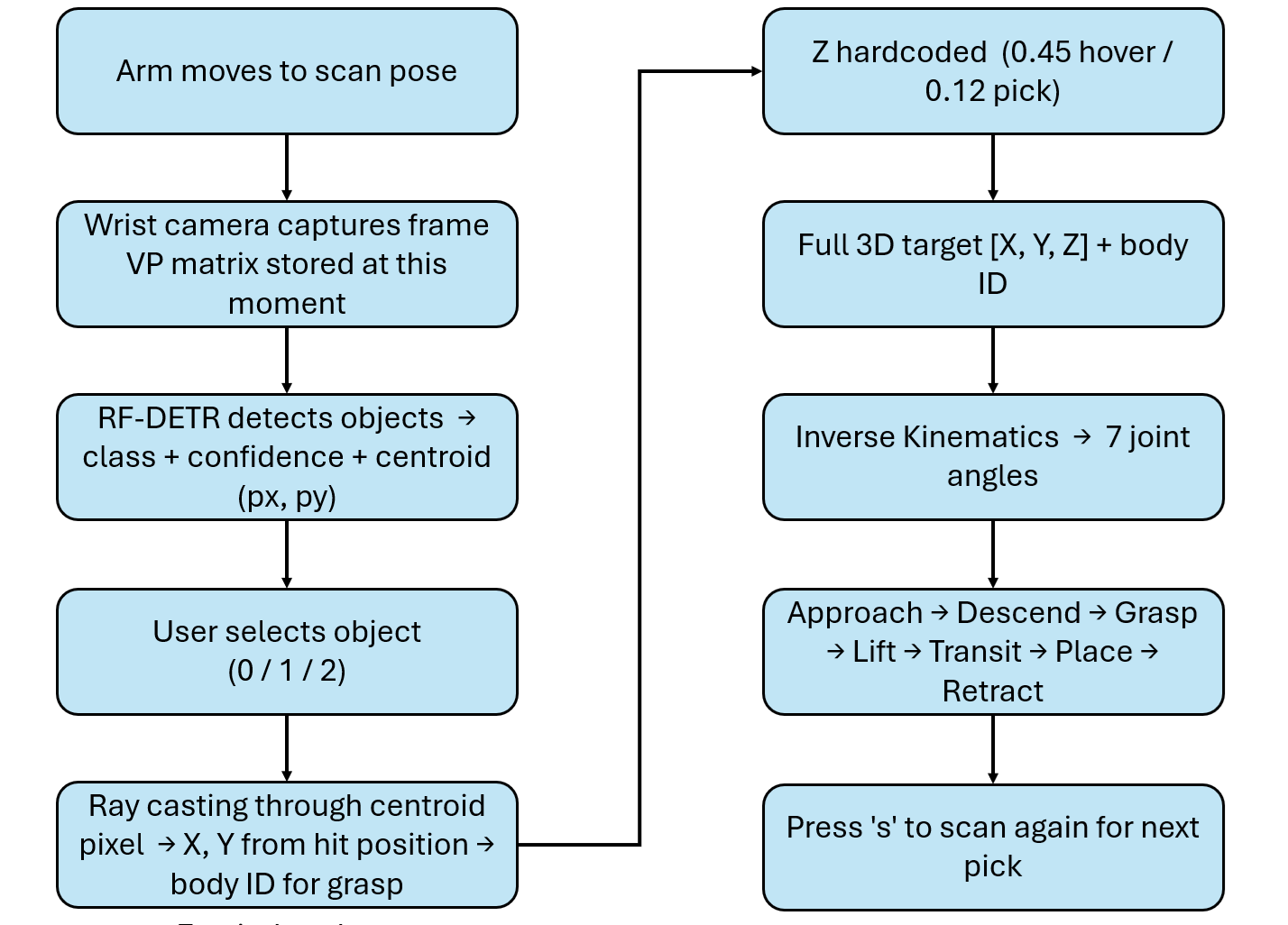
Bounding boxes are cleared as soon as the robot starts moving. Once the arm leaves the scan pose, the wrist camera observes a different view of the scene, so the pixel coordinates from the scan frame no longer correspond to the current frame. A _show_detections flag controls this behavior. It is set to True only after inference is completed at the scan pose, and it is set to False immediately when pick_and_place() is triggered.
The full Eye-in-Hand implementation is shown below.
# Eye-In-Hand Example

import os, time, threading, tempfile
import numpy as np
import cv2
import pybullet as p
import pybullet_data
from inference_sdk import InferenceHTTPClient

API_KEY    = "ROBOFLOW_API_KEY"
API_URL    = "https://serverless.roboflow.com"
MODEL_ID   = "pick-n-place-bj227/1"
CONFIDENCE = 0.60

CAM_W, CAM_H  = 640, 480
CAM_FOV       = 60
DISPLAY_EVERY = 6

DROP_X, DROP_Y = 0.20, -0.44

CLASS_NAME_MAP = {0: "cube", 1: "sphere", 2: "duck"}
CLASS_COLOURS  = {0: (80,120,255), 1: (255,160,40), 2: (60,210,100)}

SCAN_POS    = [0.50, 0.00, 0.55]
SCAN_HEIGHT = 0.55


Gr="\033[92m";Bl="\033[94m";Yl="\033[93m";Re="\033[91m";RS="\033[0m"
def info(m): print(f"{Bl}[INFO]{RS}  {m}")
def ok(m):   print(f"{Gr}[ OK ]{RS}  {m}")
def warn(m): print(f"{Yl}[WARN]{RS}  {m}")

client = InferenceHTTPClient(api_url=API_URL, api_key=API_KEY)

_inf_lock     = threading.Lock()
_inf_running  = False
_latest_preds = []

def _inference_worker(frame_bgr):
    global _inf_running, _latest_preds
    try:
        small = cv2.resize(frame_bgr, (CAM_W//2, CAM_H//2),
                           interpolation=cv2.INTER_AREA)
        ok_f, buf = cv2.imencode(".jpg", small,
                                  [cv2.IMWRITE_JPEG_QUALITY, 85])
        if not ok_f: return
        tmp = tempfile.NamedTemporaryFile(suffix=".jpg", delete=False)
        tmp.write(buf.tobytes()); tmp.close()
        result = client.infer(tmp.name, model_id=MODEL_ID)
        os.unlink(tmp.name)
        preds = [d for d in result.get("predictions", [])
                 if d.get("confidence", 0) >= CONFIDENCE]
        for d in preds:
            for k in ("x","y","width","height"):
                d[k] = d[k] * 2    # scale back to full resolution
        with _inf_lock:
            _latest_preds = preds
        ok(f"Model returned {len(preds)} detection(s)")
    except Exception as e:
        warn(f"Inference error: {e}")
    finally:
        _inf_running = False

def run_inference_sync(frame_bgr):
    """Run inference synchronously (used during scan — robot is stopped)."""
    global _latest_preds
    _inference_worker(frame_bgr)
    with _inf_lock:
        return list(_latest_preds)

def trigger_inference_bg(frame_bgr):
    """Background inference for display refresh during motion."""
    global _inf_running
    with _inf_lock:
        if _inf_running: return
        _inf_running = True
    threading.Thread(target=_inference_worker,
                     args=(frame_bgr,), daemon=True).start()

p.connect(p.GUI)
p.configureDebugVisualizer(p.COV_ENABLE_RGB_BUFFER_PREVIEW,        0)
p.configureDebugVisualizer(p.COV_ENABLE_DEPTH_BUFFER_PREVIEW,      0)
p.configureDebugVisualizer(p.COV_ENABLE_SEGMENTATION_MARK_PREVIEW, 0)
p.configureDebugVisualizer(p.COV_ENABLE_SHADOWS,                   1)

p.setAdditionalSearchPath(pybullet_data.getDataPath())
p.setGravity(0, 0, -9.8)
p.setTimeStep(1/240)
p.setRealTimeSimulation(1)

p.loadURDF("plane.urdf")
robot = p.loadURDF("kuka_iiwa/model.urdf",
                   basePosition=[0,0,0], useFixedBase=True)
EEL = 6   # end-effector link (wrist)

p.resetDebugVisualizerCamera(
    cameraDistance=1.4, cameraYaw=50,
    cameraPitch=-30, cameraTargetPosition=[0.4,0,0.25])

tc = p.createCollisionShape(p.GEOM_BOX, halfExtents=[0.16,0.30,0.005])
tv = p.createVisualShape(p.GEOM_BOX,    halfExtents=[0.16,0.30,0.005],
                          rgbaColor=[0.74,0.58,0.38,1])
table_id = p.createMultiBody(0, tc, tv, [0.50, 0.00, 0.006])

obj1 = p.loadURDF("cube_small.urdf",   [0.55,  0.10, 0.025])
p.changeVisualShape(obj1,-1, rgbaColor=[1,0.2,0.1,1])
obj2 = p.loadURDF("duck_vhacd.urdf",   [0.48, -0.12, 0.03], globalScaling=0.7)
obj3 = p.loadURDF("sphere_small.urdf", [0.38,  0.16, 0.03])
p.changeVisualShape(obj3,-1, rgbaColor=[0.1,0.4,1,1])

def make_box(hx,hy,hz,pos,col):
    c=p.createCollisionShape(p.GEOM_BOX,halfExtents=[hx,hy,hz])
    v=p.createVisualShape(p.GEOM_BOX,halfExtents=[hx,hy,hz],rgbaColor=col)
    p.createMultiBody(0,c,v,pos)

cw,ct,ch=0.10,0.012,0.040
make_box(cw,cw,0.005,[DROP_X,DROP_Y,0.006],           [0.55,0.38,0.20,1])
make_box(cw,ct,ch,  [DROP_X,DROP_Y+cw-ct,ch+0.006],   [0.65,0.45,0.25,1])
make_box(cw,ct,ch,  [DROP_X,DROP_Y-cw+ct,ch+0.006],   [0.65,0.45,0.25,1])
make_box(ct,cw,ch,  [DROP_X+cw-ct,DROP_Y,ch+0.006],   [0.65,0.45,0.25,1])
make_box(ct,cw,ch,  [DROP_X-cw+ct,DROP_Y,ch+0.006],   [0.65,0.45,0.25,1])
p.addUserDebugText("DROP ZONE",[DROP_X,DROP_Y,0.13],
                   textColorRGB=[0.1,0.85,0.2],textSize=1.0)

_cam_proj = p.computeProjectionMatrixFOV(
    fov=CAM_FOV, aspect=CAM_W/CAM_H, nearVal=0.01, farVal=3.0)

def get_wrist_camera_view():
    """
    Build a view matrix from the current EE link state.
    Camera position = EE world position.
    Camera looks along EE's local -Z axis (pointing down when arm is
    in scan pose with gripper facing the table).
    """
    ls = p.getLinkState(robot, EEL, computeForwardKinematics=True)
    ee_pos = list(ls[0])
    ee_orn = list(ls[1])

    rm = p.getMatrixFromQuaternion(ee_orn)
    cam_z = [rm[2], rm[5], rm[8]]
    cam_y = [rm[1], rm[4], rm[7]]

    target = [ee_pos[0] + cam_z[0],
              ee_pos[1] + cam_z[1],
              ee_pos[2] + cam_z[2]]

    view = p.computeViewMatrix(
        cameraEyePosition   =ee_pos,
        cameraTargetPosition=target,
        cameraUpVector      =cam_y)

    return view, ee_pos, ee_orn

def get_wrist_frame():
    """Capture BGR frame from the wrist-mounted camera."""
    view, _, _ = get_wrist_camera_view()
    try:
        _,_,rgb,_,_ = p.getCameraImage(CAM_W,CAM_H,
            viewMatrix=view,projectionMatrix=_cam_proj,
            renderer=p.ER_BULLET_HARDWARE_OPENGL)
    except Exception:
        _,_,rgb,_,_ = p.getCameraImage(CAM_W,CAM_H,
            viewMatrix=view,projectionMatrix=_cam_proj,
            renderer=p.ER_TINY_RENDERER)
    return cv2.cvtColor(
        np.array(rgb,dtype=np.uint8).reshape(CAM_H,CAM_W,4),
        cv2.COLOR_RGBA2BGR)


TABLE_Z = 0.025

def compute_scan_bounds():
    """
    Compute the world XY extent visible to the wrist camera
    when the EE is at SCAN_POS looking straight down.
    Returns (x_min, x_max, y_min, y_max).
    """
    h      = SCAN_HEIGHT - TABLE_Z   # height above objects
    half_h = h * np.tan(np.radians(CAM_FOV / 2))
    half_w = half_h * (CAM_W / CAM_H)
    cx, cy = SCAN_POS[0], SCAN_POS[1]
    return (cx-half_w, cx+half_w,
            cy-half_h, cy+half_h)

def pixel_to_world_scan(px, py):
    """
    Convert detected pixel to world XY using the scan-pose camera geometry.
    Only valid when called with detections from a frame captured at SCAN_POS.
    """
    x_min, x_max, y_min, y_max = compute_scan_bounds()
    nx =  px / CAM_W
    ny =  py / CAM_H
    wx = x_min + nx * (x_max - x_min)
    wy = y_max - ny * (y_max - y_min)   # flip Y
    return wx, wy

_scan_inv_vp = None

def store_scan_vp(view_matrix):
    """Cache the inverse VP matrix from the scan pose for ray casting."""
    global _scan_inv_vp
    view_np = np.array(view_matrix).reshape(4,4).T
    proj_np = np.array(_cam_proj).reshape(4,4).T
    _scan_inv_vp = np.linalg.inv(proj_np @ view_np)

def pixel_to_ray_scan(px, py):
    """Cast ray using the VP inverse stored at scan time."""
    if _scan_inv_vp is None:
        return None, None
    x = (2.0*px/CAM_W) - 1.0
    y = 1.0 - (2.0*py/CAM_H)
    def up(v):
        w = _scan_inv_vp @ np.array(v)
        return w[:3]/w[3]
    return up([x,y,-1,1]), up([x,y,1,1])

picked_class_ids = set()
_show_detections = False   # True only when robot is at scan pose

def filter_stale(preds):
    return [d for d in preds if int(d["class_id"]) not in picked_class_ids]

PHASE_COL = {
    "SCANNING":   (40,55,130), "APPROACH":  (10,100,190),
    "DESCEND":    (10,75,170), "GRASPED":   (15,130,25),
    "TRANSIT":    (10,90,170), "PLACING":   (15,130,25),
    "RELEASING":  (150,35,5),  "RETRACTING":(55,55,130),
    "IDLE":       (25,25,25),  "MOVING":    (60,60,60),
}

def draw_frame(frame, preds, selected=None,
               phase="IDLE", status="", camera_label="WRIST CAM"):
    out = frame.copy()
    # Phase bar
    bc = PHASE_COL.get(phase,(25,25,25))
    cv2.rectangle(out,(0,0),(CAM_W,42),bc,-1)
    cv2.putText(out, status or phase,
                (8,27),cv2.FONT_HERSHEY_SIMPLEX,0.60,(255,255,255),2,cv2.LINE_AA)
    # Camera type badge
    cv2.rectangle(out,(CAM_W-130,4),(CAM_W-2,28),(10,10,10),-1)
    cv2.putText(out, camera_label,
                (CAM_W-124,22),cv2.FONT_HERSHEY_SIMPLEX,0.42,(0,200,255),1,cv2.LINE_AA)
    # Inference indicator
    with _inf_lock:
        if _inf_running:
            cv2.circle(out,(16,16),6,(0,200,255),-1)
    # Detections
    for d in preds:
        cx,cy=int(d["x"]),int(d["y"])
        bw,bh=int(d["width"]),int(d["height"])
        x1,y1=cx-bw//2,cy-bh//2
        cid  =int(d["class_id"])
        col  =CLASS_COLOURS.get(cid,(200,200,200))
        is_s =(selected is not None and d is selected)
        bdr  =(0,255,80) if is_s else col
        cv2.rectangle(out,(x1,y1),(x1+bw,y1+bh),bdr,3 if is_s else 2)
        cv2.circle(out,(cx,cy),6,bdr,-1)
        if is_s:
            cv2.line(out,(cx-18,cy),(cx+18,cy),(0,255,80),2)
            cv2.line(out,(cx,cy-18),(cx,cy+18),(0,255,80),2)
        lbl = f"{cid}:{CLASS_NAME_MAP.get(cid)} {d['confidence']:.2f}"
        (tw,th),_=cv2.getTextSize(lbl,cv2.FONT_HERSHEY_SIMPLEX,0.52,1)
        ly=max(54,y1-6)
        cv2.rectangle(out,(x1,ly-th-6),(x1+tw+6,ly),bdr,-1)
        cv2.putText(out,lbl,(x1+3,ly-3),
                    cv2.FONT_HERSHEY_SIMPLEX,0.52,(0,0,0),1,cv2.LINE_AA)
    # Status bar
    cv2.rectangle(out,(0,CAM_H-26),(CAM_W,CAM_H),(15,15,15),-1)
    placed=[CLASS_NAME_MAP.get(c,str(c)) for c in sorted(picked_class_ids)]
    cv2.putText(out,
        f"  Placed: {', '.join(placed) or 'none'}  |  Detections: {len(preds)}",
        (6,CAM_H-8),cv2.FONT_HERSHEY_SIMPLEX,0.44,(0,220,220),1,cv2.LINE_AA)
    cv2.imshow("Eye-in-Hand Vision", out)
    cv2.waitKey(1)

grasp_con  = None
picked_ids = set()
_last_preds_display = []

def step_sim(n, phase="IDLE", status="", sel=None):
    p.setRealTimeSimulation(0)
    for s in range(n):
        p.stepSimulation()
        time.sleep(1/240)
        if s % DISPLAY_EVERY == 0:
            frame = get_wrist_frame()
            preds = filter_stale(list(_latest_preds)) if _show_detections else []
            draw_frame(frame, preds, sel, phase, status)
    p.setRealTimeSimulation(1)

def move_to(pos, steps=240, phase="MOVING", status="", sel=None,
            orn=None):
    """Move EE to target position. orn is optional target orientation."""
    if orn is not None:
        jps = p.calculateInverseKinematics(robot,EEL,pos,orn,
                                            maxNumIterations=150)
    else:
        jps = p.calculateInverseKinematics(robot,EEL,pos,
                                            maxNumIterations=150)
    for i in range(7):
        p.setJointMotorControl2(robot,i,p.POSITION_CONTROL,
                                targetPosition=jps[i],force=500)
    step_sim(steps, phase, status, sel)

def attach(body_id):
    global grasp_con
    grasp_con=p.createConstraint(
        robot,EEL,body_id,-1,p.JOINT_FIXED,
        [0,0,0],[0,0,0.05],[0,0,0])
    p.changeConstraint(grasp_con,maxForce=500)
    ok("  ✓ Gripper CLOSED")

def release():
    global grasp_con
    if grasp_con:
        p.removeConstraint(grasp_con); grasp_con=None
    ok("  ✓ Gripper OPEN")

def scan_scene():
    global _show_detections
    _show_detections = False

    info("Moving to scan pose...")
    down_orn = p.getQuaternionFromEuler([3.14159, 0, 0])
    move_to(SCAN_POS, steps=300, phase="SCANNING",
            status="Moving to scan pose...", orn=down_orn)

    step_sim(60, "SCANNING", "Settling at scan pose...")

    info("Capturing wrist camera frame...")
    view, ee_pos, ee_orn = get_wrist_camera_view()
    store_scan_vp(view)
    frame = get_wrist_frame()

    draw_frame(frame, [], None, "SCANNING",
               "Running model on wrist camera frame...")

    info("Running Roboflow inference on wrist camera frame...")
    preds = run_inference_sync(frame)
    preds = filter_stale(preds)

    _show_detections = True

    ok(f"Scan complete — {len(preds)} object(s) detected")
    draw_frame(frame, preds, None, "SCANNING",
               f"Found {len(preds)} object(s)")
    time.sleep(0.8)
    return frame, preds

def pick_and_place(pred):
    global _show_detections
    _show_detections = False

    cx, cy = int(pred["x"]), int(pred["y"])
    cid    = int(pred["class_id"])
    name   = CLASS_NAME_MAP.get(cid, str(cid))

    rf, rt = pixel_to_ray_scan(cx, cy)
    if rf is None:
        warn("No scan VP matrix — scan first"); return False

    hit     = p.rayTest(rf, rt)[0]
    body_id = hit[0]
    hit_pos = hit[3]

    if body_id < 0:
        warn("[pick] Ray missed"); return False
    if body_id in (table_id, robot):
        warn("[pick] Hit table or robot"); return False
    if body_id in picked_ids:
        warn("[pick] Already placed"); return False

    px, py = hit_pos[0], hit_pos[1]
    ok(f"Picking '{name}'  body={body_id}  pos=({px:.3f},{py:.3f})")

    down_orn = p.getQuaternionFromEuler([3.14159, 0, 0])

    above_pick  = [px,    py,    0.45]
    at_pick     = [px,    py,    0.12]
    above_place = [DROP_X,DROP_Y,0.45]
    at_place    = [DROP_X,DROP_Y,0.12]

    move_to(above_pick, 300,"APPROACH",f"Approach above {name}",pred,down_orn)
    move_to(at_pick,    240,"DESCEND", f"Descend to {name}",    pred,down_orn)
    attach(body_id); step_sim(80,"GRASPED",f"{name} grasped",pred)
    move_to(above_pick, 240,"GRASPED", f"Lifting {name}",       pred,down_orn)
    move_to(above_place,300,"TRANSIT", f"Transiting {name}",    pred,down_orn)
    move_to(at_place,   240,"PLACING", f"Placing {name}",       pred,down_orn)
    release(); step_sim(100,"RELEASING",f"{name} released",pred)
    move_to(above_place,240,"RETRACTING","Retracting",None,down_orn)

    picked_ids.add(body_id)
    picked_class_ids.add(cid)
    ok(f"'{name}' placed in drop zone")
    return True

cv2.namedWindow("Eye-in-Hand Vision", cv2.WINDOW_NORMAL)
cv2.resizeWindow("Eye-in-Hand Vision", CAM_W, CAM_H)
cv2.moveWindow("Eye-in-Hand Vision", 10, 10)

print("\n" + "═"*55)
print("  Eye-in-Hand Pick & Place")
print("  Camera is mounted on the robot wrist")
print("═"*55)
print("\n  s = scan workspace")
print("  0 = pick cube    (after scan)")
print("  1 = pick sphere  (after scan)")
print("  2 = pick duck    (after scan)")
print("  q = quit\n")

step_sim(180, "IDLE", "Settling physics...")
ok("Ready — press 's' to scan the workspace")

scan_frame  = None
scan_preds  = []
busy        = False
frame_count = 0

while True:

    if frame_count % 4 == 0:
        frame = get_wrist_frame()
        preds = filter_stale(scan_preds) if _show_detections else []
        draw_frame(frame, preds, None,
                   "IDLE", "Press s=scan  0/1/2=pick  q=quit")

    key = cv2.waitKey(10) & 0xFF

    frame_count += 1

    if key == ord("q"):
        break

    if key == ord("s") and not busy:
        busy = True
        scan_frame, scan_preds = scan_scene()
        if not scan_preds:
            warn("Nothing detected — try again or check model confidence")
        else:
            print(f"\n  Objects detected:")
            for i,d in enumerate(scan_preds):
                print(f"    [{d['class_id']}] {d['class']}  "
                      f"conf={d['confidence']:.2f}")
            print(f"\n  Press 0/1/2 to pick an object\n")
        busy = False

    if not busy and key in [ord("0"),ord("1"),ord("2")]:
        if not scan_preds:
            warn("Scan first — press 's'")
        else:
            cid     = int(chr(key))
            name    = CLASS_NAME_MAP.get(cid,"?")
            matches = [d for d in scan_preds
                       if int(d["class_id"])==cid]
            if not matches:
                warn(f"No '{name}' in last scan — press 's' to re-scan")
            else:
                target = max(matches, key=lambda d: d["confidence"])
                busy   = True
                success = pick_and_place(target)
                busy = False
                if success:
                    # Remove placed class from scan results
                    scan_preds = [d for d in scan_preds
                                  if int(d["class_id"]) not in picked_class_ids]
                    with _inf_lock:
                        _latest_preds[:] = [
                            d for d in _latest_preds
                            if int(d["class_id"]) not in picked_class_ids
                        ]
                    if scan_preds:
                        print(f"\n  Remaining: "
                              f"{[d['class'] for d in scan_preds]}")
                        print("  Press 0/1/2 to pick next, or 's' to re-scan\n")
                    else:
                        print("\n  All objects placed! Press 's' to re-scan.\n")
                    step_sim(120,"IDLE","Ready for next command")

cv2.destroyAllWindows()
p.disconnect()
print("\nDone.")
Off-the-Shelf Pick and Place Model as a Baseline
Before training anything custom, it is useful to start with a general purpose model and test the full pipeline. You can use a pre trained RF-DETR model as a baseline. It can detect common objects and immediately provides bounding boxes and centroids without any additional training. This allows to validate the complete system end to end. The camera captures an image, the model detects objects, the centroid is converted into a 3D position, and the robot performs a pick and place action. At this stage, the goal is not perfect accuracy. The goal is to confirm that all components such as detection, coordinate mapping, inverse kinematics, and motion control are working together correctly.
Using an off the shelf model significantly reduces development time. Instead of spending time collecting and labeling data early on, we can focus on building and testing the robotics pipeline. Once the pipeline is stable, the baseline model also helps identify where improvements are needed, such as missed detections, incorrect picks, or sensitivity to camera angle.
Fine Tuning RF-DETR for Overhead Pick and Place Camera Angles
While the baseline model works, it is not optimized for this specific setup. Most general purpose models are trained on natural images with side views or varied perspectives. In a pick and place system, the camera is typically fixed above the workspace, which creates a consistent top down view. Objects appear different in this view, with less visible depth and more emphasis on shape and outline.
To improve performance, the model can be fine tuned using images that match this exact setup. In this project, synthetic images are generated from the simulation using the same overhead camera configuration. These images are then used to train or fine tune the model so it learns how objects look from this specific angle.
Fine tuning helps the model become more reliable in detecting objects under the same conditions it will see during deployment. It reduces errors caused by perspective differences and improves consistency in centroid detection, which directly affects pick accuracy. This approach also makes the system more practical. The result is a detection system that is better aligned with the physical setup and more suitable for real pick and place tasks.
Using Roboflow Universe Data for Pick and Place
Before collecting your own data, it is often useful to start with existing datasets from Roboflow Universe. Universe hosts a large collection of open datasets and pre-trained models across domains such as logistics, manufacturing, and robotics, making it a strong starting point for pick-and-place projects. Here are several datasets directly applicable to building or extending a pick-and-place detection system.
1. Bolt and Nuts Detection - Industrial Fastener Sorting
A dataset of images of bolts and nuts, built specifically for component identification and sorting automation in industrial environments.
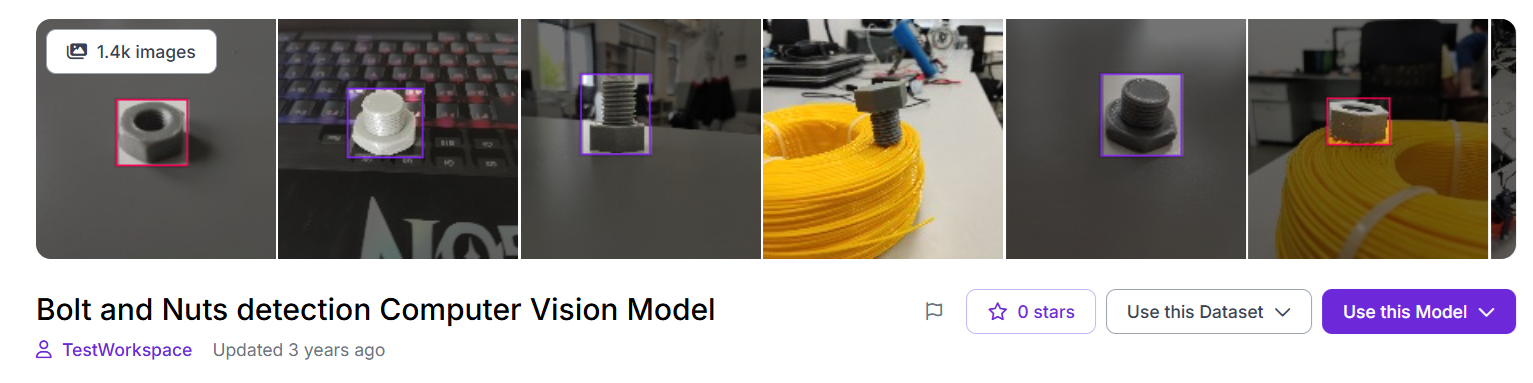
Applications: Fastener sorting systems where a robot identifies bolts from nuts on a flat tray and routes each to a different bin. Also applicable to assembly verification, where a camera checks that the correct fastener type has been picked before the robot proceeds to placement.
Dataset Link: universe.roboflow.com/testworkspace-z10xl/bolt-and-nuts-detection
2. Fruit Sorting - Agricultural Pick and Place
A dataset built for automated fruit picking and sorting on production lines. Fruit and vegetable sorting robots are among the most commercially deployed real-world pick-and-place systems. Objects arrive on a flat surface, need to be identified by type, and placed into separate collection bins.
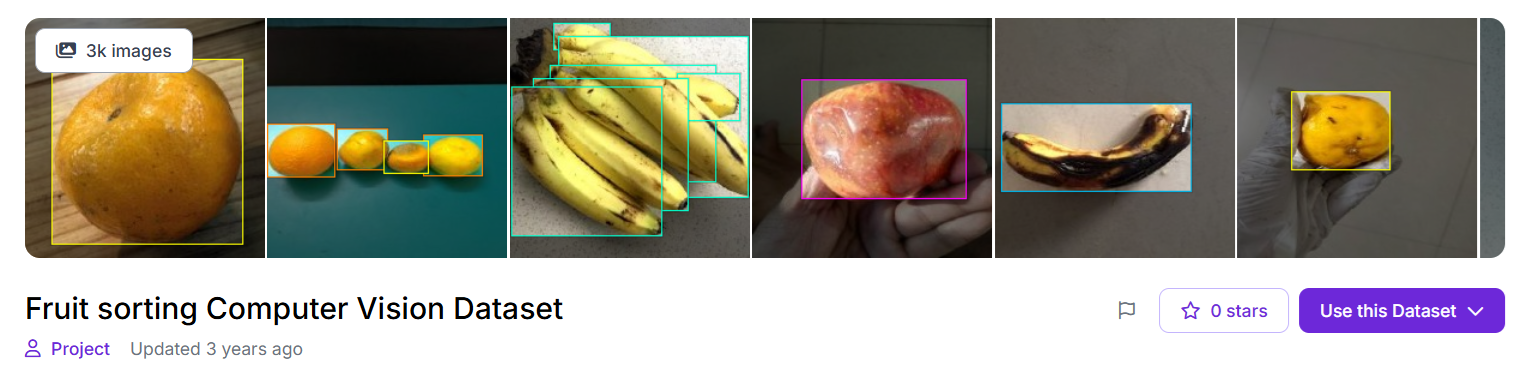
Applications: Agricultural sorting lines where a robot picks fruit by class and routes each item to a different output channel or bin. The pipeline is identical to the one in this guide detect object class, determine centroid position, pick, place to class-specific drop zone.
Dataset Link: universe.roboflow.com/project-ueiw1/fruit-sorting-ppua6
3. Garbage Classification - Recycling Sorter Robot
A dataset consisting of images categorizing waste into seven types such as biodegradable, plastic, metal, glass, paper, cardboard, and other with a pre-trained model. Built explicitly for automated recycling sorting lines and robotic conveyors.
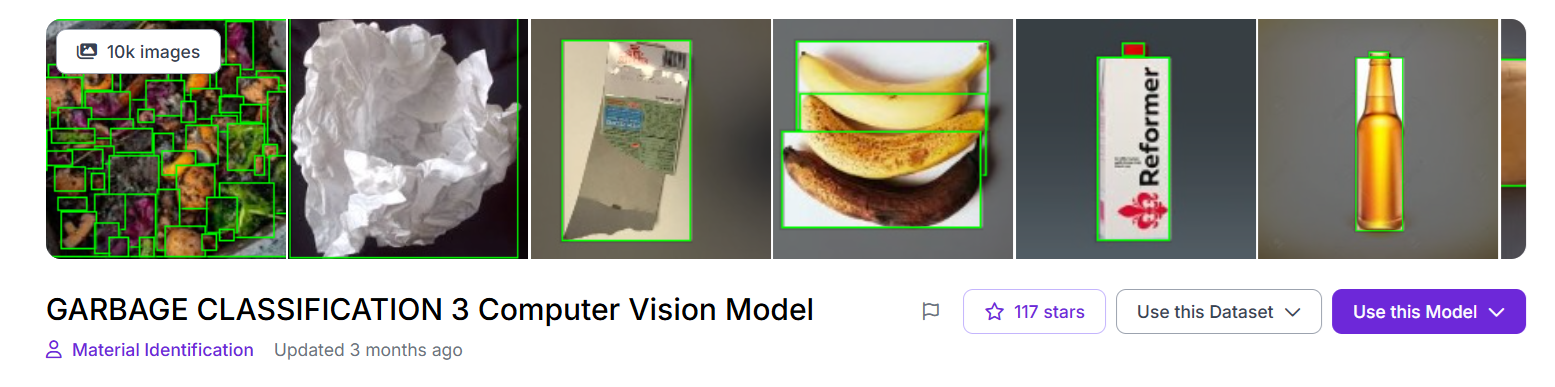
Applications: Robotic recycling sorting conveyors where the robot must classify each item before deciding where to place it. Unlike most pick-and-place datasets where all objects go to one drop zone, recycling sorting requires multiple drop zones, one per material class, making this dataset useful for building and testing multi-destination pick-and-place logic.
Dataset Link: universe.roboflow.com/material-identification/garbage-classification-3
4. Surgical Tools Detection - Medical Robotics
A dataset of images of surgical instruments including scalpels, forceps, scissors, and retractors, with a pre-trained model. Built for robotic-assisted surgery applications where a vision system must identify the correct instrument on a sterile tray before a robotic arm picks and hands it to the surgeon. The instruments are elongated, reflective, and visually similar making this one of the most challenging fine-grained pick-and-place detection tasks.
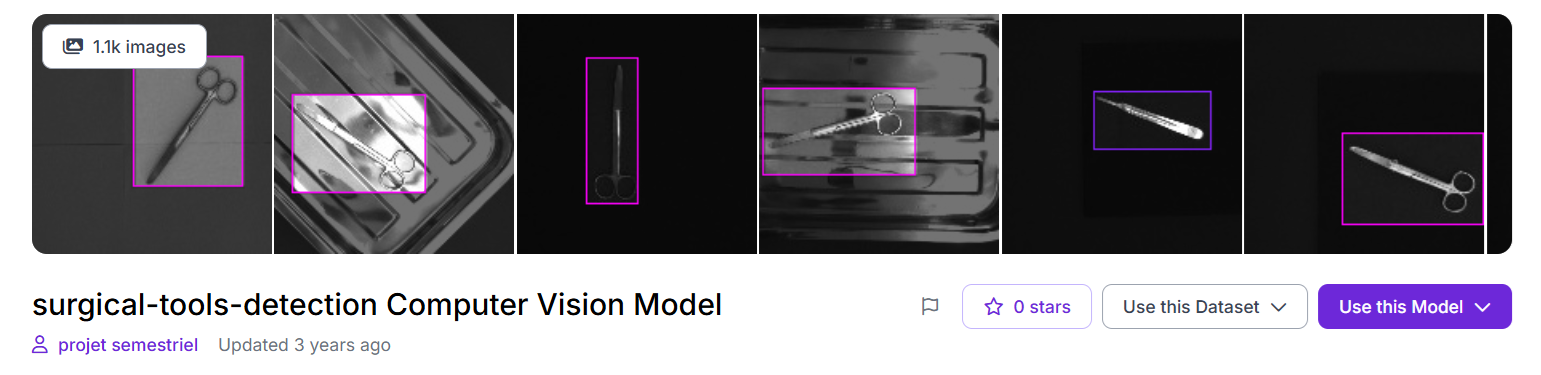
Applications: Robotic surgical assistant systems where the robot identifies and picks specific instruments from an organized tray on demand. Also applicable to automated sterilization and re-tray workflows where a robot must identify, pick, and sort instruments after a procedure by type.
Dataset Link: universe.roboflow.com/projet-semestriel/surgical-tools-detection-mjnkt
5. PCB Board Type Classification - Robotic Sorting
A PCB (Printed Circuit Board) type detection dataset. In electronics manufacturing and recycling, robot arms must identify which type of PCB a board is before deciding where to pick it and where to place it. Different board types go to different processing stations, storage bins, or recycling streams.
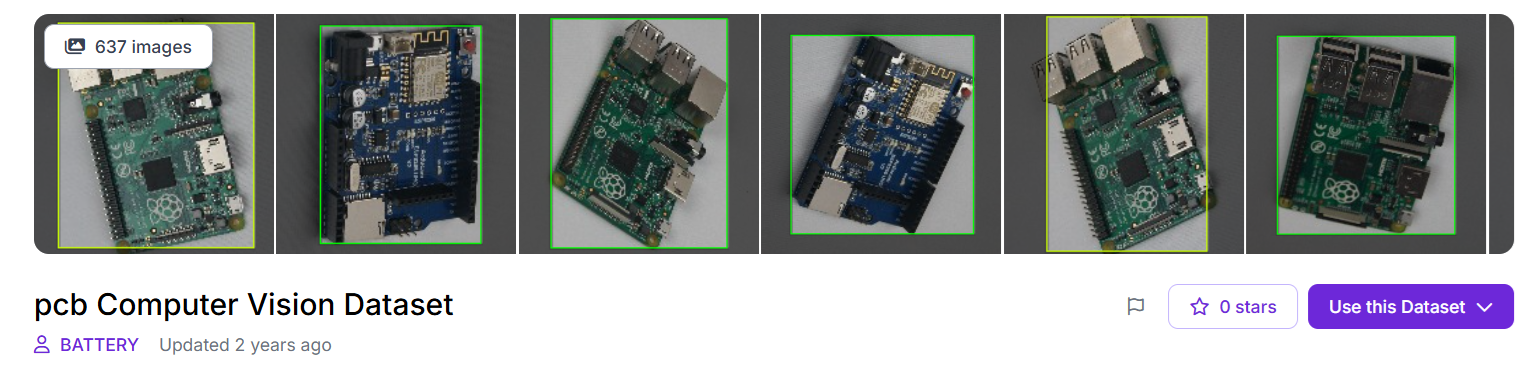
Applications: Electronics manufacturing lines where a robot picks PCBs off a conveyor and routes each to the correct processing station based on board type. Also directly applicable to e-waste recycling systems where different PCB categories contain different materials and must be sorted before shredding or recovery. Unlike component-level detection (finding resistors on a board), this is board-level classification - the robot identifies the whole board type and makes a pick-and-place decision based on that.
Dataset Link: universe.roboflow.com/battery-i4e70/pcb-tbshi
These datasets represent just a starting point. Roboflow Universe hosts thousands of object detection datasets across industrial, agricultural, medical, and consumer domains, many of which can serve as a strong foundation for a pick-and-place system before you invest time in collecting and labelling your own data.
How to Use a Universe Dataset
You can Clone/fork images directly from Roboflow universe. Open the dataset on Universe, select images, and click CloneImages to add them to your existing workspace alongside your own data. Or Fork the full dataset in your Roboflow project.
Robotic Pick and Place Model Conclusion
Vision guided pick and place starts as a computer vision problem. Once the robot receives a correct target position, the rest of the system is predictable. The arm follows inverse kinematics, the controller executes motion, and the gripper performs the action. The only part that introduces uncertainty is the vision model. When detection is reliable, the robot behaves reliably.
The workflow shown in this guide makes it possible to move quickly from idea to working system. Synthetic data allows rapid iteration. RF-DETR provides a strong starting point for detection. A simple inference pipeline connects vision to robot control. Fine tuning then improves accuracy for the exact camera setup. Together, these steps reduce development time from months to days.
Both camera setups discussed here are used in real deployments. Eye to hand is simpler and works well for conveyor belts and tabletop tasks where the workspace is clearly visible. Eye in hand is useful when the robot needs to inspect objects closely or handle occlusions. The underlying pipeline remains the same. Only the physical setup changes.
The key idea is simple. A better detection model leads to a more accurate robot. Improving the model improves the entire system. This is why training and fine tuning are the most important parts of building a reliable vision guided pick and place system.


Cite this Post
Use the following entry to cite this post in your research:
Timothy M. (May 5, 2026). Pick and Place Robot Model & Prototyping. Roboflow Blog: https://blog.roboflow.com/pick-and-place-robot-prototyping/