

This tutorial walks through building a custom object detection model end to end, using chess piece detection as the worked example. You collect and label images, generate a dataset version, train a model in the cloud, evaluate it, and deploy it, all inside Roboflow.
We train RF-DETR, Roboflow's real-time detection architecture. Like EfficientDet, RF-DETR adapts to whatever number of classes your dataset has, and it fine-tunes quickly while reaching high accuracy and shipping with commercial-safe licensing. If you came here to train a detector in the spirit of EfficientDet, an efficient, scalable architecture, this is the faster path to the same outcome, a custom model running in production.
We also walk through the same process using EfficientDet.
What Is EfficientDet?
EfficientDet is a family of object detection models from the Google Brain team, introduced in 2019. It is the detection counterpart to EfficientNet, the image classification family, and it carries over the same idea: scale the network efficiently rather than just making it bigger.
How the EfficientDet architecture works
A few design choices define EfficientDet:
- EfficientNet backbone. Features are extracted by an EfficientNet, which balances depth, width, and input resolution for a given compute budget.
- BiFPN. A weighted bidirectional feature pyramid network fuses features across scales efficiently, which helps detect objects of very different sizes.
- Compound scaling. Instead of scaling one dimension, EfficientDet scales backbone, feature network, and resolution together, producing a series of sizes from d0 (small and fast) to d7 (large and accurate).
That scalability is why EfficientDet was attractive for limited-compute settings: pick the size that fits your hardware.
What to Use Today
EfficientDet remains a reasonable convolutional detector, but the speed-and-accuracy tradeoff it represented has moved on. Transformer-based detectors like RF-DETR now reach state-of-the-art accuracy at real-time speed, adapt well to custom datasets large and small, run on limited compute including edge devices, and train without the version-pinning and environment friction of older repositories. That is why this first tutorial trains RF-DETR. The workflow is the same regardless of architecture, so what you learn here carries over.
Training an Object Detection Model with a Custom Dataset
Our worked example will be chess. The goal is to detect each piece on a board and identify which type it is and which player it belongs to, which is a 12-class problem (six piece types in two colors). It is a good stand-in for any detection task with many visually similar classes in a crowded frame.
For your own problem, constrain the scope and decide the minimum acceptable performance up front. Chess pieces are small and hard to tell apart, so it is the kind of task where careful labels and evaluation matter, which we cover in the evaluation step.
What You Need
- A free Roboflow account. Sign up takes a minute.
- A set of images of whatever you want to detect. For the chess example, you can fork our public dataset and skip collection entirely.
- A web browser. That is all you need to label, train, and deploy.
- Optional: Python, if you want to call your trained model from your own code at the end.
Step 1: Create a project
Sign in to Roboflow and create a new Project. Choose Object Detection as the project type, give it a name like chess-pieces, and set the annotation group to what you are labeling (for example, piece). You now have an empty project ready for images.
Step 2: Get your images
To follow along exactly, open the chess dataset (292 images across 12 classes) and fork it into your workspace. It is already labeled, so you can move straight to generating a version.
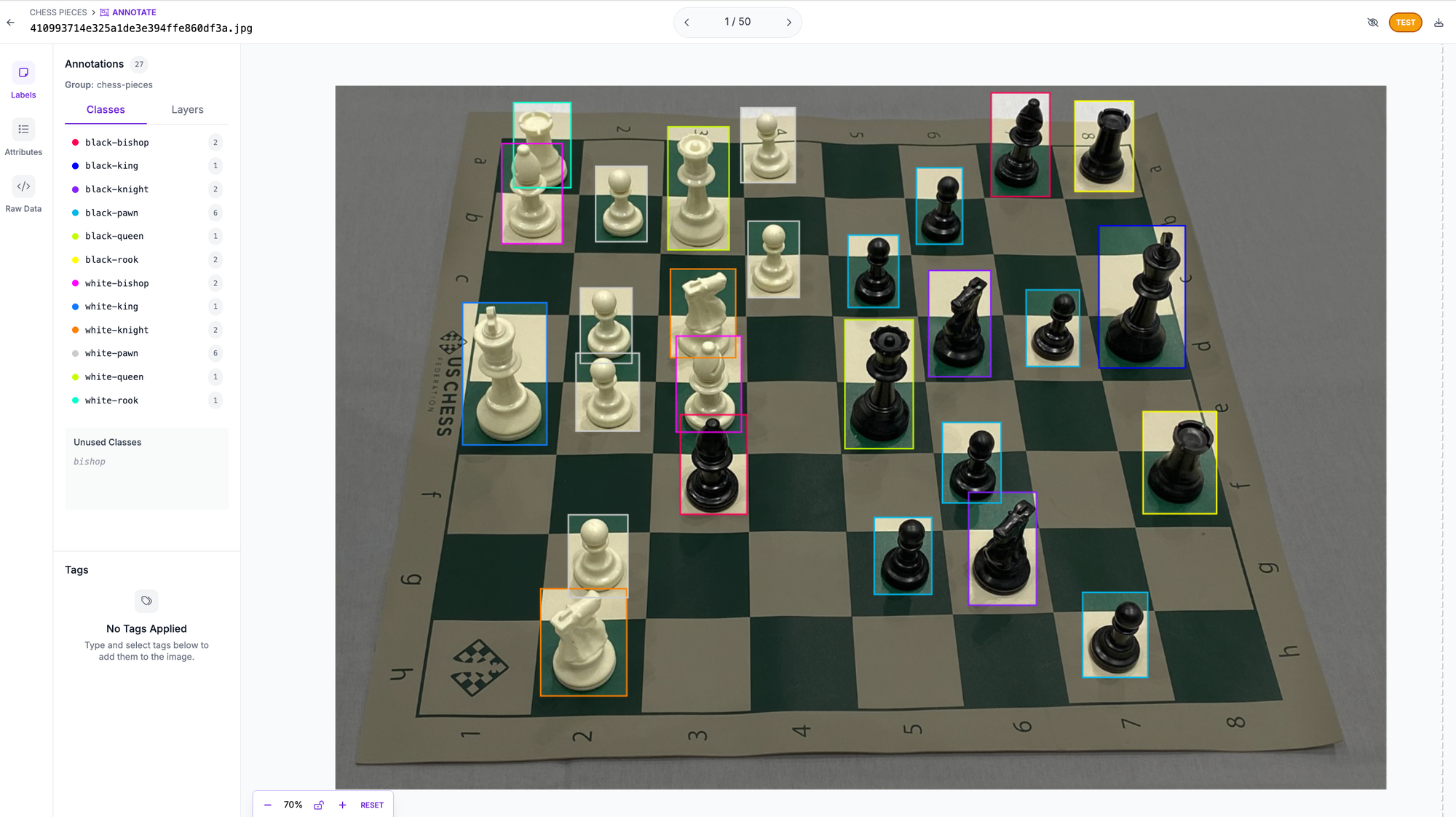
To use your own data, drag your images into the Upload tab. For a head start on a different problem, Roboflow Universe hosts more than 200,000 open datasets and pre-trained models. When you collect your own images, capture them in the conditions where the model will run: similar angles, lighting, and image quality. The closer your training images are to production, the better the model performs.
Step 3: Annotate your images
The chess dataset is pre-labeled, so you can skip ahead. For your own data, open the Annotate tab and draw boxes. Roboflow Annotate includes Auto Label and Label Assist, which use foundation models to draw the first set of boxes for you so your team only reviews and corrects them.
A few labeling rules that matter:
- Box the entire object, with a small buffer, rather than clipping any part of it.
- When pieces occlude each other, label each as if you could see the whole object.
- Be consistent across the dataset. Inconsistent labels hurt accuracy more than almost anything else.
See our guide to labeling best practices for more. When you approve your first batch of annotations, Roboflow trains a Roboflow Instant Model in the background that you can use right away to auto label the rest of your images.
Step 4: Generate a dataset version
Go to the Versions tab and generate a dataset version, a frozen snapshot of your data plus the preprocessing and augmentation you choose.
- Preprocessing: apply Auto-Orient to fix EXIF orientation issues, and Resize to a square so training is fast and consistent.
- Augmentation: expand a small dataset and reduce overfitting with variations that match production, such as brightness and exposure shifts. Apply only what your model will realistically see.
Roboflow also splits your data into training, validation, and test sets, typically around 70/20/10, and keeps that split consistent across export formats. The training set is what the model learns from, the validation set tunes the model and watches for overfitting, and the test set is held out until the end to measure real performance.
Step 5: Train your model
From the project, open Train and click Custom Training.
- Select an architecture. For object detection, choose RF-DETR. Like EfficientDet, it comes in several sizes (Nano, Small, Medium, Base, and larger on paid plans), so you scale the model to your latency budget. If you would rather not choose, select Neural Architecture Search, which trains and evaluates several configurations and recommends the best fit (it requires at least 15 validation images).
- Select a checkpoint. For your first model, choose Train from Public Checkpoint, which starts from a model pre-trained on Microsoft COCO. This is transfer learning: you begin from a model that already understands general visual features, which trains faster and scores higher.
- Start training. Roboflow shows the estimated duration and credit cost, then trains in the cloud and emails you when it finishes, usually under 24 hours. See the credits page for pricing.
There is no GPU to provision, no environment to pin, and no notebook to keep open.
Step 6: Evaluate your model
When training finishes, Roboflow reports mean average precision (mAP), precision, and recall on the held-out test set, with a per-class breakdown.
- mAP summarizes how well predicted boxes match ground truth across all classes. Higher is better.
- IoU (intersection over union) measures the overlap between a predicted box and the true box. mAP is computed at one or more IoU thresholds, commonly 0.5.
- Precision is how many predictions were correct; recall is how many real objects the model found.
Use the per-class view to find weak spots. If one piece type scores poorly, the fix is usually more or better labeled examples of that class, not a different model. Add images, re-label, generate a new version, and train again.
Step 7: Run inference
Your trained model is available through the Roboflow Serverless Hosted API. Try it in the browser on the Deploy tab, or call it from Python.
pip install inference-sdk supervision
import os
import cv2
import supervision as sv
from inference_sdk import InferenceHTTPClient

client = InferenceHTTPClient(
    api_url="https://serverless.roboflow.com",
    api_key=os.getenv("ROBOFLOW_API_KEY"),
)

# Replace with your model ID, in the form "project-name/version"
result = client.infer("chess.jpg", model_id="chess-pieces/1")

image = cv2.imread("chess.jpg")
detections = sv.Detections.from_inference(result)

box_annotator = sv.BoxAnnotator()
label_annotator = sv.LabelAnnotator()
annotated = box_annotator.annotate(scene=image.copy(), detections=detections)
annotated = label_annotator.annotate(scene=annotated, detections=detections)

cv2.imwrite("chess-annotated.png", annotated)
Pass your API key through the ROBOFLOW_API_KEY environment variable and never share it publicly. The model_id is your project name and version number. The same call works against a COCO-pretrained RF-DETR checkpoint with model_id="rfdetr-base" for a quick sanity check.
Step 8: Deploy to production
A detector is rarely the whole application, and Roboflow takes you the rest of the way without exporting and converting weights by hand.
- Roboflow Workflows is a low-code, visual builder for chaining models and logic into one pipeline: detect, filter by confidence, track across frames, and trigger an action, all without stitching libraries together.
- Roboflow Inference is the open source engine that runs your model and Workflows in production, on cloud GPUs, on-prem, or edge devices like NVIDIA Jetson and Raspberry Pi. It is the runtime behind 55 billion-plus model inferences a year, and your data and models stay yours.
- The Roboflow MCP server connects your workspace to AI agents, so a coding agent like Claude Code, Codex, or Cursor can create a project, upload images, auto-label, train, and run inference from a single chat session.
Why RF-DETR for Custom Object Detection
EfficientDet earned its reputation on efficiency: strong accuracy for the compute. RF-DETR carries that goal forward and is what Roboflow trains for you:
- Real-time speed with state-of-the-art accuracy, rather than trading one for the other.
- Adapts to any number of classes and to datasets large or small, the same flexibility EfficientDet offered.
- Commercial-safe licensing, so you can use it in production without restriction.
- One path from data to deployment, with the same Annotate, Versions, Train, Inference, and Workflows tooling.
You followed the workflow production teams use: collect and label data, generate a version, train, evaluate, and deploy. The only thing that changes for a harder problem is the data you bring.
How to Train an EfficientDet Object Detection Model
Now we explore a PyTorch implementation of EfficientDet on a custom dataset, demonstrating how you can do the same for your own dataset.
We'll use the same chess dataset as above. Either fork this dataset to your free Roboflow account, or create a download in COCO JSON format.
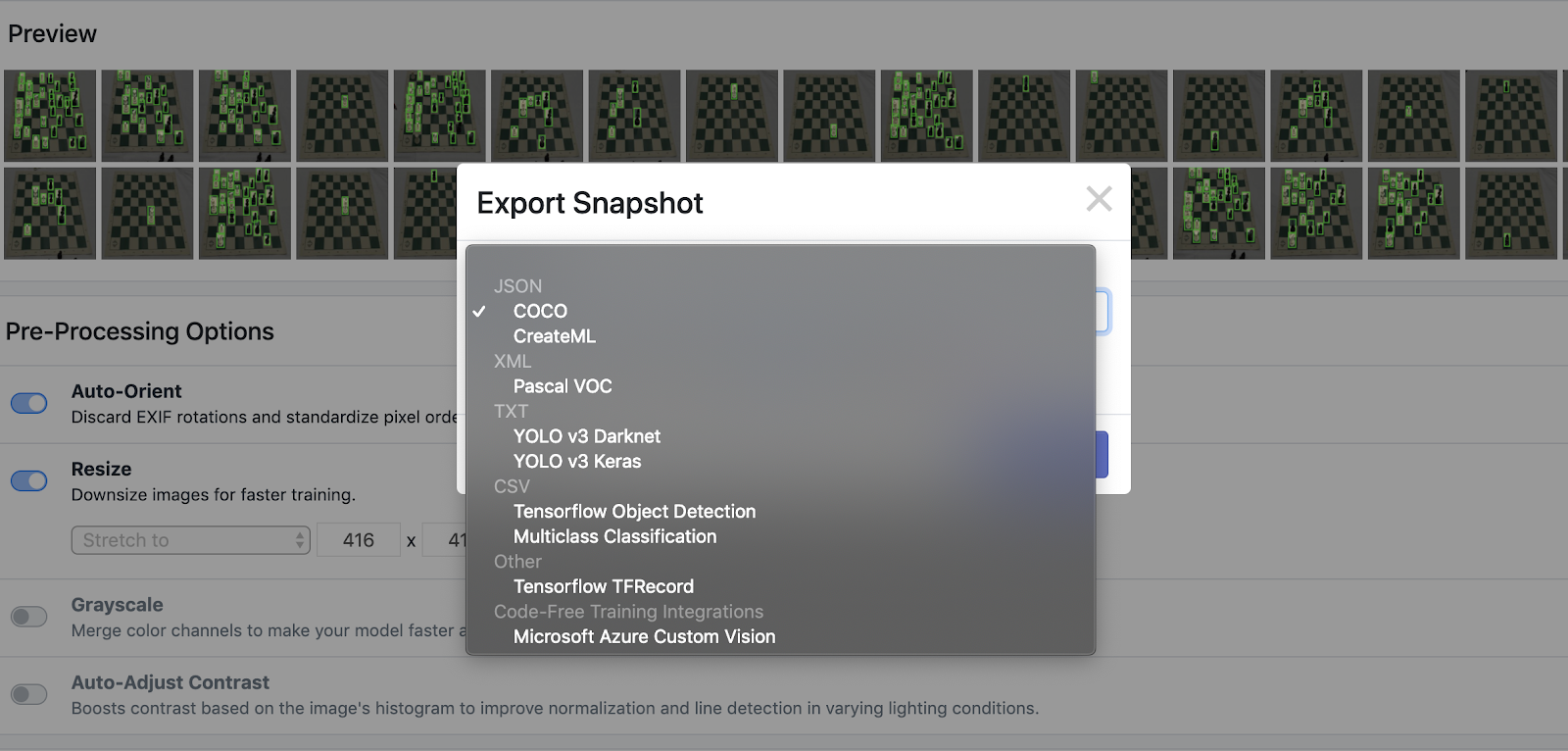
After selecting our annotation format, Roboflow provides a curl script ("Show Download Code") where we can access our dataset.
We can then use this curl script to import our data into the Colab notebook that we are working in. Colab is a Jupyter Notebook python programming environment provided by Google and provisioned with free GPU usage. Colab is free to start, but may time out on you if your notebook sits idle for 15 minutes or so.
Jump to our EfficientDet Colab Notebook.
Once our data has downloaded we will inspect the folder structure. The COCO json datacomes down in train, validate, test splits that we have determined in our data set up in Roboflow. Inspecting the train folder, we see that our data has come down as a set of images and an annotation file. We then make file structure in a fashion that our model will be expecting, but no additional data cleaning is required!
Training
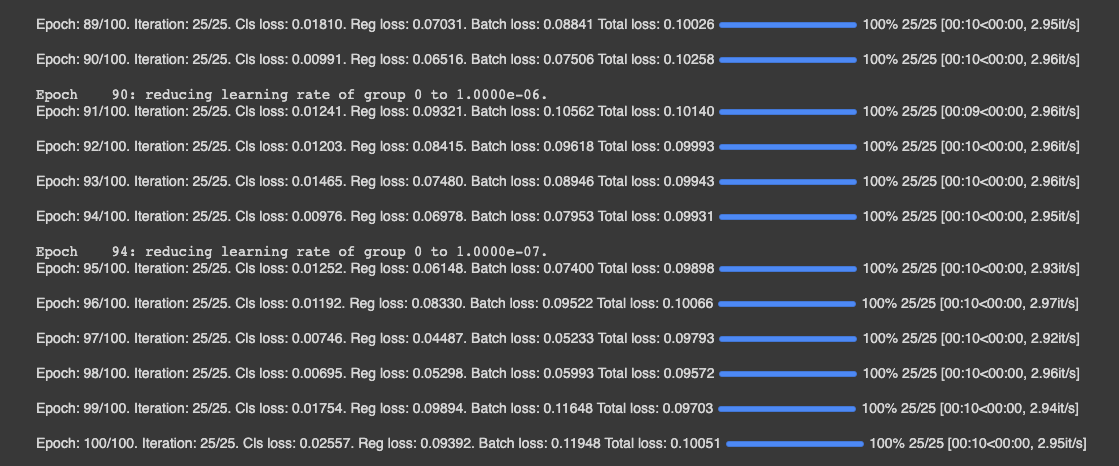
For training, we import a PyTorch implementation of EfficientDet courtesy of signatrix. Our implementation uses the base version of EfiiceitnDet-do. We train from the EfiicientNet base backbone, without using a pre-trained checkpoint for the detector portion of the network. We train for 20 epochs across our training set. The implementation naturally adapts to the number of training classes.
Inference
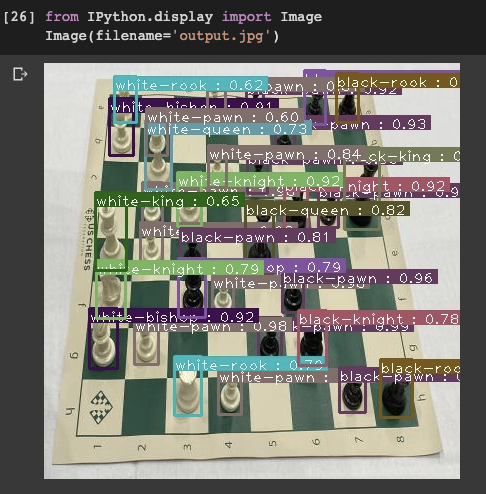
During training, our model saves .onnx files that can be easily called during inference time. We call these files to set up an infer detector and simply pass an image, our list of classes, and a prediction threshold through to our inferencer. The prediction threshold can be adjusted dynamically to control for precision and recall according to your use case.
We witness a fast inference time and according to a few test images it looks like the network quickly adapted to our custom object detection problem!
Saving Our Weights
We export our trained model’s .onxx files to Google Drive for future use. You can simply pull those files back down and rebuild the inferencer for your application!
At the bottom of the notebook, we provide an example of how you can pull trained model weights back down and use them for inference in your application.
And there you have it : a quick and easy way to begin prototyping EfficientDET on your own data, for your own custom use case, with a varying number of classes.
Can I still train EfficientDet in Roboflow?
Roboflow's hosted training trains its own model families, with RF-DETR recommended for object detection. If you specifically need EfficientDet weights, you can export your data from Roboflow in COCO JSON or another format and train EfficientDet yourself. For almost all use cases, training RF-DETR in Roboflow gives you a more accurate model with far less setup.
What is EfficientDet used for?
EfficientDet is a scalable convolutional object detection model, useful when you want to match a model size (d0 to d7) to a compute budget. RF-DETR now offers a stronger speed-and-accuracy tradeoff for most custom detection work.
How much data do I need?
There is no fixed minimum. The chess example trains a usable model from 292 images. A few hundred well-labeled images per class is a reasonable starting point. Image quality, variety, and accurate labels matter more than raw count.
Do I need a GPU?
No. Training runs in the Roboflow cloud and inference runs through the hosted API. You only need your own hardware if you choose to self-host with Roboflow Inference on the edge.
How do I know when my model is good enough?
Look at mAP, precision, and recall on the test set, and check the per-class breakdown. When accuracy clears the bar for your use case, deploy. If not, add and re-label data for the weak classes and retrain.
Get Started
To build your own detector, create a free Roboflow account, bring or fork a dataset, generate a version, and train RF-DETR.


Cite this Post
Use the following entry to cite this post in your research:
Erik Kokalj. (Mar 2, 2026). How to Train an EfficientDet Object Detection Model with a Custom Dataset. Roboflow Blog: https://blog.roboflow.com/training-efficientdet-object-detection-model-with-a-custom-dataset/