

Use a sensor when a consistent presence check is enough; choose vision AI when your station also needs to identify parts, read labels, verify placement, or detect visible defects. Roboflow Workflows lets your team combine multiple visual checks using one camera feed, expand inspection coverage with additional models and logic, and improve the system with production data as your requirements change. Build, deploy, and improve the inspection system your line needs with Roboflow.
A photoelectric sensor can confirm that a package reached an inspection station. But presence alone does not tell you whether the package is damaged, its barcode is readable, or its orientation is correct. Choosing between sensors and vision AI starts with defining everything the station needs to check, not comparing hardware prices.
For a single, consistent presence check, a sensor may be all you need. Vision AI becomes worth evaluating when you need to distinguish similar parts, detect visible defects, or adapt an inspection to new products and failure types. It also gives you a way to combine multiple visual checks using the same camera feed.
The goal is to meet the station’s inspection requirements at production speed, with a clear understanding of installation costs, ongoing maintenance, and what happens when those requirements change. Any proposed replacement needs to prove it can catch the relevant defects, limit false rejects, and return a decision in time for the line to act.
In this guide, I’ll explain when to use sensors, when to use vision AI, and how to compare the cost of a complete inspection station. Then I’ll show you how to build a multi-check packaging inspection with Roboflow Workflows. You can connect models and inspection logic in the browser, test them on your images, and deploy the Workflow on your own hardware with Roboflow Inference. The example combines package detection, barcode reading, placement checks, and visible damage detection in one application.
When to Use a Sensor Instead of Vision AI
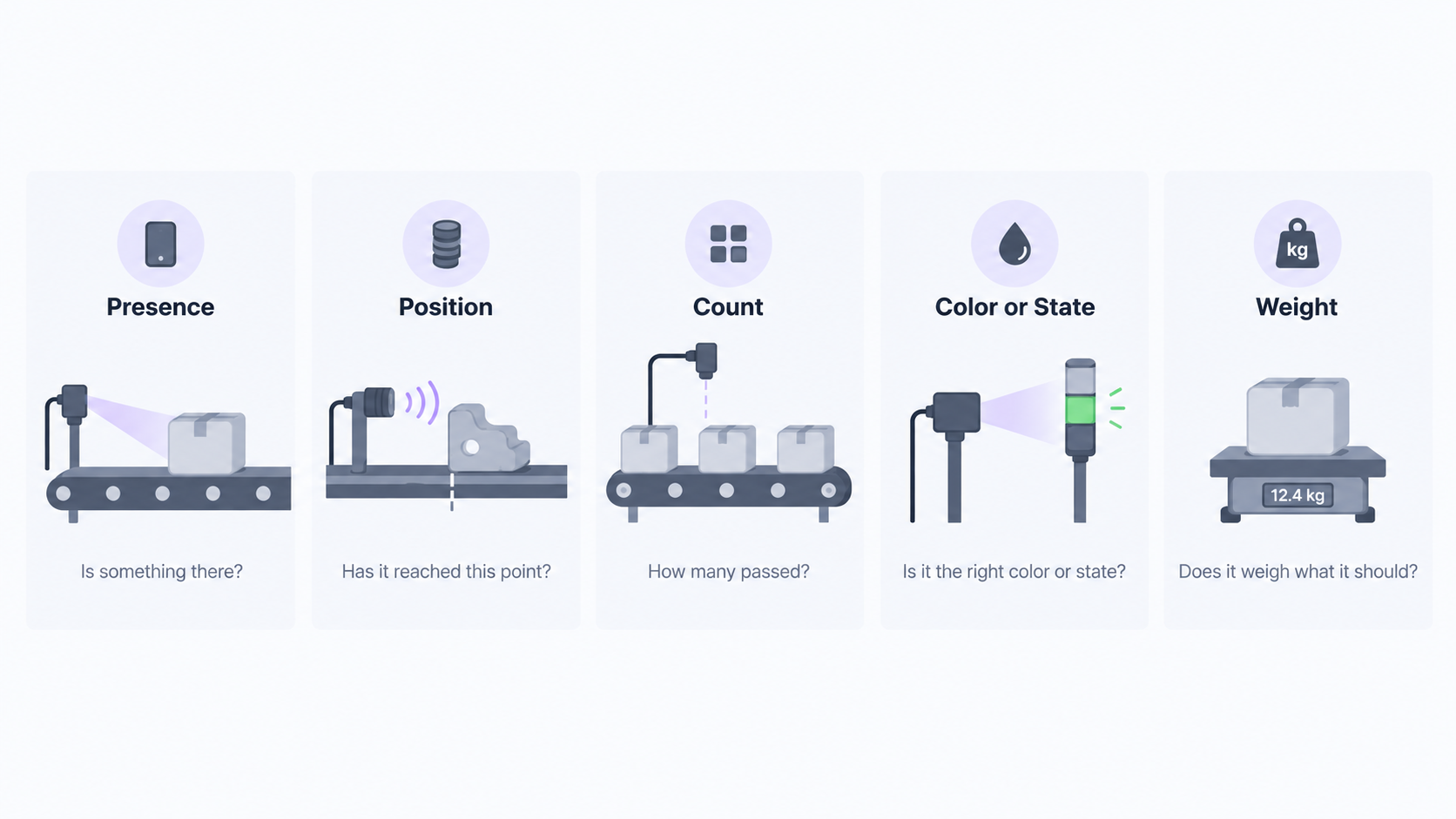
Use a sensor when a direct physical measurement reliably answers the inspection question. For a consistent part at a fixed checkpoint, traditional industrial sensors can provide the signal you need without adding image collection, model training, and inference to the system.
Match the device to what you need to measure. A photoelectric sensor can detect part presence, while a proximity sensor can confirm that a component has reached a specific position. A counter can tally consistent parts passing a fixed point. A load cell can check a carton against an expected weight range, and a color or light sensor can detect a defined state change. None of these checks necessarily requires interpreting an image.
Before choosing the sensor, define the acceptable range and test the failures you need to catch. For a weight-based check, verify that a missing component produces a measurable difference from normal carton-to-carton variation. For a presence check, test the part sizes and positions expected at that station. Choose the sensor when it meets those requirements at production speed.
The deciding factor is not whether the output is pass/fail. It is whether the measurement provides enough information to make the right decision. A vision system can also return a pass/fail signal; it uses information from an image to determine the result.
When to Use Vision AI for Inspection
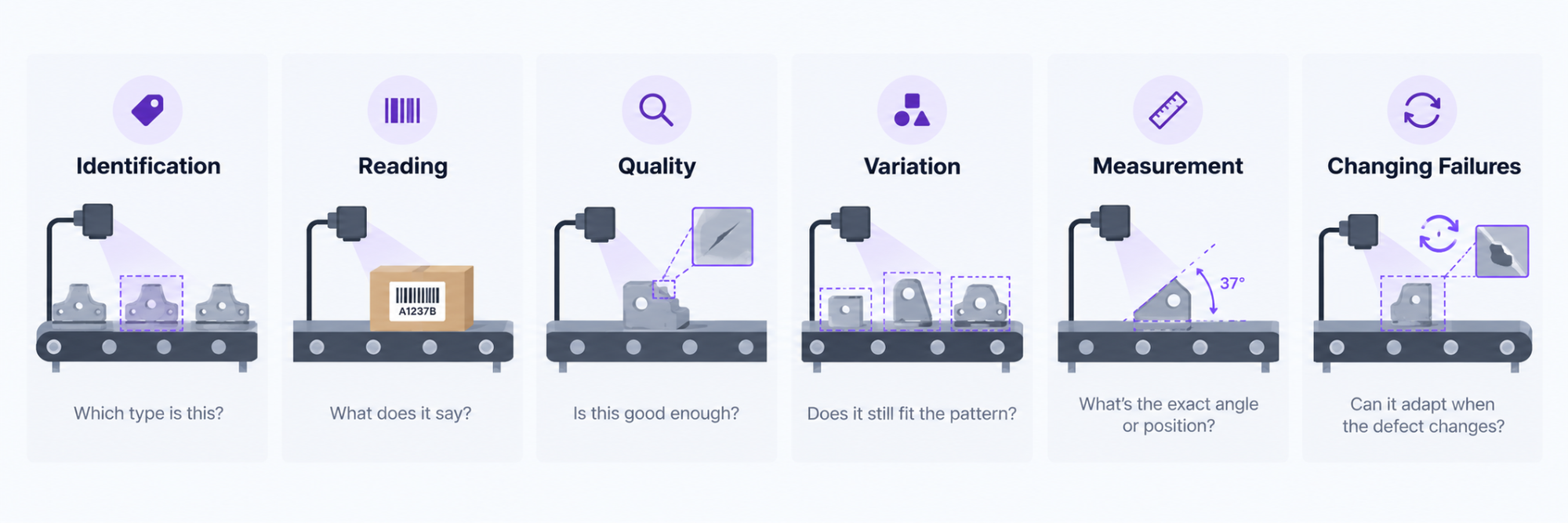
Evaluate vision AI when the station needs to identify a part, read printed information, inspect a surface, or verify placement - not simply confirm that something is present. Start with the decision the system needs to make, then select the models and logic that support it.
- Identify parts and verify placement. Use a part inspection model to distinguish component types and check that the expected parts are present. For alignment checks, measure the part’s orientation and compare it with the permitted range. A part reaching the station is not proof that it is the correct part or correctly positioned.
- Read and validate labels. Use OCR in manufacturing to extract a part number, lot code, or expiration date, then compare the result with the expected value. Use barcode decoding to read the information encoded in a barcode or QR code. The inspection should verify the required content, not stop at detecting that a label exists.
- Detect visible defects. Build a defect detection model to locate scratches, dents, cracks, or other visible damage. Collect images of defective and acceptable parts from the inspection environment, and define which conditions warrant a reject. Include acceptable variation so the inspection is not built only around examples of what goes wrong.
Not every step needs deep learning. In Roboflow Workflows, a model can locate a part, a calculation can measure its angle, and a rule can determine whether that angle is acceptable. Build the inspection around the required result rather than training a separate model for every operation.
Vision AI also gives you a way to update an inspection as products and defects change. When a new part variant or failure type exposes a gap, collect and label examples, then retrain and evaluate the model. Compare the updated model with the deployed version on both existing test cases and recent production images before replacing it.
The advantage is an inspection you can improve with production data, not a model that automatically recognizes every new defect.
How to Compare the Cost of Sensors and Vision AI
Compare the cost of the complete inspection station, not the purchase price of a sensor against a camera. For a sensor-based setup, include the devices, mounting, wiring, PLC integration, and commissioning. Then account for maintenance and the engineering work required when inspection requirements change. A sensor can still be the lowest-cost option for a single presence check. The question is what it costs to cover all the checks the station needs.
With Roboflow vision AI, multiple checks can share the same hardware. The packaging inspection Workflow below uses one camera feed to check package presence, read barcodes, assess placement and orientation, and detect visible damage. Roboflow Workflows connects the models and logic for those checks in one pipeline, so you can evaluate them as one inspection system rather than separate hardware projects.
The advantage becomes clearer when you add the next check. Need to verify a printed lot code? Add OCR and logic that compares the result against the expected value. You may be able to reuse the camera, mounting, and wiring already installed. First, confirm that the image captures the text clearly and that the expanded Workflow still returns a decision within the station’s timing requirements. Reusing a camera only saves money when it can support the new inspection.
Apply the same cost discipline to the vision system. Include the camera, lens, lighting, compute, software, data labeling, model training, and integration, not just the camera price. Budget for monitoring and revalidation as production conditions change. Adding a model can require more compute; inspecting a smaller defect can require different optics or lighting. Shared hardware can reduce the cost of adding checks, but it does not make those checks free.
Start with one station. List its current checks and the checks planned for the next product changeover, then compare installation and operating costs for both approaches over the same period. Test the complete Workflow on representative good and defective parts at production speed. Measure missed defects, false rejects, and the time from image capture to the decision reaching the PLC, not just model inference speed.
Count equipment savings only for functions you have validated and can actually replace. Track the value of new inspection coverage separately: adding damage detection is not the same as eliminating an existing sensor. Let those results determine the crossover point.
Alongside equipment savings, measure changes in manual inspection time, rework, false rejects, and defects that escape inspection. Use the pilot results to determine whether the additional coverage justifies the investment
Build and Deploy a Multi-Check Inspection with Roboflow
Here's how to replace sensors with Roboflow. With Roboflow Workflows it's easy to create a workflow where one image goes in, and multiple independent models and logic blocks run against it in parallel, each handling a check a dedicated sensor might otherwise cover on its own.
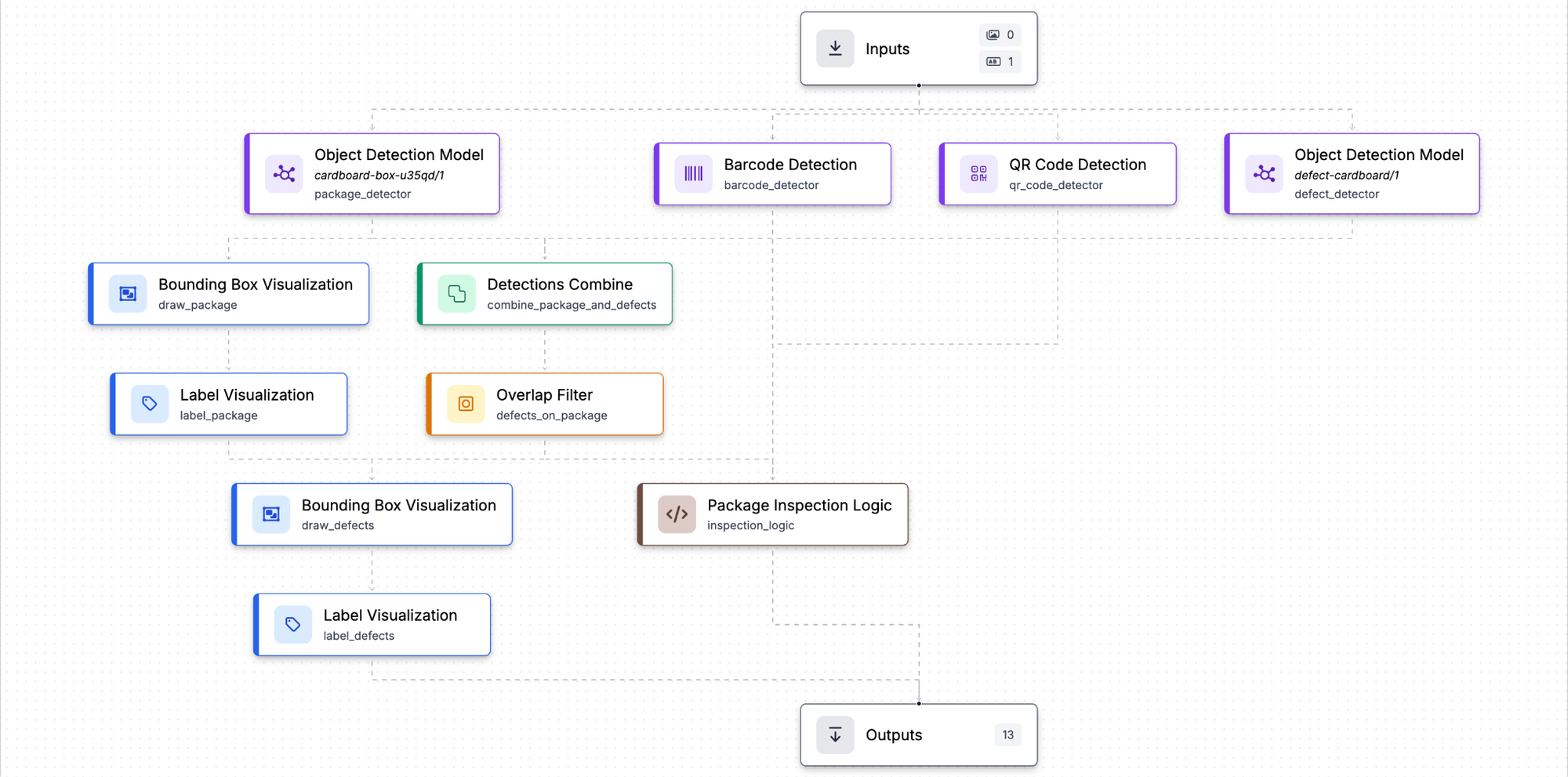
A single test frame of a box on a conveyor line shows this in action. The Workflow I've built here detects the package itself, standing in for a presence sensor, and separately flags visible damage such as dents, dirt, and a hole, each with its own bounding box and confidence score.
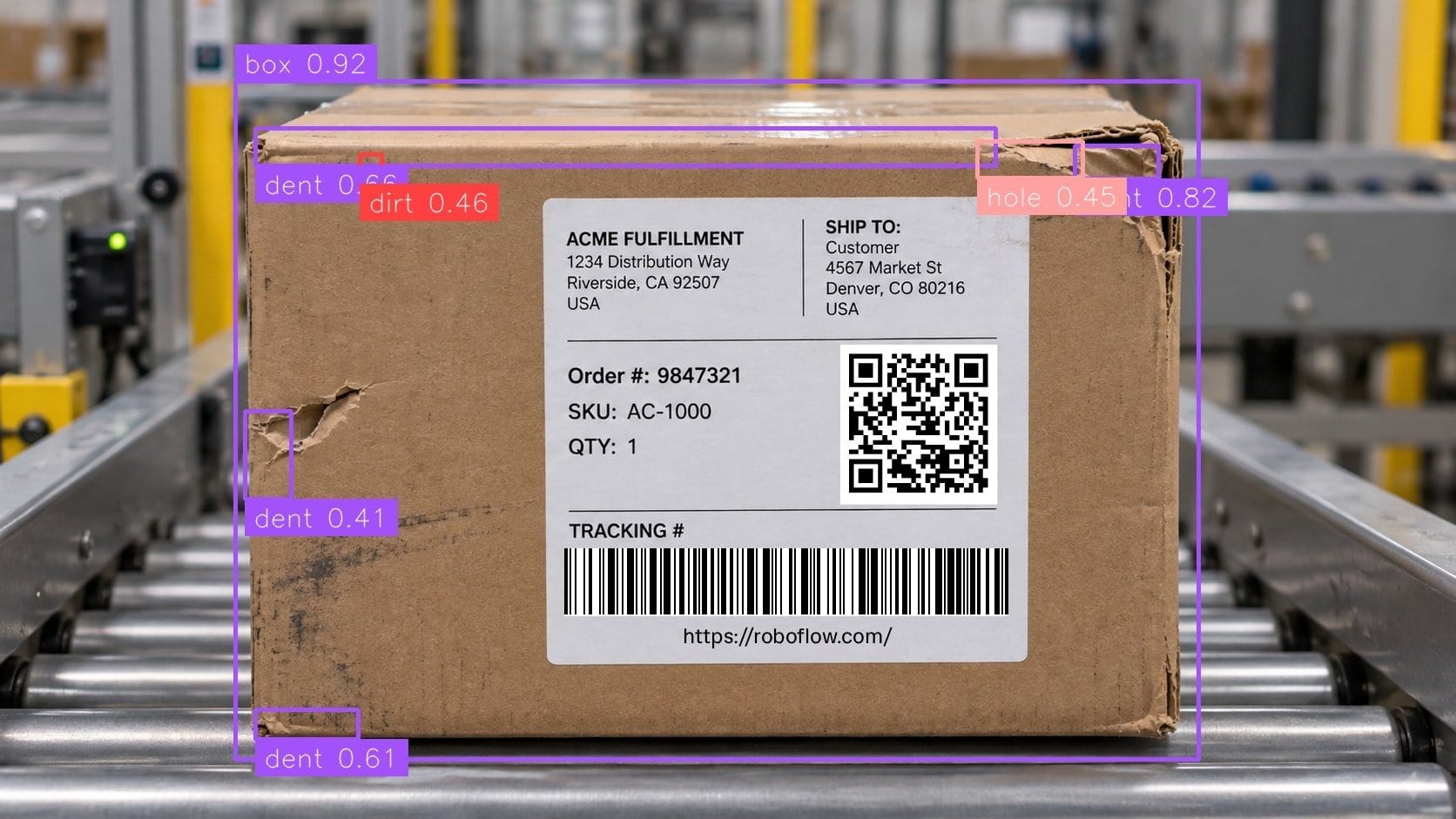
The other two checks happen at the data level rather than the visual one. The Workflow reads the QR code and barcode, returning a decoded value, and checks the package's position and orientation against expected bounds, confirming it's centered, fully visible, and correctly oriented before being counted as a valid inspection.
{
 "barcode_found": true,
 "barcode_values": ["https://roboflow.com"],
 "qr_code_found": true,
 "qr_code_values": ["https://roboflow.com"],
 "placement_pass": true,
 "placement_details": {
   "status": "pass",
   "orientation": "portrait",
   "centered": true,
   "fully_visible": true,
   "useful_size": true
 }
}
Four checks, one camera, one Workflow. When the existing camera, lighting, and compute support another inspection requirement, you can add that check by updating the Workflow rather than installing another inspection device.
Use Vision Events to capture inspection images, predictions, and metadata such as the line number, shift, and part number. When an operator identifies a false reject, they can review the event and mark the result as incorrect. Send selected event images into a Roboflow training project, review and correct the annotations, and use those examples to improve the model. Test the updated model against both existing cases and the new production examples before deployment.
Connect the Inspection to Your Production Line
This example shows how to return several inspection results from one image. To use those results on your production line, add the logic that determines the station’s next action. Compare the decoded barcode with the expected value, check placement against your acceptance criteria, and use the defect predictions to determine whether the package should pass, be rejected, or go to an operator for review.
Run the Workflow on supported hardware at the inspection station using Roboflow Inference. For machine integration, Roboflow provides PLC integration blocks that send inspection results to your control system. The Workflow supplies the inspection decision; the PLC retains control of machine timing and actuation.
Decision Checklist
Before choosing hardware, answer these five questions for one inspection station. Use the answers to define what the system must demonstrate before you put it into production.
- Which parts and checks must the station support? List the expected part types, sizes, and orientations, along with the acceptance criteria for each check. Test the proposed setup across that range and document any adjustments required at changeover.
- Can it detect the required defects at production speed? Identify the smallest defect or printed detail the inspection needs to catch. For vision AI, confirm that the camera captures it clearly, then test the complete Workflow on representative good and defective parts. Measure missed defects, false rejects, and the time from image capture to the decision reaching the PLC, not just model speed.
- What does it cost to cover every required check? Compare installation and operating costs over the same period, including integration, maintenance, and revalidation. For vision AI, account for the camera, optics, lighting, compute, software, labeling, and training. Separate savings from replacing existing equipment from the value of adding inspection coverage.
- What will it take to update the inspection? Identify the product changes and new failure types you expect the station to handle. Assess whether they require sensor adjustments, different imaging hardware, updated logic, or model retraining. Include labeling, training, and revalidation in the maintenance plan rather than assuming every new requirement can use the existing setup unchanged.
- What evidence must you retain, and for how long? Define whether quality reviews, audits, or customer claims require a pass/fail record, an inspection image, or both. Specify the results and timestamps you need to retrieve and the required retention period. For a vision-based inspection, evaluate Vision Events against those requirements as part of the system design.
Conclusion
A sensor may be enough for a single, consistent measurement. When a station also needs to identify parts, validate labels, verify placement, or detect visible defects, use Roboflow to bring those checks into one inspection application.
Start with the Multi-Check Packaging Inspection Workflow and adapt it to one station. Set the expected barcode values and placement limits, and select or train a defect model for your packaging. Test the Workflow on representative good and defective parts, then run a production-speed trial on your target hardware. Measure missed defects, false rejects, and decision latency to determine which checks are ready for production.
For a production deployment, talk with the Roboflow team about your inspection requirements, cameras, edge hardware, and PLC integration.
Further reading:


Cite this Post
Use the following entry to cite this post in your research:
Mostafa Ibrahim. (Jul 19, 2026). Vision AI Vs. Sensors. Roboflow Blog: https://blog.roboflow.com/vision-ai-vs-sensors/