

For many factories, sending every production image to a cloud API is not practical. On-premise computer vision keeps inference close to the cameras, allowing models and application logic to run on hardware inside the facility or infrastructure you control.
This can keep sensitive production data local, remove the network round trip from machine-control decisions, and allow a vision AI system to continue operating when external connectivity is unavailable. With Roboflow Inference, RF-DETR, and Roboflow Workflows it is possible to run vision AI on local CPUs, NVIDIA GPUs, NVIDIA Jetson devices, and other supported hardware.
The important question, however, is not simply whether a system is on-prem. You also need to decide what stays on-prem, what can communicate with the cloud, and how models get updated after deployment.
In this guide, I will explain what on-premise computer vision is, the main deployment options, what hardware is required, and how to run Roboflow Inference on your own infrastructure. I will also cover model updates, monitoring, and the questions IT teams typically ask before approving a production deployment.
What On-Premise Computer Vision Means
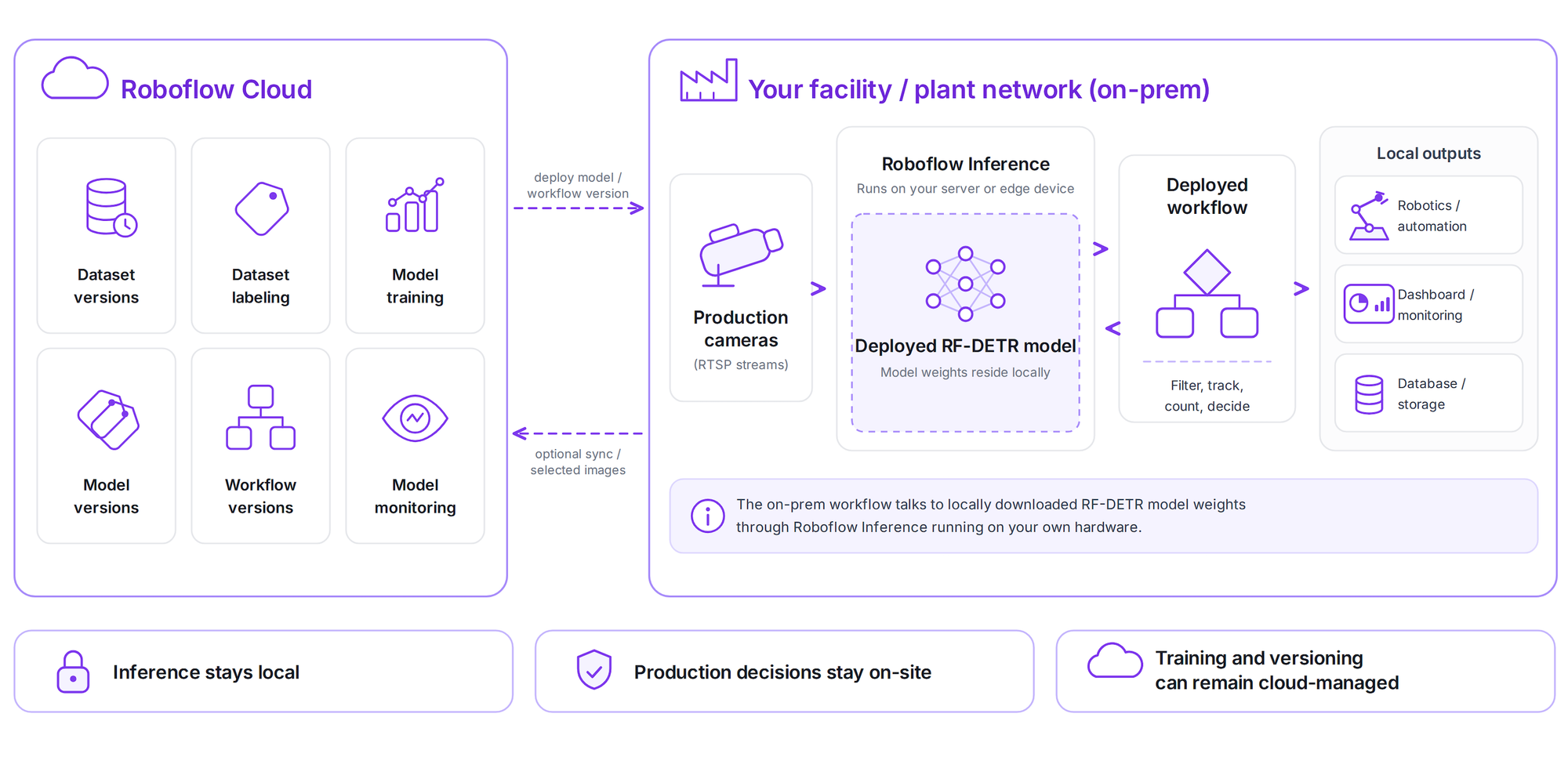
In an on-premise computer vision deployment, the production inference workload runs on hardware under your control instead of requiring every image to be sent to a remote inference server.
In the strictest deployment, the camera feed, model weights, inference results, application logic, and production records all remain inside the plant network. Roboflow supports offline deployment for Enterprise environments where the inference server needs to operate without an internet connection. But on-prem can describe several different parts of the computer vision lifecycle.
- On-prem inference: The trained model runs locally on your own server, industrial PC, or edge device. Production images are sent from the camera to this local system, processed there, and the predictions stay inside your network. This is the part that is always local in an on-prem deployment.
- On-prem training: The model is also trained or fine-tuned using computing hardware inside your own infrastructure. For example you can train an RF-DETR model on your own hardware instead of Roboflow Cloud. However, this is optional. Many organizations run inference on-prem while training models in the cloud because training usually requires more computing resources to set up, involves additional costs, and is not part of the real-time production process.
- On-prem management: This covers how deployed devices, model versions, workflow versions, logs, and updates are managed. Even when inference runs completely on-prem, some systems may still use a cloud-based management layer for monitoring devices, deploying updates, or managing model versions. Cloud-based management makes it easier to centrally monitor and update many deployed systems without managing each device individually. That's why this part is often kept in the cloud.
On-premise computer vision does not automatically mean that every part of the system is offline or located inside the factory. It usually means that the production inference path stays local, while training and management may be local or cloud-based depending on the deployment requirements. In practice, deployments range from fully air-gapped systems with no internet connection to hybrid systems where inference stays local but training, updates, or management use cloud services.
Why Factories Deploy On-Premise Computer Vision
Factories usually move inference on-prem for a combination of data control, plant-network requirements, latency, reliability, and cost.
Data sovereignty
Production AI systems can be used for much more than product defect detection. For example, computer vision models can verify product configurations and assembly, monitor manufacturing processes or process compliance, track operator activity, measure production volumes, and detect machine failures or abnormal conditions. This information can be sensitive and may need to remain inside the facility.
Sending every camera frame to an external cloud service may create privacy, security, compliance, or data-governance concerns. An on-premise computer vision deployment helps keep this visual data under local control. This makes on-premise computer vision useful for organizations that want tighter control over production data or need to run computer vision without the cloud for real-time inference.
IT and OT approval
A computer vision prototype can work well in testing but still fail to reach production if its network architecture does not meet factory security requirements. Manufacturing environments often separate enterprise IT systems from the operational technology (OT) systems that control production equipment. A vision AI application deployed near a production line therefore needs to fit into the facility's existing network and security architecture rather than require major changes to the OT environment.
The Purdue Model is an example how IT and OT systems are separated in industrial environments. For a production vision AI system, real-time data such as camera feeds, PLC signals, and inference results should ideally remain within the appropriate OT layer instead of crossing the IT/OT boundary just to keep the line running.
Latency and uptime
A quality dashboard can usually tolerate a small network delay, but a reject mechanism, robot, diverter, or line-stop action may need a response within milliseconds. When computer vision is connected to production equipment, the prediction must arrive before the product reaches the point where the machine needs to act. Cloud inference adds a network round trip, which can increase response time and make the system dependent on network availability. Edge processing is often preferred for low latency and offline applications.
With local inference, images are processed on hardware inside the facility, removing the internet round trip from the real-time decision path. The remaining latency depends on factors such as camera capture, preprocessing, model inference, Workflow processing, PLC communication, and actuator response. This is especially important in computer vision PLC integration, where the vision system determines what is happening and the PLC handles machine timing, interlocks, and the physical action. Local inference also improves uptime because production does not need to stop if the external internet connection becomes unavailable.
Predictable cost at scale
Cloud inference usually creates an ongoing usage-based cost because compute is billed as the system processes images or video. With local inference, more of the cost is shifted to hardware purchased and operated at the site. This difference becomes more important when many cameras run continuously. Occasional workloads can be a good fit for serverless cloud inference, but continuous or large-scale deployments may benefit from dedicated edge hardware because there is no separate per-request compute charge once the hardware is provisioned.
Local deployment still has costs, including hardware, software licensing, maintenance, electricity, spare capacity, and IT support. So the useful comparison is the price of a server, in addition to the cost per camera at the throughput, latency, and uptime the production system actually requires.
The Four On-Premise Computer Vision Deployment Postures
There is no single architecture for on-premise computer vision. In practice, four deployment postures cover most requirements.
Fully air-gapped
A fully air-gapped deployment has no required internet path from the production inference environment.
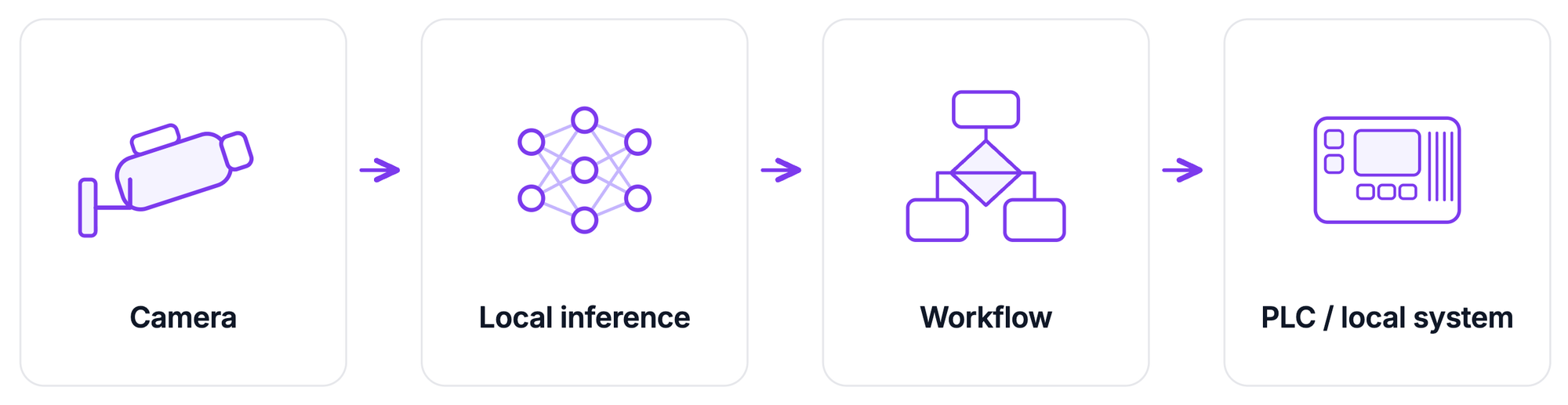
The model weights, Workflow definition, application dependencies, and other required artifacts are moved into the protected environment through a controlled process.
Air-gapped deployments are where models and Workflows can be introduced as artifacts through approved mechanisms such as a GitOps process or physical media, while the runtime path from camera to inference to PLC stays inside the protected environment.
Roboflow Enterprise also provides an Offline Mode for environments that require offline or air-gapped execution.
On-prem inference, cloud training loop
In this architecture, live inference stays inside the factory but model development does not need to be completely isolated. A simplified flow with an improvement loop looks like following:
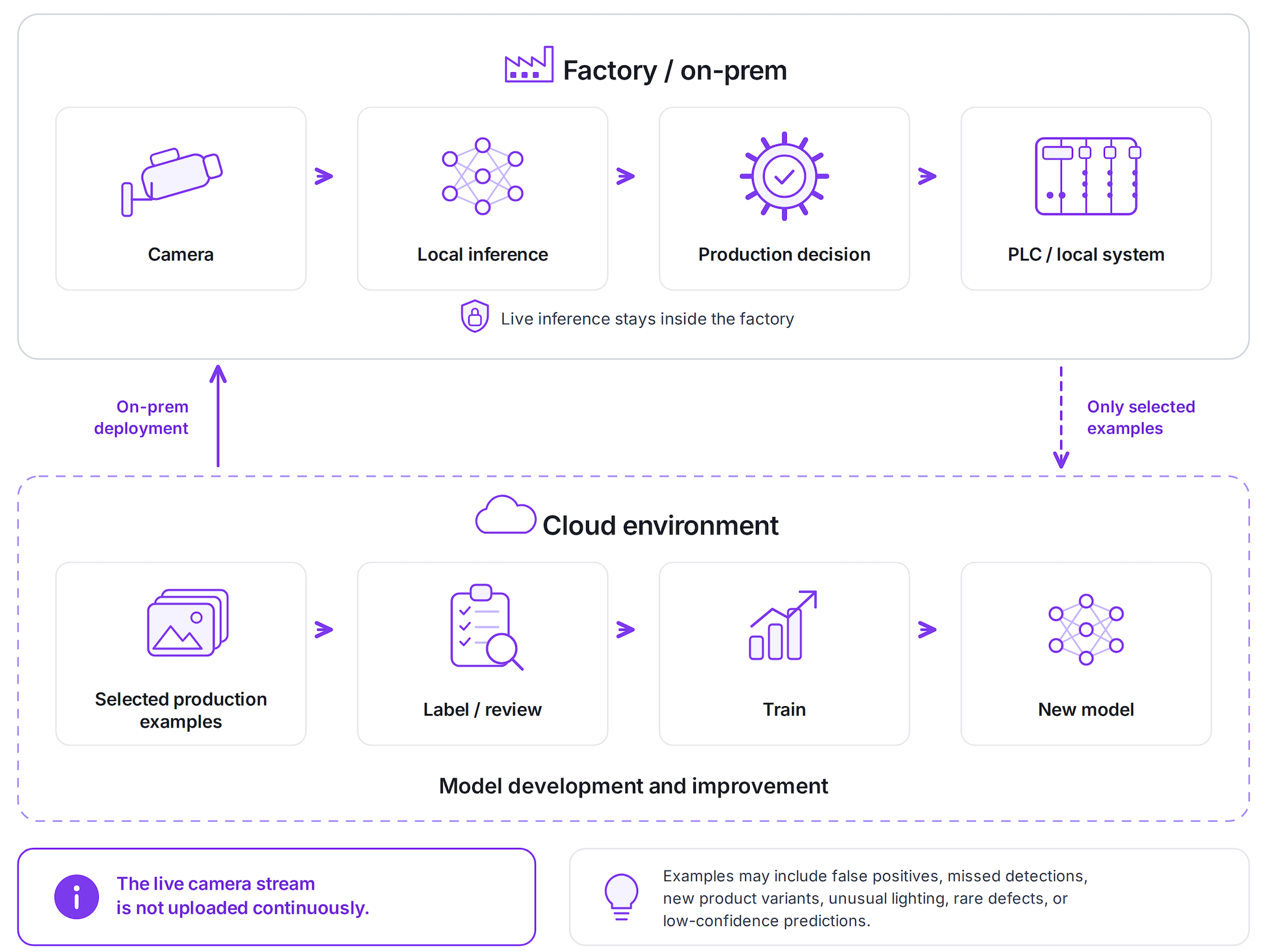
The important distinction is that the live camera stream does not need to be uploaded continuously. Instead, a small set of useful production examples such as false positives, missed detections, new product variants, unusual lighting, rare defects, or low-confidence predictions can be selected. Those examples can enter the model-development environment when company policy permits.
This is the hybrid pattern for edge deployments where fast decisions remain local while selected data can move into cloud systems for deeper analysis or retraining. This architecture gives engineering teams a practical improvement loop without turning production inference into a cloud dependency.
Dedicated deployments / VPC
Not every requirement described internally as "on-prem" actually requires a physical server inside the factory. Sometimes the real requirement is:
- No shared inference compute.
- Workloads must remain inside the company's cloud perimeter.
- Traffic must stay in a controlled network.
- or compute must run in a specific enterprise cloud account.
Roboflow provides two relevant but different options for this purpose.
- Dedicated Deployments are private compute resources managed in Roboflow's cloud and allocated to a customer's models and Workflows. They are single-tenant cloud deployments, not on-prem hardware.
- Alternatively, Roboflow Inference can run in your own AWS, Azure, or Google Cloud infrastructure. Roboflow Enterprise also lists deployment inside a customer's VPC among its supported options.
Edge appliance on the line
The fourth option moves compute directly beside the camera. This may be an NVIDIA Jetson, industrial PC, GPU edge box, or an integrated appliance. Roboflow AI1 packages the camera, compute, lighting, and Roboflow software into an edge system designed for production-line visual understanding.
An appliance approach reduces the amount of hardware integration the deployment team has to assemble separately. For a larger operation, edge devices can also be treated as a fleet rather than independent machines. Deployment Manager is designed to manage and monitor models and Workflows running across supported edge hardware.
On-premise Deployment Posture Comparison
The right question for IT is therefore not simply,
"Is it on-prem?"
A better question is:
Which data, compute, management, and update paths cross the plant boundary?
What Hardware You Need
Roboflow Inference can run on ARM and x86 CPUs, NVIDIA GPUs, and NVIDIA Jetson hardware. The minimum requirements recommend a 64-bit processor, at least 4 GB of RAM, and 20 GB of free disk space. A GPU is not required, but it is recommended to use GPU acceleration for larger models and live video workloads. That gives you four useful hardware tiers.
CPU-only server
A CPU-only machine can work for lightweight models, triggered inspection, low-cadence processing, testing, or workloads where every camera frame does not need inference. Roboflow Inference supports x86 and ARM CPU systems, including standard computers and Raspberry Pi-class hardware. A CPU-only system is generally not where you should begin for multiple high-frame-rate production streams. If the application needs continuous real-time inspection, start sizing around GPU capacity instead.
Single-GPU workstation
For many production lines, a single NVIDIA GPU is the practical middle ground. It gives enough compute for real-time object detection while still allowing the entire application to live on one industrial workstation or server. Roboflow benchmarks provide some useful reference points for RF-DETR:
- RF-DETR Nano: 2.3 ms at 384x384 resolution
- RF-DETR Small: 3.5 ms at 512x512 resolution
- RF-DETR Medium: 4.4 ms at 576x576 resolution
Larger GPU server
If you need to process video from many cameras, it is often better to use one more powerful GPU server instead of placing a separate computer beside every camera. An Inference server can handle multiple workloads at the same time and use the available CPU and GPU resources efficiently. For a larger deployment, test the system with conditions that are close to your real production setup:
- Use the same camera resolution and video format.
- Use the same RF-DETR model size.
- Run the complete Workflow.
- Test all camera streams together.
- Measure latency, GPU usage, memory usage, and dropped frames.
- Keep some extra capacity for traffic peaks, updates, and unexpected failures.
Do not choose a production server based only on the model's inference time. Test the complete system under the expected camera load.
Edge appliance
If you want a simpler setup, Roboflow AI1 combines the camera, compute, lighting, enclosure, and deployment software in one edge device. This reduces the amount of hardware you need to select and integrate separately. Smaller edge devices can also handle real-time vision workloads.
The table below summarizes the main hardware options and where each one fits in an on-premise computer vision deployment.
There is no fixed answer to how many cameras one GPU can support. Capacity depends on the model, image resolution, frame rate, Workflow complexity, and other processing running on the system. For production deployment, benchmark the complete application under the expected camera load rather than relying only on model inference latency.
Walkthrough: Standing Up an On-Premise Inference Server
The simplest way to run computer vision on your own server is to deploy Roboflow Inference. Inference is Roboflow's deployment engine for running models and Workflows locally. The Inference Server packages the runtime as a service that applications on your network can call.
Step 1: Install Roboflow Inference with Docker
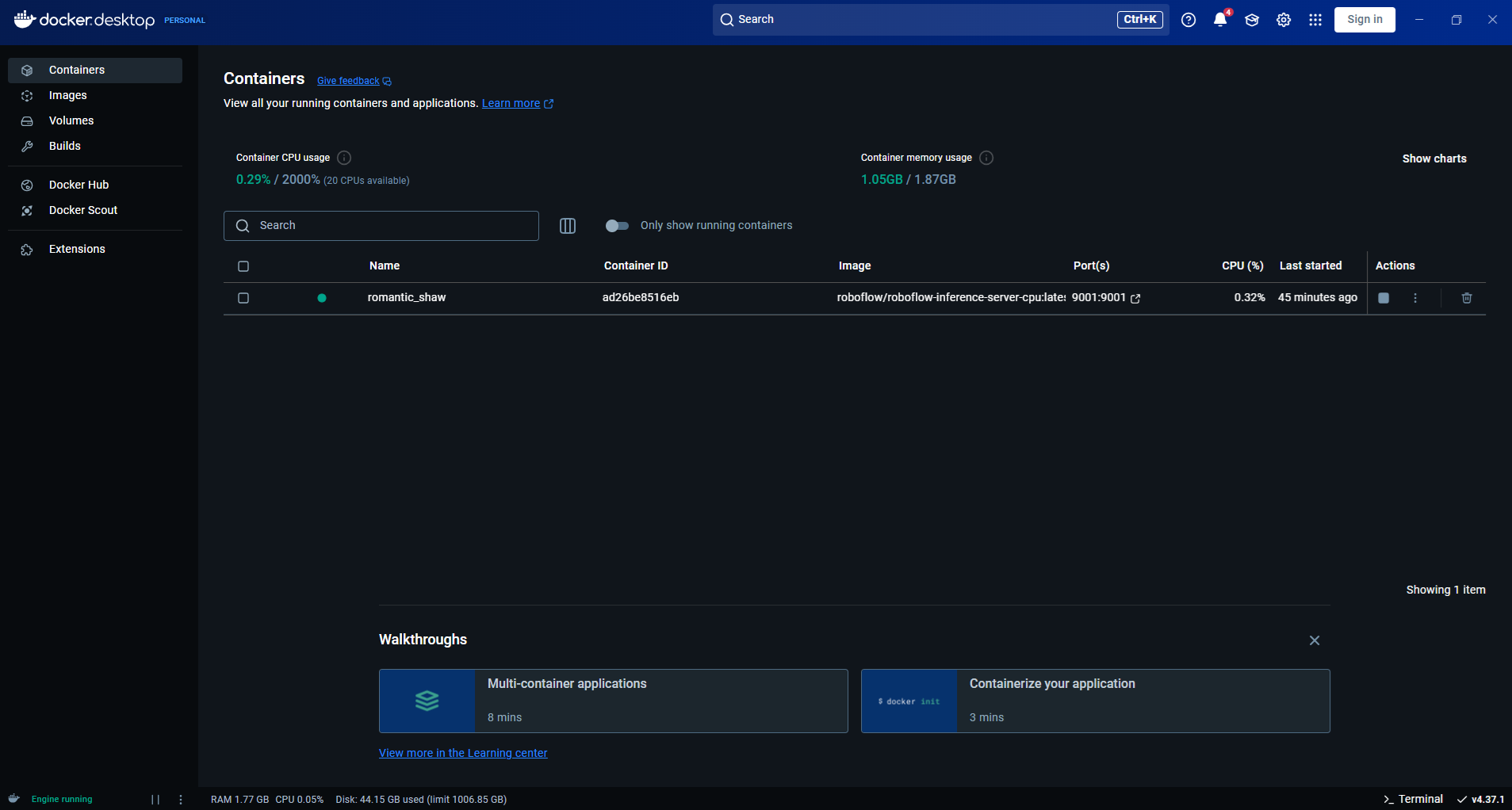
The recommended way to run Roboflow Inference is with Docker, which keeps the Inference Server and its dependencies in a consistent containerized environment. Docker is supported across Linux, Windows, macOS, NVIDIA Jetson, and other compatible devices. A Docker quickstart guide explains how to install and run the Inference Server in a container.
The easiest setup is to install Docker first and then use the Inference CLI, which automatically selects and starts the appropriate container for your machine:
pip install -U inference-cli
inference server start
By default, the local Inference Server is available on port 9001.
Depending on your hardware and environment, you can use:
- Linux: Docker + Inference CLI is the simplest option; the setup includes useful defaults such as a model cache volume and non-privileged container execution.
- Windows: Use Docker Desktop and the Inference CLI. NVIDIA GPU support also requires the appropriate NVIDIA drivers and WSL2 configuration.
- macOS: Docker and a native installation option are available from the main Inference installation guide.
- NVIDIA Jetson: Dedicated Jetson Docker images are available for supported JetPack versions.
- Docker Compose: Useful when the Inference Server needs to run alongside databases, APIs, or other containers as part of a larger on-prem application.
For most on-premise deployments, Docker + Inference CLI is the best place to start, while the platform-specific guides provide the recommended configuration for production hardware.
Step 2: Load your trained RF-DETR model
Train an RF-DETR model in your Roboflow project and deploy it to your local Inference Server. In a standard connected setup, the model files are downloaded to the local machine when needed, so initial internet access is required. Fully air-gapped deployments use a separate offline deployment process.
After the model is available locally, inference requests are processed by the local server, so production images do not need to be sent to Roboflow's hosted inference API. For example:
from inference_sdk import InferenceHTTPClient

client = InferenceHTTPClient(
    api_url="http://127.0.0.1:9001",
    api_key="ROBOFLOW_API_KEY"
)
The important line is:
api_url="http://127.0.0.1:9001"Your application is talking to the Inference Server running on your machine.
Step 3: Connect an RTSP camera
Many industrial and IP cameras expose an RTSP stream. A typical address looks like:
rtsp://username:password@camera-ip:554/streamRoboflow Workflows can process webcams, video files, and live RTSP streams through the same Inference Pipeline.
Step 4: Run the Workflow locally
Suppose you're following this Workflow:
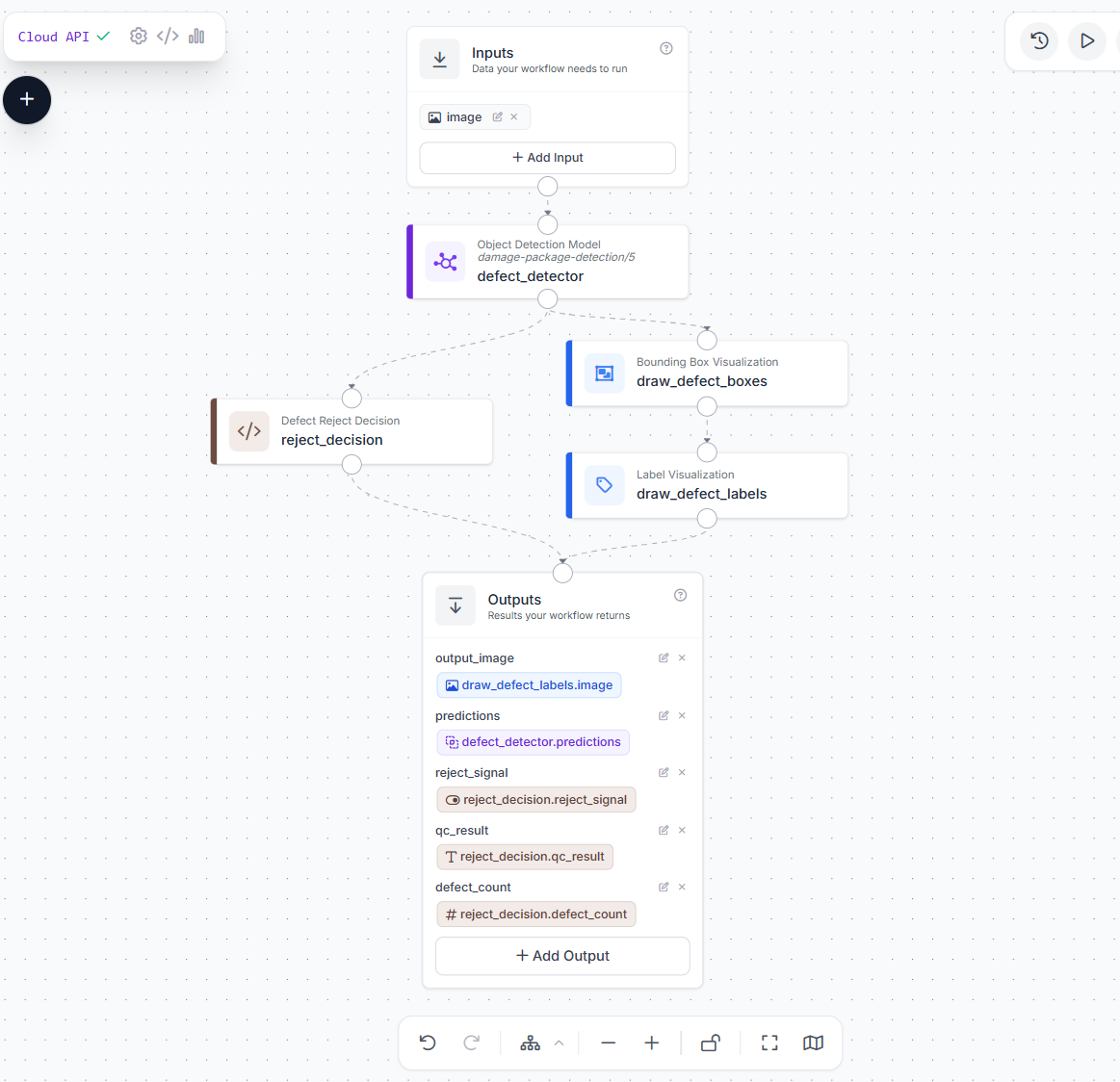
You can run that Workflow against the RTSP stream:
import cv2
from inference_sdk import InferenceHTTPClient
from inference_sdk.webrtc import RTSPSource, StreamConfig, VideoMetadata

# Initialize client
client = InferenceHTTPClient.init(
    api_url="http://localhost:9001",
    api_key="ROBOFLOW_API_KEY"
)

# Configure video source (RTSP stream)
source = RTSPSource("rtsp://demo.roboflow.com:8554")

# Configure streaming options
config = StreamConfig(
    stream_output=["output_image"],  # Get video back with annotations
    data_output=["predictions","reject_signal","qc_result","defect_count"],     # Get prediction data via datachannel
    processing_timeout=3600,             # 60 minutes
)

# Create streaming session
session = client.webrtc.stream(
    source=source,
    workflow="packagedamagedetection",
    workspace="tim-4ijf0",
    image_input="image",
    config=config
)

# Handle incoming video frames
@session.on_frame
def show_frame(frame, metadata):
    cv2.imshow("Workflow Output", frame)
    if cv2.waitKey(1) & 0xFF == ord("q"):
        session.close()

# Handle prediction data via datachannel
@session.on_data()
def on_data(data: dict, metadata: VideoMetadata):
    print(f"Frame {metadata.frame_id}: {data}")

# Run the session (blocks until closed)
session.run()
This follows Roboflow's current Workflow deployment pattern for RTSP and webcam streams. The model and Workflow logic now execute beside the production system instead of requiring each frame to be processed by a remote inference endpoint.
Step 5: Hand the result to the plant
The final Workflow output should normally include a production decision, not just model detections. In this example, the Defect Reject Decision custom python block converts the model predictions into values such as:
qc_result = FAIL
reject_signal = true
defect_count = 1
These values can then be passed to downstream industrial systems. Roboflow Enterprise Workflows provide integrations such as PLC Writer, OPC UA Writer, and Modbus TCP Writer for connecting vision results to factory systems.
At this point, you have a practical computer vision application without the cloud inference path. Cloud services can still participate in management or model improvement depending on the posture you selected, but the production decision itself is local.
Keeping On-Prem Models Accurate: The Retraining Loop
Getting a model onto an on-prem server is only the beginning. The more difficult problem may appear later as the camera was moved slightly, the supplier changed packaging, a new product variant and/or defect appear. The model has not changed, but the world the model sees has.
The model requires retraining based on production evidence such as measurable performance decline, repeated failure patterns, new conditions, changed requirements, and data drift rather than retraining simply because a fixed amount of time has passed.
An on-prem deployment therefore needs an explicit improvement loop.
Connected on-prem deployment
A connected deployment can sample selected production images and send them into the dataset improvement process. Do not upload every frame. Collect useful examples such as:
- low-confidence predictions;
- false rejects;
- missed defects;
- operator corrections;
- new product variants;
- changed lighting or backgrounds;
- unusual machine states;
- rare edge cases.
Roboflow Active Learning can be configured to collect production inference images for model improvement.
Air-gapped deployment
In an air-gapped setup, the improvement loop is handled manually. Selected production examples can be exported through an approved process, while new model and Workflow versions are reviewed and transferred back into the OT environment using controlled methods such as physical media.
Keep operational evidence
Keeping production records makes it easier to understand why a model is making mistakes and what data should be used for retraining. Roboflow Vision Events stores timestamped records of deployed vision activity, including images, predictions, and application metadata. For a defect inspection system, an event might include:
timestamp
line_id
product_id
defect_class
confidence
inspection_result
operator_feedback
image
These records help teams identify false rejects, low-confidence predictions, changes after a production changeover, or conditions missing from the training dataset. For deployments using Enterprise Deployment Manager, the Event Store can keep recent vision-event data locally and, when allowed, back it up to Roboflow Vision Events for longer-term analysis.
Manage the deployed fleet
As the number of deployed devices grows, it becomes important to track which model and Workflow version each device is running, whether the device is online, and whether it needs an update. Deployment Manager provides centralized management for supported edge devices, making it easier to deploy and update models and Workflows across multiple systems.
On-Premise Deployment Approval Checklist
Before an on-premise computer vision system is approved, IT or OT teams will usually want clear answers about data flow, access, updates, and failure handling.
1. Where does image data go?
Document every place production images can reach, including the Inference Server, Vision Events, databases, or retraining systems.
2. How long are images stored?
Define whether images are processed only in memory, stored temporarily, or retained for a fixed period.
3. What egress does the system need?
Specify whether the deployment needs internet access for updates, monitoring, model management, or data transfer.
4. How is access controlled?
Limit who can access images, update models or Workflows, change cameras, or reach the Inference Server.
5. How are patches and model updates installed?
Define who manages Docker, Inference, models, and Workflow updates.
6. What happens when something fails?
Define fallback behavior for camera, GPU, Inference, PLC, or network failures.
7. What gets logged?
Decide which predictions, actions, errors, and metadata should be recorded using tools such as Vision Events
Conclusion
On-premise computer vision keeps real-time vision processing close to the production line while still allowing cloud tools where they are useful. Roboflow Inference and Workflows can run locally, while Deployment Manager and Vision Events help manage and monitor deployed systems.
Explore how Roboflow is used for computer vision in manufacturing.


Cite this Post
Use the following entry to cite this post in your research:
Timothy M. (Aug 18, 2026). On-Premise Computer Vision: Run Vision AI on Your Own Servers. Roboflow Blog: https://blog.roboflow.com/on-premise-computer-vision/