

Object detection with YOLO can find objects in each video frame quickly and accurately. But detection alone does not remember anything. Each frame is treated as a new image, so a car that disappears behind a truck and reappears a second later may be treated as a new object.
Object tracking solves this by connecting detections across frames and assigning each object a persistent ID. Basic trackers do this using motion, which breaks down when objects are occluded or briefly disappear. Re-identification, or YOLO Re-ID, is a mechanism some trackers use to recover that identity through appearance which make it possible to re-link an object even after tracking has lost it.
This matters for applications like vehicle counting, retail foot-traffic analysis, sports tracking, and warehouse safety monitoring, where knowing that an object is the same object over time is more important than detecting it once.
In this post, we will explain what YOLO Re-ID is, how it relates to object tracking, and how to use SORT, ByteTrack, OC-SORT, and BoT-SORT in Roboflow Workflows to build a YOLO-based tracking pipeline without writing custom tracking code.
What Is Re-Identification?
Re-Identification (Re-ID) is the process of recognizing the same specific object across different video frames, or camera stream, especially after it disappears, becomes occluded, or reappears later. Three key questions help distinguish the tasks:
- Object detection answers "what is this object?"
- Object tracking answers "where is this object moving across frames?"
- Re-ID answers "is this the same object I saw before?"
To make this concrete, a detector finds a person and the tracker assigns them ID #5. If the person walks behind a shelf and reappears, a basic tracker may lose track and assign a new ID. Re-ID prevents this by comparing the person's appearance, such as clothing and body shape, with stored embeddings from earlier frames. If they match closely, the tracker keeps the same ID #5.
How Re-ID Works in Tracking
Re-ID is an optional but powerful component inside the object tracking pipeline. The detector first finds objects and outputs bounding boxes. The tracker tries to match new detections to existing tracks using motion prediction via a Kalman filter and position overlap via IoU.
When motion is not enough, such as during long occlusions or when objects leave and re-enter the frame, Re-ID performs appearance matching:
- The tracker crops the object from the bounding box and passes it to a Re-ID model, a deep neural network that generates an embedding, a compact numerical vector acting as a visual fingerprint.
- The system compares this embedding with stored embeddings from previous tracks using cosine similarity or Euclidean distance.
- A high similarity score means the same object and the tracker keeps the existing ID. A low similarity score means a different object and the tracker creates a new ID.
During training, Re-ID models use metric learning with losses such as triplet loss or contrastive loss so that embeddings of the same object are pulled closer together while embeddings of different objects are pushed apart.
The Roboflow Trackers Library
Roboflow Trackers is an open-source Python library for multi-object tracking. It provides clean implementations of popular tracking algorithms behind one consistent interface, including SORT, ByteTrack, OC-SORT, and BoT-SORT.
The library is compatible with any detection model, so you can use it with any model that returns supervision.Detections, including YOLO, RF-DETR, and other object detection models. Instead of writing tracking logic from scratch, you can pass detections into a tracker and receive stable track IDs across video frames.
- SORT is a fast and lightweight tracker that uses motion prediction and IoU matching. It works well for simple real-time tracking, but it can lose identities during long occlusions or crowded scenes.
- ByteTrack improves tracking by matching both high-confidence and low-confidence detection boxes. This helps reduce missed tracks when objects are partially hidden or detected with lower confidence.
- OC-SORT improves SORT by using observation-centric updates. It is designed to handle tracking errors that build up during occlusion and non-linear object motion.
- BoT-SORT is a stronger tracker for difficult scenes with occlusions, camera motion, and similar-looking objects. It extends ByteTrack-style tracking with optional camera motion compensation.
Using Trackers in Roboflow Workflows
Roboflow Workflows includes native tracker blocks for ByteTrack, SORT, OC-SORT, and BoT-SORT. Each tracker can be placed after an object detection model to connect detections across video frames and assign stable tracker_id values. Each tracker block outputs three detection sets:
tracked_detections: all confirmed detections with track IDsnew_instances: objects seen for the first timealready_seen_instances: objects that have appeared in earlier frames
The tracker state is managed by video_identifier, which helps separate tracking state across different video streams.
ByteTrack Tracker Block
The ByteTrack Tracker tracks objects by splitting detections into high-confidence and low-confidence pools. It first matches high-confidence detections to existing tracks, then uses lower-confidence detections to recover weak matches that overlap unmatched tracks.
Use ByteTrack for general-purpose tracking, crowded scenes, partial occlusions, sports tracking, fast-moving objects, and detectors that produce both high- and low-confidence detections. Following are the key parameters:
minimum_iou_threshold: minimum IoU needed to associate a detection with an existing track.minimum_consecutive_frames: number of matched frames required before a track is confirmed.lost_track_buffer: number of frames to keep a lost track alive.track_activation_threshold: minimum confidence required to start a new track.high_conf_det_threshold: confidence threshold for high-confidence detections.
SORT Tracker Block
The SORT Tracker is the simplest and fastest tracker. It combines a Kalman filter motion model with IoU-based Hungarian assignment. It has low overhead, but it does not include re-identification or strong occlusion recovery.
Use SORT for controlled environments, reliable high-confidence detections, real-time pipelines, and simple scenes with predictable motion. Following are the key parameters:
minimum_iou_threshold: minimum IoU needed to associate a detection with an existing track.minimum_consecutive_frames: number of matched frames required before a track is confirmed.lost_track_buffer: number of frames to keep a lost track alive.track_activation_threshold: minimum confidence required to start a new track.
OC-SORT Tracker Block
The OC-SORT Tracker extends SORT with observation-centric re-update and observation-centric momentum. These mechanisms help reduce Kalman filter drift after occlusion and improve matching when objects move in changing directions.
Use OC-SORT for crowded scenes, frequent or prolonged occlusions, pedestrians, warehouse workers, sports, dancing, and other scenes with non-linear or erratic motion. Following are the key parameters:
minimum_iou_threshold: minimum IoU needed to associate a detection with an existing track.minimum_consecutive_frames: number of matched frames required before a track is confirmed.lost_track_buffer: number of frames to keep a lost track alive.high_conf_det_threshold: confidence threshold for high-confidence detections.direction_consistency_weight: weight given to direction consistency during association.delta_t: number of past frames used to estimate track velocity.
BoT-SORT Tracker Block
The BoT-SORT Tracker follows a ByteTrack-style association pipeline with high- and low-confidence detections and Kalman track states. It can also apply camera motion compensation, which estimates global affine motion between frames so predicted boxes align better when the camera moves.
Use BoT-SORT for moving or shaking cameras, dense detection noise, and cases where you want ByteTrack-like tracking with optional motion compensation. Following are the key parameters:
minimum_iou_threshold_first_assoc: minimum fused similarity for the first high-confidence association step.minimum_iou_threshold_second_assoc: minimum IoU for the second low-confidence association step.minimum_iou_threshold_unconfirmed_assoc: minimum fused similarity for matching unconfirmed tracks.minimum_consecutive_frames: number of matched frames required before a track is confirmed.lost_track_buffer: number of frames to keep a lost track alive.track_activation_threshold: minimum confidence required to start a new track.high_conf_det_threshold: confidence threshold for high-confidence detections.enable_cmc: enables camera motion compensation.cmc_method: camera motion estimation method.cmc_downscale: downscale factor used inside camera motion compensation.instant_first_frame_activation: gives tracks stable IDs immediately on the first frame when enabled.
YOLO Re-ID: Building a YOLO26 and BoT-SORT Tracking Workflow in Roboflow
The workflow below uses YOLO26 to detect objects in each frame and BoT-SORT to assign and maintain track IDs across frames. The full pipeline consists of six blocks: an Object Detection Model, a BoT-SORT Tracker, a Bounding Box Visualization, a Label Visualization, a Trace Visualization, and an Output block that returns the final annotated frame.
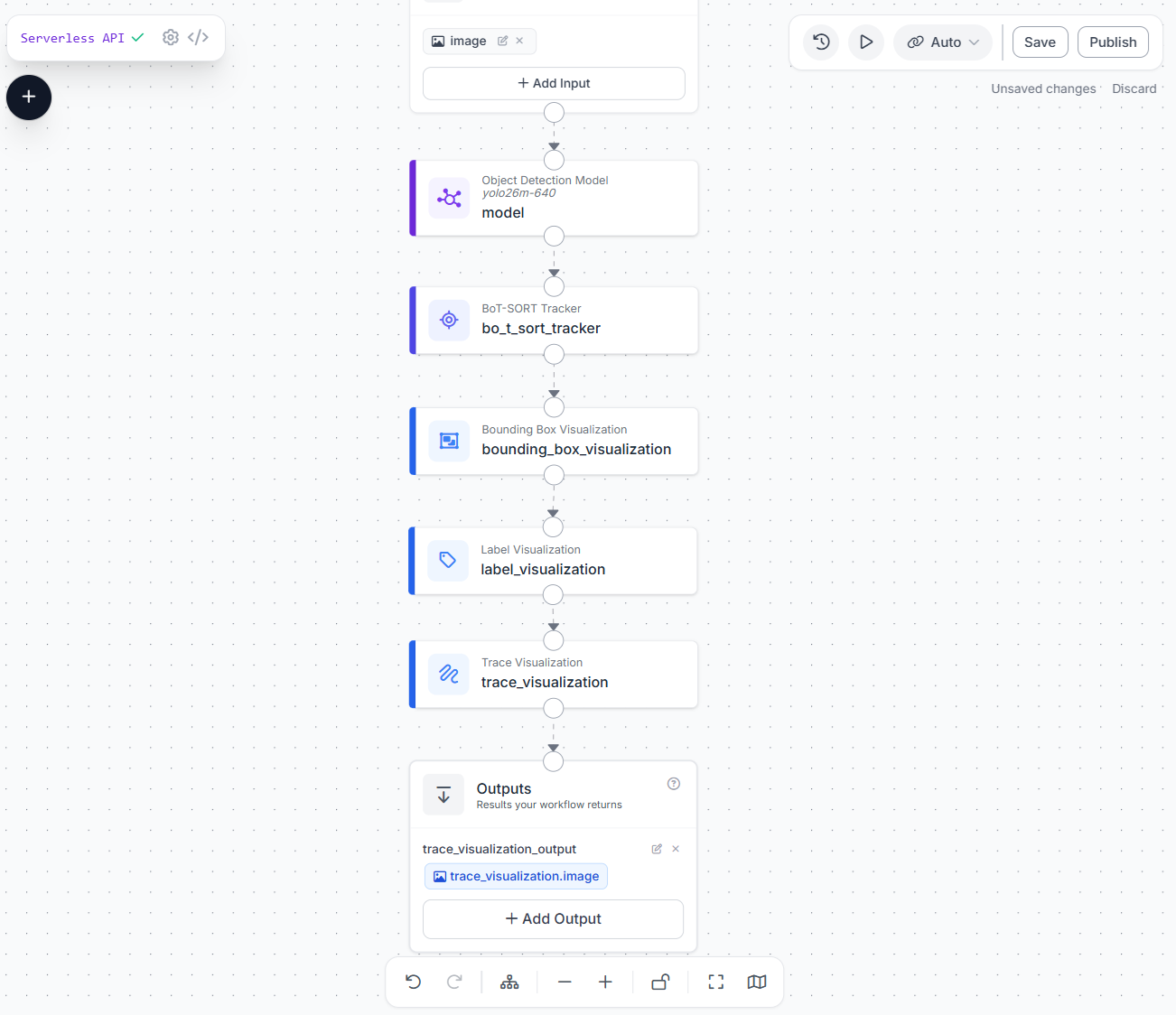
Here is how to build it step by step.
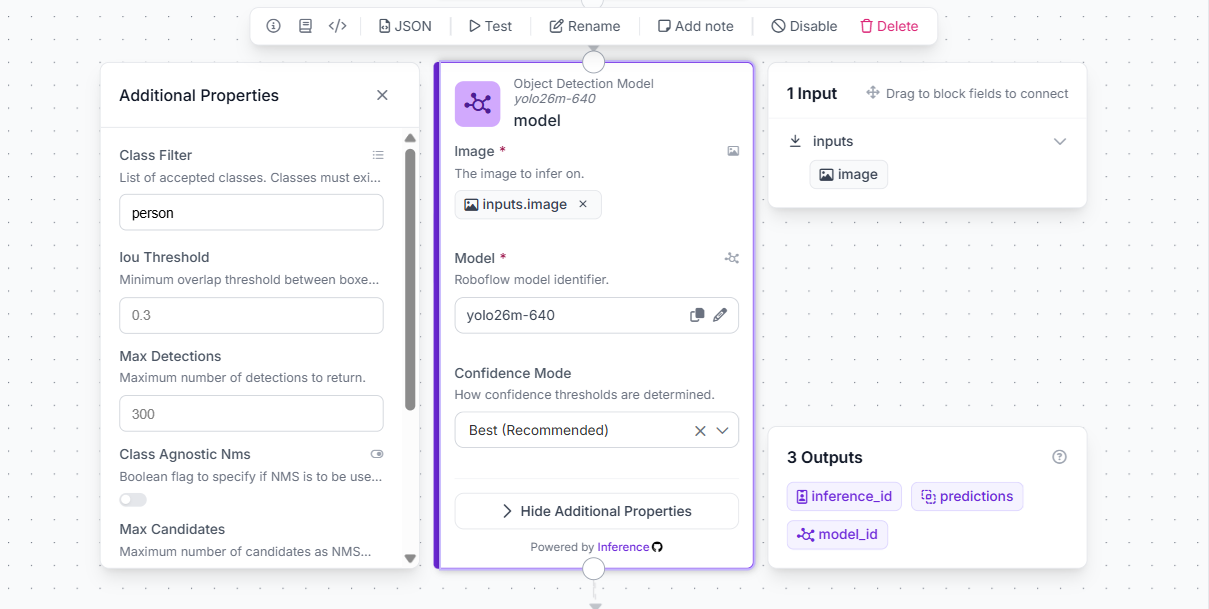
Step 1: Add the Object Detection Model Block
Open Roboflow Workflows and create a new workflow. Add an Object Detection Model block and connect it to the Inputs block. Set the model to yolo26m-640. Under Additional Properties, set the Class Filter to person to track only people. The block outputs predictions, inference_id, and model_id.
Step 2: Add the BoT-SORT Tracker Block
Add a BoT-SORT Tracker block and connect model.predictions to its Detections input and inputs.image to its Image input. Leave the key parameters to default.

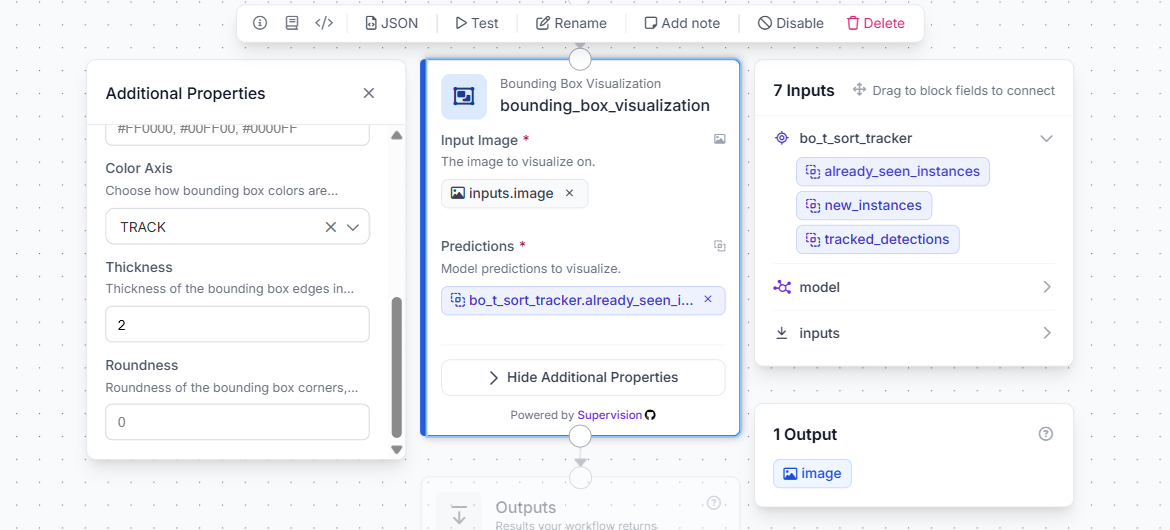
Step 3: Add Bounding Box Visualization
Add a Bounding Box Visualization block. Set Input Image to inputs.image and Predictions to bo_t_sort_tracker.already_seen_instances. Under Additional Properties, set Color Axis to TRACK so each track ID gets a consistent colour.
Step 4: Add Label Visualization
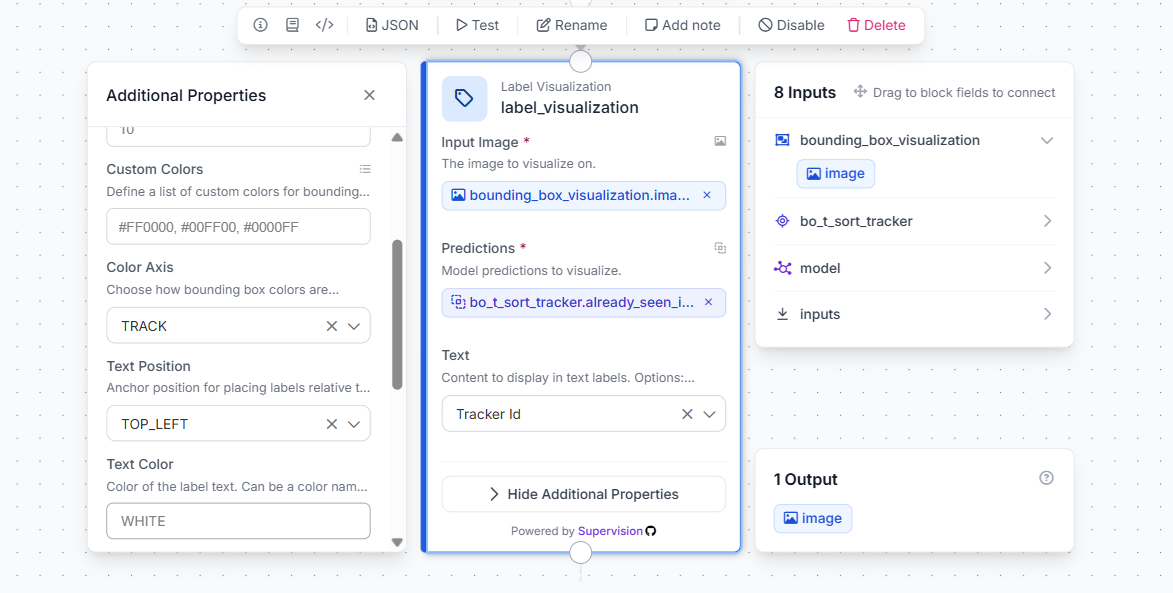
Add a Label Visualization block. Set Input Image to bounding_box_visualization.image and Predictions to bo_t_sort_tracker.already_seen_instances. Under Additional Properties, set Color Axis to TRACK.
Step 5: Add Trace Visualization
Add a Trace Visualization block. Set Input Image to label_visualization.image and Predictions to bo_t_sort_tracker.already_seen_instances. Set Color Axis to TRACK to match each trace colour to its track ID.
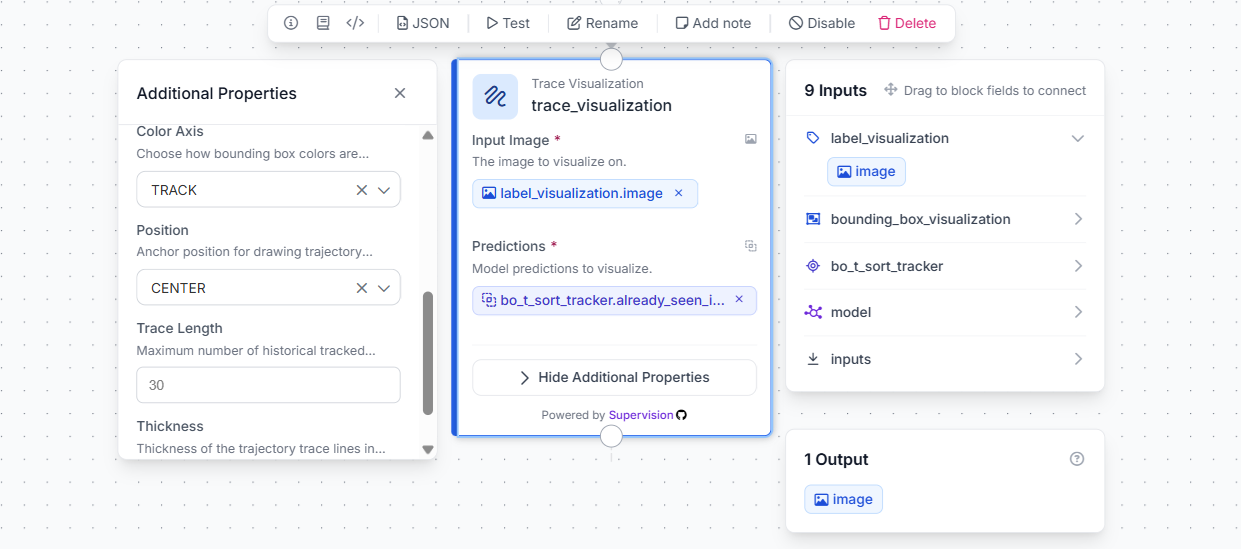
Step 6: Connect to Outputs
Add an Output and connect trace_visualization.image to it. This gives you a single annotated frame with bounding boxes, track ID labels, and movement trajectories all rendered together.
Save and publish the workflow. You can test it directly in the Workflow canvas by uploading a video frame, or deploy it via the Roboflow Inference API by sending frames from your camera or video file.
The entire pipeline from detection with yolo26m-640 to tracked, visualized output takes under five minutes to build and requires zero tracking code.
YOLO with Re-ID Conclusion
Persistent object identity is what separates a detection system from a tracking system, and the right tracker makes all the difference in real-world scenes with occlusions, crowds, and moving cameras.
Both the Roboflow Trackers library and Roboflow Workflows make it straightforward to add tracking to any YOLO-based pipeline. The library gives you a single Python interface across all four algorithms. Workflows lets you build and deploy the same pipeline without writing any tracking code. Check the full benchmark comparison to find the right tracker for your use case.
Further reading:


Cite this Post
Use the following entry to cite this post in your research:
Timothy M. (May 26, 2026). YOLO Re-ID. Roboflow Blog: https://blog.roboflow.com/re-id-with-yolo/