

Roboflow Train is a fully managed service that simplifies training computer vision models by automatically handling infrastructure, model architecture, and compute, so users can focus on their data and results. It integrates with the broader Roboflow ecosystem, including tools such as Roboflow Annotate, Roboflow Deploy, and Roboflow Workflows, to provide an end-to-end pipeline from dataset preparation to deployment and monitoring.
Training computer vision models often involves managing complex infrastructure, configuring multiple tools, or building training pipelines from scratch.
Roboflow Train removes this complexity by offering a fully managed training environment where model architecture selection, training infrastructure, optimization, and hardware provisioning are handled automatically. This allows you to focus on your dataset and the quality of your results.
In this guide, you will learn how Roboflow Train works and explore its key features. You will also go through a complete training pipeline, including preparing your dataset, selecting a model architecture, running training, evaluating performance, and deploying the model.
Training a Model in Roboflow Train
What Is Roboflow Train?
Roboflow Train is a hosted machine learning service from Roboflow that allows you to train computer vision models, including object detection, instance segmentation, image classification, semantic segmentation, keypoint detection (pose estimation), and multimodal or VLM, without setting up or managing your own training infrastructure.
It is part of the Roboflow ecosystem and serves as a training engine. It integrates seamlessly with other Roboflow tools such as Roboflow Annotate, Roboflow Workflows, Roboflow Deploy, and Roboflow Model Monitoring.
You first upload and label your dataset using Roboflow Annotate. Roboflow Train then takes over the training process in the cloud.
It automatically provisions compute resources, runs training jobs using modern model architectures, manages GPUs, and outputs a trained model that is ready for deployment.
You can then use this model in Roboflow Workflows for custom logic, deploy it directly through Roboflow Deploy, and monitor it using Roboflow Model Monitoring. In this way, Roboflow provides a complete end-to-end solution.
The reasons below are why Roboflow Train is so popular:
- No Infrastructure Management: Train models without setting up or maintaining your own training infrastructure.
- Support for Multiple Tasks: Train models for a wide range of computer vision tasks, including object detection, instance segmentation, image classification, pose estimation, semantic segmentation, and multimodal applications.
- Access to Modern Architectures: Train using a variety of state-of-the-art computer vision model architectures based on the specific computer vision task.
- Seamless Roboflow integration: Works directly with other Roboflow tools, including annotation, deployment, and monitoring, enabling a smooth pipeline from dataset annotation to model training, and then to deployment and monitoring within a single platform.
- Faster Time to Results: Reduce the time required to develop and train production-ready models.
- Built-in Training Metrics: Monitor training progress and evaluate model performance during training.
- Experiment Tracking: Keep track of training runs and compare results across experiments.
- Focus on Model Development: Spend more time improving datasets and models rather than managing infrastructure.
- Rapid Iteration: Quickly test new datasets, configurations, and model architectures.
- Easy Deployment Path: Move trained models into deployment workflows within the Roboflow ecosystem.
Key Features of Roboflow Train
Roboflow Train includes several powerful capabilities that streamline the entire model training pipeline, such as:
1. Training Engines
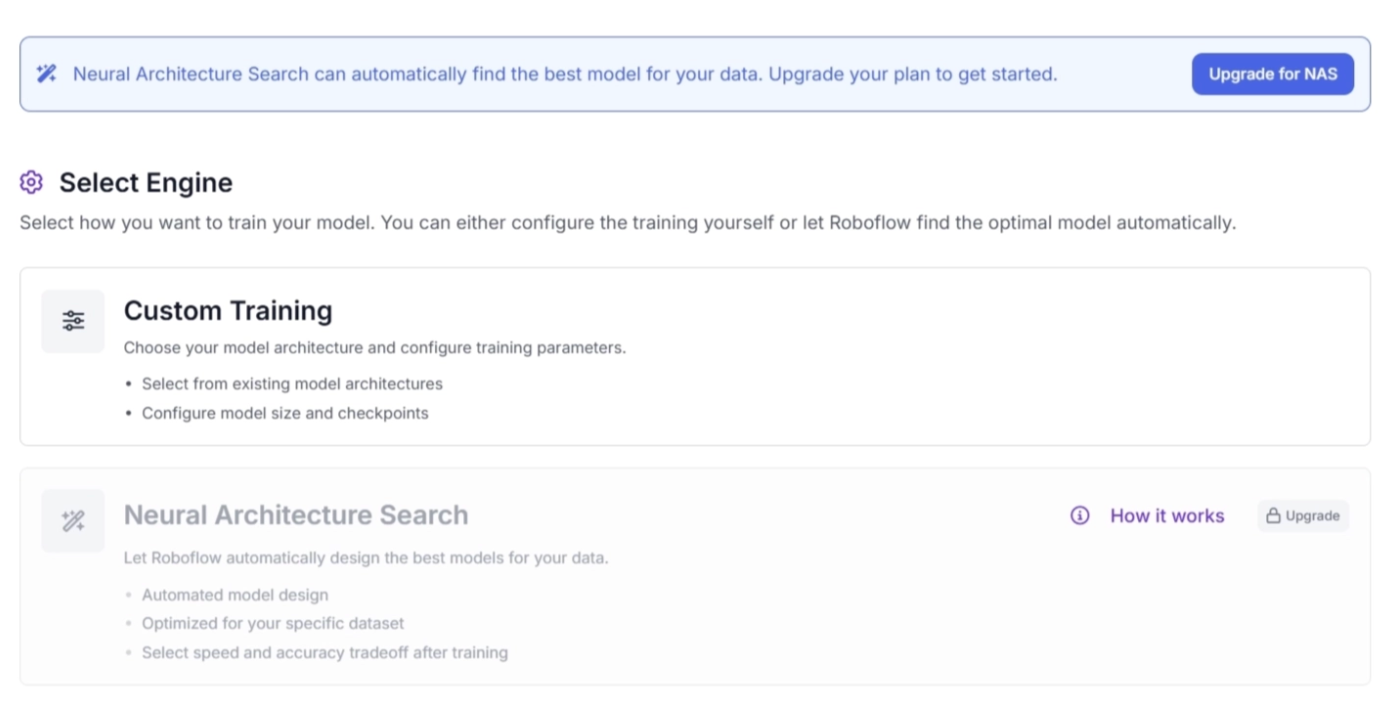
Roboflow Train offers two training engines tailored to different needs and skill levels:
- Neural Architecture Search (NAS): NAS automatically trains and evaluates dozens of model architectures on your dataset. It then presents the best-performing models across different speed-versus-accuracy tradeoffs, helping you select the most suitable model for your use case. The NAS process:
- Identifies architectures that best fit your dataset characteristics
- Fine-tunes those architectures on your data
- Tests over 5,000 configurations
- Produces 10 to 100 trained models optimized across different latency and accuracy targets
- Read more about NAS.
- Custom Training: Custom Training gives you full control over the training process through the Roboflow Train interface. You can select the architecture, choose checkpoints, and manually configure training settings.
2. Support for Multiple Model Architectures
Roboflow Train supports training for six different computer vision tasks, including object detection, instance segmentation, image classification, semantic segmentation, keypoint detection (pose estimation), and multimodal or VLM training, along with their corresponding architectures optimized for speed, accuracy, and edge deployment.
It allows users to switch between lightweight and high-accuracy model variants when training computer vision tasks, depending on hardware constraints and performance requirements.
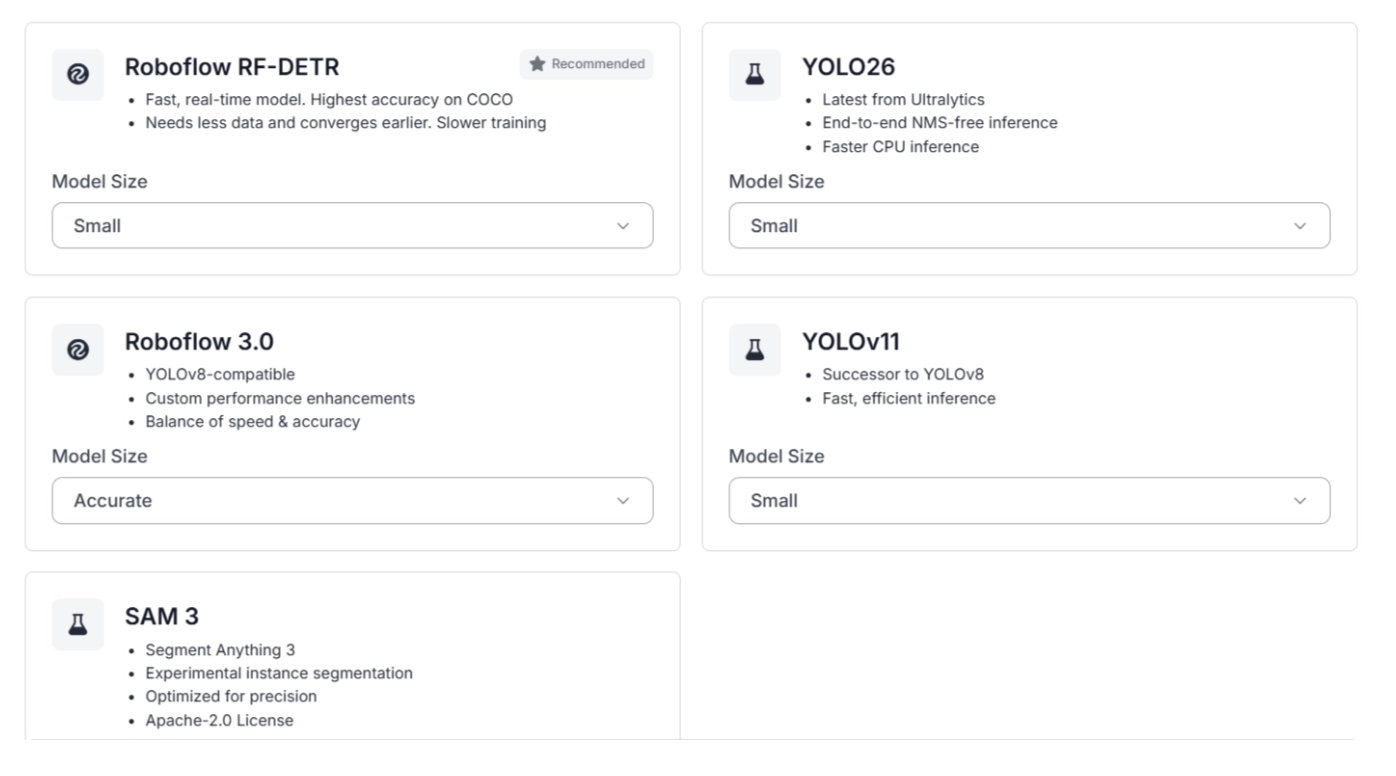
For instance segmentation tasks, Roboflow Train provides architectures such as RF-DETR, SAM 3, Roboflow 3.0, YOLOv11, and YOLO26, with model sizes ranging from nano to large.
For multimodal training, it includes architectures such as Qwen 3.5, SmolVLM, Florence-2, and Qwen3-VL, available across multiple parameter scales.
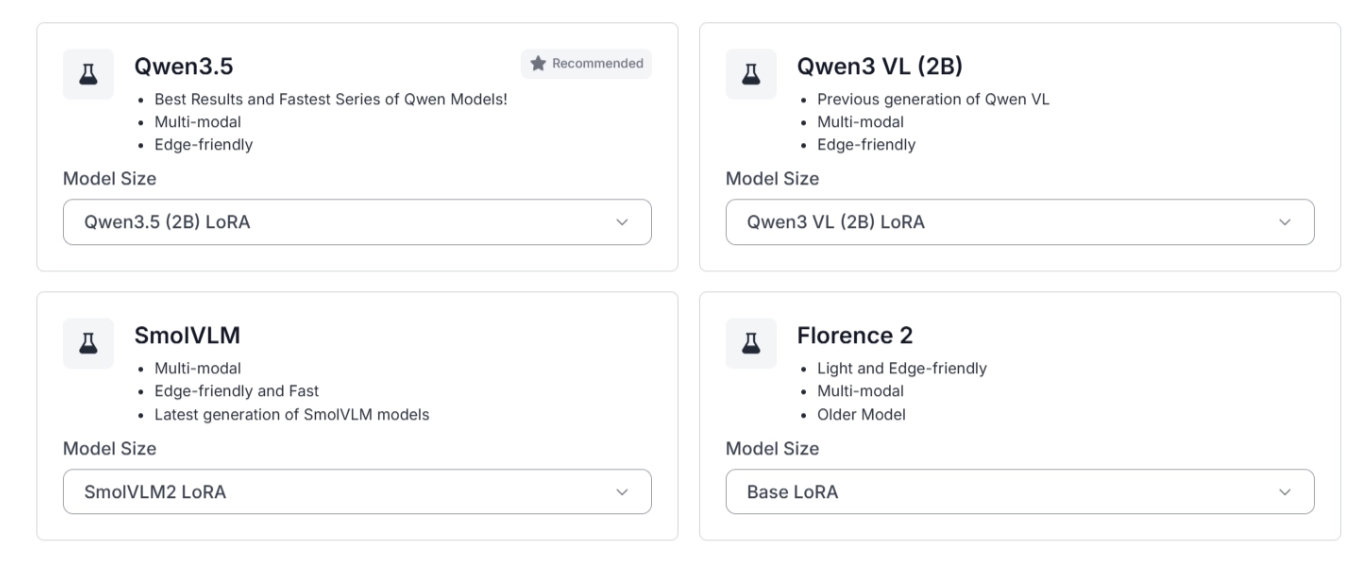
Each computer vision training task can be optimized using dedicated architectures selected based on dataset characteristics, performance requirements, and deployment constraints.
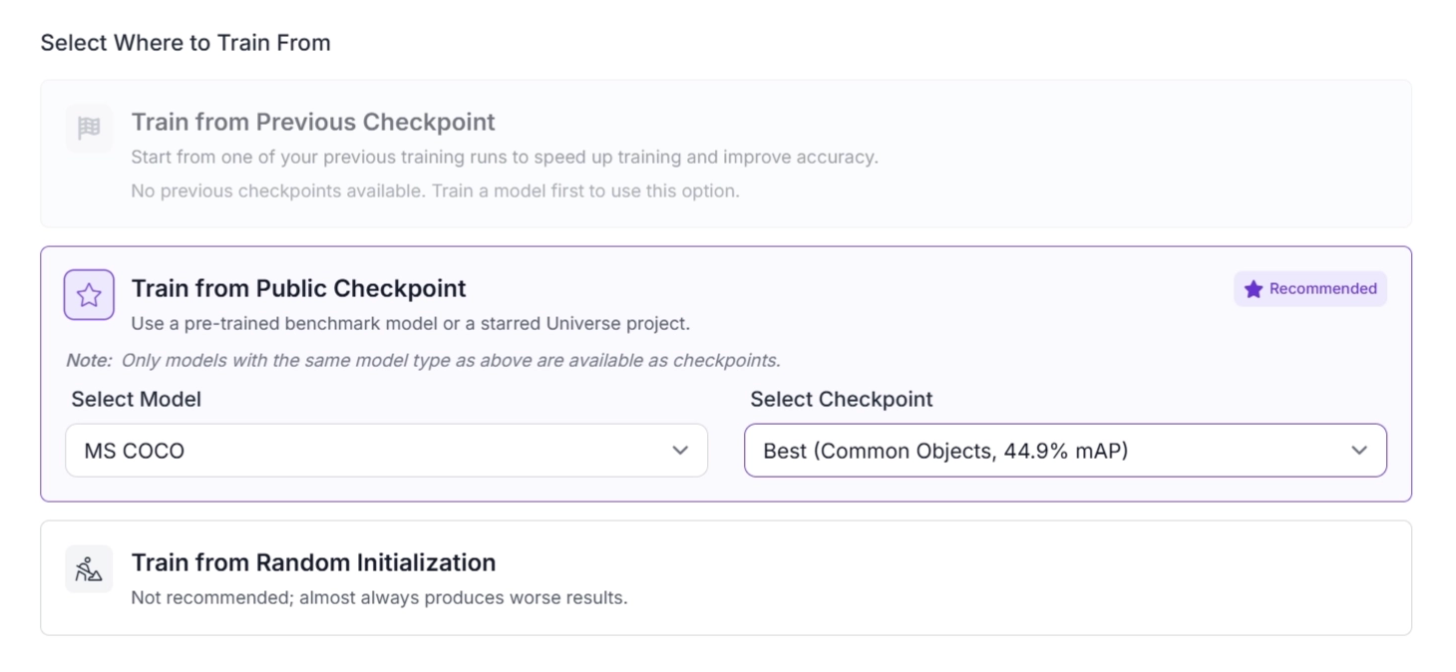
3. Train from Checkpoints
Roboflow Train allows you to resume and continue training from previously saved checkpoints instead of starting from scratch.
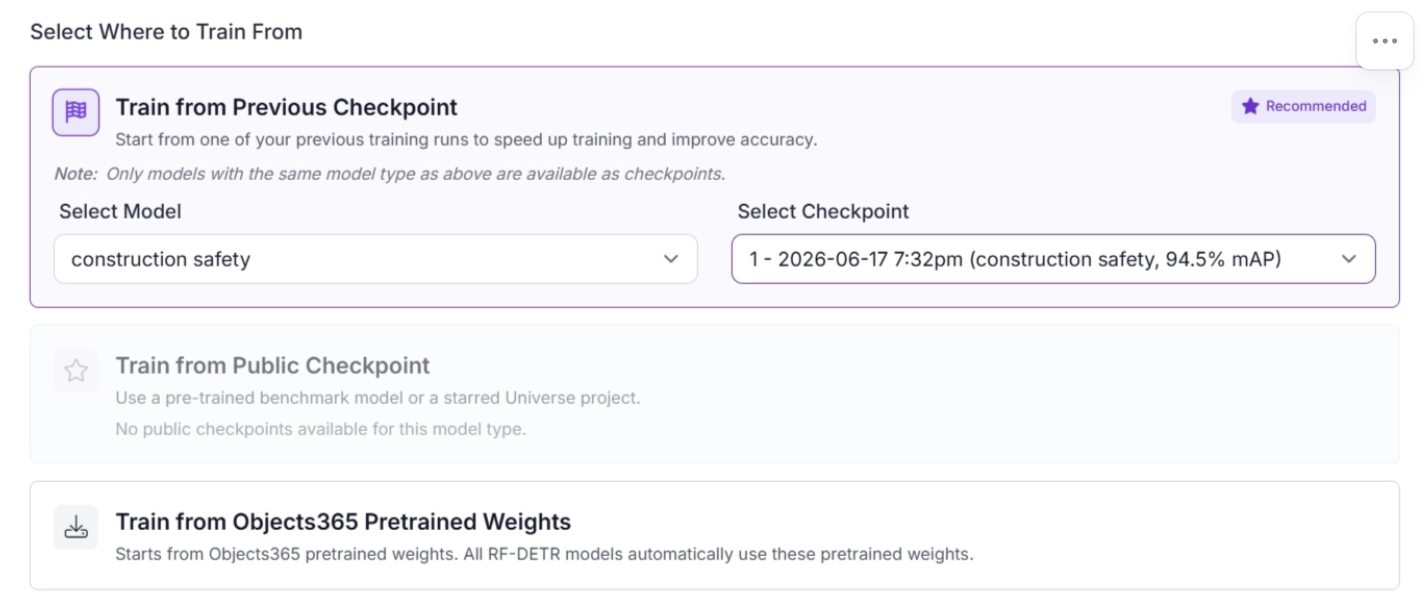
Roboflow also supports fine-tuning existing models on new or expanded datasets, allowing the model to adapt to improved or larger data while retaining previously learned knowledge.
By building on earlier training runs, Roboflow Train enables iterative improvement, making it easier to refine model performance over time through multiple training cycles.
In addition, training can be initialized from Roboflow Universe checkpoints, which are pretrained models shared within Roboflow Universe, enabling effective transfer learning and faster convergence.
4. Comprehensive Training Results
Every training run on Roboflow Train produces detailed analytics and insights. Its built-in evaluation tools measure model performance during and after training.
During training, it provides real-time tracking of key metrics such as loss, precision, and recall, allowing users to monitor learning progress and detect issues early.
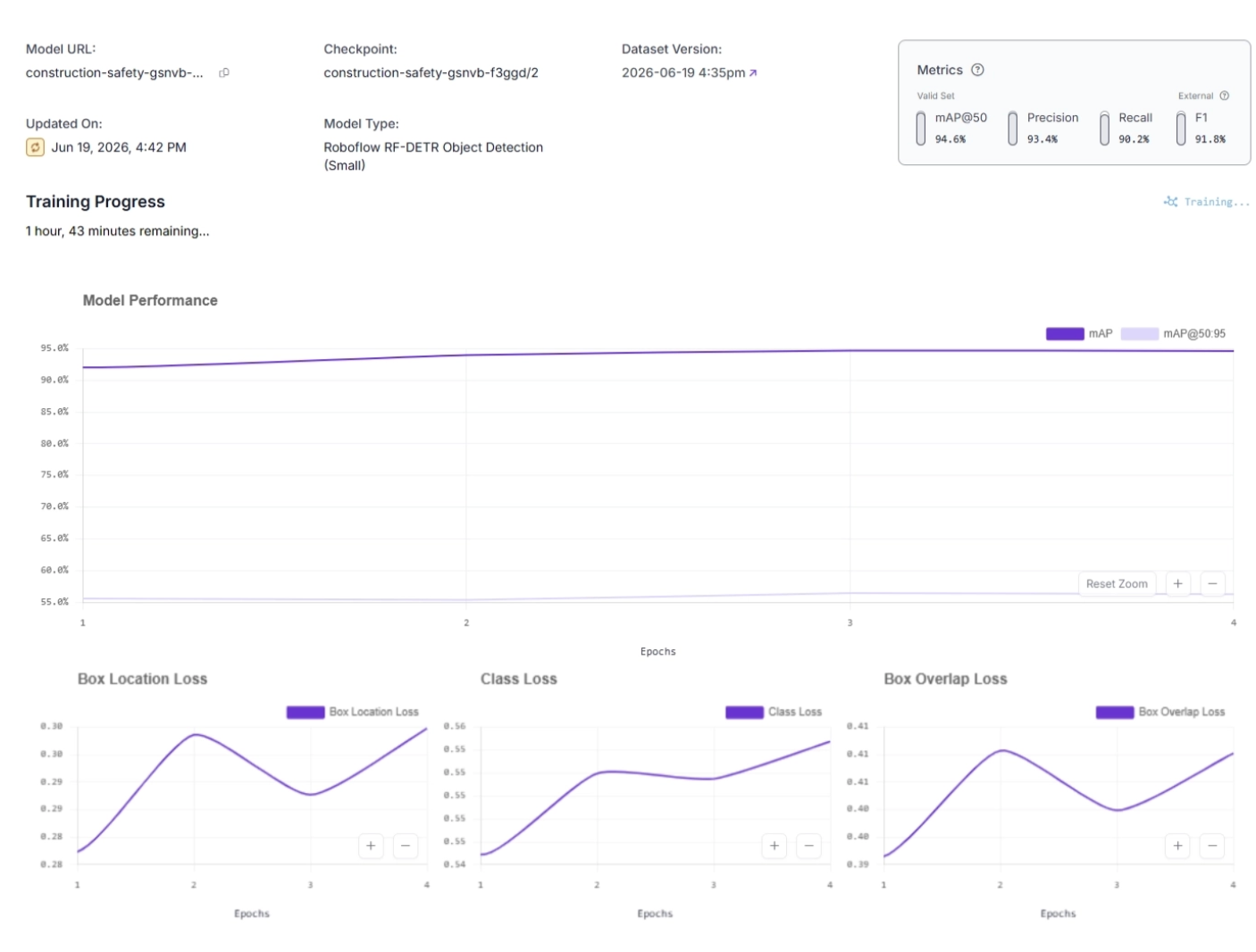
While after training, it generates a comprehensive evaluation report that includes final performance metrics such as mean Average Precision (mAP), class-wise scores, and a confusion matrix.
It also stores complete training artifacts for reproducibility and future comparison.
5. Roboflow Instant
Roboflow Instant is a fast, few-shot training solution designed to quickly build proof-of-concept models.
Instant automatically trains a model using your dataset as soon as you approve a new batch of images in your dataset. Once trained, the model can be used directly in Roboflow Workflows, just like any other model trained on the platform.
Instant only supports Object Detection projects. Read more about Roboflow Instant.
6. Managed Training Infrastructure
Roboflow Train handles all resource complexity required for model training. It automatically provisions compute resources, manages scaling, and removes the need for manual environment setup or dependency management, ensuring consistent training environments across different projects.
With Roboflow Train, the entire training pipeline is managed through a user interface, eliminating the need for local setup or compute infrastructure configuration.
Users only need to monitor and manage usage through Roboflow Credits, which serve as the sole billing mechanism for training and compute resources.
7. Seamless Integration with the Roboflow Platform
Roboflow Train is tightly integrated with the broader Roboflow ecosystem. It directly uses datasets created in Roboflow Annotate and works smoothly with deployment tools such as Roboflow Deploy and Workflows for exporting and serving models.
It is part of an end-to-end pipeline that spans data labeling, model training, deployment, and production monitoring within the Roboflow ecosystem.
How to Use Roboflow Train
Roboflow Train is extremely intuitive and easy to use for training computer vision models.
The following steps guide you through training a Construction Safety model that detects whether a worker is wearing a safety vest or helmet, or is missing required safety gear.
We then deploy the model using a Roboflow Workflow. You can try the workflow with the construction safety model that we will train in this guide here.
Step 1: Start with a Dataset
Before you can begin training with Roboflow Train, you need a dataset. You can use Roboflow Annotate to label images and create a dataset for training. Roboflow Annotate also provides various AI-assisted labeling tools to speed up your annotation process.
Labeling Dataset using Roboflow Annotate
Once your dataset is ready, you can continue directly with model training in Roboflow Train.
Alternatively, you can start with an existing public dataset from Roboflow Universe. For example, you can fork the Construction Safety dataset and use it to train your own model. For this guide, we will use this dataset.
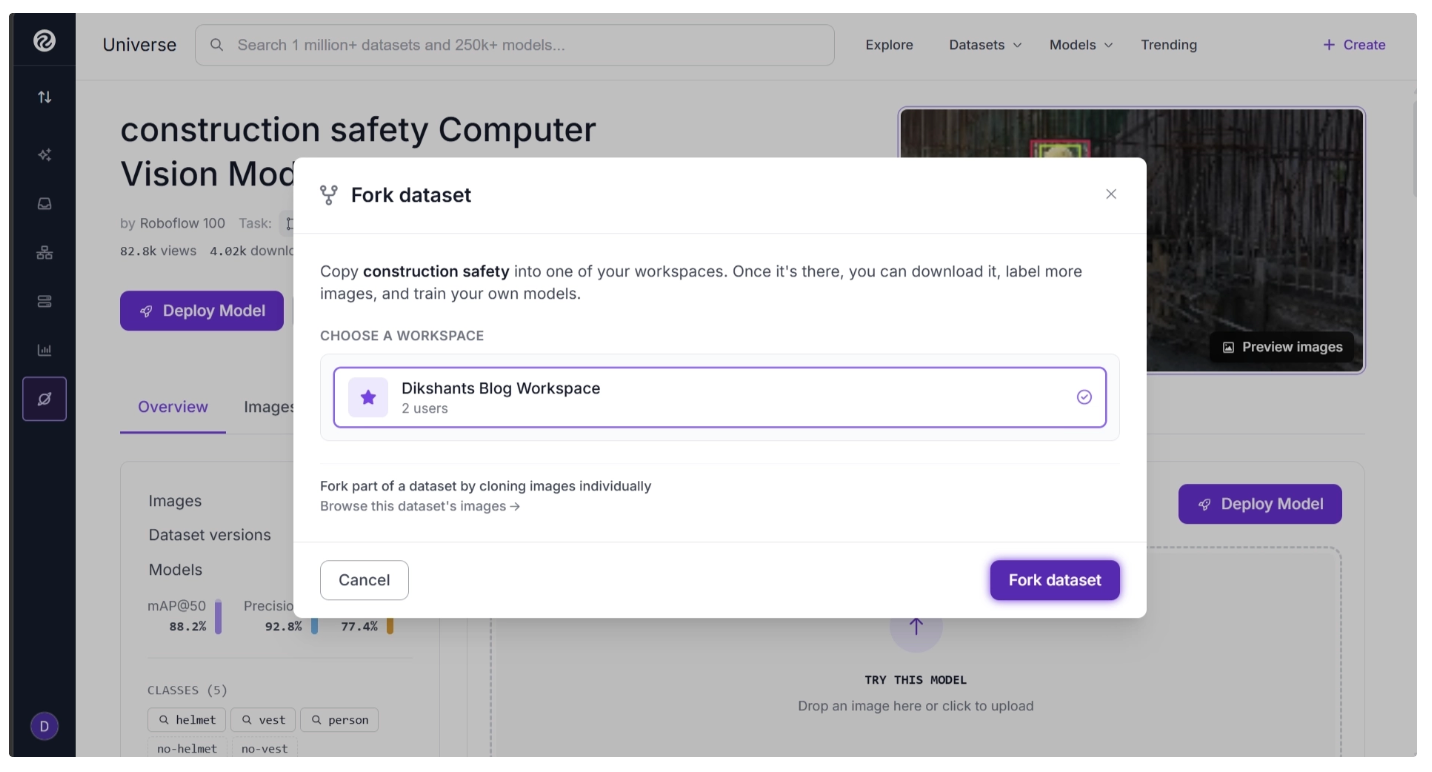
Roboflow Universe is the largest community hub for computer vision datasets across various vision tasks such as object detection, segmentation, keypoint estimation, and more, as well as pre-trained models. It enables developers, researchers, and hobbyists to discover datasets, reuse models, share projects, and accelerate computer vision development.
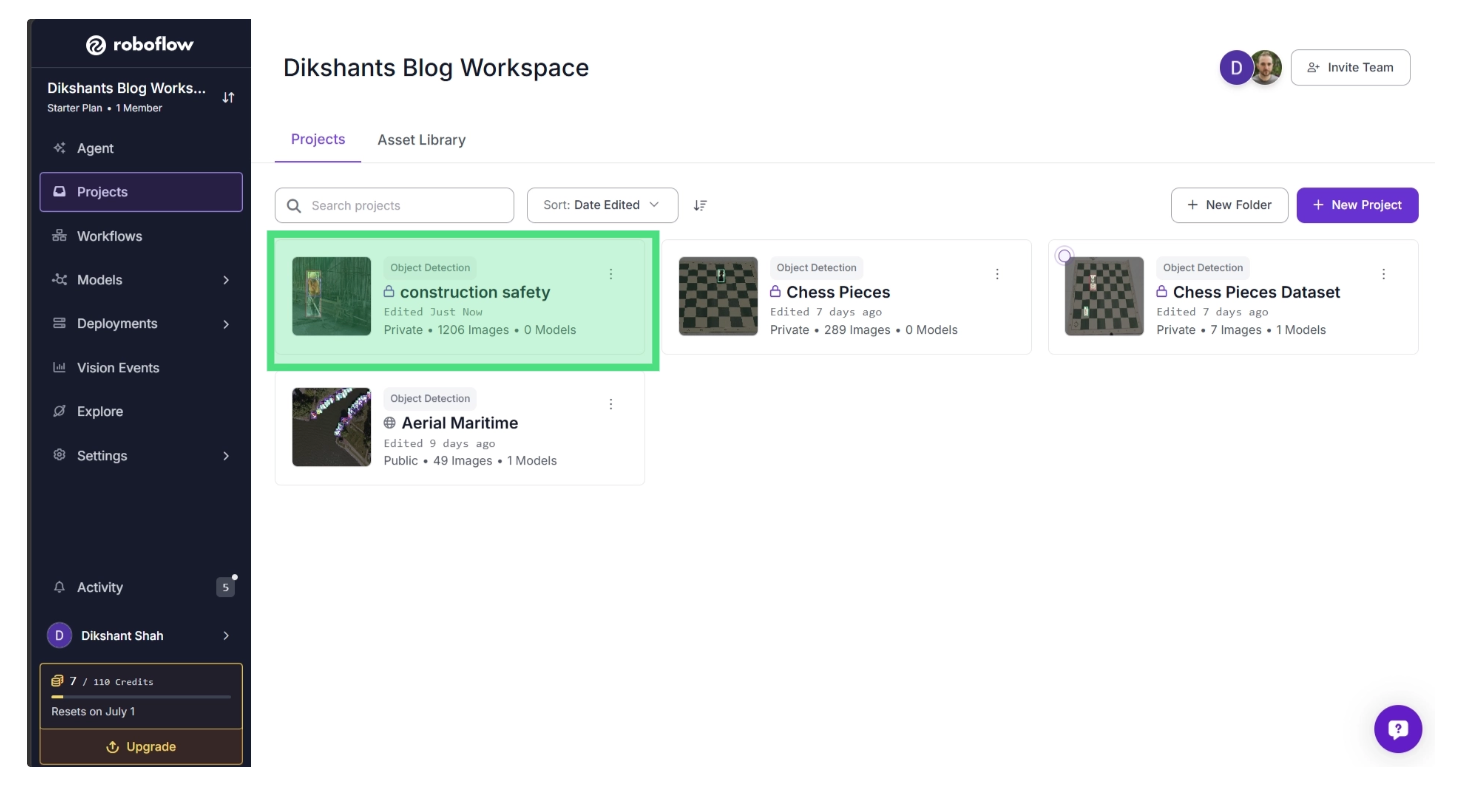
Once you have forked the dataset, it will appear in your workspace. To continue, open the dataset from your Projects page.
Step 2: Select a Training Engine
In the left sidebar under Projects, navigate to Models, then select Train. This opens the Roboflow Train interface.
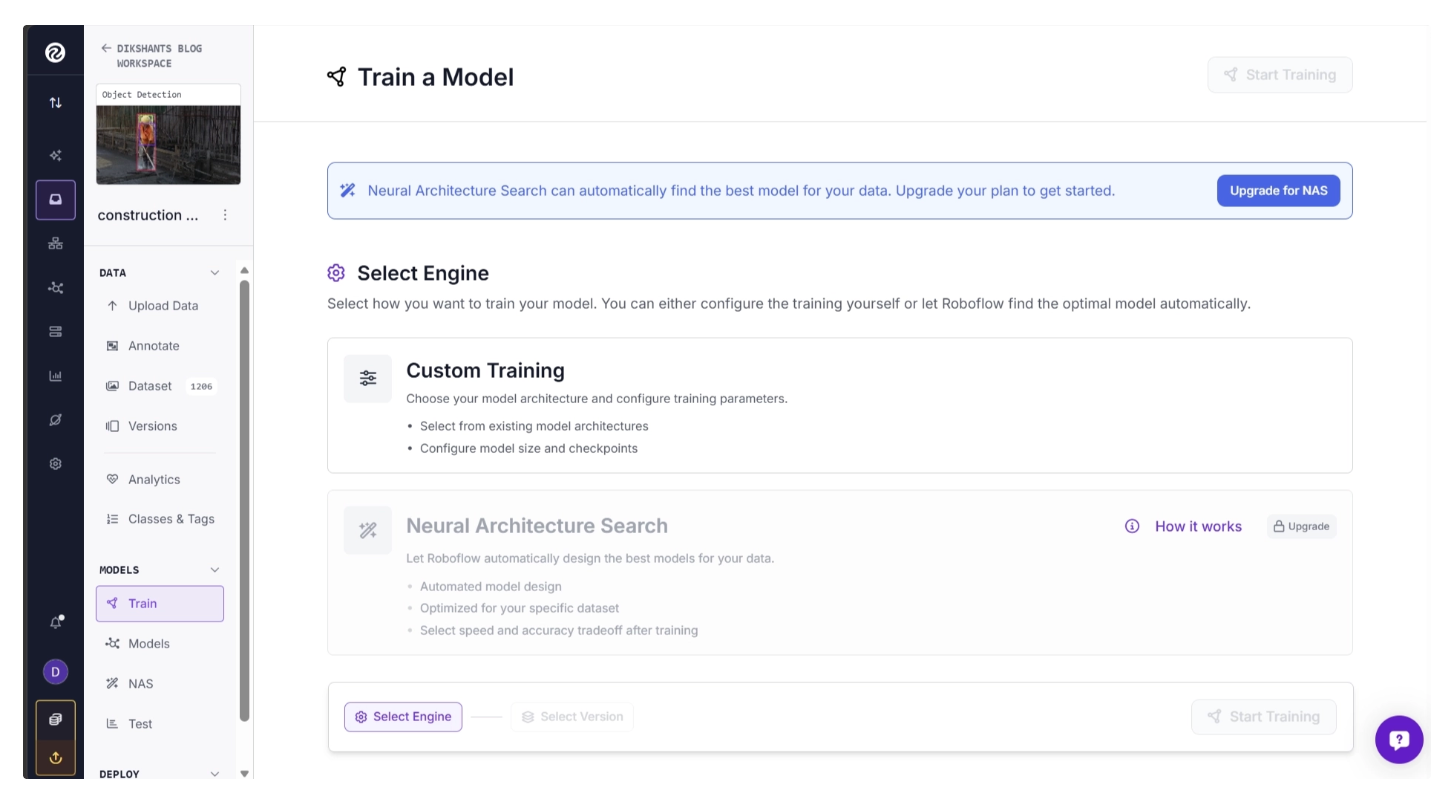
Choose one of the available training engines. Among them, Neural Architecture Search (NAS) automatically trains and evaluates dozens of model architectures on your dataset, then presents the best-performing models across different speed versus accuracy tradeoffs.
Custom Training gives you full control over the training process, allowing you to select the architecture, choose checkpoints, and configure training settings manually.
For this guide, choose Custom Training so we can explore the different options available for training models. One of these options is selecting a model architecture.
Step 3: Select an Architecture
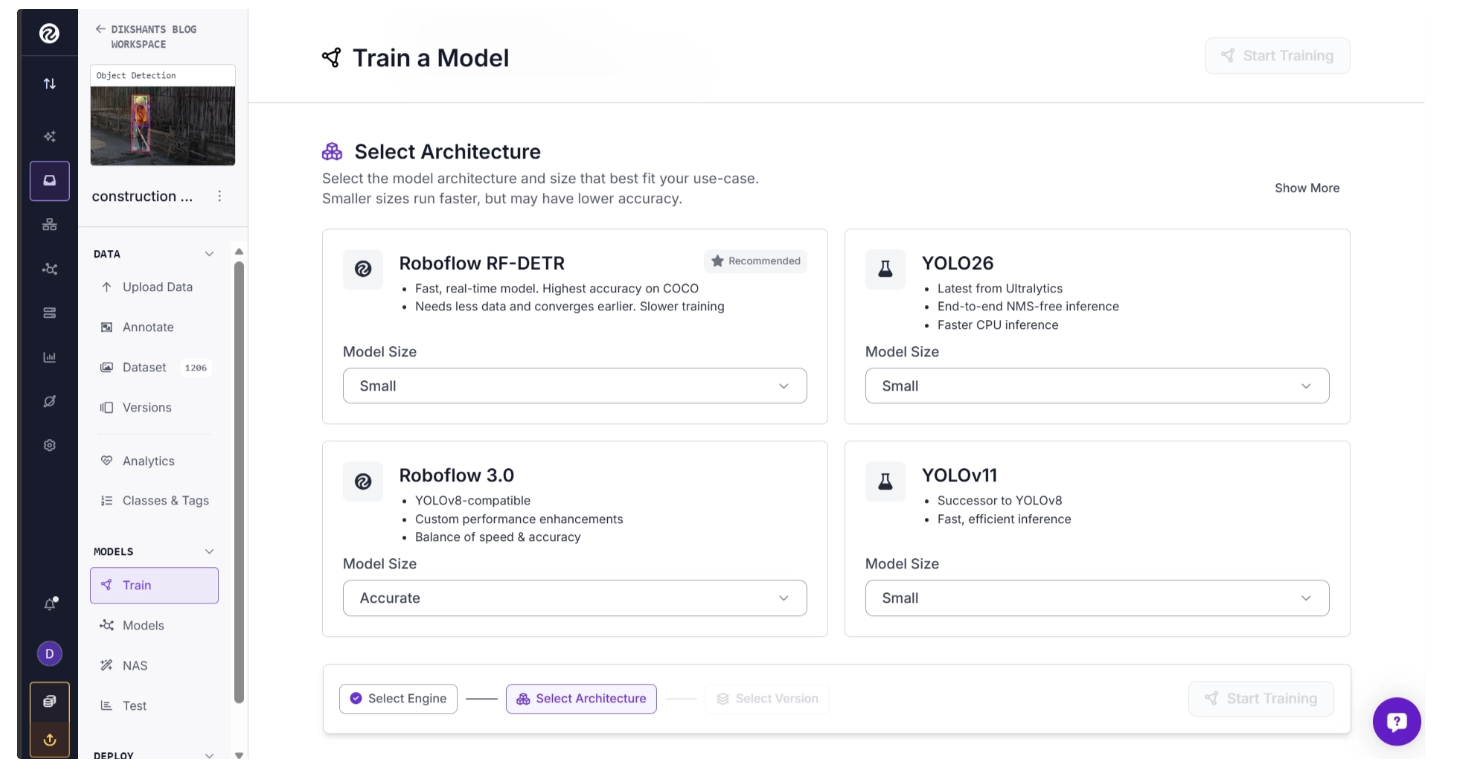
Once the training engine is selected, a list of available architectures will be shown for you to choose from.
The available architectures depend on the task associated with your dataset. Since this example uses an object detection dataset, only architectures designed for object detection are displayed.
Select the architecture and model size that best fit your requirements. Smaller models generally offer faster inference speeds, while larger models may provide higher accuracy.
Choose one of the available training engines. Among them, Neural Architecture Search (NAS) automatically trains and evaluates dozens of model architectures on your dataset, then presents the best-performing models across different speed versus accuracy tradeoffs.
Custom Training gives you full control over the training process, allowing you to select the architecture, choose checkpoints, and configure training settings manually.
For this guide, choose Custom Training so we can explore the different options available for training models. One of these options is selecting a model architecture.
Step 3: Select an Architecture
Once the training engine is selected, a list of available architectures will be shown for you to choose from.
The available architectures depend on the task associated with your dataset. Since this example uses an object detection dataset, only architectures designed for object detection are displayed.
Select the architecture and model size that best fit your requirements. Smaller models generally offer faster inference speeds, while larger models may provide higher accuracy.
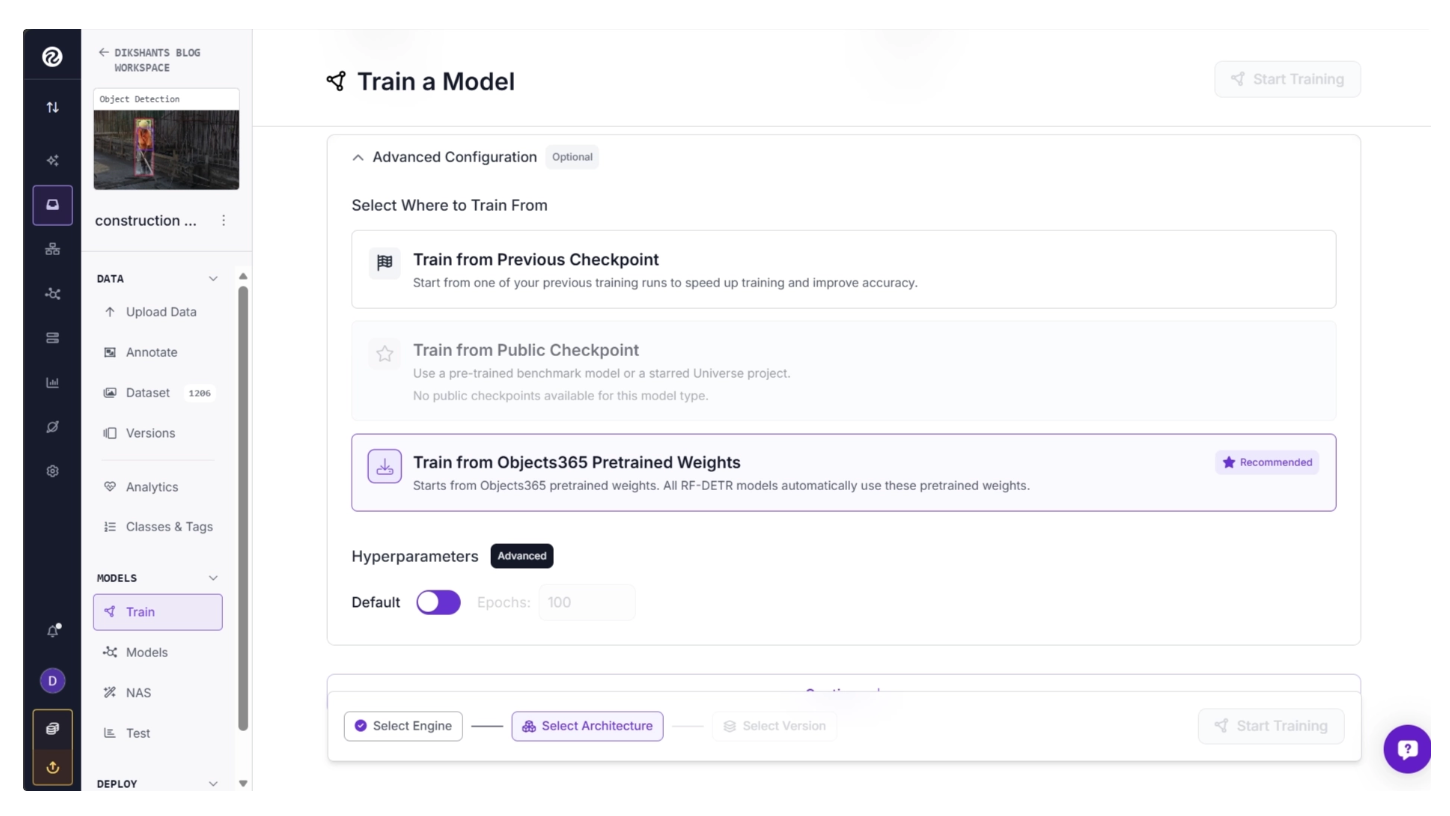
You can also configure hyperparameters such as the number of training epochs or leave them at their default values, such as 100 epochs.
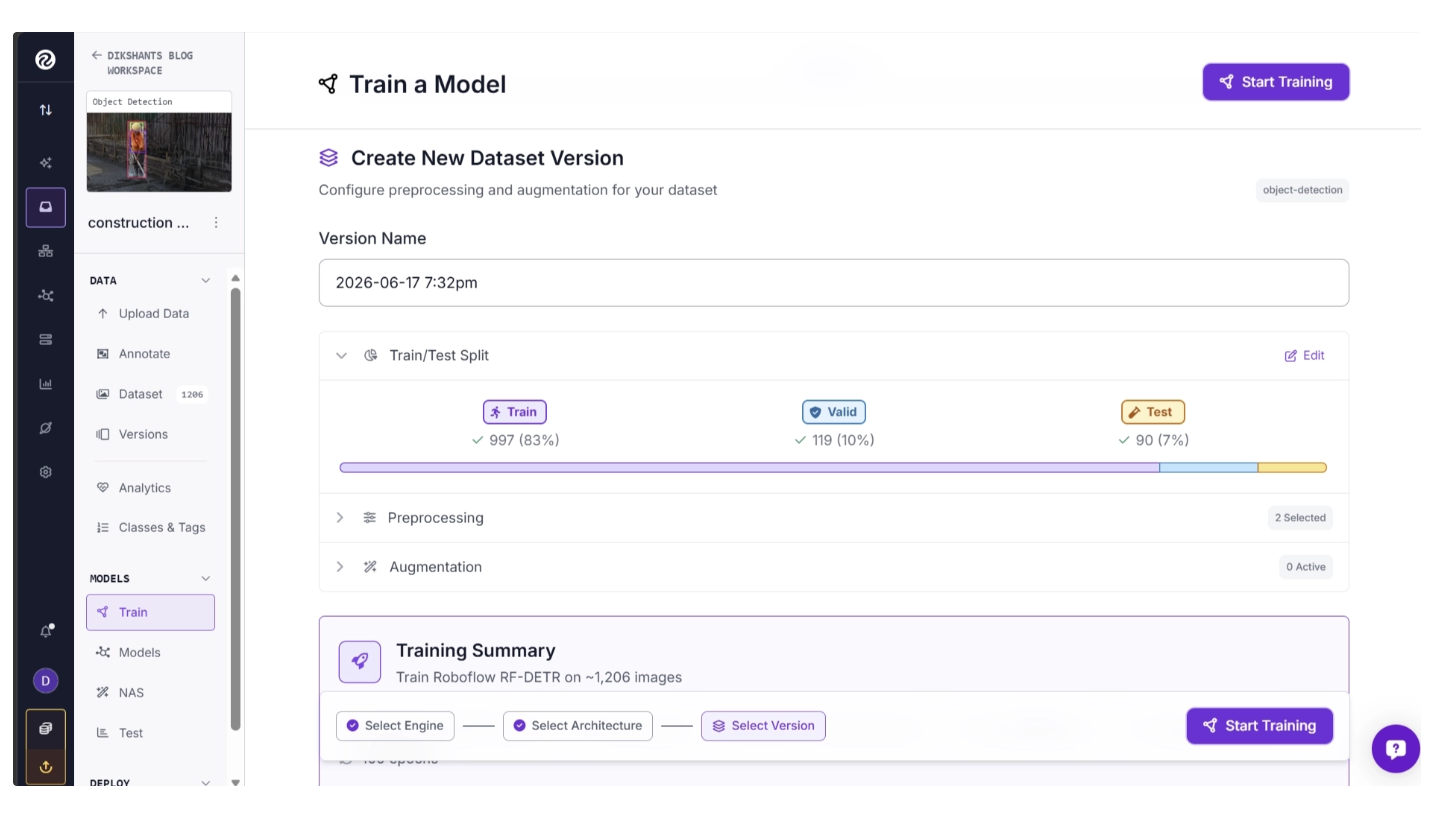
Step 4: Create New Dataset Version
Before training begins, you must create a dataset version. A dataset version is a snapshot of your dataset at a specific point in time, allowing you to preserve and manage changes as your dataset evolves.
Dataset versions help you:
- Track dataset improvements over time
- Reproduce training results accurately
- Compare model performance across dataset iterations
- Roll back to previous versions if necessary
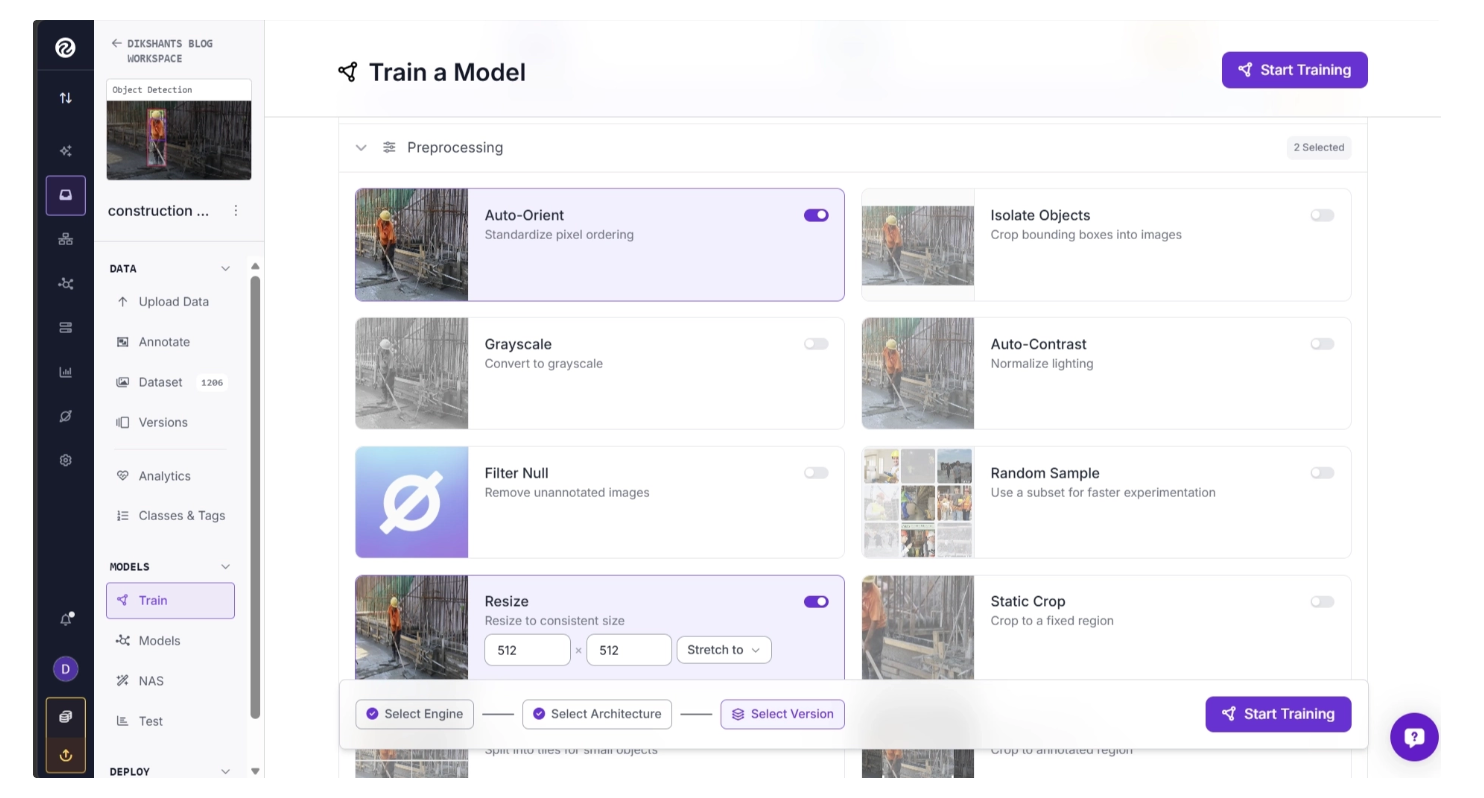
During version creation, you can apply preprocessing operations such as Auto-Orient, Grayscale Conversion, Static Crop, Resize Operations, etc. These preprocessing steps can be applied easily using simple toggle controls.
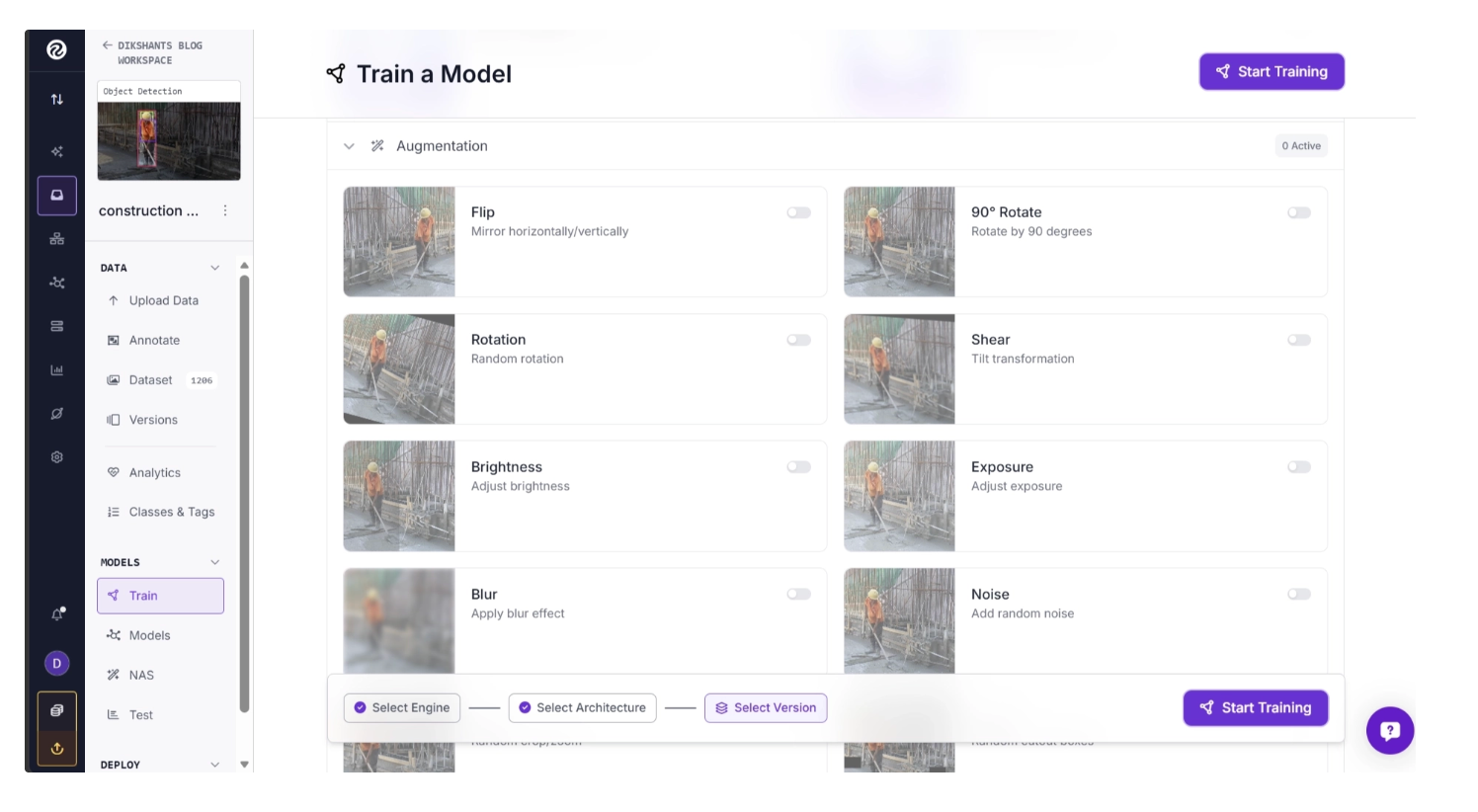
You can also apply augmentations such as Flip, Rotate, Blur, Brightness Adjustments, etc. These augmentations can be applied easily using simple toggle controls to increase dataset diversity and improve model robustness.
Step 5: Begin Training
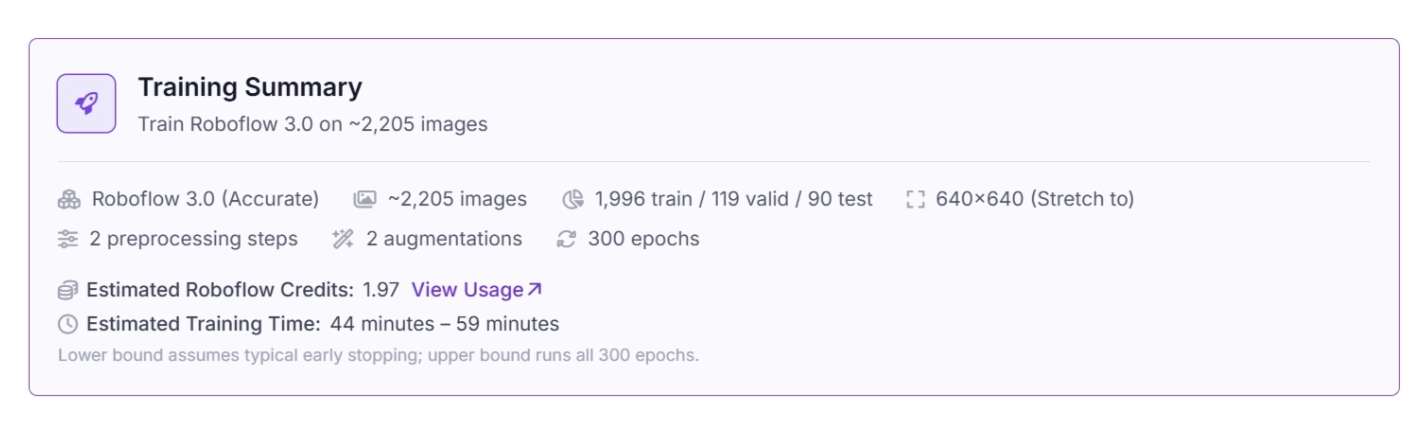
Roboflow Train provides a summary of all selected configurations, training time, estimated credit usage, preprocessing steps, and augmentations. Review this before training.
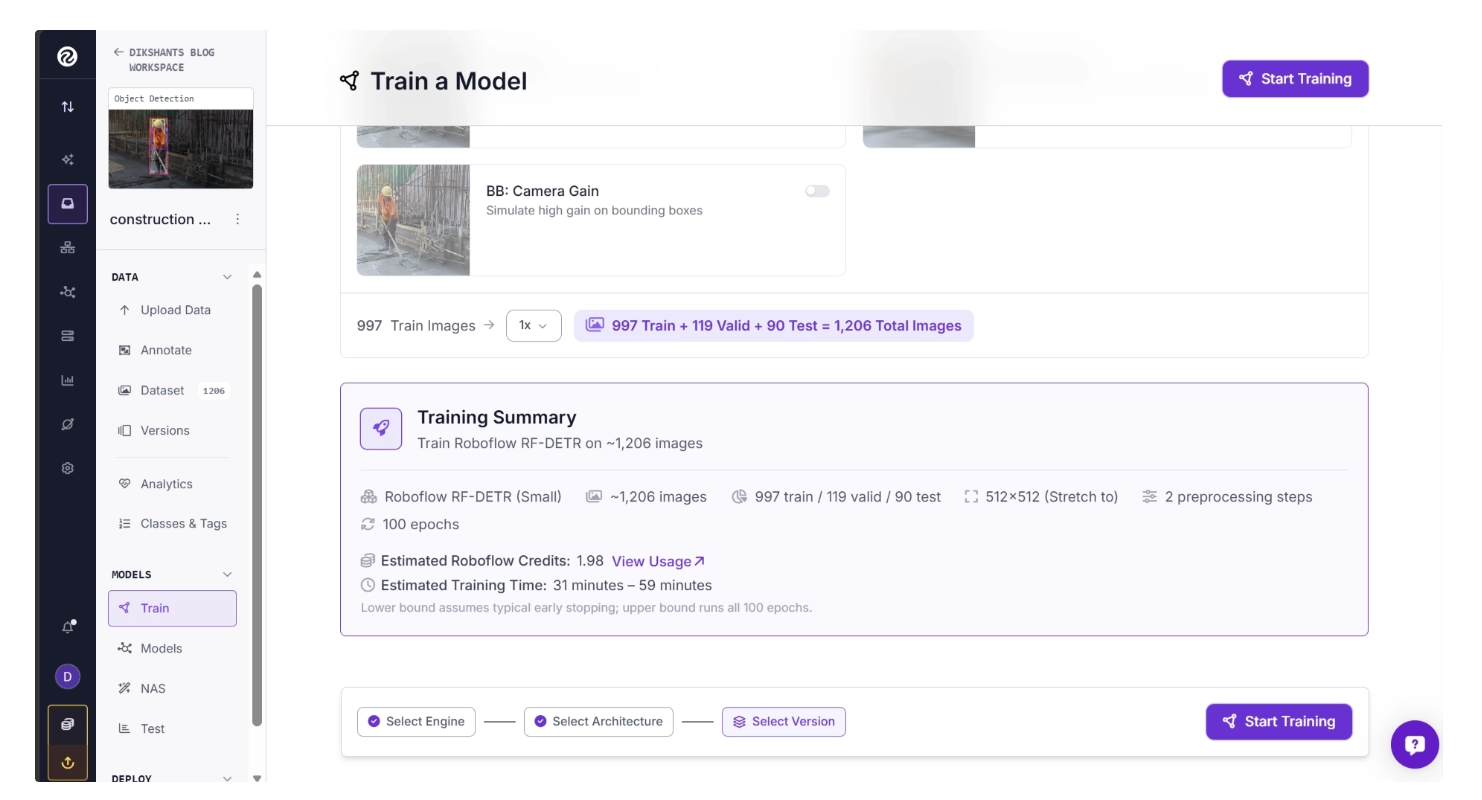
Once you have reviewed it, begin training by clicking the Train button.
Step 6: Monitor Training and Analyze Results
During training, Roboflow Train provides live metrics and progress tracking, including Epoch progress, training status, estimated time remaining, and performance metrics.
You can cancel a training job at any time while the model is running. You can also stop training early once the model has converged and additional training is no longer expected to improve performance.
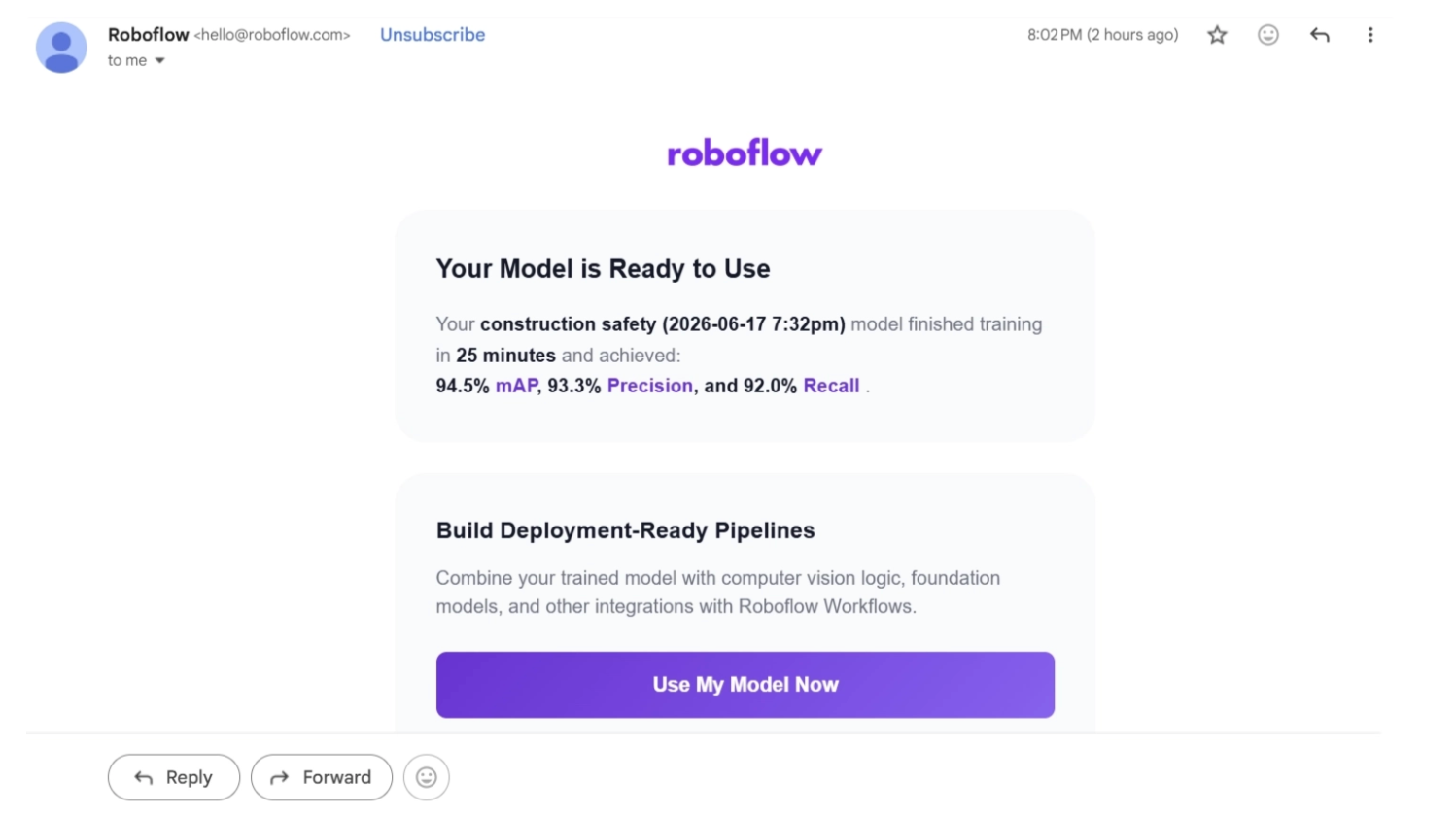
Once training is complete, you will receive an email notification containing key evaluation metrics such as mAP, precision, and recall.
The trained model will also be available in your workspace.
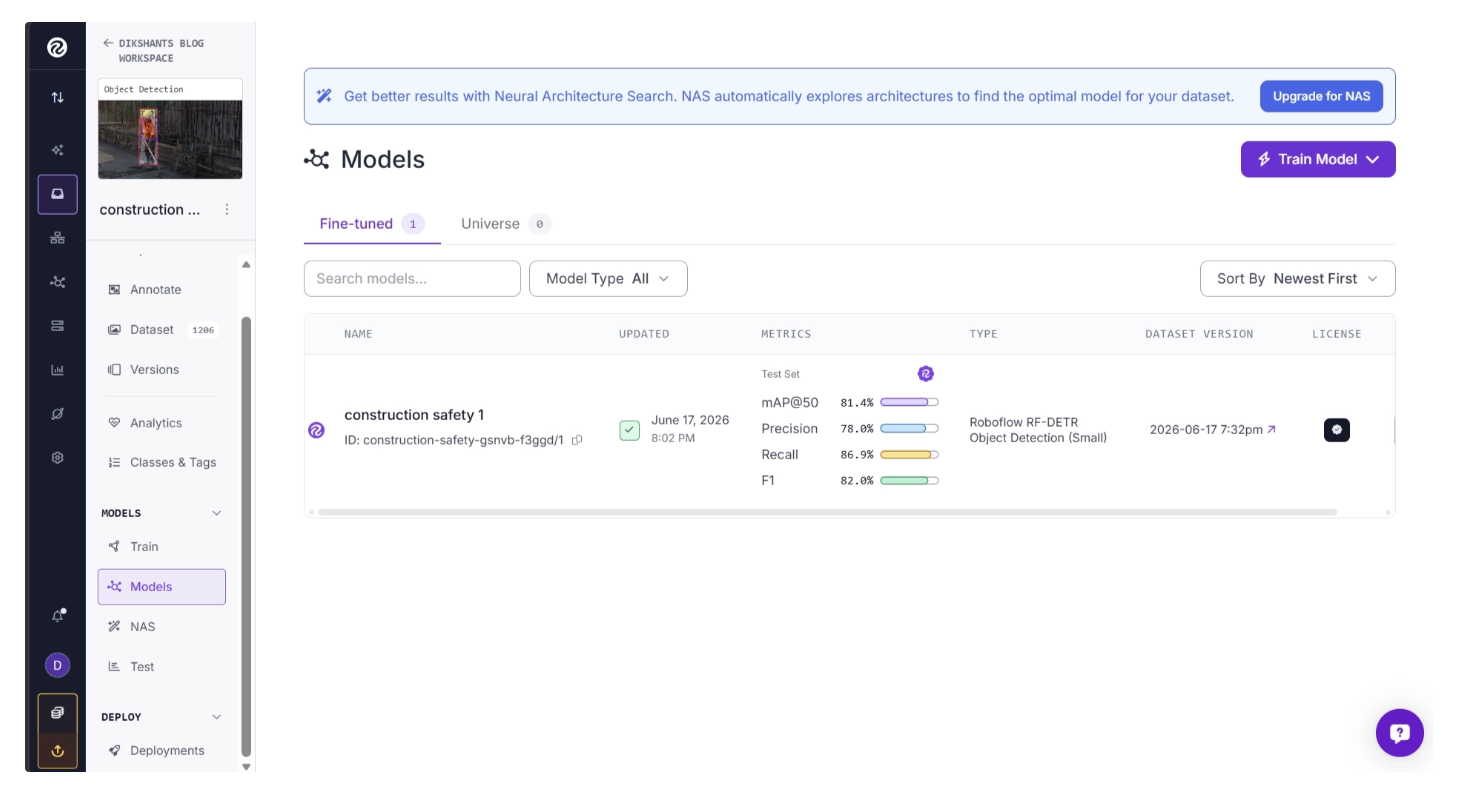
Under the project versions, you can access a complete evaluation report for the trained model, which includes mAP scores, per-class performance metrics, confusion matrices, and additional evaluation statistics.
Step 7: Running the Model
You can run the trained model directly from your workspace by navigating to Projects and then Models.
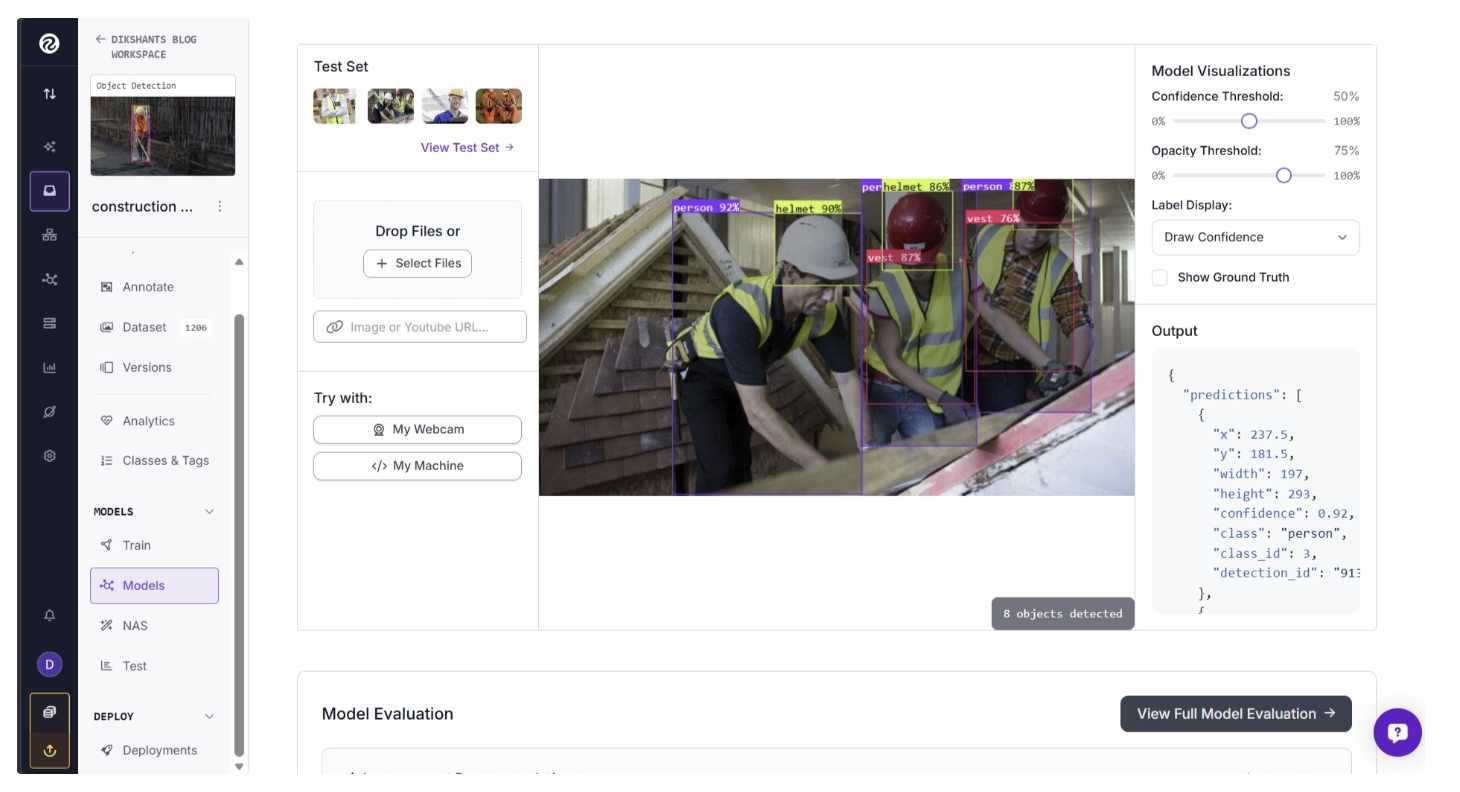
You can also integrate the model into a computer vision pipeline using Roboflow Workflows.
Roboflow Workflows is a visual, low-code platform for building end-to-end computer vision applications. Using drag-and-drop blocks, you can connect AI models, image-processing operations, and business logic to create complete vision pipelines without writing complex code.
It allows you to design, test, and deploy computer vision pipelines for tasks such as object detection, tracking, automation, and more without needing to handle code complexity.
You can also use Roboflow Agent (available in your workspace after login) to automatically generate workflows. Roboflow Agent acts as a conversational interface on top of Roboflow tools such as Workflows. Simply describe what you want in natural language, and the Agent will build a workflow for you.
It provides a strong starting point while still allowing full customization.
For example, I used the prompt:
“Create an Object Detection Workflow using the Construction Safety model I just trained.”
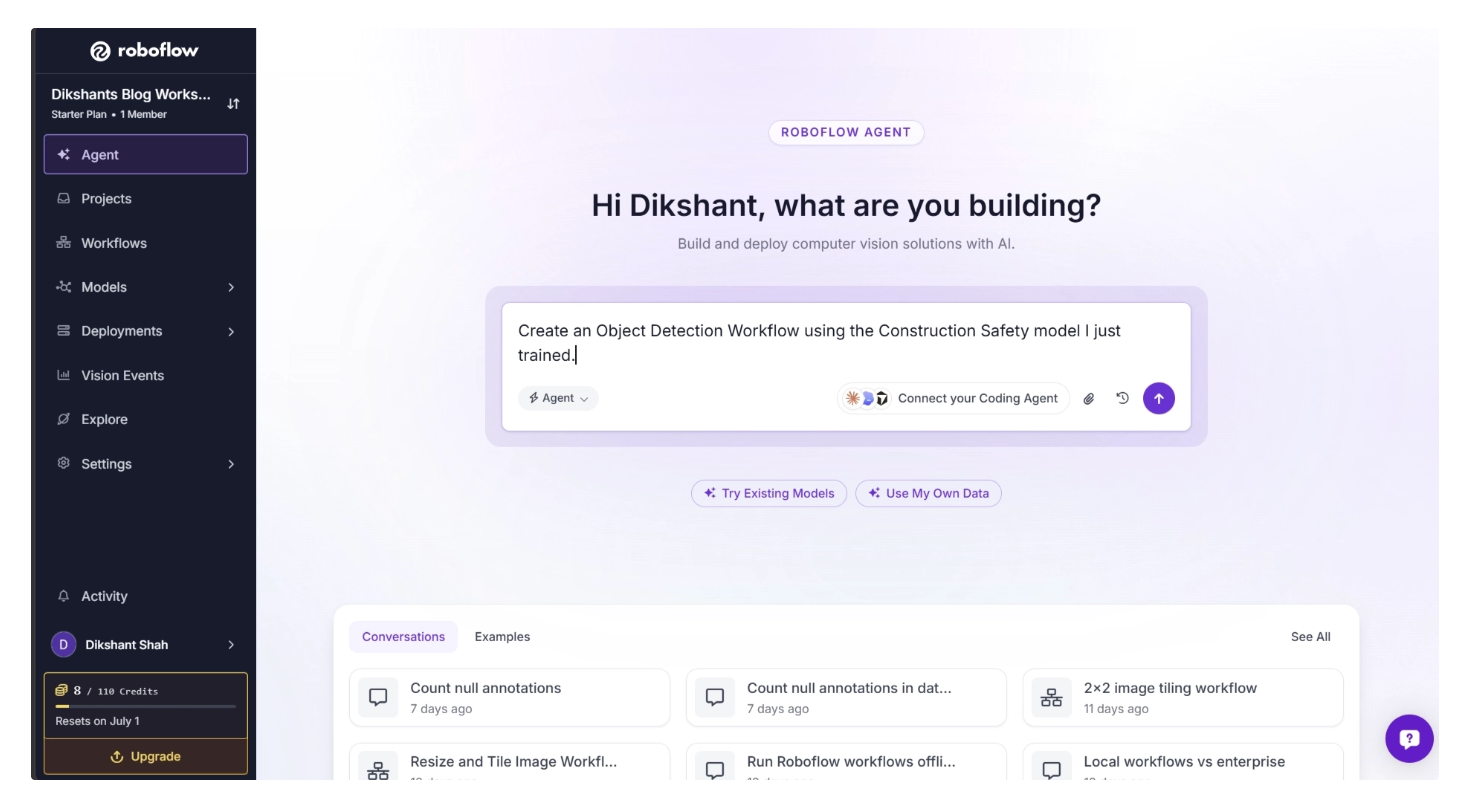
Roboflow Agent then generated a complete workflow automatically. Try the generated workflow.
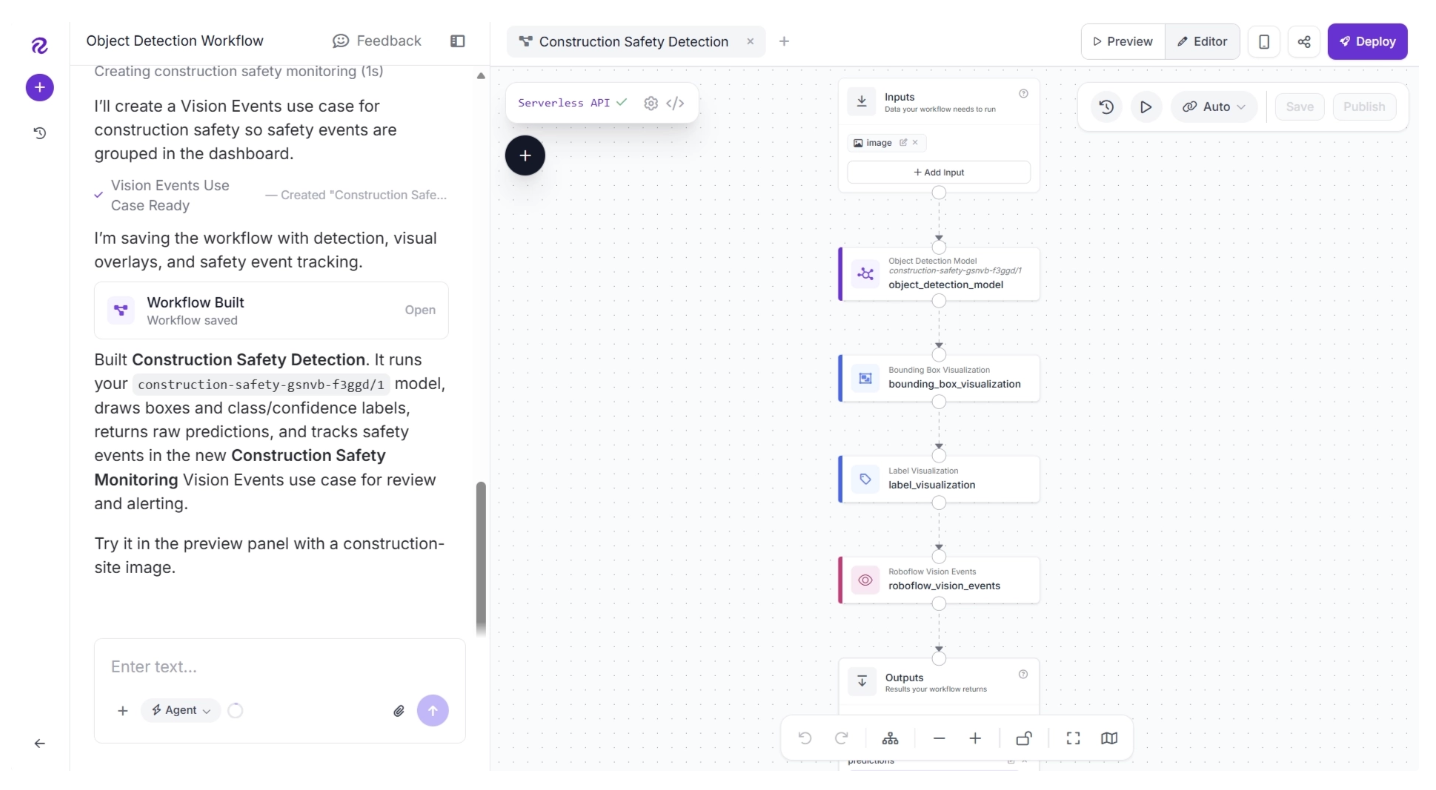
Based on the results, you can continue refining the workflow through additional prompts or by manually configuring individual blocks.
You can also ask Roboflow Agent to explain what each block does, making it easier to understand and customize the workflow.
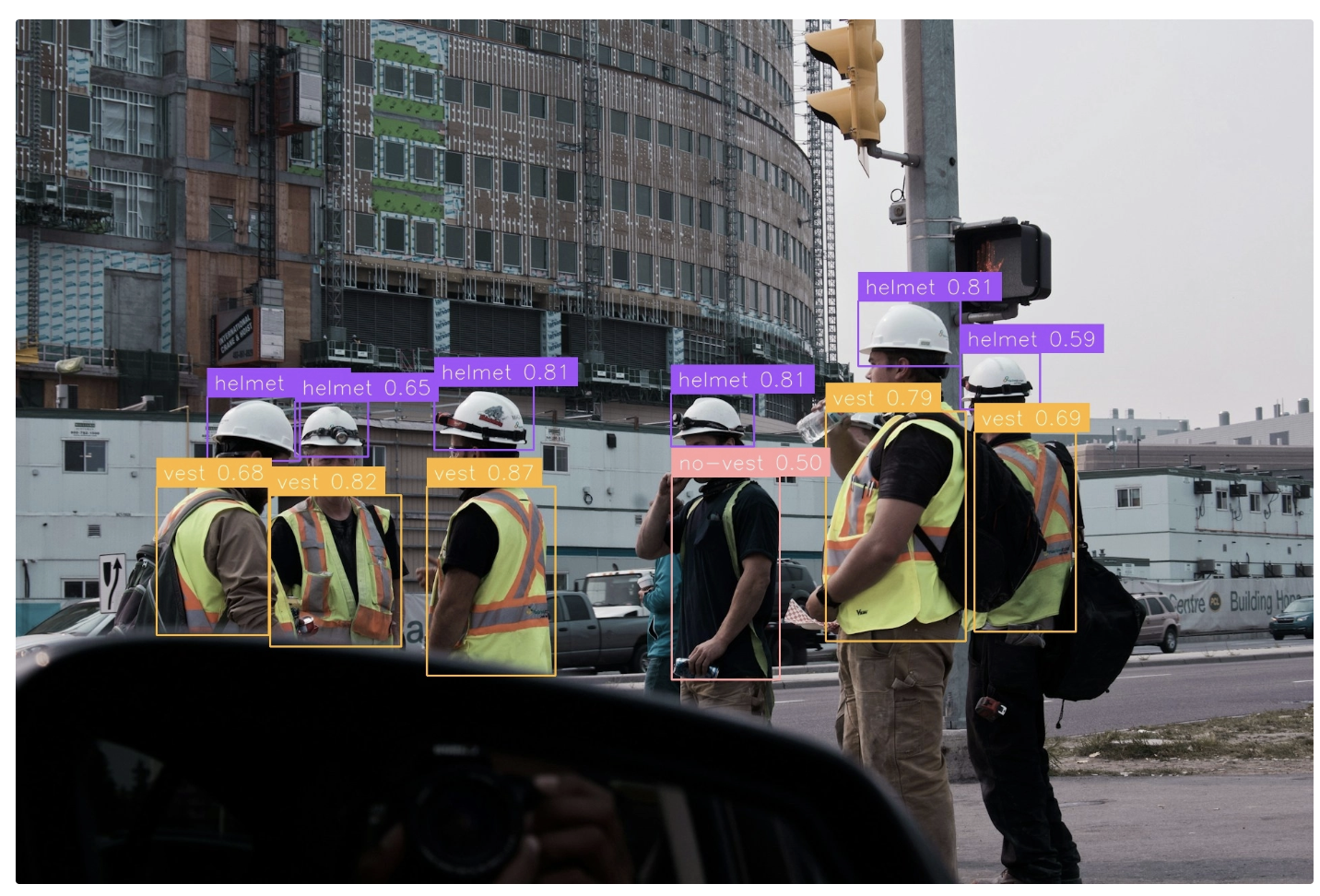
Roboflow Agent also provides a built-in interface for testing and evaluating the workflow.
Below is an example output produced by the workflow using the custom Construction Safety model we trained earlier with Roboflow Train.
Step 8: Deploy the Model
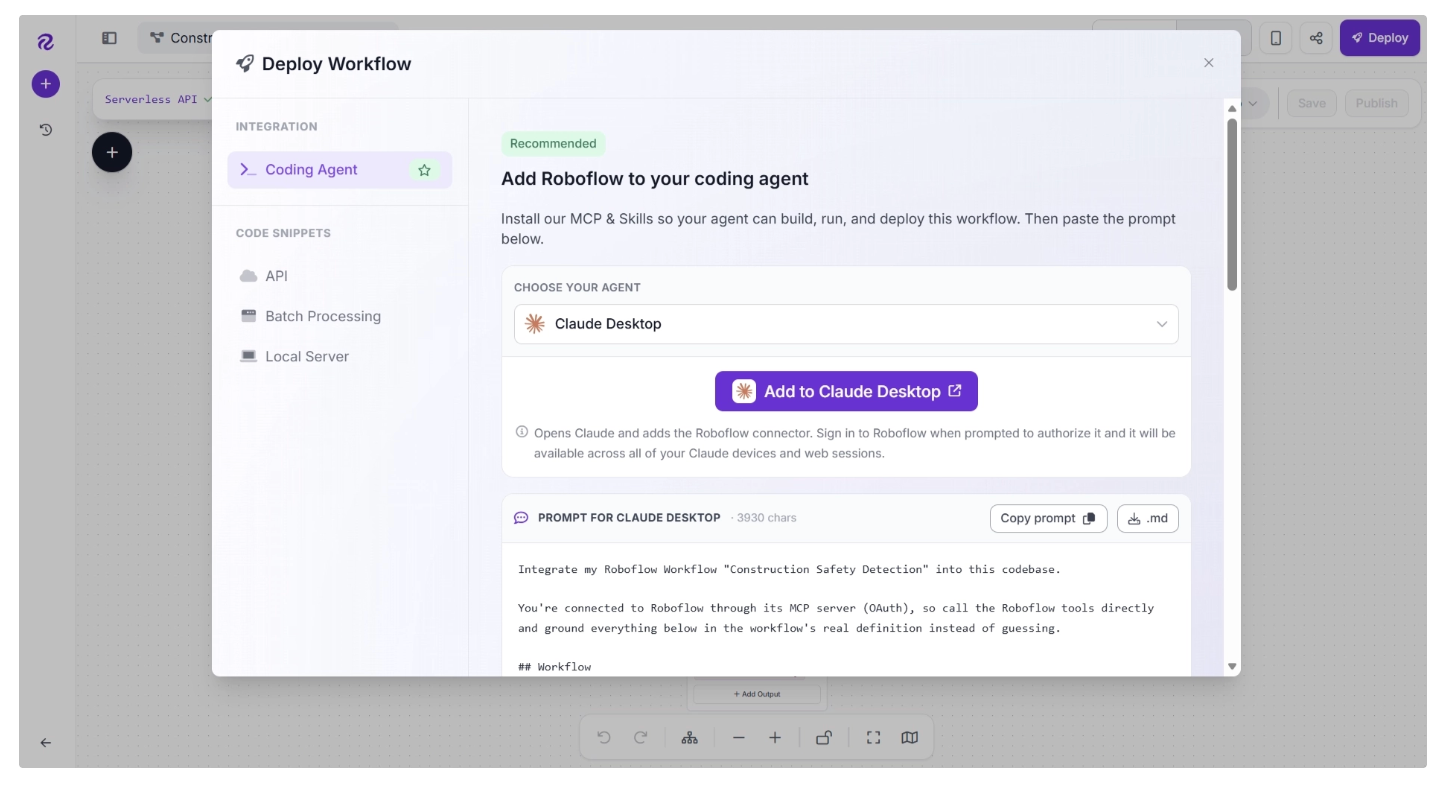
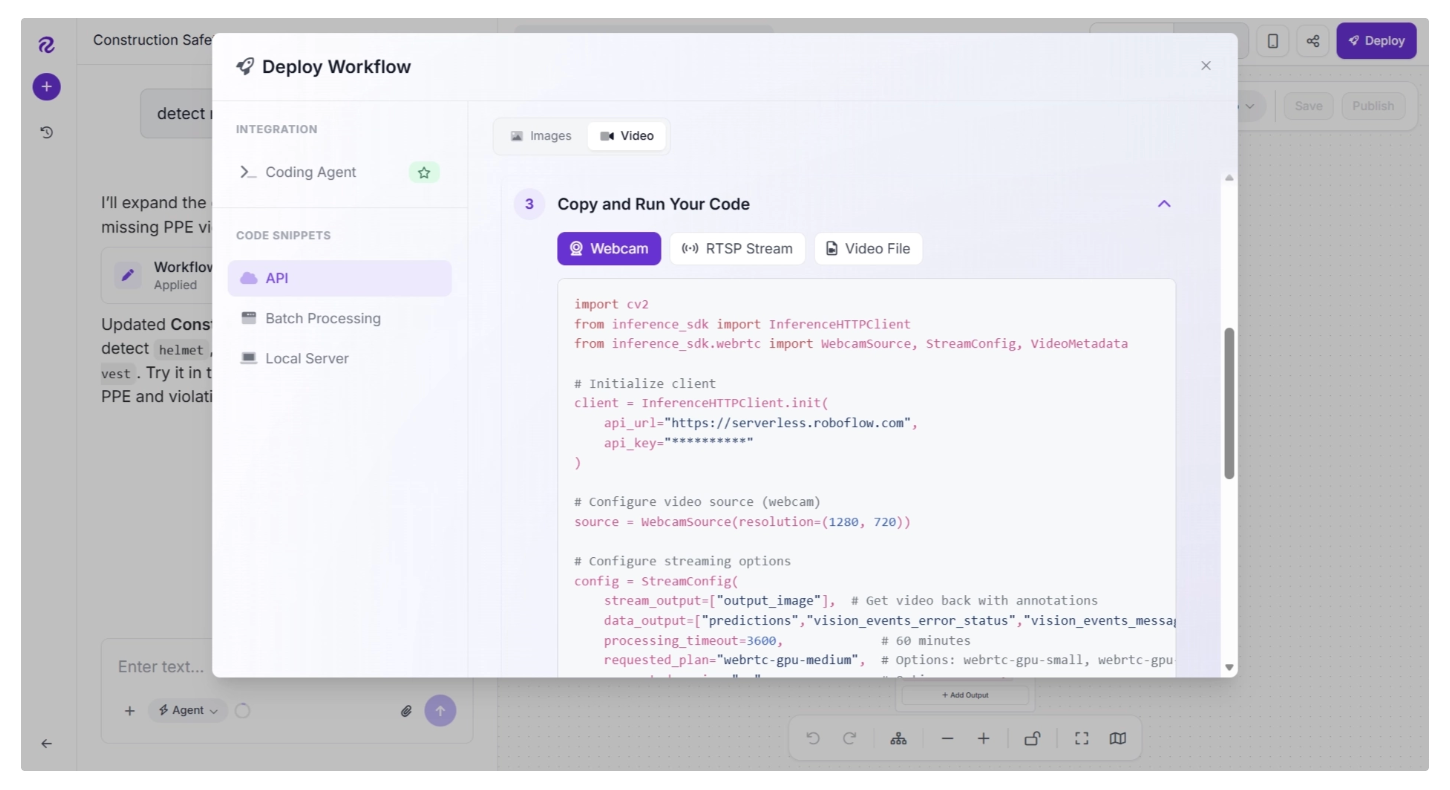
Once your workflow is ready, click Deploy in the Workflow Editor. A deployment window will open, providing instructions and deployment options for your workflow.
Roboflow Deploy provides deployment code that can be used with coding assistants such as Codex, Claude, and Cursor, making it easy to integrate workflows into your vibe-coding setup.
It also provides code to deploy workflows locally or in the cloud, allowing you to process webcam streams, RTSP streams, video files, and images.
If you prefer, you can run the model directly in Python without using a workflow:
from inference import get_model
import supervision as sv
import cv2

# define the image url to use for inference
image_file = "construction_site.jpg"
image = cv2.imread(image_file)

# load a pre-trained rfdetr model
model = get_model(model_id="construction-safety-gsnvb-f3ggd/1", api_key= "YOUR ROBOFLOW_API_KEY")

# run inference on our chosen image, image can be a url, a numpy array, a PIL image, etc.
results = model.infer(image)[0]

# load the results into the supervision Detections api
detections = sv.Detections.from_inference(results)

# create supervision annotators
bounding_box_annotator = sv.BoxAnnotator()
label_annotator = sv.LabelAnnotator()

# annotate the image with our inference results
annotated_image = bounding_box_annotator.annotate(
    scene=image, detections=detections)
annotated_image = label_annotator.annotate(
    scene=annotated_image, detections=detections)

# display the image
sv.plot_image(annotated_image)
Read more about running a fine-tuned model.
Conclusion: Training a Model on Roboflow Train
Roboflow Train simplifies the entire process of training computer vision models by removing the need to manage infrastructure, configure complex training pipelines, or handle compute resources manually, all through an intuitive user interface.
By combining a fully managed training environment with modern model architectures, comprehensive evaluation tools, and seamless integration across the Roboflow ecosystem, Roboflow Train enables users to progress from dataset preparation and training to deployment and monitoring through a unified, efficient pipeline.
With features like Neural Architecture Search, which automatically trains and evaluates dozens of model architectures on your dataset, and checkpoint-based training that enables fine-tuning and continued learning from previous training runs, Roboflow Train enables users to iterate quickly and build better models with minimal effort.
Roboflow Train is free to use. Try it on Roboflow.
Cite this Post
Use the following entry to cite this post in your research:
James Gallagher. (Jun 3, 2026). Train a Computer Vision Model with Roboflow Train. Roboflow Blog: https://blog.roboflow.com/roboflow-train-3-0/