

Self-hosted computer vision allows organizations to run models entirely on their own hardware, solving critical production challenges around data privacy, network connectivity, latency, and escalating cloud API costs. By using a standardized serving layer such as Roboflow Inference, teams can easily deploy, manage, and scale local pipelines, from edge devices to GPU workstations, without sacrificing the reliability and ease of a cloud-based API.
For many projects, calling a hosted API is the simplest way to deploy a model. Upload an image, receive a prediction, and you're done. But that approach isn't always the right fit. Some organizations can't send images outside their network, others need predictions in milliseconds, and at large scales, API costs can quickly add up.
That's where self-hosted computer vision comes in.
Instead of relying on a cloud service for inference, you run your computer vision models on your own hardware. Whether that's an on-premise computer vision setup in a factory, an NVIDIA Jetson at the edge, or a GPU workstation in your office, your images stay within your environment while still benefiting from modern computer vision models, the same broad category of application people often refer to as self-hosted image recognition.
In this guide, we'll look at what it actually takes to build a self-hosted computer vision stack, why simply downloading a model isn't enough for production deployments, and how you can use Roboflow Inference to deploy models locally with a consistent API. We'll also walk through a complete example of training an RF-DETR model in Roboflow and running inference entirely on your own hardware.
Why Choose Self-Hosted Computer Vision?
Self-hosting isn't the right choice for every computer vision application. For many projects, using a hosted API is the fastest way to get up and running. However, there are situations where running inference on your own hardware is the better option.
In most cases, teams choose self-hosted computer vision for one or more of four reasons.
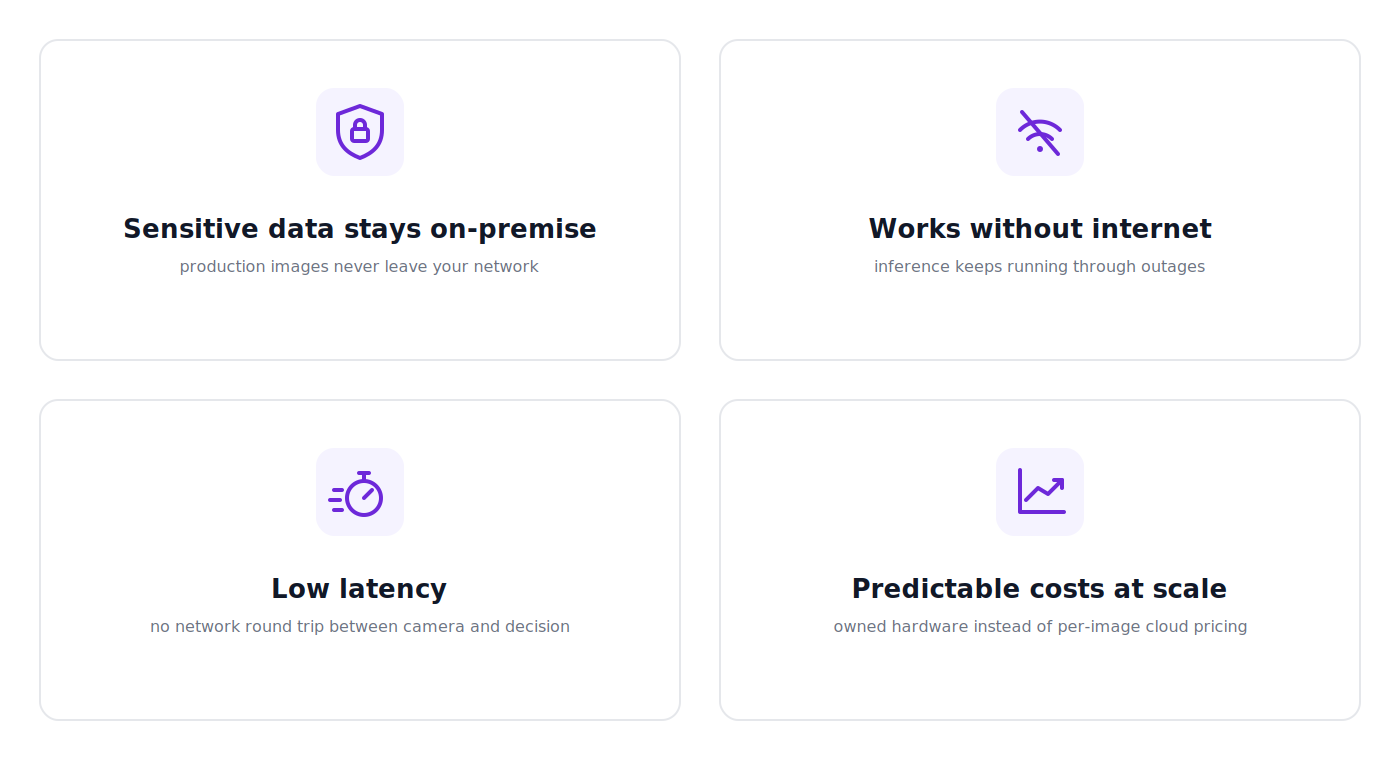
Sensitive images need to stay on-premise
Some organizations simply can't send images to the cloud. This is common in industries like healthcare, defense, manufacturing, and any environment handling proprietary data. Whether it's patient scans, confidential products, or sensitive production processes, keeping images on local infrastructure can be a security, compliance, or business requirement. With a self-hosted deployment, images never leave your environment.
Internet access isn't guaranteed
Not every deployment has a reliable internet connection. Manufacturing facilities, warehouses, remote sites, and air-gapped environments often need computer vision systems that continue working even when they're completely offline. Running inference locally means predictions are available regardless of network connectivity.
Low latency matters
Some applications need decisions in real time. A production line inspecting hundreds of products per minute or an autonomous system reacting to its surroundings can't afford the delay of sending every image to a remote server and waiting for a response. Running inference locally removes that network round trip, helping reduce latency and making real-time applications more practical.
API costs don't always scale
Hosted APIs are often the most cost-effective option for prototypes and smaller deployments. But if you're processing millions of images or analyzing multiple live camera streams around the clock, usage-based pricing can become expensive over time. Running inference on your own hardware gives you more predictable infrastructure costs while allowing you to scale without paying for every individual prediction.
The reason you're considering self-hosting often determines the type of deployment you'll build. A hospital may prioritize privacy and compliance, while a factory may care most about latency and offline reliability. Understanding your primary requirement makes it much easier to choose the right hardware and deployment strategy.
What a Self-Hosted Vision Stack Requires
When people first start exploring self-hosted computer vision, it's easy to think that deploying a model is as simple as downloading some weights from GitHub and running a few lines of Python.
That might work for a proof of concept, but production deployments require much more than a model.
Imagine you're building a quality inspection system for a manufacturing line. Beyond a model, you also need a reliable way for cameras or applications to send images to the model, support for the hardware you're running on, a way to update models over time, and tools to monitor whether everything is running as expected.
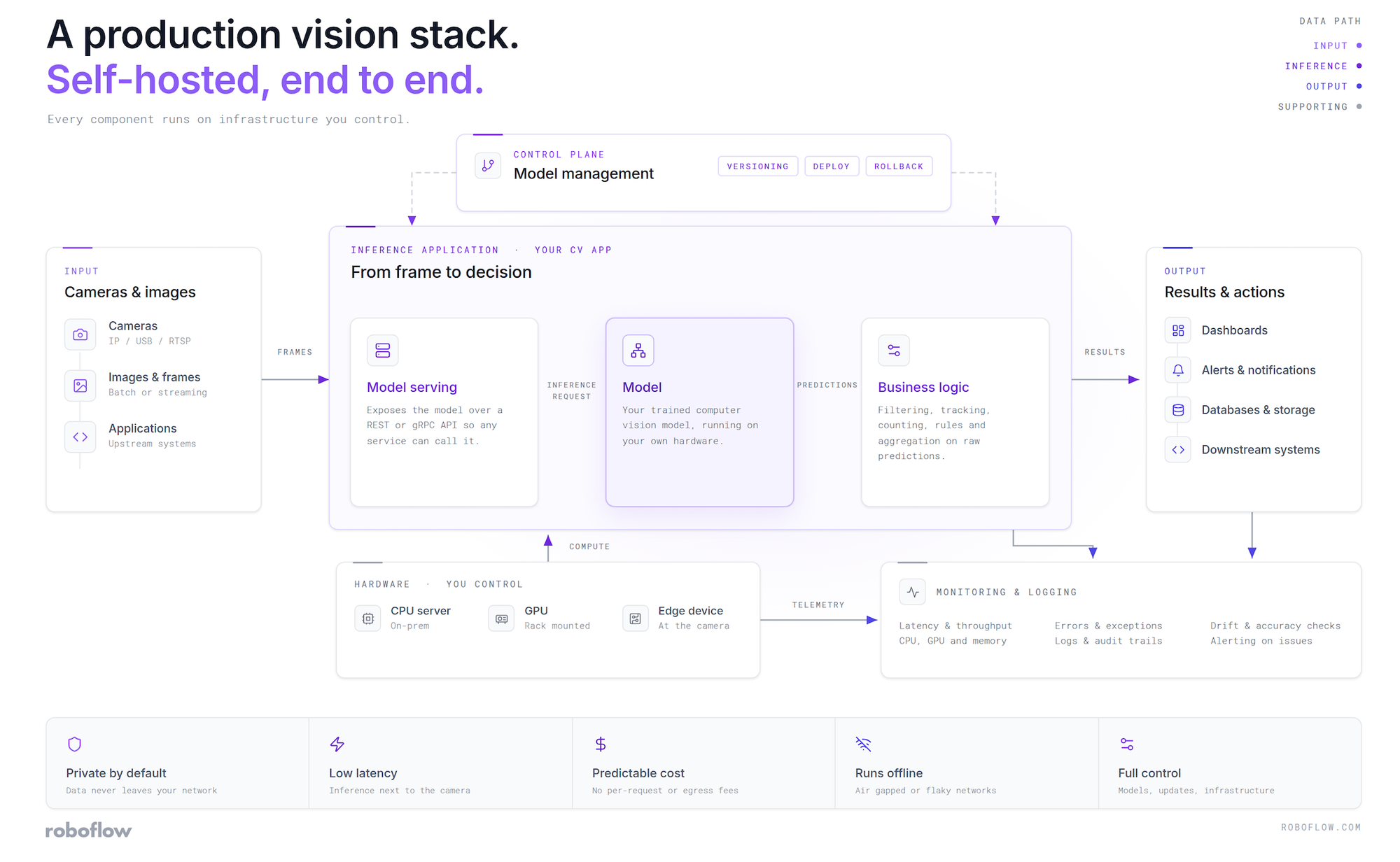
A production-ready self-hosted vision stack typically includes several components:
- A model serving layer that exposes your model through an API so applications, cameras, and other systems can easily send images and receive predictions.
- Model management so you can deploy new versions of your models without rebuilding your entire application every time you make an improvement.
- Hardware flexibility to run on the infrastructure you already have, whether that's a CPU server, an NVIDIA GPU, or an edge device like a Jetson.
- Monitoring and reliability so you can keep track of inference performance, troubleshoot issues, and ensure your deployment continues running smoothly in production.
This is why simply downloading a model repository isn't the same as having a production-ready deployment. While open source models are a great starting point, teams often end up building their own inference server, deployment pipeline, monitoring tools, and update process around them. Over time, that internal infrastructure becomes another system that needs to be maintained.
The goal of a self-hosted vision stack isn't just to run a model locally. It's to make deploying, updating, and managing computer vision models reliable enough for real-world applications.
Inference: The Stack That's Already Built
Everything the last section described is basically what Roboflow Inference already gives you, just split across a couple of places instead of one. It's genuinely open source, and here's a detail worth knowing, the same code also runs Roboflow's own hosted APIs. So you're not using a stripped-down free version while a better one exists elsewhere; you're running the exact same thing that Roboflow runs.
There's more than one way to use it, but the one you actually want for self-hosting is the Inference Server, a Docker container that exposes your models over a normal HTTP API. It's what most self-hosted projects use, mainly because it lets multiple apps talk to the same server without dragging model dependencies into your own codebase.
And getting it running really is just two commands. This one installs the CLI and starts the server, it figures out on its own whether you're on CPU or GPU and pulls the matching Docker image (a ready-made blueprint with the dependencies already built in).
pip install inference-cli && inference server start
And this one installs the tool your code will use to actually send requests to the server:
pip install inference-sdk
That's genuinely it. If you want more control over the container yourself, there are manual docker run commands in the install guide, but the two lines above cover most people.
The bigger deal is what that server can actually run. Your own custom-trained models, including anything trained on RF-DETR, sit right alongside foundation models like SAM 3, CLIP, and GLM-OCR, all behind the same API. And since Workflows run on Inference too, the same pipelines you'd build in Roboflow's cloud editor run entirely on your own hardware, no frame ever leaving your network.
Model management and monitoring work a little differently, and it's worth being upfront about that distinction. The Inference Server itself doesn't track model versions or performance metrics in isolation, those capabilities come from its connection to Roboflow's cloud platform, which handles model versioning and powers the Model Monitoring dashboard. In practice, that means the pieces that make sense to run locally, serving predictions and handling hardware, run entirely on your own machine, while the pieces that make more sense to manage centrally stay one connection away in the cloud. Alternatives exist for teams that need monitoring without any connectivity at all, though that means building and maintaining that pipeline yourself.
That same design shows up again in a detail that matters for the next section. The Inference SDK uses identical client code whether it's talking to your local server, Roboflow's hosted API, or a Dedicated Deployment, the only difference is the api_url you point it at. That means testing a deployment locally and later moving it elsewhere doesn't require rewriting anything, just updating a single line.
Training and Deploying RF-DETR Entirely On-Prem
Whatever model you're working with, deploying it locally follows the same general pattern: get it into a Workflow, then run that Workflow against your local server.
Step 1: Build a Workflow around your model
If you want to deploy a model locally, wrapping it in a Workflow is the easiest route, and it works the same way whether you're deploying a single detector or a multi-step pipeline. Open the Workflow editor, add an Object Detection block, and select your trained model from the list. That alone is enough to get a working deployment.
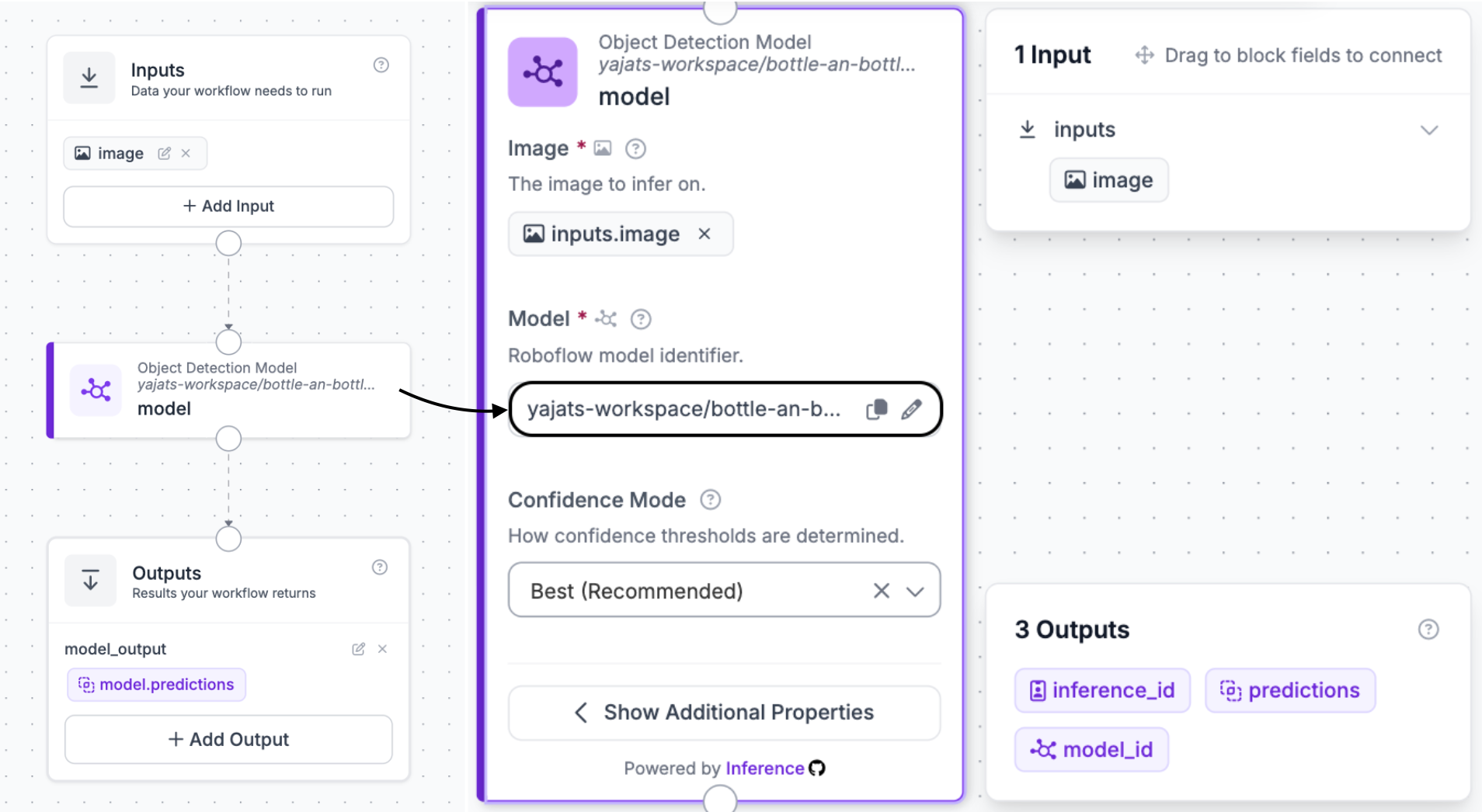
If you want to go further, you can add visualization blocks, filters, or logic on top, but to keep this walkthrough focused, we're keeping it to just the model itself.
Once your Workflow is set up, click Publish in the top right corner, then click Use in the top right corner. That opens a panel where you choose your deployment target, select Self-Hosted API, pick your language (Python, in this case), and Roboflow generates the exact code snippet you need, your workspace name, workflow ID, and API key already filled in.
If you'd rather skip building a Workflow from scratch and just want to see how the self-hosted setup works, you can fork this example Workflow directly, no training required, and follow the same Publish and Use steps to get your own code snippet from it.
Since that snippet includes your real API key, don't share it publicly as-is, screenshots included. Treat it like a password, load it from an environment variable in real code rather than hardcoding it, and rotate it if it's ever exposed.
Step 2: Install Docker
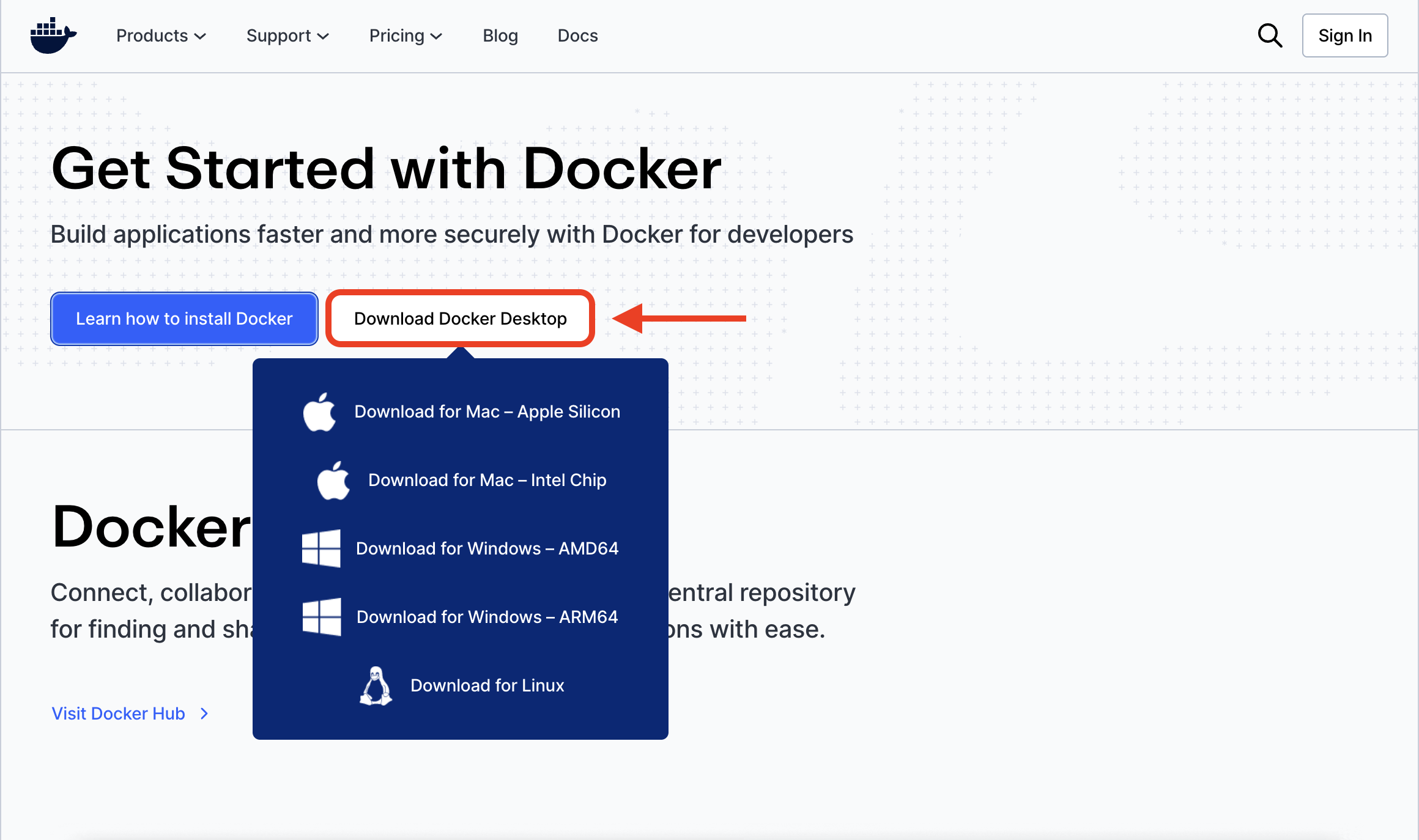
Grab Docker Desktop for your OS and install it like you would any other app, then open it once so it's running in the background. Nothing else in this section works without that first.
Step 3: Start the Inference server
Before installing anything, one thing worth checking, inference-cli and inference-sdk require Python 3.10 or newer, but below 3.13. If you're not sure what version you're running, or you'd rather not touch your system's default Python, creating a virtual environment first is the cleanest way to avoid conflicts:
python3.11 -m venv .venv
source .venv/bin/activate  # on Windows: .venv\Scripts\activate
Once that's active, or if you're just using your system Python and already know it's in range:
pip install -U inference-cli && inference server start
pip install inference-sdk
The first line does the heavy lifting, it figures out whether you're on CPU or GPU, pulls the right Docker Image, and gets the server running on localhost:9001. The second installs the client your Python code uses to send images to the server and get predictions back.
Step 4: Run it
Take the snippet you copied in Step 1 and run it:
# 1. Import the library
from inference_sdk import InferenceHTTPClient

# 2. Connect to your local server
client = InferenceHTTPClient(
    api_url="http://localhost:9001",  # Local server address
    api_key="YOUR_API_KEY"            # load from an environment variable, don't hardcode this
)

# 3. Run your workflow on an image
result = client.run_workflow(
    workspace_name="your-workspace",
    workflow_id="your-workflow-id",
    images={
        "image": "YOUR_IMAGE.jpg"  # Path to your image file
    },
    use_cache=True  # Speeds up repeated requests
)

# 4. Get your results
print(result)
The one detail that matters most here is api_url. It points at localhost:9001, your own machine, not Roboflow's servers. That's the entire difference between a cloud call and a self-hosted one, everything else about the code is identical either way.
Step 5: Confirm it's really local
Worth doing once just to see it happen, turn off your wifi entirely and run the exact same script again (make sure you've already run it at least once with wifi on first, that initial run is what downloads and caches the workflow and model weights, offline only works after that). Since everything's already cached, it runs exactly the same as before, no image, no request, nothing leaves your machine.
And that's the whole loop, build the Workflow and grab your code where the tools already live, deploy on hardware you actually control. For every configuration detail beyond this, environment variables, HTTPS, persistent caching, GPU flags, the full Inference Server docs go deeper than makes sense to repeat here.
Hardware and Where Inference Runs
One of the more underrated things about Inference is that it isn't picky about hardware. The same server, same API, same Docker-based setup runs across a wide range of machines, making your hardware decision mostly about how much throughput and latency you need.
CPU
A plain CPU box is the simplest starting point, and for a lot of use cases it's genuinely enough. If you're processing still images, running inference on an occasional frame from a video feed rather than every frame, or working with lighter models, a CPU server handles it fine, and Roboflow's CPU container includes OpenVINO acceleration to squeeze more performance out of it. Where CPU starts to struggle is heavier models, foundation models like SAM in particular can take several seconds per image on CPU alone, which is fine for a batch job and not fine for anything real-time.
NVIDIA GPUs
Once you need real-time detection, high frame rates, or you're running foundation models regularly, a GPU stops being optional. A NVIDIA GPU gets you hardware acceleration through Inference's GPU container, and you can optionally enable TensorRT on top of that for another meaningful speed jump, at the cost of a longer compile step the first time each model loads. This is the tier most production detection workloads, quality inspection on a moving line, live camera monitoring, land on.
Jetson-class edge devices
For deployments where the hardware needs to live at the edge itself, mounted next to a camera on a production line, in a vehicle, on a robot, NVIDIA Jetson devices give you GPU acceleration in a small, low-power form factor. Roboflow ships optimized, TensorRT-enabled containers specifically for Jetson, so the same models you'd run on a full-size GPU server can run on a device the size of a deck of cards.
AI1: the packaged version of the same idea
If you'd rather not assemble the camera, the compute, and the lighting yourself, Roboflow AI1 is the same self-hosted philosophy in a single industrial unit. It's a purpose-built edge device that combines an 8MP camera, an onboard GPU, integrated lighting, and Roboflow's software into one box, running the same Workflows and syncing to the same deployment tools as a DIY setup, without you having to source and wire the parts together. It's worth reading through the full production line monitoring build to see what that looks like end to end, from training a detector to running it on AI1 with no cloud round trip.
Considering sizing
If you're doing simple classification, processing images in batches, or sampling a frame every few seconds rather than analyzing live video, CPU is genuinely fine and you shouldn't overspend on a GPU you don't need. The moment you're running object detection on every frame of a live stream, working with foundation models like SAM regularly, or need sub-second response times, budget for a GPU from the start. Trying to force a real-time detection workload onto CPU is one of the more common ways self-hosted projects disappoint people, not because the stack is wrong, but because the hardware was undersized for the job.
Navigating the Trade-Offs of Self-Hosting and How to Manage Them
Self-hosting trades one set of problems for another. With a hosted API, uptime, scaling, and patching the model runtime are someone else's job. The moment you self-host, they're yours. Nobody's watching your server for you anymore, and if something breaks or traffic spikes past what your hardware can handle, that's your team's problem to solve.
None of that makes self-hosting the wrong call - it just means it's not a free upgrade. The teams that do this well don't treat it as all-or-nothing, they train models and manage datasets in Roboflow's cloud, where the tooling already exists, then run inference on their own hardware wherever privacy, latency, or connectivity actually demand it. Connected devices pull the latest model down automatically, disconnected ones keep running fine on whatever version they last synced.
This is effectively what AI1's Deployment Manager and over-the-air updates already do, and it's worth replicating even on a DIY setup. You get the parts of self-hosting you actually need, local data, no network dependency for inference, without building your own training infrastructure from scratch. That's usually the difference between a deployment that's sustainable and one that turns into the unmaintained side project.
Self-Hosting Conclusion
Self-hosting computer vision isn't the all-or-nothing decision it's often made out to be. It's not choosing between a convenient API and a pile of unmaintained GitHub weights, there's a middle ground. It starts with knowing why you're self-hosting in the first place: images that can't leave your network, connectivity you can't rely on, latency a round trip can't hit, or costs that stop scaling. That driver should shape everything else you build.
Your goal isn't just to get a model running locally, it's to build something that still works six months from now, a serving layer, model management, hardware support, and monitoring, not a script someone writes once and forgets. That's the gap Roboflow Inference closes: open source, running in Docker with a single command, serving everything from a fine-tuned RF-DETR model to foundation models like SAM 3 behind one API.
In this blog, we walked through deploying one end to end, and looked at where it can run, CPU for lighter workloads, GPU for real-time, Jetson at the edge, or AI1 if you'd rather not assemble the components yourself.


Cite this Post
Use the following entry to cite this post in your research:
Yajat Mittal. (Aug 18, 2026). Self-Hosted Computer Vision: Run Your Own Vision Stack with Roboflow Inference. Roboflow Blog: https://blog.roboflow.com/self-hosted-computer-vision/