

For years, task-specific models such as YOLO have been widely used to solve common vision problems such as detecting, segmenting, tracking, and classifying objects in images and videos. Today, Vision-Language Models (VLMs) are changing how developers build vision systems because VLMs can understand images using natural language, answer questions, describe scenes, and find objects or patterns from text prompts without always needing a separate model for every task.
This raises an important question: Should you use YOLO or a Vision-Language Model?
The answer depends less on model popularity and more on the problem you are trying to solve. In this guide, I'll compare YOLO and VLMs, explain their strengths and weaknesses, and show where each fits in a production computer vision system.
What Is YOLO?
YOLO (You Only Look Once) is a family of real-time computer vision models designed for tasks such as:
- Object detection
- Instance segmentation
- Pose estimation
- Classification
- Oriented object detection
YOLO models are trained on a predefined set of classes and produce structured outputs such as bounding boxes, confidence scores, masks, or keypoints. A YOLO model trained to detect:
- person
- helmet
- safety vest
will consistently detect those classes at high speed across millions of images.
YOLO's biggest advantage is efficiency. Modern YOLO models can process video streams in real time, making them ideal for production deployments in robotics, manufacturing, retail, security, and autonomous systems. YOLO is one of the most widely adopted real-time object detection architectures.
However, if you need transformer-based accuracy with practical real-time performance, RF-DETR is worth considering. RF-DETR is Roboflow's real-time detection model that performs strongly on standard benchmarks and is designed for practical deployment. RF-DETR was the first real-time model to exceed 60+ mAP on COCO, and newer RF-DETR variants are available for object detection, segmentation, and keypoint tasks.
Use RF-DETR when accuracy, strong generalization, and deployment flexibility are important. You can train and deploy RF-DETR models in Roboflow, including through Roboflow Inference and edge deployment workflows.
What Is a Vision-Language Model (VLM)?
A Vision-Language Model combines image understanding and language reasoning within a single model. Instead of being limited to fixed classes, a VLM can interpret natural language prompts such as:
- "Find damaged products."
- "Describe what is happening in this image."
- "Is the worker wearing proper safety equipment?"
- "Count the people waiting in line."
VLMs learn from large-scale image-text datasets and can perform many tasks without additional training. They are capable of:
- Visual question answering
- Image captioning
- Open-vocabulary detection
- OCR reasoning
- Document understanding
- Scene analysis
Rather than returning only bounding boxes, VLMs can explain what they see using natural language.
The Core Difference Between YOLOs and VLMs
Rather than competing technologies, YOLO and VLMs are complementary. The most important distinction is not just what these models can do, but how they solve problems. That difference affects their performance, outputs, deployment options, and the types of applications where each one works best. The simplest way to think about it is:
| YOLO | VLM |
|---|---|
| Detects predefined objects | Understands images using language |
| Requires training for custom classes | Can often work zero-shot |
| Optimized for speed | Optimized for reasoning |
| Produces structured outputs (bounding boxes, masks, keypoints, etc.) | Produces natural language outputs |
| Best for production inference | Best for flexible image understanding |
YOLO answers:
"Where is the forklift?"
A VLM answers:
"Is the forklift operating safely near workers?"
So in simple words we can say that YOLO is a localization problem and VLM is a reasoning problem.
When YOLO Is the Better Choice
While VLMs are highly flexible, many computer vision applications still benefit from the speed, efficiency, and precision of specialized models like YOLO. Following are some benefits of using YOLO over VLM.
1. Real-Time Applications
If your system processes live video streams, YOLO is usually the correct choice. Examples include:
- Manufacturing inspection
- Sports analytics
- Traffic monitoring
- Robotics
- Retail analytics
YOLO models are specifically optimized for low-latency inference and can process frames much faster than most VLMs.
2. Fixed Object Categories
YOLO is right choice when you need to you only need to detect specific or pre-defined objects everytime such as:
- hard hats
- safety vests
- forklifts
A trained YOLO model will generally be faster, cheaper, and more consistent than repeatedly prompting a VLM.
3. High-Volume Inference
At high inference volumes, cost becomes an important factor. VLM APIs can be useful for experimentation and prototyping, but processing hundreds of thousands or millions of images every month can become expensive. For fixed computer vision tasks, deploying a dedicated YOLO model is often more cost-effective, faster, and easier to scale.
4. Edge Deployment
YOLO models can run efficiently on edge devices such as:
- NVIDIA Jetson devices
- Industrial PCs
- Edge GPUs
- Embedded systems
This makes them ideal for applications requiring local inference and low latency.
Example 1: YOLO Powered Roboflow Workflow for Object Analysis
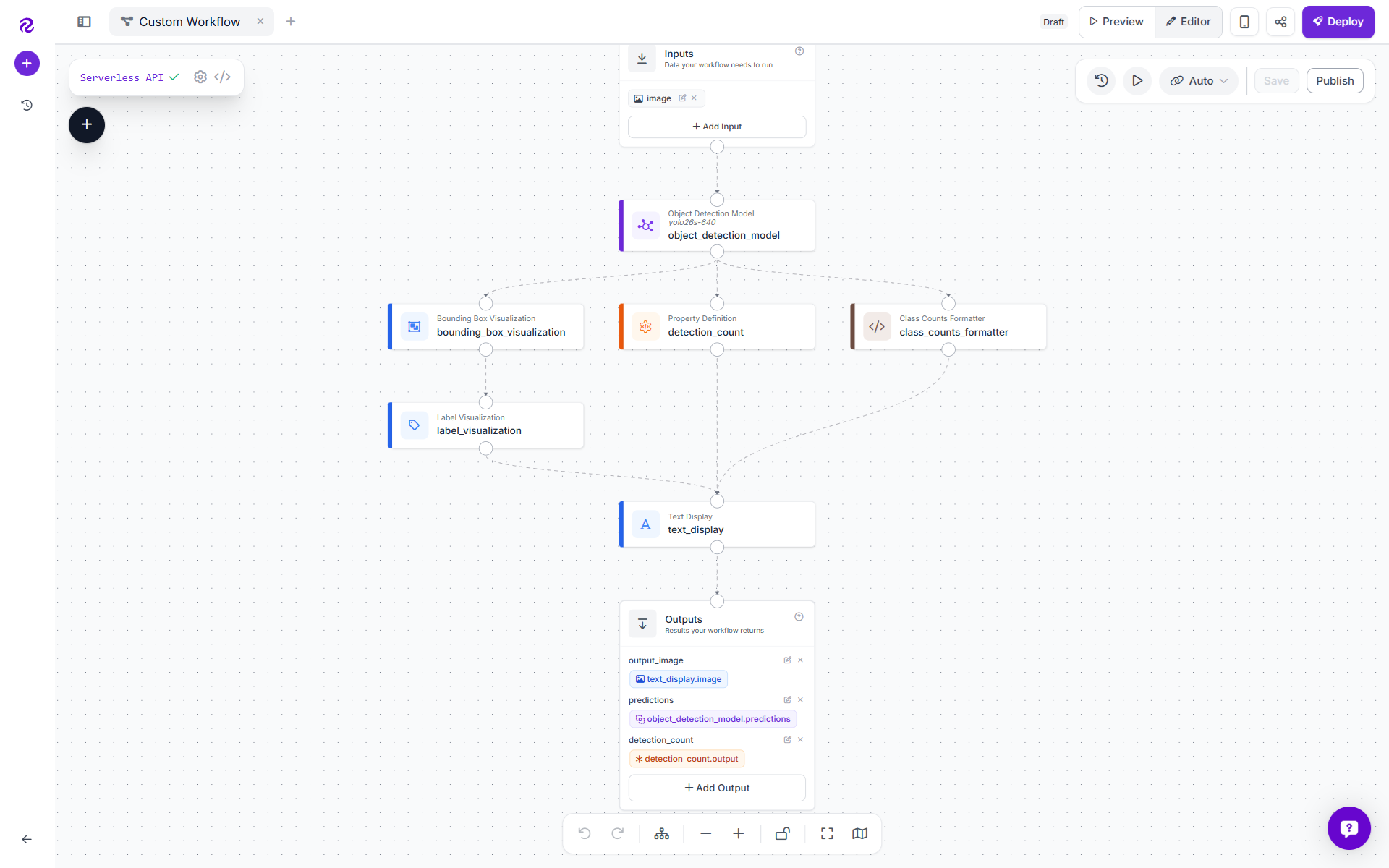
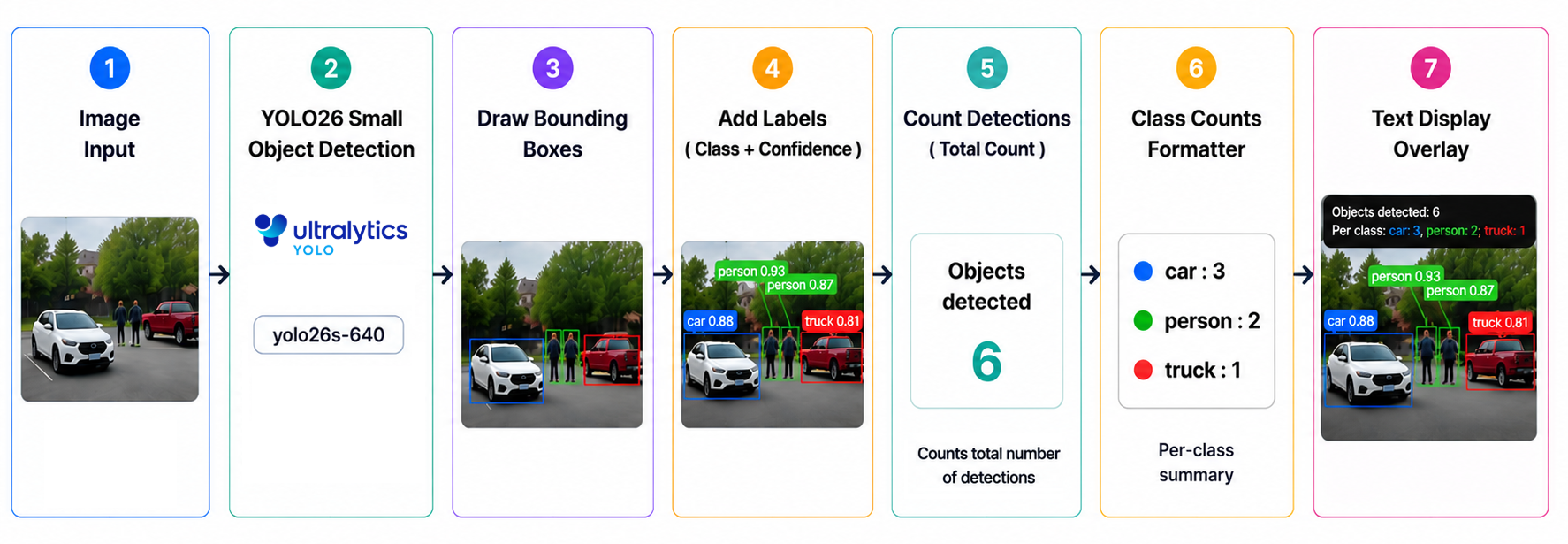
The workflow, YOLO Example Workflow, is a simple but practical object detection pipeline built with Roboflow Workflows. It takes an input image, runs a YOLO26 object detection model, draws boxes and labels around detected objects, counts how many objects were found, and prints both the total count and per-class counts directly onto the final image.
In other words, this workflow does not just detect objects, it turns the results into a human-readable visual report. Here's how the workflow looks:
What This Workflow Does
The workflow uses YOLO26 Small with the model ID:
yolo26s-640
This is a pretrained object detection model that can identify common COCO objects such as people, cars, trucks, bottles, chairs, dogs, and many other everyday items. The final output image includes:
Objects detected: 6
Per class: car: 3, person: 2, truck: 1
It also returns the raw predictions and the numeric detection count as separate workflow outputs. Following are the components of workflow.
Image Input
The workflow starts with a single image input. This can be a test image in the preview panel, an uploaded image, or a frame from a video stream if the workflow is later used in a video context.
Every downstream block uses this image either directly or indirectly.
Object Detection Model Block
This block uses yolo26s-640 model. This is the core detection step. It receives the input image and runs YOLO26 Small to find objects in the scene. The block outputs structured detections, including:
- Object class, for example
person,car,truck - Bounding box coordinates
- Confidence score
- Model inference metadata
This block produces the predictions that power every other part of the workflow.
Bounding Box Visualization Block
Once YOLO26 finds objects, this block draws bounding boxes around them. For example, if the model detects a person, a box is drawn around the person. If it detects a car, a box is drawn around the car. This turns the raw model output into something easy to inspect visually.
Label Visualization Block
The label visualization block adds text labels to the boxes. In this workflow, the label setting is Class and Confidence. That means each detection is labeled with both what the object is and how confident the model is. Example labels might look like:
person 0.89
car 0.76
truck 0.81
This makes the image easier to understand because you can immediately see what YOLO26 detected and how confident it was.
Detection Count Block
This block counts the total number of detections returned by YOLO26. It uses a SequenceLength operation, which means it looks at the list of predictions and returns how many objects are in that list. For example:
- If YOLO26 finds 0 objects, the count is
0 - If YOLO26 finds 5 objects, the count is
5 - If YOLO26 finds 12 objects, the count is
12
This value is exposed as a workflow output and also printed on the image.
Class Counts Formatter Block
This is a custom Python block that summarizes detections by class. Instead of only saying:
Objects detected: 6
it creates a more useful breakdown like:
Per class: car: 3, person: 2, truck: 1
The block reads the class names from the model predictions, counts how many times each class appears, sorts the results, and formats them into a clean string. If no objects are detected, it returns:
Per class: none
This makes the final image much more informative, especially when there are multiple object types in the scene.
Text Display Overlay Block
This block prints the workflow’s summary directly onto the image. It displays two lines:
Objects detected: {{ count }}
Per class: {{ per_class }}
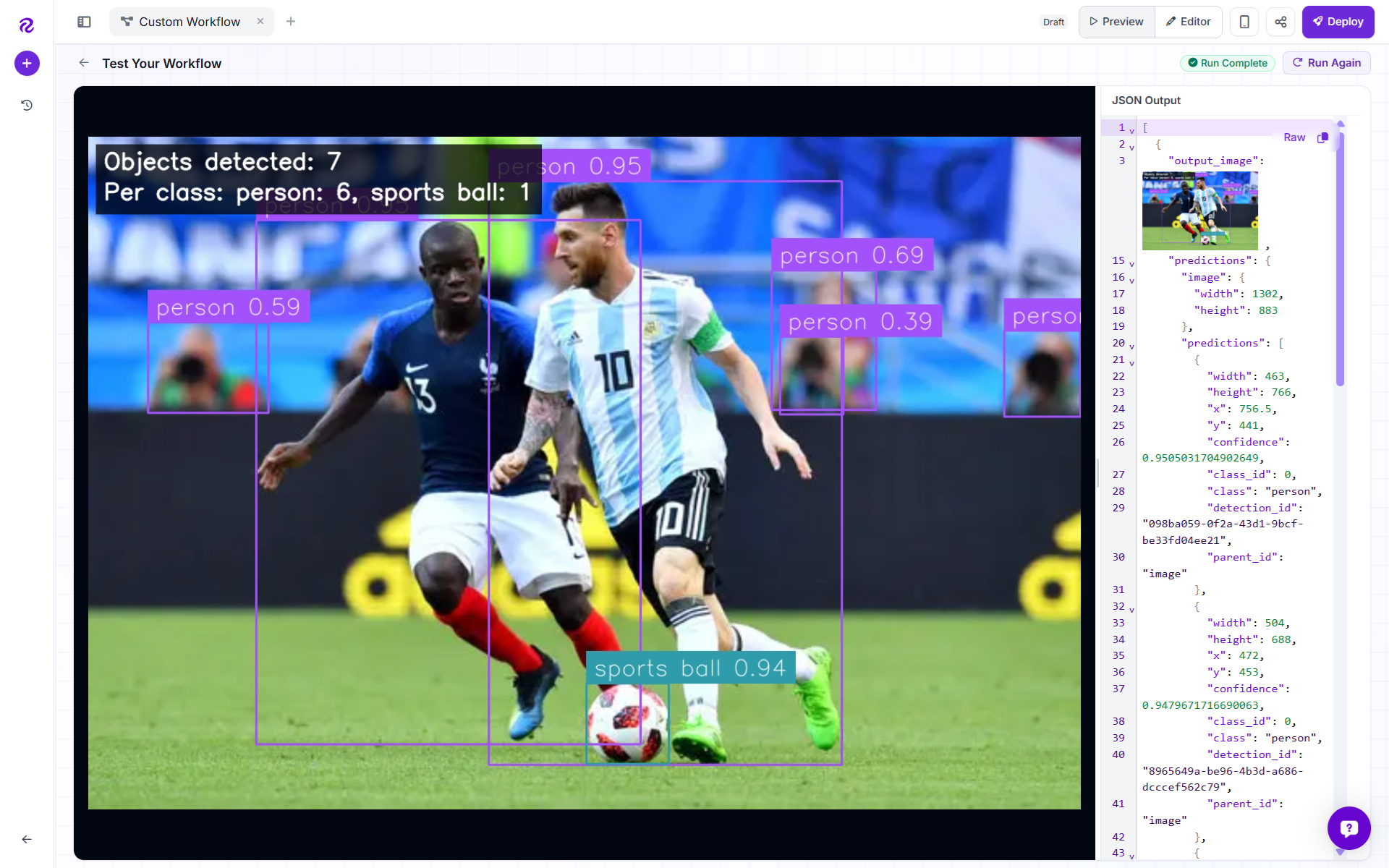
In the final image, that becomes something like:
Objects detected: 6
Per class: car: 3, person: 2, truck: 1
The overlay is styled with:
- White text
- Black background
- 75% background opacity
- Top-left placement
- Padding for readability
This makes the final image useful as a visual report without needing to inspect raw JSON.
Workflow Outputs
The workflow returns three outputs.
output_imageThis is the final annotated image. It includes:
- Bounding boxes
- Class labels
- Confidence scores
- Total object count
- Per-class count summary
This is the main output most users will look at.
predictions
This returns the raw YOLO26 detection results. It is useful if you want to send the detections to another system, process them with code, or build additional workflow logic later.
detection_count
This returns the total number of detected objects as a structured value. It can be used for dashboards, alerts, filtering, or decision logic.
The workflow runs like this:
Why This Workflow Is Useful
This workflow is useful because it combines detection, visualization, and analytics in one pipeline. Instead of only showing boxes, it answers a practical question:
What objects are in this image, and how many of each were found?
That makes it a good starting point for:
- General object detection demos
- Image inspection workflows
- Camera monitoring
- Inventory-style counting
- Traffic or parking lot analysis
- Quick visual summaries of images
- Prototyping before training a custom model
The YOLO Example Workflow takes an image, detects objects using YOLO26 Small, visualizes each detection, counts the total number of objects, calculates per-class counts, and prints the results directly on the final image.
It is a clean, readable object detection workflow that turns model predictions into an image-level summary humans can understand at a glance. Following is the output generated by workflow.
RF-DETR as an Alternative Detection Model
The object detection block in above workflow example is not locked to any single model. RF-DETR slots in as a direct replacement. For an example of RF-DETR powering a real production workflow, see this PPE detection pipeline built with RF-DETR and Roboflow Workflows for monitoring helmets and safety vests in real time.
Automate PPE Detection with RF-DETR Real-Time Worker Safety Monitoring
When a VLM Is the Better Choice
VLMs are a better choice when your application requires image understanding, reasoning, or flexibility beyond detecting predefined objects. Following are some benefits of using VLM over YOLO.
1. Unknown Objects
Traditional detectors require predefined classes. But what if users can ask for anything? For example:
- "Find all damaged machinery."
- "Locate emergency exits."
- "Identify abandoned luggage."
A VLM can often perform these tasks using prompts instead of retraining.
2. Visual Question Answering
Many applications require answers rather than detections. For examples asking questions as below:
- Is this package damaged?
- Is the worker following safety procedures?
- What text appears on this document?
These tasks involve reasoning rather than pure localization and are well suited to VLMs.
3. Dataset Labeling
One of the most useful applications of VLMs is accelerating dataset creation. VLMs can generate:
- captions
- object descriptions
- labels
- bounding box proposals
These outputs can then be reviewed and used to train a dedicated YOLO model for production deployment.
4. Multi-Step Reasoning
VLMs excel when a task requires understanding relationships between multiple objects. For example:
"Is anyone entering a restricted area without a helmet?"
This requires detecting people, detecting helmets, and reasoning about spatial relationships. VLMs can often solve such problems with a single prompt.
Example 2: A VLM-Powered Image Inspection Assistant using Roboflow
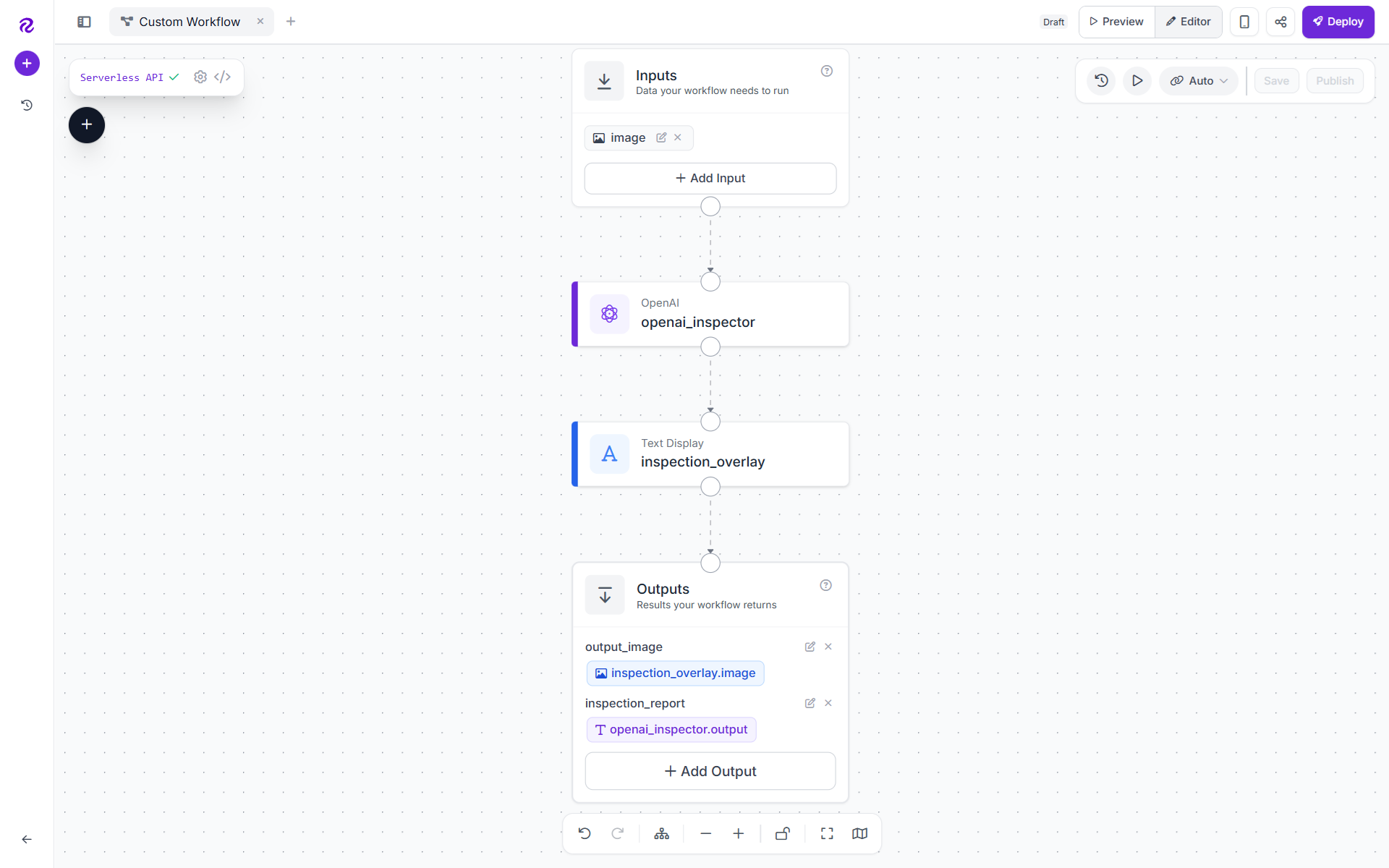
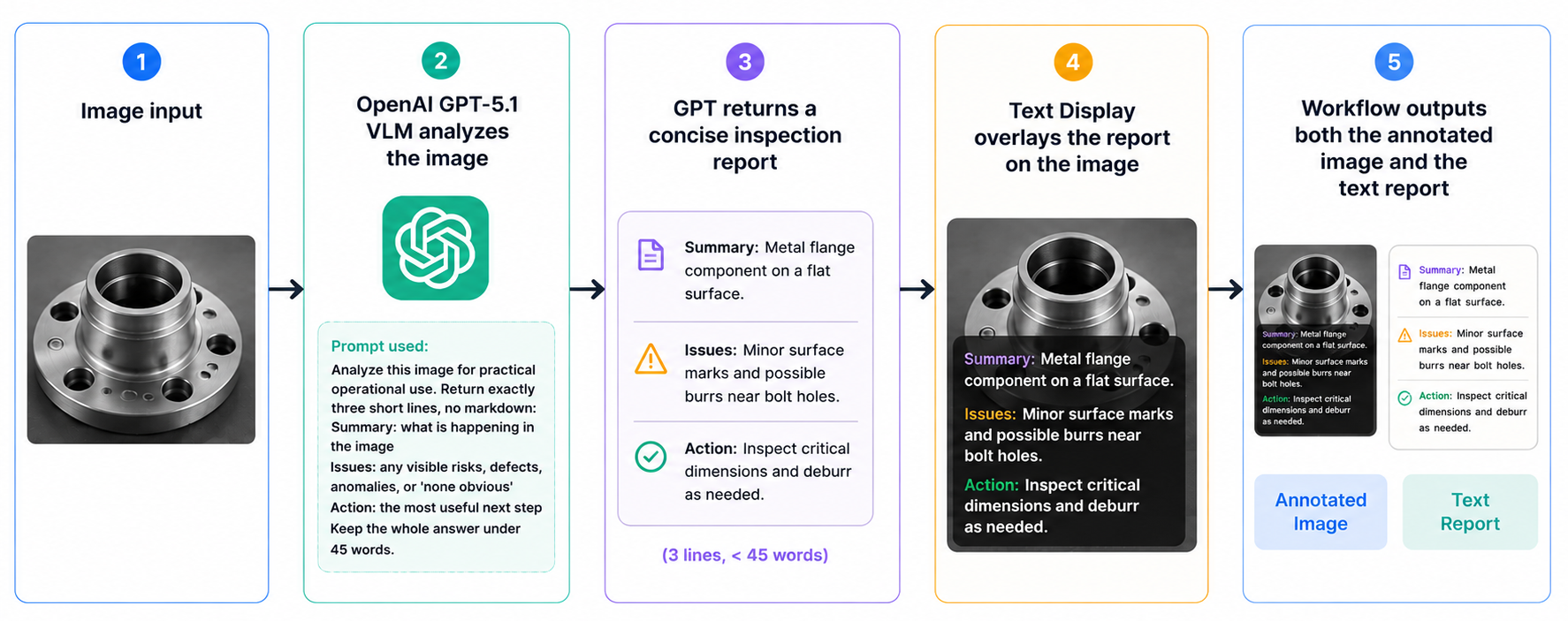
This workflow is a lightweight visual inspection pipeline that uses a vision language model to look at an image, explain what is happening, flag possible issues, and recommend a practical next step. Instead of only returning bounding boxes or class labels, it produces a short human-readable inspection report and places that report directly on top of the image.
It is useful for quick review workflows where you want an immediate explanation of a scene, for example: workplace safety checks, visual QA review, operational monitoring, field inspection images, or general scene triage. The workflow looks like following:
What the Workflow Does
The workflow takes one image as input and sends it to an OpenAI vision-capable model. The model analyzes the image and returns a concise three-line report:
- Summary: What is happening in the image
- Issues: Any visible risks, defects, anomalies, or “none obvious”
- Action: The most useful next step
That report is then rendered onto the image using a compact Supervision-style text overlay. The workflow returns both:
- An annotated image with the inspection report displayed on it
- The raw text inspection report as a JSON output
Why GPT Is Used Here?
Open AI GPT model is used because this workflow needs image understanding plus language reasoning, not just object detection. A traditional object detection model is great when you already know exactly what objects you want to find, such as people, cars, helmets, boxes, or defects. But this workflow is more open-ended. It asks: “What is going on in this image, and what should someone do next?”
That requires a VLM, or vision language model. A VLM can inspect the visual content of an image and answer in natural language. In this workflow, GPT-5.1 is acting as the VLM: it receives the image, interprets the scene, identifies possible issues, and writes a short operational recommendation.
So yes, this workflow is working as a VLM-based image inspection workflow.
Following are the components of this workflow:
Image Input
This is the image the workflow analyzes. It can be a photo, camera frame, inspection image, or other visual input.
OpenAI VLM Block
This is the core intelligence of the workflow. It sends the input image to OpenAI’s vision-capable model and asks it to produce a practical inspection report. The VLM configuration is:
{
  "type": "roboflow_core/open_ai@v4",
  "name": "openai_inspector",
  "images": "$inputs.image",
  "task_type": "visual-question-answering",
  "prompt": "<YOUR_PROMPT_HERE>",
  "model_version": "gpt-5.1",
  "reasoning_effort": "none",
  "image_detail": "auto",
  "max_tokens": 160
}
The block uses visual-question-answering because the workflow is asking the model to interpret the image and answer a specific operational question. The exact prompt used in the workflow is:
Analyze this image for practical operational use. Return exactly three short lines, no markdown:
Summary: what is happening in the image
Issues: any visible risks, defects, anomalies, or 'none obvious'
Action: the most useful next step
Keep the whole answer under 45 words.
This prompt is designed to keep the output concise and consistent. It asks for three predictable fields so the result is easy to read, easy to overlay on the image, and easy to consume downstream.
The prompt intentionally avoids markdown because the output is displayed directly on the image. Markdown formatting would make the overlay messier.
Text Overlay Block
This block takes the original image and draws the VLM’s report onto it. It uses this text template:
{{ $parameters.report }}
And the report parameter is wired to the OpenAI block output:
"text_parameters": {
  "report": "$steps.openai_inspector.output"
}
That means whatever GPT returns becomes the visible text overlay. The overlay styling is compact and Supervision-like:
{
  "text_color": "WHITE",
  "background_color": "BLACK",
  "background_opacity": 0.55,
  "font_scale": 0.35,
  "font_thickness": 1,
  "padding": 5,
  "border_radius": 2,
  "position_mode": "relative",
  "anchor": "top_left",
  "offset_x": 6,
  "offset_y": 6
}
This keeps the inspection report small, readable, and positioned in the top-left corner without covering too much of the image.
Workflow Outputs
The workflow returns two outputs.
output_image
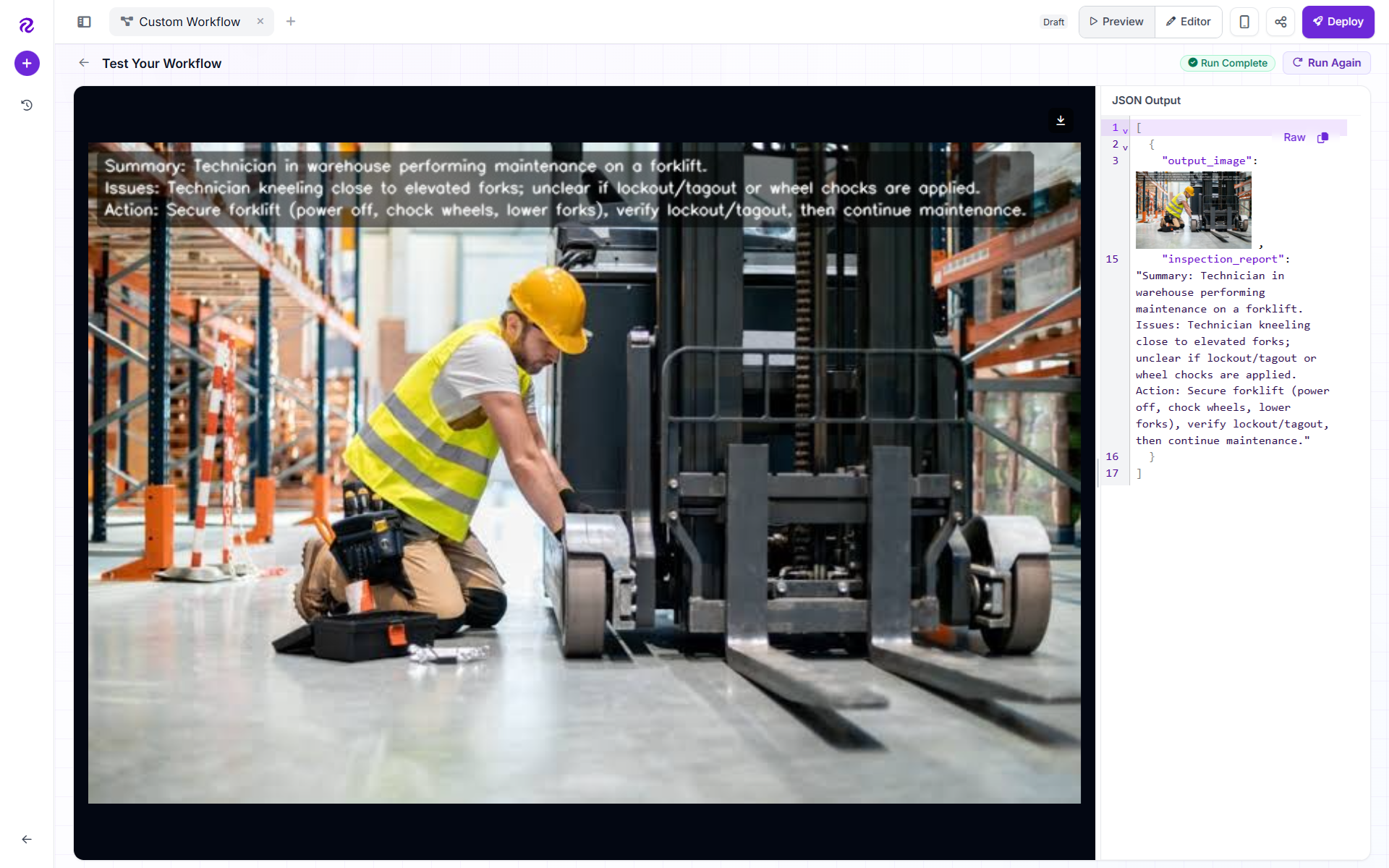
This is the final image with the GPT-generated inspection report overlaid.
inspection_report
This is the raw text response from the VLM. It can be used by an API, dashboard, webhook, notification system, or another downstream step.
The workflow runs like this:
What Makes This Workflow Useful
The main value is that it turns an image into an actionable human-readable summary. Instead of forcing a user to inspect an image manually, the workflow immediately answers:
- What is happening here?
- Is anything visibly wrong?
- What should I do next?
That makes it useful as a general-purpose visual triage assistant, especially when the use case is not narrow enough for a single object detection model. The following is the output of the workflow.
When Should I Use YOLO vs. VLMs?
YOLO and VLMs are not direct replacements for each other. YOLO is the better choice when an application needs real-time performance, fixed object categories, high-volume inference, edge deployment, and precise localization. It is built for speed, efficiency, and scalable production use.
VLMs are better suited for applications that require open-vocabulary understanding, visual reasoning, natural language interaction, rapid prototyping, and flexible image analysis. They are useful when the task is not limited to fixed classes or when the system needs to understand the broader context of an image.
The right choice depends on your application requirements. Use YOLO when you need fast and reliable computer vision at scale. Use VLMs when you need flexible image understanding and reasoning. To get started, try both approaches in Roboflow today.


Cite this Post
Use the following entry to cite this post in your research:
Timothy M. (Jun 5, 2026). YOLO vs. VLMs: When to Use Each. Roboflow Blog: https://blog.roboflow.com/yolo-vs-vlms-when-to-use-each/