

The best open-source computer vision model depends on the task: RF-DETR for real-time detection, segmentation, and keypoints, SAM 3 for promptable masks, Grounding DINO for zero-shot boxes, GLM-OCR for text extraction, Depth Anything 3 for depth, and CLIP for embeddings, with YOLO26, DINOv3, Florence-2, and Qwen3.5 rounding out the top ten. Check licenses before you ship: RF-DETR and Grounding DINO are Apache 2.0, YOLO26 is AGPL-3.0, and SAM 3 and DINOv3 use custom Meta terms.
Open-source computer vision models give developers access to powerful capabilities without depending entirely on closed APIs. Today, open models can detect objects, create segmentation masks, estimate depth, extract text, classify images, generate embeddings, and answer questions about visual content.
However, open source does not always mean commercially permissive. Apache 2.0 and MIT are generally permissive licenses, while AGPL-3.0 introduces source-sharing requirements that may not suit proprietary applications. Some models, including SAM 3 and DINOv3, use custom licenses that developers should review before production deployment.
My list of the best open-source vision AI models is based on data from Roboflow Playground, a free tool for testing and comparing vision models. It gives you many ways to evaluate open weights models before committing to one:
- Run models on your own images. Upload an image and run it through multiple models at once, with each result shown side by side. Model performance is domain-specific, so a model that tops a benchmark can still miss your objects. Testing on your own data is the fastest way to find out what works.
- Check the Leaderboard. Over 50 models ranked by ELO score from Arena votes, with average latency listed for each. It updates continuously, so open models like Qwen and Gemma are ranked against proprietary APIs on the same scale.
- Review Vision Evals. An objective pass/fail benchmark where every model gets identical image tasks, no votes involved. Evals also track token usage and estimated cost per task, useful when comparing a self-hosted open model against a paid API at volume.
Combined, these provide crowd-sourced rankings, objective scores, and a way to sanity check both against your own data.
The Best Open-Source Computer Vision Models
This guide covers ten leading open-source or open-weight computer vision models in 2026 and explains how each can be used with Roboflow.
1. RF-DETR
RF-DETR is Roboflow’s family of real-time Detection Transformer models. It provides object detection, instance segmentation, and keypoint detection through a consistent architecture and API.
Vision Tasks: Object detection, instance segmentation, and keypoint detection.
License: Apache 2.0.
Unlike traditional object detectors that apply Non-Maximum Suppression (NMS) after inference, RF-DETR directly produces final object predictions. This simplifies the inference pipeline while providing a strong balance between accuracy and latency. RF-DETR is suitable for many CV applications such as:
- Manufacturing inspection
- Sports analytics
- Retail monitoring
- Medical instrument detection
- Drone and aerial analysis
- Robotics
- and more...
The open-source rfdetr package and the Nano, Small, Medium, and Large checkpoints are available under Apache 2.0. RF-DETR XL and 2XL detection models are distributed separately under the Platform Model License 1.0, so developers should check the license of the specific checkpoint they plan to deploy.
How to use RF-DETR in Roboflow
Create an object detection, instance segmentation, or keypoint project in Roboflow and upload your annotated dataset. Generate a dataset version, open the Train page, choose Custom Training, and select an RF-DETR architecture. After training, the model can be deployed using:
- Roboflow Serverless Hosted API
- Dedicated Deployments
- Self-hosted Roboflow Inference
- Roboflow Workflows
- Supported edge devices
Developers can also select RF-DETR NAS during training. It automatically searches for a suitable model architecture for the dataset, helping balance accuracy, speed, and computational requirements.
An example of different model architecture trained using RF-DETR NAS allowing you to select the most suitable one
Inside a Workflow, RF-DETR predictions can be connected to tracking, counting, filtering, measurements, OCR, visualization, alerts, and custom Python logic.
An example of RF-DETR segmentation with object tracking
2. YOLO26
YOLO26 is a real-time, multi-task computer vision model designed for efficient CPU and edge inference. Its end-to-end architecture can return final predictions without requiring a separate Non-Maximum Suppression step.
Vision Tasks: Object detection, segmentation, classification, pose estimation, and oriented bounding boxes.
License: AGPL-3.0.
The model family includes Nano, Small, Medium, Large, and Extra Large variants. This gives developers several options when balancing model accuracy, inference speed, memory consumption, and hardware limitations. YOLO26 is particularly useful when:
- CPU inference performance is important.
- The application must run on edge hardware.
- A developer already uses the Ultralytics ecosystem.
- Multiple vision tasks must use a similar training and deployment workflow.
Roboflow supports YOLO26 for labeling, custom training, deployment, and Workflows.
Important YOLO26 licensing note
YOLO26 is open source under AGPL-3.0, but it is not commercially permissive in the same way as Apache 2.0 or MIT. The AGPL license can require source code to be made available when the software is used as part of an application, including applications provided over a network. Developers building proprietary or closed-source commercial products should carefully review these obligations.
Ultralytics offers an Enterprise license for organizations that want to use its models in proprietary applications without AGPL source-sharing requirements. Roboflow is also an authorized licensor of Ultralytics models.
How to use YOLO26 in Roboflow
Upload and annotate a dataset, create a dataset version, and select YOLO26 from Roboflow Custom Training. You can choose an appropriate model size and initialize training from a pretrained checkpoint.
Training YOLO26 in Roboflow
The trained model can then be added to a Roboflow Workflows or deployed through Serverless Hosted API or self-hosted Inference server or a Roboflow Dedicated Deployment on CPU, GPU, or edge hardware.
3. SAM 3
Segment Anything Model 3, or SAM 3, is a promptable vision foundation model from Meta. It can detect, segment, and track objects in images and videos using text descriptions or visual examples. For example, a developer can provide prompts such as:
yellow safety helmetdamaged leafshipping containervehicle wheel
SAM 3 returns an individual mask for each matching object. This makes it useful when the required object classes change frequently or when manually drawing segmentation masks would take too much time.
Vision Tasks: Promptable segmentation, open-vocabulary detection, and video object tracking
License: Custom Meta SAM License.
SAM 3 is especially useful for:
- Creating segmentation annotations
- Interactive image editing
- Open-vocabulary object segmentation
- Tracking object masks across video
- Dataset preparation
- Rapid prototyping before training a custom model
SAM 3 uses Meta’s custom SAM License rather than Apache 2.0 or MIT. Its code and weights are publicly available, but developers should review the license terms before integrating it into a commercial product.
How to use SAM 3 in Roboflow
SAM 3 is integrated across several parts of Roboflow. Developers can:
- Test SAM 3 in the Roboflow Playground.
- Use SAM 3 Label Assist while annotating images.
- Auto-label an instance segmentation dataset.
- Add a SAM 3 block to Roboflow Workflows.
- Fine-tune SAM 3 on a custom segmentation dataset.
- Deploy SAM 3 through Roboflow Inference.
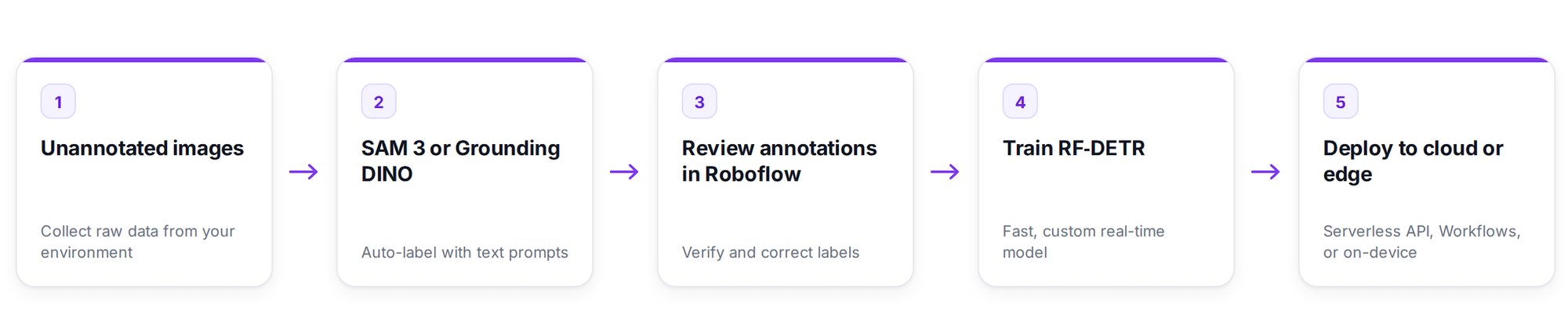
A practical approach is to use SAM 3 to generate initial masks, review them in Roboflow Annotate, and then train a smaller RF-DETR Segmentation model for predictable production inference.
4. DINOv3
DINOv3 is Meta’s self-supervised vision foundation model. Instead of depending entirely on manually annotated datasets, it learns useful visual representations from large collections of unlabeled images.
Vision Tasks: Image classification and general-purpose visual feature extraction.
License: Custom DINOv3 License.
The learned visual features can support several downstream tasks, including:
- Image classification
- Object detection
- Image segmentation
- Depth estimation
- Image similarity
- Visual retrieval
- Feature extraction for other models
DINOv3 is valuable when a developer has many images but limited labels. Its pretrained visual backbone can be fine-tuned using a much smaller labeled dataset than would normally be required when training a model from scratch.
The DINOv3 model family includes Vision Transformer and ConvNeXt variants. DINOv3 uses a custom Meta license rather than a standard permissive license, so its terms should be reviewed for the intended deployment.
How to use DINOv3 in Roboflow
Create an image classification project and upload images organized by class. After reviewing the labels and generating a dataset version, open Roboflow Custom Training and select DINOv3.
The resulting classifier can be deployed through Roboflow Inference or added to a classification block in Roboflow Workflows. It can then be connected to filtering, routing, visualization, database, or custom logic blocks.
5. Grounding DINO
Grounding DINO is an open-vocabulary object detection model that accepts natural-language prompts and returns bounding boxes around matching objects.
Vision Task: Zero-shot and open-vocabulary object detection.
License: Apache 2.0.
A traditional object detector is limited to the classes included in its training dataset. Grounding DINO can instead be prompted with descriptions such as:
worker wearing a helmetblue medicine bottledamaged cardboard boxforkliftperson sitting on a chair
This flexibility makes Grounding DINO valuable for testing new ideas and automatically creating initial annotations. It is generally more computationally expensive than a small custom detector, so it is commonly used during dataset development rather than continuous real-time inference.
How to use Grounding DINO in Roboflow
Grounding DINO is available through Roboflow open-source Autodistill to automatically label dataset for training the model.
6. Florence-2
Florence-2 is a open-source vision-language foundation model developed by Microsoft. A single Florence-2 can perform several visual tasks based on the prompt provided to the model.
Vision Tasks: Captioning, Instance Segmentation, OCR, Object Detection
Open Vocabulary Object Detection, Phrase Grounding, Region Proposal.
License: MIT.
The tasks supported by Florence-2 include:
- Image captioning
- Optical Character Recognition
- Object detection
- Phrase grounding
- Region captioning
- Prompted object detection
- Prompted instance segmentation
- OCR within a selected region
- Region-of-interest generation
Florence-2 is useful when a project needs structured visual outputs but does not require the size or computational cost of a large general-purpose VLM. It can also act as an auto-labeling model that creates initial annotations for training a faster task-specific detector. Florence-2 is released under the permissive MIT license.
How to use Florence-2 in Roboflow
Create a Roboflow Workflow and add the Florence-2 Model block. Select the required task, such as captioning, OCR, object detection, or prompted segmentation. The block can be connected to VLM as detector block and other blocks such as:
- Bounding box visualization
- Confidence filters
- Custom Python
- JSON Parser
- and many other...
Florence-2 can run through a Serverless Hosted API or GPU-enabled self-hosted Inference server or a Roboflow Dedicated Deployment. Roboflow also supports Florence-2 fine-tuning for selected multimodal tasks. You can also use Florence-2 via the Autodistill.
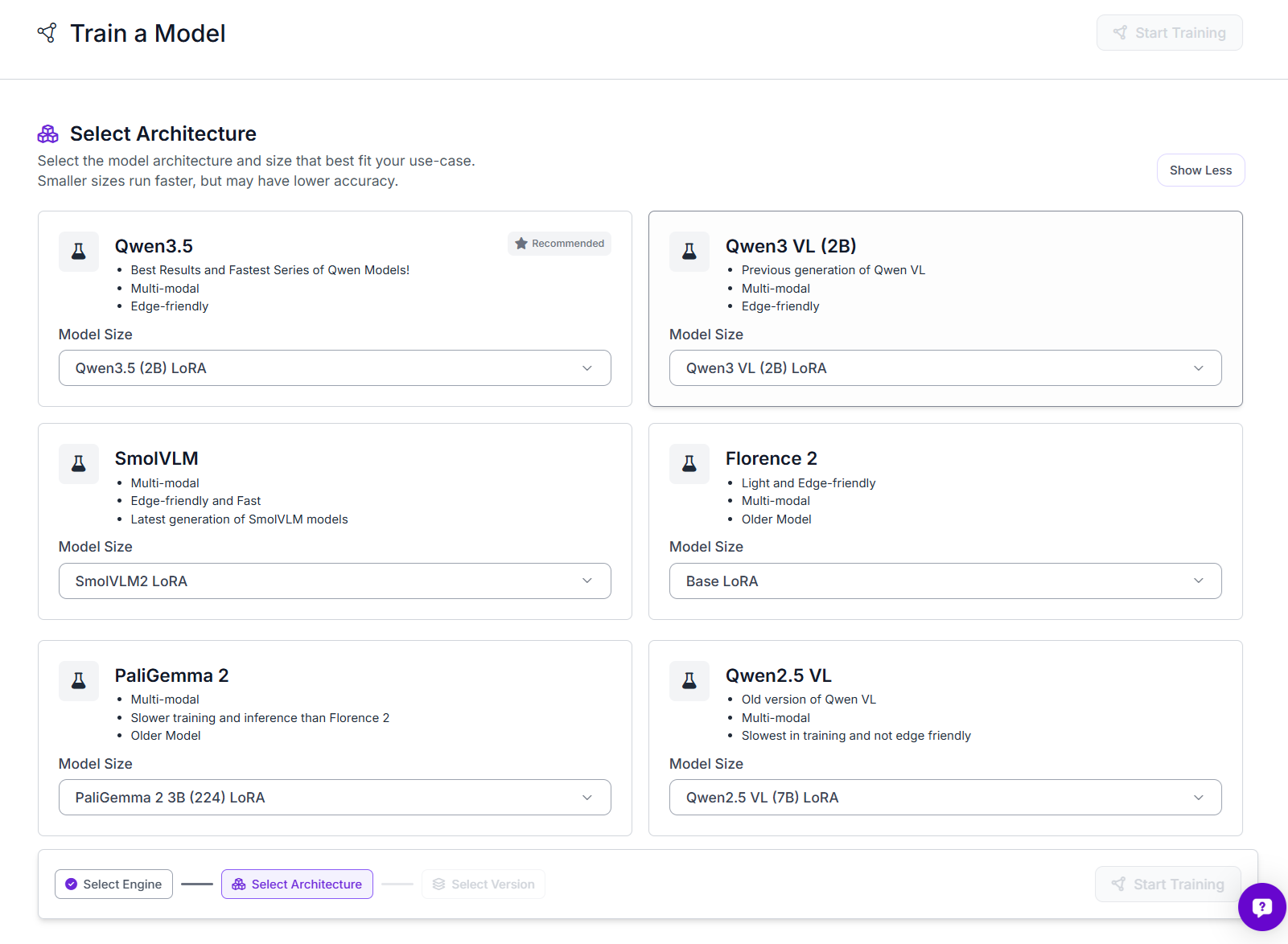
7. Qwen3.5
Qwen3.5 is a native vision-language model developed by the Qwen team at Alibaba Cloud. It combines language generation with image understanding and uses a hybrid architecture that includes linear attention and a sparse Mixture-of-Experts design.
Vision Tasks: Visual reasoning, Visual Question Answering, document understanding, OCR, image captioning, and spatial analysis.
License: Apache 2.0.
Qwen3.5 can be used for:
- Visual Question Answering
- Image captioning
- Multi-step visual reasoning
- Document understanding
- OCR and text extraction
- Chart and diagram analysis
- Object counting
- Spatial relationship analysis
- Fine-grained object recognition
- Structured information extraction
Roboflow supports Qwen3.5 models with 0.8B, 2B, and 4B parameters. The smaller model is more suitable for resource-constrained applications, while the larger variants provide stronger accuracy and reasoning capabilities. Qwen3.5 is available under the permissive Apache 2.0 license.
How to use Qwen3.5 in Roboflow
Create a Roboflow Workflow and add the Qwen3.5 block. Connect an image input, choose a model version, and provide a clear prompt describing the required task. The block accepts an optional system prompt and can return structured output for use in later Workflow steps.
Roboflow supports Qwen3.5 in Workflows, self-hosted Inference, and LoRA fine-tuning. GPU acceleration is recommended because CPU inference may be very slow.
8. GLM-OCR
GLM-OCR is a multimodal model specialized for Optical Character Recognition. It can transcribe visible text from documents, labels, receipts, signs, packaging, and other text-heavy images.
Vision Tasks: OCR, document transcription, and structured text extraction etc.
License: MIT, Apache 2.0 .
GLM-OCR is suitable for extracting:
- Serial numbers
- Product codes
- Invoice fields
- Receipt contents
- Shipping information
- Equipment labels
- Dates and identifiers
- Structured document text
- and many other OCR tasks
Unlike a fixed OCR endpoint, GLM-OCR supports prompts that can guide the model toward the information required by an application. The GLM-OCR model is released under MIT, while its repository code is released under Apache 2.0. The complete pipeline may include additional components with their own licenses.
How to use GLM-OCR in Roboflow
GLM-OCR is available as a supported Roboflow model and can be used through the shared multimodal inference endpoint or inside Roboflow Workflows through a GLM-OCR block. A recommended production structure is:
- Use RF-DETR to locate a label, receipt, display, or document.
- Crop the detected region.
- Send the crop to GLM-OCR.
- Validate the returned text using a Python block.
- Return structured JSON or trigger an application rule.
This detect-then-read approach reduces unrelated text and gives the OCR model a clearer region to process.
9. Depth Anything 3
Depth Anything 3 estimates the distance and three-dimensional structure represented in images or video. It can process a single image, stereo images, multiple camera views, or video sequences.
Vision Tasks: Monocular depth estimation, multi-view geometry, and camera understanding.
License: Apache 2.0.
The model can produce information related to:
- Relative scene depth
- Camera geometry
- Ray geometry
- Multi-view depth
- Camera pose
- Three-dimensional scene reconstruction
Depth estimation is useful for robotics, autonomous navigation, drones, warehouse monitoring, augmented reality, virtual reality, and infrastructure inspection. Depth Anything 3 is released under Apache 2.0.
How to use Depth Anything 3 in Roboflow
Create a Roboflow Workflow and add the Depth Estimation block. The block runs Depth Anything 3 and produces a depth map from the input image.
10. CLIP
CLIP, or Contrastive Language–Image Pretraining, maps images and text into a shared embedding space. Images and text descriptions that have similar meanings are placed closer together in that space.
Vision Tasks: Classification, Image Embedding, Image Similarity, Image Tagging, and zero-shot classification.
License: MIT.
CLIP is useful for various vision tasks such as:
- Semantic image search
- Image similarity
- Image deduplication
- Zero-shot classification
- Content filtering
- Media indexing
- Dataset exploration
- Image ranking
- Finding unusual or out-of-distribution images
For example, a developer can compare an image against labels such as construction site, office, warehouse, and outdoor road without training a separate classifier for those categories. The official OpenAI CLIP repository uses the MIT license.
How to use CLIP in Roboflow
Roboflow Workflows includes a CLIP Embedding Model block. It can generate embeddings for an image or text prompt, which can then be compared using a Cosine Similarity block. A simple zero-shot classification Workflow can:
- Receive an input image.
- Generate its CLIP embedding.
- Generate embeddings for several text labels.
- Compare the image and text vectors.
- Return the label with the highest similarity.
CLIP endpoints are also available through the self-hosted Roboflow Inference Server for image embeddings, text embeddings, and image-text comparison.
How Developers Should Choose Between These Models
The best model depends on the output your application needs.
- Choose RF-DETR when you need a fast custom object detector, segmentation model, or keypoint model for real-time applications where accuracy and precision matters.
- Choose YOLO26 when CPU or edge inference is the priority and its AGPL or commercial licensing terms fit the application.
- Choose SAM 3 when you need promptable masks, open-vocabulary segmentation, or fast dataset creation.
- Choose DINOv3 when you need a strong visual backbone or want to train a classifier with limited labeled data.
- Choose Grounding DINO when you want text-prompted bounding boxes or automatic dataset annotation.
- Choose Florence-2 when you need a compact model that can perform captioning, grounding, OCR, and region-level tasks.
- Choose Qwen3-VL when the application requires broader visual reasoning, VQA, document analysis, or structured multimodal output.
- Choose GLM-OCR when accurate text extraction is the main task.
- Choose Depth Anything 3 when the application needs information about distance or three-dimensional scene structure.
- Choose CLIP when the application needs semantic search, similarity scoring, embeddings, or zero-shot classification.
Practical Development Recommendations
Choosing the right model is only the first step. Developers must also consider dataset quality, prompt design, inference cost, hardware limits, deployment environment, and licensing before moving a computer vision model into production.
- Start by testing the model on images collected from the real deployment environment. Public benchmarks are useful, but they cannot fully represent your camera position, image quality, lighting, object size, motion blur, or domain-specific classes.
- For open-vocabulary models, experiment with multiple prompts. Small changes in wording can affect Grounding DINO, SAM 3, CLIP, Florence-2, and VLM predictions.
- For high-volume production applications, consider using a foundation model for auto-labeling and then training a smaller custom model.
- For OCR, visual reasoning, and VLM pipelines, crop the relevant region before sending it to a larger model. This reduces computation and usually produces more focused outputs.
- Finally, review the complete license for the exact code, checkpoint, and third-party components being deployed. A model being downloadable or publicly available does not automatically make it suitable for every commercial application.
The best results usually come from testing multiple models on real application data and selecting the one that provides the right balance of accuracy, speed, cost, and deployment flexibility.
MediaPipe is also worth considering when an application needs ready-made, real-time human pose, hand, face, or gesture landmarks. It is available under Apache 2.0 and is especially useful for mobile, browser, and on-device applications.
Open-Source and Open-Weight Computer Vision Models
Open-source and open-weight computer vision models now cover almost every major visual AI task. Developers can use RF-DETR and YOLO26 for real-time detection, SAM 3 for promptable segmentation, DINOv3 for visual features, Grounding DINO for zero-shot annotation, Florence-2 and Qwen3-VL for multimodal understanding, GLM-OCR for text extraction, Depth Anything 3 for scene depth, and CLIP for semantic embeddings.
Roboflow brings these capabilities into a common environment for dataset management, annotation, training, evaluation, Workflows, and deployment. The most effective approach is not simply to choose the largest or newest model, but to select the model that provides the required accuracy, latency, hardware compatibility, output format, and license for the application. Try yours today for free in Roboflow.


Cite this Post
Use the following entry to cite this post in your research:
Timothy M. (Jul 9, 2026). Top 10 Open-Source Computer Vision Models in 2026. Roboflow Blog: https://blog.roboflow.com/best-open-source-computer-vision-models/