

Computer vision is the field of AI that turns images, video, and live camera feeds into structured information software can act on: what is present, where it is located, and what should happen next. Modern systems pair custom models such as RF-DETR with foundation models, then run in the cloud or on edge hardware to catch defects, count inventory, and guide robots in real time.
Computer vision is the field of AI that lets software understand images, video, and live camera feeds, and act on what it sees. A vision model turns pixels into structured information: which objects are present, where they are located, what is happening, and what should happen next.
In production, that looks like a camera catching a damaged product and rejecting it before it ships, spotting an empty shelf and notifying store staff, guiding a warehouse robot around a person, or verifying that a patient completed a care-plan task. The prediction connects to an action, often within milliseconds.
Earlier image processing matched hand-written rules for edges, colors, and shapes, and it broke whenever a rule met a condition nobody wrote down. Modern vision models learn from examples instead, so they keep working when the lighting shifts, the product changes, or a defect appears that nobody predicted.
What Is Computer Vision?
Computer vision is the branch of artificial intelligence that turns visual data into answers, and the question determines the task. A vision system can tell you:
- What objects are present.
- Where each one is located.
- Whether an object is damaged.
- How it is moving.
- What text appears in the scene.
- How far away something is.
- Whether a process is being performed correctly.
- What should happen next.
This matters to organizations because so much of their data is visual and almost none of it gets used. Physical operations generate images and video all day, but conventional software cannot read any of it. Product defects, shelf conditions, equipment positions, worker posture, fill levels, package orientation: all of it is visible to anyone standing on the floor and invisible to every system the company runs. Computer vision turns it into structured, searchable data.
Building this no longer means building the infrastructure. Platforms now handle collecting and labeling visual data, training models, writing application logic, and deploying to the cloud, edge devices, or on-prem hardware.
How Computer Vision Works
A computer vision system takes visual information as input and converts it into a prediction, measurement, answer, or action. At a high level, the process can be represented as:

Let's understand how this works. A camera first captures a scene as an image or sequence of images. Each image is represented as a grid of pixels containing numerical values for information such as shape, color, brightness etc. The image is then passed to a computer vision model.
Depending on the task, the model may identify an image category, locate objects, generate segmentation masks, recognize text, estimate depth, or answer a question about the scene. The raw model prediction is often processed by an application layer. This layer may apply confidence thresholds, filter specific object classes, track objects between frames, compare measurements with business rules, or combine the prediction with information from other systems. The final result can trigger an action such as:
- Sending an alert.
- Updating a database.
- Rejecting a defective product.
- Stopping a machine.
- Calling an API.
- Updating inventory.
- Guiding a robot.
- Sending a signal to a PLC.
- Saving an image for human review.
- Adding an uncertain example to a future training dataset.
Consider a manufacturing inspection system. A camera captures a product, vision AI model identifies a defect, and business logic checks whether the defect exceeds an acceptable limit. Then the system sends a signal to remove the product from the line. The basic pattern is therefore:
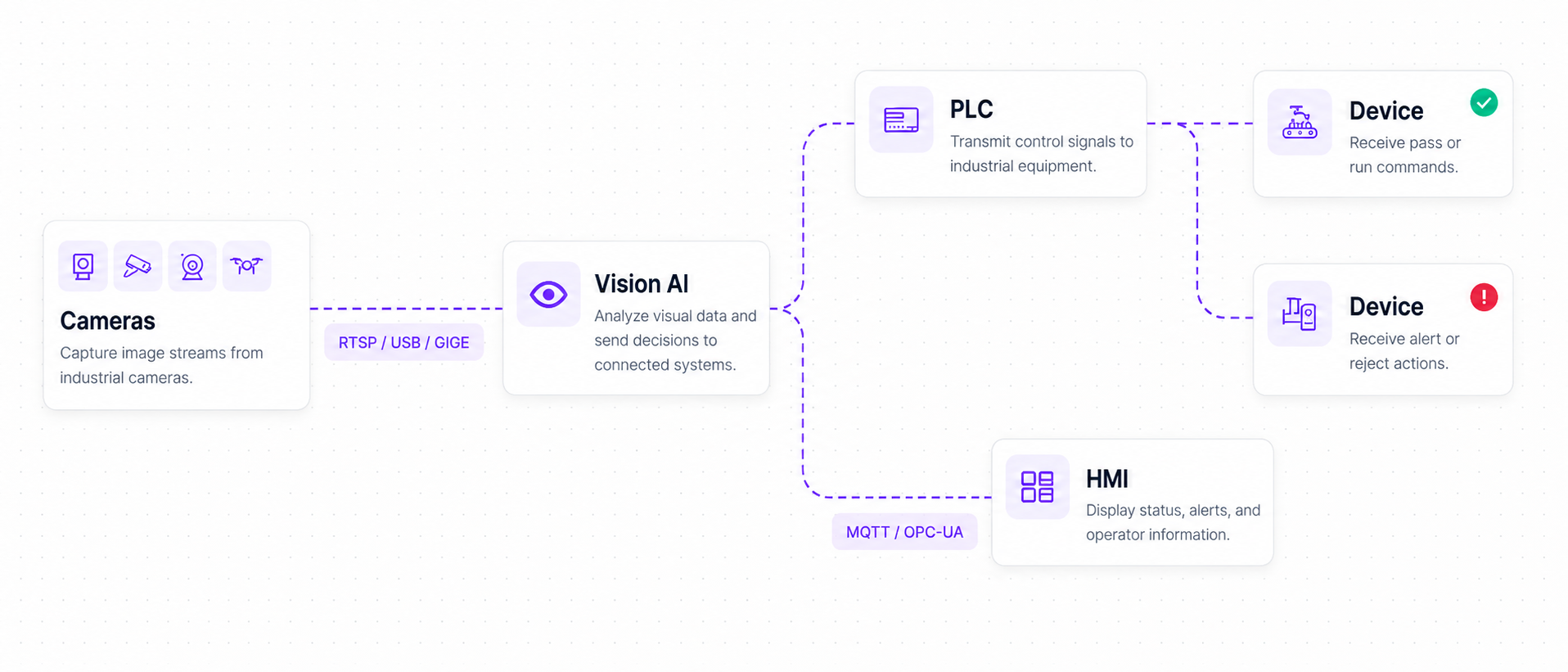
Computer vision systems have evolved from systems based on hand-crafted visual features to convolutional neural networks, vision transformers, multimodal models, and large computer vision foundation models. Foundation models can perform broad visual tasks or adapt to new concepts with limited task-specific training, while smaller custom models provide the speed and consistency required for many production applications.
The Core Computer Vision Tasks
Computer vision is not one capability. It is a set of distinct tasks, each answering a different question about an image, and each with its own leading model in 2026.
1. Object Detection
Object detection identifies objects in an image and places a bounding box around every detected instance.
Example: A factory camera detects missing bolts, incorrectly positioned components, and damaged products moving on a conveyor.
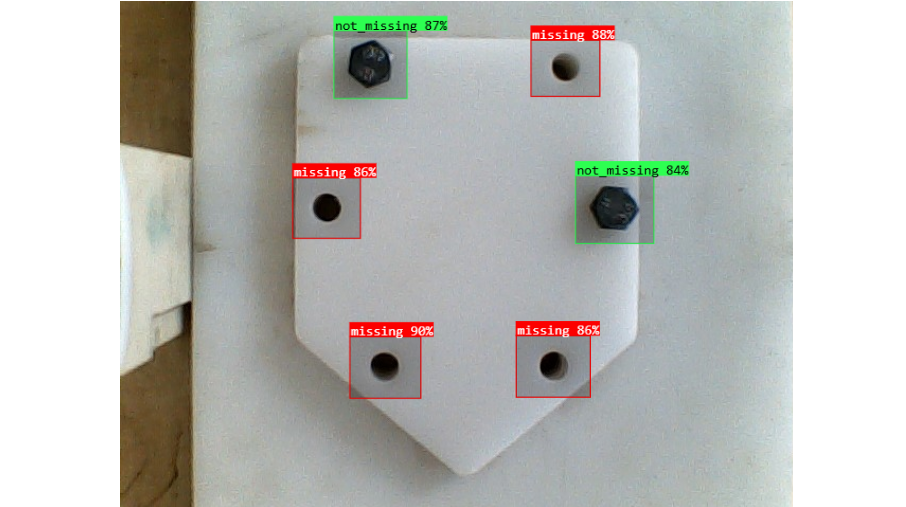
Leading model: RF-DETR is a strong default for custom object detection. It is an end-to-end Detection Transformer designed for high accuracy and real-time inference without requiring a separate Non-Maximum Suppression stage. The RF-DETR family provides multiple model sizes for balancing accuracy, latency, memory, and deployment cost.
2. Image Classification
Image classification assigns one or more categories to an entire image.
Example: A quality-control system classifies a product in an image.
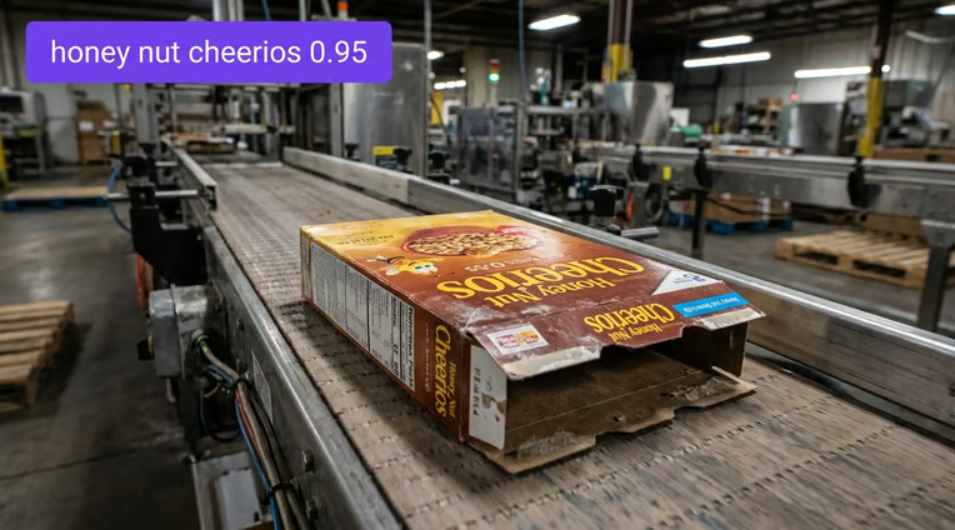
Leading model: DINOv3 is a strong foundation model for fine-grained image classification and visual feature extraction. Its learned visual representations can be adapted to custom classification problems using comparatively small labeled datasets.
3. Instance Segmentation
Instance segmentation identifies individual objects and traces the precise pixel-level boundary of every instance.
Example: A surface-inspection system identifies separate corrosion regions and calculates the area covered by each defect.
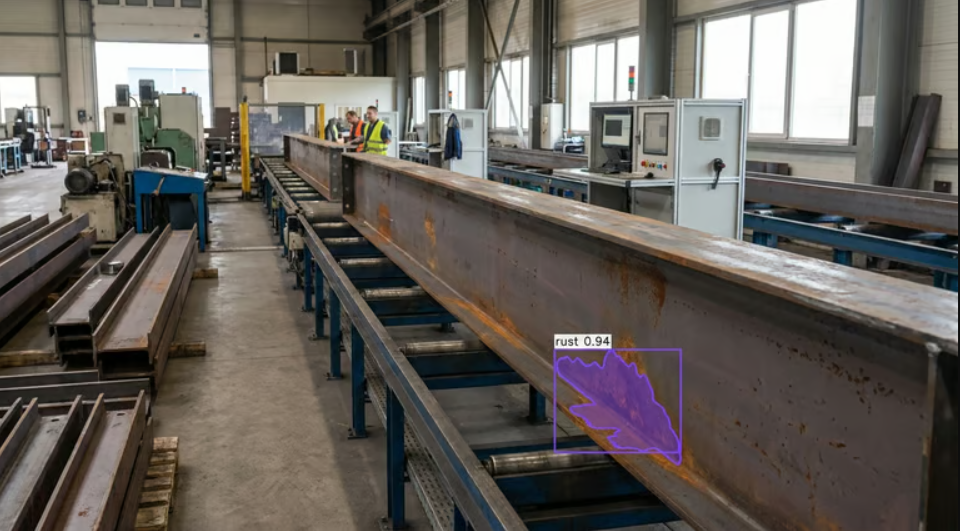
Leading model: RF-DETR Segmentation is a strong option for custom, real-time instance segmentation. For promptable and zero-shot masks, SAM 3 can segment objects using visual or text prompts without first training a task-specific model.
4. Keypoint and Pose Estimation
Keypoint detection locates important points on an object, while pose estimation uses relationships between those points to understand structure, orientation, or movement.
Example: A workplace-safety system detects body joints to determine whether a worker is bending, falling, lifting incorrectly, or entering a dangerous posture. It can also detect keypoint of other objects like a robotic arm for manufacturing process safety.
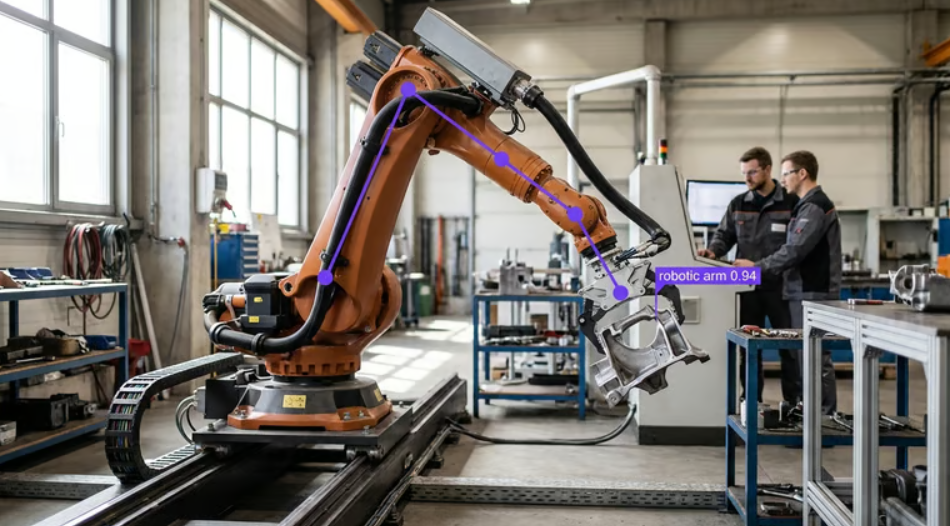
Leading model: RF-DETR Keypoint supports real-time keypoint detection and custom skeleton definitions. It can be trained for people, machinery, animals, tools, components, and other objects whose shape can be represented through meaningful points.
5. Optical Character Recognition
Optical Character Recognition, or OCR, converts text appearing in images or documents into machine-readable characters.
Example: A logistics system reads package labels, serial numbers, container identifiers, expiration dates, and shipping codes.
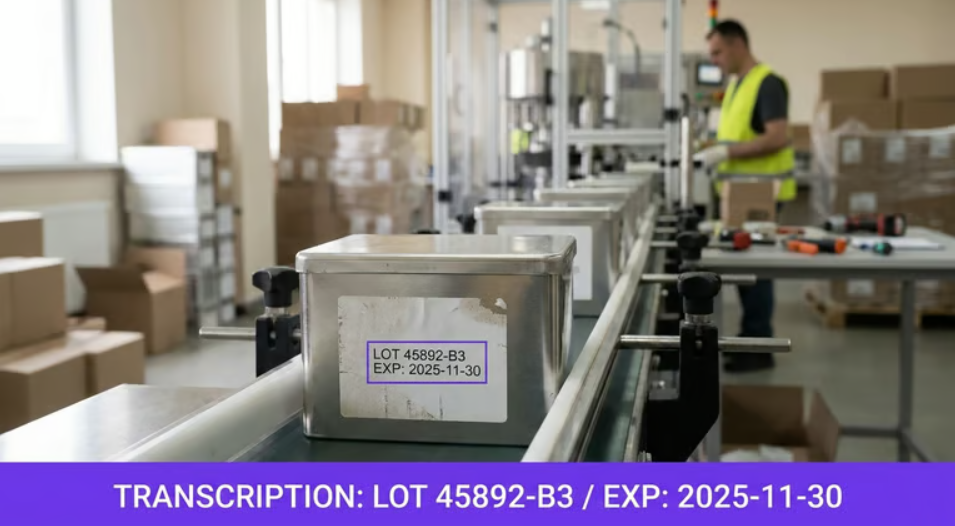
Leading model: GLM-OCR is a strong option for prompt-guided text extraction and document understanding in Roboflow Workflows. It can be combined with detection, cropping, preprocessing, and validation blocks to build complete OCR pipelines.
6. Depth Estimation
Depth estimation predicts the distance between the camera and different parts of a scene.
Example: A warehouse robot estimates how far away pallets, workers, shelves, and other obstacles are before planning its movement.
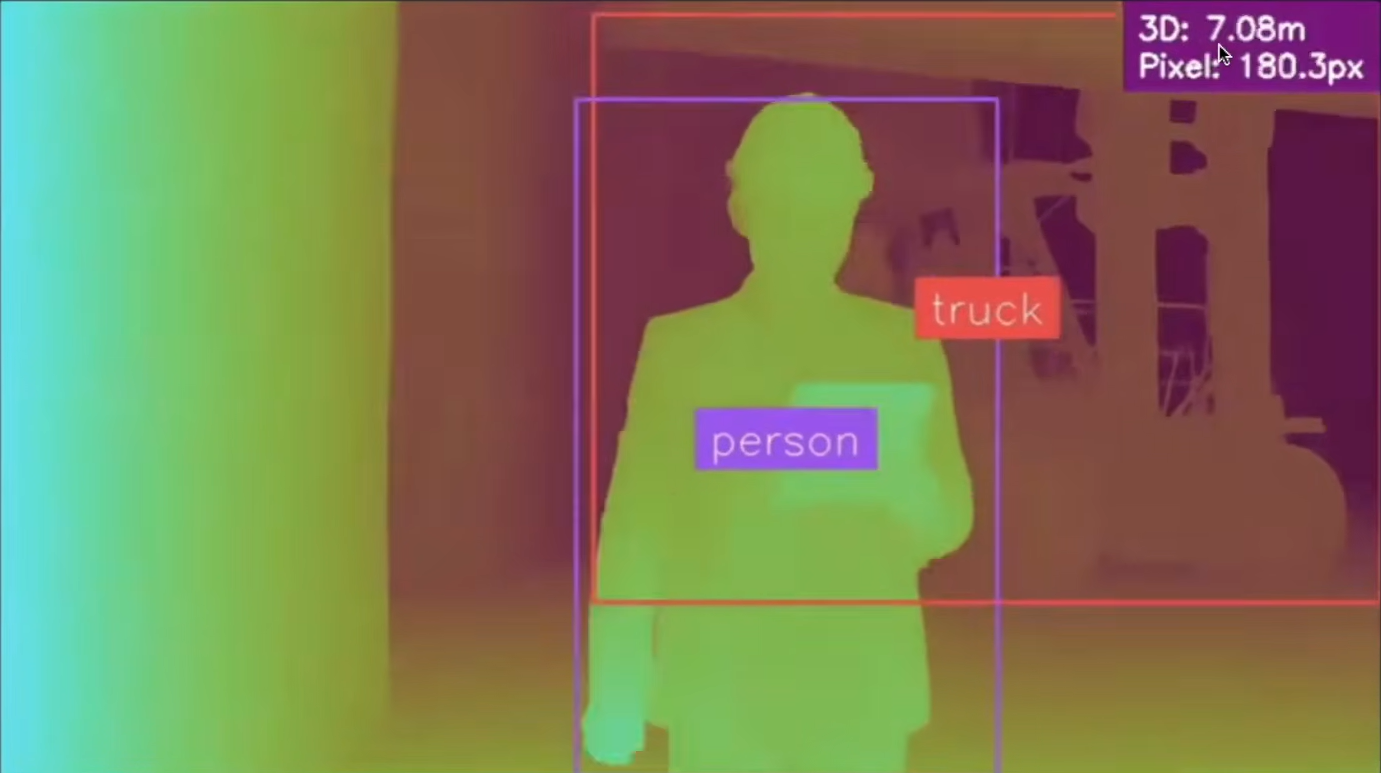
Leading model: Depth Anything 3 is a leading general-purpose model for estimating scene geometry and depth from visual inputs. It can support robotics, spatial measurement, augmented reality, mapping, inspection, and three-dimensional scene understanding.
7. Object Tracking
Object tracking follows detected objects across consecutive video frames and assigns each object a persistent identity.
Example: A warehouse system tracks individual pallets as they enter, move through, and leave a loading area without counting the same pallet multiple times.
Object tracking example
Leading method: ByteTrack is an efficient and widely used tracker for fixed-camera applications. BoT-SORT is another strong option when camera movement, re-identification, or more complex motion must be handled.
8. Visual Question Answering
Visual Question Answering, or VQA, allows a model to answer natural-language questions about an image or video.
Example: A user provides an image of a loading dock and asks, “Is the entrance blocked, and what is causing the obstruction?”
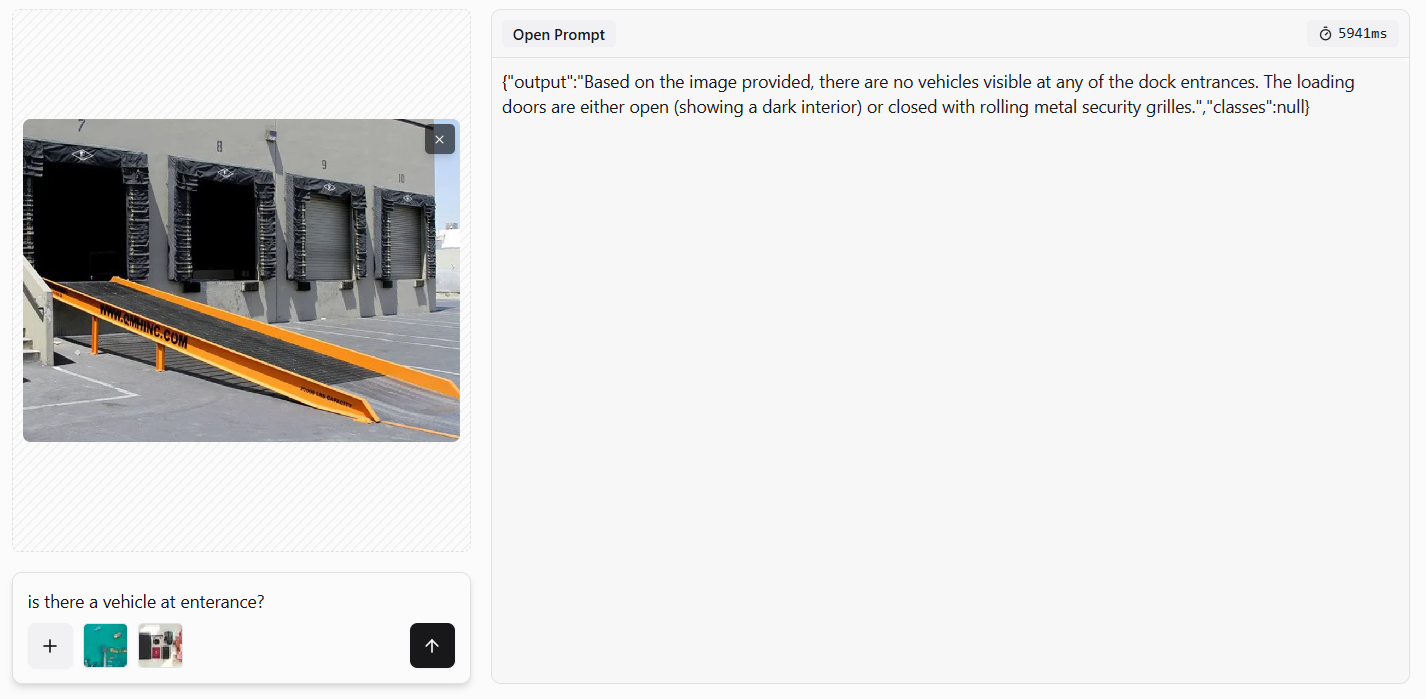
Leading models: Gemini 3.5 Flash is a strong option for reasoning-heavy visual questions, while Gemini 3.6 Flash performs strongly on counting, general image understanding, and video analysis. The best model depends on whether the application prioritizes detailed reasoning, object localization, speed, video support, or inference cost.
Foundation Models vs. Custom Models
A foundation model is a large AI model trained on a broad collection of images, text, or other visual data. Instead of being built for only one specific task, it learns general visual patterns, concepts, objects, and relationships that can be reused across many applications.
Because of this broad training, a foundation model can often recognize unfamiliar objects, respond to text prompts, answer questions about images, or generate initial predictions without being trained on a company’s own dataset. Examples of vision foundation models include:
- Vision-language models that understand images and text.
- Open-vocabulary detectors that locate objects described in a prompt.
- Promptable segmentation models that create masks around selected objects.
- General-purpose visual encoders that extract reusable image features.
For example, a user may ask a foundation model to “find all damaged boxes” or “segment the red vehicle,” even if those exact categories were not defined during application development.
A custom model is trained or fine-tuned using images collected for a specific problem. Its training data usually represents the actual objects, defects, camera angles, lighting conditions, backgrounds, and operating environment in which the system will be used.
For example, a manufacturer may train a custom model to identify five specific defects on one product line. The model does not need to understand every object in the world. It only needs to detect those defects accurately, quickly, and consistently. The main difference is therefore:
A foundation model provides broad, general visual understanding, while a custom model is optimized for a specific task and environment.
Foundation models are useful for experimentation, visual reasoning, zero-shot predictions, and creating initial annotations. Custom models are usually better for continuous production use where speed, accuracy, predictable outputs, and efficient edge deployment are important. The right choice depends on the application, and many vision AI systems use both.
Foundation and custom models should not be treated as competing approaches. Production vision AI systems increasingly chain them together. For example, a team can use a vision-language model, SAM 3, or an open-vocabulary detector to automatically label a dataset. Human reviewers can correct the generated annotations, after which a custom RF-DETR model can be trained for the precise classes that matter to the application. The resulting custom model can run continuously on a production line, while the larger foundation model handles unusual cases, reviews low-confidence predictions, or helps label new data. A practical production loop is:

Roboflow’s Auto Label, multi-model auto-labeling, and zero-shot VLM labeling resources demonstrate how larger general-purpose models can help create the training data needed for smaller production models. The open-source computer vision model roundup provides additional models that can be evaluated for each stage of this process. This combination gives teams the flexibility of foundation models and the speed, efficiency, and consistency of purpose-built models.
Vision AI in the Real World
Vision AI becomes most valuable when a prediction is connected to an operational decision. The following examples show how organizations use visual data to understand and act on events in the physical world.
- Manufacturing Inspection: In manufacturing, computer vision is used to inspect products, verify assembly, and automate production tasks. For example, Almond uses custom vision models to help robotic arms identify, locate, and handle different objects in real-world factory environments. The visual predictions guide the robot’s movements, enabling manufacturers to automate tasks that are difficult to solve with fixed rules alone.
- Logistics and Robotics: Vision AI helps logistics companies track assets, inspect equipment, and improve operational visibility. For example, BNSF Railway uses computer vision to maintain real-time inventory information in intermodal yards and inspect train wheels for conditions that could create safety risks.
- Agriculture: In agriculture, computer vision can detect crop diseases, weeds, pests, and changes in plant health. For example, in weed detection and targeted spraying, cameras mounted on drones, tractors, or sprayers identify weeds among crops so treatment can be applied only where needed instead of across the entire field. This can reduce chemical use, lower costs, and support more precise crop management.
- Healthcare: Healthcare applications use computer vision to analyze medical images, automate laboratory tasks, and support research. For example, in a cancer research, a custom object detection model identifies and counts neutrophils in microscopy images, helping researchers evaluate experiments more efficiently.
- Retail: In retail, computer vision can verify prices, monitor customer activity, and automate product checks. A shelf-price verification Workflow detects shelf labels, extracts product names and prices, compares them with point-of-sale data, and flags price mismatches for store employees.
Where Computer Vision Runs
Computer vision inference can run in the cloud, at the edge, on local servers, or through a hybrid architecture. The right deployment option depends primarily on latency, connectivity, computing requirements, data privacy, and cost. For a detailed comparison, see Roboflow’s guide to edge vs. cloud inference.
Cloud Inference
Cloud inference sends an image or video frame to a model running on remote infrastructure. The cloud processes the visual data and returns a prediction to the application. Cloud deployment is often appropriate when:
- Images are already stored in the cloud.
- The application requires large GPUs or computationally intensive models.
- Immediate real-time action is not required.
- Workloads change significantly over time.
- A team wants centralized infrastructure and model management.
- Several locations need access to the same deployed model.
Cloud infrastructure makes it easier to scale an application without installing and maintaining computing hardware at every location. It is also useful for running large foundation models, processing stored images, and performing deeper analysis after an event has occurred.
Edge Inference
Edge inference runs the model close to the camera or data source. The processing may happen on an industrial computer, NVIDIA Jetson, local GPU server, embedded device, AI-enabled camera, or another on-site system. Edge deployment is often preferable when:
- A decision must be made immediately.
- Internet connectivity is limited or unreliable.
- Sending continuous video to the cloud would consume too much bandwidth.
- Images or video must remain within a facility.
- The application must continue operating during an internet outage.
- The system controls machinery, robots, or production equipment.
Latency is often the deciding factor in physical-world applications. A system analyzing stored inspection images may tolerate a cloud request. A system stopping a conveyor, guiding a robot, or rejecting a fast-moving defective product may need to process the image and trigger an action locally.
Hybrid Inference
Many production Vision AI systems use both edge and cloud inference. A custom model can run at the edge for continuous, low-latency decisions. Selected images, events, and difficult cases can then be sent to the cloud for more computationally intensive analysis, monitoring, storage, or future model improvement.
Roboflow allows the same model and workflow logic to be deployed in the cloud or on edge hardware. This means a team can prototype an application using hosted infrastructure and later move the same application closer to the camera without rebuilding the complete computer vision pipeline.
What a Computer Vision Deployment Looks Like
A practical computer vision deployment can be represented as below.
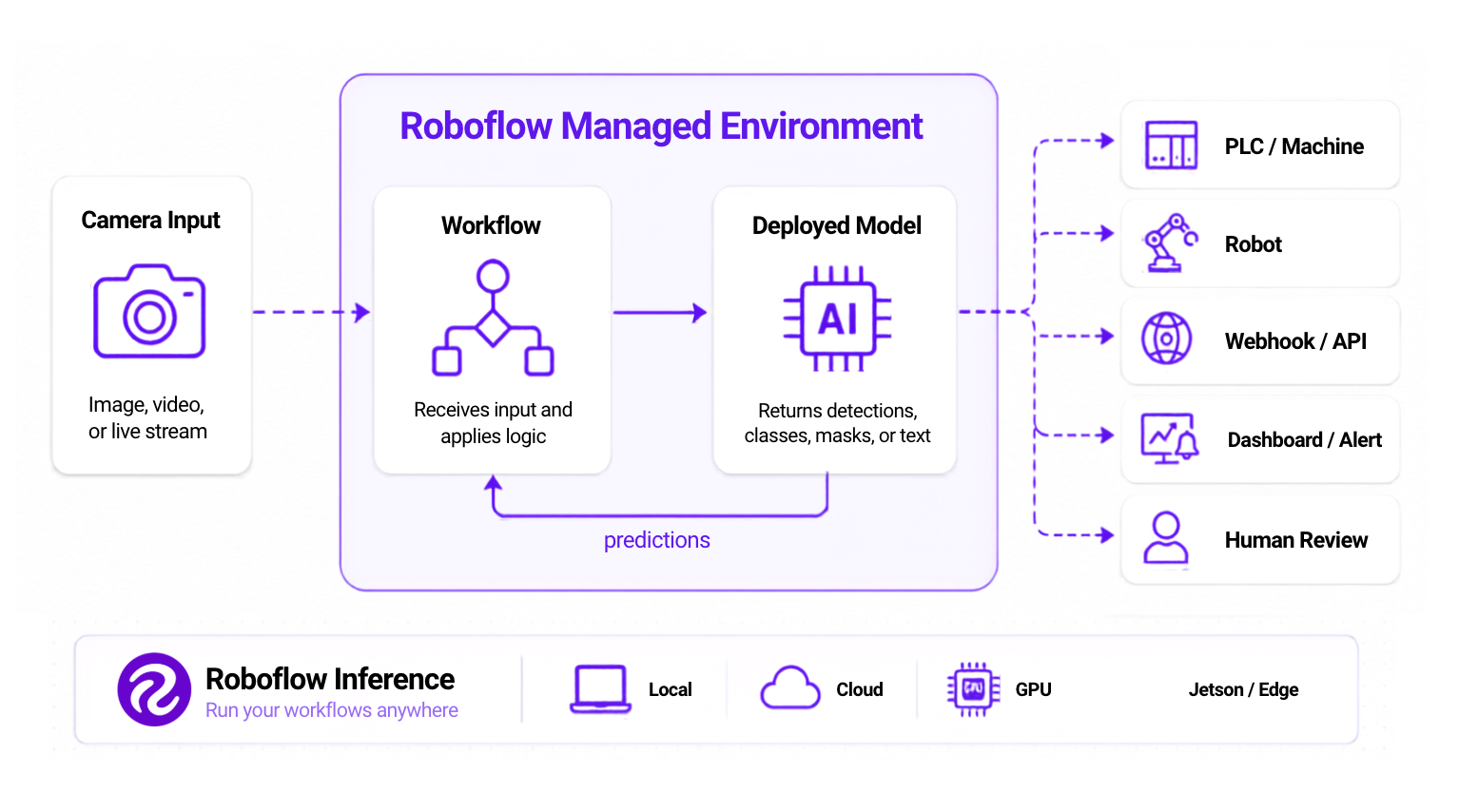
The camera captures an image, video, or live stream. The model converts the visual input into structured information such as detections, classifications, segmentation masks, keypoints, recognized text, or depth estimates.
A Roboflow Workflow applies the application logic. It can filter predictions, track objects, count detections, crop image regions, run additional models, execute custom code, call APIs, save results, or determine whether an event requires action. The result can then:
- Send a signal to a PLC or machine controller.
- Guide a robot or automated system.
- Call a webhook or application API.
- Update a database or dashboard.
- Notify an operator.
- Save an image for human review.
Roboflow Inference is an open-source framework for deploying computer vision models and Workflows. It can run on local computers, cloud servers, NVIDIA GPUs, NVIDIA Jetson devices, and other supported edge hardware. It manages model serving and can process images, videos, and live streams.
For teams that need a purpose-built edge device, Roboflow provides Roboflow AI1. Roboflow AI1 is an all-in-one edge vision system that combines an 8 MP image sensor, 4 mm lens, integrated LED ring, and onboard GPU. It is designed to run computer vision models and Workflows close to where visual data is captured, reducing the need to send every image or video frame to the cloud.
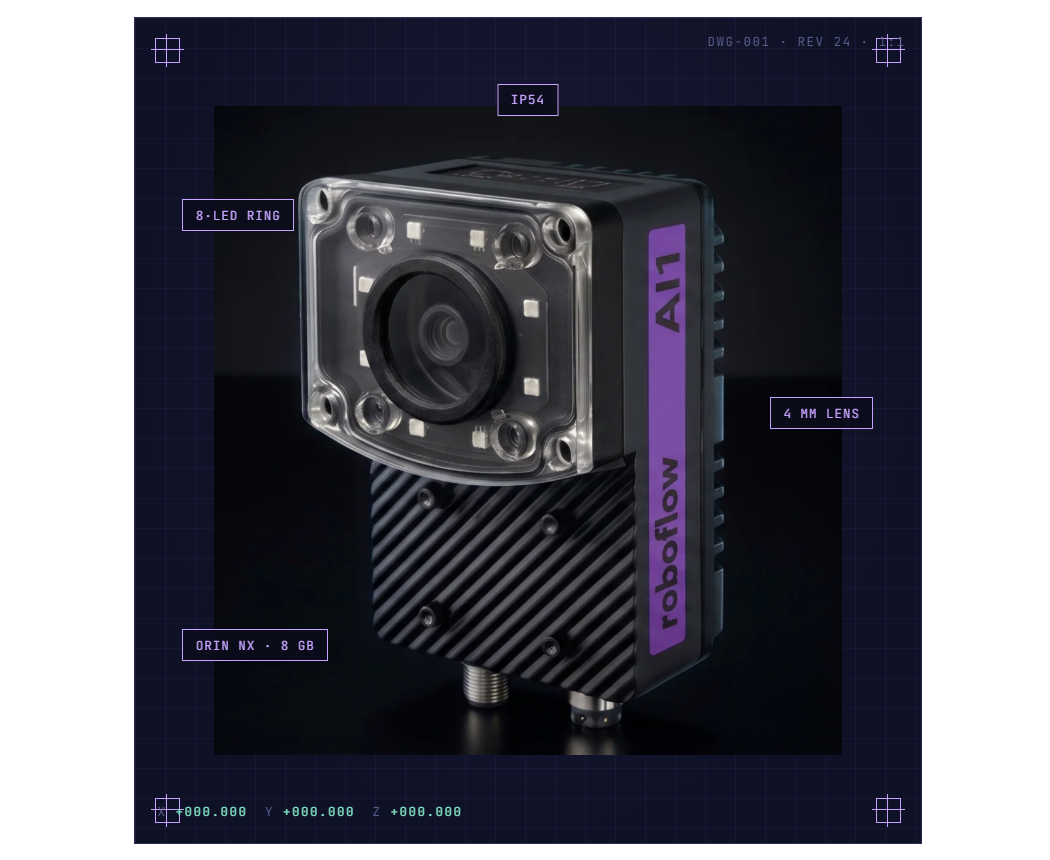
The deployment location may differ between applications, but the goal remains the same: run the model where it can produce reliable predictions within the application’s latency, connectivity, privacy, computing, and cost requirements.
How to Build Your First Computer Vision Application
Building a computer vision application starts with identifying a clear visual problem and selecting the right model, data, and deployment approach. A simple prototype can help test the idea before developing a complete production system. Following are the steps that help you get started.
Step 1: Test Existing Models
Open the Roboflow Model Playground and upload one of your own images. Test object detection, segmentation, OCR, depth estimation, and vision-language models before collecting a large dataset. This helps determine whether an existing model can solve the problem directly or whether a custom model is required.
Step 2: Define the Prediction You Need
Write down exactly what the system should return. For example:
- A bounding box around every damaged package.
- A
passorfailclassification. - A mask covering each surface defect.
- The number of people entering an area.
- Text extracted from a product label.
- The location of specific machine components.
A precise output definition makes dataset collection, annotation, model selection, and evaluation easier.
Step 3: Collect and Label a Dataset
Create a Roboflow project and upload images representing the actual environment in which the model will operate. Use Roboflow Annotate to draw bounding boxes, polygons, masks, or keypoints. When appropriate, use AI-assisted labeling to create initial annotations and then review them manually. Include variation in lighting, camera angle, object position, background, distance, product type, and real operating conditions.
Step 4: Train RF-DETR
Generate a dataset version and train an RF-DETR model. Begin with a smaller model to establish a baseline. Review precision, recall, confusion patterns, and predictions on the validation and test sets before increasing model size or adding more data. More data is not automatically better. The most valuable additions are usually examples that represent mistakes, rare conditions, difficult camera positions, and situations the model has not previously seen.
Step 5: Build the Application Logic
Add the trained model to Roboflow Workflows. Connect the model output to the logic your application needs, such as:
- Confidence filtering.
- Region-of-interest checks.
- Object counting.
- Tracking.
- OCR.
- Classification.
- Measurements.
- Custom Python.
- API requests.
- Alerts.
- Database operations.
- Pass-or-fail rules.
Test the complete Workflow on representative images or video, not only the model in isolation.
Step 6: Deploy the Application
Use Roboflow Deploy to run the model through hosted infrastructure or self-host it with Roboflow Inference. For an open project, development can begin with Roboflow’s free Public Plan. Projects, datasets, and trained models created under the Public Plan are public, so private or commercially sensitive applications require an appropriate paid plan.
Once deployed, connect the Workflow output to the system that will use it: an application, camera, PLC, robot, dashboard, alerting service, or business process. A first computer vision application does not need to solve every possible visual condition. It needs to solve one valuable problem reliably.
Start with a real image, test a model in the Playground, label the examples that matter, train a custom model, and connect its prediction to an action.
That is the foundation of computer vision.
Computer Vision Conclusion
Computer vision turns images and video into information that a machine can understand and act on. By combining foundation models, custom models, Workflows, and edge or cloud deployment, vision AI can support real-time decisions across manufacturing, logistics, agriculture, healthcare, retail, and many other industries. Start building your computer vision project with Roboflow for free.


Cite this Post
Use the following entry to cite this post in your research:
Timothy M. (Jul 15, 2026). What Is Computer Vision? An Overview of Vision AI in 2026. Roboflow Blog: https://blog.roboflow.com/what-is-computer-vision/